 ChatGPT,
 Claude,
 Gemini,
 Grok — all four for
Key highlights
- Learn how VPS for forex trading supports continuous platform access and lower-latency trade execution.
- Understand how the right VPS solution can reduce latency between your trading platform and broker.
- Explore key factors such as server location, CPU, RAM and NVMe storage when choosing a Forex VPS.
- Discover how Bluehost self-managed VPS provides dedicated resources, server-level control and scalable infrastructure for trading workloads.
- Learn how to set up MT4 or MT5 and keep Expert Advisors running on a Forex VPS.
When you trade forex, speed and reliability matter a lot. Slow connections or unexpected downtime can cause missed trades or losses. That’s why many traders use Forex VPS.
A Forex VPS is a remote server that lets you run your trading platform, like MT4 or MT5 and expert advisors, without depending on your home computer or internet. It is 24/7, hosted in data centers built for low latency and fast execution.
Using a forex VPS server means your automated trading strategies and robots keep running all day and night without interruptions. This gives you faster trade execution and a more stable trading environment.
If you’re serious about trading forex, understanding how a Forex VPS works and choosing the right FX trading server can improve your results.
In this blog, we’ll cover what makes a good Forex VPS, how to choose the right FX trading server and why Bluehost offers reliable VPS for forex trading with minimal latency. So, let’s get started.
Why should you use a VPS for forex trading?
A VPS for forex trading gives your trading terminal a remote, always-on environment that does not depend on your home computer, internet connection or power supply. This is particularly useful for traders running Expert Advisors (EAs), trade copiers, signals or other automated strategies that need the terminal to remain connected continuously.
A Forex VPS can also reduce network latency when it has a strong network route to your broker’s trade server. MetaTrader specifically recommends choosing virtual hosting close to the broker server to minimize the delay between the trading platform and trade server.
For latency-sensitive strategies, the important metric is the actual ping between the VPS and your broker’s trade server. Lower network latency can improve execution conditions, but it does not guarantee a specific fill price or eliminate slippage. Broker processing, liquidity, spreads and market volatility still affect execution.
A VPS for traders is therefore most valuable when you need continuous platform availability, consistent connectivity and lower dependence on local hardware. When comparing the best VPS for forex trading, check broker-server latency, uptime, CPU and RAM, operating system compatibility and the number of terminals or EAs you plan to run.
At Bluehost, we offer forex VPS hosting plans optimized to meet these needs. Our servers provide low latency, powerful resources and 24/7 support, ensuring you can trade forex with confidence and speed.
How does a Forex VPS work?
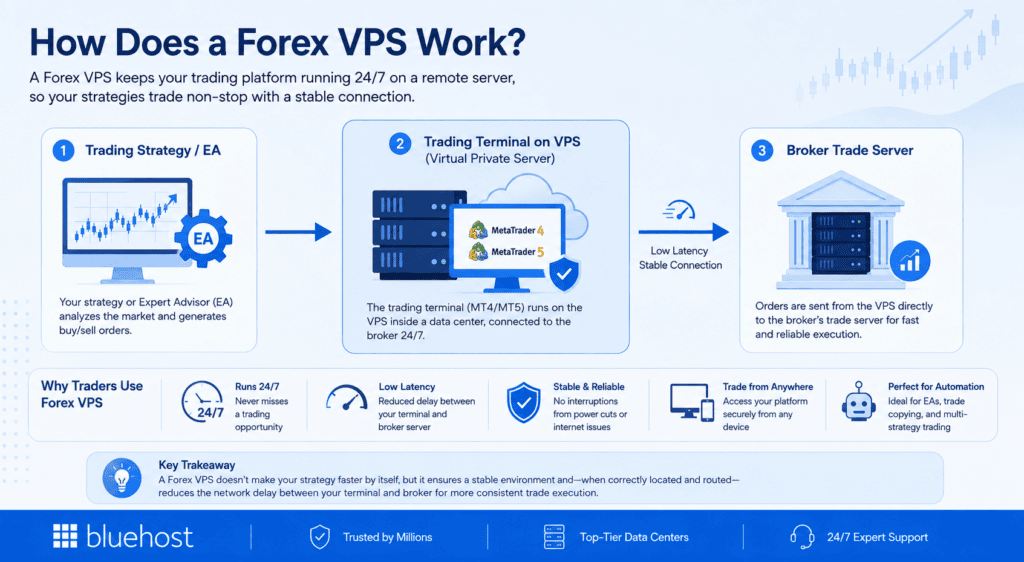
A Forex VPS hosts your trading platform on a virtual server inside a data center. Instead of running MT4, MT5 or another trading terminal on your local computer, you install and operate it on the VPS.
Your setup typically works like this:
Trading strategy or EA → Trading terminal on VPS → Broker trade server
When an EA generates an order, the trading terminal sends that request from the VPS directly to the broker’s trade server. Because the terminal remains on the remote server, automated strategies can continue operating even when your personal computer is turned off. MetaTrader’s virtual hosting documentation confirms that EAs and signal subscriptions can run continuously in this type of environment.
The VPS does not make the trading strategy faster by itself. Its main execution advantage comes from maintaining a stable trading environment and, when correctly located and routed, reducing the network delay between your terminal and broker.
For experienced traders, this makes Forex VPS especially relevant for automated trading, multiple EAs, trade copying and strategies where consistent connectivity and low broker-server latency matter.
What are the key benefits of using a forex VPS?
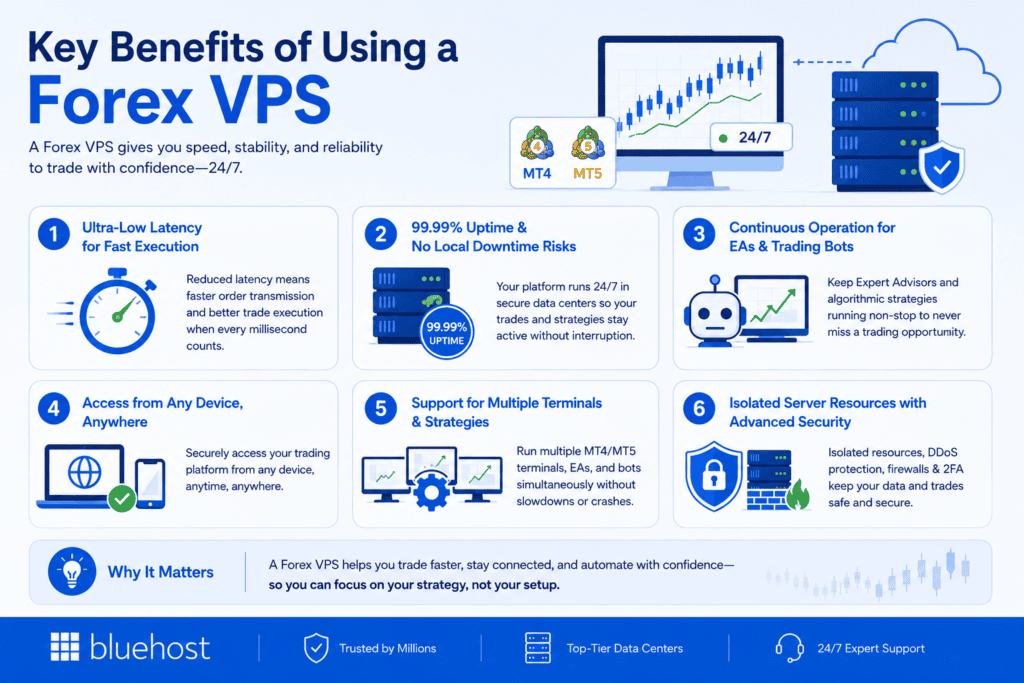
A Forex VPS gives traders a stable, always-on environment for running trading platforms, Expert Advisors and automated strategies without relying on a local computer or internet connection. It can also reduce network latency when the VPS has a strong connection to your broker’s trade server.
The six key benefits of using a Forex VPS are:
- Lower latency for faster order transmission
- High uptime with less reliance on local infrastructure
- Continuous operation for Expert Advisors and trading bots
- Remote access from different devices and locations
- Support for multiple trading terminals and automated strategies
- Isolated server resources with configurable security controls
Let’s look at each benefit in more detail and how it can affect your trading setup.
1. Ultra-low latency for fast trade execution
One of the biggest advantages of a forex latency VPS is its ability to minimize delays between your trading terminal and your broker’s server.
By hosting your trading platform close to major forex brokers, a Forex VPS server reduces latency. This leads to faster trade execution, which is critical in the fast-moving forex market where even milliseconds matter.
2. 99.99% uptime and no local downtime risks
Forex trading happens around the clock, so your trading platform must be accessible. A Forex VPS runs 24/7 in secure data centers, protecting your trades from outages, disconnections or shutdowns. This ensures your expert advisors and strategies remain uninterrupted.
3. Ideal for expert advisors and algorithmic bots
Automated trading strategies depend on a stable, always-on environment to monitor markets and execute trades instantly. A Forex VPS hosting plan provides the reliability and speed necessary for running expert advisors and algorithmic bots effectively. This ensures your trading algorithms stay active without interruption, reducing the risk of missed signals or delayed execution.
4. Access from any device, anywhere
Because a Forex VPS is a remote server, you can securely access your trading platform from any device with an internet connection. Whether at home, the office or traveling, you can manage your trades without keeping your personal computer running.
5. Compatible with expert advisors & bots
A quality Forex VPS hosting solution supports multiple expert advisors and trading bots running simultaneously. This means you can diversify your automated trading strategies without worrying about performance issues or crashes on your trading server.
6. Security isolation and protection
VPS hosting offers a secure trading environment by isolating your server from other users. Most Forex VPS platforms include DDoS protection, built-in OS-level firewalls, and optional two-factor authentication. This safeguards your data and platform from external threats and disruptions.
These benefits highlight why a Forex VPS is essential for both new and experienced traders seeking improved speed, stability and flexibility.
Self-managed vs managed VPS for forex trading
When choosing a VPS for forex trading, the main decision is how much control you want over your trading environment. Both self-managed and managed VPS solutions provide dedicated server resources, but a self-managed VPS gives experienced forex traders more freedom to configure the server around their trading platform, Expert Advisors and automated trading strategies.
For professional traders running MT4, MT5, trading bots or other automated trading systems, a self-managed Forex VPS is generally the stronger fit. You can control CPU, RAM, storage and server configuration while installing the trading software and supporting applications your setup requires. Bluehost self-managed VPS also supports advanced server access and scalable resources.
| Aspect | Self-managed VPS | Managed VPS |
|---|---|---|
| Best for | Professional traders, developers and automated trading setups | Traders who prefer more server-management tools |
| Server control | Greater control over the virtual server and configuration | More structured management through cPanel and WHM |
| Dedicated resources | Select and scale CPU, RAM and NVMe storage | Select and scale CPU, RAM and NVMe storage |
| Trading software | Install and configure your preferred trading platforms and supporting tools | Suitable for more standardized server setups |
| Automated trading | Strong fit for EAs, bots, custom scripts and supporting automation | Better when advanced customization is less important |
| Multiple platforms | Flexible for running multiple applications, subject to available resources | Also possible within the resources of your VPS plan |
| Advanced access | SSH and server-level access | Advanced access is also available |
| Management | You manage the operating system, applications and configuration | Includes additional server-management tools |
| Support | 24/7 support, with self-managed support limited to hardware restarts and restores | 24/7 support |
Bluehost self-managed VPS hosting lets users select and scale CPU, RAM and NVMe storage while retaining greater control over their environment. It also supports tools such as Docker, Portainer and n8n, which can be useful when building supporting workflows around automated trading. Managed VPS provides scalable resources, advanced access and cPanel/WHM tools for users who want a more guided management experience.
Which VPS is better for forex trading?
For experienced and professional traders, a self-managed trading VPS is usually the better choice. It gives you greater flexibility to configure the virtual private server around your trading platform, Expert Advisors, trading bots and other automated strategies.
This becomes particularly useful if you run multiple trading platforms, need to control resource usage or want to integrate additional applications into your Forex trading setup. You can also scale your VPS plan as your trading workloads require more CPU, RAM or storage.
A managed VPS may be a better fit if you prefer additional server-management tools and do not need the same level of configuration flexibility.
For traders comfortable managing their own server, a self-managed Forex VPS hosting environment offers a stronger balance of dedicated resources, control and scalability for running trading software and automated workflows.
How can you use a VPS for automated trading?
A VPS for forex trading can do more than keep MT4, MT5 and Expert Advisors running continuously. It can also support an automated trading system by giving traders an always-on environment for signals, alerts, bots and supporting workflows.
For example, Bluehost VPS supports n8n, a self-hosted workflow automation platform. Traders can use n8n with webhooks to receive TradingView alerts, route signals to an MT5 setup, log trading activity or send notifications through tools such as Telegram and Discord.
For more advanced setups, professional traders and developers can also use Docker to run custom trading bots or supporting applications in containers. Portainer can then help manage those containers through a visual interface.
These tools do not replace MT4, MT5, EAs or your broker. Instead, they can help build a more flexible automated trading environment around your existing trading platforms and strategies.
How to set up MT4 / MT5 on a VPS?
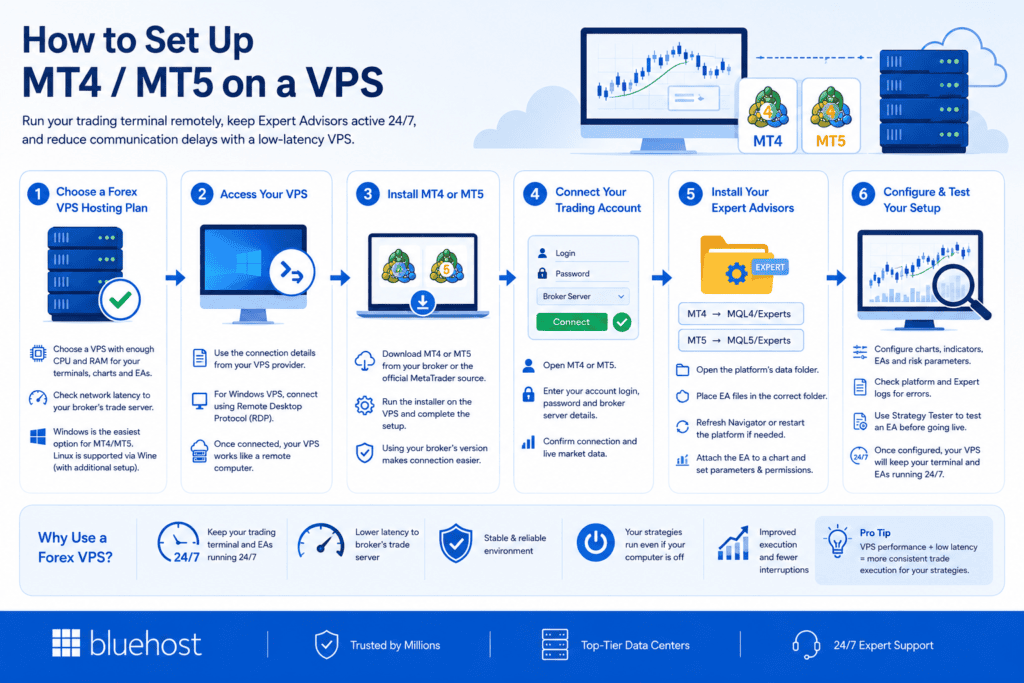
Setting up MT4 or MT5 on a VPS lets you run your trading terminal remotely without depending on your local computer or internet connection. For automated trading, this can help keep Expert Advisors active continuously. A VPS with low network latency to your broker’s trade server can also reduce communication delays.
Here’s how to set it up:
Step 1: Choose a Forex VPS hosting plan
Choose a VPS for trading with enough CPU and RAM for the number of terminals, charts and Expert Advisors you plan to run. Also check the network latency to your broker’s trade server.
Windows provides the most straightforward setup for MT4 and MT5. Linux can also run MetaTrader using Wine but requires additional configuration.
Step 2: Access your VPS
After provisioning the VPS, use the connection details provided by your hosting provider to access the server. For a Windows VPS, you can typically connect through Remote Desktop Protocol (RDP).
Once connected, the VPS works like a remote computer where you can install and manage your trading software.
Step 3: Install MT4 or MT5
Download MT4 or MT5 from your broker or the appropriate MetaTrader source. Run the installer on the VPS and complete the setup.
Using your broker’s version can make it easier to connect to the correct trading servers.
Step 4: Connect your trading account
Open MT4 or MT5 and enter your trading account login, password and broker server details.
Confirm that the terminal has successfully connected to your broker and is receiving live market data before configuring automated strategies.
Step 5: Install your Expert Advisors
To install an EA, open the platform’s data folder and place the EA files in:
- MQL4/Experts for MT4
- MQL5/Experts for MT5
Refresh the Navigator or restart the platform if needed. Then attach the EA to the appropriate chart and configure its parameters and automated trading permissions.
Step 6: Configure and test your setup
Configure your charts, indicators, EAs and risk parameters. Check the platform and Expert logs for errors and confirm that your automated strategies are operating as expected.
You can also use MetaTrader’s Strategy Tester to test an EA before relying on it in a live trading environment.
Once configured, your Forex VPS can keep the trading terminal and automated strategies running independently of your personal computer.
Quick check: Is your Forex VPS ready?
Before running MT4 or MT5 continuously, confirm that:
- Your VPS has enough CPU and RAM for your terminals and EAs.
- Network latency to your broker’s trade server is consistently low.
- MT4 or MT5 is connected to the correct broker server.
- Your EAs are installed in the correct MQL4/Experts or MQL5/Experts folder.
- Automated trading permissions are enabled where required.
- EA parameters, logs and risk settings have been reviewed.
- The platform remains connected when you disconnect from the VPS.
How do you choose the right Forex VPS server for your needs?
The right VPS for forex trading should match your broker connection, trading platform, automation needs and server workload. For experienced forex traders, the goal is to choose a Forex VPS that delivers enough resources, reliable connectivity and control without unnecessary complexity.
With our self-managed VPS hosting, you can select and scale CPU, RAM and NVMe storage while managing your own server environment.
Key factors when choosing a Forex VPS hosting provider
- Latency to your broker: Check the actual network latency between the Forex VPS server and your broker’s servers. A nearby data center can help, but routing quality also affects latency. A low latency connection can reduce communication delays between your trading platform and forex broker. This is especially relevant for latency-sensitive automated trading strategies.
- CPU and RAM: Choose resources based on the number of terminals, charts, expert advisors and trading bots you plan to run. Traders using multiple trading platforms or complex automated trading systems may need more CPU and RAM. With our self-managed VPS, you can scale these resources as your workload grows.
- NVMe storage: Fast storage helps your trading software, logs and supporting applications access data efficiently. Our self-managed VPS plans include NVMe storage, with higher capacities available as your requirements increase.
- Operating system compatibility: Make sure your chosen operating system supports your preferred trading software. For MT4 MT5, confirm the requirements of your broker’s platform before selecting a server. If your setup requires Windows Server, you may use Remote Desktop Protocol to access the remote environment.
- Reliability: A trading VPS reduces dependence on your personal computer, home power supply and local internet connection. If your local internet connection fails, applications running on the remote server can continue operating while the VPS remains available. This makes a VPS useful for uninterrupted trading and always-on automation. However, no reliable Forex VPS provider can guarantee zero downtime across the host, broker or wider network.
- Server control and automation: For professional traders, control can be just as important as performance. Our self-managed virtual private server gives you advanced access and control over your server configuration. It also supports tools such as Docker, Portainer and n8n for custom applications and supporting automated trading workflows. This makes self-managed hosting useful for traders running custom scripts, EAs or other automated strategies alongside their core trading platform.
- Security and support: Review authentication, firewall configuration, updates and access permissions when comparing Forex VPS providers. With a self-managed VPS, you are responsible for your software environment and security configuration. We provide 24/7 support, while self-managed support is limited to server hardware restarts and restores.
Which Forex VPS plan should you choose?
The right Forex VPS plan depends on how you trade.
A trader running one terminal has different requirements from someone operating multiple EAs, bots or automated trading systems. For professional traders comfortable managing their own environment, a self-managed Forex VPS hosting service provides greater flexibility over resources, applications and configuration.
When comparing the best Forex VPS hosting options, focus on:
- Broker latency
- CPU and RAM
- NVMe storage
- Operating system compatibility
- Server reliability
- Configuration control
- Support scope
The best VPS is not simply the plan with the most resources. It is the one that fits your trading activities, broker connection and software requirements without adding unnecessary cost or complexity.
Final thoughts
A Forex VPS is an essential tool for traders who want speed, stability and reliability. It cuts latency, prevents downtime and supports automated trading strategies on popular platforms like MT4 and MT5.
If you want to gain a trading edge in 2026, invest in a high-quality forex VPS hosting plan. We at Bluehost are here to help you find the right VPS for forex trading that fits your needs and boosts your trading performance.
Start your VPS journey today with Bluehost, low latency forex VPS hosting plans designed to power your trading success.
FAQs
The best VPS for forex trading is one that provides low latency to your broker’s servers, reliable uptime, sufficient CPU and RAM and compatibility with your trading platform. For experienced vps for traders use cases, a self-managed Forex VPS can be a strong option because it gives you more control over server resources, software and automated trading setups.
A Forex VPS can vary in price depending on CPU, RAM, storage, server location and whether the VPS is managed or self-managed. When comparing VPS for forex trading, choose a plan based on the number of trading platforms, Expert Advisors and automated strategies you plan to run rather than price alone.
Yes. Some brokers and Forex VPS providers offer free VPS access, trials or VPS services tied to specific account, deposit or trading-volume requirements. Free options may have resource or usage limits, so traders running EAs or automated strategies should check latency, uptime and available resources before relying on them for continuous trading.
A Forex VPS is a remote virtual server that keeps your trading platform, Expert Advisors and automated trading software running independently of your personal computer. If you are researching what is Forex VPS, its main purpose is to provide an always-on environment for forex trading while reducing dependence on your local power and internet connection.
A VPS does not make money on its own. In forex trading, traders use a VPS for forex trading to keep MT4, MT5, Expert Advisors and automated trading strategies running continuously without relying on a personal computer. A Forex VPS can also reduce network latency to a broker when the server has a good connection to the broker’s infrastructure. However, profitability depends on the trading strategy, market conditions, execution and risk management, not on the VPS itself.

Write A Comment