 ChatGPT,
 Claude,
 Gemini,
 Grok — all four for
Key highlights
- Detect vulnerabilities like SQL injection, cross-site scripting and broken authentication early with automated web application scanning.
- Strengthen your website’s security posture through regular vulnerability assessments that support PCI DSS, HIPAA and GDPR compliance.
- Leverage advanced scanning tools with AI-powered accuracy, automated testing and detailed remediation reports for faster fixes.
- Integrate continuous scanning into your workflow to improve risk prioritization, reduce false positives and secure APIs and web apps efficiently.
- Simplify your security management with Bluehost Malware Protection scanning, real-time protection and 24/7 expert support designed for WordPress and eCommerce sites.
You spend time building your website designing pages, uploading content and serving customers. But what if the real threat isn’t visible on your screen? Hidden vulnerabilities can quietly open doors to hackers, putting your data and reputation at risk.
Web application scanning helps you stop that before it starts. It automatically checks your website or app for security flaws like weak authentication, unpatched plugins or hidden code exploits so you can fix them before attackers find them.
Even a small oversight can expose your website to major risks. Regular web application security scanning keeps your defenses sharp, your data safe and your customers’ trust intact no matter how complex your site becomes.
To understand why this process matters, you first need to know what web application scanning actually does and how it works behind the scenes.
What is web application scanning?
Web application scanning is the automated process of checking your website or web app for security vulnerabilities before hackers exploit them.
Think of it as a regular health check for your website’s safety.
These web application scanning tools review your site’s code, configuration and inputs to spot issues like SQL injection, cross site scripting (XSS) and broken authentication.
By running consistent web app scans, you can detect vulnerabilities early and protect your sensitive data.
Definition and purpose
The purpose of web application vulnerability scanning is to find and fix security flaws before attackers do.
Modern web apps handle critical business data, making web application security scanning essential to your overall defense strategy.
Key benefits include:
- Identifying known and unknown vulnerabilities early.
- Maintaining stronger security posture.
- Supporting compliance with industry standards.
- Helping security teams prioritize and fix issues faster.
Regular scans ensure your business stays ahead of emerging threats in an evolving security landscape.
Web application scanning vs. Malware scanning
Both tools secure your site, but they address different stages of a potential attack.
Malware scanning finds malicious software already inside your system.
Web application vulnerability scanning focuses on prevention by locating potential weaknesses before they’re exploited.
A vulnerability scanner tests your attack surface, including login forms, API endpoints and other input areas. It identifies security issues that could expose your app to future attacks.
How do scanning tools detect vulnerabilities?
Web application security testing simulates real-world attacks to uncover weak spots.
Each scanning tool sends test requests and analyzes your app’s responses to identify risks.
Common checks include:
- SQL injection: Sending database queries through form fields.
- Cross site scripting (XSS): Injecting harmless test scripts to reveal unsafe input handling.
These automated scanning methods use both static and dynamic application security testing. They generate detailed reports, reduce false positives and simplify remediation efforts for your security teams.
With cloud-based vulnerability scanners, you can schedule recurring scans, track security weaknesses and stay protected across internal and external networks.
Also read: How to Secure a Website in 2025: 18 Proven Ways to Stay Safe
Once you understand what is web application scanning, it’s time to see why making it a routine part of your website maintenance plan is essential.
Why does web application scanning matter for your website?
You can’t protect what you can’t see. If your website handles payments, personal data or logins, web application scanning gives you the visibility to keep everything safe.
It finds security vulnerabilities before attackers do helping you prevent data leaks, downtime and loss of trust.
With studies showing that three out of four web applications contain at least one security flaw, proactive scanning isn’t optional anymore, it’s essential.
1. Avoid expensive breaches before they happen
When a security breach strikes, it’s not just your data at risk it’s your entire business reputation.
You may face:
- Regulatory fines or legal penalties
- Lost customer confidence and churn
- Operational downtime that stops revenue cold
The cost of prevention is far lower than recovery. Regular web application vulnerability scanning lets your security teams find and fix critical vulnerabilities early from SQL injection and broken authentication to cross site scripting (XSS).
Automated scans give you continuous insight into your attack surface, so you can stay ahead of threats and maintain a stronger security posture.
2. Stay compliant without the complexity
If you process payments or manage customer data, compliance isn’t a choice it’s a requirement. Standards like PCI DSS (Payment Card Industry Data Security Standard), HIPAA (Health Insurance Portability and Accountability Act) and GDPR (General Data Protection Regulation) require regular scans and strong security controls to protect sensitive data.
A reliable web application scanning tool helps you:
- Run scheduled scans for continuous monitoring
- Generate detailed reports for auditors
- Prove your compliance with minimal effort
You meet legal obligations, reduce liability and show customers you take web security seriously.
3. Keep pace with modern threats
As technology evolves, so do the risks. Your website might use APIs, single-page apps or third-party components that introduce new vulnerabilities. Without consistent web application security testing, even one outdated plugin can open a backdoor for attackers.
With cloud-based vulnerability scanners, you can automatically detect known and unknown vulnerabilities across your internal and external networks. This level of visibility helps your team respond faster and keep your defenses aligned with an ever-changing security landscape.
4. Protect business continuity and customer trust
Your web application powers everything sales, sign-ups, communication and service.
A single security issue can take all that offline and damage your brand within minutes.
Regular vulnerability management keeps your website resilient and your customers confident.
By integrating web application scanning into your ongoing security routine, you minimize cyber risk, maintain uptime and ensure your digital foundation stays solid no matter how fast threats evolve.
Knowing the benefits is one thing, understanding the process is another. Here’s how a scanner actually detects and reports vulnerabilities.
How does a web application scanner work?
Before you trust any security tool, you need to understand how it protects your website.
A web application scanner uses automated testing and security intelligence to uncover hidden vulnerabilities within your website or app.
By simulating real-world attacks, it helps you spot and fix security flaws before they impact your customers or data.
4 steps scanning process
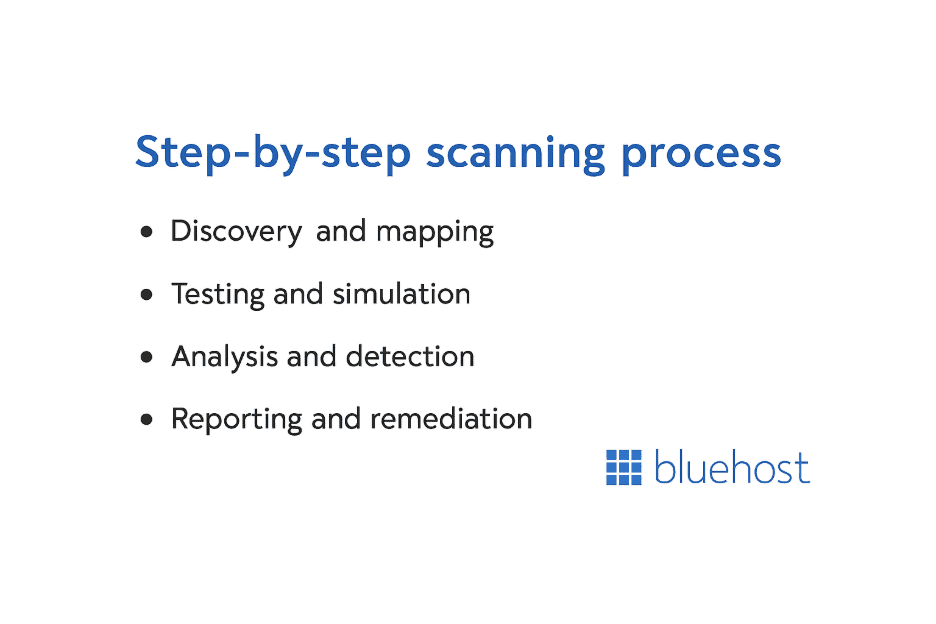
Every web application vulnerability scanning tool follows a structured process to ensure accurate, reliable results.
- Discovery and mapping
The scanner crawls your site to identify every page, form and API endpoint.
This builds a complete picture of your web application’s structure and potential attack surface.
- Testing and simulation
Next, the scanner sends test inputs to your site to identify security weaknesses.
- It tests for SQL injection by submitting database queries through input fields.
- It checks for cross site scripting (XSS) by injecting harmless scripts into browsers.
- Analysis and detection
The scanner analyzes your site’s responses for unusual behavior, data exposure or error messages.
Advanced web application security scanning tools use machine learning to reduce false positives and accurately detect genuine issues.
- Reporting and remediation
After scanning, the tool generates a detailed report showing:
- Each vulnerability and its severity level
- Recommended remediation steps for your team
These actionable reports help your security teams prioritize fixes and strengthen your overall security posture.
Active vs. passive scanning
Web application scanners use two main approaches active scanning and passive scanning.
- Active scanning sends simulated attacks to test how your app reacts to malicious inputs. It provides deeper insights but should be scheduled carefully to avoid disrupting live systems.
- Passive scanning monitors network traffic and app behavior without sending test data.
It’s safer for production environments but may miss vulnerabilities that appear only under specific attack conditions.
The ideal setup blends both passive monitoring for real-time awareness and active scans during maintenance windows for deeper coverage.
Automated scanning vs. manual testing
Automated vulnerability scanning delivers speed and coverage no human tester can match. A single web application scanning tool can test thousands of attack vectors in minutes, identifying known vulnerabilities across your internal and external networks.
However, automated scans can’t catch everything.
They may overlook business logic flaws or emerging threats that don’t follow known patterns. That’s why many security professionals complement automation with manual penetration testing.
The most effective approach combines both:
- Use automated scanning for continuous monitoring and broad coverage.
- Apply manual testing for complex, high-risk areas.
This hybrid strategy helps your business maintain comprehensive web application security, reduce blind spots and stay protected against evolving cyber risks.
With so many options available, choosing the right tool can feel overwhelming. These next sections help you make that decision with confidence.
How do you choose the right web application scanning tool?
You need a web application scanning tool that fits your technology, budget and security goals.
The best option isn’t just the most advanced it’s the one that works seamlessly with your stack, scales with your business and helps your security teams focus on what matters most: protecting your website and users.
Key features to look for
A good web application scanner should combine accuracy, flexibility and clear reporting.
Here’s what you should prioritize:
- Comprehensive coverage
Your scanner must identify a broad range of security vulnerabilities, including the OWASP top 10 threats such as SQL injection, cross site scripting (XSS) and broken authentication.
Look for tools that support modern frameworks, APIs and dynamic application security testing (DAST) methods for full coverage.
- Integration capabilities
The tool should connect easily with your existing security tools, CI/CD pipelines and development environments.
Features like API integration, command line interface (CLI) support and cloud-based vulnerability scanner options make automation and collaboration easier.
- Reporting and risk prioritization
Strong reporting features help you turn scan results into clear action steps. The best web application vulnerability scanning tools provide:
- Detailed reports with severity levels and remediation steps
- Risk prioritization based summaries to focus on critical issues
- Customizable dashboards for technical and executive teams
- Accuracy and false positive management
Advanced web application security scanning tools use machine learning and AI to reduce false positives while maintaining detection precision. This saves time and ensures your team works on real threats, not noise.
Open-source vs. commercial tools
Choosing between open-source and commercial scanners depends on your team’s skills and support needs.
- Open-source vulnerability scanners like Zed Attack Proxy (ZAP) from OWASP offer powerful, cost-effective scanning.
They suit technical teams comfortable with manual configuration and command line interfaces.
- Commercial tools such as Burp Suite Professional provide polished interfaces, enterprise-grade support and advanced automation like scheduled scans and comprehensive platform reporting.
They’re ideal for teams that want an intuitive user experience and vendor-backed updates.
If your team has limited bandwidth for setup or troubleshooting, commercial scanners may be worth the investment.
If you have in-house expertise and need flexibility, open-source tools can deliver strong results with minimal cost.
How to interpret scan reports and take action?
Running scans is only half the job you must also act on what you find. Most vulnerability scanning tools categorize results by severity, making it easier to plan remediation efforts effectively.
- High-severity vulnerabilities: Fix these immediately. They include SQL injection, broken authentication or API security flaws that expose sensitive data.
- Medium severity issues: Schedule these for remediation during your next security sprint.
- Low severity findings: Address them in regular maintenance cycles.
Look for patterns in your reports. If multiple pages show similar security weaknesses, the issue may stem from your codebase or configuration settings rather than isolated bugs.
Use these insights to strengthen your security controls, not just patch individual problems.
Finally, document every fix and schedule follow-up scans to confirm results.
Many scanners include trend reporting features that show how your security posture improves over time.
Tracking this data helps you demonstrate measurable progress and maintain ongoing vulnerability management discipline.
If managing security sounds complex, Bluehost simplifies it for you with integrated scanning, cleanup and continuous protection built right in.
How does Bluehost simplify web application security?
Securing your website shouldn’t feel like a full-time job. With Bluehost, you get web application security that continuously protects your site from vulnerabilities, malware and other cyber risks.
Everything runs automatically behind the scenes, so you can focus on your business, not your server logs.
Bluehost combines automated web application vulnerability scanning, real-time threat detection and expert support in one platform.
The result: enterprise-level protection designed for small businesses, agencies and online stores that need security without complexity.
Integrated Bluehost Malware Protection scanning for malware and vulnerabilities
It performs daily scans to detect:
- Known vulnerabilities in your website or plugins
- Malware infections or injected code
- Security misconfigurations that could expose sensitive data
This automated system does more than alert you it fixes many problems instantly.
When Bluehost Malware Protection identifies malware or unsafe plugins, it can remove or repair them without manual action.
That’s especially useful for WordPress websites, where plugin vulnerabilities, outdated themes and third-party components are frequent attack vectors.
Take control of your website’s speed and security today with Bluehost – powerful hosting and advanced protection designed for WordPress success.
Automatic alerts and hands-free cleanup
When threats appear, Bluehost keeps you informed and protected at the same time.
You receive alerts that clearly explain the issue, affected files and recommended next steps no confusing technical jargon.
In most cases, the system automatically handles the fix by:
- Deleting or quarantining malware files
- Updating vulnerable components
- Applying security patches as soon as they’re available
This hands-free remediation process ensures your web application security remains intact even when you’re not actively monitoring your site.
Real-time protection and expert assistance
Security doesn’t stop at scheduled scans. Bluehost includes real-time monitoring and a built-in web application firewall (WAF) that blocks malicious traffic before it reaches your site.
It filters suspicious requests, prevents cross site scripting (XSS) attacks and guards against brute-force attempts that could compromise your credentials.
If something does go wrong, help is always available. Bluehost’s 24/7 support team includes security professionals who can investigate complex issues, guide you through remediation or explain your scan results in plain language. You’re never left guessing about your site’s safety.
Why it’s ideal for WordPress and WooCommerce sites?
WordPress powers over 40% of all websites online which makes it a favorite target for attackers.
Bluehost’s security tools are designed specifically for WordPress environments.
They monitor:
- Core updates and plugin patches
- Theme vulnerabilities
- Configuration weaknesses that could lead to exploitation
For WooCommerce websites, the stakes are even higher. You’re handling customer data, transactions and payment details every day. Bluehost helps you stay compliant with PCI standards, prevents downtime and protects your brand’s reputation.
The platform automatically monitors your store for security vulnerabilities, unpatched software and emerging threats giving you peace of mind while you focus on growing your business.
Final thoughts
Website security isn’t a one-time task it’s an ongoing commitment. Web application scanning gives you the visibility to catch vulnerabilities early, protect your data and maintain customer trust.
When you combine regular scans with real-time protection and timely updates, your site becomes far harder to compromise. That’s exactly what you get with Bluehost’s built-in security tools automated scanning, active monitoring and 24/7 expert support that always has your back.
Stay confident knowing your website is protected from the inside out. Start securing it today with Bluehost’s integrated web application security.
FAQs
Web application scanning uses automated tools to check your site for known vulnerabilities through standardized tests. Penetration testing involves security professionals manually attempting to exploit vulnerabilities to simulate real-world attacks. Scanning provides broad, continuous coverage, while penetration testing offers deeper insight into complex security issues and business logic flaws.
Scan duration depends on your website’s size, structure and the depth of testing. A basic scan for a small site may take 15–30 minutes, while large or complex web applications can take several hours or more. Factors such as the number of pages, forms and authentication requirements also affect total scan time.
WordPress websites benefit greatly from regular web application vulnerability scanning. Frequent plugin and theme updates introduce new security risks, making consistent scanning essential. Bluehost Malware Protection scanning automatically detects and fixes WordPress-specific vulnerabilities, reducing your manual workload.
When a vulnerability is detected, the scanner generates a detailed report outlining the issue type, severity and recommended fixes. High-severity vulnerabilities should be resolved immediately, while moderate and low-risk issues can be addressed during scheduled maintenance. Many modern tools, including Bluehost Malware Protection, apply automatic patches for common security issues.
Modern web application scanning tools are designed for accessibility and ease of use. Even without deep technical knowledge, you can schedule scans, review reports and follow guided remediation steps. Bluehost Malware Protection integration simplifies the process with automated scanning, clear alerts and 24/7 expert support.
Static application security testing (SAST) analyzes your application’s source code without running it, catching vulnerabilities early in development. Dynamic application security testing (DAST) tests the running application by simulating attacks to find security flaws in real-time. Together, SAST and DAST provide comprehensive coverage, helping security teams detect and fix vulnerabilities throughout the application lifecycle.

Write A Comment