 ChatGPT,
 Claude,
 Gemini,
 Grok — all four for
Key highlights
- Understand how a custom domain email enhances your brand’s credibility and builds immediate trust with potential clients.
- Explore the advanced security protocols and compliance tools that protect sensitive business data far beyond standard personal accounts.
- Learn why centralized admin controls are essential for managing team access, permissions and security policies at scale.
- Discover how expanded cloud storage and professional collaboration tools like Shared Drives streamline workflows for growing organizations.
- Uncover the value of 24/7 dedicated support in ensuring your business operations remain uninterrupted and efficient.
If you have searched for a professional email solution for your business, you have likely encountered both Gmail and Google Workspace. On the surface, they appear nearly identical as both offer email, Google Drive and access to Google’s productivity ecosystem. But the difference between Google Workspace and Gmail goes far deeper than most people realize. Understanding the Google Workspace vs Gmail difference is essential for making the right decision, whether you are a solo entrepreneur, a growing startup or an established enterprise with dozens of employees.
This guide breaks down what each product offers, how they differ in features and functionality and which solution suits your specific needs, including a detailed look at Google Workspace pricing plans.
Google Workspace vs Gmail: Differences at a glance
When choosing between Google Workspace and Gmail, the confusion is understandable, they look similar on the surface. But one is built for personal use, while the other is designed for businesses that need control, collaboration and scalability. Here’s a quick breakdown to make the difference crystal clear.
| Feature | Gmail (Free) | Google Workspace |
|---|---|---|
| Primary use | Personal email | Business email & collaboration suite |
| Email address | @gmail.com | Custom domain (e.g., you@[yourcompany].com) |
| Storage | 15 GB shared (Drive, Photos, Gmail) | 30 GB + per user (varies by plan) |
| Admin controls | No admin console | Full admin panel for user & data management |
| Security features | Basic security | Advanced security, endpoint management, data controls |
| Team collaboration | Individual use | Built for teams with shared drives & permissions |
| Support | Help center & community forums | 24/7 priority support |
| Pricing | Free | Paid plans (per user/month) |
| Business tools | Limited | Integrated Meet, Calendar, Drive, Docs, Chat with business-grade controls |
| Branding | No custom branding | Custom domain, branded email experience |
In short, Gmail is perfect for personal communication, while Google Workspace is built to power professional teams with structure, security, and scalability.
What is Gmail?
Gmail is Google’s free, consumer-grade email service that launched in 2004. Today, it serves over 1.8 billion active users worldwide, making it one of the most widely adopted email platforms on the planet. Anyone can create a Gmail account at no cost, gaining access to an email address with the “@gmail.com” domain.
A standard Gmail account includes:
- 15 GB of shared storage across Gmail, Google Drive and Google Photos
- Access to Google Docs, Sheets, Slides and Forms
- Google Meet video conferencing with limited host controls
- Google Calendar and Google Chat
- Basic spam filtering and account security
Gmail is an excellent tool for personal use. However, it has notable limitations for professional applications. You cannot use a custom domain (such as name@[yourbusiness].com) with a free account and administrative controls, security features and storage are all capped at consumer-level thresholds.
What is Google Workspace?
Google Workspace formerly known as G Suite is Google’s premium, cloud-based productivity suite designed specifically for businesses, nonprofits, educational institutions and professional teams. What is Google Workspace beyond just email? It is an integrated platform combining professional email, cloud storage, video conferencing, document collaboration, team messaging and enterprise-grade security under a single subscription.
Instead of “@gmail.com,” users send and receive email from a custom domain address, for example, name@[yourcompany].com lending far greater credibility to business communications. Key applications included in Google Workspace are:
- Gmail (custom domain): Professional email tied to your business domain
- Google Drive: Cloud storage with pooled or per-user capacity
- Google Meet: HD video conferencing with advanced host controls and recording
- Google Chat: Team messaging and collaboration spaces
- Google Docs, Sheets and Slides: Real-time collaborative document editing
- Google Admin Console: Centralized control over users, devices and security policies
- Google Vault: Email and chat archiving for compliance (select plans)
Google Workspace is built to scale with your organization, maintaining enterprise-level reliability whether you have two employees or two thousand.
The evolution of Google Workspace
If you followed Google’s enterprise offerings over the years, you probably remember G Suite. In late 2020, Google rebranded this ecosystem to Google Workspace to reflect a fundamental shift in how people work. The goal was no longer just providing individual applications like Docs, Sheets and Drive. Instead, the evolution focused on breaking down silos to create a deeply unified platform for real-time collaboration.
This transition highlights what is Google Workspace at its core. It brings chat, email, voice and video calling together in a single interface so your team can jump from a text conversation to a video call without switching tabs.
By unifying these services, Google Workspace eliminates digital friction and empowers your business to collaborate effortlessly. This seamlessly integrated experience represents a key difference between Google Workspace and Gmail for modern teams.
What apps and services are included in Google Workspace?
Google Workspace includes Gmail, Calendar, Meet, Chat, Drive, Docs, Sheets, Slides, Forms, Sites and more all accessible under a single subscription tied to your custom business domain. Together, these tools replace the fragmented mix of disconnected apps most teams rely on, so you can communicate, collaborate and manage your business from one integrated platform. If you are setting up a professional domain to pair with Workspace, registering and managing your domain through Bluehost keeps your hosting and email infrastructure aligned from the start.
The suite breaks down into four functional categories.
- For communication, Gmail (custom domain) and Google Calendar handle email and scheduling, while Google Meet and Google Chat cover video conferencing and real-time team messaging.
- On the collaboration side, Docs, Sheets, Slides and Forms let your team co-edit documents and collect data simultaneously, from any device.
- Storage is covered by Google Drive, with pooled capacity that scales across your plan tier.
- For administration and security, the Admin Console gives you centralized control over user accounts, security policies and device access, so you can onboard new hires, enforce permissions and protect sensitive data without relying on third-party tools.
Some capabilities are plan-dependent. Google Vault, which provides email and chat archiving for compliance and eDiscover, is available on Business Plus and higher tiers, making it particularly relevant for businesses in regulated industries.
What is new with Google Workspace?
Recent updates focus on artificial intelligence integration and enhanced hybrid work tools that further widen the difference between Google Workspace and Gmail. The platform now features Gemini AI for automated content creation, expanded Smart Canvas capabilities and upgraded Google Meet functionalities.
- AI-assisted writing and organization: Gemini AI is now integrated directly into Docs, Sheets and Slides to help you draft emails, summarize long reports and generate project plans instantly.
- Smart Canvas enhancements: New smart chips allow you to seamlessly embed third-party app data, Google Maps locations and interactive calendar events directly into your collaborative documents.
- Advanced Google Meet features: Video conferencing now includes AI-powered noise cancellation, dynamic camera framing and studio-quality lighting adjustments to ensure you always present a professional image.
Google Workspace key features
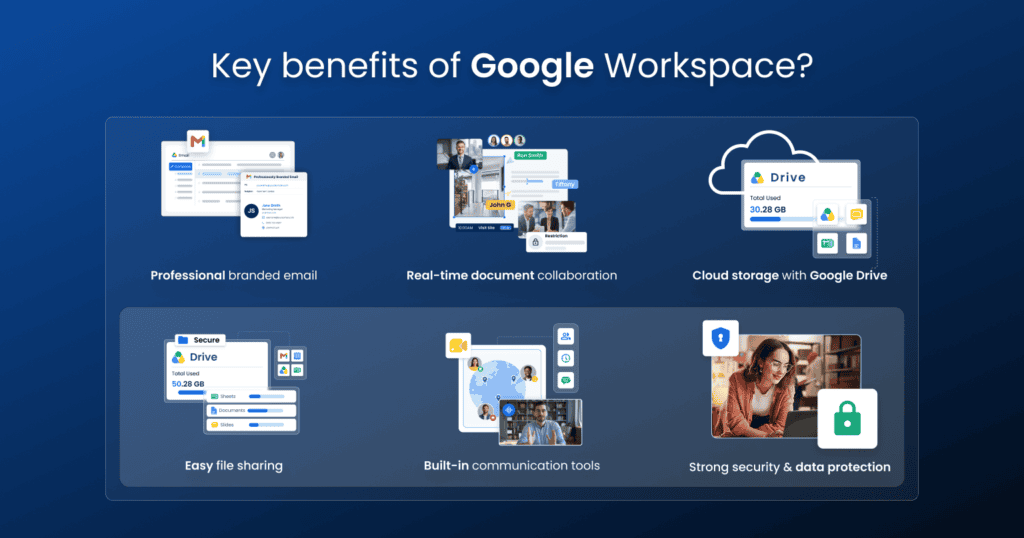
The key features of Google Workspace include custom domain email, real-time collaboration tools, shared team drives and centralized security controls. Understanding what is Google Workspace helps you realize why these built-in tools are essential for managing a professional business.
- Real-time collaboration tools: You can co-edit Docs, Sheets and Slides simultaneously with your team to eliminate confusing email attachments and speed up project delivery.
- Shared drives: These team-owned storage spaces ensure your critical files remain accessible to the entire group even if an individual employee leaves your company.
- Centralized security controls: The Admin Console lets you easily manage user access, enforce two-factor authentication and protect sensitive business data from a single unified dashboard.
Google Workspace vs Gmail: key differences explained
The Google Workspace vs Gmail difference is most apparent when you examine specific features side by side. Below is a detailed breakdown across the most critical categories for businesses.
1. Email and domain customization
One of the most significant distinctions in the Google Workspace vs Gmail difference is email address customization. Free Gmail users are limited to “@gmail.com” addresses, which do not project a professional image for businesses.
Google Workspace allows you to send email from a custom domain (e.g., support@[yourcompany].com), strengthening brand identity and building trust with clients. Google Workspace also provides access to email aliases, group email addresses and multi-user management capabilities simply unavailable with a standard Gmail account.
2. Storage and file management
Free Gmail accounts provide 15 GB of shared storage split across Gmail, Google Drive and Google Photos. Once that limit is reached, users must purchase additional storage through Google One.
Google Workspace plans offer substantially more capacity ranging from 30 GB on the entry-level tier to 5 TB per user (pooled) on higher plans. Enterprise subscriptions offer unlimited pooled storage, giving large organizations the flexibility to scale without worrying about capacity constraints.
3. Collaboration and productivity tools
While both Gmail and Google Workspace provide access to Google Docs, Sheets and Slides, the collaboration capabilities in Google Workspace are notably superior. Workspace users benefit from meeting recordings saved directly to Drive, larger Google Meet participant capacities, noise cancellation and tighter app integrations.
Shared drives, collaborative inboxes and structured team spaces within Google Chat create a workflow environment that a free Gmail account cannot replicate for distributed teams.
4. Admin controls and security
This is where the difference between Google Workspace and Gmail is most pronounced for business users. Google Workspace provides a centralized Admin Console that enables full control over user accounts, security policies, device management and data access. Administrators can enforce two-factor authentication, set data retention policies and manage third-party app permissions.
Free Gmail accounts offer no administrative oversight if an employee leaves, there is no centralized way to revoke access, transfer data or audit account activity, which represents a significant security vulnerability for businesses handling sensitive information.
What are the main benefits of Google Workspace?
Google Workspace gives your business a tangible credibility boost the moment you switch from a free “@gmail.com” address to email on your own domain. Beyond that first impression, it delivers the collaboration, security and administrative control your team needs to operate at a professional level and it scales as you grow.
- Instant trust with clients: A custom domain email helps build customer trust by giving everyone in your company a professional address tied to your brand something a free Gmail account cannot offer.
- Real-time collaboration without the back-and-forth: Unlike traditional office software that requires multiple document versions, Google Docs, Sheets and Slides let your team work on the same file simultaneously, eliminating the need to send attachments back and forth via email. This matters most during team meetings, shared project deadlines and document reviews.
- Simplified onboarding and offboarding: You can easily add or remove users as the business scales and when employees leave, shared drive managers can quickly revoke access, maintaining data security.
- Centralized control that reduces risk: Your Admin Console lets you enforce security policies, manage devices and audit account activity across your entire organization from one place eliminating the blind spots that come with unmanaged personal accounts.
- Scalability without infrastructure overhead: The pay-per-use model means you only pay for the users you have, eliminates the need to invest in and maintain server hardware and lets you scale on demand with a simple order.
Why pay for Google Workspace?
Paying for Google Workspace means investing in business outcomes, not just software. You get a professional identity with a custom domain email, centralized user management and security controls and a collaboration environment built to scale all backed by a 99.9% uptime SLA that a free Gmail account simply cannot match.
- Custom domain credibility: Every email you send from name@[yourcompany].com reinforces brand trust in a way “@gmail.com” never will
- Admin control across your team: Add users, enforce security policies and revoke access instantly from one centralized console
- Shared drives and structured workflows: Team-owned storage keeps files accessible even when employees leave, eliminating data loss risk
- Compliance-ready tools: Vault and eDiscovery features on higher tiers help businesses in regulated industries meet retention and audit requirements
- Business-grade support and uptime: A contractual 99.9% monthly uptime SLA and dedicated support mean your communications stay reliable when it matters most
Google Workspace for nonprofits and education
Overall, Google Workspace offers specialized editions for nonprofits and educational institutions to help manage limited budgets and coordinate scattered teams. These versions provide premium collaboration tools and enterprise-grade security at a fraction of the cost, allowing organizations to maintain a professional presence beyond what a standard Gmail account offers.
- Access custom domain email, shared drives, and centralized admin controls through Education Fundamentals or Nonprofit editions without typical per-user fees.
- Establish a professional image for donors and parents by utilizing enterprise-level security and seamless document collaboration.
- Scale community outreach and virtual classroom management using a unified platform that grows with your organization.
- Eliminate financial barriers to high-quality software, ensuring resources are focused on your mission rather than operational costs.
- Bridge the gap between basic tools and professional infrastructure with features specifically tailored to the unique needs of the nonprofit and education sectors.
Google Workspace pricing plans
Google Workspace offers four tiered pricing plans designed to scale with your business needs. Every plan includes a custom business email, access to Google’s core productivity apps and dedicated cloud storage. Pricing starts at $6 per user per month and increases based on storage capacity and advanced collaboration features. The table below outlines each plan’s cost and key offerings to help you identify the right fit for your team.
| Plan | Price (per user/month) | Pooled Storage | Key Features |
|---|---|---|---|
| Business Starter | $6 | 30 GB | Custom email, 100-participant video calls, basic collaboration tools |
| Business Standard | $12 | 2 TB | 150-participant video calls with recording, enhanced Drive capabilities |
| Business Plus | $18 | 5 TB | 500-participant video calls, attendance tracking, advanced security controls |
The Business Starter plan suits small teams that need a professional email setup without heavy collaboration demands. Upgrading to Business Standard or Business Plus unlocks significantly more storage and richer meeting features.
Note: Pricing is subject to change, please visit Bluehost Google Workspace Plans for accurate details.
Which option is right for you?
Choosing between Google Workspace and Gmail ultimately depends on your goals, budget and the level of professionalism your situation demands.
Choose free Gmail if:
- You are using email strictly for personal purposes
- You do not require a custom domain email address
- You are an individual testing early-stage ideas with no immediate team collaboration needs
- Budget constraints prevent committing to a monthly subscription
Choose Google Workspace if:
- You operate a business and need a custom domain email address
- Your team requires centralized admin controls and user management
- Employees regularly collaborate on documents, spreadsheets or presentations
- You need enhanced security, compliance tools or data retention capabilities
- Projecting professionalism and building brand credibility are business priorities
For the vast majority of businesses even small teams with just a few employees the investment in Google Workspace pays dividends in professionalism, productivity and security that a free Gmail account simply cannot match.
Making the right choice for your business
The Google Workspace vs Gmail difference ultimately comes down to one fundamental distinction: personal versus professional. Gmail is a powerful, free tool ideal for individual use. Google Workspace is a robust, enterprise-ready platform that equips businesses with the tools, security and credibility needed to operate professionally in today’s competitive landscape.
From custom domain email and advanced admin controls to expanded storage and Google Workspace pricing plans that scale with your organization, Google Workspace offers tangible advantages that justify its cost for any serious business. Pair your Google Workspace subscription with a professional web hosting solution to establish a fully branded, secure and high-performing online presence and position your business for long-term growth. Explore your options today and take the next step toward a more professional, productive digital operation.
Final thoughts
Overall, choosing between Google Workspace and Gmail depends entirely on your unique goals and communication requirements. While a standard Gmail account is an ideal free solution for personal use, Google Workspace delivers the professional custom email addresses, advanced team collaboration features and reliable business infrastructure necessary to support a growing brand. By upgrading to the Workspace environment, you gain access to enhanced security protocols, centralized administrative controls and domain-based emails that build immediate credibility and trust with your clients.
Ready to get started? Set up Google Workspace with Bluehost today and give your business the professional edge it deserves.
FAQs
What is the main difference between Google Workspace and Gmail?
The main difference between Google Workspace and Gmail is that Gmail is a free, consumer-grade email service limited to “@gmail.com” addresses, while Google Workspace is a paid business suite offering custom domain email, expanded storage, centralized admin controls and enterprise-grade security tools.
Can I use Gmail for my business email?
You can use free Gmail for business communications, but you will be limited to an “@gmail.com” address, which may appear less professional to clients. Google Workspace allows you to use a custom domain (e.g., name@[yourcompany].com), which is strongly recommended for businesses looking to build brand trust and credibility.
How much do Google Workspace pricing plans cost?
Google Workspace pricing plans start at $6 per user per month for the Business Starter plan. Plans scale to $12 (Business Standard), $18 (Business Plus) and custom Enterprise pricing, with each tier offering progressively more storage, features and administrative capabilities to match your organization’s needs.
Is Google Workspace worth it for small businesses?
Yes, Google Workspace is generally worth the investment for small businesses. Even the entry-level Business Starter plan provides custom domain email, 30 GB of storage, Google Meet, centralized admin controls and Google’s full productivity suite all of which directly support professional operations and team collaboration.
Does Google Workspace include all the same apps as Gmail?
Google Workspace includes all the same core applications available with a free Gmail account including Gmail, Google Drive, Docs, Sheets, Slides, Calendar and Meet but with significantly enhanced features, greater storage capacity, business-grade security and centralized administrative controls not available in the free consumer version.

Write A Comment