 ChatGPT,
 Claude,
 Gemini,
 Grok — all four for
Key highlights
- Explore the core differences between gTLDs and ccTLDs, focusing on governance, registration eligibility and legal dispute resolution policies that affect business operations.
- Analyze how the gTLD vs ccTLD choice impacts SEO performance, specifically regarding geographic targeting signals and local search click-through rates.
- Identify which country-coded extensions, such as .io and .ai, are officially classified as generic by Google in 2025 for broader global search visibility.
- Apply a strategic decision framework to align your domain extension with your specific business model, from global SaaS platforms to local service providers.
- Understand the high-stakes renewal risks associated with certain ccTLDs, including specific extensions like .de that offer zero grace periods for missed deadlines.
- Learn how to efficiently search, compare and secure your domain through Bluehost while managing privacy protections and auto-renewal settings from one dashboard.
Your domain extension is not just a technical label. It is a signal to search engines, a trust cue for users and a long-term strategic choice for your brand.
Should you choose .com, .org or a country-specific extension like .uk or .de? The right answer depends on your audience, your market and how you want to grow.
In “www.bluehost.com,” the extension “.com” is a generic top-level domain (gTLD). In “bbc.co.uk,” the “.uk” is a ccTLD (country code top-level domain). Both are valid. But they serve different purposes.
This guide explains the difference between gTLD and ccTLD, how each affects your SEO and how to choose the right extension for your website.
TL;DR: gTLD vs ccTLD
| Factor | gTLD | ccTLD |
| Full name | Generic top-level domain | Country code top-level domain |
| Examples | .com, .org, .net, .shop, .tech | .uk, .ca, .de, .us, .au |
| Who can register | Anyone globally, no restrictions | Varies (some require local presence) |
| Geographic signal | None (globally neutral) | Strong local country signal |
| Governed by | ICANN (global) | Each country’s own registry |
| Dispute resolution | ICANN UDRP (standardized globally) | Country-specific rules vary |
| Google SEO treatment | All gTLDs treated equally | Geo-restricted to country by default |
| Best for | Global brands and businesses | Local businesses serving one country |
Understanding TLD basics before choosing between gTLD vs ccTLD
TLD stands for top-level domain. It is the final segment of any domain name, the part that comes after the last dot. In “bluehost.com,” the TLD is “.com.”
The global domain name system is managed by ICANN, the Internet Corporation for Assigned Names and Numbers. ICANN maintains the root zone database, which lists every authorized TLD in existence.
Every domain you register belongs to one of three main TLD categories. Knowing the difference between them helps you make a more informed decision from the start.
3 interesting top-level domain options
- .blog: Instantly signals editorial authority for writers and content strategists.
- .photography: Sets clear industry expectations for visual professionals at the domain level.
- .guru: Reinforces expert positioning for consultants and thought leaders with every link shared.
- Strategic branding: These descriptive gTLDs allow niche brands to occupy a unique space instead of competing for generic .com extensions.
- Availability: Search and register these extensions alongside other gTLD and ccTLD options through the Bluehost domain search tool.
gTLD vs ccTLD vs sTLD: Key differences between the main domain types
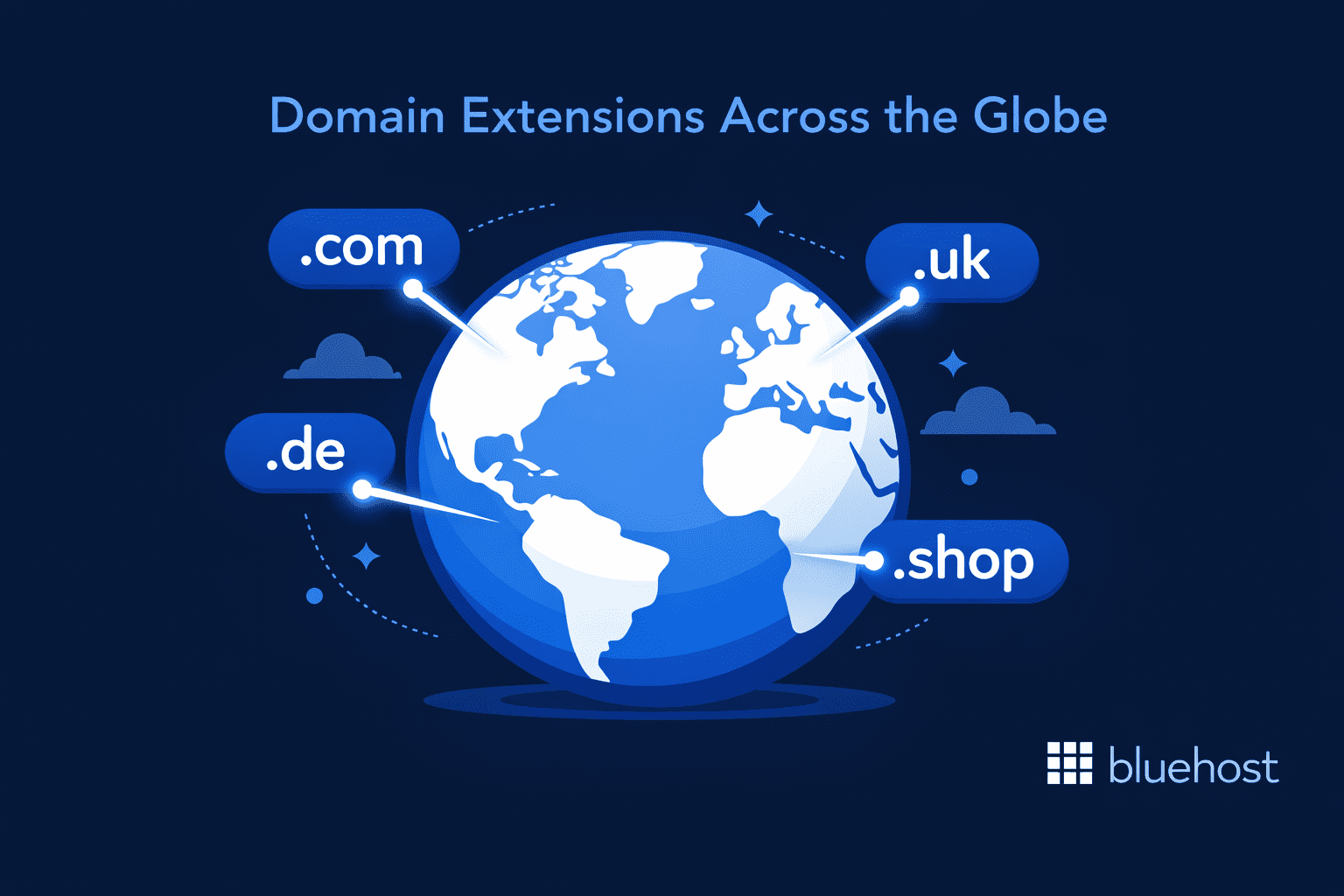
gTLDs are the most widely used type because anyone can register them without meeting geographic requirements. ccTLDs signal a specific country and come with rules that vary by territory. sTLDs are reserved for specific institutions such as universities and government agencies.
One more detail worth knowing: gTLD domains can only be registered through ICANN-accredited registrars. ccTLD registries set their own rules for which registrars they work with. This means your registrar options may differ depending on which type of extension you choose.
Also read: Top-Level Domain Extensions 2026: Complete TLD Guide
What is a gTLD (generic top-level domain)?
A gTLD is a domain extension not tied to any specific country. Anyone anywhere in the world can register one without meeting geographic restrictions.
ICANN oversees all gTLDs through a standardized global framework. This uniform governance makes gTLDs the most widely used domain type on the internet today.
The original gTLDs, called legacy gTLDs, date back to the 1980s when the Domain Name System was first established to replace the old ARPANET host.txt system. These include .com, .org, .net, .edu, .gov and .mil. These six extensions built the early structure of the web.
In 2013, ICANN launched its New gTLD Program. This expanded the total from 22 extensions to more than 1,500. New gTLDs cover industries, interests, cities and brands. Examples include .shop, .tech, .app, .blog, .photography, .finance and many more.
The scale of this growth is significant. According to Verisign’s Domain Name Industry Brief (Q3 2025), there are now 378.5 million registered domains worldwide. Of those, .com and .net alone account for 171.9 million, making gTLDs by far the dominant choice for online presence globally.
Not sure which extension fits your brand from more than 1,500 options? The Bluehost AI Domain Name Generator lets you search available names across hundreds of gTLD and ccTLD extensions based on your keywords, in seconds.
Common gTLD examples: Legacy and new extensions
- .com: The most recognized extension for commercial websites worldwide. Best for businesses of any size targeting a global audience.
- .org: Used by nonprofits, charities, foundations and open-source communities. Carries a non-commercial trust signal.
- .net: Originally for network service providers. Now used broadly by technology and infrastructure companies.
- .info: Best suited for informational and resource-based websites, directories and knowledge bases.
- .shop / .store: Used by e-commerce brands to signal a retail purpose directly in the domain name.
- .tech / .app / .ai: Popular with technology companies, software products and artificial intelligence startups worldwide.
Important update on .io and .ai: Both are technically ccTLDs by ICANN assignment. The .io extension belongs to the British Indian Ocean Territory. The .ai extension belongs to Anguilla. However, Google announced in 2024 that it now treats .ai as a generic TLD. Google does not apply geographic restrictions to .io or .ai sites in search results. Both are safe to use for a global audience.
What is a ccTLD (country code top-level domain)?
A ccTLD is a two-letter domain extension assigned to a specific country or territory. It signals to search engines and users that your website is intended for a particular geographic market.
For example, .uk represents the United Kingdom. .ca represents Canada. .de represents Germany. Each ccTLD is managed by that country’s own registry authority, not by ICANN. This means registration rules, pricing, renewal timelines and dispute resolution policies vary widely from one ccTLD to another.
The process for granting a ccTLD to a geographic region is overseen by IANA, the Internet Assigned Numbers Authority, working alongside ICANN. Once granted, the local registry takes full responsibility for managing and maintaining that extension.
How ccTLDs are governed differently from gTLDs?
One of the biggest practical differences is in governance. gTLD registries must operate under ICANN contracts and follow standardized policies. ccTLD registries operate under local laws and are free to set their own rules.
This affects three key areas: registration eligibility, dispute resolution and renewal policies. ccTLD disputes go through country-specific processes rather than the standardized ICANN UDRP. This can make resolving a domain dispute slower depending on the country involved.
Renewal timelines are also a serious practical risk. Some extensions such as .de (Germany), .am (Armenia) and .cx (Christmas Island) have zero grace periods. If you miss a renewal deadline, the domain can be deleted or moved into a costly redemption period immediately with no standard recovery window. The safest approach for zero-grace-period ccTLDs is enabling auto-renewal before the deadline – not after. Bluehost’s Domain Expiration Protection helps by automating renewal well ahead of the expiry date, reducing the risk of a missed deadline. However, no registrar-level service can override a registry’s zero grace period policy once a domain has already expired.
Open vs Restricted ccTLDs: How ccTLD Rules Affect Your gTLD vs ccTLD Decision
| Restricted ccTLDs (local presence required) | Open ccTLDs (no restrictions) |
|---|---|
| .uk (United Kingdom) (physical address required) | .co (Colombia), popular .com alternative globally |
| .jp (Japan) (local entity required) | .io (British Indian Ocean Territory), popular in tech |
| .de (Germany) (local admin contact + zero grace period) | .me (Montenegro), widely used for personal brands |
| .ca (Canada) (Canadian residency or entity required) | .tv (Tuvalu), the global standard for media and streaming |
| .au (Australia) (ABN or ACN required) | .ai (Anguilla), widely used by AI startups globally |
| .fr (France) (EU or EEA residents only) | .gg (Guernsey), popular in gaming and esports |
Open ccTLDs give you branding flexibility with no local registration barriers. However, even open ccTLDs may carry a geographic association in some search engines by default. Always check the specific rules and renewal policies before committing to any ccTLD.
One additional detail: the .us ccTLD does not allow WHOIS privacy protection. This means your personal registration details remain publicly visible in the WHOIS database if you register a .us domain.
Popular ccTLDs around the world
Some ccTLDs have grown far beyond their borders to become trusted signals in their home markets. If you are targeting users in a specific country, registering the local extension immediately tells both Google and your audience that your site is built for them.
- .uk: The United Kingdom’s primary extension, widely recognized and trusted by British consumers for local businesses and services.
- .de: Germany’s ccTLD, one of the most registered country-code extensions in Europe and essential for reaching German-speaking markets.
- .ca: Canada’s extension, restricted to Canadian residents and entities, making it a strong credibility signal for local audiences.
- .cn: China’s ccTLD, critical for businesses targeting Chinese consumers and navigating local search engines like Baidu.
- .au: Australia’s extension, which requires an ABN or ACN, reinforcing trust with Australian users in local search results.
gTLD vs ccTLD: Key differences at a glance
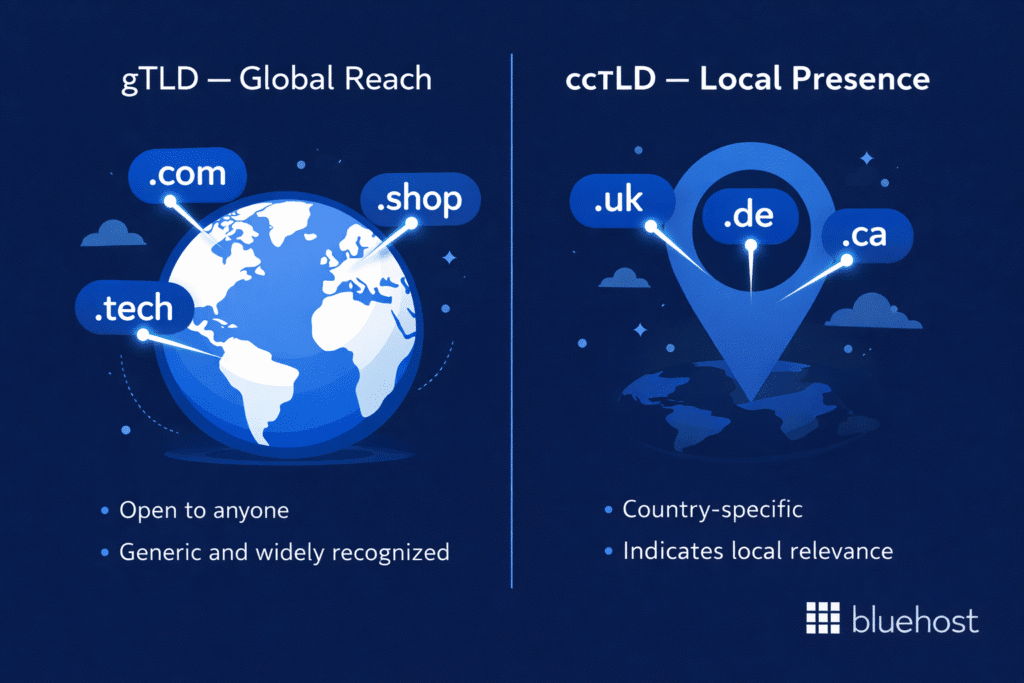
The table below compares both types across all the factors that matter when choosing a domain for your website.
| Factor | gTLD | ccTLD |
|---|---|---|
| Registration eligibility | Open to anyone globally | Restricted in many cases (local presence may be required) |
| Geographic signal to Google | None (globally neutral) | Strong (geo-restricted to assigned country by default |
| Governing authority | ICANN (global, standardized) | Each country’s own registry (rules vary) |
| Registrar requirements | Must register via ICANN-accredited registrar | Registrar eligibility set by each ccTLD registry |
| Dispute resolution | ICANN UDRP (standardized and predictable) | Country-specific policies (vary significantly) |
| Renewal risk | Standard 30–40 day grace period | Varies (some have zero grace period (.de, .am, .cx) |
| WHOIS privacy | Available on most gTLDs | Not available on .us; varies by ccTLD |
| Link equity | All backlinks benefit the one domain | Backlinks to each ccTLD stay separate with no shared equity |
| Best suited for | Global brands and international businesses | Local businesses focused on one country |
Does domain extension affect SEO?
Your domain extension does not directly boost your Google rankings. But it does shape how Google categorizes your site geographically and how users perceive your credibility.
The choice between a gTLD and ccTLD affects your geographic targeting, your organic click-through rates in local searches and the way backlink authority is distributed across your domains.
1. How Google treats gTLDs
Google has officially confirmed that all gTLDs are treated equally in its ranking algorithm. A .shop or .tech site has the same ranking potential as a .com site. The extension itself is not a ranking factor.
The scale of .com adoption helps explain why it remains the default trust signal for most audiences. According to W3Techs, .com powers close to 44% of all websites globally, more than all 316 ccTLD extensions combined. That installed base of recognition is part of what users expect when they type a web address.
Google’s John Mueller has stated this clearly across multiple public forums. He has also cautioned against choosing TLDs that are heavily associated with spam. Extensions like .xyz and .biz are not harmful by definition, but they carry lower perceived trust with many users. Lower user trust typically leads to lower click-through rates, which can affect your overall SEO performance indirectly.
The practical advice: choose a gTLD that aligns with your brand and has broad user recognition. .com remains the highest-trust gTLD globally. New gTLDs like .app, .shop and .tech are also well-recognized in their respective niches.
2. How ccTLDs influence local search rankings
ccTLDs carry a built-in geographic signal. Google uses this signal to determine which country your site is most relevant to and adjusts its rankings accordingly.
A .ca site will rank more prominently in Canadian search results. A .de site gets preference in German Google searches. This is a genuine local SEO advantage that cannot be replicated by a gTLD alone without additional configuration.
ccTLDs also improve click-through rates in local searches. Users in the UK tend to click .co.uk results over .com results when searching for local products and services. This behavioral trust signal adds a practical conversion benefit on top of the ranking advantage.
However, Google has been reducing its reliance on ccTLDs as a geotargeting signal since 2024. Hreflang tags, content language signals and Google Search Console geo-targeting settings now carry more weight than they previously did.
Key takeaway: ccTLDs still help with local SEO, but they are no longer the only geotargeting signal. Google now prioritizes content relevance, hreflang implementation and Search Console settings alongside the domain extension.
3. Link equity and the multi-domain problem
This is one of the most important SEO considerations that most comparison articles miss entirely.
When you build backlinks to your .com domain, all of that link authority accumulates in one place. Your domain authority grows with every quality link pointing to it.
When you run multiple ccTLDs (for example, a .de site, a .fr site and a .uk site), the backlinks each domain earns stay separate. A link to your .de site does not benefit your .fr site. You are essentially building three separate link profiles simultaneously instead of one strong one.
This is why many large international brands choose a single gTLD with subfolder-based localization (domain.com/de/, domain.com/fr/) rather than separate ccTLDs. Subfolder localization keeps all link authority on one domain while still allowing Google to serve country-specific content.
Also read: Secret Unlocked: What is the Best TLD for SEO?
Which domain extension is right for your business?
The right choice comes down to your business model, your target audience and your long-term growth plans. Neither extension is universally better.
Choose a gTLD if…
- You are building a brand that targets customers in multiple countries.
- You want a single domain to build consolidated SEO authority over time.
- Your preferred .com, .org or .net domain is still available to register.
- You are running a SaaS product, eCommerce store or content website with a global audience.
- You want the widest registrar options and standardized ICANN dispute resolution policies.
- You plan to use subfolder localization (domain.com/de/) rather than separate country domains.
Choose a ccTLD if…
- Your entire customer base is located in one specific country.
- You operate a local service business such as a law firm, medical practice or regional retailer.
- Your industry requires local compliance or licensing, such as finance, insurance or healthcare.
- Competitors in your target market predominantly use country-code extensions and local trust matters.
- You want the CTR advantage that comes from showing a country-specific domain in local search results.
Can you use both a gTLD and a ccTLD?
Yes. Some businesses register a gTLD as their primary domain and also register country-specific ccTLDs for key markets. The ccTLDs can then redirect to localized subfolder versions of the main gTLD site.
This approach protects your brand across markets without splitting your SEO authority. However, it adds management overhead. Each ccTLD has its own renewal timeline, pricing and policy rules.
If you use this strategy, enable auto-renewal on every ccTLD. Some extensions like .de have zero grace periods. A single missed renewal can mean permanent loss of that domain.
Use this table to match your situation to the right choice:
Use this table to match your situation to the right choice:
| Your situation | Recommended choice |
|---|---|
| US-only local service business | .com gTLD with Search Console geo-targeting or .us ccTLD |
| Global SaaS product or brand | .com or new gTLD like .app, .io or .tech |
| eCommerce targeting multiple countries | .com gTLD with subfolder localization and hreflang |
| AI or tech startup | .ai or .io (now treated as gTLD by Google) |
| Nonprofit or community organization | .org gTLD for credibility and instant recognition |
| Local business in Germany, France or Japan | Country ccTLD (.de, .fr, .jp) for local search advantage |
| Enterprise expanding internationally | Single .com gTLD + ccTLD redirects for key markets |
How to register your domain with Bluehost
Bluehost is an ICANN-accredited domain registrar that has been helping people register and manage domains since 2003. It is the official hosting provider recommended by WordPress.org. You can search, compare and register both gTLDs and select ccTLDs from one dashboard.
Step 1: Search for your domain
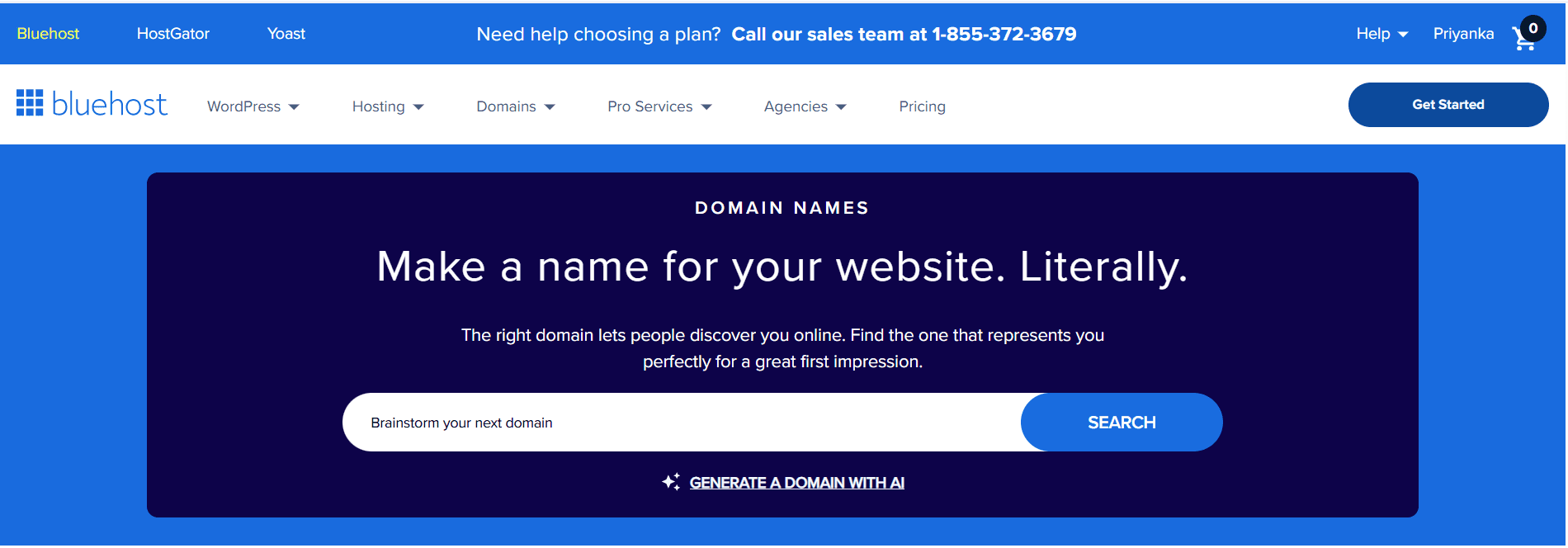
Go to the Bluehost domain name search tool. Enter your preferred name to check availability across hundreds of gTLD and ccTLD extensions. If your first choice is already registered, Bluehost suggests alternative names and extensions in real time. You can compare multiple options side by side before making a decision.
Step 2: Choose your extension and review pricing
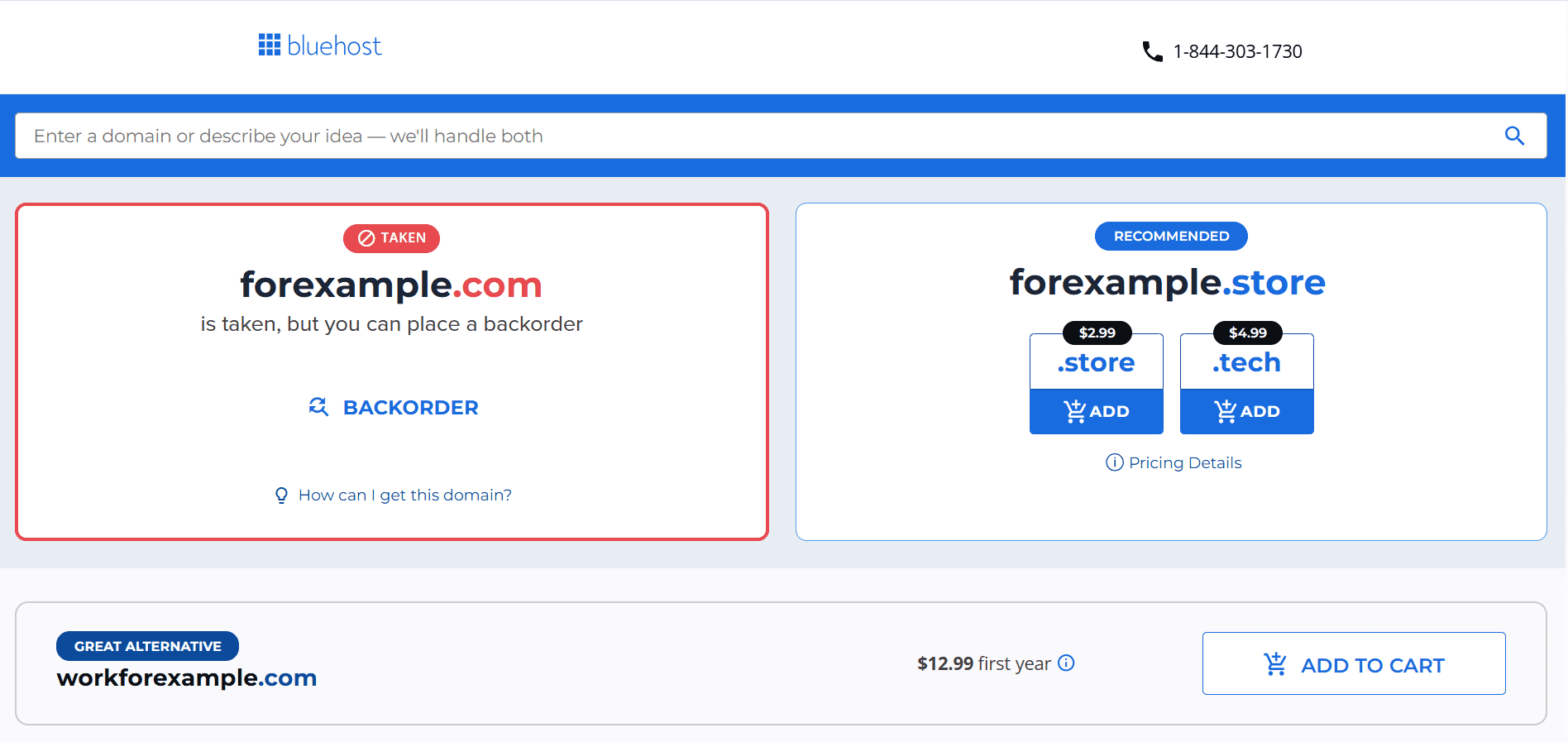
Select the gTLD or ccTLD that matches your audience and business goals. Bluehost supports all major legacy gTLDs, hundreds of new gTLDs and select open ccTLDs. Pricing is transparent and shown before checkout. There are no hidden renewal surprises. Bluehost also includes a free domain for the first year with any qualifying hosting plan.
Step 3: Add domain privacy + protection
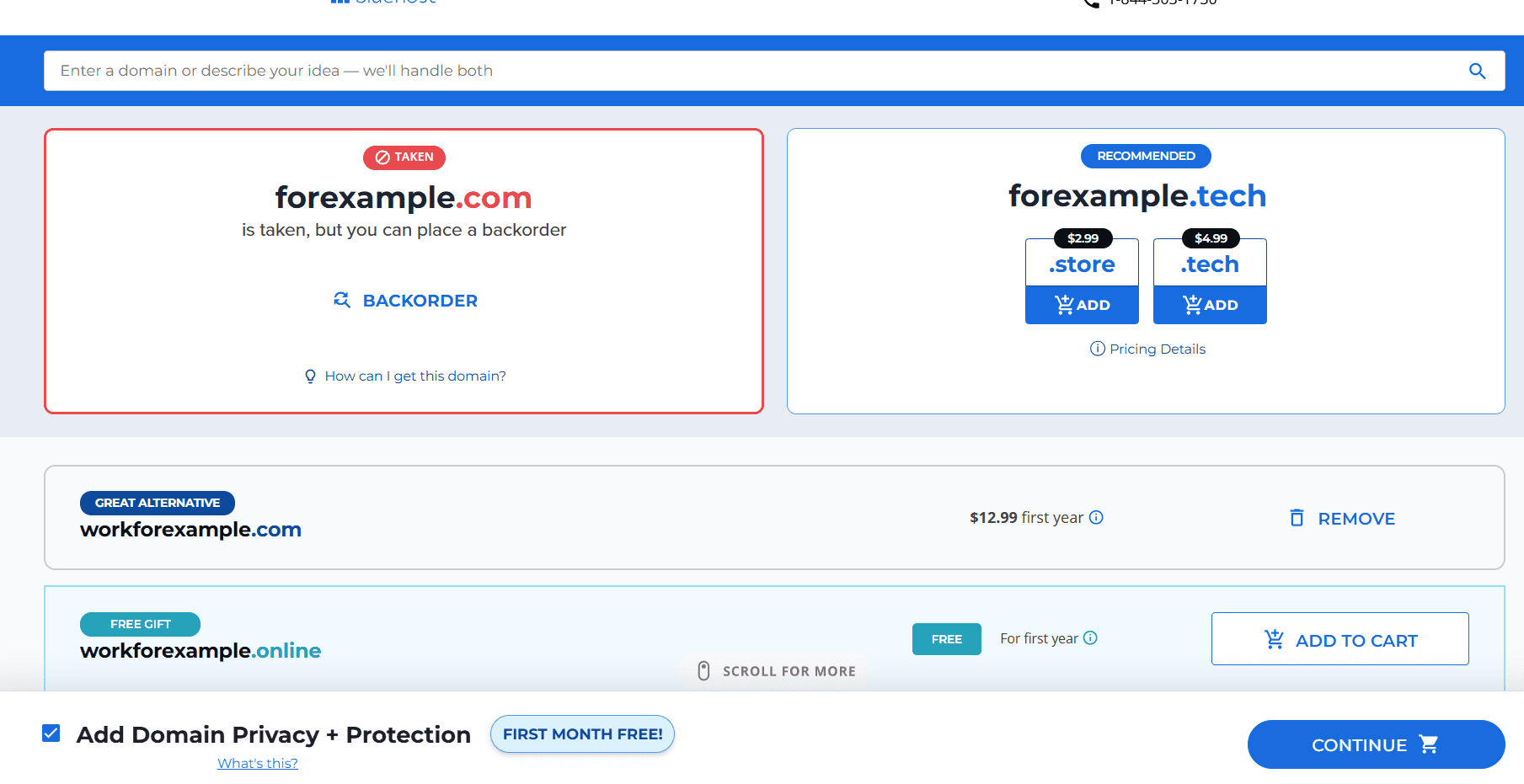
Once you have selected your domain, stay on this same results screen. At the bottom of the page, Bluehost shows an add Domain Privacy + Protection pre-ticked by default, with the first month free. This protects your personal contact information from being publicly visible in the WHOIS database. Review your selection, keep or uncheck the privacy option, then click Continue.
In this example, I first searched for [forexample].com, but it wasn’t available, so I selected [workforexample].com instead and added it to the cart.
Note: Domain Privacy isn’t available for .us ccTLD registrations due to that registry’s disclosure requirements.
Also read: Protect Your Domain with Privacy & Protection
Step 4: Create your account and complete the purchase
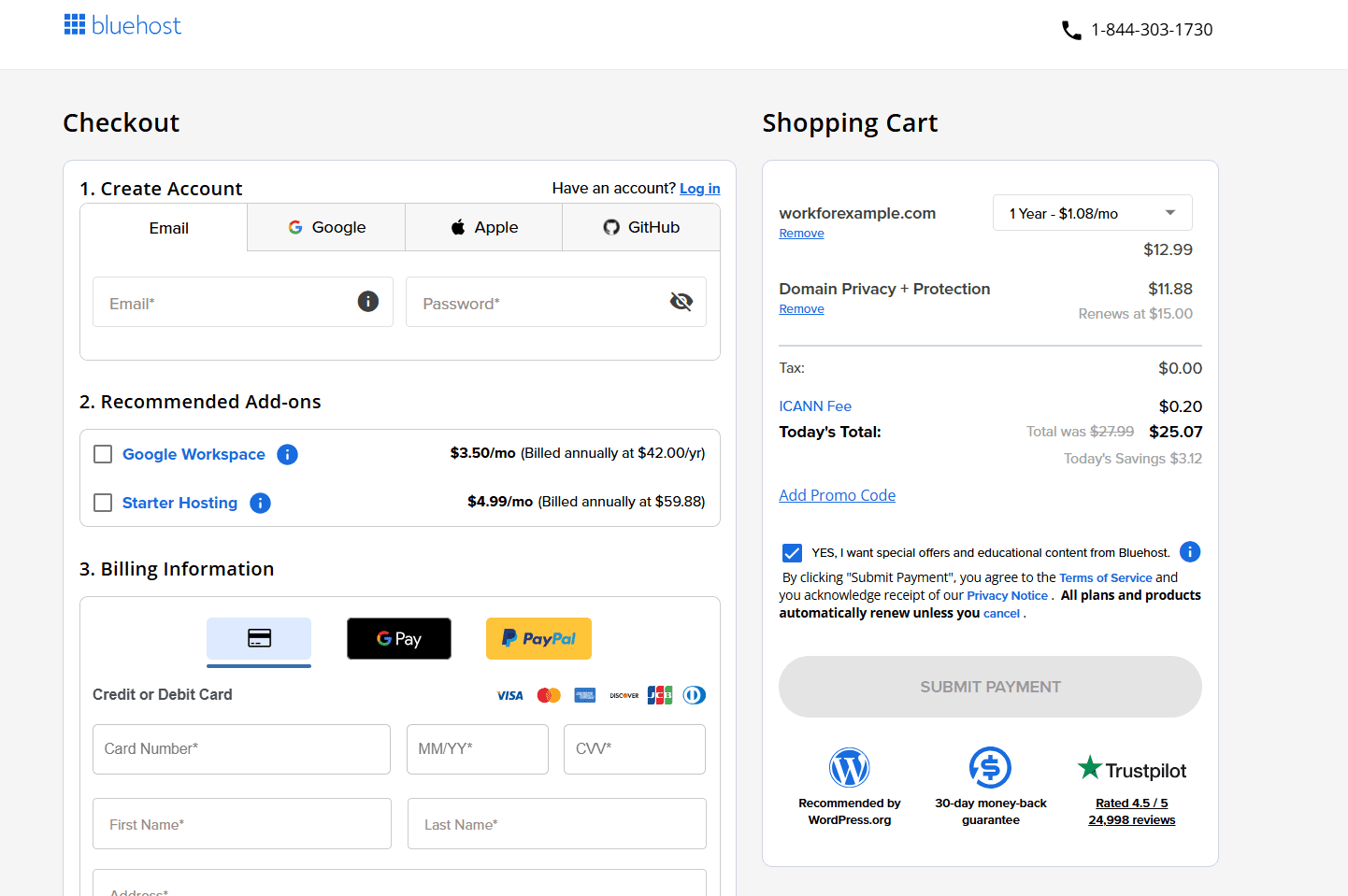
The next screen is the checkout page. If you are a new Bluehost customer, create your account at this stage. Existing customers can log in and proceed directly. Enter your billing details via card, Google Pay or PayPal and click Submit Payment to complete your registration.
Bluehost lets you activate auto-renewal during the checkout process. This is especially important for ccTLDs. Some country extensions such as .de have zero grace periods after expiry. A missed renewal can result in the permanent loss of your domain. Enabling auto-renewal through your Bluehost account removes that risk entirely.
Once registered, you manage everything from the Bluehost account manager. From there you can update DNS settings, connect your domain to a hosting plan, set up professional email and configure Google Search Console for geo-targeting. Bluehost’s 24/7 expert support is available by chat or phone if you need help at any stage.
Final thoughts
Both gTLDs and ccTLDs are legitimate, well-supported options. Neither is universally better. The right one depends on who you are trying to reach.
Choose a gTLD if you are building a global brand or targeting multiple countries. A .com remains the safest and most recognized choice for most businesses. One domain builds one consolidated SEO authority over time.
Choose a ccTLD if your entire audience is in one country, local trust matters or your industry requires regional compliance. The local CTR advantage and geographic relevance signal are real benefits for single-market businesses.
If you are expanding internationally, use a primary .com with subfolder localization for each market. This keeps link authority consolidated while serving geo-relevant content to each audience. Register key ccTLDs as brand protection and redirect them to the corresponding subfolder.
Whatever you choose, your domain extension is the foundation your online identity is built on. Don’t let the right name get claimed by someone else.
Register your domain with Bluehost today. Search hundreds of gTLD and ccTLD extensions, get a free domain with any qualifying hosting plan and manage everything, domain, hosting, SSL and privacy from one dashboard.
Already own a domain elsewhere? Transfer it to Bluehost to consolidate your domain and hosting under one account with 24/7 expert support.
FAQs
Is .com a gTLD or ccTLD?
.com is a gTLD. It is managed by VeriSign under ICANN oversight and has been a generic extension since the 1980s. Anyone in the world can register a .com domain. There are no geographic requirements. It remains the most widely recognized and trusted domain extension globally.
Is .io a gTLD or ccTLD?
.io is technically a ccTLD assigned to the British Indian Ocean Territory. However, Google treats .io as a generic extension in search results. It does not apply geographic restrictions to .io sites. The extension is widely used by technology startups worldwide and is safe for a global audience.
Does using a ccTLD hurt global SEO?
Yes, it can limit your global reach. Google restricts ccTLD sites to their assigned country in search results by default. You can override this in Google Search Console under International Targeting settings. However, a gTLD is a better starting point if you want to rank in multiple countries from the beginning.
Can I use a WHOIS lookup to check domain ownership before registering?
Yes. A WHOIS lookup tool lets you verify the current registration status of any domain. It shows the registrant name, registration date, expiry date and the registrar on record. Always run a WHOIS search before finalizing your domain choice. This helps you avoid purchasing a name with a problematic ownership history or pending legal disputes.
What happens if I miss a ccTLD renewal deadline?
For most gTLDs, you have a standard grace period of 30 to 40 days after expiry to renew at the normal rate. For ccTLDs, the rules vary sharply. Extensions like .de, .am and .cx have zero grace periods. Missing the deadline can result in immediate deletion or a costly redemption fee of $100 to $230 or more. Always enable auto-renewal for ccTLD domains to avoid this risk.
What is the difference between a subdomain and a ccTLD for international SEO?
A subdomain uses a format like de.yourdomain.com. A ccTLD uses a separate domain like yourdomain.de. Google treats subdomains and the main domain independently for SEO purposes, similar to separate sites. A subfolder structure like yourdomain.com/de/ is generally recommended over both subdomains and separate ccTLDs for consolidating link authority on a single domain.

Write A Comment