 ChatGPT,
 Claude,
 Gemini,
 Grok — all four for
Key highlights
- The root domain vs. subdomain choice directly affects your site structure, branding and long-term SEO performance.
- A root domain like example.com is your core web address where all authority and backlinks are consolidated.
- A subdomain like [blog.example].com is free to create and sits under your existing registered domain.
- Google can treat subdomains as separate websites, which may dilute your overall domain authority over time.
- For most new websites, a subdirectory structure builds SEO authority faster than splitting content into subdomains.
- Use a subdomain for staging environments, separate web apps or content targeting a completely different audience.
When you set up a website, the address you choose matters more than most people realize. Once you get past picking a name, a second question tends to come up: should your content live at bluehost.com or at [blog.example].com?
That distinction between root domain vs. subdomain affects how your site is organized, how search engines interpret it and how users navigate it. Whether you are building your first site or restructuring an existing one, understanding the difference is a foundational step.
This guide walks you through what a root domain and subdomain actually are, how they differ, how each affects your SEO and which one to use based on your specific situation.
What is a domain name?
A domain name is the human-readable address you type into a browser to reach a website. Instead of memorizing a server’s numerical IP address like 192.0.2.1, you use a name like [businessname].com. That name maps to the correct server through the Domain Name System (DNS), which acts like the internet’s phone book.
It is also worth separating a domain name from a full URL. Your domain name is just the registered name: [businessname].com. A URL is the complete address that includes the protocol and a specific path, such as https://[businessname].com/blog. The domain name is one component inside every URL you use.
Parts of a domain name
Before comparing root domains and subdomains, it helps to understand what a domain name is actually made of. Every web address follows a predictable structure and each part serves a specific function.
Take the URL: [blog.example].com
Here is how it breaks down:
- Subdomain: blog (the prefix that appears before the root domain)
- Second-level domain (SLD): example (the brand name or word you register)
- Top-level domain (TLD): .com (the extension at the end)
Together, the SLD and TLD form the root domain: bluehost.com.
What is a top-level domain?
A top-level domain (TLD) is the final segment of a domain name. It is the part that comes after the last dot. In the United States, .com is by far the most common TLD and is generally the recommended choice for business websites. Other widely used TLDs include .org, .net, .edu and country-specific options like .us.
Beyond generic TLDs, there are also country code TLDs (ccTLDs) such as .uk for the United Kingdom or .ca for Canada. If your audience is based in the US, .com remains the standard default.
What is a root domain?
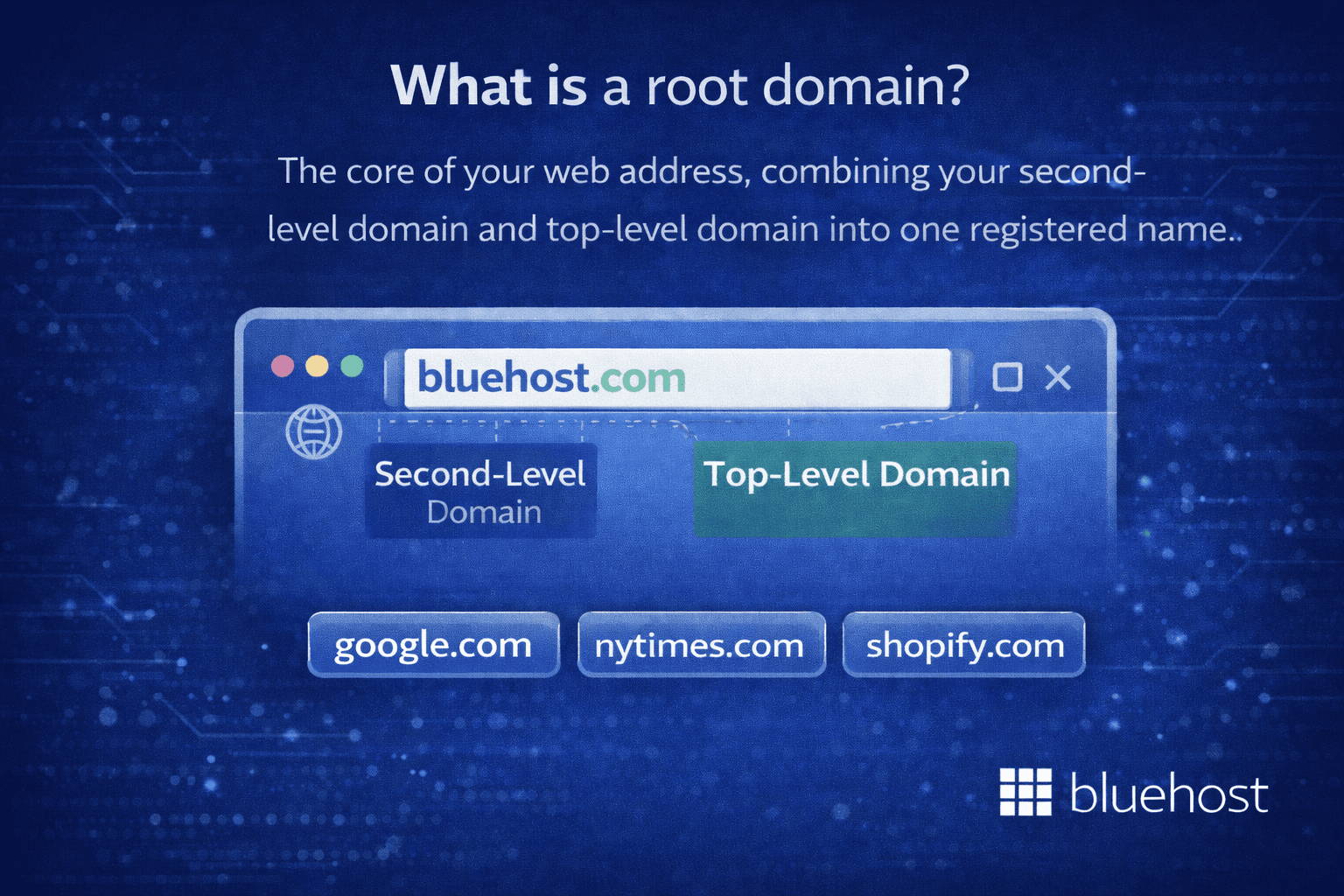
A root domain is the core of your web address. It combines your second-level domain and your top-level domain into one registered name.
For example, bluehost.com is a root domain. So are google.com, nytimes.com and shopify.com.
Your root domain is the central identity of your website. It is what users type into a browser when they want to find you directly. It appears on your business cards, in your email address and across your marketing materials.
From an SEO standpoint, the root domain is where your authority lives. Every backlink pointing to your website, every piece of content you publish and every trust signal Google registers is tied to your root domain. That centralized authority is one of the main reasons most SEO professionals recommend keeping content on the root domain wherever possible.
If you have not registered a domain yet, that is your starting point. With Bluehost, you can search for available domain names, review pricing and complete registration in just a few minutes.
What is a subdomain?
A subdomain is a prefix added to the front of your root domain, separated by a dot. It creates a distinct web address that sits under your existing domain without requiring a separate registration.
Common subdomain examples:
- [blog.yoursite].com
- [shop.yoursite].com
- [support.yoursite].com
- [staging.yoursite].com
Is www a subdomain? Yes, technically it is. The “www” in www.bluehost.com is the most widely used subdomain on the internet. It has been standard practice for so long that most browsers and servers treat it interchangeably with the root domain. For everyday users, there is no visible difference.
What is a subdomain example in practice?
A software company might use [app.company].com for their web application and [docs.company].com for technical documentation. Both exist under the root domain buehost.com but serve completely different functions for different audiences.
Subdomains are free to create. You do not need to purchase a new domain name. If you already have hosting with Bluehost, you can create and manage subdomains directly from your control panel.
Root domain vs. subdomain: The core differences
Now that both terms are defined, here is a side-by-side comparison across the factors that matter most for anyone building a website in the US.
| URL example | bluehost.com | [blog.example].com |
| Registration cost | Annual fee | Free under existing domain |
| SEO authority | All signals in one place | Treated as separate entity by Google |
| Setup | Register via domain registrar | Create in hosting control panel |
| Clean and authoritative | Can fragment brand perception | |
| Best for | Core website, blog, store | Staging, apps, separate functions |
1. URL structure
Your root domain is the cleanest possible web address: [example].com. There is nothing before it and nothing after it to qualify it. A subdomain adds a prefix that becomes part of the address itself, such as [blog.example].com. For users, the subdomain address signals they are in a specific section of a site, not on the main property. For some visitors, especially those less familiar with how websites are structured, a subdomain can feel like a different destination altogether.
2. Cost
Registering a root domain involves an annual registration fee paid to a domain registrar. At Bluehost, domain registration pricing varies by TLD, with .com domains typically falling in the range of $10 to $15 per year. Subdomains, on the other hand, cost nothing to create. Once you have a registered domain and an active hosting plan, you can create as many subdomains as you need at no additional charge.
3. SEO authority
This is the factor that matters most for most website owners. Your root domain accumulates authority over time through the content you publish, the backlinks you earn and the trust signals Google assigns to your site. All of that authority is stored under one domain.
When you create a subdomain, Google may treat it as a separate website. That means a subdomain does not automatically inherit the authority your root domain has built. If your blog lives at [blog.example].com and earns backlinks, those signals may not fully flow back to [example].com. For new and growing sites, this separation can slow down rankings.
4. Branding and user perception
Your root domain is your brand address online. When someone hears or sees your domain, it should immediately connect to your business. A subdomain adds a qualifier to that address. While experienced web users understand what [blog.yoursite].com means, a less technical audience may not realize it is part of the same business. For brand consistency, the root domain or a subdirectory path keeps the identity unified.
5. Setup and management
Setting up a root domain requires registering it through a domain registrar, connecting it to a hosting provider and configuring the DNS. This is a one-time process that takes just a few minutes on Bluehost. Creating a subdomain is done entirely within your hosting control panel, with no registration process and no additional payment. The subdomain becomes active once DNS propagation completes, which typically takes a few minutes to a few hours.
Also read: How to Register a Domain Name
6. When each one makes sense
A root domain is the right foundation for any primary website, whether that is a business site, a personal blog, a design portfolio or an online store. It is also the right choice when you want all your content and SEO authority to build in one place.
A subdomain makes sense when you have a clearly separate function that requires its own distinct address. Common examples include a staging environment for testing changes before they go live, a web application that runs independently from your main content site or a dedicated help center that serves a different purpose than your homepage.
Subdomain vs. subdirectory: The third option worth knowing
When people research subdomains, they often encounter a related debate: subdomain vs. subdirectory. This comparison comes up frequently in SEO discussions and understanding the difference is worth your time before you make a structural decision.
What is a subdirectory?
A subdirectory, also called a subfolder, is a folder path that comes after your root domain.
- Subdomain: [blog.example].com
- Subdirectory: bluehost.com/blog
Both technically accomplish the same organizational goal: they separate a section of your site from the rest. But they handle SEO authority very differently.
Best URL structure for SEO
For content-heavy pages like blogs, resource libraries and service pages, a subdirectory structure is generally the stronger SEO choice. When your content lives at bluehost.com/blog, it is part of the same domain entity in Google’s eyes. Links pointing to those pages contribute directly to the authority of your root domain.
With a subdomain like [blog.example].com, Google treats it more like a separate website. Links and ranking signals do not pass as freely between the two properties.
That said, subdomains are not a universal SEO problem. Large enterprise sites, multilingual websites and platforms that run separate software stacks on different sections regularly use subdomains without issue. The concern is most relevant for new and mid-size sites that are still building domain authority.
Subdomain vs. subdirectory SEO: A quick summary
- Use a subdirectory when your content is part of the same brand experience and you want all SEO signals to consolidate under one domain.
- Use a subdomain when the content or tool is functionally separate and would not make sense as a simple folder path.
Also read: Subdomain vs Subdirectory Explained & Which Wins for SEO
Subdomain SEO: Does your domain structure affect rankings?
This is the question most people are really asking when they search root domain vs. subdomain: the SEO implications.
Here is the core issue: Google has the ability to treat subdomains as separate websites. That means a subdomain may not automatically inherit the domain authority, backlink profile or ranking signals that your root domain has built up over time.
What this means in practice?
If your main site is [example].com and you run your blog at [blog.example].com, the two may behave as competing properties in search results. Links pointed to the blog may not fully support the rankings of the main site. And if the blog is newer, it may rank slowly because it has not yet built its own authority.
Google’s own guidance on this topic has shifted over the years. Google representatives have noted that they try to treat subdomains as part of the same site when they clearly belong to the same entity. However, many SEO practitioners have observed that consolidating content under one root domain or subdirectory tends to produce stronger results, particularly for sites in competitive verticals.
When subdomain SEO works well?
- Large, established brand sites with strong authority across both properties
- Language or regional targeting (for example, [fr.example].com for a French-speaking audience)
- Dedicated web applications or tools that are separate from the content marketing function
- Sites where the subdomain has its own substantial backlink profile and recognized brand presence
When subdomain SEO may work against you?
- New websites trying to build authority quickly
- Blogs or resource sections being separated from the main domain without a strategic reason
- Sites where incoming links and content signals are already limited
For blogs, service businesses and eCommerce brands targeting US audiences, the subdirectory approach is typically the more conservative and consistently performing option when starting out.
Bluehost tip: If you are starting a blog on your business site, a subdirectory structure keeps all your SEO authority consolidated under one domain. This is the approach most Bluehost WordPress users take.
SEO strategy for subdomains
If you decide a subdomain is the right choice, treat it with the same strategic discipline as a standalone website. Build a dedicated content plan for it, earn backlinks that point directly to that subdomain and add it as a separate property in Google Search Console so you can monitor crawling, indexation and performance independently. Submit its own XML sitemap through Search Console and configure its robots.txt file to control what gets indexed and what does not.
Connecting the subdomain to your main site matters for both users and search engines. Add visible navigation links between the two properties, use contextual internal links within your content and maintain consistent branding, fonts and UX across both. If duplicate content exists on the subdomain and root domain, apply canonical tags to identify the preferred version and prevent indexation conflicts.
If you later migrate from a subdomain to a subdirectory, implement 301 redirects from every old URL to its new equivalent, update all internal links and track performance in Google Search Console to confirm that traffic and ranking signals carry over correctly. Skipping the measurement step is one of the most common migration mistakes.
Six ways subdomains can impact SEO performance
Subdomains affect SEO in six specific ways, each with direct consequences for your site’s search performance. Knowing them upfront helps you avoid structural decisions that are difficult to undo later.
- Crawling and discovery: Search engines crawl subdomains independently, which can slow content discovery and delay indexing compared to pages living on your root domain.
- Indexation and duplication risk: Similar content on a subdomain and root domain can trigger duplicate content flags, suppressing rankings on both properties simultaneously.
- Authority and link equity flow: Backlinks earned by a subdomain may not transfer full ranking power to your root domain, splitting your cumulative SEO authority across two separate entities.
- Internal linking and site architecture: Links between a subdomain and root domain carry less SEO weight than links within the same domain, weakening the structural signals that influence how search engines assess page importance.
- Tracking and reporting: Google Search Console treats each subdomain as a separate property, so performance data does not automatically consolidate under your main site without additional setup.
- Internationalization and regional targeting: Subdomains like [fr.example].com paired with hreflang tags are a recognized method for targeting specific languages or geographic audiences in global SEO campaigns.
When to use a root domain vs. a subdomain
Here is a practical decision guide based on the most common website setups.
Use your root domain (or a Subdirectory) when:
- You are building a primary business website
- You want to run a blog as part of your main content strategy
- You are launching an eCommerce store
- You want all SEO signals to consolidate in one place
- You are just starting out and want simplicity in your URL structure
Use a subdomain when:
- You need a staging or development environment: [staging.yourdomain].com
- You are running a separate web application: [app.yourdomain].com
- You want a dedicated support or help center: [help.yourdomain].com
- You are targeting different languages or regions: [es.yourdomain].com
- Your blog or store runs on a different software platform than your main site
Quick rule of thumb: If the content is part of your core brand and serves the same audience, keep it on the root domain or in a subdirectory. If it is genuinely a separate function, tool or audience, a subdomain is a reasonable choice.
How to register a domain name and set up a subdomain on Bluehost?
Once you have decided on your structure, here is exactly how to handle both scenarios on Bluehost.
Register as a new customer
- Go to bluehost.com, navigate to the Domains section and type your desired domain name into the search bar to check availability.

- If your preferred domain is available, click Continue to proceed. If it is not available, Bluehost will suggest similar options. Select an alternative or try a variation.
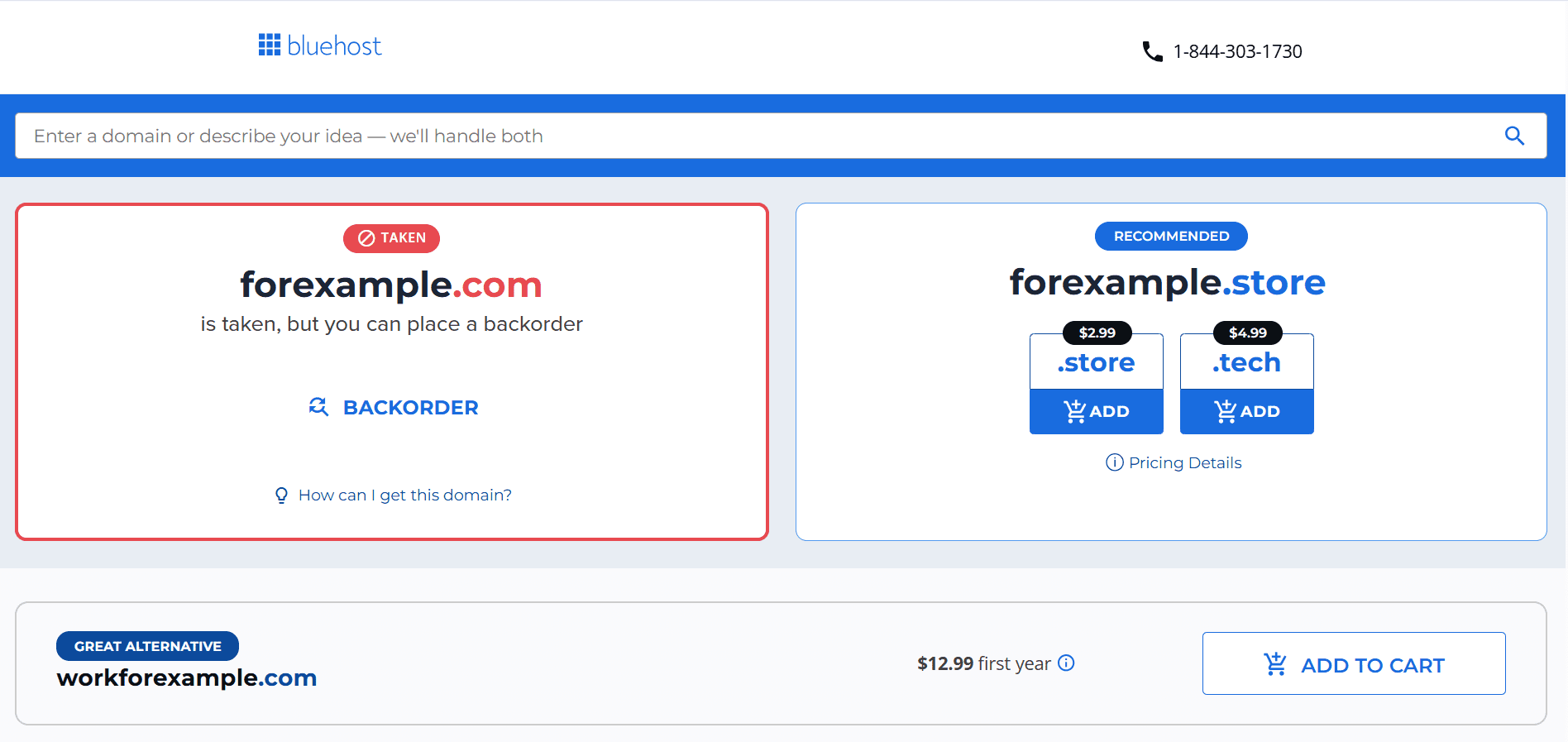
- Review your order in the cart. Double-check the spelling of your domain carefully, as domain names cannot be edited once registered.
- We recommend adding Domain Privacy + Protection to protect your personal information online.
- Select your billing and payment options, then click Submit Payment to complete your purchase.
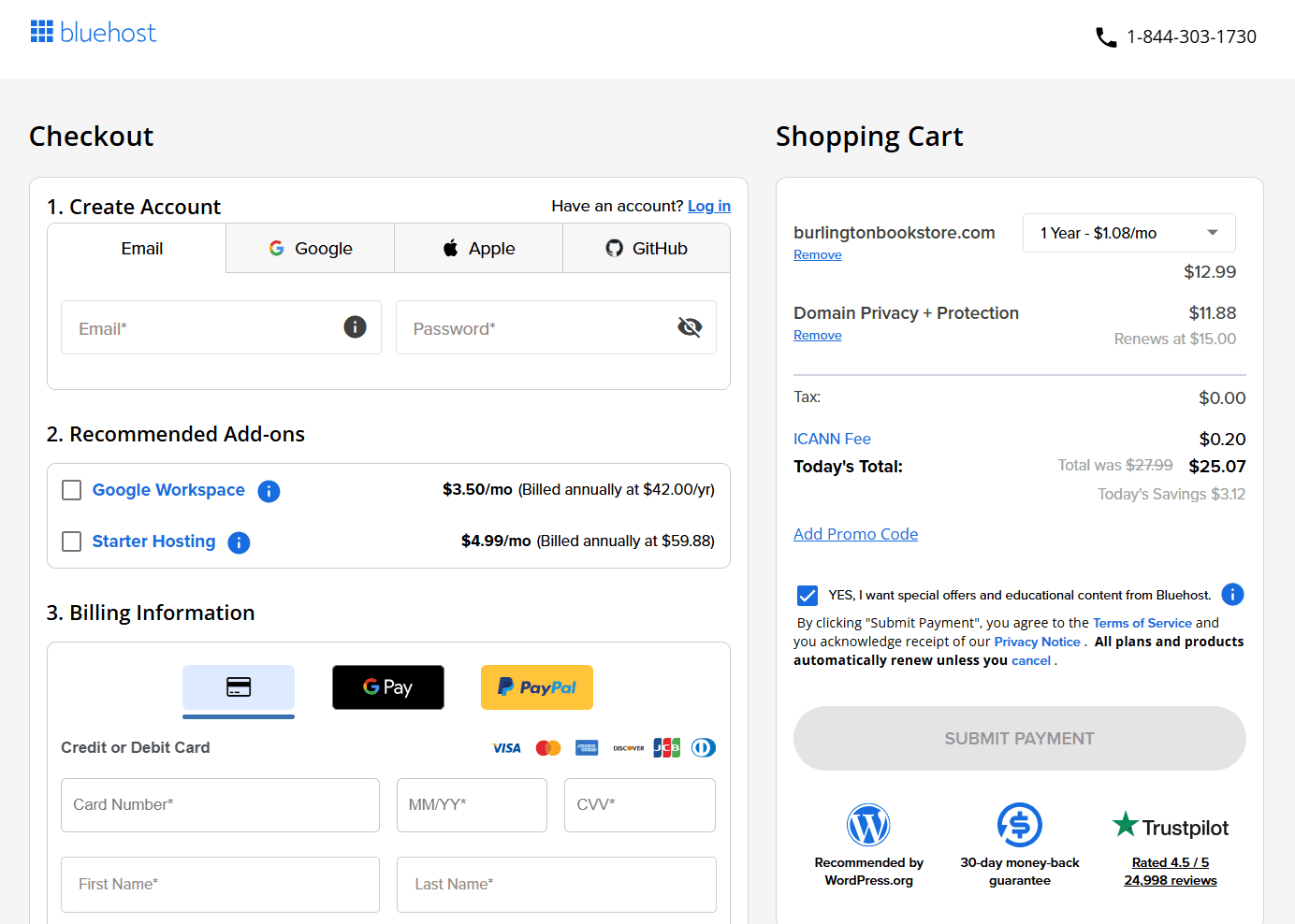
- After payment, check your inbox for a confirmation email from Bluehost and verify your email address to activate the domain registration. This step is required by ICANN.
How to create a subdomain on Bluehost
- Login into Bluehost Portal.
- In the hosting details page, click the cPanel button.

- Your cPanel will open in a new tab.
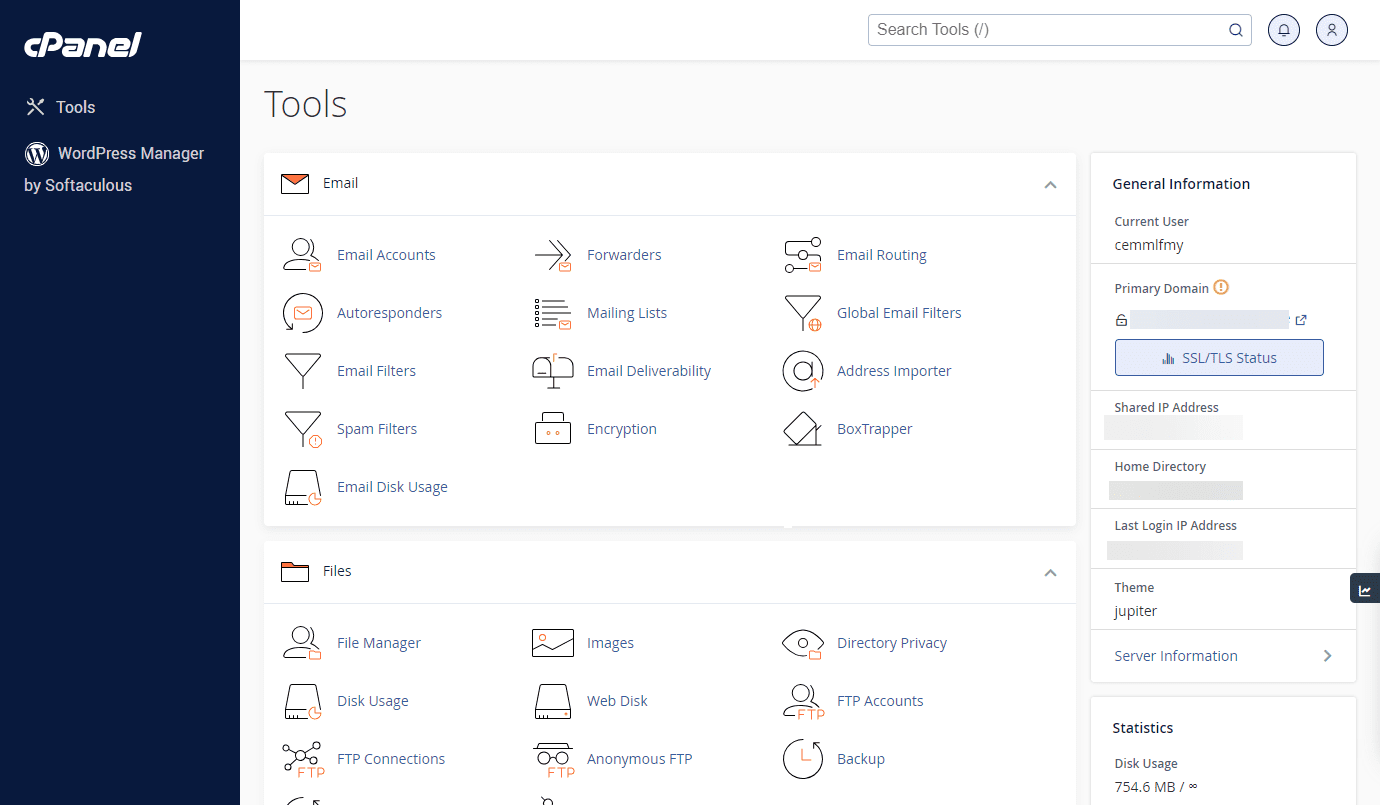
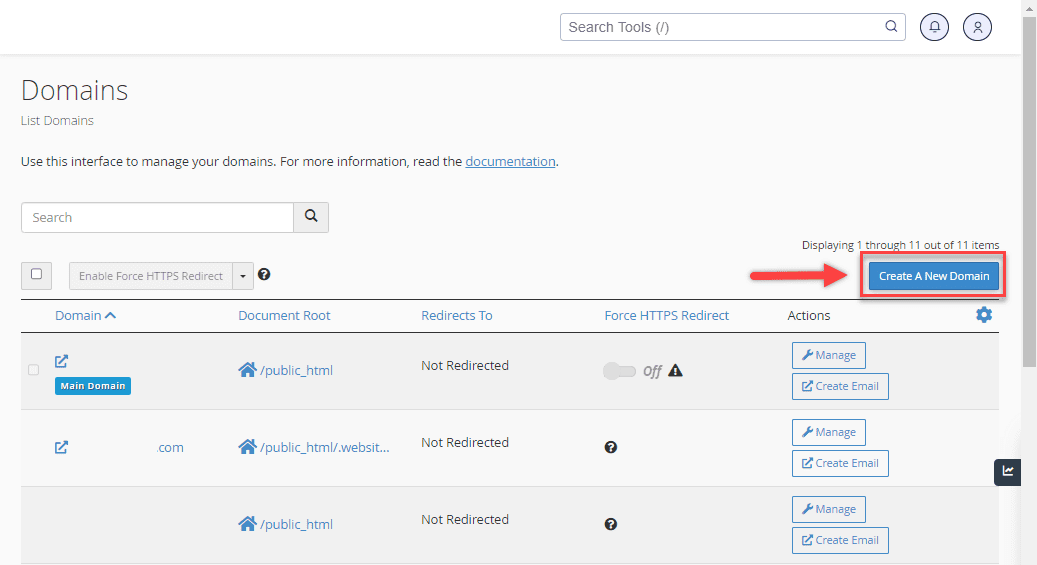
- From the cPanel, click on the Domain Names icon, then click Domains.

- Click the Create a New Domain button.
- Enter the subdomain name you want to create in the Domain field (for example, entering “blog” will create [blog.yourdomain].com).
- Uncheck the option “Share document root with domain.tld” to give your subdomain its own directory.
- Log in to your Bluehost Portal and click Hosting in the left-hand menu.
- Choose the directory for the website you want the subdomain to point to, ideally named after your subdomain, then click Submit.
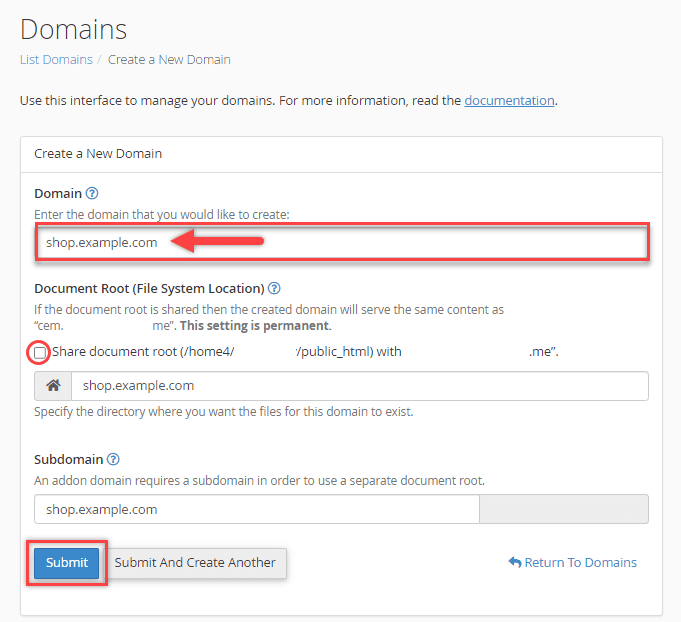
Your subdomain will be active once DNS propagation completes, which typically takes a few minutes to a few hours.
Also read: How to Create A Subdomain
Final thoughts
Root domains and subdomains each have a clear role in how a website is structured.
Your root domain is the foundation of your entire web presence. Everything authoritative, branded and permanent lives there. Subdomains are useful extensions for when you have specific, separate functions to serve under the same overall identity.
For most people building their first website or growing a content-driven business in the United States, the straightforward choice is to start on the root domain and use subdirectories to organize content as you scale. Reserve subdomains for situations where technical or organizational separation genuinely makes sense.
When you are ready to stake your claim online, Bluehost makes it easy to register your domain, set up your hosting and get your site live from one place.
FAQs
What is the difference between a root domain and a subdomain?
A root domain is your core registered web address, such as [example].com. A subdomain is a prefix added before it, such as [blog.example].com. The root domain holds all your SEO authority. A subdomain can function as a separate web property under the same domain.
What is a root domain?
A root domain is the core of your web address, combining your second-level domain and top-level domain. For example, [yoursite].com is a root domain.
What is a subdomain?
A subdomain is a prefix added before your root domain, separated by a dot. For example, [blog.yoursite].com is a subdomain of [yoursite].com.
What are the parts of a domain name?
Parts of a domain name include: the subdomain (if used), the second-level domain and the top-level domain. Together, the SLD and TLD form the root domain.
Does using a subdomain hurt SEO?
It depends on how you use it. Google can treat subdomains as separate websites, which means SEO signals may not pass freely to your root domain. For new or growing sites, keeping content on a subdirectory is generally the stronger choice for consolidating authority.
Is www a subdomain?
Yes. The “www” in www.bluehost.com is technically a subdomain. It is the most commonly used subdomain on the internet. Most browsers and servers treat it as equivalent to the root domain, so users typically see no difference.
Are subdomains free to create?
Yes. Once you have a registered domain and an active hosting plan, you can create subdomains at no additional cost. You do not need to register a subdomain separately.
Should I use a subdomain or subdirectory for my blog?
For most websites, a subdirectory like [example].com/blog is the better option for SEO. It keeps your content and authority under one domain. A subdomain is a better fit when your blog runs on a completely different platform than your main site.
How do I create a subdomain on Bluehost?
Log in to your Bluehost Portal and go to Hosting. Click the cPanel button, then select Domains. Click Create a New Domain, enter your subdomain name, assign a directory and click Submit. Your subdomain will go live after DNS propagation completes.

Write A Comment