 ChatGPT,
 Claude,
 Gemini,
 Grok — all four for

Key highlights
- Identify the critical warning signs that your website has outgrown shared hosting.
- Understand the performance and security benefits of moving to a virtual private server.
- Compare managed and self-managed options to determine the right level of control for your needs.
- Learn how upgrading to VPS affects your website speed, SEO and ability to handle traffic spikes.
- Explore specific Bluehost VPS plans designed to support growing small businesses.
Your hosting plan can either support your growth or quietly hold your website back. Many small businesses start with shared hosting because it is affordable and easy to manage. But as traffic grows, website demands increase and online sales become more important. That’s where shared hosting can start causing slow load times, resource errors and security concerns.
At that stage, upgrading to VPS hosting often becomes the next step.
A virtual private server gives your website dedicated resources, stronger performance and better stability than shared hosting. It is a smart next step for businesses that need faster page speed, more control and reliable uptime during busy periods. In this guide, we will explain the difference between shared and VPS hosting, the signs you need an upgrade and how to choose the right VPS hosting plan for your business.
What is the difference between shared and VPS hosting?
Shared hosting is like living in an apartment building. Your website has its own space, but it shares server resources with other sites. If one site uses more resources, your site’s performance can be affected.
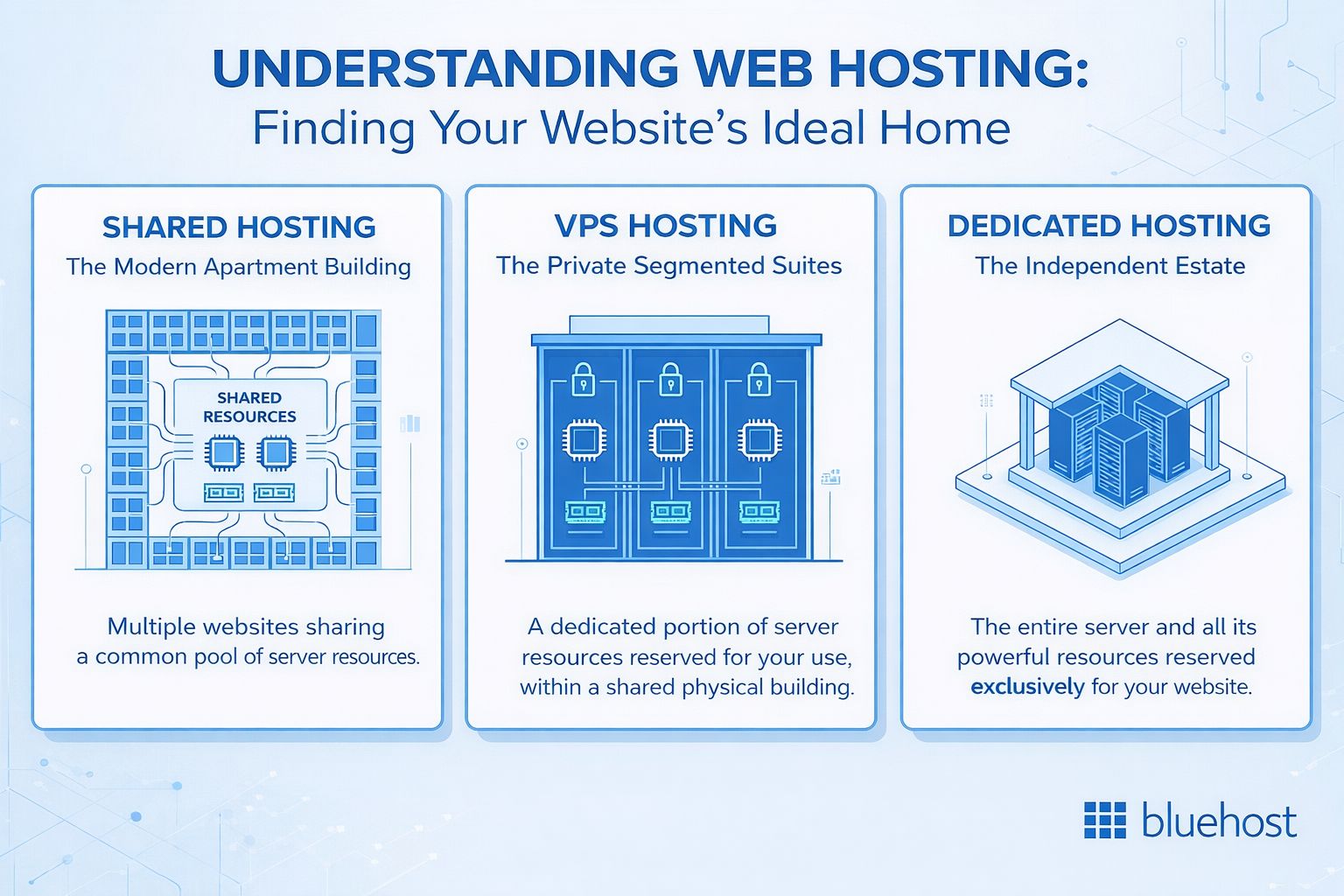
VPS hosting is more like owning a townhouse. You still share the physical server, but your website gets dedicated resources such as CPU and RAM. That means more stable performance, better control and easier scaling.
| Feature | Shared hosting | VPS hosting |
|---|---|---|
| Resources | Shared with other websites | Dedicated allocated resources |
| Performance | Can be affected by other sites | More stable and consistent |
| Cost | More affordable | Higher cost, more power |
| Control | Limited customization | Greater control and flexibility |
| Best for | Small or starter websites | Growing or higher-traffic websites |
For smaller websites, shared hosting is a simple and budget-friendly option. On the other hand, for growing businesses, VPS hosting offers more reliability, flexibility and room to scale.
For more details, check out our guide on VPS vs Shared hosting.
What are the signs you need to upgrade to VPS?
As your business grows, shared hosting can start to show its limits. At first, the issues may seem minor, like a slower dashboard or occasional site lag. Over time, they can turn into bigger problems such as failed checkouts, poor user experience and lost sales.
Spotting these warning signs early can help you avoid downtime during busy periods and move to a hosting solution that better supports your growth. Here are some of the most common signs that it may be time to upgrade to VPS hosting.
1. Your website is loading slower than usual
Slow load times are often one of the first signs that shared hosting is no longer enough for your website. Because server resources are shared, performance can become inconsistent as traffic and demand increase.
A slow website does more than frustrate visitors. It can also affect your visibility in search. Google says page experience can impact rankings and it recommends strong Core Web Vitals as part of delivering a good user experience.
Upgrading to VPS hosting gives your website dedicated resources, which helps improve speed, stability and overall performance as your business grows.
Monitoring tip: Focus on peak traffic, not just average performance. If CPU or RAM usage often rises above 90% during busy periods, or your site slows down when demand increases, your hosting may be at its limit. Tools like GTmetrix and Google PageSpeed Insights can help you measure performance and decide whether it is time to move to VPS hosting.
2. You are seeing resource limit reached errors
If your website regularly shows 503 errors or warnings about CPU, memory or process limits, your current hosting plan is likely too small. Shared hosting providers place strict limits on resource usage so one website does not affect everyone on the server.
These limits can hurt your business when traffic grows. A VPS hosting plan removes many of these restrictions and gives your site the resources it needs to run without interruptions.
Monitoring tip: Watch for repeated spikes, not just one-off errors. If 503 errors keep showing up during busy periods, backups or key customer actions, your site may be outgrowing shared hosting.
3. Your site traffic is increasing steadily
More traffic is usually a good sign. But it also means your website needs more server power. If you are seeing thousands of visitors each day, your shared hosting plan may no longer keep up.
This is especially true for websites with dynamic content, membership areas or online stores. VPS hosting is built to support growing traffic and gives your business better performance as demand increases.
Monitoring tip: Track traffic growth in Google Analytics 4 and check site performance with Google PageSpeed Insights, GTmetrix or Lighthouse during busy periods. If your site slows down when visits increase, it may be time to move to VPS hosting.
4. You run an eCommerce website or collect sensitive data
If your site handles online payments, customer records or account logins, security becomes even more important. Shared hosting can be secure, but VPS hosting adds another layer of protection through resource isolation.
A virtual private server helps reduce risk by keeping your environment separate from other websites on the same physical machine. This can also help businesses working toward compliance standards such as PCI DSS.
Monitoring tip: Security needs usually grow quietly. A site that started as a simple brochure website can quickly become more sensitive once it collects payments, stores user data or supports account logins. If that shift has happened, it may be time to move beyond shared hosting.
5. You are planning for traffic spikes or seasonal campaigns
Shared hosting can struggle during sudden traffic surges. If you are preparing for Black Friday, a product launch or a major promotion, your website needs to stay fast and available when demand rises.
VPS hosting gives you dedicated resources, which helps your site handle traffic spikes more smoothly. That makes it a better fit for businesses that rely on seasonal sales, campaigns or other high-traffic moments.
Monitoring tip: Look beyond average traffic and plan for your busiest days. If your site slows down every time you run a sale, send a marketing email or launch a campaign, your hosting may not have enough headroom for growth.
6. You need more server control or custom software
Shared hosting works well for basic websites, but it can become limiting as your technical needs grow. If you need custom applications, advanced server settings or more control over your hosting environment, shared hosting may no longer be enough.
VPS hosting gives you greater flexibility. Depending on your plan, you may get root access, custom configurations and support for specialized software. This makes it a strong choice for developers, agencies and businesses with more complex requirements.
Monitoring tip: Pay attention to workarounds. If you keep hitting platform restrictions, asking support for exceptions or avoiding tools your site actually needs, that is often a sign you have outgrown shared hosting.
7. You are managing multiple websites
As your business grows, you may add more websites for different brands, products or markets. Hosting several sites on a shared plan can put extra strain on performance and make management more difficult.
VPS hosting gives you more dedicated resources and a more stable environment, making it easier to run multiple websites without the same performance limits. It is a practical option for agencies, freelancers and business owners managing more than one site.
Monitoring tip: Watch how one site affects the others. If updates, traffic spikes or backups on one website start slowing down the rest, your hosting setup may no longer be able to support your portfolio efficiently.
How much traffic requires a VPS upgrade?
There is no single traffic number that automatically means you need VPS hosting. However, certain patterns can indicate that your shared hosting plan is reaching its limits.
1. Your traffic is consistently high
If your website receives thousands of visitors per day, shared server resources may start to struggle to keep up. Shared hosting is designed for affordability, not sustained high demand.
2. Your website is becoming more complex
Traffic alone does not tell the full story. Site complexity matters just as much.
- A simple blog might handle 50,000 visitors on shared hosting.
- A dynamic ecommerce store may struggle with far fewer visitors.
Online stores run multiple database queries for every visitor. Product searches, cart updates and checkout processes all require extra server power.
3. Your server resources are hitting their limits
If your hosting dashboard frequently shows high CPU usage or RAM limits, it is a strong signal that your site has outgrown shared hosting. Resource bottlenecks can cause slow pages, errors and interrupted transactions.
4. Your business depends on uptime and performance
5. You need hosting that can grow with your business
A VPS provides your website with enhanced power, stability, and flexibility as your traffic grows and site features become more complex. For a scaling business, the investment in when to upgrade to VPS hosting is significantly lower than the potential losses caused by slow speeds or site crashes. To help you get started, let’s look at which management style fits your needs.
Is managed or self-managed VPS right for you?
Most providers offer both managed and self-managed VPS options. Choosing between managed and self-managed VPS mostly depends on your technical expertise and how much time you want to spend managing a server.
A self-managed VPS gives you full control. You handle the operating system, firewall setup, updates and server configuration yourself. This option offers flexibility and lower cost, but it requires solid Linux and server administration knowledge.
A managed VPS provides the same VPS power without the technical burden. Your hosting provider takes care of updates, security patches and server maintenance, while you manage your website through a user-friendly control panel.
Managed VPS vs. self-managed VPS
| Feature | Managed VPS | Self-managed VPS |
|---|---|---|
| Server setup | Handled by the hosting provider | You configure everything yourself |
| Updates & patches | Managed by the provider | You manage updates manually |
| Technical skill required | Low to moderate | High (Linux/server expertise needed) |
| Server control | Limited customization | Full root access and control |
| Maintenance | Provider handles maintenance | You manage maintenance |
| Best for | Small businesses, entrepreneurs, non-technical users | Developers, sysadmins, advanced users |
| Cost | Higher due to support services | Lower but requires more effort |
Which one should you choose?
- Choose managed VPS if you want strong performance without worrying about server administration. It is ideal for busy business owners who want to focus on running their website.
- Choose self-managed VPS if you have technical expertise and want full control over your server environment.
Once you have determined when to upgrade to VPS hosting, selecting a platform that can scale alongside your business is the next crucial step. Bluehost offers both managed and self-managed VPS solutions, allowing you to choose the level of control and support that best fits your specific technical needs.
Why choose Bluehost for your VPS hosting?
Bluehost VPS hosting is designed for businesses that need more power, flexibility and control than shared hosting can provide. Our infrastructure combines high-speed storage, scalable resources and reliable support to help your website handle growing traffic and more complex workloads.
Key Bluehost VPS features:
1. High-performance NVMe SSD storage
Bluehost VPS plans use NVMe SSD drives, which are significantly faster than traditional SATA storage. This helps your websites, databases and applications load faster and handle more traffic efficiently.
2. Instant server provisioning
Your VPS is ready within seconds of purchase, not days. You can start configuring your server, deploying applications or launching websites immediately.
3. On-demand scalability
As your business grows, you can add more RAM, storage or resources directly from your dashboard without migrating your website or rebuilding your server.
4. Managed VPS support
Managed VPS plans include 24/7 expert human support, software updates, security patches and server maintenance. This lets you focus on running your website rather than managing infrastructure. Our award-winning support team, recognized with Stevie Awards for customer service, helps you focus on running your website rather than managing infrastructure. Conversely, we provide only infrastructure related support with our self-managed VPS plans.
5. Self-managed option for developers
If you prefer full control, Bluehost also offers self-managed VPS plans with root access. These are ideal for developers and advanced users who want to configure their own server environment.
6. Support for automation and AI tools
Bluehost VPS provides the flexibility to run powerful applications such as n8n for workflow automation and OpenClaw for AI-driven tools and development environments, making it a strong choice for modern automation and AI projects.
7. Reliable infrastructure with dedicated resources
Your VPS runs with guaranteed CPU, RAM and storage, giving your site better stability and performance compared to shared hosting.
8. Affordable entry point
Plans start at $4.99 per month for the NVMe 2 plan, giving growing businesses access to powerful VPS hosting at a competitive price.
Note: Prices are subject to change
For businesses that rely on their website for growth and revenue, Bluehost VPS offers the performance, flexibility and support needed to scale confidently.
Final thoughts
Upgrading to VPS is a milestone for any growing business. It solves the speed, security and scalability issues that hold you back on shared plans. You get the power to handle traffic spikes and the isolation to protect customer data.
Don’t wait for your site to crash during a big sale to make the move. Proactive upgrading prevents downtime and keeps your reputation intact. However, if your budget is very tight and traffic is low, staying on shared hosting is fine for now. But if you are growing, a VPS is the best investment you can make.
Take the next step beyond shared hosting with Bluehost VPS. Choose our Managed VPS for expert support or Self-Managed VPS if you prefer full server control.
FAQs
No. Upgrading is usually seamless. If you stay with the same hosting provider, the migration is often handled for you. Your files and databases are securely transferred to the new server with minimal disruption.
With Bluehost, your VPS is provisioned instantly. The time needed to move your data depends on the size of your website, but most migrations are completed within a few hours. Our goal is to keep the process smooth and avoid downtime. For more details, check out our <a href=”https://www.bluehost.com/help/article/bluehost-pro-migration-important-things-you-must-know”>website migration guide</a>.
Yes, indirectly. VPS hosting can improve website speed and uptime, both of which are important ranking factors for search engines. A more stable hosting environment can also help your site meet Core Web Vitals performance standards.
Yes. You can host multiple websites on a single VPS as long as your server resources allow it. This makes VPS hosting a great option for agencies, developers and businesses managing multiple sites.
VPS hosting is designed to scale with your needs. You can upgrade your plan at any time to get more CPU, RAM or storage directly from your dashboard without needing to migrate your website again.

Write A Comment