 ChatGPT,
 Claude,
 Gemini,
 Grok — all four for

Key highlights
- Know when ChatGPT is secure enough for everyday tasks and when sensitive data or weak controls create risk.
- Understand the difference between ChatGPT privacy and security so you can judge what is safe to share.
- Learn the biggest ChatGPT security risks, including prompt exposure, risky uploads, weak logins and third-party tools.
- Explore how ChatGPT security changes across consumer plans, business workspaces and API-based setups.
- Discover what you should never share with ChatGPT, from passwords and customer records to legal files and private code.
- Uncover practical ways to use ChatGPT more securely with account protection, data redaction, limited access and team guardrails.
One prompt can save an hour of work. But a single careless prompt can expose customer data or internal strategy that should never leave your organization. That tension explains why so many teams keep asking how secure is ChatGPT before they roll it into daily work.
Security questions around AI rarely have a yes or no answer. ChatGPT is not a single risk level for every user and every task. A student asking for help with a study outline faces a very different risk profile than a law firm uploading client documents or an eCommerce team connecting AI to support order data and internal knowledge bases.
In this blog, you’ll find out where the real security risks come from, when ChatGPT is secure enough to use, where extra caution is needed and how to reduce exposure without missing out on the benefits of AI.
Is ChatGPT secure?
Yes, ChatGPT is generally secure for low-risk tasks, but it is not secure enough for every type of information by default. You can safely use it for things like brainstorming, drafting, editing, summarizing public content and organizing ideas.
The risk starts when you share sensitive data. That includes customer records, passwords, payment details, legal documents, medical information, private source code or internal business strategy. In those cases, security depends on your plan, settings, account protection, connected tools and internal company rules.
For businesses, ChatGPT is safest when used through approved workflows with clear data policies, strong login security, access controls and human review. It is much riskier when employees use personal accounts, upload confidential files or connect third-party tools without oversight.
So, is ChatGPT secure? Yes, for the right tasks and with the right safeguards. But it should not be treated as a secure place for all business or personal information by default.
What are the biggest ChatGPT security risks?
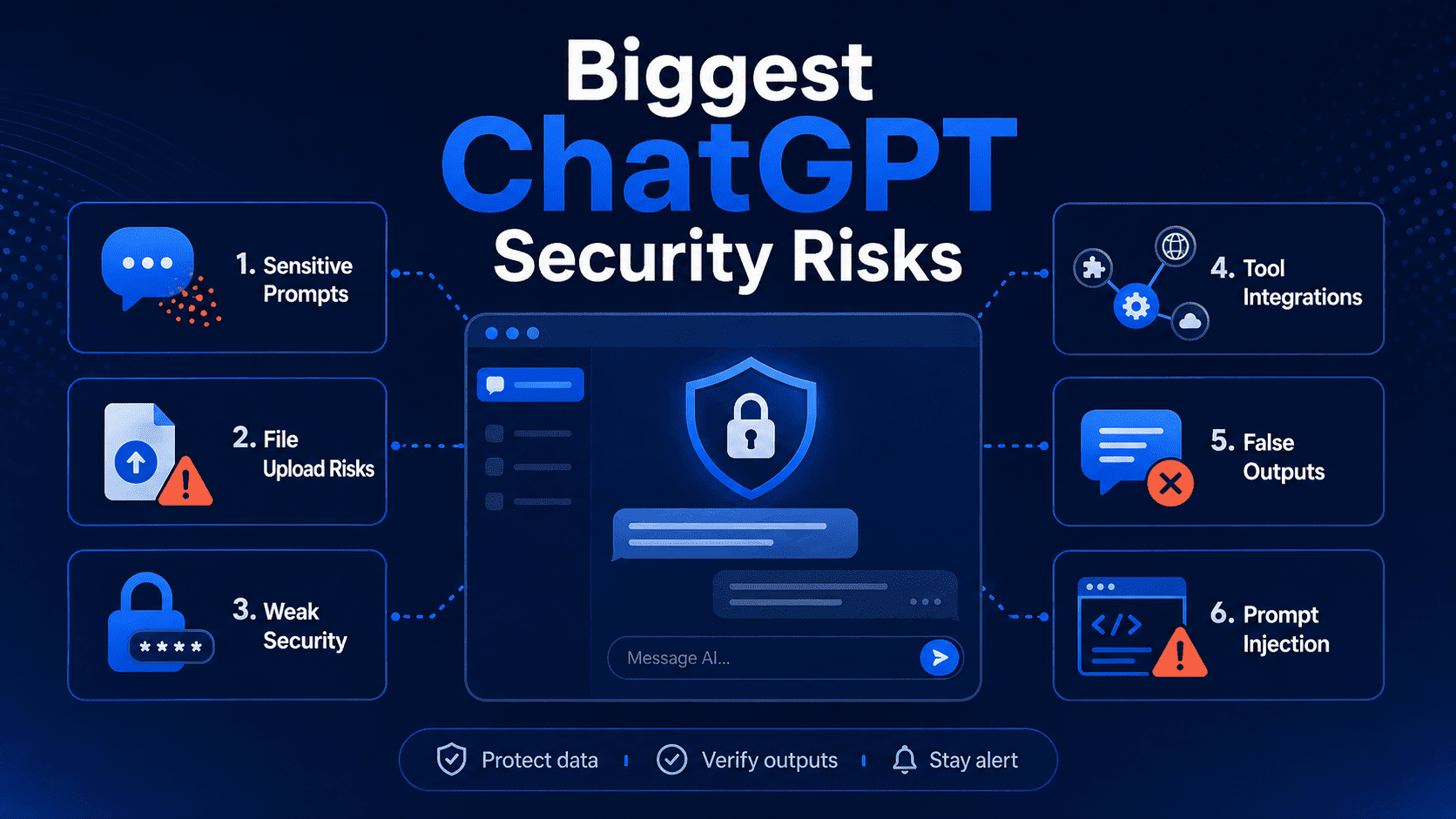
Most ChatGPT security issues fall into a handful of predictable categories. While the tool can save time and improve productivity, the way you use it matters just as much as the platform itself. Sharing sensitive information, uploading the wrong files, connecting third-party tools or trusting AI-generated answers too quickly can all create avoidable risks.
1. Sensitive prompt exposure
Every prompt is a data disclosure decision. If you paste confidential text into an AI chat, you have moved that information into an external system, whether you intended a long-term record or not.
Common examples include customer lists, financial forecasts, legal drafts, source code, login credentials and private health details. Employees often share this material without noticing because the task feels harmless: “summarize this meeting,” “rewrite this email” or “find bugs in this script.” The instruction looks routine, but the prompt can carry far more context than the model needs.
Tip: Strip prompts down to the minimum useful detail. Replace names, account numbers and project identifiers with placeholders before you submit anything.
Also read: How to Make AI Content Undetectable in 2026
2. Risky file uploads
Uploaded files raise the stakes because they can contain far more than the visible content on the page. A PDF may include hidden metadata, comments, tracked changes or document history. An image can carry location data. A spreadsheet may hold tabs nobody meant to share.
Risk grows further when staff upload large files for convenience instead of creating a smaller extract. A sales report with one number you want summarized may also contain margins, customer names and unreleased targets. The safest practice is to upload only a sanitized copy built for the task at hand.
File risk matters even more in regulated fields such as healthcare, legal services and finance, where a single upload can create compliance problems along with security exposure.
3. Weak account security
Many AI incidents begin with account hygiene, not model failure. A stolen password, a shared login or an unlocked browser session can give someone direct access to prompts, uploaded files and saved chats.
Verizon’s Data Breach Investigations Report 2024 found that the human element remains involved in most breaches. ChatGPT accounts fit that pattern. If an employee reuses a password from another site and that site is breached, the AI account can become the next target.
Strong unique passwords, multi-factor authentication and device-level protections matter here. So does basic discipline. Shared team credentials make investigations, access control and offboarding much harder than they need to be.
Also read: AI in web development: How AI is transforming the industry
4. Third-party tool risks
Connected tools can expand ChatGPT’s reach far beyond the chat window. Browser extensions, plug-ins, workflow tools and document connectors may read, send or store data across several services at once.
That setup can be useful, but each integration adds another trust decision. A poorly built extension can capture prompts. An automation tool can route AI output into the wrong channel. A connector can surface documents that the user should not have attached in the first place. Popular tools like Zapier, Slack and Google Drive are convenient, yet convenience does not remove the need for access reviews and data rules.
Businesses should treat AI integrations like any other vendor relationship. Review permissions, minimize scope and remove access that no longer serves a clear need.
Also read: Gemini vs ChatGPT AI traffic: What the shift means for brands
5. Unsafe or false outputs
Security risk is not limited to data leaving your hands. Risk also appears when people act on bad output without review. ChatGPT can produce code with security flaws, policy advice with factual gaps or summaries that sound certain but miss key exceptions.
That problem matters in software, legal review, medical content and customer support. A model might suggest an outdated library, weaken authentication logic or invent a source that does not exist. IBM’s Cost of a Data Breach Report 2024 put the global average breach cost at $4.88 million, which shows why blindly deploying AI-generated code or procedures is a poor bargain.
Human review is not optional for high-impact tasks. AI can speed up drafting and analysis, but final approval still needs domain expertise.
6. Prompt injection attacks
Prompt injection is a growing risk for any large language model (LLM) connected to outside content. In this attack, malicious instructions hidden in a webpage, file or data source try to override the model’s intended behavior.
A retrieval system that pulls in external documents can be tricked into following hostile text inside that material. A browser-based AI helper can be nudged by content on a page.
Developers and businesses should assume prompt injection will happen and design around it. Content filtering, tool permissions, output validation and narrow access scopes reduce damage when a model is exposed to untrusted inputs.
Also read: AI for Small Business: The Complete Guide to Getting Started in 2026
Is ChatGPT secure for personal use?
For ordinary, low-risk tasks, ChatGPT is often safe enough for personal use. Asking for meal ideas, travel planning help, study support or resume phrasing is very different from uploading tax returns, medical records or banking credentials.
Personal risk usually comes down to oversharing and weak device security. If your phone or laptop is shared, lost or poorly protected, your chats may be exposed through the device even if the AI provider itself is not breached. Public computers and work-managed devices create extra concerns because administrators may monitor browsing activity or install logging tools.
A good personal rule is easy to remember: if you would not post it in a private company help desk ticket or email it to a stranger for analysis, do not paste it into AI. Use the tool for ideas, editing and organization, not as a vault for your most sensitive details.
Also read: What Is llms.txt? How the New AI Standard Works (2026 Guide)
Is ChatGPT secure for business use?
Business use can be safe only when AI sits inside clear governance, approved workflows and technical controls. The question is not whether the tool exists. The real question is whether your company has set rules for what data can enter it, who can access it and how outputs are checked before they affect customers or operations.
Security teams should look at business AI use through six lenses:
- Data classification: What information is public, internal, confidential or restricted
- Identity controls: Who can sign in, share chats and connect tools
- Vendor terms: What the provider says about retention, training use and enterprise protections
- Auditability: What admins can review after the fact
- Output risk: Which tasks require human approval before action
- Compliance fit: Whether the workflow conflicts with legal or industry obligations
For many organizations, AI becomes risky when adoption happens faster than policy. A sales team may use it to draft outreach, support agents may summarize tickets and developers may paste code into chat long before legal, security and leadership agree on acceptable use. That gap creates shadow AI, which looks productive on the surface but leaves no reliable record of what data went where.
For individuals and small teams, a private AI workspace can help reduce that risk by giving users access to leading AI models in one place while keeping work inside a more controlled environment. With Bluehost AI All-Access Pack, you can choose the right AI assistant for the task, compare outputs across models and, with Privacy+, add safeguards like prompt sanitization, encrypted workflows and private-mode options for sensitive conversations.
ChatGPT security by setup: Consumer, Business and API
Security posture changes significantly across consumer chat use, business deployments and API-based applications. The biggest differences usually involve administrative visibility, contractual data handling terms, logging control and how much of the surrounding environment your team controls.
The comparison below gives a practical starting point.
| Setup | Main strengths | Main gaps | Best fit |
|---|---|---|---|
| Consumer plan | Easy access, fast adoption, low setup effort | Limited admin oversight, greater chance of ad hoc sharing | Low-risk personal or exploratory tasks |
| Business plan | Better controls, team management, policy alignment | Needs training, governance and procurement review | Department or company use with approved workflows |
| API use | Custom app controls, narrower permissions, workflow design | Requires technical skill and secure development practices | High-volume or specialized business use cases |
Choosing the safer option depends on how much control you need. The more sensitive the workflow, the more valuable structured access, logging and application-level safeguards become.
1. Consumer plan risks
Consumer plans are designed for ease of access, which makes them convenient for quick, low-risk tasks but far less suitable for sensitive business use. Employees can start using them instantly, often without IT approval, admin oversight or clear data controls. That lack of visibility makes it harder for organizations to know what information is being shared, which tools are being connected and where business content is being stored.
The risk grows when employees mix personal and work activity in the same account. Business data can end up in personal chat history, making offboarding, audits and policy enforcement much harder. For that reason, consumer chat should usually be treated as an option for low-risk exploration, not as a default workspace for confidential company information.
2. Business plan controls
Business-focused plans give organizations more structure and control than consumer accounts. Features like centralized user management, admin visibility and clearer purchasing and policy paths make it easier to guide how AI is used across teams. This helps reduce the risks that come with unmanaged, bring-your-own-account usage.
That said, a business plan does not eliminate risk on its own. Companies still need internal rules around approved use cases, restricted data types, employee training and review processes for sensitive work. In other words, stronger tooling improves security, but governance is what turns those controls into a safer day-to-day system.
3. API use cases
API-based deployments are often the safest option for organizations that want to use AI in more controlled or specialized workflows. Instead of relying on employees to use a general chat interface, businesses can build their own applications around the model and decide exactly what data is sent, how access is managed and what safeguards are applied. Developers can redact sensitive details, limit permissions, log activity and add review steps that align with internal security policies.
However, this approach also comes with the most responsibility. A custom AI app is only as secure as the system built around it. If teams overlook basics like secret management, access control, rate limiting, output validation or secure development practices, an API deployment can introduce serious risk instead of reducing it.
Which setup is safest?
The right choice depends on your data and risk level. Low-risk brainstorming may be fine in a consumer setup, while customer records, regulated data and production systems usually require a more controlled environment.
- API deployments are usually the safest option for sensitive or high-impact workflows because they give businesses the most control over data handling, access, logging and security safeguards.
- Business plans are generally the next best option for approved team use, since they offer more structure, admin oversight and policy support than unmanaged individual accounts.
- Consumer chat is usually the least secure option for business use because it offers the least organizational visibility and makes it easier for employees to mix personal and work activity.
If the workflow involves sensitive business information, consumer chat should generally be treated as the weakest fit unless it has been specifically approved by your security or compliance team.
Also read: ChatGPT Ads May Reshape Website Traffic in 2026
How to use ChatGPT more securely?
Using ChatGPT more securely comes down to consistent habits, not just platform settings. A few practical steps can go a long way in reducing everyday risk, especially when you are working with business information, team workflows or connected tools.
1. Protect your account
Your account is the first layer of security. If it is weak or easily accessible, your chats, uploads and connected tools may be exposed to the wrong person.
- Avoid staying signed in on shared devices or synced browsers used across multiple machines.
- Use a strong, unique password instead of reusing one from another account or website.
- Turn on multi-factor authentication to make unauthorized access much harder.
2. Remove sensitive details
ChatGPT often does not need the full original information to be useful. Redacting sensitive details before you paste content into the tool can lower risk without affecting output quality.
- Create simple redaction rules or templates for recurring content like support logs, transcripts or drafts.
- Remove names, account numbers, addresses, contract values and internal identifiers where possible.
- Replace sensitive information with placeholders or summaries that still give enough context.
3. Limit third-party access
Connected apps, browser extensions and plug-ins can make ChatGPT more useful, but they can also increase exposure if left unchecked.
- Treat every integration as a security decision, especially if it can access files, chats or business systems.
- Review connected tools regularly and remove anything you no longer use.
- Limit permissions to the smallest useful scope instead of granting broad access by default.
4. Review outputs carefully
Fast output is helpful, but it is not always accurate, complete or safe to use as-is. The more important the task, the more important human review becomes.
- Treat ChatGPT as a drafting tool, not a final authority for high-stakes work.
- Check facts, citations, formulas, summaries and code before publishing or acting on them.
- Use extra review for legal, financial, technical or customer-facing content.
5. Choose the right plan
Not every ChatGPT setup fits every use case. Security improves when the plan matches the level of sensitivity, oversight and collaboration involved.
- Consider API-based setups for custom workflows that require tighter control over data and access.
- Use consumer plans for low-risk tasks like brainstorming or basic writing support.
- Use business plans when teams need stronger oversight, management and policy support.
6. Set business guardrails
For teams, secure AI use depends on clear internal rules as much as technical features. Employees should know what is allowed, what is restricted and when extra review is required.
- Group AI use cases by risk level so teams can work faster without guessing what is safe.
- Create a simple acceptable-use policy that explains approved tasks and banned data types.
- Train staff on what should never be entered into AI tools and when human review is required.
ChatGPT security is not just about the platform you choose. The more intentional you are about protecting accounts, redacting sensitive data, reviewing outputs and matching the tool to the task, the safer and more useful AI becomes in day-to-day work.
Also read: The Ultimate Guide on How to Build a Website with ChatGPT
What should you never share with ChatGPT?
A good rule is simple: do not share anything in ChatGPT that would create legal, financial, security or reputational problems if it were exposed, stored longer than expected or seen by the wrong person.
Here are the types of information to keep out of ChatGPT:
- Compliance-sensitive data: Avoid sharing information covered by privacy laws, industry regulations, contracts or internal compliance rules. This can include regulated customer data, employee records, healthcare information, financial records or anything your business is required to protect.
- Passwords, OTPs and API keys: Never paste passwords, one-time passcodes, recovery codes, private keys, API tokens or login credentials into ChatGPT. If exposed, these can give someone direct access to your accounts, systems or customer data.
- Customer records: Do not enter customer names, contact details, support histories, purchase records, contracts or private account information. Even if you only need a summary, remove identifying details first and use placeholders where possible.
- Payment or banking details: Keep credit card numbers, bank account details, invoices with payment data, transaction records and payroll information out of ChatGPT. This type of data can create serious financial and compliance risk if mishandled.
- Medical, tax or legal documents: Avoid uploading health records, tax returns, legal agreements, case files, settlement details or compliance documents. These often contain highly sensitive personal or business information that should be handled through approved secure systems.
- Confidential contracts or internal strategy: Do not paste unreleased business plans, pricing strategy, merger discussions, product roadmaps, investor updates, vendor terms or confidential contracts. Even a small excerpt can reveal more than intended.
- Proprietary source code: Be careful with private code, algorithms, credentials hidden in code, architecture details or unreleased product logic. If developers use ChatGPT for coding help, they should remove secrets, internal identifiers and business-sensitive logic before sharing snippets.
Also read: AI Tools for Business to Drive Real Growth in 2026
How can Bluehost support safer AI use?

For businesses, using AI securely is not just about choosing the right chatbot. It is also about reducing tool sprawl, limiting unnecessary access and creating a more controlled environment for teams. When employees rely on multiple AI tools across different accounts, subscriptions and workflows, it becomes much harder to manage who is using what, what data is being shared and where business information is moving.
Bluehost’s AI All Access Pack simplifies setup by bringing multiple leading AI models into a single dashboard, rather than spreading work across disconnected tools. This can help businesses reduce login overload, improve oversight and make AI use more consistent across teams.
Here is how Bluehost can support safer AI use:
- One dashboard instead of scattered AI tools: AI All Access Pack brings together ChatGPT, Gemini, Claude and Grok in a single workspace, helping reduce tool sprawl and making AI activity easier to manage.
- More control for teams and agencies: AI All Access Pack includes an Account Management Dashboard for seat management, team access and agency-style oversight, giving businesses a clearer way to manage who can use AI tools and how access is assigned.
- Model choice without extra subscriptions: Different models work better for different tasks. AI All Access Pack allows teams to switch between models and compare outputs, which helps them choose the right tool without adding more separate accounts.
- Built-in tools that reduce workflow sprawl: Features like Research Agent, Presentation Builder and Article writer help teams complete more work within one platform instead of relying on a growing stack of separate AI tools and apps.
- Stronger protections for sensitive work: For businesses with higher security needs, Privacy+ adds features like Privacy Mode, prompt sanitization, end-to-end encryption, user-specific PIN protection and Incognito Mode for more sensitive conversations.
- A better fit for security-conscious teams: Instead of relying on unmanaged employee usage across scattered tools, Bluehost AI All Access Pack provides a more centralized, team-friendly and controlled way to bring AI into the business.
Using AI securely is often less about avoiding AI altogether and more about using it in a setup that gives your business better visibility. Bluehost’s AI All Access Pack is designed to make AI adoption easier to manage as teams grow.
Final thoughts
ChatGPT can be a valuable tool for saving time, improving productivity and helping teams move faster, but secure use does not happen by accident. It depends on the choices you make around access, data sharing, connected tools and internal guardrails. The more sensitive the work, the more important it becomes to use AI in a safer way.
With a more centralized setup, instead of managing AI across scattered tools, separate logins and disconnected subscriptions, businesses need a simpler way to bring powerful AI into everyday workflows without losing oversight. Bluehost AI All Access Pack is built for exactly that. By bringing leading AI models into one dashboard, it helps reduce tool sprawl, streamline access and make AI use easier to manage across teams.
Bluehost AI All Access Pack gives businesses a more organized and scalable way to work with AI. And for teams handling more sensitive tasks, Privacy+ adds stronger protection.
Ready to use AI with more confidence? Explore Bluehost AI All Access Pack to access leading AI models with stronger privacy features.
FAQs
ChatGPT can be secure for business use when companies use approved plans, clear data policies, strong account controls and human review processes. The risk increases when employees use personal accounts, paste sensitive data into prompts or connect third-party tools without oversight.
The biggest ChatGPT security risks include sensitive prompt exposure, risky file uploads, weak passwords, unauthorized account access, third-party integrations, prompt injection and unsafe AI-generated outputs. Many risks come from how users handle data, not just from the tool itself.
Yes, ChatGPT can expose sensitive data if users enter confidential information into prompts, upload private files or connect tools that share data with other systems. Businesses should avoid entering customer records, passwords, payment details, legal files, medical data or internal strategy into unmanaged AI tools.
ChatGPT is not always safe for confidential company information, especially when used through personal accounts or without business controls. If a team needs to work with sensitive files, client data or internal documents, it should use approved AI setups with privacy protections, access management and clear data handling rules.
Deleting chats can remove them from your visible chat history, but it does not always mean the data disappears instantly from all systems. Deleted conversations may be retained for a limited time for security, legal or abuse-prevention reasons. For sensitive data, the safest approach is not to share it in the first place.
You can make ChatGPT more secure by using a strong password, enabling multi-factor authentication, avoiding sensitive data in prompts, reviewing connected apps, deleting unnecessary chats and checking outputs before using them. Businesses should also create AI usage policies and use a managed team or business-grade setups. For added protection, Our AI All-Access Pack helps centralize AI access in one secure dashboard, with Privacy+ giving you safeguards like prompt sanitization, encryption and Incognito Mode for sensitive work.
Bluehost AI All Access Pack supports safer AI use by bringing multiple leading AI models into one dashboard, helping businesses reduce scattered tools, separate logins and unmanaged AI usage. For sensitive workflows, Privacy+ adds stronger privacy-focused features such as prompt sanitization, encryption and Incognito Mode.
ChatGPT privacy depends on your plan, settings, and how you use the tool. Consumer users should review chat history, temporary chats, memory, data controls, and file uploads. Business and API users may have stronger default data-use protections, but companies still need clear policies around retention, access, and sensitive data.

Write A Comment