 ChatGPT,
 Claude,
 Gemini,
 Grok — all four for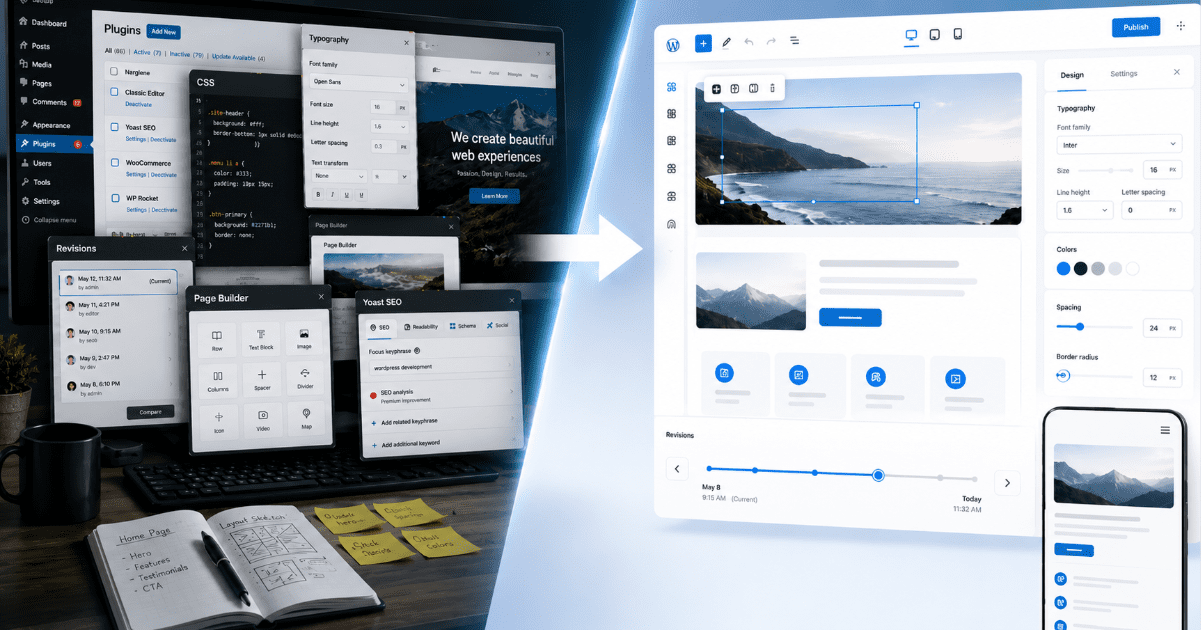
WordPress 7.0 is not just another version update. It is a signal that WordPress is trying to feel faster, cleaner and more useful for the way websites are built today.
The WordPress 7 release, codenamed Armstrong, brings a redesigned admin experience. It also adds visual revision tools, stronger responsive editing and more mobile navigation control. The update includes deeper native design features as well.
AI may get the louder headlines. But the real story is simpler: WordPress 7 makes everyday website management feel less fragmented.
For website owners, developers, agencies and publishers, that matters more than one flashy feature.
Methodology
This article is based on official WordPress 7.0 release documentation, including the WordPress.org release announcement for WordPress 7.0 “Armstrong” and the WordPress 7.0 Field Guide published by Make WordPress Core. The analysis focuses on what the documented changes mean in practical terms for website owners, developers, publishers and agencies. Any interpretation in the article is based on the officially documented features, release notes and developer guidance, not on third-party claims or independent performance testing.
WordPress has been powerful, but not always modern
WordPress has always been flexible. That flexibility is why it powers so many websites.
But flexibility has also created a familiar problem.
Many site owners rely on plugins, theme settings and custom code to solve basic workflow needs. One tool controls typography. Another handles design tweaks. Another improves mobile menus. Another manages layouts. Another helps teams review changes.
WordPress 7 starts pulling more of that control back into core.
That does not mean plugins stop mattering. It means the default WordPress experience is becoming stronger before users add anything extra.
The admin experience finally gets a cleaner feel
The first major change is the WordPress dashboard itself.
WordPress 7 introduces a new Modern admin theme. The dashboard gets a refreshed color palette, higher contrast styling, updated typography and a cleaner admin header.
This may sound cosmetic, but it matters.
The admin area is where website owners spend time publishing posts, updating pages, managing users, checking settings and maintaining the site. If that experience feels dated or inconsistent, the whole platform feels heavier than it should.
WordPress 7 makes wp-admin feel more unified.
The release also adds smoother View Transitions between supported admin screens. These transitions respect reduced-motion settings, so users who prefer less animation are not forced into it.
A new Command Palette icon also appears in the upper admin bar. Users can open it with ⌘K or Ctrl+K to access dashboard tools faster.
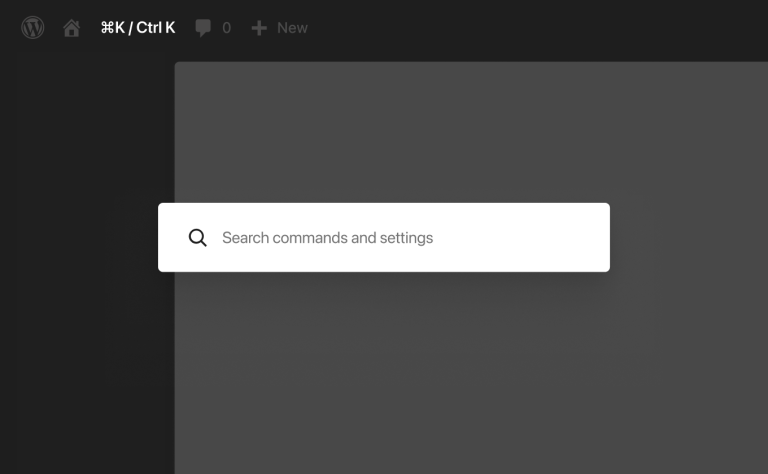
Together, these changes make WordPress feel closer to the productivity tools users already know.
Editing and reviewing content becomes more visual
One of the most useful updates in WordPress 7 is Visual Revisions.
Until now, reviewing changes in WordPress could feel technical and text-heavy. That works for some users, but it is not always ideal for content teams, editors or business owners who want to see what actually changed on the page.
WordPress 7 makes revision review more visual.
Users can compare two versions of a post or page with a slider. The document inspector summarizes changes using color indicators and change sizes. Users can also jump directly to changed areas.
That is a practical improvement for teams that publish often.
A content manager can review changes faster. A site owner can understand what was edited before restoring an older version. An agency can make client reviews clearer.
This is the kind of feature that does not sound dramatic in a changelog, but can make daily publishing easier.
WordPress 7 gives creators more design control without extra workarounds
The biggest shift in WordPress 7 is not just how it looks. It is how much more design control moves into the editor.
The release adds stronger responsive editing tools. Users can show or hide specific blocks based on device type. A block can appear on desktop but stay hidden on mobile.
List View now shows visibility indicators, making these device-specific rules easier to track.
This matters because responsive design is no longer just a developer task. Site owners and content teams often need to adjust how pages behave across desktop and mobile.
WordPress 7 makes that easier inside the normal editing workflow.
The release also expands control over breakpoints and styling across screen sizes. That gives developers and advanced site builders more room to fine-tune layouts without relying on as many external tools.
Mobile navigation gets a major usability upgrade
Mobile navigation is one of the most important parts of a website experience.
WordPress 7 gives users more control over hamburger menu overlays inside the Site Editor. Instead of accepting a fixed mobile menu layout, site owners can build overlays using blocks and patterns.
That means mobile menus can include custom layouts, added content and a styled close button.
Theme developers can also package default overlay templates and patterns, giving users a better starting point.
For website owners, this is a meaningful change. Mobile menus are often where visitors decide whether to keep browsing or leave. More control over that experience can directly affect usability.
More design features are moving into WordPress core
WordPress 7 also adds several native design improvements.
The release introduces new Heading, Icons and Breadcrumbs blocks. The Gallery block gets lightbox support. Navigation Link blocks now support dynamic URLs.
Users also get more layout and typography controls. They include text indentation, text columns, width and height controls, dimension presets and aspect ratios.
The Font Library now has its own management screen, so users can upload, install and manage fonts from one place across block, hybrid and classic themes.
Another important update is block-level custom CSS. Users and developers can add custom CSS to individual blocks instead of only applying it at the site or theme level.
That gives more precise control for branded sections, landing pages and custom layouts.
The bigger point is clear: WordPress is reducing the number of small gaps that users previously filled with plugins, theme hacks or custom workarounds.
WordPress 7 also makes user roles safer
WordPress 7 includes a small but important security improvement.
The Administrator and Editor roles are removed from the default role selector in General Settings. This helps prevent site owners from accidentally assigning powerful permissions to new users.
If one of those roles was already selected before the update, Site Health will warn the site owner.
Developers can still modify excluded roles using a filter.
This is not the flashiest part of WordPress 7, but it reflects the same theme as the rest of the release: better defaults for everyday site management.
What does WordPress 7 mean for developers?
For developers, WordPress 7 is not just a user-facing update.
It points to a clearer direction for the platform.
More design controls in core mean developers can build themes and client sites with stronger native tools. Mobile overlay templates, breadcrumb filters, block-level CSS and responsive controls give developers more flexibility inside the block system.
Jonathan Desrosiers, Software Engineer, Principal at Bluehost, sees this release as an important step toward making WordPress more useful in the AI era while preserving the control that has always defined the platform.
“One of the main reasons why WordPress is so powerful is its flexibility. You can bend WordPress to meet your needs with the available APIs foundationally built into the software. While 7.0 may not seem that exciting at first glance, it’s one of the most important releases in recent years. This release makes this flexibility accessible to AI-related tools, opening the door for the WordPress ecosystem to build the tools needed to springboard WordPress to the forefront of the agentic era. All of this while keeping site owners in complete control.”
That perspective matters because WordPress 7 is not only adding visible design and admin improvements. It is also strengthening the technical foundation that developers, agencies and AI-assisted tools can build on.
The delayed push toward real-time collaboration also matters. WordPress 7 was originally expected to move further toward collaborative editing, but that work needed more time.
Instead, this release focuses on practical improvements that make the current publishing and site-building experience better.
That may be the smarter move.
Before WordPress becomes more collaborative or AI-driven, the core editing, admin and design experience needs to feel stronger. WordPress 7 works in that direction.
Why does this release matter now?
WordPress is facing a different web than the one it grew up in.
Website owners now expect visual editing, fast workflows, responsive controls, flexible design systems and cleaner admin tools. Agencies need better native features for client work. Developers need more reliable building blocks. Publishers need smoother editing and review workflows.
WordPress 7 does not solve every problem.
But it does make the platform feel more modern in the places users touch most often.
WordPress 7 makes the overall dashboard feel more streamlined. Revisions are easier to review. Mobile navigation is more flexible. Responsive design controls are stronger. Design tools are more native. User role defaults are safer.
WordPress 7 also arrives at a time when AI tools are reshaping publishing workflows across the web. Instead of centering the release entirely around AI features, WordPress appears to be strengthening the core editing and site-building experience first. That may prove more valuable long term as AI-assisted publishing becomes more common.
That is why WordPress 7 feels bigger than a routine update.
The takeaway
WordPress 7 is not trying to win attention with one dramatic feature.
It is doing something quieter, and maybe more important. It is making the everyday parts of WordPress feel more considered.
The admin area feels less dated. Revisions are easier to understand. Mobile editing gives users more room to shape the experience. Design controls feel closer to where people actually work.
That is the shift worth watching.
For years, WordPress has been powerful because it could be stretched in almost any direction. With WordPress 7, the bigger question is different: what happens when more of that power starts to feel native?
For website owners, that could mean fewer workarounds. For developers, it could mean stronger foundations inside core. For publishers, it could mean workflows that feel less like maintenance and more like momentum.
WordPress 7 does not reinvent WordPress. It makes WordPress feel more ready for the web it now has to serve.
And that may be the real update.
Cleaner screens now breathe
Blocks shift into clearer shape
The web moves forward

Write A Comment