 ChatGPT,
 Claude,
 Gemini,
 Grok — all four for
Most agencies already manage hosting for clients, but many do not price it like a real service. They set up hosting, connect domains, manage SSL, handle backups, fix issues and answer support questions, often for little or no margin.
That creates risk. Price too low and hosting becomes unpaid work. Price too high without explaining the value and clients may compare it to a cheap DIY hosting plan.
The right approach is to treat hosting as a managed service and a recurring revenue opportunity. In this guide, you’ll learn how to calculate your actual costs, choose a pricing model, build hosting packages, factor in support time and explain your fees with confidence.
TL;DR
- Price website hosting for clients as a managed service, not just a hosting plan.
- Include hosting costs, SSL, backups, security, plugin licenses, support time and billing overhead.
- Use tiered hosting packages so clients pay based on traffic, complexity and support needs.
- Bundle hosting with maintenance to create predictable monthly recurring revenue.
- Choose scalable managed hosting to reduce support work and protect agency margins.
Also read: What Is Agency Hosting? A Complete Guide for Growing Agencies
How to price website hosting for clients
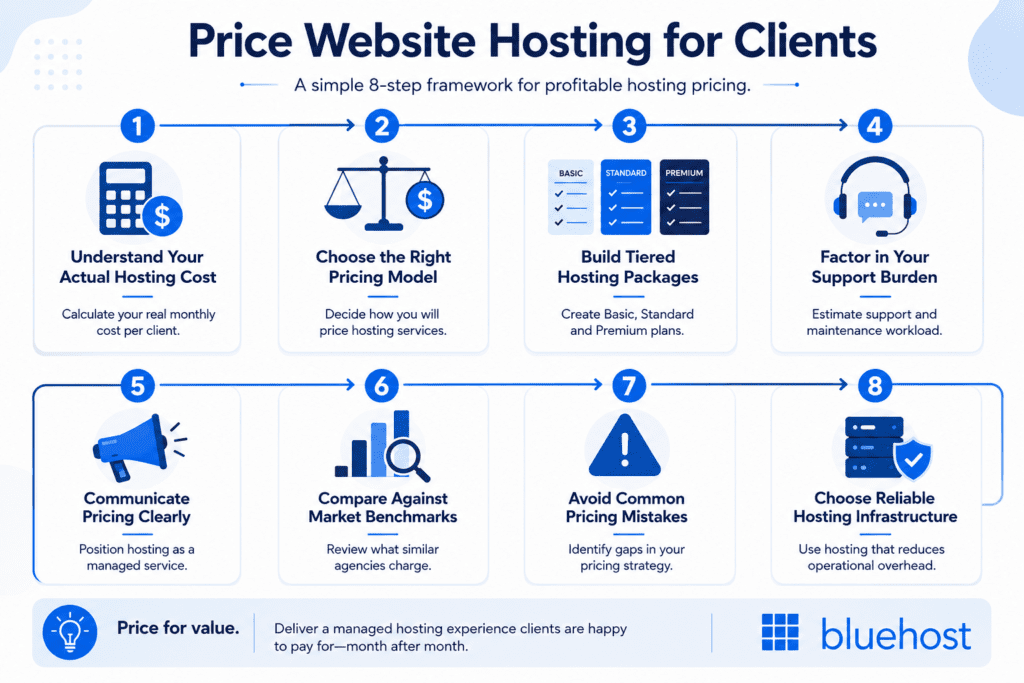
Pricing website hosting is not just about adding a markup to a hosting plan. To build profitable recurring revenue, agencies need to understand their actual costs, choose the right pricing model and position hosting as a managed service clients value.
| Step | What to do | Quick check questions | Goal |
| Step 1: Understand Your Actual Hosting Cost | Calculate your real monthly cost per client | Have you included hosting, plugins, backups, support time and admin overhead? | Know your minimum profitable price |
| Step 2: Choose the Right Pricing Model | Decide how you will price hosting services | Are you using cost-plus, market-rate or value-based pricing? | Build a pricing structure that fits your agency |
| Step 3: Build Tiered Hosting Packages | Create Basic, Standard and Premium plans | Can clients clearly see differences between tiers? | Simplify buying decisions and increase revenue |
| Step 4: Factor in Your Support Burden | Estimate support and maintenance workload | How many support hours does each client require monthly? | Protect margins from hidden operational costs |
| Step 5: Communicate Pricing Clearly | Position hosting as a managed service | Are you selling outcomes instead of server space? | Reduce pricing objections and improve perceived value |
| Step 6: Compare Against Market Benchmarks | Review what similar agencies charge | Are your prices aligned with your market and service level? | Stay competitive without underpricing |
| Step 7: Avoid Common Pricing Mistakes | Identify gaps in your pricing strategy | Are you undercharging or offering unlimited support? | Maintain sustainable recurring revenue |
| Step 8: Choose Reliable Hosting Infrastructure | Use hosting that reduces operational overhead | Does your hosting provider support scalability, uptime and support? | Improve profitability and client retention |
Step 1: Understand your actual hosting cost
Before you decide how to price website hosting for clients, you need to understand your real web hosting cost. Many agencies only consider the hosting plan cost, but real hosting expenses also include support, maintenance and operational overhead.
For agencies, website hosting is not just renting server resources from hosting providers. It also includes technical support, security updates, plugin management, backups, billing and keeping client websites running smoothly.
What agencies actually pay for
Most agencies managing hosting services need to account for:
- Hosting plan: Shared hosting, managed hosting, VPS hosting, cloud hosting or dedicated hosting.
- SSL certificates: Security protection for professional looking websites and online stores.
- Domain registration: Managing the client’s domain name and website’s address.
- Backup and security tools: Malware scanning, DDoS protection, uptime monitoring and automated backups.
- Plugin licenses: Premium plugins, eCommerce features and SEO tools.
- Support time: Technical support, troubleshooting and client maintenance requests.
- Billing overhead: Renewals, invoices and account management.
Not all hosts are created equal. Some hosting providers include security, backups and performance tools in their plans, while others charge extra for them. Bluehost agency hosting includes automated WordPress updates, built-in WAF security, DDoS mitigation, Jetpack backups and Yoast Premium directly inside its web hosting plans.
Example hosting cost breakdown per client
Here’s a realistic monthly cost example for one small business website using managed hosting:
| Cost item | Estimated monthly cost |
|---|---|
| Managed hosting plan | $15 |
| SSL certificates and security tools | $10 |
| Premium plugins | $10 |
| Technical support and maintenance costs | $25 |
| Billing and admin overhead | $5 |
| Overall cost | $65/month |
If clients pay only for the hosting plan itself, agencies usually lose money on support time and maintenance work. Your pricing should reflect the actual costs involved in managing a website, not just the server space.
Average hosting costs by hosting type
Different hosting types vary in pricing, performance and server resources.
| Hosting type | Best for | Key features |
|---|---|---|
| Managed WordPress hosting | Growing WordPress websites | Automatic updates, backups, security, CDN support and technical support |
| VPS hosting | eCommerce and high-traffic websites | Dedicated resources, better performance and greater flexibility |
| Dedicated hosting | Large, performance-heavy websites | Full server control, maximum performance and stronger reliability |
Bluehost Agency hosting includes features like performance monitoring, staging, cloning, multiple-site management and built-in security tools to help agencies manage client websites more efficiently.
Step 2: Choose the right hosting pricing model
Once you understand your web hosting cost, the next step is choosing how you want to charge clients. The pricing model you choose affects your profit margins, support workload and how clients perceive your hosting services.
There is no single pricing strategy that works for every agency. The right model depends on your hosting package, client type, technical support requirements and long-term business goals.
Cost-plus pricing
Cost-plus pricing is one of the most common ways agencies price website hosting.
How it works
With cost-plus pricing, you calculate your actual hosting costs and add a profit margin on top. Your final client price includes the hosting plan, plugin licenses, maintenance costs, billing overhead and support time.
This model works well for agencies that want predictable margins and a clear pricing structure.
Pros and cons
Pros
- Easy to calculate and explain
- Protects your profit margins
- Works well for standardized hosting packages
- Helps agencies account for all costs involved
Cons
- May undervalue premium hosting services
- Does not always reflect business value to the client
- Can become difficult when support needs vary widely
Example pricing calculation
Here’s a simple example:
| Cost item | Monthly cost |
|---|---|
| Managed hosting plan | $20 |
| Security features and backups | $15 |
| Premium plugins | $10 |
| Technical support | $30 |
| Billing/admin overhead | $5 |
| Total agency cost | $80/month |
If your target margin is 40%, your client price would be around $130–$140/month.
This formula helps agencies avoid underpricing hosting fees while still maintaining healthy recurring revenue.
Market-rate pricing
Market-rate pricing means setting prices based on what other hosting providers, freelancers or agencies charge.
When it works best
This approach works best when:
- You operate in a highly competitive market
- Clients compare multiple hosting companies
- You offer standardized hosting services
- You are trying to find clients in price-sensitive industries
Many agencies use market-rate pricing as a starting point when launching new hosting packages.
Risks of competitor-based pricing
The biggest problem with competitor pricing is that it ignores your actual costs and service quality.
For example, many hosting providers advertise shared hosting for only a few dollars per month. But those web hosting plans often exclude technical support, backups, security updates, staging tools or performance optimization.
If you compete only on price, you may:
- Undercharge for support time
- Reduce your margins
- Struggle to scale
- Attract clients focused only on low cost
Not all hosts are created equal. A cheap hosting plan on a crowded same server environment is very different from managed hosting built for performance, uptime and client management.
Value-based pricing
Value-based pricing focuses on the outcome your hosting services deliver instead of the raw hosting cost.
Pricing based on outcomes
With this model, clients pay for:
- Faster website performance
- Better uptime
- Stronger security features
- Reliable technical support
- Faster issue resolution
- Reduced downtime risk
- Peace of mind
This works especially well for eCommerce features, online store setups and high-traffic websites where downtime directly affects revenue.
Positioning hosting as a managed service
The most profitable agencies position hosting as a managed service instead of a commodity product.
Instead of saying:
- “You are paying for server space”
You position it as:
- Ongoing website management
- Security monitoring
- Plugin and core updates
- Backup management
- Technical support
- Website performance optimization
- Site reliability and uptime monitoring
This approach makes hosting fees easier to justify because clients understand they are paying for expertise, maintenance and accountability, not just storage space on a server.
Which pricing model is best for your agency?
Most agencies eventually combine multiple pricing models.
A common structure looks like this:
- Use cost-plus pricing to protect margins
- Reference market-rate pricing to stay competitive
- Use value-based pricing to justify premium hosting packages
For growing agencies, value-based managed hosting is usually the most scalable long-term model. It creates predictable recurring revenue while helping clients see hosting as an important business service instead of just another monthly expense.
Step 3: Build tiered hosting packages
One of the easiest ways to price website hosting for clients is to create tiered hosting packages. Instead of offering a single hosting plan for every client, you create different service levels based on website complexity, support needs and website performance requirements.
Tiered pricing helps agencies simplify sales conversations, protect margins and scale hosting services more efficiently.
Why tiered pricing works
Different clients have different needs. A small brochure website does not need the same hosting package as a high-traffic online store with eCommerce features and payment processing.
Tiered hosting packages help agencies:
- Match hosting costs to client needs
- Avoid one-size-fits-all pricing
- Increase recurring revenue opportunities
- Upsell premium hosting services naturally
- Make pricing easier for clients to understand
Bluehost agency hosting is built around scalable hosting tiers ranging from single-site plans to multi-site agency hosting with cloud hosting infrastructure, multiple-site management and advanced monitoring tools.
Basic hosting package ($25–$40/month)
A basic hosting package is designed for low-maintenance websites that need reliable website hosting without advanced server resources.
What’s included
Typical inclusions:
- Shared hosting or entry-level managed hosting
- SSL certificates
- Weekly backups
- Basic security features
- Core WordPress updates
- Limited technical support
- Basic uptime monitoring
Some agencies also include free plugins or lightweight maintenance services to improve perceived value.
Best-fit client type
This hosting package works best for:
- Small businesses
- Portfolio websites
- Local service providers
- Personal brands
- Low-traffic websites
These websites usually do not require dedicated server hosting, advanced cloud hosting or heavy server maintenance.
Standard hosting package ($60–$100/month)
The standard tier is often the most profitable hosting package for agencies because it balances website performance, support and recurring revenue.
What’s included
Typical inclusions:
- Managed hosting or VPS hosting
- Daily backups
- Security updates and malware protection
- Premium plugins
- Performance optimization
- Staging environment
- Priority technical support
- CDN integration
- Monthly reporting
Best-fit client type
This package works well for:
- Growing small businesses
- Agencies managing multiple websites
- Content-heavy websites
- Businesses relying on SEO and lead generation
- Moderate-traffic WordPress websites
Clients at this level usually expect better website performance, faster support response times and stronger security features.
Premium hosting package ($150–$250/month)
Premium hosting packages focus on performance, scalability and proactive management for business-critical websites.
What’s included
Typical inclusions:
- Cloud hosting or dedicated hosting
- Advanced website performance optimization
- Priority support with faster response times
- High-level security monitoring
- DDoS protection
- Automated backups and disaster recovery
- Staging and cloning tools
- Advanced uptime monitoring
- Traffic spike scaling
- Dedicated account management
Agencies positions cloud hosting around high-traffic scalability, built-in CDN performance, real-time failover systems and 100% network uptime for agencies managing performance-intensive websites.
Best-fit client type
This hosting package is best for:
- eCommerce websites
- Membership platforms
- High-traffic brands
- Enterprise WordPress websites
- Online stores with payment processing
- Businesses running seasonal promotions
These websites often require stronger server resources, lower latency and infrastructure designed for traffic spikes.
The psychology behind Good / Better / Best pricing
Most agencies use a “Good / Better / Best” structure because it simplifies decision-making for clients.
Instead of asking:
- “Do you want hosting?”
Clients compare:
- Which hosting package fits their business best
This pricing structure works because:
- The basic tier attracts price-sensitive clients
- The middle tier becomes the most attractive option
- The premium tier anchors value perception
In many cases, clients choose the middle option because it feels like the safest balance between price and features.
Tiered pricing also helps agencies increase margins without aggressively upselling. Clients naturally move toward higher-value hosting services when they clearly see differences in website performance, support, security features and scalability.
Step 4: Factor in your support burden
One of the biggest mistakes agencies make when pricing website hosting for clients is ignoring support time. Your hosting plan may cost only a few dollars per month, but the real expense usually comes from managing websites, solving problems and responding to client requests.
If you do not factor support into your hosting fees, your margins disappear quickly.
The hidden support costs agencies forget
Most hosting costs are not tied to server resources alone. Agencies also spend time on:
- Plugin conflicts
- Website downtime
- Security updates
- Malware cleanup
- SSL certificate renewals
- Content management system updates
- Website migration requests
- Email setup issues
- Performance troubleshooting
- Client communication
These tasks create operational overhead even when the actual web hosting cost stays low.
Many hosting providers advertise low monthly costs, but agencies are usually responsible for keeping the website running smoothly after launch. That ongoing responsibility is what clients are really paying for.
What are the common hosting pricing mistakes to avoid?
Even simple client websites can create recurring support work.
Common tasks include:
- Installing security patches
- Updating WordPress core and premium plugins
- Restoring backups
- Fixing broken forms or eCommerce features
- Monitoring website performance
- Troubleshooting payment processing issues
- Managing domain registration and DNS records
- Handling staging and cloning requests
- Responding to urgent support tickets
These support tasks become even more time-consuming when agencies manage many websites across different hosting companies or outdated hosting plans.
How to calculate support time per client
A simple way to estimate support burden is to track average monthly maintenance time per website.
For example:
| Task | Monthly time |
|---|---|
| Updates and security checks | 30 mins |
| Client support requests | 30 mins |
| Performance monitoring | 15 mins |
| Billing/admin tasks | 15 mins |
| Total monthly support time | 1.5 hours |
If your internal hourly rate is $75/hour, your support cost alone is about $112/month before hosting costs, plugin licenses or other expenses are added.
This is why agencies that charge only for the hosting plan itself often struggle with profitability.
Ways to protect your margins
The best agencies build systems that reduce support overhead while improving website reliability.
Add a support buffer
Always build extra margin into your hosting package.
Unexpected issues happen:
- Plugin conflicts
- Website outages
- Traffic spikes
- Security incidents
- Emergency client requests
A support buffer protects your profitability when support demands increase unexpectedly.
Define support scope clearly
One of the fastest ways margins disappear is through unlimited support expectations.
Clearly define:
- What hosting services are included
- Response times
- Emergency support rules
- What counts as billable work
- Third-party troubleshooting limits
- Website update responsibilities
This helps clients understand the difference between managed hosting and custom development work.
Use reliable hosting infrastructure
Your hosting infrastructure directly affects your support burden.
Cheap shared hosting environments with overloaded same server setups often create:
- Slower website performance
- More downtime
- More troubleshooting
- More client complaints
Step 5: Communicate hosting pricing without client pushback
Clients push back when hosting looks like a simple server fee. Avoid that by showing what your hosting service includes and what problem it solves.
Position hosting as a managed service
Do not sell only the hosting plan. Sell the management around it: uptime monitoring, backups, security updates, SSL certificates, performance checks and technical support.
Bluehost agency hosting supports this positioning with managed WordPress features such as automated updates, built-in WAF security, DDoS protection, global CDN, backups, staging and priority WordPress support.
What clients are really paying for
Clients pay for reliability, security and reduced risk. They also pay for your time, technical skills and accountability.
For small businesses, this matters because they usually do not want to manage website files, plugin updates, domain settings, SSL issues or hosting support tickets themselves.
How to respond to “I can get hosting for $5/month”
Use a clear comparison:
“You can buy basic shared hosting for a few dollars per month. Our service includes managed hosting, security monitoring, backups, updates, performance support and help when something breaks.”
This reframes the fee from cheap web hosting to managed website care.
Monthly vs annual billing
Monthly billing works well for predictable recurring revenue and lower client commitment.
Annual billing reduces admin work, improves cash flow and helps clients commit long term. Many agencies offer a small annual discount.
Contract terms agencies should define
Define these before the client signs:
- What is included
- What costs extra
- Support response times
- Backup and restore terms
- Domain registration ownership
- Cancellation notice
- Renewal pricing
- Migration fees
Clear terms prevent scope creep and make your hosting fees easier to defend.
Real-world hosting pricing benchmarks
Hosting fees vary based on the type of hosting, support level and services included. These ranges help agencies understand what clients typically pay for managed website hosting services.
Freelancer pricing ranges
Freelancers usually charge $25–$75/month for basic managed hosting.
This pricing commonly includes:
- Shared hosting or entry-level managed hosting
- SSL certificates
- Basic backups
- Security updates
- Limited technical support
These hosting packages work well for brochure websites, portfolios and small businesses with low traffic.
Small agency pricing ranges
Small agencies often charge $75–$150/month for managed WordPress hosting.
At this level, hosting services may include:
- Daily backups
- Premium plugins
- Performance monitoring
- Malware protection
- Staging environments
- Faster support response times
This pricing is common for growing businesses, SEO-focused websites and moderate-traffic WordPress sites.
Agency care plan pricing ranges
Agency care plans usually range from $150–$300+/month.
These plans combine hosting with ongoing maintenance and support services such as:
- Cloud hosting or VPS hosting
- Advanced security features
- Website performance optimization
- eCommerce support
- Uptime monitoring
- Priority technical support
- Website maintenance
- Monthly reporting
This model is common for eCommerce websites, membership sites and high-traffic business websites.
| Provider type | Typical monthly price | Common inclusions | Best-fit website type |
|---|---|---|---|
| Freelancer | $25–$75 | Shared hosting, SSL certificates, backups, updates | Small business websites |
| Small agency | $75–$150 | Managed hosting, security monitoring, premium plugins, support | Growing WordPress websites |
| Agency care plan | $150–$300+ | Cloud hosting, performance optimization, advanced support | eCommerce and high-traffic websites |
Factors that affect pricing
Several factors affect how much agencies should charge for website hosting:
- Type of hosting
- Website traffic
- eCommerce features
- Storage space requirements
- Premium plugins
- Security features
- Technical support workload
- Website performance expectations
- Number of websites managed
- Backup frequency
- Maintenance costs
For example, an online store with payment processing and traffic spikes will require stronger server resources and more support than a simple brochure website. That increases both your hosting costs and your client pricing.
Note: Pricing examples are estimated ranges and may vary based on hosting provider, website requirements, support needs and market conditions.
Also read: Best Hosting for Agencies: Which Hosting Type Fits Your Clients and Workflow?
What are the common hosting pricing mistakes to avoid?
Pricing website hosting is not only about choosing a monthly cost. It is also about protecting your time, margins and client expectations.
Undercharging to win clients
Low pricing may help you close a client, but it can hurt your margins later. If your hosting fees do not cover the hosting plan, support time, security tools and maintenance costs, every client becomes less profitable over time.
Charge based on the full service, not just the web hosting cost.
Ignoring support and operational costs
Hosting services create ongoing work. Agencies often forget to price for updates, backups, troubleshooting, billing, domain registration, SSL certificates and technical support.
These tasks take time even when the website is running smoothly. Include them in your hosting package from the start.
Offering unlimited support
Unlimited support creates unclear expectations. Clients may treat every website request as part of the hosting fee.
Set clear limits around:
- Response times
- Emergency support
- Plugin issues
- Website edits
- Migration help
- Out-of-scope work
This keeps hosting fees profitable and easier to manage.
Using one-size-fits-all pricing
Not every website needs the same type of hosting. A small business site, an online store and a high-traffic content site all have different server resources, security features and performance needs.
Use tiered hosting packages so clients pay for the level of hosting, support and reliability their website actually needs.
Start with the right hosting foundation
Your hosting provider affects your margins, support time and client satisfaction. A cheap hosting plan may lower your monthly cost, but it can create more downtime, slower website performance and extra technical support work.
Reliable infrastructure helps agencies reduce support tickets, protect uptime and keep client websites running smoothly. Bluehost includes hosting, built-in CDN, DDoS protection, backups, uptime monitoring and multiple-site management tools.
As your agency grows, choose hosting that supports more websites, stronger server resources, staging, cloning, security monitoring and priority support.
Explore Bluehost Agency hosting to build profitable, scalable hosting services your clients can rely on.
Frequently asked questions
Most agencies charge between $25 and $300+ per month depending on the type of hosting, website traffic, support level, included services and important factors such as how many websites are hosted and the level of control provided by the control panel. eCommerce websites and managed hosting plans usually justify higher hosting fees.
Yes. Many agencies bundle website hosting, backups, security updates, technical support and social media integrations into one monthly care plan. Bundling simplifies billing, reduces extra cost for clients and increases recurring revenue while making the service easier for clients to understand. Using website builders with an intuitive interface can also help clients save money and streamline web design.
Most agencies target a 40–60% gross profit margin on hosting services. The exact margin depends on support workload, hosting costs, plugin licenses and how efficiently the agency manages client websites across single servers, virtual servers or entire server setups in data centers.
Yes. Managed hosting reduces maintenance work by handling updates, backups, security features and server maintenance compared to unmanaged hosting. It also improves website performance and uptime, helping agencies reduce support overhead and scale more efficiently. Managed hosting often includes features like staging, cloning and CDN access, which are key factors for high-quality service.
The best type of hosting depends on the website and web design needs. Shared hosting works for low-traffic sites and free website options, while VPS hosting, virtual servers, cloud hosting and dedicated hosting with an entire server are better for eCommerce websites, high-traffic businesses and performance-focused WordPress websites. Choosing hosting close to clients’ audiences in data centers can also improve site speed and reliability. Hosting plans vary based on how many websites they support and whether they offer features like control panels and social media integrations.

Write A Comment