 ChatGPT,
 Claude,
 Gemini,
 Grok — all four for

Key highlights
- Choose SEO-friendly web hosting to boost Core Web Vitals, uptime and security.
- Map server locations and add a CDN to cut latency and lift Google rankings.
- Enable HTTP/2/3, caching and free SSL to improve site speed fast.
- Scale from shared to VPS or dedicated hosting as your website’s traffic grows.
- Launch with Bluehost for quick setup, free domain name and SEO-ready tooling.
Want higher rankings without rewriting every page? Start with your web host.
Find your perfect plan
📋 View PlansSpeed, uptime and security tell search engines you mean business.
That’s why SEO-friendly web hosting matters. It turns technical choices into higher visibility.
You don’t need a huge budget. You need the right web hosting provider and smart setup. Look for modern stacks, global server locations and free SSL certificates. These boost site performance and trust. They also protect your rankings from avoidable issues.
Running a WordPress site? Choose WordPress hosting that supports caching and built-in SEO tools. Growing fast? Consider VPS hosting, cloud hosting or dedicated hosting for stable resources. Good customer support helps you move with just a few clicks. Your web hosting services should scale as your online business grows.
This guide focuses on practical wins such as fast loads, strong uptime, solid security features and real SEO benefits.
Before we compare features, let’s set expectations. This SEO-friendly web hosting list focuses on speed, uptime and security that influence search engines.
Before we compare features, let’s set expectations. This SEO-friendly web hosting list focuses on speed, uptime and security that influence search engines.
What is SEO hosting?
SEO – Search Engine Optimization – hosting is web hosting that is built and configured to support better search engine visibility. It prioritizes fast load times, reliable uptime, strong security and clean site architecture so search engines can crawl and index your pages without friction.
Your hosting provider influences rankings in four direct ways. Server speed determines your Time to First Byte (TTFB), which shapes Core Web Vitals scores that Google uses as ranking signals. Uptime keeps your pages reachable when crawlers visit – repeated downtime wastes crawl budget and signals instability. A valid SSL certificate and secure infrastructure protect user data and prevent browser warnings that reduce trust. Finally, a stable server environment ensures Googlebot can access your content consistently, without timeouts or errors. Choosing the best web hosting for SEO means addressing all four of these areas from the start.
What SEO hosting is not: a shortcut or a guarantee. No hosting plan replaces quality content, relevant keywords or authoritative backlinks. Think of it as the technical foundation your SEO strategy sits on. A weak foundation limits how far even excellent content can climb. If you run WordPress, pairing your plan with a WordPress-optimized hosting environment gives your site the performance baseline it needs to compete.
Top five elements of SEO hosting
Not all hosting is equal when rankings are at stake. The best web hosting for SEO combines five core elements that directly influence how search engines discover, evaluate and rank your site.
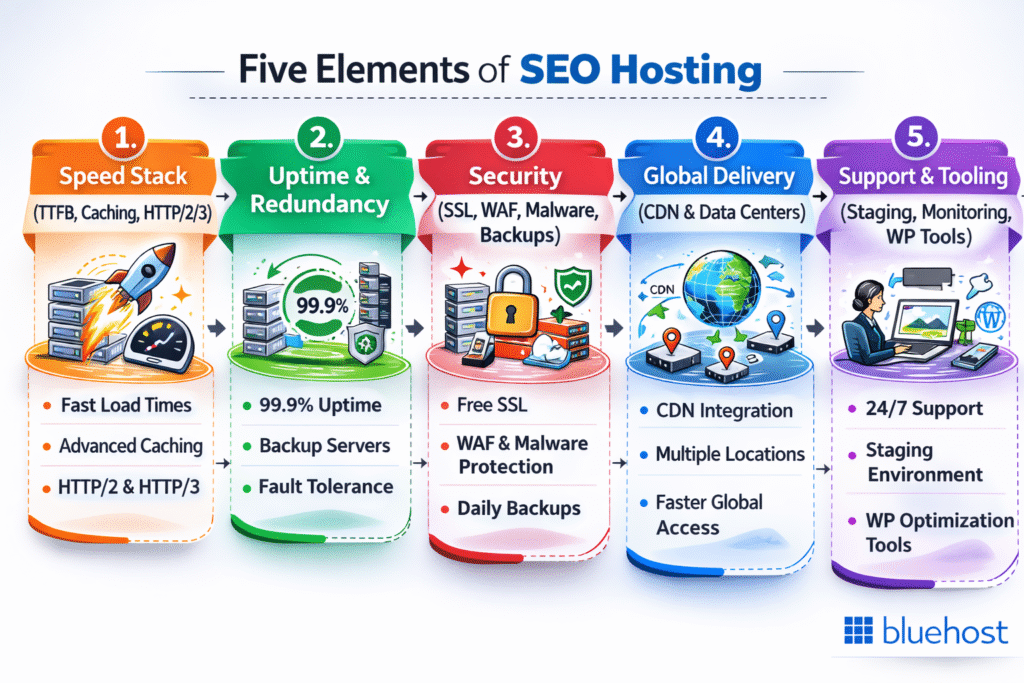
- Speed stack (TTFB, caching, HTTP/2/3): A fast Time to First Byte is the foundation of strong Core Web Vitals. Server-level caching eliminates repeat processing overhead, while HTTP/2 and HTTP/3 enable multiplexed requests that cut page load times significantly. Slower stacks suppress LCP scores and reduce crawler throughput.
- Uptime and redundancy: Consistent availability protects your crawl budget. When Googlebot visits a downed server, that crawl visit is wasted. Redundant infrastructure – failover systems and multi-zone deployments – keeps your pages accessible and your rankings intact.
- Security (SSL, WAF, malware removal, backups): HTTPS is a confirmed ranking signal. A Web Application Firewall blocks malicious traffic before it reaches your site. Automated malware removal and scheduled backups prevent search engine penalties caused by compromised content.
- Global delivery (CDN and data center locations): Physical distance between your server and your visitor adds measurable latency. A CDN distributes static assets across edge nodes worldwide, reducing TTFB for every audience segment regardless of geography.
- Support and tooling (staging, monitoring, WordPress tools): Staging environments let you test changes without risking live rankings. Uptime monitoring catches issues before search engines do. Built-in SEO plugin compatibility and managed WordPress tools streamline the technical work that sustains long-term SEO hosting performance.
Together, these five pillars determine whether your hosting quietly limits SEO – or actively strengthens it through faster crawling, stronger Core Web Vitals, higher trust and fewer technical failures.
In the next section, we’ll apply this framework to compare the best SEO-friendly web hosting providers for 2026, so you can choose a plan that matches your traffic, platform and performance goals.
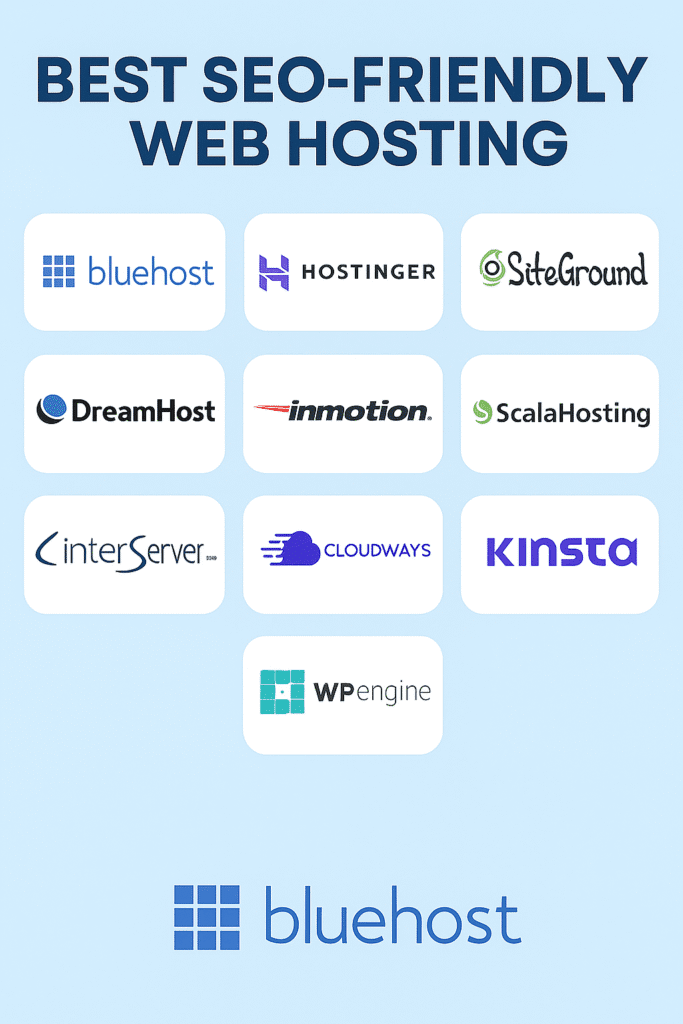
Best SEO-friendly web hosting list for 2026
1. Bluehost
Bluehost is a strong starting point for WordPress users and advanced businesses. Setup is quick and scaling is simple. You get essentials that boost site performance and trust. Staging and backups help you experiment safely. It’s a dependable web hosting provider for SEO-friendly web hosting.
Top SEO features
- Free SSL certificates and easy HTTPS enforcement
- Global CDN integration for lower TTFB and better site speeds
- Built-in caching for faster pages and improved search rankings
- Guided WordPress tools, plus support for popular SEO plugins
2. Hostinger
Hostinger focuses on price-to-performance. You get fast storage and a modern stack. It suits website owners who want speed without a complex setup. Upgrades are simple as traffic grows. Great value for hosting for SEO.
Top SEO features
- NVMe storage and HTTP/3 for quicker delivery
- Data center choices to match audience server locations
- One-click free SSL certificate and CDN options
- LiteSpeed-based caching for Core Web Vitals gains
3. SiteGround
SiteGround blends strong performance with helpful customer support. The platform is polished and stable. Tools make website management easier across multiple sites. It’s reliable for growing content sites and online stores. A safe pick among web hosting companies.
Top SEO features
- Server-level caching and optimized PHP for faster TTFB
- Global network and CDN for proximity-based speed
- Automatic backups and security hardening to avoid downtime
- Easy staging to safely test website changes
4. DreamHost
DreamHost keeps pricing transparent and tools straightforward. It suits creators who prefer clean dashboards. Managed WordPress options reduce busy work. Migrations take just a few clicks. Good fit for steady search engine optimization work.
Top SEO features
- Free SSL and integrated CDN options
- On-by-default backups and malware scanning
- Fast storage and optimized PHP for site speed
- Staging to test updates without risking rankings
5. InMotion
InMotion shines as you grow into VPS hosting or a dedicated server. Support is knowledgeable and responsive. Resource isolation keeps noisy neighbors away. That stability helps search engine performance. Strong choice for scaling online business needs.
Top SEO features
- Managed virtual private server options for consistent performance
- Free SSL and security suite to protect site’s SEO
- Multiple data centers for audience proximity
- Caching and CDN paths to improve Core Web Vitals
6. ScalaHosting
ScalaHosting is popular with users stepping beyond shared hosting. SPanel makes server management simpler. Resources are easy to tune for traffic spikes. Security is proactive. A flexible lane to the best web hosting outcomes.
Top SEO features
- Managed VPS with isolated resources for stability
- Free SSL and real-time protection to prevent downtime
- Easy staging and backups for safer deployments
- CDN-ready setup for faster global delivery
7. InterServer
InterServer offers predictable pricing and practical tools. It’s straightforward for site owners and web developers. You can move from shared to VPS smoothly. Stability helps protect search engine rankings. A pragmatic hosting solution.
Top SEO features
- Resource isolation and an upgradeable hosting plan
- Free SSL and regular security updates
- Data center choices for latency reduction
- Caching options to boost site speeds
8. Cloudways
Cloudways manages the cloud, so you focus on content. You choose the underlying provider. The stack is tuned for speed and uptime. Workflows suit agencies and multiple websites. Great for advanced hosting providers needs.
Top SEO features
- Edge caching and object caching for faster renders
- Multiple clouds and server locations for audience match
- Free SSL and automated backups to reduce risk
- Staging and Git deploys for clean rollouts
9. Kinsta
Kinsta targets premium WordPress hosting performance. Monitoring and analytics are built in. Security is tight and automated. It’s ideal for high-traffic brands and SEO professionals. Support is quick and thorough.
Top SEO features
- Edge caching and CDN for global speed
- Instant HTTPS with free SSL certificates
- Automatic scaling and isolation for stable uptime
- One-click staging for safe optimization tests
10. WP Engine
WP Engine is a polished, enterprise-ready platform. It simplifies performance tuning. Security and backups are handled for you. It works well for agencies and multiple websites. Strong partner for long-term SEO efforts.
Top SEO features
- EverCache-style acceleration and integrated CDN
- Free SSL, WAF and automated backups
- Global data centers for better proximity and TTFB
- Staging and versioned deploys to protect rankings
Also read: How to Choose a Web Hosting Service Provider: Find Your Best Fit
Why choose Bluehost for SEO-friendly web hosting?
Want to level up your SEO game without heavy lifting? Bluehost web hosting keeps website building simple and fast. It supports clean caching, CDN and mobile optimization, so pages feel quick on every device. That speed, plus rock-solid uptime, helps site ranking and Google ranking as your website’s traffic grows.
Among popular web hosts, Bluehost stands out as the best hosting provider for WordPress-first sites that also care about links, speed and safety.
Top SEO features
- Start fast with a free domain name, free SSL and one-click HTTPS
- Built-in caching + CDN to boost Core Web Vitals and protect site ranking
- Staging, backups and easy restores to test mobile optimization safely
- Clear upgrade path (shared → VPS → dedicated) as website’s traffic scales
- WordPress-ready stack with Yoast SEO plugin support for better link-building impact
Start with Bluehost today and give your site a faster foundation for stronger rankings and growth.
How does hosting affect Core Web Vitals and crawlability?
Core Web Vitals start at the server. If your stack is slow, every page and asset pays the price. Choose SEO-friendly web hosting that reduces latency, stabilizes uptime and protects crawl budget.
1. TTFB, server stack (HTTP/2/3, PHP 8.x) and caching engines (LiteSpeed/NGINX)
Your backend sets the pace. A faster TTFB lifts LCP and interaction. Modern protocols reduce overhead. Server caching removes repeat work.
- Pick a web hosting provider with HTTP/2 or HTTP/3 by default.
- Run PHP 8.x or newer for better execution and site performance.
- Prefer LiteSpeed or optimized NGINX for powerful server-level caching.
- Use object caching and OPcache for WordPress hosting.
- Test changes on staging. Then test website vitals again before going live.
Why it matters: Lower TTFB improves Core Web Vitals. Better code paths help search engines crawl more pages. Your search engine rankings benefit.
2. CDN & data center proximity for global audiences
Distance adds delay. CDN and nearby data centers shorten the trip. Static assets travel from edge nodes. HTML reaches users quicker.
- Choose web hosting services with global server locations and easy CDN.
- Map audiences to regions. Place the primary web host close to them.
- Serve images and scripts from edge caches.
- Use compression and website builder image formats like WebP.
- Track TTFB and LCP by country to guide hosting solutions.
Why it matters: Faster delivery boosts site speed and engagement. Search engine performance improves, especially on mobile.
3. Uptime SLAs, redundancy and their real SEO effects (bounce, crawl budget)
Downtime blocks crawlers and users. Redundancy keeps you visible. SLAs signal reliability. Monitoring catches issues early.
- Aim for 99.9%+ uptime from reputable web hosting companies.
- Use redundancy: multi-AZ clouds, failover and backups.
- Scale resources with VPS hosting, cloud hosting or dedicated hosting as traffic grows.
- Add status alerts and health checks in your hosting account.
- Log bot activity to protect crawl budget and your site’s SEO.
Why it matters: Fewer errors mean fewer bounces. Crawlers waste fewer visits. Your pages hold position on the search engine results page.
Invest in SEO-friendly web hosting. Modern stacks, smart caching, a global CDN and real redundancy make Core Web Vitals easier – and crawling smoother.
Ready to lock in quick wins? This checklist makes your SEO-friendly web hosting truly search-ready on day one.
Follow the steps, publish with confidence and protect your crawl budget from the start.
How to make your hosting “SEO-ready” on day one: Setup checklist.
1. Point DNS smartly, enable HTTP/2/3, force HTTPS, set HSTS
Your path from user to server must be short and secure. Fewer hops and modern protocols lift site speed and trust.
- Point DNS to the closest edge or your primary server locations.
- Turn on HTTP/2 or HTTP/3 in your hosting account or control panel.
- Force HTTPS sitewide; issue a free SSL certificate immediately.
- Add HSTS to prevent downgrade attacks and protect search engine signals.
- Confirm redirects (HTTP→HTTPS, non-www→www or vice-versa) with a single 301 chain.
2. Turn on server-level/page caching + CDN; tune image/WebP and compression
Fast delivery improves Core Web Vitals and search rankings. Cache first, then optimize payloads.
- Enable server-level caching (LiteSpeed/NGINX) and page caching for WordPress hosting.
- Connect to a CDN for global delivery across multiple servers.
- Convert heavy images to WebP; lazy-load where sensible.
- Enable Brotli or Gzip. Minify CSS/JS via your website builder or plugin.
- Re-test after each change to verify site performance gains.
Skip the jargon and get live human help 24/7
💬 Chat with an Expert3. Install WAF, schedule backups and add uptime monitoring
Security keeps your momentum. Outages and malware can trigger search engine penalties and loss.
- Activate a Web Application Firewall at your web hosting provider or CDN.
- Schedule daily encrypted backups with one-click restore.
- Add uptime monitoring and alerting for your web hosting service.
- Scan for malware weekly; auto-patch when possible.
- Document recovery steps for your team and website management workflows.
4. Track Core Web Vitals and TTFB after launch (compare before/after)
Measure what matters. Tie changes to outcomes, so your SEO strategy stays data-driven.
- Record baseline TTFB, LCP, INP and CLS before optimization.
- Use field data (Search Console) and lab data (Lighthouse) after each deploy.
- Segment by country and device to guide hosting solutions and CDN routing.
- Log incidents from your support team alongside metric dips.
- Reassess capacity; move from shared hosting to VPS hosting, cloud hosting or a dedicated server when spikes appear.
With these steps, your SEO-friendly web hosting aligns with SEO best practices. You’ll ship faster pages, improve search engine performance and protect the site’s SEO from day one.
How to switch hosting companies for better SEO?
The safest way to switch SEO hosting without losing rankings is to migrate via a staging environment, run both servers briefly in parallel, preserve your full URL structure and validate all redirects before DNS cutover. This approach keeps search engines and crawlers largely unaware of the underlying change.
- Backup files and benchmark Core Web Vitals. Record TTFB, LCP and CLS on the current host. You need a baseline to prove the new host improves – not harms – performance.
- Migrate to staging first. Never cut over directly to production. A staging run catches broken links and plugin conflicts before they affect crawl budget.
- Preserve URL structure and internal links. Every changed URL requires a redirect that adds latency and dilutes link equity. Keep paths identical wherever possible.
- Set 301 redirects if URLs must change – one hop only. Redirect chains compound latency and weaken PageRank transfer. Map old URLs directly to final destinations.
- Preserve canonical tags. Mismatched canonicals post-migration create duplicate content signals that suppress rankings.
- Lower DNS TTL to 300 seconds before cutover. Faster propagation shrinks the downtime window that would otherwise interrupt crawlers mid-index.
- Re-issue SSL immediately on the new host. A missing or mismatched certificate triggers browser warnings that spike bounce rates and erode search engine trust signals.
- Verify robots.txt and XML sitemap on the live domain. A single misconfigured robots.txt can block all crawlers on the new server.
- Monitor Search Console for 404 errors and coverage gaps. Check within 48 hours of launch and resolve any indexing drops before they compound.
Wrap up by validating the live site end-to-end after DNS cutover (crawling key templates, checking logs, Core Web Vitals, redirects, canonicals, robots.txt and sitemap) and fixing issues immediately.
If performance and crawl health stay stable – or improve – in the first 1–2 weeks, you’ve successfully switched hosts without sacrificing SEO.
Get the most out of SEO optimized hosting
Keep your SEO hosting performance on track by running monthly Google Search Console coverage checks and bi-weekly Lighthouse audits. Review server logs weekly for aggressive bot activity that drains crawl budget. Scale your hosting plan before traffic spikes hit, not after resource limits slow your pages down.
Staging environments let you test plugin updates and theme changes without risking live Core Web Vitals scores. Keep your plugin list lean – each added script adds load time. Set incident alerts on your hosting account so downtime triggers an immediate response, not a morning discovery. These habits protect the technical foundation your SEO hosting builds, preserve crawl budget and reduce the risk of ranking drops caused by avoidable performance or availability issues.
Final thoughts
Great content needs a fast, stable home. That’s why SEO-friendly web hosting matters. It improves site speed, uptime and security and protects crawl budget. It lifts Core Web Vitals and user trust. Choose modern stacks, global CDN and strong defenses. Track TTFB and real-user metrics. Scale to VPS or cloud when traffic grows. Small technical wins add up to bigger search gains.
Ready to move? Get Bluehost web hosting for simple setup, free SSL, caching, CDN options and expert support. Launch with confidence. Grow without friction.
FAQs
Short outages rarely tank positions. Repeated downtime does. Crawlers waste visits and users bounce. That hurts search engine performance. Choose hosts with 99.9%+ uptime, redundancy and monitoring. That’s table stakes for SEO-friendly web hosting.
No. It’s not a ranking factor by itself. HTTPS and stable performance matter more. A dedicated IP can help with certain SSL or server needs. But it isn’t required for SEO-friendly hosting.
Shared is fine for new sites. But resource spikes can slow down pages. VPS hosting adds isolation and steady speed. Managed WordPress hosting handles caching, updates and security. For most SEO web hosting needs, managed WordPress or VPS is the sweet spot.
Closer is better. Lower latency improves TTFB and Core Web Vitals. Pick server locations near primary markets. Add a CDN to reach global visitors fast. That’s core to SEO-friendly web hosting.
Speed stacks first. Look for HTTP/2 or HTTP/3, NVMe and server-level caching. Then add CDN, Brotli/Gzip and image optimization. Round it out with uptime monitoring and WAF. Those choices define SEO-friendly hosting and support long-term search engine optimization.

Write A Comment