 ChatGPT,
 Claude,
 Gemini,
 Grok — all four for

Key highlights
- Discover how RAM capacity directly impacts your dedicated server’s overall performance and speed.
- Compare 32GB, 64GB and 128GB memory configurations to find the perfect fit for your workload.
- Learn why DDR5 memory outpaces legacy DDR4 technology for demanding enterprise and business applications.
- Understand the specific RAM requirements for eCommerce stores, gaming servers and high-traffic databases.
- Explore the financial and technical risks of over-provisioning versus under-provisioning your server memory.
Choosing the right amount of RAM is critical for your dedicated server performance. Memory acts as a high-speed workspace for your most active data. Without enough memory your website will struggle during unexpected traffic spikes. This can lead to lost sales and frustrated customers.
Fortunately sizing your server memory does not have to be complicated. For most growing businesses a 32GB configuration provides a strong baseline for standard operations. If you run multiple demanding applications then 64GB is the standard business choice. Finding the right balance is essential for finding your perfect fit as your business scales.
Optimizing your server memory ensures a smooth experience for your website visitors. Investing in the right capacity saves you time and protects your digital revenue. Let us explore exactly what server memory is and why it matters.
What is server RAM and why does your dedicated server need it?
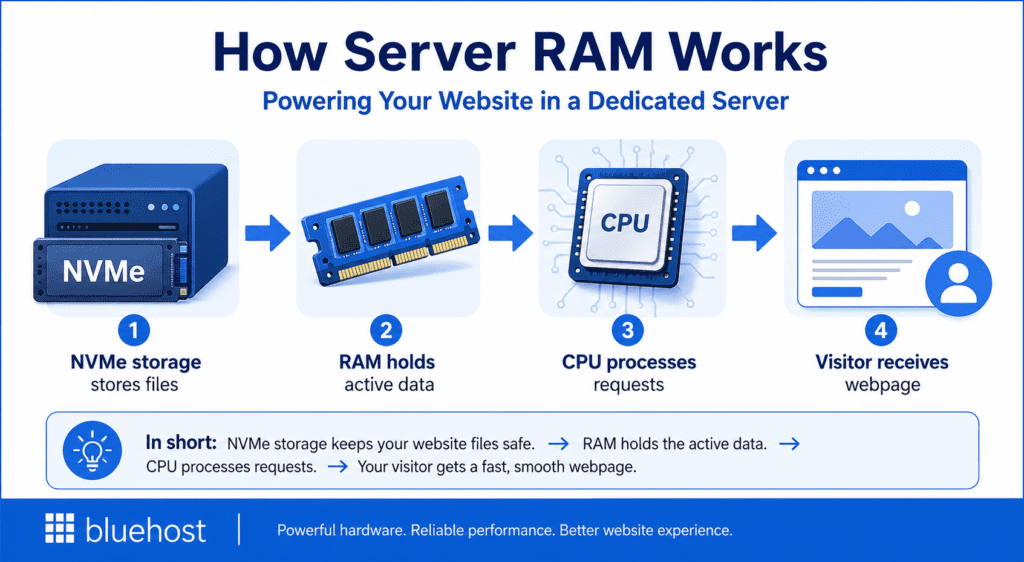
Random Access Memory serves as the short-term memory for your dedicated server. It holds the active data your applications need to access instantly. This is fundamentally different from long-term storage drives that hold files permanently.
When a visitor requests a web page your server must process that action. Memory bridges the performance gap between your NVMe storage and the CPU. Data moves much faster from RAM than it does from a storage drive. If you are reviewing dedicated server system requirements you will see memory listed prominently.
Having adequate memory prevents your CPU from waiting on slow data transfers. This keeps your online store or business website running at peak speed. Understanding this relationship helps clarify how your server memory actually processes data behind the scenes.
How does server memory work?
When your server receives a request the CPU looks for the necessary data. It checks the RAM first because memory access is incredibly fast. If the data is present the server delivers your website content almost instantly.
If the data is missing from memory the CPU must fetch it from the storage drive. This retrieval process takes significantly longer and slows down your website. Sufficient memory ensures your most active data is always ready for immediate use. Next we will look at the different types of memory available for your hardware.
What are the different types of server RAM?
Choosing the right server RAM is critical for performance, stability and scalability. While many memory technologies exist, only a few are truly relevant for modern business servers and web hosting environments.
The most important RAM types today focus on data integrity, capacity and performance, especially for high-traffic websites, databases and applications. The table below highlights the key server RAM types you should understand when evaluating dedicated server hardware.
Server RAM comparison table
| RAM Type | Description | Common use cases | Performance | Key advantages | Limitations |
|---|---|---|---|---|---|
| ECC RAM | Memory that detects and corrects data errors automatically | Enterprise servers, financial systems, business applications | Moderate speed | High reliability, prevents crashes and data corruption | Slight performance overhead, higher cost |
| UDIMM (Unbuffered DIMM) | Standard memory without buffering or register | Consumer PCs, entry-level servers | High speed, low latency | Cost-effective, fast response | Limited stability at scale, lower capacity support |
| RDIMM (Registered DIMM) | Memory with a register to stabilize signal transmission | Enterprise servers, databases, virtualization | Moderate speed | Improved stability, supports ECC, better scalability | Slightly higher latency than UDIMM |
| LRDIMM (Load-Reduced DIMM) | Reduces electrical load to allow higher memory capacity | High-density servers, cloud infrastructure | High capacity with good speed | Supports very large RAM configurations, efficient scaling | More expensive, slightly higher latency |
| DDR4 RAM | Previous generation DDR memory standard | Existing servers, general workloads | Good performance | Widely available, cost-efficient | Lower bandwidth compared to DDR5 |
| DDR5 RAM | Latest generation DDR memory with higher bandwidth and efficiency | Modern dedicated servers, high-performance workloads | Very high speed | Faster data transfer, better power efficiency, future-ready | Higher cost, newer adoption |
Choose ECC RAM for reliability, RDIMM or LRDIMM for server stability and scalability, and DDR5 for faster performance. The right RAM type helps your server handle traffic, protect data and support long-term business growth.
Why does memory generation matter for performance?
Memory generation affects how quickly your server can move, process and support data-heavy workloads. DDR4 is still reliable, but DDR5 offers better speed, bandwidth and efficiency for modern dedicated servers.
| Factor | DDR4 | DDR5 | Why it matters for your server |
|---|---|---|---|
| Bandwidth | Lower bandwidth compared to DDR5 | Higher bandwidth for faster data transfer | Helps the server process more data at the same time |
| Speed | Reliable for standard workloads | Faster performance for modern workloads | Supports quicker page loads and smoother application response |
| Power efficiency | Uses more power than DDR5 | Designed for better energy efficiency | Improves stability and reduces strain on server hardware |
| Traffic handling | Can manage regular traffic well | Better suited for sudden traffic spikes | Helps websites stay responsive during busy periods |
| Scalability | Suitable for many existing servers | Better fit for high-performance enterprise hardware | Supports growing websites, databases and applications |
| Bluehost advantage | Older-generation standard | Bluehost uses premium DDR5 memory across all dedicated server tiers | Helps deliver stronger throughput and reliable performance |
Conclusion: DDR5 is the stronger choice for modern dedicated servers because it delivers higher bandwidth, faster performance and better efficiency. For growing business websites, this means smoother performance, better traffic handling and more room to scale.
Which factors influence your dedicated server RAM needs?
Your dedicated server RAM requirement depends on how much work your server needs to handle at the same time. Before choosing a RAM size, you should look at your operating system, control panel, website traffic, applications, databases and future growth plans.
1. Operating system requirements
Your server’s operating system needs a baseline amount of RAM to run smoothly. Linux, Windows Server and other environments use memory for system processes, security services and background tasks.
Example: A basic Linux server may run comfortably on 1–2 GB RAM, while Windows Server often needs 2–4 GB or more just for stable operation.
2. Control panel usage
Control panels like cPanel also consume RAM. These tools manage websites, email accounts, databases, backups and server settings, so they require memory even before your website starts receiving traffic.
Example: A cPanel server hosting multiple accounts may require an additional 1–2 GB RAM compared to a server without a control panel.
3. Website traffic volume
Higher traffic means higher RAM usage. Every visitor creates requests that your server must process, so a website with thousands of monthly visitors will need more memory than a small brochure site.
Example: A blog with 1,000 monthly visitors may run on 2 GB RAM, while a site with 100,000+ visitors may need 8 GB or more.
4. Concurrent user connections
Concurrent users are visitors using your website at the same time. A sudden traffic spike during a sale, campaign or product launch can quickly use up available RAM if your server is not sized properly.
Example: A flash sale on an online store can bring hundreds of users at once, quickly exhausting a low-RAM server.
5. Type of website or application
Static websites need less RAM because they serve the same files to every visitor. Dynamic websites need more RAM because they generate pages, process requests and run scripts in real time.
Example:
- Static HTML site → 1–2 GB RAM
- WordPress site → 2–4 GB RAM
- Web app or SaaS tool → 8 GB+ RAM
6. Database activity
Websites with active databases require more memory. eCommerce stores, membership sites and booking platforms use RAM to process product searches, customer accounts, shopping carts and transactions.
Example:
- Static HTML site → 1–2 GB RAM
- WordPress site → 2–4 GB RAM
- Web app or SaaS tool → 8 GB+ RAM
7. CMS, plugins and scripts
Platforms like WordPress, Joomla or Drupal can increase RAM usage, especially when running multiple plugins, themes, forms, analytics tools or custom scripts.
Example: A WordPress site with 20+ plugins, page builders and analytics tools may require 4–8 GB RAM for smooth performance.
8. eCommerce functionality
Online stores need more RAM than simple websites. They must support product filters, inventory updates, carts, checkout pages, payment processing and customer sessions at the same time.
Example: A WordPress site with 20+ plugins, page builders and analytics tools may require 4–8 GB RAM for smooth performance.
9. Background processes
Backups, malware scans, cron jobs, email services and software updates can all use memory in the background. These tasks may run while your website is also handling visitors.
Example: Daily backups, malware scans and email services running together can add 1–2 GB RAM usage.
10. Future growth
It is better to plan for future traffic than choose only the current minimum. Extra RAM gives your server room to handle business growth, seasonal demand and unexpected traffic spikes.
Example: Daily backups, malware scans and email services running together can add 1–2 GB RAM usage.
How much RAM is right for your specific use case?
Choosing the right RAM capacity depends on your workload, traffic volume and growth plans. A small website may only need enough memory for steady page delivery, while an eCommerce store, database server or virtualized environment needs more RAM to handle concurrent users, dynamic requests and background processes.
Use the table below as a practical starting point for matching your server type with the right RAM range.
RAM requirements by use case
| Use case | What it includes | Recommended RAM |
|---|---|---|
| Small websites | Blogs, portfolios, static sites with low traffic | 4–8 GB |
| Business websites | Company sites, basic WordPress, moderate traffic | 8–16 GB |
| High-traffic / CMS sites | Popular blogs, news sites, heavy plugins | 16–32 GB |
| eCommerce stores | WooCommerce, Magento, carts, payments, product search | 32–64 GB |
| Multiple websites (agencies) | Hosting several client sites on one server | 64 GB+ |
| Database-heavy apps | SaaS tools, large databases, real-time queries | 64–128 GB+ |
| Advanced workloads | AI tools, analytics, virtualization | 128 GB+ |
Note: These are practical estimates. Your exact RAM needs depend on traffic volume, concurrent users, database size, plugins, background processes and future growth.
What are the risks of choosing the wrong RAM capacity?
Choosing the wrong RAM capacity can affect your server’s speed, stability and cost efficiency. Too little RAM can slow down or crash your website, while too much RAM can increase your hosting costs without adding real value.
1. Poor website performance
- If your server does not have enough RAM, it struggles to process requests quickly.
- Pages may load slowly during normal traffic or busy periods.
- This can affect user experience, conversions and search performance.
2. Server thrashing
- When RAM fills up, the server starts moving data to the storage drive.
- This process is called thrashing.
- Storage is much slower than RAM, so performance drops sharply.
3. Higher risk of crashes
- A server with insufficient RAM may freeze, timeout or crash under heavy load.
- This is especially risky during sales, campaigns or seasonal traffic spikes.
- Downtime can lead to lost revenue and customer trust.
4. Wasted hosting budget
- Choosing too much RAM can increase monthly costs unnecessarily.
- If your website does not use the extra memory, you are paying for resources you do not need.
- This creates a poor cost-to-performance ratio.
5. Limited scalability
- Too little RAM can make it harder to support future traffic growth.
- You may need to upgrade sooner than expected.
- Planning only for today’s needs can create performance problems later.
6. Poor resource balance
- RAM should match your CPU, storage and traffic needs.
- High RAM alone will not fix performance issues caused by weak CPU, slow storage or poor optimization.
- A balanced server setup gives better long-term performance.
The right RAM capacity helps your server stay fast, stable and cost-efficient. Choose enough memory to support your current workload, traffic spikes and future growth without overpaying for resources you will not use.
Bluehost dedicated servers are designed to support businesses that need reliable performance, strong resources and room to grow. With multiple RAM options, fast storage and simple management tools, you can choose a server that matches your current workload and future goals.
Why choose Bluehost for your dedicated server?
Bluehost dedicated servers are designed to support businesses that need reliable performance, strong resources and room to grow. With multiple RAM options, fast storage and simple management tools, you can choose a server that matches your current workload and future goals.
1. Flexible RAM options
- Standard plan: 32 GB DDR5 RAM
- Enhanced plan: 64 GB DDR5 RAM
- Premium plan: 128 GB DDR5 RAM
These tiers make it easier to choose the right memory capacity based on your website traffic, application needs and growth plans.
2. High-performance DDR5 memory
- Bluehost includes DDR5 RAM across dedicated server plans.
- DDR5 offers better speed, bandwidth and efficiency than older memory generations.
This helps your website process more requests and stay responsive during traffic spikes.
3. Fast NVMe storage
- NVMe storage helps improve data access speeds.
- Faster storage supports quicker page loads, smoother database performance and better overall responsiveness.
- This is especially useful for eCommerce stores, high-traffic sites and dynamic applications.
4. Easy server management with cPanel
- Every plan includes cPanel access for simpler server management.
- You can manage websites, domains, emails, files and databases from one familiar dashboard.
- This reduces the complexity of running a dedicated server.
Bluehost dedicated servers combine DDR5 RAM, NVMe storage, cPanel access and expert support to give businesses a strong hosting foundation. Whether you need 32 GB, 64 GB or 128 GB of RAM, Bluehost offers a tier that can support your website performance, scalability and long-term growth.
Choose the right RAM for long-term server performance
Selecting the ideal memory capacity directly impacts the success of your online business. For a standard corporate website, 32 GB RAM provides a strong foundation. On the other hand, agencies managing multiple client sites or busy online stores, 64 GB RAM offers better performance and room to grow.
For enterprise applications, massive databases or high-traffic workloads, 128 GB RAM delivers the power needed to maintain speed and stability. Choosing the right hardware helps prevent costly downtime, protects your brand reputation and supports future growth.
If you’re looking for a reliable, high-performance dedicated server, check out Bluehost’s dedicated server options.
With flexible configurations, Bluehost lets you choose the optimal RAM and resources for your website or application, backed by excellent support and robust security. Start building a faster, more powerful server experience today!
FAQs
A basic gaming server usually requires at least 16GB of memory to function properly. Complex environments with multiple players and custom modifications require 64GB for a lag-free experience.
Yes you can usually upgrade your server memory as your business requirements grow. However this process typically requires scheduling brief maintenance downtime with your hosting provider.
Yes 32GB is plenty of memory for a standard e-commerce website with average traffic. If you experience massive seasonal traffic spikes you should consider upgrading to 64GB.
VPS memory is virtually partitioned from a larger pool of shared hardware resources. Dedicated server RAM provides you with exclusive access to the physical memory modules.
Choose 32 GB for a single high-traffic website, basic eCommerce store, corporate blog or staging environment. It offers a strong performance upgrade for small businesses moving beyond shared hosting.
Choose 64 GB for <a href=”https://www.bluehost.com/agency-hosting”>agencies</a> managing multiple sites, busy WooCommerce stores, larger databases or game servers. It gives your server more room to handle concurrent users and heavier workloads.
Choose 128 GB for enterprise apps, massive databases, virtualization, major traffic spikes and critical workloads. It is ideal when uptime, speed and scalability are business-critical.

Write A Comment