 ChatGPT,
 Claude,
 Gemini,
 Grok — all four for
Key highlights
- Understand why a virtual private server (VPS) keeps OpenClaw agents, channels and workflows running around the clock.
- Learn which features matter most when you compare providers and choose the best VPS for OpenClaw.
- Explore how self-hosted AI agents keep data on your own server and support deeper internal integrations.
- Know how OpenClaw 2.0’s restart-safe Automations can resume work missed during a restart without re-running finished jobs.
- Discover how Bluehost OpenClaw VPS Hosting deploys OpenClaw 2.0 in one click for technical teams.
Finding the best VPS for OpenClaw starts with choosing a server that can support your AI agents, workflows and integrations reliably. You need sufficient CPU, RAM and storage, plus root access and persistent data storage. A practical starting point is 2 vCPU and 4 GB RAM, though requirements vary by workload and model.
A virtual private server (VPS) gives you greater control over your AI environment, from software configuration to model selection. However, privacy depends on your server setup and where your AI model processes requests.
This guide compares five VPS providers, their features and pricing considerations. You’ll also learn how to evaluate server requirements, explore Bluehost OpenClaw VPS Hosting and understand key considerations for running OpenClaw 2.0.
What features should you look for in the best VPS for OpenClaw?
The best VPS for OpenClaw needs more than basic hosting resources. It should support persistent agent state, secure server access and the runtime dependencies required for your deployment. Evaluate these features before comparing providers.
1. Dedicated CPU and RAM
OpenClaw workflows can involve multiple agents, API calls and concurrent Automations. Choose a VPS with enough CPU and RAM to handle your expected workload without resource bottlenecks.
A practical starting point is 2 vCPU and 4 GB RAM for a smaller deployment. Larger workloads may require more resources, especially when running additional containers or local AI models.
2. Fast storage with persistent state
OpenClaw stores sessions, transcripts and other state on disk by default. Persistent storage helps preserve this data across restarts, while solid-state storage can improve access to sessions and cache files.
Look for SSD or NVMe storage with enough capacity for your application, logs and growing conversation history. Back up important data regularly to protect against accidental loss.
3. Root access and secure server management
OpenClaw may require system-level configuration, custom integrations and troubleshooting access. Choose a VPS that provides root access or equivalent administrative control, along with Secure Shell (SSH) access and server logs.
You should also be able to configure firewall rules and protect the OpenClaw Gateway. Follow the official OpenClaw VPS guide for recommended access and security practices.
4. Linux, Node.js and Docker support
Check that the VPS supports a compatible Linux environment and the required runtime dependencies. OpenClaw’s installation requirements specify supported Node.js versions.
If you plan to use containers, verify that the server supports Docker Engine and Compose v2. Container image builds may need more memory than deployments using prebuilt images, so account for that difference when sizing your server.
5. Persistent and reliable Automations
Production AI agents need more than a server that stays online. Their schedules, state and execution history must remain available when the server restarts.
Review how your OpenClaw version handles interrupted tasks, scheduled jobs and message delivery. OpenClaw 2.0 includes restart-related improvements, but not every interrupted command or task automatically resumes. Check run history to confirm that critical workflows completed successfully.
6. Flexible scaling and integrations
Your resource requirements may increase as you add agents, channels and integrations. Choose a provider that offers a practical way to upgrade CPU, RAM and storage as workloads grow.
Check whether upgrades require a restart or a migration to another server. Also confirm support for APIs, webhooks and the automation platforms your workflows depend on.
7. Transparent pricing and support
Compare introductory pricing with renewal rates and contract terms. A low initial price may not reflect the long-term cost of running OpenClaw.
Review the provider’s support scope, too. Some providers cover infrastructure and hardware, while others offer additional help with server management. For self-managed VPS hosting, you should expect to handle application configuration, updates and security.
What are the best VPS providers for OpenClaw?
The best VPS provider depends on how you want to deploy and manage OpenClaw. Some options offer a dedicated installation path, while others provide general-purpose cloud servers that require manual setup.
Here are five providers to consider based on their deployment approach, infrastructure flexibility and intended use cases.
| VPS provider | Best for | Key strength |
|---|---|---|
| Bluehost VPS | Users seeking a guided OpenClaw deployment | One-click OpenClaw installation |
| DigitalOcean | Developers and technical teams | Flexible cloud instances |
| AWS EC2 | Organizations with broader cloud infrastructure needs | Scalable infrastructure options |
| Linode | Developers and DevOps workloads | General-purpose cloud compute |
| Vultr | Users who need regional deployment options | Multiple data center locations |
The main difference is how much setup and management you want to handle yourself. A one-click installation can simplify deployment, while a general-purpose VPS offers flexibility for teams comfortable configuring OpenClaw manually.
1. Bluehost
Bluehost OpenClaw VPS Hosting offers one-click installation of OpenClaw 2.0 Community edition on an NVMe VPS. It combines a guided deployment path with server access and resources you can scale as your workloads grow.
Which Bluehost VPS plan should you choose?
Bluehost offers three NVMe VPS tiers for different workload sizes. NVMe 4 is a starting option for smaller deployments, while NVMe 8 and NVMe 16 provide additional resources for more demanding workloads.
| Plan | vCPU | DDR5 RAM | NVMe storage | Suitable for | Introductory price |
|---|---|---|---|---|---|
| NVMe 4 | 2 cores | 4 GB | 100 GB | One agent, a few channels and basic Automations | $9.49/mo |
| NVMe 8 | 4 cores | 8 GB | 200 GB | Multiple containers and heavier workloads | $12.99/mo |
| NVMe 16 | 8 cores | 16 GB | 450 GB | Larger deployments and more demanding workflows | $25.99/mo |
All three plans include unmetered bandwidth, subject to the Terms of Service, and infrastructure and hardware support.
The listed introductory prices apply to a 24-month term. Renewal prices are $11.99/month for NVMe 4, $28.99/month for NVMe 8 and $49.99/month for NVMe 16.
Pricing was verified in October 2026 and may change. Check the current Bluehost OpenClaw VPS plans for the latest details.
Also read: Best VPS size for OpenClaw
2. DigitalOcean
DigitalOcean offers general-purpose cloud infrastructure for developers who want control over their server configuration. You can use a suitable instance to deploy OpenClaw and manage its dependencies, integrations and updates yourself.
This approach suits technical teams that prefer configuring their own environments. Before choosing a plan, compare its available CPU, memory, storage and scaling options against your expected workload.
3. AWS EC2
Amazon EC2 provides configurable compute instances within the AWS ecosystem. It can suit organizations that already use AWS services or need to integrate OpenClaw into a broader cloud environment.
You will need to select an appropriate instance, configure the operating system and install OpenClaw. Consider the total cost of compute, storage, data transfer and any additional services you use.
4. Linode
Linode provides cloud compute options for developers and DevOps teams. A suitable instance can host OpenClaw when configured with the required runtime, storage and security settings.
Compare available instance sizes, regional availability and pricing before deploying. You will also need to manage the OpenClaw installation and ongoing server maintenance.
5. Vultr
Vultr offers cloud compute instances across multiple data center locations. This can help teams evaluate where to host OpenClaw based on user proximity, connectivity and deployment requirements.
Check the available locations, server specifications and pricing for your target region. As with other general-purpose VPS options, you will need to configure and maintain the OpenClaw environment yourself.
Note: Provider features and plan availability can change. Verify current specifications, prices and support terms on each provider’s official website before making a decision.
What can you build with OpenClaw on a VPS?
OpenClaw on a VPS lets you build AI agents that support everyday business operations. You can automate repetitive tasks, connect tools and process information through workflows tailored to your needs.
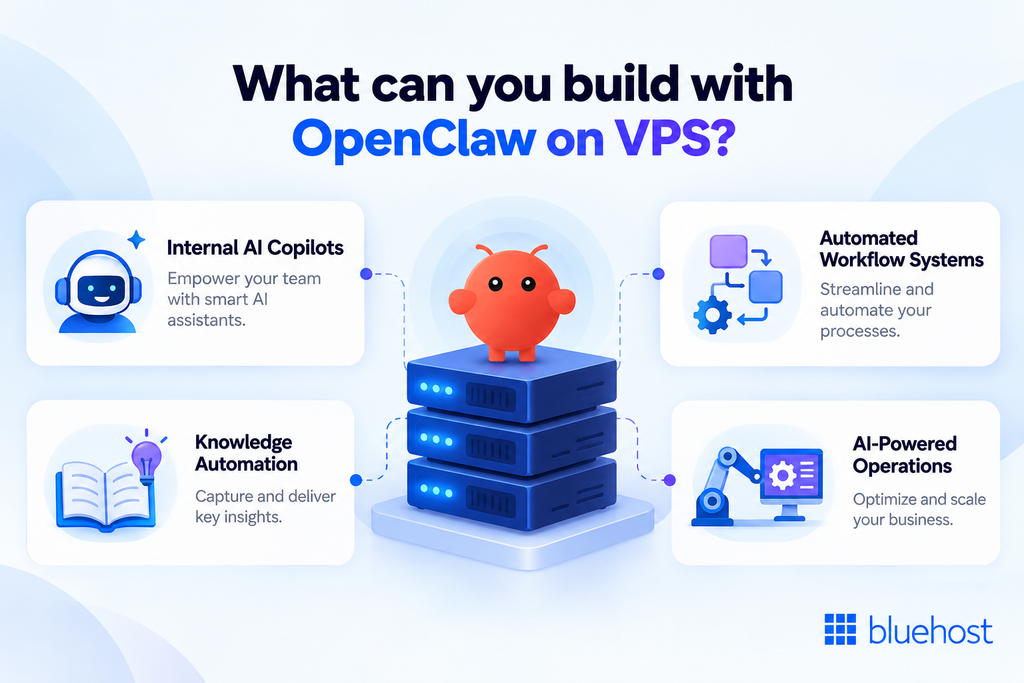
Here are four practical ways to use OpenClaw on a VPS.
1. Internal AI copilots
Build AI copilots that help teams research topics, summarize documents and respond to routine questions. For example, a support copilot can draft customer responses, while an engineering copilot can help developers investigate technical issues.
Connect your agents to approved knowledge sources and tools to make relevant information easier to access. Review permissions carefully to ensure agents only access the information they need.
2. Automated workflow systems
Use OpenClaw to connect AI reasoning with routine business processes. An agent could classify incoming requests, extract key details and route each request to the appropriate team or system.
You can integrate these workflows with APIs, databases and other tools. This helps reduce manual handoffs while keeping people involved in decisions that require review or approval.
3. Knowledge and documentation management
OpenClaw agents can help teams work with large collections of documents and internal resources. They can retrieve relevant information, summarize lengthy materials and assist with drafting or updating documentation.
For example, a team could use an agent to summarize project notes or locate information across connected knowledge sources. Configure access controls carefully, especially when working with confidential business information.
4. AI-powered operational tasks
Build agents that monitor events, process information and initiate routine operational tasks. Examples include preparing reports, updating records and notifying teams when specific conditions occur.
You can connect OpenClaw to the systems that support your operations and define which actions agents can perform. Use appropriate permissions, logging and approval steps to keep automated actions controlled.
A VPS gives you a configurable environment for running these workflows and connecting the tools they depend on. As your requirements grow, you can adjust resources and refine your deployment to support additional agents and integrations.
Why choose Bluehost OpenClaw VPS Hosting?
Bluehost OpenClaw VPS Hosting combines one-click OpenClaw deployment with dedicated resources and control over your server environment. It’s designed for users who want a simpler starting point without giving up the flexibility of self-managed VPS hosting.
Here’s how we support your OpenClaw deployment.
1. Deploy OpenClaw with one-click installation
Our one-click setup installs OpenClaw 2.0 Community edition, reducing the manual work involved in configuring the application and its dependencies. Guided setup can also reuse supported subscriptions, API keys or local models.
After installation, you can configure your model provider through the OpenClaw dashboard. Follow our guide to connecting APIs in OpenClaw for setup instructions.
You control when to update OpenClaw. Its supported update process checks the installation before replacing it and can stop when an update candidate is considered unsafe. The plugin installation process is also designed to return failed installations to a retryable state.
Also read: How to set up OpenClaw on a VPS
2. Run agents on dedicated compute resources
OpenClaw agents need CPU, memory and storage to process tasks and interact with connected services. Bluehost plans include dedicated vCPU, DDR5 RAM and NVMe storage to support these workloads.
You can choose from NVMe 4, NVMe 8 and NVMe 16 based on your expected agent activity and resource requirements. Monitor CPU and memory usage as you add agents, channels and Automations to determine when an upgrade may help.
3. Customize your environment with root access
Different OpenClaw deployments may need custom scripts, integrations and system-level configuration. Bluehost Self-Managed VPS Hosting provides root access through SSH, giving you control over your server environment.
You can configure supported tools, connect APIs and inspect server logs as needed. You’re also responsible for operating system maintenance, application updates and server security.
4. Evaluate network performance with independent benchmarks
Network performance can affect connections between OpenClaw, messaging channels and external model APIs. Independent VPS benchmarks can help you compare infrastructure performance before choosing a plan.
In its 12-month ranking through September 2026, VPSBenchmarks’ Best VPS 2026 under $15 evaluated 37 plans priced between $8 and $15 per month. Bluehost NVMe 4 ranked third overall and first for network performance in that comparison.
These results measure the VPS plan, not OpenClaw itself. Actual performance depends on your workload, configuration, model provider and network path.
5. Upgrade resources as your workloads grow
Your initial VPS configuration may not meet your needs as you add agents and integrations. Bluehost lets you upgrade between preset NVMe plans through the Bluehost Portal.
The server restarts during an upgrade, so schedule it outside busy Automations. Downgrades aren’t currently supported, so choose your initial plan carefully and monitor resource usage before upgrading.
6. Understand what support covers
Bluehost manages the underlying hardware, network and virtualization layer. You manage the operating system, OpenClaw configuration, software updates, integrations and server hardening. Self-Managed VPS support covers account and billing questions. cPanel and 24/7 priority support aren’t included.
Also read: Bluehost VPS hosting scope of support
Final thoughts
Choosing the best VPS for OpenClaw starts with the right resources, reliable storage and control over your AI environment. Compare providers based on deployment options, management responsibilities and renewal pricing. Start with at least 2 vCPU and 4 GB RAM, then scale as your workload grows.
Want to run OpenClaw 2.0 without handling the initial installation manually? Bluehost OpenClaw VPS Hosting offers one-click deployment on self-managed VPS plans. Choose a configuration that fits your needs and build your AI workflows on infrastructure you control.
FAQs
OpenClaw is an open-source, self-hosted AI agent platform that connects AI models, tools and messaging channels through its Gateway. It supports integrations with platforms such as Slack, Telegram and WhatsApp. OpenClaw 2.0 (v2026.8.1) adds an updated Control UI, restart-safe Automations and an admin hub for plugins and skills. Learn more in our guide to what OpenClaw AI is.
Shared hosting is generally unsuitable for OpenClaw because it often restricts server-level access and runtime configuration. A VPS gives you greater control over the environment, including the resources and dependencies needed to run AI agents and Automations.
A VPS is a practical choice for running OpenClaw continuously with greater control over resources and server configuration. It lets you manage integrations, persistent data and automation workflows. Your exact requirements depend on your deployment, workload and whether you use local or external AI models.
OpenClaw 2.0 includes restart-related improvements that help supported Automations handle missed runs without repeating completed jobs. Run history helps you check whether each Automation ran, delivered its output and completed. Accepted messages are also designed to survive managed restarts. The Gateway can restart after a reboot when configured as a systemd service with an appropriate restart policy. Review the OpenClaw Automation release notes for details.
Back up your OpenClaw configuration and data before updating. Use the supported update process, which checks the installation before replacing it and can stop unsafe update candidates. Review plugin permission changes before approving replacements. On Bluehost OpenClaw VPS Hosting, you choose when to apply updates, so schedule them outside busy Automations.
The cost depends on your VPS plan and AI model usage. Compare introductory and renewal prices, then account for API charges from your chosen model provider. If you run a compatible local model through Ollama, you can reduce reliance on paid model APIs, but you’ll need enough server resources to run the model.
Yes. Server location can affect network latency between your users, OpenClaw and external model providers. Choosing a data center closer to your users may reduce some connection delays, although routing and provider locations also matter. Bluehost OpenClaw VPS Hosting offers data center options in Virginia and Arizona in the US, along with London, Toronto and Amsterdam. Check available locations when selecting your plan.

Write A Comment