 ChatGPT,
 Claude,
 Gemini,
 Grok — all four for
Key highlights
- Learn when a Black Friday web hosting price is a real saving and when it falls short.
- Discover how to compare a sale price against the regular price for the same plan and term.
- Know why renewal pricing and term length shape your total cost more than the headline discount.
- Compare 12-month and 36-month commitments and decide when buying before or after Black Friday fits.
- Choose with confidence using a pre-checkout checklist for refunds, domain renewal, add-ons and auto-renewal.
The price on a Black Friday hosting banner covers your first term only. Every term after that bills at the renewal rate, so that’s the number to check first.
Black Friday can be a good time to buy web hosting when the sale price beats the regular price for the same plan and term and the renewal price still fits your budget after the first term ends. Black Friday 2026 falls on Nov. 27, and Cyber Monday follows on Nov. 30.
This guide shows what a sale changes, how to check a deal and how renewal and term math shape your total. It also covers timing, Black Friday vs. Cyber Monday and a checklist to use before you pay.
What Black Friday changes on a hosting plan
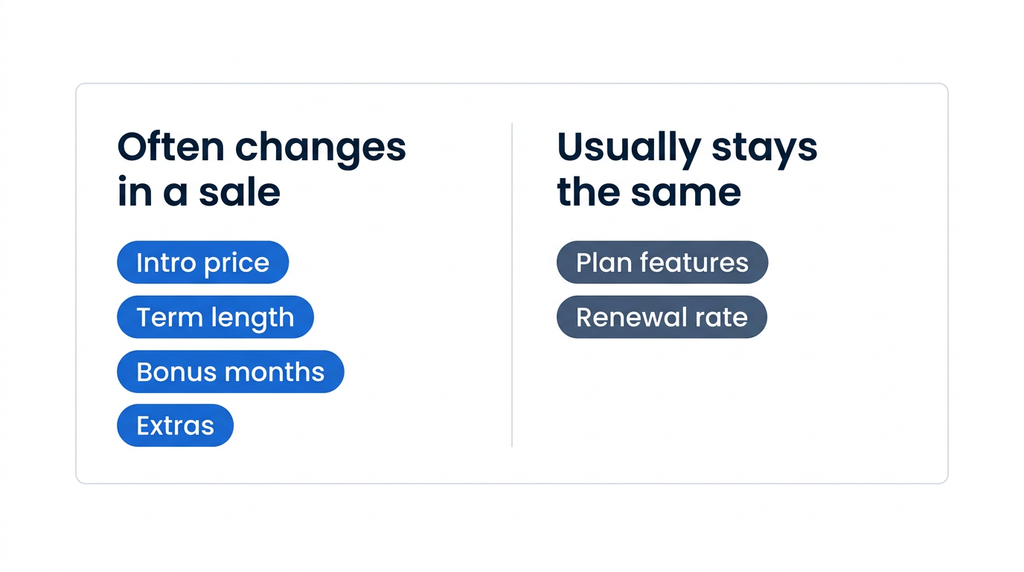
A Black Friday sale usually changes the introductory price, the term you need to get it and the extras bundled in. The plan itself and its renewal rate usually stay the same.
Knowing which parts move helps you compare offers on equal terms. Each item below can look different on a sale page than on a regular pricing page.
- Introductory price: The discounted rate covers your first term only, then the plan renews at the regular rate.
- Term length: The lowest monthly figure often requires 12, 36 or 48 months paid upfront.
- Free months or bonus time: The offer may add extra months, which lowers the effective monthly rate.
- Extras: The bundle may include a first-year domain, a Secure Sockets Layer (SSL) certificate, credits or email trials that renew.
To see what you’ll pay today, multiply the monthly price by the number of months in the term. Some hosts show this upfront total for you, while others show only the monthly figure.
Match plan types before you compare prices. A shared hosting discount and a virtual private server (VPS) discount cover different products. Before you weigh offers, compare the main types of web hosting.
Checking a Black Friday web hosting deal against the regular price
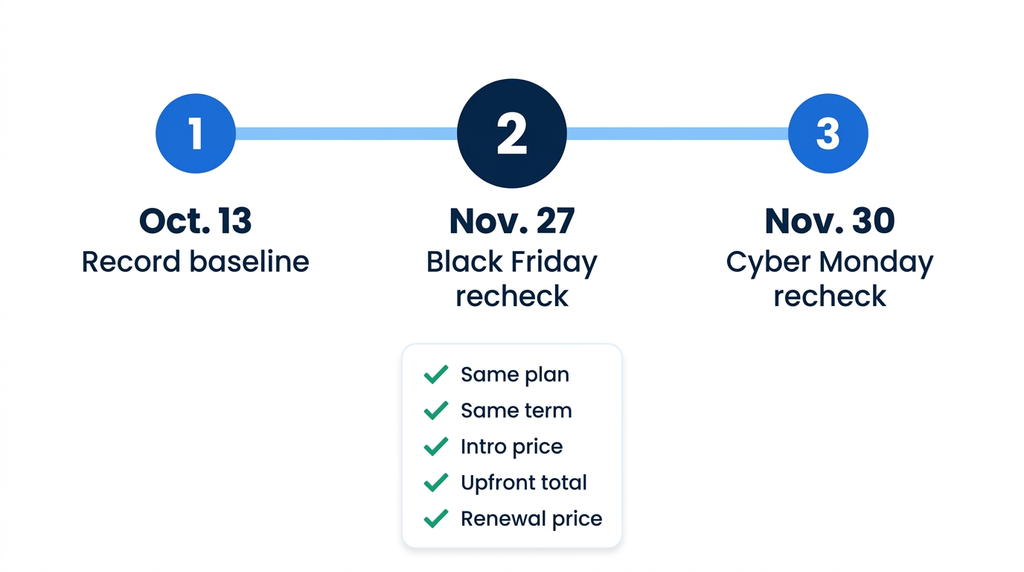
Write down the regular price for the plan and term you want today, then compare it with the sale price on Nov. 27. A two-date check shows whether the sale changed the number you’d actually pay.
The steps below take a few minutes and work with any host. Dated screenshots give you a clear record for the later comparison.
- Pick your plan and term: Choose the plan and term length you’d actually buy.
- Record the baseline: Note the intro price, upfront total and renewal price, then save a dated screenshot.
- Recheck on sale days: Look at the same page again on Nov. 27 and Nov. 30.
- Match like for like: Compare the same plan and the same term on both dates.
- Recalculate your total: Add the intro term and renewals for the years you plan to stay.
Pro tip: Compare dollar amounts instead of percentage labels. A percentage-off label can be measured against different reference prices, so two offers with the same label may save different amounts.
Regular prices: a status table
The table lists entry shared hosting plans, with prices taken from each host’s own pages and checked on Oct. 13, 2026. Use it as a baseline for your Nov. 27 recheck. If you’re unsure the plan type fits, review the pros and cons of shared hosting first.
Bluehost publishes this guide and lists its own plan first. The table is not a ranking.
| Host | Plan | Term | Listed price | Renewal price | Refund window | 2026 sale status |
|---|---|---|---|---|---|---|
| Bluehost | Starter | 36 months | $3.99/mo | $9.99/mo | 30 days | Holiday offer applies to 12-month terms only. |
| Bluehost | Starter | 12 months | $4.24/mo | $11.99/mo | 30 days | 15% off one, 20% off two or 25% off three eligible products on 12-month terms, through Nov. 30 |
| Hostinger | Premium | 48 months ($143.52 upfront) | $2.99/mo | $10.99/mo | 30 days | Sale page live (checked Oct. 13); prices matched the regular pricing page |
| HostGator | Hatchling | 36 months | $3.75/mo | $10.99/mo | 30 days | Not announced (checked Oct. 13) |
| SiteGround | StartUp | 12 months | $3.99/mo | $17.99/mo | 30 days | Not announced (checked Oct. 13) |
| DreamHost | Launch | 12 months | $2.89/mo | $10.99/mo | 30 days | Not announced (checked Oct. 13) |
| InMotion Hosting | Launch | 24 or 36 months | $4.99/mo | $14.99/mo | 90 days | Not announced (checked Oct. 13) |
Note: Pricing is as of October 2026. For the latest pricing and offerings for each host, visit the provider’s website directly. See current Bluehost plans and pricing.
Terms in the table run 12–48 months, so the lowest monthly figure isn’t automatically the lowest total. Renewal rates also vary by host, and they shape every year after the first term.
Hostinger’s status is sale page live (checked Oct. 13), so prices on its Black Friday page may change after this check.
Why the renewal price outweighs the discount
You pay the intro price once and the renewal price for as long as you stay. After the first term ends, the renewal rate decides most of what you spend.
A small difference in the renewal rate adds up quickly over several years. The example and checklist below show how to measure it.
Hypothetical example: 3-year and 5-year totals
This example uses made-up numbers, not real host prices. It compares a lower intro price on a short term with a slightly higher intro price on a long term.
| Cost item | Plan A | Plan B |
|---|---|---|
| Intro price | $3/mo for 12 months | $4/mo for 36 months |
| Renewal price | $18/mo | $10/mo |
| 3-year total | $36 + $432 = $468 | $144 |
| 5-year total | $36 + $864 = $900 | $144 + $240 = $384 |
Plan A looks cheaper on day one, yet it costs $516 more over five years. Nearly all of that gap comes from the renewal rate.
Where to find the renewal price
Hosts publish renewal rates in a few predictable places. Checking more than one source helps you confirm the rate before you commit.
- Plan card: Look for “renews at” text beside the intro price.
- Pricing page: Some hosts publish a renewal table broken out by term.
- Terms of service: The legal terms explain how promo pricing and renewals work.
- Checkout summary: The cart may show the renewal date and rate before you pay.
Bluehost, HostGator and Hostinger each state that promotional pricing covers the initial term only. Renewals often bill automatically, so note the renewal date on the day you buy.
12-month vs. 36-month terms: Which commitment fits?
Longer terms usually lower the monthly rate and can lower the renewal rate, too. The trade-off is a larger upfront payment and a longer commitment.
Our pricing page lists Starter plan renewals at $15.99/mo monthly, $11.99/mo on a 12-month term and $9.99/mo on a 36-month term. That’s a $6 monthly gap between monthly billing and the 36-month term. Bluehost’s holiday offer through Nov. 30 applies to 12-month terms, so compare its discounted 12-month total against the 36-month rate before you choose.
The table compares the three billing options on the factors that usually decide the choice. Prices are left out because they vary by host and plan.
| Term | Upfront cost | Monthly rate | Flexibility | Best when |
|---|---|---|---|---|
| Monthly | Lowest | Highest | Most flexible | You need a site for a short project or test |
| 12-month | Moderate | Lower than monthly | Review the plan each year | You’re launching and expect your needs to change |
| 36-month | Highest | Often the lowest | Committed for three years | Your site is stable and your budget is set |
The takeaway: A longer term trades flexibility for a lower rate. The right choice depends on how settled your site and budget are.
Your business stage usually points to one of these terms. Use the lists below to match your situation with a commitment length.
Choose 12 months if:
- You’re testing a new business idea.
- You’re unsure how much storage or traffic you’ll need.
- You expect to upgrade plans within a year.
Choose 36 months if:
- Your site is established and its needs are stable.
- You know your hosting budget for the next three years.
- You want the lower renewal rate a longer term can carry.
Free domain eligibility can depend on term, too. HostGator and InMotion Hosting tie their free domain to 12-month or longer plans, and Bluehost limits its free first-year domain to 12- or 36-month terms.
When buying before or after Black Friday makes sense
Buy when the timing fits your project and the price passes your checks. Waiting makes sense mainly when you don’t need the site yet.
Deciding when to buy web hosting comes down to your launch date more than the calendar. The scenarios below cover common situations for small business owners, so find the one closest to yours.
- You need a site live now: Buy now for a launch, campaign or store opening. A refund window gives you a safety net.
- You’re planning a new site for next year: Record today’s baseline and compare it with the sale price on Nov. 27.
- You’re switching hosts mid-contract: Check your current renewal date and refund terms before you buy elsewhere.
- Your current plan renews soon: Compare the new host’s total cost against your upcoming renewal invoice.
- You’re unsure about plan size: Pick a shorter term or rely on a refund window to limit your risk.
One date before Black Friday affects domains. Verisign, the .com registry operator, announced a .com wholesale fee increase from $10.26 to $10.97 per year, effective Nov. 1, 2026.
That is the fee registrars pay, and each registrar sets its own retail price. If a plan includes a free first-year domain, check the domain’s renewal price separately.
Also read: Learn how to choose a web hosting service if you’re comparing hosts on more than price.
Black Friday vs. Cyber Monday for web hosting
For web hosting, Black Friday and Cyber Monday often fall inside the same sale window, so compare offers the same way on both days. Neither day is guaranteed to be cheaper.
The Black Friday vs. Cyber Monday hosting question often comes from retail shopping habits. Adobe’s 2025 holiday shopping data shows how United States (US) online spend split across the two days.
| Period (2025) | US online spend | Change from 2024 |
|---|---|---|
| Black Friday | $11.8 billion | +9.1% |
| Cyber Monday | $14.25 billion | +7.1% |
| Cyber Week (Thanksgiving through Cyber Monday) | $44.2 billion | +7.7% |
In 2025, Cyber Monday drew more spending, while Black Friday grew faster. These figures cover US online retail spend overall, so they say nothing about hosting prices or discount depth on either day.
Some hosts publish sale pages well before either date. Hostinger, for example, had its sale page live (checked Oct. 13), more than six weeks before Black Friday.
Pro tip: Recheck your chosen plan on Nov. 27 and Nov. 30. Buy on whichever date the total cost for your plan and term comes out lower.
What to check before you pay
A few minutes at checkout can prevent surprise charges later. Work through these checks before you enter payment details, whichever day you buy.
- Plan type and limits: Confirm the number of sites, storage and any visit limits match your needs.
- Term and upfront total: Multiply the monthly price by the months in the term to see today’s charge.
- Renewal price and start date: Note the renewal rate and the date it begins.
- Refund window and exclusions: Check whether domains, add-ons or monthly plans are excluded. Payment method can matter too.
- Domain renewal after year one: Look up the domain’s renewal price, since a free domain typically covers the first year.
- Pre-selected add-ons and trials: Remove extras you don’t need and note any email trial that renews at the regular rate.
- Auto-renewal and cancellation steps: Read how to turn off auto-renewal and cancel before you commit.
- Taxes at checkout: Expect taxes on the final total, since several hosts list prices before tax.
Refund terms differ between hosts and between products at the same host. Bluehost’s 30-day money-back guarantee covers hosting fees, while most add-ons and domains are excluded. If your plan included a free domain, a non-refundable domain fee is deducted from the refund.
For a closer look at common exclusions, read about how hosting refunds and money-back guarantees work. It also covers how cancellation affects a refund.
Final thoughts
A Black Friday web hosting deal is worth taking when the numbers still hold up on the day you check. Record your plan’s regular price and renewal rate today, then recheck on Nov. 27 and buy when the plan and total cost fit.
Bluehost lists renewal prices by term, so you can see your post-promo rate before you buy.
Through Nov. 30, Bluehost’s holiday offer takes 15% off one eligible product on a 12-month term, 20% off two or 25% off three. Eligible hosting plans qualify. Terms and eligibility apply.
Every plan includes free SSL, a free first-year domain on 12-month terms and a 30-day money-back guarantee on hosting fees, with 24/7 human support.
Compare Bluehost Web Hosting plans and renewal prices by term.
FAQs
Yes, web hosting is sold and activated online, so any Black Friday pricing appears on each host’s own website and checkout page. Many hosts charge the full term upfront, and some add taxes only at checkout. Treat the checkout total as the real price, since the plan card’s monthly figure may leave out tax and add-ons.
It varies by host: Hostinger’s sale page was already live on Oct. 13, more than six weeks before Black Friday. HostGator, SiteGround, DreamHost and InMotion Hosting had not announced 2026 dates as of Oct. 13, and Bluehost’s 2026 offer runs through Nov. 30. If a host hasn’t posted dates, check its pricing page again during Thanksgiving week.
It depends on how long you expect to keep the site on the same plan. Before you choose, confirm at checkout whether the sale price applies to every term or only one. With a 3-year term, your next renewal is three years out, so set a calendar reminder a few weeks before that date to compare options.
Not usually for introductory pricing, which Bluehost and HostGator both reserve for new customers on the first term or invoice. Eligibility for existing accounts depends on the offer terms, so read them before you buy. If you already host with us, compare any upgrade offer against your current renewal invoice before you accept it.
Often, since many hosts bundle free SSL and a first-year domain with the plan, and Bluehost includes free SSL on every Web Hosting plan. Under Bluehost’s free domain policy, you have 90 days from purchase to redeem the domain, which renews at the then-current rate after the first year. Extras vary by offer, so confirm what your cart includes at checkout. Our guide to a free domain name with hosting covers eligible extensions.
Not always, since Hostinger’s 2026 Black Friday page says its discounts apply automatically with no coupon needed. For Bluehost, confirm at checkout that the discount shows in your cart total. If a code field appears at checkout, enter any code before you pay and confirm the cart total matches the sale page price.

Write A Comment