 ChatGPT,
 Claude,
 Gemini,
 Grok — all four for
Key highlights
- Understand how shared hosting works: multiple websites share the same server resources, keeping costs low and setup simple.
- Evaluate the tradeoffs: shared hosting performs well for low to moderate traffic but has limits under heavy load or complex requirements.
- Identify the right fit: blogs, portfolios, local business sites and early-stage eCommerce stores get the most value from shared hosting.
- Know when to upgrade: move to VPS or cloud hosting when traffic grows consistently or performance becomes business-critical.
Picking a hosting plan feels like a bigger decision than it should be. There are too many options, too many acronyms and not enough straight answers about what actually matters for a site at your stage. If you’re weighing shared hosting against other options, you’re in the right place.
This guide breaks down what shared hosting is, how it works and the real pros and cons so you can make a confident call before you commit.
What is shared hosting?
Shared hosting is a type of web hosting where multiple websites live on the same physical server and share its resources: storage, bandwidth, CPU and RAM. Each site has its own account and files, but the underlying infrastructure is shared across all users on that server.
It’s the most widely used hosting type for a reason. Because costs are split across many users, shared hosting plans are priced to fit a small business or personal site budget without sacrificing the basics you actually need to get online.
For most new websites, a shared server has more than enough capacity. The tradeoffs only become relevant as traffic grows or technical requirements become more specific and we’ll cover when that threshold hits.
How does shared hosting work?
When you sign up for a shared hosting plan, your website is assigned to a server alongside other websites managed by the same host. A control panel (typically cPanel or a custom dashboard) gives you access to your files, databases, email accounts and settings without ever touching the server directly.
The hosting provider handles everything at the server level: hardware maintenance, software updates, security patches and uptime monitoring. You manage your site. They manage the infrastructure.
Resources on a shared server are drawn from a common pool. If traffic to your site increases, it uses more of that pool. If a neighboring site on the same server experiences a sudden spike, it can temporarily reduce what’s available to others. This is the core mechanic behind both the advantages and the limitations of shared hosting and it explains every point in the pros and cons sections below.
Pros and cons of shared hosting at a glance
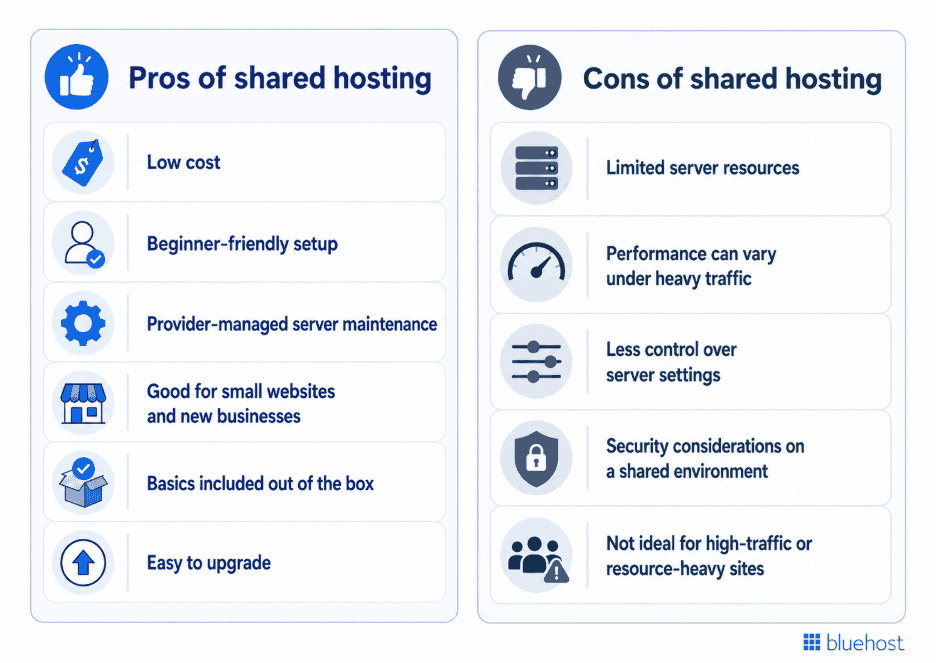
Shared hosting has real advantages for the right site at the right stage. It also has clear limits. The table below gives you the full picture before we break down each point in detail.
| Feature | Pro | Con |
| Cost | Lowest price point of all hosting types. Fits a small business or personal site budget. | Savings come from sharing resources, which has limits as traffic grows. |
| Setup | No server knowledge needed. Your host manages the technical layer. | Limited ability to customize server-level configurations. |
| Server maintenance | Provider handles updates, patches and uptime monitoring. | You have no control over when or how server changes are applied. |
| Performance | More than enough for low-to-moderate traffic sites. | Traffic spikes can slow your site temporarily. |
| Security | Reputable hosts include SSL and real-time malware scanning. | Shared environment means a larger attack surface than a private server. |
| Scalability | Easy to upgrade to VPS or cloud when your site grows. | Shared resources have a ceiling. High-growth sites will outgrow it. |
| Control | Simplified dashboard for files, email and site management. | No access to server-level settings or custom software installs. |
The sections below break down each point so you know exactly what to expect and when these tradeoffs start to matter for your site.
Pros of shared hosting
Evaluated on its own terms, for the audience it’s built for, shared hosting has real advantages worth understanding.
1. Low cost
Most new websites don’t need a dedicated server. They need reliable hosting that works, costs a manageable amount per month and doesn’t require an IT background to run. Shared hosting delivers on all three.
Because infrastructure costs are distributed across many users, providers can offer shared plans at a fraction of what VPS or dedicated hosting costs. For a blogger, a local business owner or a first-time site builder, that price difference matters. You’re not paying for server capacity you won’t use for months or years.
When you’re ready to explore plan options, shared hosting plans from Bluehost include a free domain and free SSL in every plan, so your starting costs stay predictable.
2. Beginner-friendly setup
You don’t need to know what a server configuration file is to run a shared hosting account. That’s the point. Your host handles the technical layer and you get a dashboard that lets you install WordPress, set up email and manage your files without touching a command line.
For small business owners who want a live site without hiring a developer, shared hosting removes the barrier between “I have an idea” and “my site is online.”
3. Provider-managed server maintenance
Every server needs software updates, security patches and uptime monitoring. On shared hosting, your provider handles all of it. You never have to schedule a maintenance window, apply a PHP update or worry about whether your server’s firewall rules are current.
For a business owner focused on running their business, this is a genuine advantage. The alternative, managing your own server, adds a recurring technical obligation that most small site owners don’t need and aren’t equipped for.
4. Good for small websites and new businesses
A blog, portfolio, local service website or early-stage business site runs comfortably within shared hosting limits. Low to moderate traffic volumes don’t push shared resources anywhere near their ceiling, which means you get reliable performance without paying for capacity you don’t need yet.
Right-sizing your hosting matters as much as choosing the right platform. Shared hosting is the correct tool for this stage of a site’s life, not a compromise.
5. Basics included out of the box
Most shared hosting plans bundle what a new site actually needs to launch: an SSL certificate for secure connections, a professional email trial tied to your domain and access to our WordPress AI builder.
A free SSL certificate protects your visitors and signals trust to search engines. Professional email on your own domain makes your business look credible from day one. Getting both included in a base plan removes friction from the launch process.
6. Easy to upgrade
Shared hosting gives new sites a practical place to start, with room to move to VPS or cloud hosting later. When your site outgrows it, reputable providers make it straightforward to move to a VPS or cloud plan without rebuilding your site from scratch. However, migration steps vary by site and plan.
Knowing the upgrade path exists and is designed to be simple removes one of the biggest hesitations new site owners have. You’re not locked in. You’re starting at the right level for where you are now, with room to scale when your traffic and requirements justify it.
Cons of shared hosting
Every hosting type has tradeoffs. Shared hosting’s limitations aren’t flaws in the product. They’re the natural result of the resource-sharing model that makes it affordable in the first place.
1. Limited server resources
Your site shares CPU, RAM and bandwidth with every other site on the same server. For most small sites running at normal traffic levels, this is a non-issue. The shared pool has enough capacity to go around.
The constraint becomes real when your site grows. A high volume of simultaneous visitors, large file uploads or resource-intensive plugins can push your usage toward the limits of what a shared plan allocates. When that happens consistently, performance suffers and an upgrade becomes necessary.
2. Performance can vary under heavy traffic
A sudden traffic spike, a viral post, a product launch or a seasonal sale can temporarily strain your shared resources. Your site may load more slowly than usual during those peaks, not because anything is broken, but because demand is outpacing what the shared pool can comfortably absorb at that moment.
For sites where a slow page directly costs conversions, this variability matters. Understanding when your hosting setup needs an upgrade before a traffic event forces the decision is a smarter approach.
3. Less control over server settings
On a shared server, you work within the configuration your provider sets. You can manage your site, your files, your database and your email. You can’t change server-level settings, modify PHP configuration globally, install custom server software or adjust firewall rules at the infrastructure level.
For most small business owners and bloggers, this limitation never surfaces. For developers building applications with specific server dependencies or businesses with custom security requirements, it’s a real constraint that shared hosting can’t accommodate.
4. Security considerations on a shared environment
Multiple sites on one server means a larger shared attack surface than a private server. If one account on the server is compromised, a poorly configured host could expose other accounts on the same machine.
The risk is manageable with the right provider. Bluehost Web Hosting plans include encryption, malware scanning and active monitoring, so your account has active defenses running whether you think about them or not. Provider choice matters here more than the hosting type itself.
5. Not ideal for high-traffic or resource-heavy sites
Large eCommerce catalogs, high-traffic content publishers, membership platforms with concurrent logins and applications running custom server processes all put demands on hosting infrastructure that shared plans aren’t built to meet at scale.
This isn’t a criticism of shared hosting. It’s a signal of growth. A site that has outgrown shared resources is a site that’s succeeding. The right response is an upgrade to VPS hosting or a cloud plan, not a reluctance to have started on shared hosting in the first place.
Shared hosting vs. other hosting types
Shared hosting is one of four main hosting types. Each is built for a different stage of a site’s growth and a different set of technical requirements. The table below shows where shared hosting fits relative to the alternatives so you can assess which one matches where your site is right now.
| Hosting type | Best for | Main advantage | Main limitation |
| Shared hosting | New sites, blogs, portfolios, small business sites | Lowest cost, easiest setup, provider-managed | Limited resources, less control, performance variability |
| VPS hosting | Growing sites needing more control and resources | Dedicated resources, root access, better performance | Higher cost, more technical setup required |
| Cloud hosting | Sites with variable or unpredictable traffic | Elastic scaling, pay for what you use | Pricing can be harder to predict |
| Dedicated hosting | High-traffic, mission-critical, resource-heavy sites | Maximum performance, full server control | Most expensive, requires server management expertise |
Shared hosting vs. VPS hosting
This is the most common upgrade decision. VPS hosting gives your site dedicated resources on a virtual partition of a physical server. You’re no longer sharing CPU and RAM with other accounts, which means more consistent performance and more control over your server environment.
The tradeoff is cost and complexity. VPS plans cost more and require a higher comfort level with server management. If your traffic has grown consistently, your site is slowing under load or you need server-level control for a custom application, VPS hosting is the natural next step from shared.
Shared hosting vs. cloud hosting
Cloud hosting distributes your site across multiple servers rather than keeping it on one machine. If one server has an issue, another picks up the load. This makes cloud hosting more resilient and better suited for sites where downtime has a direct revenue cost.
It’s also more flexible. You scale resources up or down based on demand, which suits sites with traffic that spikes unpredictably. The downside is that pricing can be harder to forecast month to month compared to a fixed shared hosting plan.
Shared hosting vs. dedicated hosting
Dedicated hosting gives you an entire physical server to yourself. No shared resources, no neighboring sites, full control over the hardware and software stack. It’s the most powerful option and the most expensive.
For a new or small site, dedicated hosting is significant overkill. It makes sense for large eCommerce operations, high-traffic publishers or businesses with strict compliance and security requirements that can’t be met on shared infrastructure.
Who should use shared hosting?
Shared hosting is the right fit when your site is at an early stage, your traffic is low to moderate and your priority is getting online reliably without overcomplicating the setup or the budget.
These are the site types that run well on shared hosting:
Blogs and content sites: A personal blog, niche content site or editorial publication in its early growth phase doesn’t generate the kind of sustained traffic that strains shared resources. You get reliable performance at a price that makes sense while your audience builds.
Portfolios and freelancer sites: A site that showcases your work and captures leads doesn’t need dedicated server resources. It needs to look professional, load quickly and stay online. Shared hosting covers all three.
Local service businesses: A plumber, consultant, salon or restaurant with an informational website and moderate traffic is exactly the audience shared hosting is built for. You need a credible online presence, not enterprise infrastructure.
Small eCommerce stores: An early-stage online store with a manageable product catalog and growing traffic runs comfortably on shared hosting. As order volume and catalog size increase, upgrading to Bluehost WooCommerce Hosting gives you the performance and tooling your store needs at scale.
New site owners testing an idea: If you’re launching something new and haven’t yet proven traffic demand, shared hosting lets you get online at low cost and low risk. If the idea takes off, the upgrade path is straightforward.
Who should avoid shared hosting?
Shared hosting isn’t the wrong choice for everyone who outgrows it. It’s the wrong starting choice for sites that already have requirements shared infrastructure can’t meet. If any of the following describes your site, a different hosting type will serve you better from day one.
High-traffic publishers and media sites: A site generating tens of thousands of pageviews a day puts consistent pressure on shared resources. Performance variability under that load isn’t acceptable when your revenue depends on ad impressions and page engagement.
Large eCommerce operations: A store with a large product catalog, high concurrent visitors and peak traffic during sales events needs dedicated resources and faster database queries than shared hosting can reliably deliver.
Developers building custom applications: If your project requires specific PHP configurations, custom server software or root access to the server environment, shared hosting won’t give you the control you need. A VPS hosting plan is the right fit.
Businesses with strict security or compliance requirements: Industries handling sensitive data, such as healthcare, legal or financial services, often have compliance requirements that go beyond what a shared environment can accommodate. A private server environment gives you the isolation and configurability those requirements demand.
Agencies managing multiple client sites at scale: Running dozens of client sites from a single shared account creates resource contention and limits your ability to isolate client environments. Dedicated or cloud hosting gives agencies the performance headroom and control structure that client work requires.
Also read: How Agencies Should Evaluate Hosting Uptime?
Membership platforms and sites with high concurrent logins: A site where many users are logged in and active at the same time, streaming content, accessing gated resources or running transactions, puts a different kind of load on a server than a standard informational site. Shared hosting wasn’t designed for that traffic pattern.
The honest answer is that outgrowing shared hosting is a good problem to have. It means your site is working. The right response is a planned upgrade, not avoiding shared hosting as a starting point in the first place.
Is shared hosting worth it?
Yes, for the right site at the right stage. The three questions that settle it:
- How much traffic do you expect: Low to moderate – shared hosting handles it.
- How critical is peak performance? Nice to have, not revenue-critical – shared hosting works.
- How much server control do you need? None – shared hosting is built for that.
If your answers shift on any of those three, it’s time to upgrade. If they don’t, shared hosting is the right call.
Where does Bluehost Web Hosting fit?
For new sites and small businesses, Bluehost Web Hosting is built for exactly this stage. You get:
- Free domain and free SSL included in every plan
- 99.99% uptime SLA so your site stays online
- 24/7 expert support with an average response time under two minutes
- Guided setup so you go from signup to live site without technical experience
- Scalable plans so you upgrade when your traffic justifies it, not before
Start there. Track your traffic and performance. Upgrade when the numbers tell you to.
Ready to launch? Bluehost Web Hosting gets your site online today, with a 30-day money-back guarantee
Final thoughts
Shared hosting is the right starting point for most new websites. It keeps costs predictable, removes the technical overhead of server management and includes the basics you need to launch. Its limits are real but they’re growth limits, not quality limits. A site that outgrows shared hosting is a site that’s working.
If you’re launching a first website, testing a business idea or running a small business site with moderate traffic, shared hosting gives you everything you need right now without paying for infrastructure you’re not ready to use.
Bluehost Web Hosting is built for exactly this stage. Trusted by 5 million customers worldwide and recommended by WordPress.org since 2005.
FAQs
Shared hosting’s main advantages are low cost, beginner-friendly setup and provider-managed maintenance. Its main limitations are shared server resources, performance variability under heavy traffic and limited server-level control. For new sites, blogs and small businesses with moderate traffic, the pros outweigh the cons. For high-traffic or resource-heavy sites, the limitations become the deciding factor.
Yes. Shared hosting is designed for users who don’t have server management experience. Your provider handles updates, security patches and uptime monitoring. You get a dashboard to manage your site, email and files without touching a command line. It’s the lowest-friction way to get a site online.
Shared hosting carries a larger attack surface than a private server because multiple sites share the same machine. A reputable provider mitigates this with account isolation, free SSL and real-time malware scanning and removal. Provider choice matters more than the hosting type itself when it comes to security.
It can, under specific conditions. For low to moderate traffic, shared hosting performs well. Under heavy or sustained traffic spikes, shared resources can create temporary slowdowns. Bluehost shared hosting runs on Oracle Cloud Infrastructure, which delivers faster baseline performance than standard shared environments.
On shared hosting, your site shares server resources with other accounts. On VPS hosting, you get a dedicated portion of a physical server with resources allocated only to you. VPS gives you more consistent performance, more server-level control and a higher price point. It’s the natural upgrade from shared hosting when traffic and performance requirements grow.
Three signals tell you it’s time. Your site is slowing consistently under normal traffic loads. You need server-level control or custom software your shared plan doesn’t allow. Your traffic has grown to a point where shared resources can’t absorb peak demand without affecting performance. When any of those conditions become regular rather than occasional, VPS hosting or cloud hosting is the right next step.
Yes, for most small business use cases. The cost is manageable, setup is straightforward and the basics, SSL, and email trail, come included. Simple starter stores can begin on shared hosting, but if selling online is central to the business, Bluehost WooCommerce Hosting may be a better fit.

Write A Comment