


Key highlights
- Understand how n8n works and how it automates workflows by connecting apps, APIs and databases through a visual workflow builder.
- Discover the core components of n8n, including workflows, nodes, triggers and the execution engine that power automated processes.
- Explore why technical teams prefer n8n over traditional automation tools like Zapier and Make for flexibility, customization and infrastructure control.
- Learn common n8n use cases such as data synchronization, DevOps automation, customer workflows and internal process automation.
Let’s be real, automation starts easy but gets messy fast. What begins as a simple way to connect two apps often spirals into a tangled web of scripts, custom integrations and those inevitable, sky-high SaaS bills. As teams scale, traditional no-code tools often become limiting, with rigid logic, capped tasks and minimal control over the infrastructure.
That’s where n8n comes in. It’s built for teams that understand how APIs and systems connect and need more flexibility than traditional automation tools provide. Instead of locking you into a rigid platform, n8n combines an intuitive visual workflow builder with the ability to add custom logic, connect to almost any API and run everything on infrastructure you control.
In other words, it puts automation back in your hands. Rather than paying for every task or workflow execution, you can build and scale automation on your own terms.
In this guide, we’ll explain what n8n is, how it works and why many technical teams are choosing it as their main automation platform.
What is n8n?
n8n is a powerful workflow automation platform that enables teams to synchronize applications, APIs and databases effortlessly. By automating repetitive sequences, it eliminates manual data transfers and streamlines complex operational processes. Whether triggering actions based on schedules or real-time data events, n8n serves as a robust hub for managing digital tasks.
Unlike standard SaaS automation tools, n8n prioritizes a developer-centric approach. It features an intuitive visual interface paired with the flexibility to inject custom JavaScript. This combination allows technical users to architect intricate logic while maintaining full transparency across every node in the workflow.
A defining feature is its self-hosting potential. Organizations can deploy n8n on their own infrastructure, ensuring absolute control over sensitive data and security protocols. This autonomy makes it a superior choice for businesses requiring scalability without external platform dependencies.
Overall, n8n transforms fragmented tools into a cohesive, automated ecosystem. It offers an extensive library of 1,432 integrations and uses an event-driven architecture. The platform covers many categories, including AI, analytics, communication, cybersecurity, data & storage, developer tools, finance & accounting, marketing, productivity, sales and more.
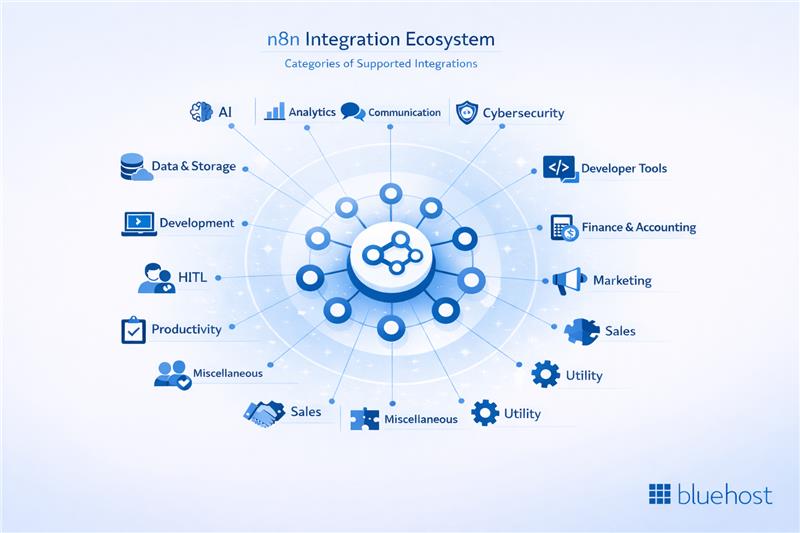
For added reliability, users can filter for Partner-built nodes. This shows only verified integrations created by official partners, making it ideal for self-hosted workflow automation. With these powerful features in mind, let’s take a closer look at the key characteristics of n8n:
Key characteristics of n8n:
n8n is a technical-first, self-hosted automation platform designed for teams that require deep customization and full control over their infrastructure. Unlike traditional SaaS automation tools, it gives teams the flexibility to build sophisticated workflows without platform restrictions.
The following features highlight why technical teams increasingly prefer n8n over traditional automation platforms.
- Visual workflow builder: A drag-and-drop interface that allows for the rapid design of complex automation flows across various services and systems.
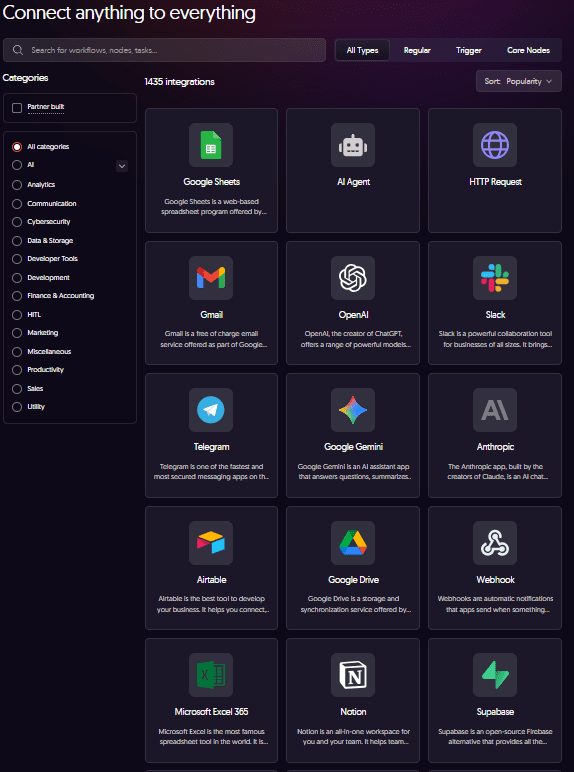
- 400+ native integrations: Access pre-built connectors for popular SaaS tools, databases and productivity platforms to automate across your existing stack immediately.
- Custom JavaScript logic: Execute custom JavaScript code directly inside workflows for advanced use cases that require deeper flexibility than standard nodes.
- AI and LLM capabilities: Integrate large language models like OpenAI and Google Gemini directly into workflows for intelligent data classification, summarization and generation.
- Self-hosted ownership: Run n8n entirely within your own Bluehost VPS environment to maintain full ownership of sensitive business data and execution logic.
- Predictable infrastructure costs: Eliminate per-task or per-execution fees in favor of flat, predictable infrastructure pricing that allows you to scale without financial penalties.
- Custom API and webhook support: Connect to internal systems and services not supported by traditional tools using HTTP requests and custom endpoints.
By choosing n8n on a self-managed VPS, you transition from “renting” automation to “owning” it. This approach ensures your workflows remain private, extensible and cost-effective, allowing you to build automation like a core product rather than a limited third-party service.
In the next section, we’ll look at the fundamentals behind how n8n actually operates and how workflows are created, triggered and executed across different systems.
How does n8n work?
At its core, n8n works by connecting different apps, APIs and systems into automated workflows that run tasks without manual intervention. Instead of writing long scripts or building custom integrations from scratch, you design workflows visually and define how data moves between systems.
Each workflow is made up of nodes that perform specific actions. These nodes are connected together to create a sequence of operations. When a workflow is triggered, by an event, schedule or webhook, the execution engine processes each step and passes data from one node to the next.
This architecture allows teams to automate everything from simple notifications to complex backend processes while keeping full visibility into how the automation works.
1. Workflows
Workflows are the core building blocks in n8n. A workflow is essentially an automated sequence of tasks that execute in a defined order.
You design workflows using a visual interface where each step represents an action or operation. Data flows between these steps, allowing the system to process inputs, trigger logic and produce outputs automatically.
Example: A workflow can capture a lead from a website form, add it to a CRM, send a welcome email and notify the sales team in Slack, all automatically.
Workflows can handle tasks such as:
- Moving data between apps
- Processing API responses
- Triggering notifications
- Running scheduled background jobs
Because workflows are modular and flexible, they can support everything from simple automations to complex system integrations.
Also read: n8n AI Agent Guide: Use Cases, Setup & Automation
2. Nodes
Nodes are the individual steps inside a workflow. Each node performs a specific action or function.
Example: In a lead workflow, one node captures form data, another sends it to the CRM, a third formats the information and a final node notifies the sales team.
Common node actions include:
- HTTP requests – Connect to external APIs or services
- API integrations – Send or retrieve data from SaaS platforms
- Data transformation – Modify or structure data before passing it to the next step
- Database actions – Read from or write to SQL and NoSQL databases
n8n provides hundreds of prebuilt integration nodes, but you can also use custom API calls or write JavaScript logic for more advanced automation.
3. Triggers
Triggers determine when a workflow starts running. Instead of executing manually, workflows can begin automatically based on events or schedules.
Example: A workflow can start when a new support ticket is submitted, run nightly to generate reports or trigger when a CRM record is updated.
Common triggers include:
- Webhooks – Start workflows when an external system sends a request
- Scheduled Triggers – Run automation at specific times or intervals
- App Events – Launch workflows when something happens in an integrated app
This event-driven model allows automation to respond instantly to system activity or run reliably in the background.
4. Execution engine
The execution engine is the component that runs workflows and processes data.
Example: When a new lead is submitted, the engine passes the data through nodes that add it to the CRM, format it and notify the sales team, all automatically.
When a workflow is triggered, the engine:
- Starts the workflow execution
- Passes data through each connected node
- Runs the defined logic and integrations
- Produces the final output or action
Because n8n can run on self-hosted infrastructure, teams maintain full control over how workflows execute, how data flows between systems and how automation scales as usage grows.
5. Example workflow
To understand how everything works together, consider a simple automation scenario.
Imagine a company receiving leads through a website form.
A workflow in n8n might look like this:
- A webhook trigger starts the workflow when a user submits the form.
- An HTTP request node sends the lead data to a CRM API.
- A data transformation node formats the contact information.
- A database node stores the lead in an internal system.
- A notification node sends a message to a team channel in Slack.
This entire process happens automatically in seconds, ensuring that leads are captured, stored and shared without any manual work.
As workflows grow more advanced, teams can add conditional logic, AI integrations and multiple system connections, turning n8n into a powerful automation engine for internal tools and products.
Understanding how workflows, nodes, triggers and the execution engine work together also highlights why so many technical teams prefer n8n for building automation infrastructure. Next, let’s explore the key features that make n8n such a powerful and flexible workflow automation platform.
Next, let’s look at why technical teams prefer n8n over tools like Zapier and other SaaS-based automation solutions.
Why technical teams prefer n8n over traditional automation tools?
As automation becomes a core part of modern infrastructure, many technical teams begin to outgrow traditional SaaS automation tools like Zapier and Make. Platforms such as n8n offer greater flexibility, control and extensibility, allowing teams to build automation that integrates deeply with their systems.
Key differences between n8n and traditional automation tools
| Capability | n8n | Traditional automation tools |
|---|---|---|
| Infrastructure control | Self-hosted or cloud deployment allows teams to run workflows within their own infrastructure. | Workflows run on the platform provider’s infrastructure. |
| Data ownership | Automation logic and data remain within internal systems. | Workflow data is processed through third-party platforms. |
| Pricing model | Self-hosting removes per-task pricing and keeps costs tied to infrastructure. | Pricing typically increases with tasks, runs or operations. |
| Customization | Supports custom JavaScript, HTTP requests and internal API integrations. | Limited to predefined integrations and workflow steps. |
| API-driven automation | Designed for API-first systems with webhooks and event-based triggers. | API capabilities exist but are limited by platform connectors. |
| AI integration | AI models can be integrated directly while keeping workflows self-hosted. | AI automation usually runs inside the platform ecosystem. |
| Target users | Built for developers, DevOps teams and technical operators. | Designed mainly for non-technical users and simple workflows. |
Below are the key reasons technical teams increasingly choose n8n over traditional automation tools.
1. Full control over infrastructure and data
Most SaaS automation platforms run workflows on their own infrastructure. This means your automation logic, execution environment and often your data are processed on a third-party platform.
With n8n, teams can deploy workflows in their own environment, such as a self-managed VPS. This approach ensures:
- Full ownership of automation logic
- Greater control over sensitive data
- The ability to run workflows within internal infrastructure
For organizations building automation into their internal tools or customer-facing systems, this level of control is often essential.
2. No execution-based pricing
Traditional automation platforms typically charge based on the number of tasks, runs or operations executed. As automation usage grows, costs can quickly become unpredictable and expensive.
n8n follows a different model when self-hosted. Instead of paying per workflow execution, teams simply run automation on their own infrastructure. This leads to:
- Predictable infrastructure costs
- No per-task or per-execution fees
- The ability to scale automation without scaling subscription costs
For teams running hundreds or thousands of workflows, this pricing model can significantly reduce long-term expenses.
3. Developer-level customization
Many no-code automation tools limit users to predefined integrations and workflow logic. When a workflow requires custom logic, complex transformations or integration with internal APIs, these platforms often hit their limits.
n8n is designed for technical operators who want deeper customization. It allows teams to:
- Write custom JavaScript directly inside workflows
- Use HTTP requests to connect to any API
- Build custom integrations with internal systems
This flexibility makes it possible to automate workflows that traditional no-code tools simply cannot support.
4. Built for API-driven systems
Modern software ecosystems are increasingly API-driven. Engineering teams often need automation that connects microservices, internal tools and external platforms in real time.
n8n is built with this architecture in mind. It supports:
- Webhook-triggered workflows
- Custom API requests
- Event-driven automation
As a result, teams can orchestrate complex backend processes without writing separate integration services.
5. AI-powered automation without platform lock-in
AI is becoming an important part of workflow automation, enabling tasks such as classification, summarization and content generation. However, many SaaS automation tools require teams to run AI-powered workflows entirely within their platforms.
With n8n, teams can integrate models such as OpenAI or Google Gemini directly into workflows while still running everything within their own infrastructure.
This allows teams to build AI-powered pipelines while maintaining control over data and execution.
6. Designed for technical operators
Unlike many automation platforms that target non-technical users, n8n is built for developers and system operators who understand APIs, integrations and infrastructure.
It combines a visual workflow builder with developer-friendly features such as:
- Custom scripting with JavaScript
- Database integrations
- Webhook-based event triggers
- Direct API orchestration
This hybrid approach makes it easier for technical teams to build sophisticated automation while still benefiting from a visual workflow interface.
In short, technical teams prefer n8n because it transforms automation from a limited SaaS feature into a flexible infrastructure capability. Instead of renting automation through subscription platforms, organizations can build and scale workflows on their own terms. To better understand its impact, let’s explore some common use cases where n8n delivers the most value.
What are the most common use cases for n8n?
n8n enables teams to automate workflows that connect applications, APIs and internal systems. By combining a visual workflow builder with developer-level flexibility, it can support a wide range of operational and product-driven automation.
Below are some of the most common ways teams use n8n to streamline processes and integrate their technology stack.
1. Data synchronization
Organizations often struggle to maintain consistency across their CRM, databases and internal spreadsheets. n8n solves this by automating data synchronization in real-time or via scheduled intervals. These workflows can consolidate records from disparate sources and ensure that every platform reflects the most current information, which significantly reduces the likelihood of manual data entry errors.
2. DevOps automation
Operations and development teams leverage n8n to streamline infrastructure monitoring and CI/CD pipelines. The platform can respond to system alerts or deployment triggers by executing specific remediation steps or sending notifications to Slack and email. This automation enables teams to maintain high availability and respond to critical system events much faster than with manual observation.
3. Customer workflow automation
n8n is frequently applied to customer-centric processes like lead management and user onboarding. When a prospect signs up or submits a query, workflows can automatically route the lead to the correct sales rep and trigger a series of personalized welcome communications. By automating these interactions, businesses ensure a rapid and professional response, freeing up support staff for more complex inquiries.
4. Internal process automation
Beyond external integrations, n8n is highly effective at optimizing internal administrative functions. It can be programmed to generate recurring financial reports, transfer files between cloud storage providers or refresh internal team dashboards. These automations remove the burden of repetitive tasks, allowing employees to dedicate their time to high-impact projects that drive the business forward.
Overall, the flexibility of n8n makes it an essential tool for any organization looking to modernize its workflow. Whether managing intricate developer tasks or standard administrative duties, the platform provides a scalable solution that ensures efficiency across all departments and fosters a more connected digital ecosystem.
Is n8n truly open source?
It’s one of the first questions teams ask and the answer is a bit nuanced. Strictly speaking, n8n isn’t “open source” in the classic sense. It uses a source-available licensing model. This means you can view the code and host it yourself, but specific usage rights, especially regarding enterprise capabilities, are governed by their own license rather than a permissive one like MIT.
For most devs, it still feels like open source. You can audit the code, run it on your own hardware and tweak integrations without being locked into a SaaS vendor’s ecosystem. That sense of control is exactly why so many teams choose n8n over standard subscription tools.
The license basically aims to keep the project sustainable while keeping the engine accessible. Most of the platform is free for the community, while specialized features for massive operations are kept for the enterprise tier.
Breaking down the n8n license
1. The source-available core
- The entire codebase is public for anyone to inspect.
- Developers can modify and deploy the platform on their own servers or VPS.
- This allows for deep customization and internal automation without third-party data risks.
2. The community edition
This is what most people start with. It’s the version that powers serious automation workflows without the enterprise price tag.
Key features include:
- Visual drag-and-drop workflow builder
- Hundreds of pre-built integrations for SaaS and APIs
- Full support for Webhooks and custom HTTP requests
- JavaScript nodes for custom logic
- Scheduled and event-driven triggers
- Self-hosting on your own infrastructure
For technical teams, this edition is usually more than enough to build production-grade pipelines while maintaining ownership of the logic.
3. Enterprise features
If you’re part of a massive organization, you’ll eventually need “grown-up” features. The enterprise tier adds capabilities like:
- Granular access controls and permissions
- Advanced security and compliance logs
- Workflow governance for large teams
- Dedicated enterprise support and scaling tools
These are built specifically for companies baking automation into their core product or high-stakes internal systems.
Why this appeals to technical teams?
The biggest draw here is ownership. You aren’t paying “per task” or “per execution” like you would with traditional SaaS tools. You run it on your own terms, which keeps costs predictable even as your volume explodes.
This approach gives you the freedom to:
- Host everything behind your own firewall
- Keep a close eye on exactly how data flows
- Extend the code at the API level
- Avoid the “success tax” of usage-based SaaS pricing
Essentially, automation becomes a core part of your stack, not just another outsourced service you can’t control.
Clearing up the confusion
Is it open source? Not by the strict OSI definition, but it sits in a very comfortable middle ground:
- Source-available: Code is visible and self-hostable
- Community edition: Free and highly capable for most users
- Enterprise tier: Adds advanced management for big orgs
For teams that prioritize control and extensibility, this model strikes a solid balance between being open and being enterprise-ready.
In short, n8n lets you build automation like it’s your own product, on infrastructure you own, rather than just renting space on someone else’s platform.
Now, let’s take a closer look at how n8n compares with other popular automation platforms like Zapier and Make.
n8n vs Zapier vs Make: Key differences explained
Several automation platforms help teams connect apps and automate workflows, but they differ in flexibility, control and pricing. Tools like n8n, Zapier and Make are commonly used for workflow automation. However, each platform is designed for slightly different use cases and levels of technical complexity.
The comparison below highlights the key differences.
| Factor | n8n | Zapier | Make |
|---|---|---|---|
| Flexibility | Highly flexible with advanced logic, branching workflows and custom scripting capabilities. | Best suited for simple automations and straightforward workflows. | More flexible than Zapier with visual scenarios and branching logic. |
| Hosting options | Can be self-hosted on your own VPS or used via managed cloud hosting. | Fully cloud-based SaaS with no self-hosting option. | Primarily cloud-based SaaS platform. |
| Pricing model | When self-hosted, costs depend on infrastructure rather than workflow executions. | Charges based on the number of tasks executed each month. | Uses an operations-based pricing model tied to workflow usage. |
| Developer customization | Supports JavaScript function nodes, custom APIs, webhooks and database integrations. | Limited developer customization beyond built-in integrations. | Provides HTTP modules and advanced configuration for custom workflows. |
| Scalability | Scales based on server resources, making it suitable for large automation workloads. | Scaling usage typically increases monthly subscription costs. | Can scale workflows but usage costs increase with activity. |
When each tool is best:
- n8n is ideal for technical teams that need deeper customization, API-level integrations and the ability to run automation on their own infrastructure.
- Zapier works well for beginners or non-technical teams that want simple, quick automations between common SaaS tools.
- Make sits between the two, offering a visual automation builder with more advanced logic than Zapier but still operating primarily as a cloud-based platform.
Overall, while Zapier and Make focus on simplicity and convenience, n8n is designed for teams that want greater flexibility, deeper integrations and more control over how their automation workflows run.
If you’re ready to take advantage of that control and flexibility, the next step is setting up your own self-managed n8n instance on a Bluehost VPS.
Why choose self-managed n8n on Bluehost VPS?
Self-managed n8n on a Bluehost VPS offers technical operators the power of a professional-grade automation engine without the restrictive costs and limitations of traditional SaaS platforms. This configuration is the ideal choice for those who want to bridge the gap between simple no-code tools and complex, custom-coded integrations.

Here are the primary advantages of choosing a self-managed VPS for your n8n automation workflows.
1. Complete infrastructure control
Unlike shared SaaS environments, a Bluehost VPS provides dedicated NVMe storage and RAM that ensure your critical workflows run with consistent performance and reliability. You own the entire stack, allowing you to manage sensitive business data within your own secure perimeter rather than relying on third-party security protocols.
2. Predictable and scalable costs
Subscription-based automation tools often charge per task or execution, which can lead to ballooning monthly bills as your business operations grow. With n8n on a VPS, you pay a flat, predictable rate for your server resources regardless of how many workflows or executions you run.
3. Advanced customization with JavaScript
Technical operators can go beyond standard drag-and-drop features by using JavaScript function nodes to execute custom logic directly within any automation flow. This provides the code-level flexibility required for advanced use cases and data transformations that traditional no-code platforms simply cannot handle.
4. Secure and private AI workflows
Integrating Large Language Models into your workflows allows for automated summarization, classification and content generation without sending data through intermediate service layers. Hosting these processes on your own VPS ensures that your AI-powered automations remain private and are integrated directly into your proprietary systems.
5. Unlimited integration flexibility
With support for over 400 native connectors and robust webhook capabilities, n8n allows you to connect virtually any tool or internal service with an API. This flexibility ensures you can build a custom automation ecosystem that perfectly matches your existing tech stack without being restricted by vendor-specific limitations.
Choosing a self-managed n8n deployment ensures your automation strategy is built on a foundation of ownership rather than a rental model. It is the definitive solution for technical teams that prioritize long-term scalability and complete infrastructure control.
How to install n8n on Bluehost self-managed VPS: A step-by-step guide
n8n is a powerful, open-source workflow automation tool that allows users to connect different apps and services seamlessly. If you are using a Bluehost Self-Managed VPS and want to install n8n easily, this guide will walk you through the process using the Bluehost Portal.
Installing n8n using the Bluehost portal
Note that only one application can be installed at a time on your server. If you already have an application installed, please uninstall it before proceeding with the n8n installation.
- Log in to your Bluehost Portal.
- Click Hosting in the left-hand menu.
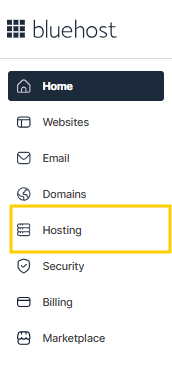
- Click the MANAGE button on the Self-Managed VPS package.
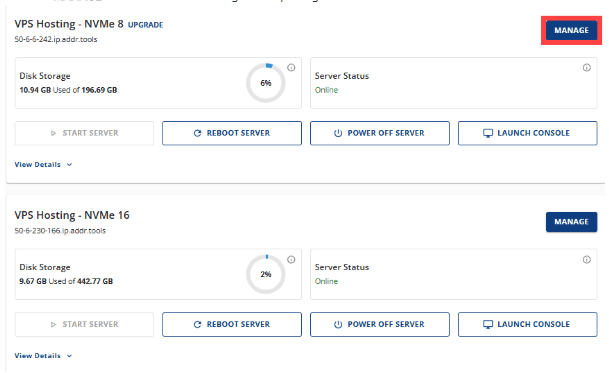
- On the Overview tab, click the INSTALL APPLICATION button. (Alternatively, you can navigate to the OS & Applications tab and select INSTALL APPLICATION).
- From the list of available applications, find n8n and click SELECT.

- Wait for a few seconds for the system to complete the installation.
Accessing your n8n dashboard
Once the installation is finished, you can access your n8n instance by following these steps:
- Log in to your Bluehost Portal and click Hosting in the left-hand menu.
- Find the Self-Managed VPS package where n8n is installed and click MANAGE.
- In the Application section, click MANAGE next to n8n.
- The n8n dashboard login page will open automatically in a new browser tab.
By self-hosting n8n on your Bluehost VPS, you gain full control over your automation workflows, allowing you to design complex processes using drag-and-drop nodes or custom JavaScript functions without the limitations of third-party hosting.
Is n8n the best automation solution for your specific needs?
Overall, n8n is a powerful and flexible platform designed for users who need more control and customization than standard no-code tools provide. It is particularly effective for individuals and teams who want to build complex logic without being limited by vendor-specific constraints. It is best for:
- Software developers who want to write custom JavaScript and self-host their automation environment.
- DevOps engineers looking to manage infrastructure and automate server-side tasks.
- Technical operations professionals who require a balance between visual workflow building and advanced technical depth.
- Teams building internal automation systems where data privacy and self-hosting are critical requirements.
- Businesses that need to scale intricate, API-driven workflows across multiple platforms.
However, if your goal is a simple, zero-maintenance tool for basic personal tasks, other consumer-grade automation platforms might be better suited for those who prefer a purely hands-off, cloud-only experience.
Final thoughts
Automation should empower your team, not trap them in those exhausting “per-execution” pricing loops. That is why so many technical operators are moving n8n to a self-managed VPS. You stop paying for every little task and start building on a predictable foundation where scaling doesn’t break your monthly budget.
Hosting on a Bluehost VPS gives you something a standard SaaS tool just can’t, true ownership of your workflows. Your logic and credentials stay under your own roof and with 400+ integrations, you’re building a custom engine that feels like a native part of your tech stack.
Overall, it’s about total control, plain and simple. If you want better privacy and unlimited growth, taking the leap to self-hosting is easily the smartest move for your modern automation infrastructure. Enhance your automation journey with Bluehost self-managed VPS hosting for n8n, providing the high-performance environment and dedicated resources you need to scale your workflows without limits.
FAQs
n8n is a workflow automation platform that connects apps, APIs and databases to automate repetitive tasks. It uses a visual workflow builder with nodes, triggers and custom logic to move data between systems without manual intervention.
n8n differs from platforms like Zapier by offering deeper customization, self-hosting and developer-level flexibility. While Zapier focuses on simple cloud-based automations, n8n supports custom JavaScript, API integrations and infrastructure control for complex workflows.
Self-hosting n8n gives you full control over infrastructure, automation logic and sensitive data. It also eliminates per-task pricing, allowing teams to scale workflows on their own servers with predictable costs and greater privacy.
Yes, n8n supports integration with custom APIs using HTTP request nodes and webhooks. This allows teams to connect internal tools, microservices and third-party platforms even when native integrations are unavailable.

Write A Comment