 ChatGPT,
 Claude,
 Gemini,
 Grok — all four for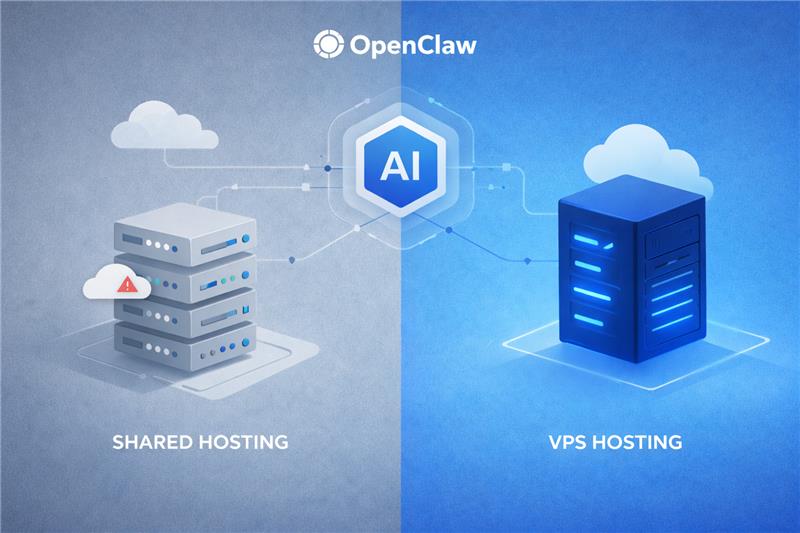
Key highlights
- Compare OpenClaw on VPS vs shared hosting to see why shared plans can’t support a self-hosted OpenClaw setup.
- Learn what OpenClaw needs from a server, including root access, Docker support and persistent storage.
- Discover how OpenClaw 2.0’s restart-safe Automations and admin hub depend on an always-on host.
- Know how running OpenClaw on your own server keeps credentials and conversation history under your control.
- Choose the right OpenClaw VPS plan by comparing renewal prices alongside intro rates before you buy.
Shared hosting is generally unsuitable for running OpenClaw because it typically restricts the root access, Docker support and persistent background processes the platform needs. A self-managed virtual private server (VPS) gives you greater control over the runtime and storage needed to keep the OpenClaw Gateway available.
That choice matters when your team relies on agents for recurring work. Your hosting environment affects resource availability, security configuration and how reliably workflows can run over time.
This guide explains OpenClaw’s server requirements, compares VPS and shared hosting and covers security, ongoing management, plan selection and deployment.
How does OpenClaw work?
OpenClaw is an open-source, self-hosted AI agent platform. Its Gateway connects messaging apps such as Slack and WhatsApp to AI models that can use tools and APIs to complete multi-step tasks.
When a prompt or configured trigger fires, OpenClaw uses the selected model to determine the next steps and take permitted actions. Depending on the task, workflows may require additional input or approval.
Also read: What is OpenClaw AI?
Teams use OpenClaw for internal copilots, research agents, operations assistants and recurring reports. Three capabilities support these use cases:
- Persistent execution: Agents can respond to configured schedules, webhooks and API calls while the Gateway is running.
- Tool calling and API integration: Agents can interact with external services, databases and internal systems through connected tools.
- Memory and session continuity: Session history and workspace memory can support ongoing tasks, depending on configuration. Not every detail is automatically recalled in every interaction.
Why does hosting matter when running OpenClaw?
OpenClaw is built for technical operators moving from AI experiments to dependable systems. Its Gateway is a long-running service that owns sessions, state and the workspace, so the server underneath shapes how well your agents run. In practice, OpenClaw needs five things from a host:
- Full root access: You can install system packages, configure services and manage the server environment. OpenClaw 2.0 also provides a central hub for managing supported plugins, skills and MCP connectors, while the VPS gives you control over the underlying installation.
- Docker support: Docker is the documented containerized path. Manual npm installs need Node 24.16+ or 26.1+, per the OpenClaw install documentation.
- Persistent storage: Sessions, run history, skills and configuration need to survive reboots.
- An always-on environment with allocated resources: Assigned vCPU, RAM and persistent storage help support the Gateway and its background workloads. Actual performance depends on workload, configuration and resource usage.
- Room to grow: Unmetered bandwidth and Non-Volatile Memory Express (NVMe) storage give you headroom as you add agents and Automations.
Any hosting plan you consider has to meet those needs.
Can you run OpenClaw on shared hosting?
No. Bluehost OpenClaw hosting FAQ answers this directly: Shared hosting typically blocks the root access and Docker support OpenClaw’s plugin, skill and MCP ecosystem depends on and shared hosts rarely offer persistent volumes. A self-managed VPS is the minimum environment for running it and shared plans stay the right fit for websites.
Why shared hosting appeals for websites
Shared hosting distributes server costs across multiple accounts and is designed for websites that need a straightforward setup. It’s often a practical choice for blogs, portfolios, marketing sites and small businesses because the host manages much of the server infrastructure.
However, OpenClaw needs more control over the runtime and background processes than typical shared plans provide.
Why shared hosting can’t run OpenClaw
OpenClaw’s Gateway is a long-running service that needs to maintain sessions, connect to external systems and store agent state. Typical shared hosting plans restrict several capabilities it depends on:
- Root access: Shared accounts generally don’t let you install system packages or manage system-level services.
- Docker and runtime control: Docker requires suitable host support and permissions. Available Node.js versions may also be controlled by the hosting provider.
- Persistent background processes: Shared hosting commonly restricts services that need to run continuously.
- Persistent storage and resources: OpenClaw needs storage for its configuration and session data, while shared plans allocate resources across multiple accounts.
Taken together, these restrictions make typical shared hosting unsuitable for a persistent OpenClaw deployment. You can keep your website on shared hosting while running OpenClaw on a separate self-managed VPS.
Running OpenClaw on a VPS
A VPS gives OpenClaw its own server with dedicated CPU, RAM and storage plus full root access. The Gateway can run around the clock without competing with other sites for resources.
Why a VPS is the right fit for OpenClaw
A virtual private server (VPS) gives you control over the operating system, runtime and resources OpenClaw needs. Unlike typical shared hosting, it supports a persistent Gateway and gives you the flexibility to configure your agent environment.
A VPS provides four key advantages:
- Allocated vCPU and RAM: Assigned resources support agent execution and connected services. Actual performance depends on workload and configuration.
- Root access: Install system packages, configure services and manage the software stack OpenClaw requires.
- Persistent storage: Keep session data, configuration and other required files available across reboots.
- An always-on environment: Run the Gateway and configured background tasks without the restrictions commonly placed on shared hosting.
These capabilities make a VPS suitable for long-running agents, multi-step tasks, scheduled Automations and connections to internal APIs or team messaging tools. You remain responsible for managing the operating system, OpenClaw configuration, updates and security.
VPS vs shared hosting for OpenClaw: key differences
Each row below checks one of OpenClaw’s hosting needs against both environments.
| Criterion | Self-managed VPS | Shared hosting |
|---|---|---|
| Resources | Allocated vCPU, RAM and VPS storage | Resources shared across hosting accounts |
| Isolation | Separate virtual server environment | Shared server environment |
| Scaling | Upgrade vCPU, RAM and storage; unmetered bandwidth subject to terms | Plan limits designed primarily for websites |
| Runs OpenClaw | Suitable when configured to meet OpenClaw’s requirements | Typical shared plans lack the required access and persistent process support |
Shared hosting fails the requirements that matter most, so it’s ruled out for OpenClaw. A self-managed VPS meets each one and in return you take on management of the OS and apps.
Keep shared hosting for:
- Your website or blog
- A marketing site that links to your agent
- Host-handled server management through a control panel
Run OpenClaw on a VPS to:
- Answer messages around the clock across your channels
- Install Node.js, Docker, plugins and system packages with root access
- Keep scheduled Automations running through restarts
- Share one instance across teammates and channels
- Keep prompts, credentials and history on a server you control
Is OpenClaw secure on a VPS?
A VPS gives you control over where OpenClaw runs and how its environment is secured, but self-hosting doesn’t automatically guarantee privacy or security. Prompts sent to cloud AI models are processed by the selected model provider and connected messaging platforms and tools may receive data as part of a workflow. Local models can run inference on your server when configured appropriately.
To reduce risk:
- Secure credentials: Store API keys securely, restrict access to credential files and avoid committing secrets to repositories. Use supported environment-based credentials or SecretRefs.
- Protect Gateway access: Follow OpenClaw’s security guidance for local access, SSH tunnels or Tailscale and configure firewall rules to limit connections.
- Review approvals and permissions: OpenClaw 2.0 ties approvals to the specific request being reviewed, but approval controls don’t replace careful permissions and access configuration.
- Maintain your VPS: Apply security updates, review access, rotate exposed or outdated credentials and back up important configuration and session data.
Run openclaw security audit after setup and follow the current OpenClaw security documentation to review risky settings.
Also read: Securing Cloud Data with VPS Servers: The Best Practices
Managing your OpenClaw instance
Bluehost OpenClaw VPS Hosting is self-managed. Bluehost maintains the hardware, network and virtualization layer; you manage the operating system, OpenClaw configuration, updates, server hardening and integrations.
OpenClaw 2.0 includes features that help with restart recovery and administration, but ongoing maintenance is still important:
- Review Automation run history: Check whether runs fired, were delivered and completed. Eligible missed Automations can resume after a restart, but not every interrupted task is guaranteed to resume or finish.
- Check channel status and logs: Review connection states, failed tool calls and integration errors when troubleshooting.
- Monitor CPU and RAM: Check resource usage as you add agents, channels and Automations and upgrade your plan if needed.
- Back up before updates: Back up and verify important session data and configuration before significant upgrades. OpenClaw uses SQLite for session and transcript storage.
- Update and diagnose: Follow the current official update guide, then use Doctor to help identify configuration issues.
Run these commands over SSH as the user who operates OpenClaw:
openclaw update
openclaw doctor
Review the command output and verify Gateway health after updating. Exact update behavior can vary by version and installation method.
Why choose Bluehost VPS hosting for OpenClaw?
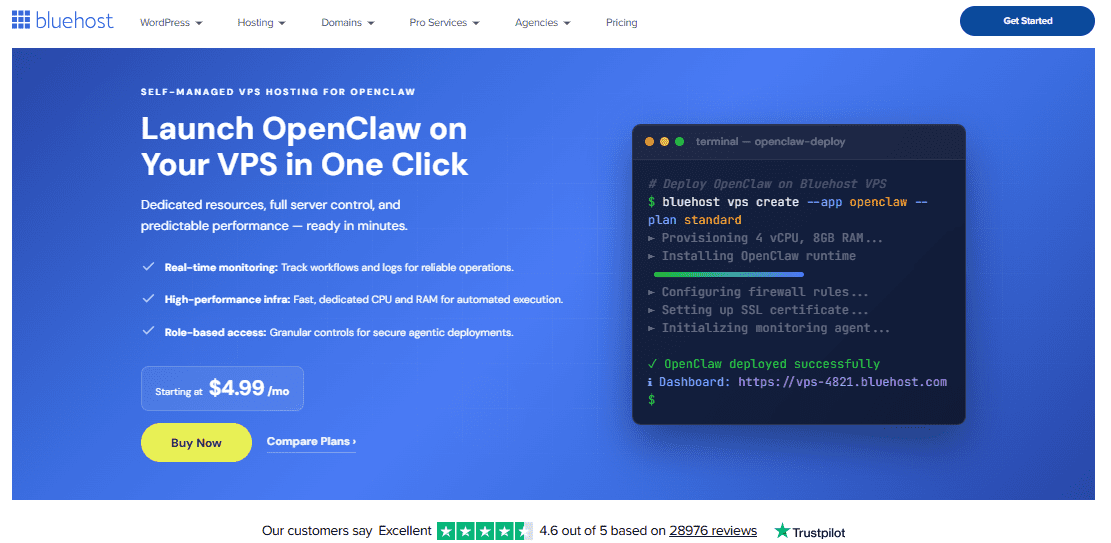
Bluehost OpenClaw VPS Hosting deploys OpenClaw 2.0 (Community edition) on a self-managed Bluehost VPS in one click. You start with the full root access, Docker support and persistent NVMe storage OpenClaw needs and we handle the infrastructure underneath.
1. Your data, agents and server
You can bring your own OpenAI or Anthropic Claude API keys, or run local models through Ollama. Your conversations, skills and configuration stay on your VPS, under your control.
2. Performance and room to grow
Each plan gives you dedicated vCPU, DDR5 RAM and NVMe storage for the persistent context your agents build across conversations. All plans include unmetered bandwidth, subject to our Terms of Service.
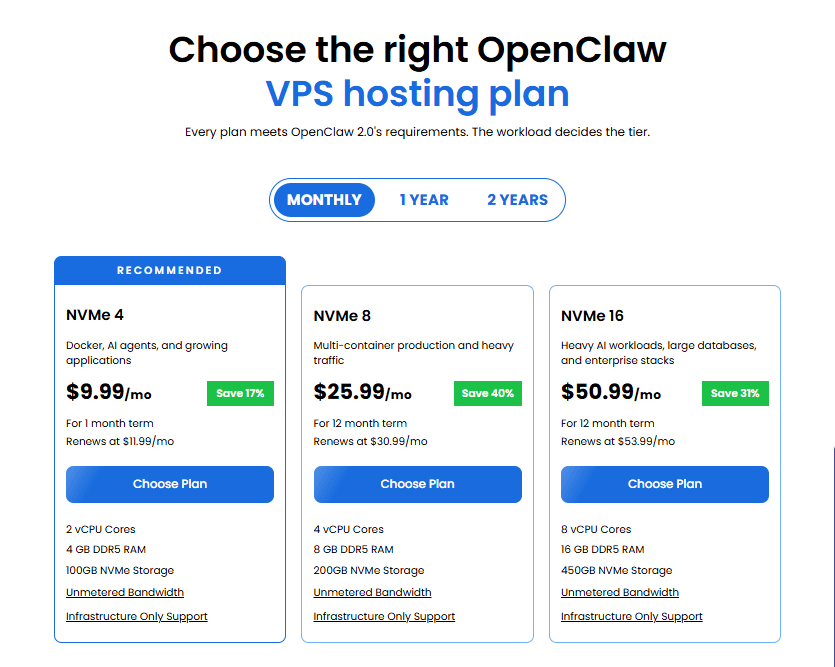
Use this table to match a plan to your workload and compare the renewal rate as well as the intro price.
| Plan | Resources | Best for | Price (24-month term) |
|---|---|---|---|
| NVMe 4 (recommended; functional minimum for OpenClaw) | 2 vCPU, 4 GB DDR5 RAM, 100 GB NVMe | One agent, a few channels and a handful of Automations | $9.49/mo, renews at $11.99/mo |
| NVMe 8 | 4 vCPU, 8 GB DDR5 RAM, 200 GB NVMe | Multi-container production and heavier traffic | $12.99/mo, renews at $28.99/mo |
| NVMe 16 | 8 vCPU, 16 GB DDR5 RAM, 450 GB NVMe | Heavy AI workloads and larger teams | $25.99/mo, renews at $49.99/mo |
Note: Bluehost pricing was verified in October 2026 and may change. See current Bluehost plans and pricing.
If value for money shapes your plan choice, independent testing gives you a reference point. In VPSBenchmarks’ price-weighted Best Value VPS ranking for May 2026, the Bluehost NVMe 4 plan placed 2nd of the 26 VPS plans tested. The test measures the underlying VPS plan rather than OpenClaw itself and VPSBenchmarks notes that it receives support from featured providers, including Bluehost.
Also read: Best VPS size for OpenClaw
3. One admin hub for plugins, skills and MCP connectors
Admins can browse, install, enable, disable and roll back plugins, ClawHub skills and vetted MCP connectors from one hub. A failed install returns to a retryable state instead of breaking your existing configuration. Root access and Docker support on your VPS match what that ecosystem depends on.
One agent can serve your team across Slack, Discord, Telegram, WhatsApp, Signal, Microsoft Teams and SMS/MMS via Twilio. You can also pair OpenClaw with self-hosted n8n for event-driven workflows.
4. One workspace in the rebuilt Control UI
The rebuilt Control UI puts conversations, files, approvals, settings and live agent work in one browser workspace. Because your VPS stays on, that workspace stays reachable for every teammate.
How to deploy OpenClaw on a Bluehost VPS
These steps cover the one-click path, where OpenClaw is installed when you buy your VPS. If you’d rather install OpenClaw manually on a server you already have, the GitHub guide linked below walks you through it. Before you follow it, confirm the current Node.js requirement in the OpenClaw install documentation, since supported versions change between releases.
- Go to the Bluehost VPS Hosting page and click Choose Plan.
- Select a data center location.
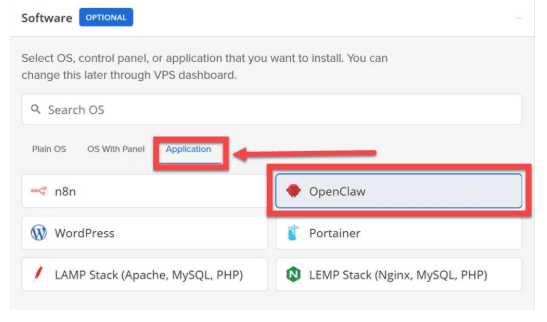
- On the Cart page, open the Application tab in the Software section.
- Select OpenClaw and click Confirm. If it’s grayed out, the plan is below OpenClaw’s minimum, so pick a larger plan.
- Review optional add-ons, such as Premium Support and AI Credits. Then add an SSH public key under Advanced options.
- Choose a billing term and click Continue to Checkout. Sign in or create an account with your email, Google, Apple or GitHub.
- Enter your payment details and click Submit Payment. Your VPS provisions and appears in the Hosting tab of your Bluehost Portal.
Also read: How to purchase a Self-Managed VPS with OpenClaw installation
Once provisioning finishes, open OpenClaw and connect your team’s channels, such as WhatsApp or Slack.
Final thoughts
OpenClaw needs more than a place to run code. It needs an always-on environment with the access, storage and resources to support its Gateway, connected tools and scheduled Automations. Shared hosting remains a practical choice for your website, but a self-managed VPS is the better fit for running OpenClaw.
Bluehost OpenClaw VPS Hosting gets you started with OpenClaw 2.0 installed in one click, while you retain control over the operating system, configuration, integrations and security. Start with the recommended NVMe 4 plan for a first agent, then scale as your workload grows.
Stop experimenting with AI. Start owning it, with Automations built to recover after a restart. Explore Bluehost OpenClaw VPS Hosting and choose the plan that fits your workload.
FAQs
No. Shared hosting doesn’t provide the root access, Docker support or persistent background service OpenClaw needs. If your website already lives on a shared plan, keep it there and run OpenClaw on a separate VPS.
You need an always-on server and a VPS gives you one without buying or maintaining hardware. A laptop can run OpenClaw for testing, but your agents, channels and scheduled tasks go offline whenever it sleeps or restarts.
Yes. GatorClaw Hosting gives you a visual, guided way to build and run agents on the OpenClaw ecosystem and it still runs on a Bluehost VPS. Choose OpenClaw VPS Hosting when you want hands-on control of the full framework.
OpenClaw needs Node 24.16+ or 26.1+ (Node 26 is recommended) or Docker, plus root access and persistent storage on an always-on server. On Bluehost, NVMe 4 is the functional minimum and the cart grays out OpenClaw on plans that don’t meet it. For more detail, see our guide to choosing the right VPS size for OpenClaw.

Write A Comment