


Key highlights
- Understand what an IP address is and why every device needs one to communicate online.
- Learn the key differences between IPv4 and IPv6 address formats and their specific uses.
- Discover how IP addresses route data across networks and enable device-to-device communication.
- Explore the distinction between static and dynamic IP addresses and their practical applications.
- Know how to find your IP address and leverage this knowledge for network troubleshooting.
Over 8 billion people use the internet daily, yet most don’t understand the technology connecting them. Behind every click, stream and message is an IP address working silently in the background.
What is an IP address? It’s your device’s unique digital identifier on the global internet network. Think of it as your online home address that enables communication. Without IP addresses, websites couldn’t find you and you couldn’t access them.
This article breaks down IP address definitions, explores various types and explains how they work. By the end, you’ll understand why IP addresses matter for your everyday internet use.
Let’s get started with the basics.
What’s an IP Address and why is it important?
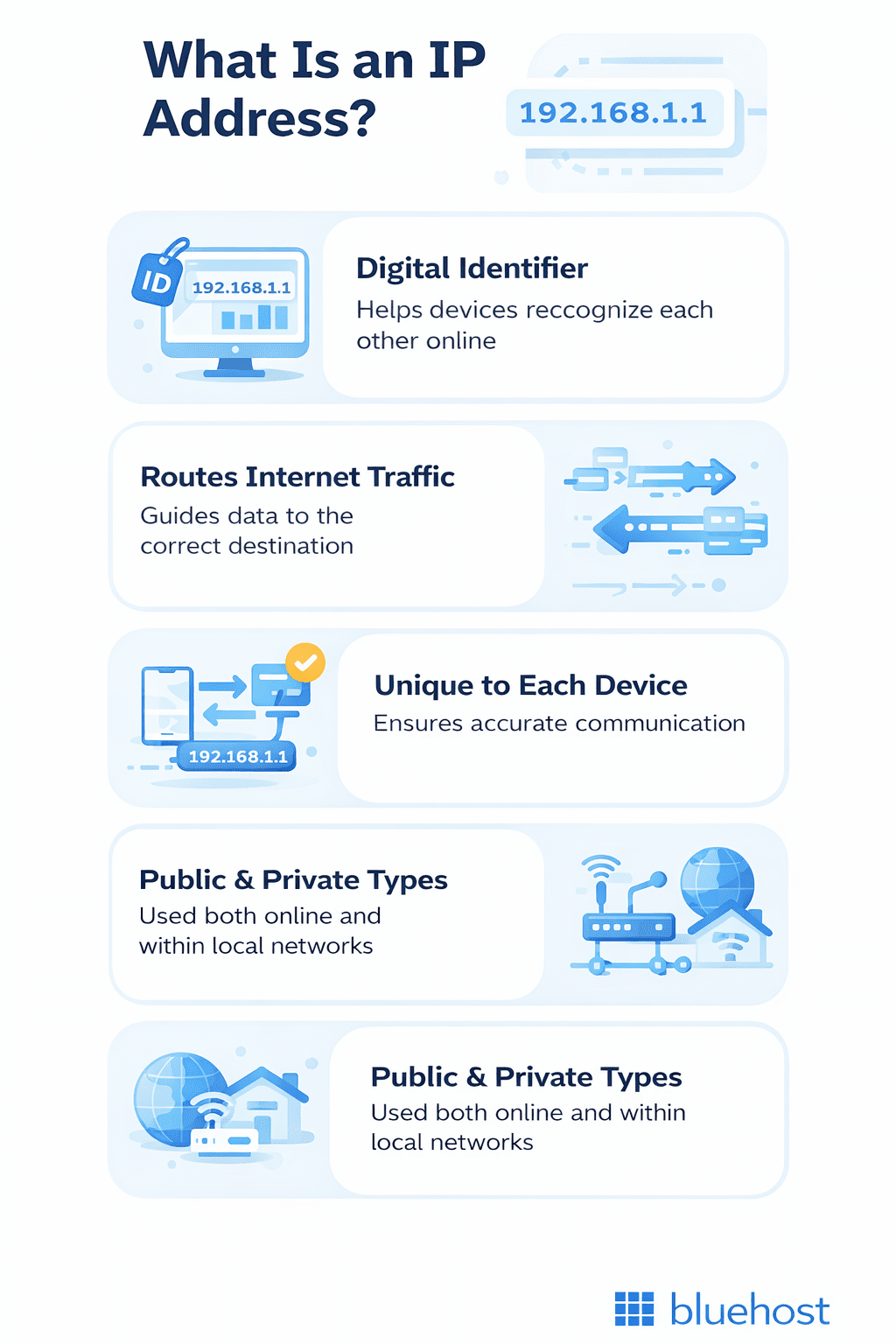
An IP (Internet Protocol) address identifies a computer/server on the internet. It allows different devices, such as smartphones, computers and IoT devices, to communicate with each other across the internet and on local networks.
The IP address takes the form of a dotted-quad number, such as 128.175.13.92. No other computer/server on the same network or the internet can have the same IP address at the same time.
When we use domain names to access a website or online service, we use a human-readable shortcut corresponding to the server’s IP address. DNS servers automatically translate domain names into IP addresses each time we use a domain name.
Now let’s break down how IP addresses actually work in simple terms.
How do IP addresses work?
Think of the internet as a global postal system. Just as a physical house needs a street address to receive mail, every online device needs a unique identifier to communicate effectively. What is an IP address in this context? It is the digital coordinate that allows devices to identify and locate each other across the vast network.
Why do we need an IP address? Without this specific locator, networks would be unable to distinguish your computer from billions of others, effectively making accurate data exchange and internet browsing impossible.
The technical process functions by breaking information into small “packets” attached to the destination IP. Routers act like traffic controllers or postal sorting centers, reading these addresses and directing the packets through the most efficient network paths to reach the correct server.
While the underlying IP protocol handles these complex routing logistics, the Domain Name System (DNS) simplifies the experience for users. It is done by automatically translating human-readable domain names into the numerical IP addresses that computers understand.
Regardless of the specific types of IP address used, this seamless background operation ensures your data travels from source to destination instantly and accurately.
Now that we’ve covered the basics, let’s dive into why IP addresses are so important in the first place.
What is an IP address used for?
At its core, an IP address functions as your device’s digital ID card, essential for establishing your presence online. You might ask, why do we need an IP address? The answer lies in connectivity and accurate identification.
Just as physical mail requires a street address to reach your home, digital data needs an IP address to locate your device among billions of others. It enables your computer to communicate with servers, ensuring that when you request a website, the information arrives specifically on your screen rather than someone else’s.
From a practical standpoint, IP addresses facilitate almost every action you take online by routing data packets to their correct destinations.
For individual users, this technology powers daily activities like streaming high-definition video, playing online games with low latency and connecting to social media platforms.
For businesses, IP addresses are critical for network management, allowing administrators to secure remote work connections and control access to sensitive company data.
Here’s how IP addresses impact your digital experience:
- Web browsing: Connecting your browser to web servers to load pages instantly.
- Remote access: Enabling secure connections for employees working from home.
- Device communication: Allowing printers, smart speakers and computers to talk on a local network.
Next, let’s break down the structure of an IP address to understand how it’s organized.
Understanding the structure of an IP address
To understand what is an IP address, you must look at its specific anatomy. An IP address isn’t just a random string of numbers; it is a hierarchical identifier similar to a physical mailing address.
The most common format, IPv4, uses a 32-bit structure written in “dot-decimal” notation (example, 192.168.1.1). This address consists of four numbers ranging from 0 to 255, separated by periods.
These four sections are technically called “octets” because each represents 8 bits of data. This numerical precision allows computers to process the address in binary code while keeping it readable for humans.
| Component | Format example | Description |
|---|---|---|
| IPv4 Format | 192.168.1.1 | Four decimal “octets” separated by dots. |
| IPv6 Format | 2001:0db8::ff00 | Eight hexadecimal segments separated by colons. |
| Network ID | First part (example, 192.168.1) | Identifies the specific network (like a street name). |
| Host ID | Last part (example, .1) | Identifies the specific device (like a house number). |
The logic behind this structure is vital for global routing. An IP address is divided into two distinct sections: the Network ID and the Host ID. A “subnet mask” acts as a filter to tell routers exactly where the Network ID ends and the Host ID begins.
While IPv4 relies on simple numbers, the advanced IPv6 standard uses eight segments of alphanumeric characters (hexadecimal) separated by colons. This complex structure allows for exponentially more unique combinations, ensuring that the different types of IP address formats can accommodate the billions of devices connecting to the internet today.
What are the different versions of an IP address?
Two main IP address versions power the internet today:
- Internet Protocol version 4 (IPv4)
- Internet Protocol version 6 (IPv6)
Both handle device identification and data routing. They coexist because the internet has outgrown its original addressing system.
Why do two versions exist?
When the internet was first developed, IPv4 provided enough addresses. However, the rapid growth of connected devices changed that.
Today’s internet includes:
- Smartphones
- Laptops
- Smart home devices
- IoT systems
This explosion of devices quickly exhausted the available IPv4 address pool.
That shortage led to the creation of IPv6, a modern protocol designed to offer a virtually limitless number of addresses. If you’re wondering what IP address exhaustion means, it refers to this IPv4 shortage.
We are currently in a transition phase. Both IPv4 and IPv6 operate together so legacy systems can still communicate with modern networks.
1. IPv4 addresses
IPv4 has been the foundation of internet infrastructure since the 1980s. It uses a 32-bit address format divided into four numeric blocks called octets.
Example: 192.168.0.1, commonly used in home routers.
Key characteristics:
- Supports approximately 4.3 billion unique addresses
- Designed when global connectivity demands were much lower
The massive growth of internet adoption caused an address exhaustion problem. The number of connected devices eventually exceeded the available IPv4 supply.
Despite these limits, IPv4 remains the dominant standard today. Its strength lies in universal compatibility with existing hardware and software.
You still use IPv4 for most home and business networks. This ongoing use keeps older systems connected while the industry transitions to IPv6.
2. IPv6 addresses
IPv6 is the modern replacement for IPv4. It uses a 128-bit address format to provide an almost unlimited number of addresses, about 340 undecillion.
IPv6 addresses look different. They use eight groups of hexadecimal values separated by colons.
Example: 2001:0db8:85a3:0000:0000:8a2e:0370:7334
IPv6 is essential for the future internet because it supports:
- Expanding mobile device usage
- The Internet of Things (IoT)
- Continued global connectivity growth
Additional benefits:
- Built-in security enhancements
- More efficient routing
Adoption is gradual due to compatibility issues with older systems. Many networks use dual-stack setups, which support IPv4 and IPv6 together.
Leading hosting providers, including Bluehost, support IPv6. This ensures websites remain accessible and ready for the future of internet connectivity.
What are the different classes of IPv4 addresses?
The IPv4 address space is divided into five classes to organize network allocation based on size requirements:
- Class A (1.0.0.0 to 126.255.255.255) supports very large networks.
- Class B (128.0.0.0 to 191.255.255.255) is designed for medium-sized organizations.
- Class C (192.0.0.0 to 223.255.255.255) is typically used for small networks.
- Class D is reserved for multicast groups.
- Class E is reserved for experimental purposes.
This classification helps structure how IP addresses are assigned to different entities. Modern networking now uses Classless Inter-Domain Routing (CIDR) for better efficiency. However, understanding the original classes is still useful. It helps explain networking fundamentals and how IP address management evolved over time.
Now that you understand what an IP address is, how it functions and its structure, let’s explore the different types of IP addresses available.
What are the different types of IP addresses?
Let’s take a look at different types of IP addresses:
- Public IP address: Assigned to devices so they can be directly accessed over the internet. Public IP addresses are unique across the entire web to ensure each device has a distinct address.
- Private IP address: Used within private networks and is not routable on the internet. Private IP addresses allow for devices within the same network to communicate with each other without using public IP addresses. They are defined in specific ranges, with common ones being 192.168.x.x for IPv4 and fd00::/8 for IPv6.
- Dynamic IP address: Usually temporarily assigned to devices (smartphones, computers or routers) to provide security and anonymity. Every time a device tries to connect to the ISP’s (Internet Service Provider) network, it will be assigned an available IP from the pool. Which will then be returned after connection and assigned to another device.
- Static IP address: A fixed IP address usually used for running servers or hosting websites. Bluehost supports this. Users can connect domains to servers with a static IP address, making their websites accessible. The network administrator or ISP provides a fixed IP address.
- Shared IP address: An IP address used by multiple websites or hosting accounts on a single server. This is a common configuration in web hosting environments, especially in shared hosting plans. Service cost is reduced because several users share the resources of a single server (including its IP address). Shared IPs are affordable and enough for most small to medium websites without specific IP configuration needs.
- Dedicated IP address: An IP address exclusively assigned to a single hosting account or website. It provides unique benefits, like access to your website directly via its IP address, improved email deliverability and the need for certain applications and services, like SSL certificates, for securing a website. Dedicated IPs are particularly helpful for larger websites or those with specific technical requirements that shared IPs can’t meet.
Know these additional IP address types for complete network control
Understanding these additional IP address types helps you maintain better control, security and flexibility across your network.
1. Communication-type IP addresses
Understanding what is IP address communication reveals three distinct methods for moving data efficiently. Unicast is the standard one-to-one approach used for daily tasks like web browsing and sending emails, connecting a single sender to a receiver. For real-time media, multicast offers an efficient one-to-many solution by delivering data to multiple specific recipients at once, which is perfect for video conferencing and IPTV streaming. In contrast, broadcast addresses send one-to-all signals within a local network for essential maintenance like network discovery. These specific types of IP address categories ensure networks don’t waste bandwidth, highlighting why do we need an IP address system versatile enough for modern applications.
2. Special IP addresses
Certain types of IP address are reserved for unique internal functions rather than communicating across the public internet. These special addresses are essential for network maintenance, software development and troubleshooting connection issues. For example, developers use them to test applications locally, while network administrators rely on them to identify when a device fails to connect to a DHCP server.
- Loopback addresses: Used to establish a connection with your own device (127.0.0.1 for IPv4 and ::1 for IPv6), commonly known as localhost.
- Link-local addresses: Automatically assigned (169.254.0.0/16) when a computer cannot obtain an IP from a server, which helps diagnose network failures.
- Documentation addresses: Reserved specifically for use in manuals and examples to prevent users from accidentally connecting to real networks.
3. Website IP addresses
Every website domain functions by resolving to a static IP address, which acts as its unique digital coordinates. In web hosting, these generally fall into two categories: shared and dedicated. A Shared IP address connects multiple domains to a single address, which is standard for most hosting plans. Conversely, a Dedicated IP address is exclusive to one website, answering what is IP address isolation and offering enhanced control for site administrators.
Determining why do we need an IP address that is dedicated involves specific technical requirements. While shared IPs are sufficient for SEO, dedicated IPs are vital for custom SSL certificates, direct server access and protecting email deliverability from other users’ actions. Bluehost assigns these various types of IP address configurations based on your specific hosting tier, ensuring your site maintains optimal security and management capabilities separate from other domains.
4. Consumer IP addresses
Most consumers receive a single public IP address from their ISP, which is assigned directly to their home router. Through Network Address Translation (NAT), your router then assigns unique private IP addresses to every device in your home, allowing them to share that one public connection. This efficient system explains why we need an IP address structure that clearly distinguishes between internal device traffic and external internet communication.
Furthermore, consumer IPs are typically dynamic, meaning they change periodically, unlike the static types of IP address often used by businesses. This dynamic nature extends to mobile devices, which switch IPs seamlessly when moving between Wi-Fi and cellular networks. Dynamic IP addresses offer some privacy benefits because they change your digital footprint regularly. However, they can make tasks like remote access to home networks or security cameras more complex without extra configuration.
Now that you understand the types of IP addresses, you might be wondering who assigns these addresses. Let’s see how the system stays organized, how IP addresses are distributed and managed across the internet.
How are IP addresses allocated and managed?
IP Address Allocation simplifies how the internet knows where to send data. Organizations called Regional Internet Registries (RIRs) are in charge of giving out IP addresses to make sure everyone on the internet can have their own unique address, regardless of their specific region.
There are five main RIRs around the world, each taking care of a different part of the globe:
- African Network Information Centre (AFRINIC) covers Africa.
- American Registry for Internet Numbers (ARIN) looks after the US, Antarctica, Canada and parts of the Caribbean.
- Asia Pacific Network Information Centre (APNIC) manages East Asia, Oceania, South Asia and Southeast Asia.
- Latin America and Caribbean Network Information Centre (LACNIC) is responsible for Latin America and most of the Caribbean.
- Réseaux IP Européens Network Coordination Centre (RIPE NCC) takes care of Europe, Central Asia, Russia and West Asia.
Now that you understand how IP addresses are allocated and managed globally, you might be wondering how to locate your own device’s IP address.
Let’s walk through the simple steps to find your IP address on any device you’re using.
How to find your IP address on different devices?
The instructions on finding your IP Address will differ depending on your device. The links below will lead you to the support or community sites for the device you may be using:
- Windows 11 or Windows 10Windows 11 or Windows 10
- iPhone
- Mac
- Android
If you’re looking for instructions on finding your public IP address, please see our article on how to find your public IP address.
Now that you know how to locate your IP address on any device, you’re ready to take control of your network security.
Speaking of security, let’s explore how you can manage which IP addresses can access your network through whitelisting and blacklisting.
How to whitelist or blacklist IP addresses?
Want to control who accesses your site? Whitelisting allows specific IP addresses in, while blacklisting keeps the unwanted ones out. Let’s see how:
- IP whitelisting is a security technique that limits access to a system or network by only allowing specific IP addresses considered safe and trustworthy. This approach protects your business from unauthorized access and helps you control who can access your tools and software. For instructions on how to whitelist an IP address, see Whitelist IP Address.
- If your local IP has been blacklisted due to suspicious activity, review the article If Your Local IP is Blacklisted for instructions on what to do.
Managing your whitelist and blacklist settings is a powerful way to control network access, but it’s just one piece of the security puzzle.
Also read: Common Causes for the Error: “Access Denied. Your IP Address Is Blacklisted.”
Now that you know how to manage IP access, let’s talk about the security risks your IP address might be facing.
7 common security threats to IP addresses
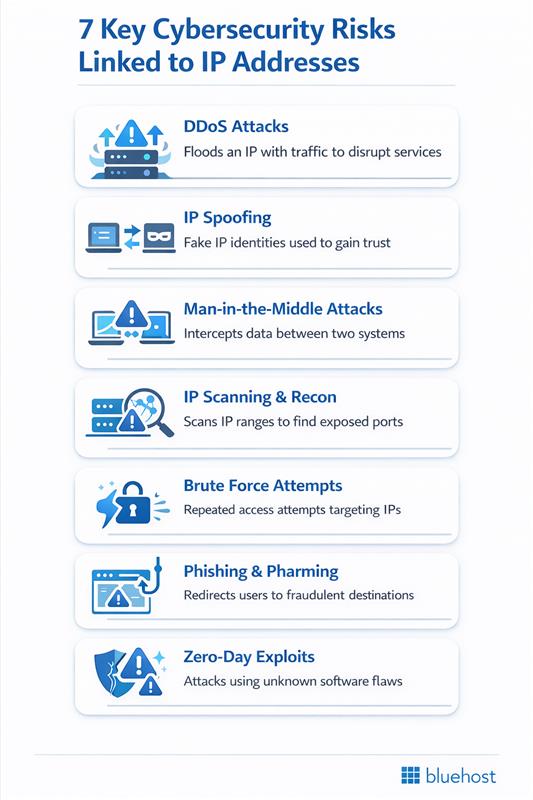
IP addresses are crucial for online interactions but also pose security risks. These are common security threats associated with IP addresses:
- DDoS attacks (Distributed Denial of Service): Attackers can target the IP address of a service, website or network by flooding it with excessive traffic to overload systems and disrupt services.
- IP spoofing: Malicious parties can disguise their internet communication by changing packet headers to make it appear as though the packet is coming from a trusted, legitimate source. They’ll get unauthorized access which causes the service to misbehave.
- Man-in-the-middle attacks: By intercepting the communication between two systems, attackers can use IP addresses to eavesdrop or alter the communication without either party knowing.
- IP scanning and sniffing: Hackers use automated tools to scan ranges of IP addresses for open ports and vulnerabilities. Once a vulnerable service is identified, it can be exploited to gain unauthorized access.
- Brute force attacks: By attempting to access a range of IP addresses with numerous password combinations, attackers will aim to break into networks or systems.
- Phishing and pharming: Phishing involves tricking individuals into providing sensitive data by mimicking legitimate requests. This directs users to enter their personal information at a fake website whose IP address is controlled by the attacker. Pharming takes this further by redirecting users from legitimate websites to fraudulent ones via IP address manipulation.
- Zero-day vulnerabilities: Newly discovered vulnerabilities in software or hardware that are unknown to the vendor can be exploited before a fix is available. Attackers may target specific IP addresses known to use the vulnerable software.
These security threats show why protecting your IP address matters but don’t worry, you’re not defenseless.
Ready to secure your online identity? Let’s dive into the practical steps you can take to protect your IP address.
How to protect your IP address online?
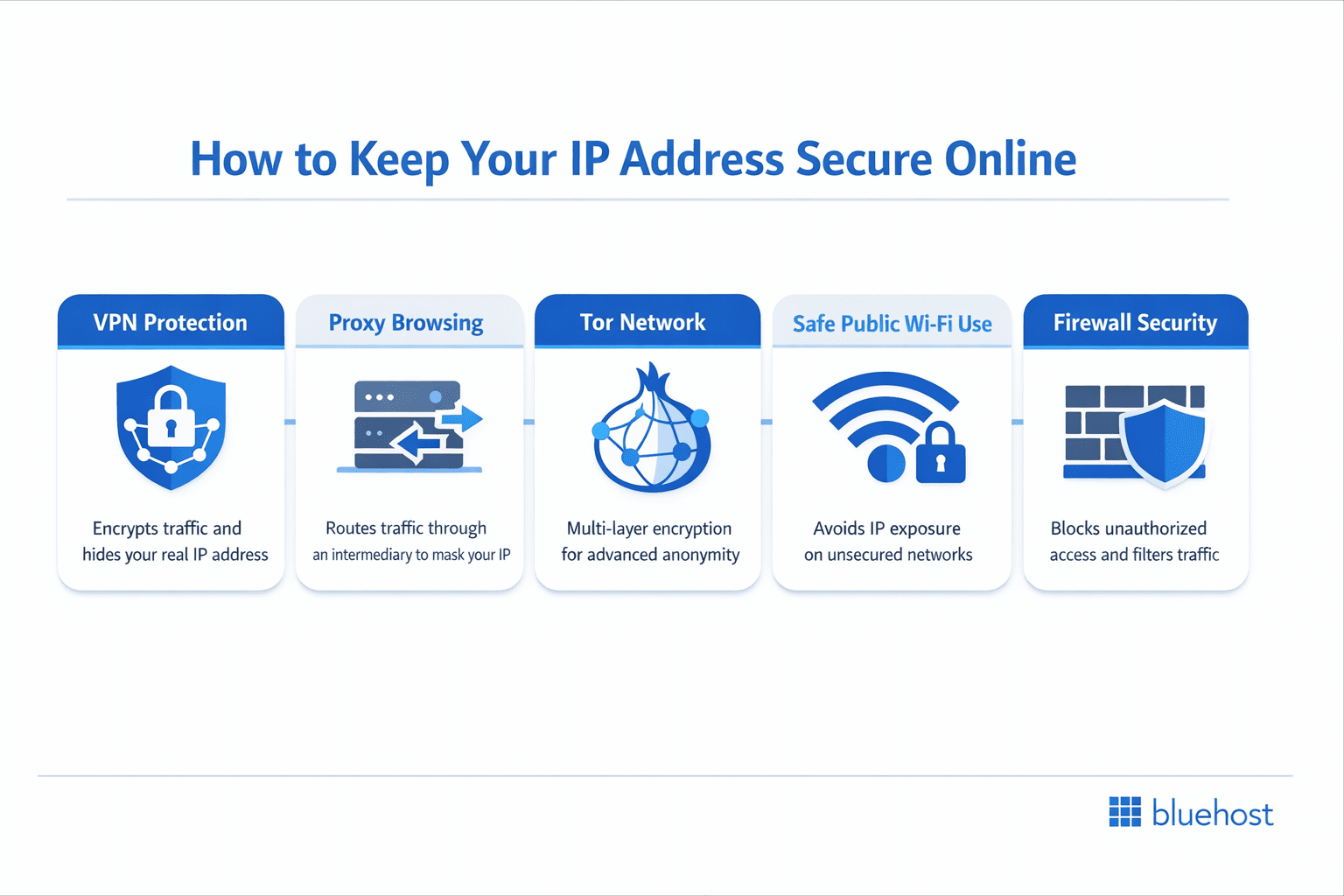
Protecting your IP address helps maintain your online privacy and security. Several methods can effectively shield your digital identity.
1. Use a VPN service
A Virtual Private Network encrypts your internet traffic and masks your IP address. VPNs route your connection through secure servers worldwide. It encrypts your internet traffic and masks your IP address.
2. Enable a proxy server
Proxy servers act as intermediaries between your device and the internet. They hide your actual IP address from websites you visit.
3. Use the Tor browser
Tor browser routes traffic through multiple encrypted nodes for maximum anonymity. This method provides strong protection against IP tracking.
4. Avoid unsecured public Wi-Fi
Public networks expose your IP address and data to potential threats. Use secure connections or VPNs when accessing public Wi-Fi.
5. Enable firewall protection
Firewalls monitor incoming and outgoing network traffic to block unauthorized access. They add an extra security layer to protect your IP. incoming and outgoing network traffic to block unauthorized access. They add an extra security layer to protect your IP.
Implementing these protection methods ensures better online privacy and reduces tracking risks.
There are different methods to protect your IP address online.
Also read: Cloudflare Guide
Next, learn how to pick the right type of IP address based on your specific needs.
How to choose the right IP address type for your needs?
Selecting the appropriate IP address configuration depends entirely on how you intend to use the internet. For everyday personal browsing or running a standard WordPress blog, a dynamic IP from your provider or a shared IP address is typically cost-effective and sufficient.
However, if you run a home server or manage a growing eCommerce store, your needs are different. You may require a static or dedicated IP address for stable and secure remote access.
For small businesses and agencies, the decision often revolves around reliability and email reputation. A dedicated IP address helps prevent email deliverability issues caused by other users on a shared network and is often required for specific security certificates or custom applications.
Bluehost supports these advanced requirements by providing dedicated IPs with our Dedicated and VPS hosting plans, allowing you to scale your infrastructure as your traffic and technical needs increase.
Choosing the right IP address based on different use cases
Choosing the right IP address depends on how you use the internet or manage your online services. Use the table below to identify the most suitable IP type based on common usage scenarios.
| User persona | Recommended IP type | Key benefits |
| Personal browser / Blogger | Dynamic or Shared IP | Cost-effective and suitable for everyday browsing and basic websites. |
| Home server administrator | Static IP | Provides consistent remote access without IP changes. |
| Small business / eCommerce | Dedicated IP | Enhances security, email deliverability and site reliability. |
| Enterprise / Agency | Dedicated IP Block | Offers full control, scalability |
This comparison makes it easier to match your usage requirements with the right IP solution, helping ensure secure access, stable connectivity and optimal performance.
Final thoughts
Now you know what an IP address is – your device’s digital identity that keeps the internet running smoothly. Whether you’re browsing, streaming or building a website, IP addresses work behind the scenes to connect you to the world.
Ready to take control of your online presence? If you’re running a business website or email server, a dedicated IP address gives you consistent access, better email deliverability and enhanced control.
Bluehost’s VPS and Dedicated hosting plans come with dedicated IP addresses built in, perfect for growing businesses that need reliability and performance. Get started with Bluehost today and secure your dedicated IP! come with dedicated IP addresses built in, perfect for growing businesses that need reliability and performance. Get started with Bluehost today and secure your dedicated IP!
FAQs
IP stands for Internet Protocol. It’s a set of rules that governs how data is sent and received over the internet, enabling devices to communicate with each other across networks.
Your IP address reveals your general location like city or region, but not your exact home address. Internet service providers and law enforcement can trace it to specific users when necessary.
You can find your IP address by typing “what is my IP” into Google or checking your device’s network settings. You can also visit websites like WhatIsMyIPAddress.com that display your public IP instantly.
IPv4 uses 32-bit addresses with four number groups separated by periods, while IPv6 uses 128-bit addresses with hexadecimal characters. IPv6 provides significantly more available addresses to accommodate growing internet demands.
You have both. A public IP address identifies your network to the internet, while private IP addresses identify individual devices within your local network. Routers manage communication between them.
Most home internet connections use dynamic IP addresses that change periodically. Your internet service provider assigns these temporarily to manage their address pool efficiently. Business connections often use static IPs that remain constant.
Yes, you can mask your IP address using VPNs, proxy servers or the Tor browser. These tools route your internet traffic through different servers, making your actual IP address invisible to websites.


Write A Comment