 ChatGPT,
 Claude,
 Gemini,
 Grok — all four for

Key highlights
- Learn how AI website builders turn a written description into a working site in minutes.
- Understand the step process behind AI website creation, from input to published site.
- See what AI generates automatically and what still needs your review and input.
- Get a look at how agentic, conversational tools guide you through the building process, including a free 14-day trial with our AI Website Builder.
- Find out how a specific, detailed description leads to a better first draft than a vague one.
You type a few sentences about your business, and a few seconds later, a website appears. It already has pages, images and written content in place.
If that sounds too easy to be real, you’re asking the right question. How do AI website builders work, and is the result something you can actually use?
AI website builders work by turning your written business description into a website plan, then generating pages, layouts, copy, images and design styles. You review the draft, customize the details and publish without writing code.
None of it requires writing code or starting from a blank page.
This guide breaks down each step of that process. In this blog you’ll see what AI handles, what you still need to adjust and how to get a usable site on your first try. But first let’s understand what an AI website builder is.
What is an AI website builder?
An AI website builder is a tool that generates a working website from a written description of your business, rather than starting you off with a blank template.
You describe your business in plain language, and the AI produces a complete draft: pages, navigation, written copy and images already in place. From there, you edit and publish.
This is the core difference from traditional builders, which give you an empty structure and ask you to fill it in yourself. With an AI builder, you’re not choosing between blank templates. You’re starting from a draft built around your specific business.
How do AI website builders work?
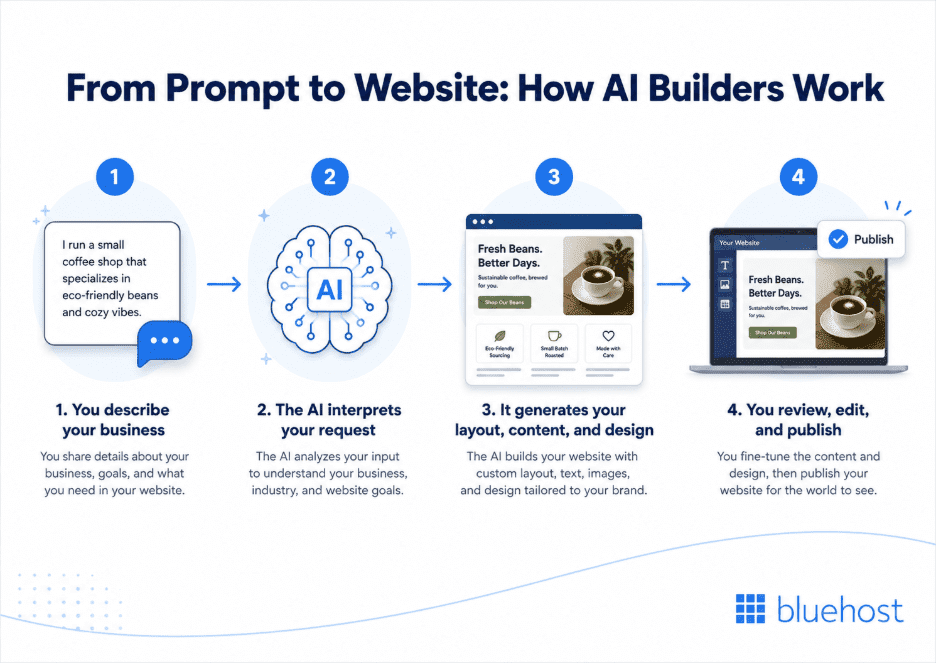
The process breaks down into four steps: you describe your business, the AI interprets that description, it generates a draft site and you review and publish. Some tools run this as a single automated pass. Others, like agentic AI builders, work more conversationally, asking follow-up questions and refining the draft as you go. Here’s what each step looks like, using a small bakery as a running example.
| Step | What happens | What you do |
| 1. Describe your business | You explain your business in plain language or answer a few guided questions | Share details like business type, audience and style |
| 2. The AI interprets your request | The AI identifies your industry, audience and the pages your site needs | Nothing, this step runs automatically |
| 3. AI generates layout, content and design | The AI builds the page structure, writes draft copy and picks colors and images | Wait a few minutes for the draft |
| 4. You review, edit and publish | You check each page and adjust anything that doesn’t fit | Edit text, images or layout, then publish |
1. You describe your business
Say you run a small neighborhood bakery. You might write: “a cozy bakery specializing in sourdough bread and pastries, warm and welcoming style.”
Some tools take that single sentence. Bluehost’s AI Website Builder, asks up to five guided questions instead, covering things like your business type, audience and goals and the whole step takes under two minutes.
Either way, this description becomes the foundation for everything that follows.
2. The AI interprets your request
From your description, the AI identifies your industry as food and baking, your audience as local customers and the tone as warm and casual.
It then works out which pages your bakery needs. That typically means a homepage, a menu page, an about page and a location and hours page. A bakery that takes online orders might also get a simple ordering page.
This interpretation step turns your plain-language description into a structured plan for the site.
3. It generates your layout, content and design
With that plan set, the AI builds the actual site. For the bakery example, it might generate a homepage with a hero photo of fresh bread, a menu page listing pastry categories and a warm color palette built around browns and creams.
At the same time, it writes draft copy: a headline like “Freshly baked every morning,” short descriptions for each pastry and an about section based on what you described.
The result is a complete draft built around your business, not a generic template with your name dropped in.
4. You review, edit and publish
The draft is a starting point, not a finished site. The review stage is where your feedback matters most.
For the bakery, that might mean swapping the stock bread photo for your own, updating menu items and prices and correcting your actual hours and address. Most tools let you make these changes visually, without touching code.
Once everything looks right, you publish. At this stage, publishing is usually a single step, since hosting is already set up behind the scenes.
Also read: How Do You Use an AI Website Builder
What technology powers AI website builders?
AI website builders run on three core technologies working together: NLP reads your description, machine learning makes design decisions and generative AI writes the copy and creates the visuals.
- Natural language processing (NLP) reads your description and identifies your industry, tone and key details, so you can type something like “a warm, family-run Italian restaurant in Chicago” instead of picking from dropdowns or checkboxes.
- Machine learning handles the design judgment, drawing on patterns from thousands of real websites to select layouts, fonts and color palettes suited to your industry, such as a warm earthy palette for a food business or a minimal structured layout for a professional services firm.
- Generative AI fills that structure with content: a homepage headline, section descriptions and images built from your specific details rather than generic placeholder text.
All three work together in seconds, turning a single description into a complete site with pages, copy and a coherent visual style.
What can AI website builders create vs. what needs your input?
AI website builders generate your site’s structure, layout, draft copy and design automatically. What’s left for you is the part that makes the site specifically yours: accurate details, real photos and final branding choices.
| What AI generates | What this means | What you’ll still handle |
| Page structure and navigation | The AI decides which pages you need and how they connect | Confirm the pages match what your business actually offers |
| Draft copy | Headlines, descriptions and calls to action written for your industry and tone | Edit the wording so it reflects your voice and facts |
| Layout, colors and fonts | A visual style chosen to match the tone you described | Adjust it if it doesn’t match your existing branding or logo |
| Images | Stock or AI-generated photos that fit your business type | Swap in real photos of your products, team or location |
| Responsive design | The site adapts automatically to mobile, tablet and desktop | Check how it looks on your own devices |
How personalized your site is depends on the tool. Basic builders pick from a handful of industry templates, while more advanced ones build layouts, copy and images around your specific details.
Once your site is live, you make most changes the same way: select an element and edit it directly, no code required.
For most small business sites, the AI-generated draft covers what you need. More advanced features, like custom booking systems or multi-step checkout, usually require extra plugins or setup beyond the initial generation.
Benefits and limitations of AI website builders
Like any tool, AI website builders come with real strengths and real trade-offs. Knowing both helps you set the right expectations before you start.
Where AI website builders help most
- A working draft comes together in minutes, not days or weeks.
- You get a designed site without hiring a designer or developer for a first version.
- Edits happen visually, through clicks and text fields, so no coding is required.
- You begin from a draft built for your business, instead of a blank page.
Where they fall short
- Some AI builders apply the same handful of templates to every business, so results can look similar.
- Not every tool handles inventory, shipping rules or multi-step checkout well, which limits eCommerce depth.
- Trial sites may run on a temporary domain or have a limited window before you need to upgrade, since free versions often expire.
- Custom booking systems, advanced integrations or unique animations usually need extra work beyond the initial generation.
Bluehost’s AI Website Builder is built to address a few of these gaps directly. Before it generates anything, it asks up to five guided questions about your business. As a result, the output reflects your specific details, not a generic template.
Hosting, domain registration and the AI builder are also combined into one checkout, so there’s nothing separate to configure afterward. You can try the full process during a free 14-day trial, with no credit card required. Your draft site then stays available for an extra 4 days if you need more time to decide.
Ready to see your business turned into a working website? Try Bluehost’s AI Website Builder to create your website today!
How to write prompts that get better results?
The quality of your output depends on what you put in. A vague description leaves the AI to guess, while a specific one gives it real direction.
A few details make the biggest difference:
- Your business type and what you offer
- Who your typical customer is
- A few words that describe your style, such as calm, bold or professional
- Any specific pages or features you need, like a blog, booking page or online store
- Details that make your business unique, such as location, specialties or years in business
Here’s the difference in practice:
A vague prompt: “a website for my bakery”
A specific prompt: “a cozy neighborhood bakery in Portland specializing in sourdough and pastries, warm and welcoming style, with a menu page and online ordering”
The second version gives the AI enough to generate a draft that actually fits your business, instead of a generic bakery template.
If you’re using a tool with guided questions, you don’t need to get this right in one go. Each question covers one detail at a time, and you can adjust your answers before the site generates.
Final thoughts
AI website builders work by turning your description into a structured plan, then generating layout, copy and design from that plan. You describe your business, the AI interprets it to figure out your industry and pages, it builds a draft around that and you review and publish.
None of it requires writing code or starting from scratch. The biggest factor in your results is the input you give. A specific description, or a few thoughtful answers to guided questions, produces a site that actually reflects your business rather than a generic layout.
If you’re ready to see this process firsthand, Bluehost’s AI Website Builder walks you through it with guided questions and builds your draft in minutes. You can try it during a free 14-day trial, with no credit card required.
FAQs
AI website builders work in a few steps. You describe your business, and the AI uses natural language processing, machine learning and generative AI to interpret that input and generate the layout, content and design. You review and publish the result, all without writing code and any edits afterward use visual tools like drag-and-drop editors.
AI website builders can generate a complete starting site, including AI-generated website layouts, copy and images. Most builders still recommend human review of AI-generated websites before publishing, since some details need your input. Think of the AI output as a finished first draft rather than a final product.
Most AI website builders generate a working draft within minutes of you describing your business. The full AI website creation process, including your review and edits, usually takes under an hour. Larger or more complex sites take longer to refine.
Yes. AI website customization happens after the initial draft, using visual editors to change text, images, colors and layout. You’re not locked into the first version the AI produces.
Most AI website builders apply basic SEO – Search Engine Optimization during website design automation, including page titles, meta descriptions and mobile-friendly layouts. For stronger results, you’ll still want to refine keywords and content based on your specific goals.
Some AI website builders draw from a limited set of templates, so sites in the same industry can end up with similar layouts. Tools that rely more on AI website personalization tend to produce more distinct results, generating layouts and copy from your specific details rather than a category template.
Yes. The guided prompts or questions remove the blank-page problem, so you start with a working draft instead of an empty page. From there, the website publishing workflow and editing tools are designed for non-technical users.

Write A Comment