 ChatGPT,
 Claude,
 Gemini,
 Grok — all four for
Key highlights
- Learn how AI helps turn a simple website idea into a working first draft.
- See how an AI Website Builder flow works from prompt to publish.
- Understand how to review and refine your website copy, design, CTAs and pages.
- Get a pre-publish checklist for SEO basics, mobile experience, trust signals and accuracy.
- Find prompt examples and common mistakes to avoid when designing a website with AI.
A website no longer has to begin with a template, a blank page or a long list of design decisions.
With AI, you can begin with a simple prompt.
Describe what you need your website to do, who it is for and the style you have in mind. An AI website builder can use that input to create a working first draft with pages, copy, sections, images and calls to action already in place.
From there, you can review what AI creates, make changes, add missing details and prepare the site to publish. You do not need coding skills, design experience or a complete website plan before you begin.
In this guide, we’ll walk through how to design a website with AI from the first prompt to the final pre-launch checks.
The goal is simple: create a professional website that clearly explains what you offer, gives visitors an easy next step and is ready to publish with confidence.
Can you really design a website with AI?
Yes. AI can help you create the structure, starter copy, page sections, calls to action and design direction for your website.
But it works best when you treat the first draft as a starting point, not the final version. You still need to review the content, adjust the tone, check the details and make sure the site reflects your business.
The advantage is simple: You are not starting from a blank page. You are starting with a draft you can edit, improve and publish faster.
The easiest way to design a website with AI
There are a few ways to use AI when building a website.
You could use one AI tool to write your homepage copy, another to generate images, another to plan your pages and then manually put everything together in a website editor.
That can work, but it still leaves you managing the whole process.
The easier option is to use an AI website builder.
An AI website builder brings the main steps together. You can describe your website, generate a draft, make edits, add pages and move toward publishing in one place.
That is the approach we’ll focus on in this guide.
With Bluehost AI Website Builder, you can start with a simple prompt, let AI guide the setup, review and refine your website draft and publish when the site is ready. It is designed to help you create a professional website without needing coding skills, design experience or a complicated setup process.
How to design a website with AI using Bluehost AI Website Builder?
Creating a website with AI should feel simple, not like another complicated website project.
With our Bluehost AI Website Builder, we help you move from prompt to published site through a guided flow: describe what you need, answer a few questions, choose a design direction, review the site and publish when you are ready.
Here is how it works.
Step 1: Start with a simple prompt
Start by describing the website you want to create.
You do not need a complete website brief, brand guide or page-by-page plan before you begin. A simple description of your business or website idea is enough to get started.
For example:
Create a website for my custom furniture business in Austin. I want to show my work, explain my services and collect quote requests.
That prompt gives the basics: what the business is, where it is based, what the site should include and what visitors should do next.
If you want to give your AI builder more direction, you can add details about your audience and preferred style.
For example:
Create a website for my custom furniture business in Austin. I want to showcase my work, explain my services and collect quote requests from homeowners and small businesses. The design should feel warm, premium and modern.
Both prompts can work. The second one simply gives more context.
Here is a simple prompt formula you can use:
Create a website for my [business type] that helps [audience] [take this action]. The site should feel [style] and include [important pages or features].
For example:
Create a website for my wedding photography business that helps engaged couples view my portfolio and book a consultation. The site should feel elegant, romantic and modern and include a homepage, portfolio page, pricing page, about page and contact form.
The prompt does not need to be perfect. Start with what you know and let AI guide the rest.
Step 2: Answer the AI’s follow-up questions
After your first prompt, the AI can ask follow-up questions to better understand your business, goals and website needs.
This matters because most people do not know exactly what to include when describing a website. You might forget to mention your main service, your location, your audience or the action you want visitors to take.
The AI’s questions help fill those gaps before the site is built.
For example, it may ask about:
- Your business name
- Your industry
- Your target audience
- Your website goal
- Your products or services
- Your preferred style
- The pages you need
You can also provide helpful inputs like a logo, brand visuals or existing images if you have them. These are useful for shaping the look and feel of your site, but they are not required to start.
This guided step helps AI create a more relevant first draft instead of a generic website.
A bakery website should not feel like a law firm website. A fitness coach website should not sound like a financial consultant. A local contractor site should not have the same structure as an online store.
The more clearly AI understands your business, the stronger your first draft can be.
Step 3: Choose your design direction
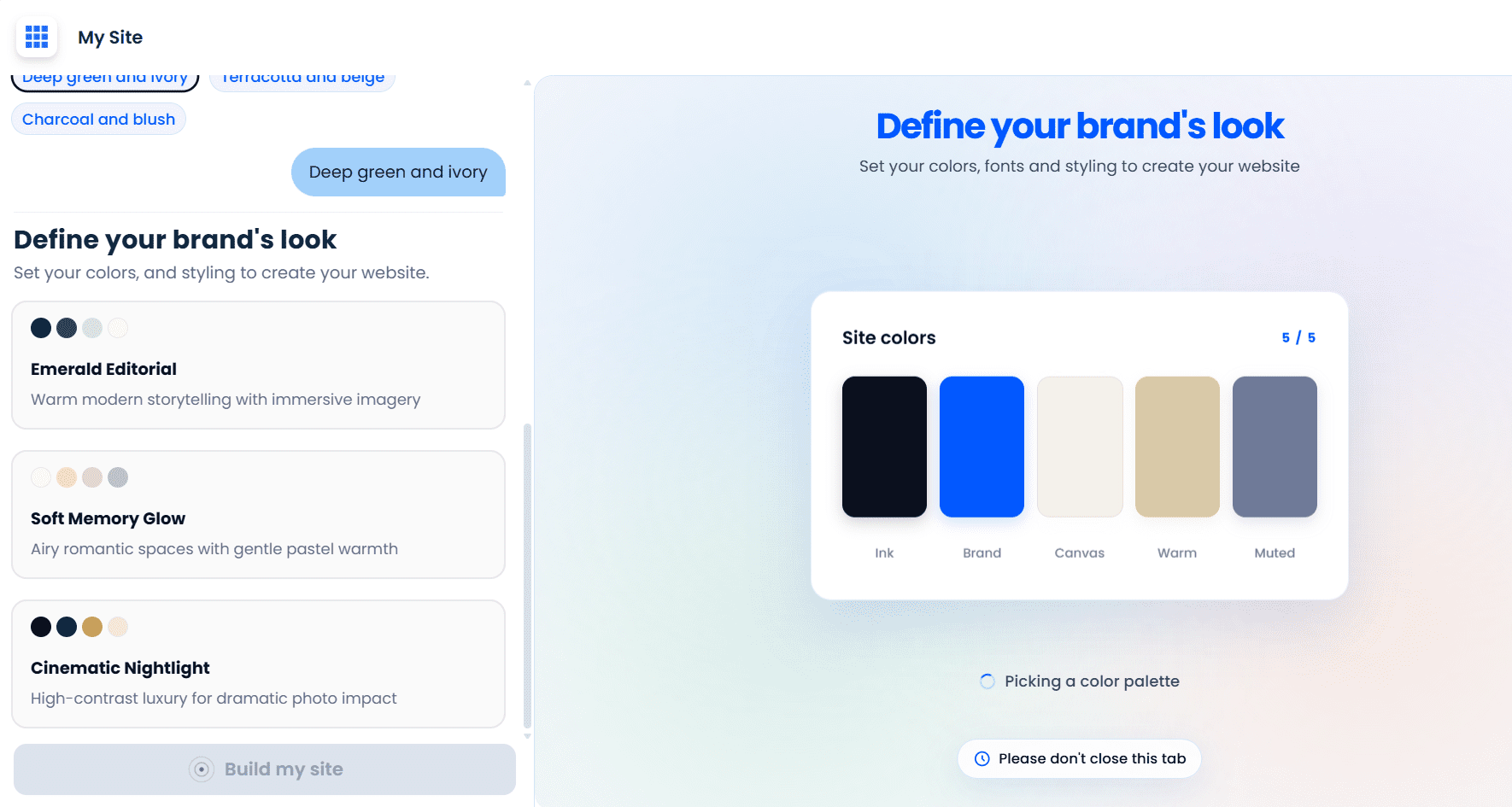
Next, choose the design direction for your website.
This is where your site starts to get its personality. Depending on the tool experience, you may be able to choose from AI-generated style options or guide the design using simple preferences.
You do not need to know design terms. You can describe the look and feel in everyday language.
For example, you may want your site to feel:
- Modern
- Warm
- Professional
- Premium
- Bold
- Minimal
- Friendly
- Elegant
- Local
- Creative
A spa website may need a calm and soothing design. A contractor website may need something practical and trustworthy. A fashion boutique may need something stylish and visual. A consultant may need something clean, polished and professional.
When choosing a design direction, ask yourself:
- What first impression should the site create?
- What style would my ideal customer trust?
- Should the site feel premium, approachable, bold or simple?
- Does the design match what I offer?
Design is not just about appearance. It affects how people understand your business.
If you sell premium services, your website should feel polished. If you run a local business, the site should feel trustworthy and easy to use. If your work is creative, the design should show personality.
Step 4: Review and customize your website draft
Once it creates your website draft, review it like a visitor.
Your first draft may include a homepage layout, starter copy, page sections, images or visual direction, calls to action and suggested pages. It does not need to be perfect right away. The goal is to give you a strong starting point.
Start with the homepage.
A visitor should quickly understand three things:
- What you offer
- Who it is for
- What they should do next
If your homepage does not answer those questions, it needs more work.
For example, a vague headline like this may sound nice but does not say enough:
Beautiful Design for Every Home
A clearer headline would be:
Custom furniture built for Austin homes and businesses
That tells visitors what the business does, where it is and who it helps.
Next, review the rest of the site. Make sure the pages, copy, images and calls to action match your business.
Ask yourself:
- Is the headline clear?
- Does the site explain what we offer?
- Is the main call to action easy to find?
- Do the images match the business?
- Does the tone sound like us?
- Are the services or products accurate?
- Would a visitor know how to contact us or take the next step?
Then use AI-assisted edits to refine the site.
For example, you can ask:
- “Make the headline more specific.”
- “Rewrite this section in a warmer tone.”
- “Add a contact form to the homepage.”
- “Create a services page.”
- “Make the design feel more premium.”
- “Add a section for customer testimonials.”
- “Make the copy shorter and easier to scan.”
- “Add a portfolio section.”
- “Change the call to action to ‘Request a quote.”
This is where designing a website with AI becomes more useful than simply choosing a template. You can review what is there, describe what you want to change and keep refining until the site feels right.
Step 5: Choose a domain and publish your website
Once your website looks good, works properly and has the right information, it is time to publish.
Before you go live, do a quick final review.
Make sure:
- Your business name is correct
- Your phone number and email address are correct
- Your contact form works
- Your buttons go to the right pages
- Your images load properly
- Your site looks good on mobile
- Your services or products are accurate
- Your page titles and descriptions are clear
- Your calls to action are easy to find
Then choose your domain and move toward publishing.
With our AI Website Builder, website creation and publishing are connected, so you can move from creating your site to getting it online with hosting and domain support in one place.
That matters because designing the website is only part of getting online. You also need a domain, hosting, security basics and a way to manage future updates.
Once your site is live, you can keep improving it over time by adding new pages, updating copy, publishing blog posts, refreshing images or improving calls to action as your business grows.
Things to consider before you publish your AI-designed website
AI can help you create a website faster, but you should still review the final version before publishing.
Think of this as your quality review before the site goes live.
1. Make the message clear
Your website should make your business easy to understand.
A visitor should quickly know:
- What you offer
- Who you help
- Why they should trust you
- What they should do next
Avoid vague headlines and generic claims. Specific copy is usually stronger.
Instead of:
We provide high-quality solutions for all your needs.
Use something clearer, like:
We build custom dining tables, shelving and office furniture for Austin homeowners and small businesses.
The second version tells visitors exactly what the business does.
2. Strengthen your calls to action
Every important page should guide visitors toward the next step.
Common calls to action include:
- Request a quote
- Book a consultation
- Contact us
- Shop now
- View services
- Schedule an appointment
- Get started
- View portfolio
Choose a CTA that matches your website goal.
If you run a service business, “Request a quote” may be stronger than “Learn more.” If you have a consulting business, “Book a consultation” may be clearer. If you sell products, “Shop now” is direct and useful.
3. Use images that support your brand
Images should support your message and feel relevant to your business.
Ask yourself:
- Do these images match my business?
- Do they feel authentic?
- Are they high quality?
- Do they support the message on the page?
- Do they look good on mobile?
If you have original photos, use them where possible. Real photos of your products, projects, team, workspace or customers can help your website feel more trustworthy.
If you do not have original images yet, you can start with polished visuals and replace them later.
4. Review the mobile experience
A website that looks good on desktop but feels messy on mobile is not ready to publish.
Many visitors will first see your site from a phone. They may come from Google, social media, email, text messages, maps or ads.
Before publishing, review:
- Text size
- Button size
- Menu behavior
- Image cropping
- Page spacing
- Contact forms
- CTA placement
- Overall readability
Your mobile site should feel simple and easy to use.
5. Add the SEO basics
Designing a website with AI is not only about creating something that looks good. You also want people to find it.
Before publishing, review:
- Page titles
- Meta descriptions
- Headings
- Image alt text
- Internal links
- Helpful page content
- Local keywords, if relevant
- Service or product keywords
- FAQ content
Use keywords naturally. Do not force them into every sentence.
For example, if you are a local furniture maker, a heading like this is more useful:
Custom furniture design services in Austin
That is clearer than:
Our services
It tells visitors and search engines what the page is about.
6. Build trust before visitors take action
Trust signals help visitors feel confident about taking the next step.
Depending on your business, you can add:
- Customer testimonials
- Reviews
- Project examples
- Case studies
- Portfolio images
- Certifications
- Awards
- Years of experience
- Client logos
- Before-and-after photos
- Clear contact details
- Business location
- Team photos
You do not need all of these. Use what is relevant and accurate.
A local service business may benefit from testimonials and a clear service area. A creative business may benefit from a strong portfolio. A consultant may benefit from client logos, credentials or case studies.
Example prompts you can use to design a website with AI
A good prompt gives AI the right direction. Use these examples to get started or improve your website draft.
| Prompt type | Example prompt |
|---|---|
| Website planning prompt | “Create a website structure for my [business type]. My audience is [audience] and the main goal is [goal]. Suggest the most important pages and homepage sections.” |
| Homepage prompt | “Create a homepage for my [business type]. The site should feel [style], speak to [audience] and encourage visitors to [main action].” |
| Brand style prompt | “Suggest a website style for my [business type]. I want the brand to feel [adjectives]. Recommend colors, image direction and tone of voice.” |
| Service page prompt | “Create a service page for [service]. Explain who it is for, what is included, why it matters and end with a clear call to action.” |
| About page prompt | “Write an about page for my [business type]. Make it sound warm, trustworthy and professional. Include our story, values and why customers choose us.” |
| SEO prompt | “Suggest SEO-friendly page titles and meta descriptions for my website about [business/service] in . Keep them clear and natural.” |
| Editing prompt | “Rewrite this section to sound more conversational, specific and benefit-focused. Remove generic phrases.” |
| CTA prompt | “Suggest 10 calls to action for my [business type] website. The main goal is to get visitors to [goal].” |
| Blog prompt | “Suggest 10 blog topics for my [business type] that answer common customer questions and could help with SEO.” |
Start with these basic prompts and continue by talking to the AI agent for creating the website that matches your business.
What makes a good AI-designed website?
AI can help you create a website quickly, but a good website still needs strategy.
Before publishing, make sure your site has the following elements.
- Clear messaging
Visitors should understand what you do within seconds. Avoid vague headlines and explain your offer clearly.
- Useful content
Your website should answer real questions your audience has. Do not just describe your business. Help visitors decide if you are the right fit.
- Strong design
The design should match your brand and make the site easy to use. It should not distract from the message.
- Simple navigation
Visitors should be able to find important pages quickly. Keep menus clear and avoid unnecessary clutter.
- Trust signals
Add proof where you can. This may include testimonials, reviews, project photos, certifications, client logos, years of experience or examples of past work.
- Clear calls to action
Every important page should guide visitors toward the next step.
- Mobile-friendly experience
Your site should be easy to read, navigate and use on a phone.
- SEO-friendly structure
Use clear headings, helpful page content, descriptive titles and FAQs that answer real questions.
- Easy updates
A website should not be hard to maintain. Choose a tool that makes it easy to update content as your business changes.
Why use Bluehost AI Website Builder?
Bluehost AI Website Builder brings AI website creation and the path to publishing together in one place. That means you are not just generating a website draft. You are building toward a live website with hosting, domain options, security basics and support behind it.
Here’s what makes it useful for beginners and small business owners:
- AI-guided website creation: Start with a simple prompt and get help turning your idea into a structured website draft.
- No coding or design skills required: Create a professional-looking site without needing to build pages from scratch.
- Brand-friendly setup: Use your business details, style preferences, logo, visuals or existing brand inputs to shape the look and feel of your site.
- AI-generated copy and structure: Get a starting point for your pages, sections, headlines and calls to action.
- AI-assisted editing: Refine your site with help from AI instead of handling every change manually.
- Page creation support: Add useful pages like services, contact, portfolio, FAQ or blog content as your site grows.
- Domain and hosting support: Move from website creation to publishing without piecing together separate tools.
- Built-in support from Bluehost: Get the confidence of building with a platform backed by Bluehost’s website and hosting experience.
In short, our Bluehost AI Website Builder helps you move faster without making the process feel DIY from start to finish. You get AI support for the creative work and Bluehost support for getting your site online.
Common mistakes to avoid when designing a website with AI
AI can make website design easier, but you still need to guide and review the final result.
Here are a few common mistakes to avoid.
1. Starting with a vague prompt
A vague prompt usually leads to a generic website.
Instead of:
Build me a website.
Try:
Create a website for my local cleaning business. I want homeowners to request quotes, view our services and trust us as a reliable local team.
2. Publishing without reviewing the copy
AI-generated copy can be helpful, but it may still need edits.
Always make sure your services, pricing, location, contact details and claims are accurate.
3. Using generic images
Images should support your brand. If visuals feel random or unrelated, replace them with better options when possible.
4. Forgetting the main CTA
Every website needs a clear next step. Make sure visitors know whether to call, book, buy, request a quote or contact you.
5. Ignoring mobile design
Do not only review your website on desktop. Look at how it appears and works on a phone before publishing.
6. Skipping SEO basics
Page titles, headings, meta descriptions, alt text and helpful content all matter. AI can help, but you should still review these elements.
7. Treating the first draft as final
The first draft is a starting point. The best results come from reviewing, refining and adding your own business details.
Final thoughts
Designing a website with AI is not about handing over control.
It is about getting a better starting point.
Instead of staring at a blank page, you can describe your business, generate a website draft, review the design, improve the copy, add the pages you need and prepare your site to publish.
The best results come when you treat AI like a helpful assistant. Give it clear direction. Review what it creates. Add your own expertise. Make the site specific to your business.
With the right AI website builder, you can move from idea to website draft faster and avoid getting stuck in the technical details.
Your website does not need to start with a blank screen anymore.
It can start with a prompt. Get started with Bluehost AI Website Builder 14-day free trial today!
FAQs
Yes, you can design a website with AI. AI website builders can help create layouts, write copy, suggest pages, add images and help you customize your site based on your business goals.
The easiest way is to use an AI website builder. Instead of using separate tools for copy, design, images and publishing, an AI website builder helps bring the process together in one place.
AI can create a complete website draft, including page structure, copy, design direction and calls to action. You should still review and customize the site before publishing to make sure it is accurate and aligned with your brand.
No, you do not need coding skills to design a website with AI. AI website builders are designed to help users create and edit websites without writing code.
Your prompt can include your business type, audience, website goal, preferred style and any pages or features you need. You do not need a perfect prompt to begin, but more context can help AI create a better first draft.
An AI-designed website can be good for SEO if it has clear page structure, helpful content, optimized titles, meta descriptions, headings, image alt text and useful answers to customer questions. You should review and improve AI-generated content before publishing.
Yes, AI can help you update your website after launch. You can use it to rewrite copy, create new pages, add FAQs, draft blog posts, improve calls to action or refresh existing content.
Yes, AI website design can be especially helpful for small businesses because it saves time and reduces the need for technical or design experience. It helps business owners get a professional website draft faster and make updates more easily.
Yes, Bluehost AI Website Builder can help you create a business website by using AI to generate your site, customize content and support the path toward publishing online.
It might look generic if you provide a vague prompt or publish the first draft without edits. To make your site feel unique, give specific details about your business, audience, style, services, location and brand personality. Then review and customize the content before launch.
No, you do not need a logo before designing a website with AI. If you have a logo or brand visuals, they can help shape the look and feel of your website. If not, you can still start with a prompt and update your visuals later.
The first draft can be created much faster than building a website manually. The total time depends on how much you want to customize the copy, design, images, pages and SEO details before publishing.
Before publishing, review your business name, contact details, services, forms, links, mobile layout, images, calls to action, page titles, meta descriptions and overall accuracy. Make sure the site clearly explains what you offer and what visitors should do next.

Write A Comment