


Key highlights
- Learn how OpenClaw transforms passive AI into an active agent that executes terminal commands and manages files.
- Understand how to automate repetitive coding tasks and streamline CI/CD workflows using intelligent AI-driven execution.
- Explore practical use cases like autonomous debugging and infrastructure management to accelerate your software development lifecycle.
- Uncover the security benefits of self-hosting your AI infrastructure to maintain absolute control over sensitive data.
- Know why VPS hosting is essential for running reliable, 24/7 autonomous agents for production workflows.
OpenClaw is an AI agent framework that lets AI do more than generate text. Instead of stopping at answers or code suggestions, it enables AI to take real actions like running terminal commands, working with local files, calling APIs and sending updates through tools like Telegram.
That makes it especially compelling for developers. Instead of acting like a chatbot that only suggests ideas, OpenClaw turns AI into a hands-on assistant that can support debugging, automate routine tasks, streamline CI/CD workflows and help build internal tools.
In this article, we will explore how OpenClaw works, where it fits into modern development workflows and why more engineers are paying attention to it.
What is OpenClaw?
OpenClaw is an open-source AI agent framework that helps large language models work with real tools and systems. Instead of only generating text, it can interact with files, terminals, APIs and messaging tools to carry out tasks.
For developers, that means AI can move beyond giving suggestions and start helping with actual workflow automation. OpenClaw can connect to your environment, follow multi-step instructions and support tasks that involve execution as well as reasoning.
At its core, OpenClaw acts as a bridge between AI models and the tools developers use every day, making it easier to automate practical work inside a live development setup.
How OpenClaw works?
Fundamentally, OpenClaw relies on an open-source agent architecture to fuse LLMs with external software tools. After the initial setup, the agent translates prompts into concrete system actions, constrained only by the specific permissions you grant it.
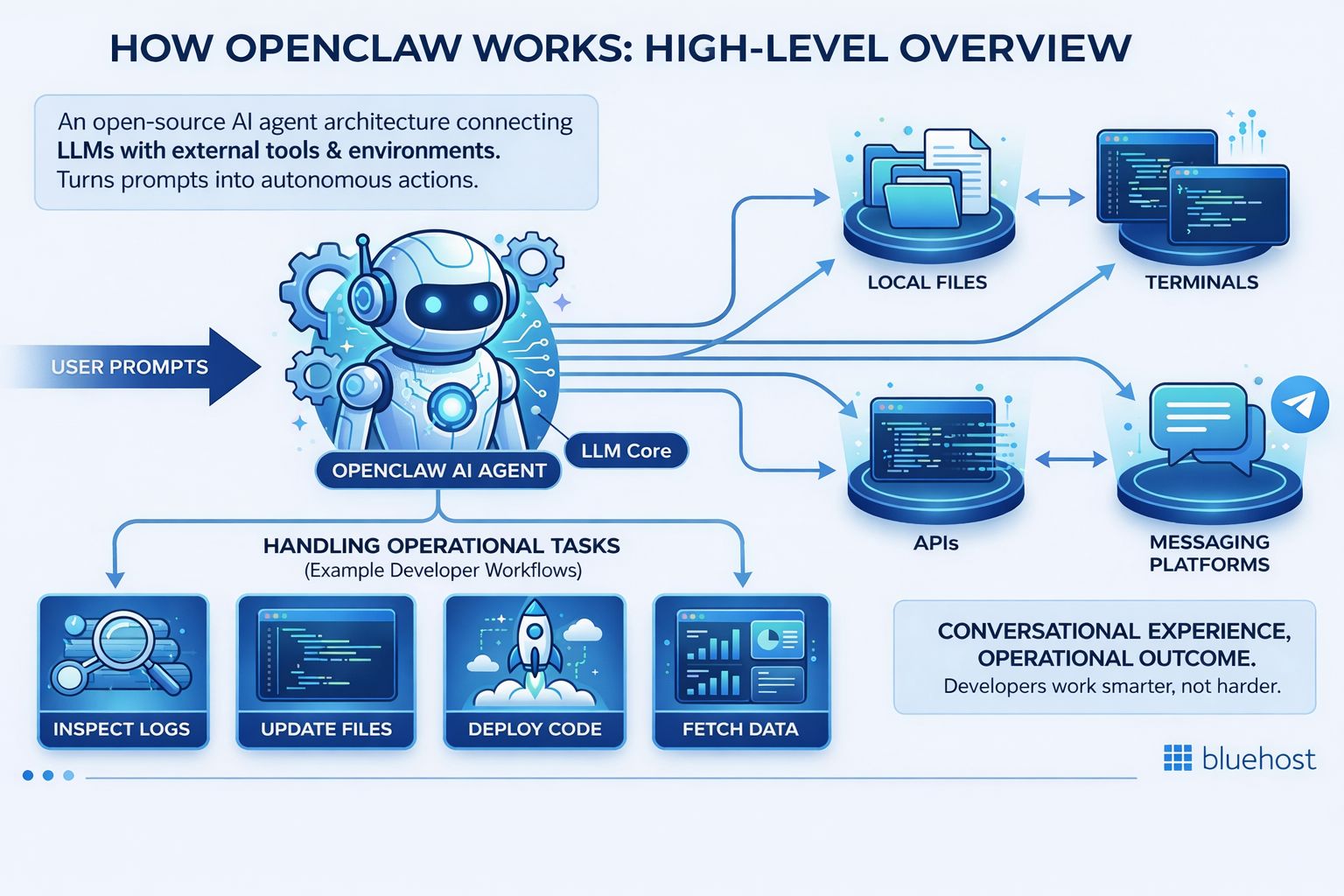
Typically, the agent is granted access to a combination of:
- Local and server-side files
- Command-line terminals
- External web APIs
- Communication apps like Telegram
For example, OpenClaw may be set up to interact with local files, run terminal-based actions, connect with external APIs or send updates through messaging tools like Telegram. Rather than working as a general autonomous system with unlimited access, it operates within the scope defined by the developer.
This makes OpenClaw useful for workflow automation while keeping the focus on controlled, tool-based execution. Its value comes from helping developers connect AI with real systems in a more practical and structured way.
Why developers are adopting OpenClaw?
There are a few compelling reasons driving the rapid adoption of OpenClaw use cases for developers, particularly regarding intelligent workflow optimization.
- Self-hosted AI environments: Engineering teams retain absolute control over AI operations, guaranteeing data privacy and enabling highly specialized workflows tailored to their unique infrastructure.
- Boosted technical productivity: OpenClaw eliminates friction by managing tedious responsibilities like evaluating logs, transferring data between platforms, running bash scripts and supervising VPS health.
- Extensive adaptability: Rather than forcing teams to conform to strict SaaS platforms, OpenClaw empowers developers to craft custom internal automation that perfectly matches their established processes.
This blend of robust control, hands-free execution and architectural flexibility is precisely what makes OpenClaw so appealing. Let’s dive into exactly how engineers are applying these advantages in the real world.
Best OpenClaw use cases for developers
Professionals have moved past mere experimentation with OpenClaw. They rely on it to govern infrastructure, automate tedious pipelines and construct smart utilities that accelerate the entire development lifecycle.
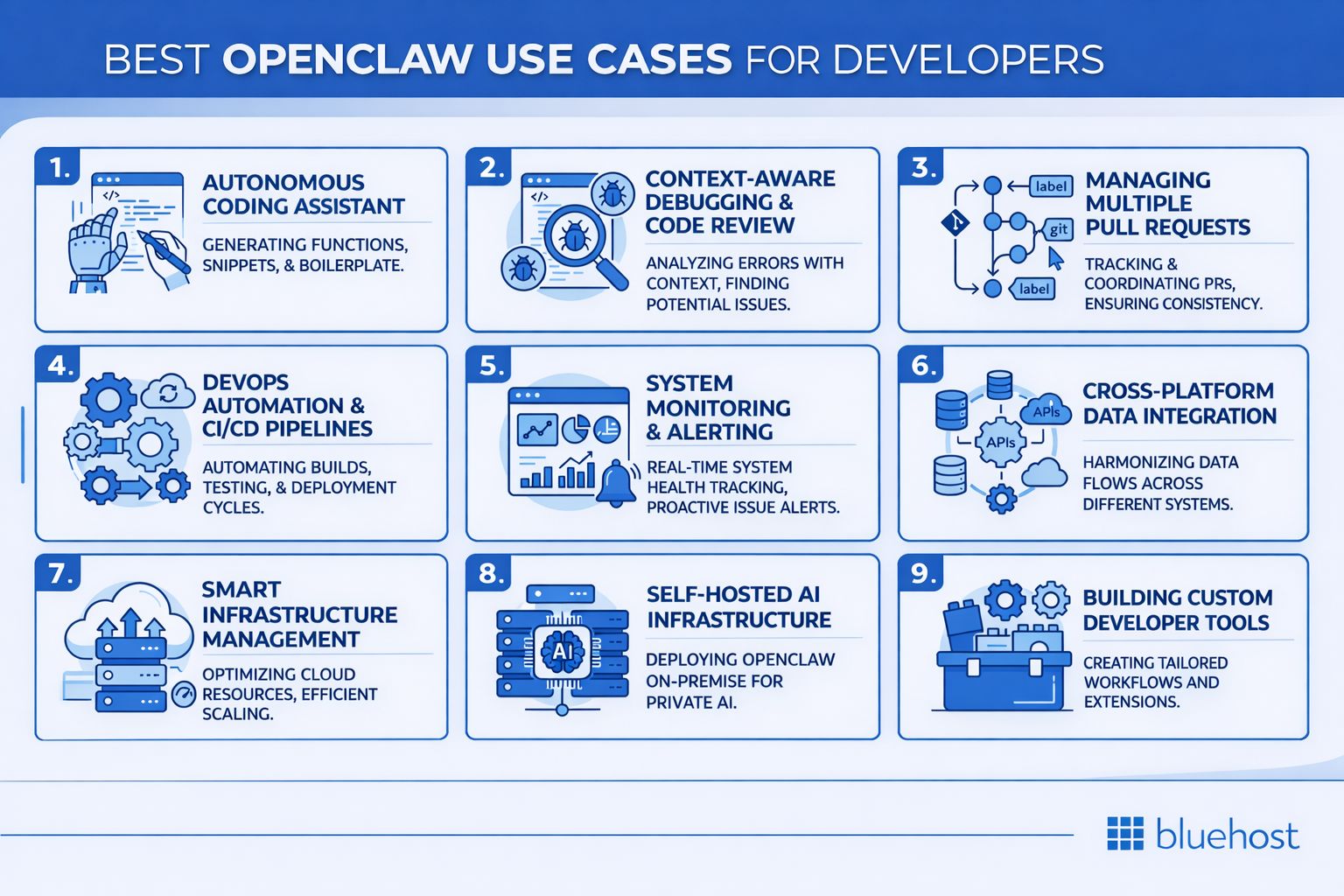
Below are the most impactful OpenClaw use cases for developers today.
1. Autonomous coding assistant
One of the most immediate applications is deploying OpenClaw as an active, independent coding partner.
Configured correctly, this agent does more than autocomplete text; it creates project files, executes necessary terminal commands and aids in complex deployments. It evolves from a passive advisor into a tool that actually handles project execution.
For instance, if you need to flush the cache on a remote staging server, you simply instruct OpenClaw to do it. The agent authenticates and runs the commands directly on the host, skipping the manual login process entirely.
By absorbing these routine maintenance chores, developers can dedicate their cognitive energy to complex architectural challenges. And just as it assists in building software, it provides equal value when things inevitably break.
2. Context-aware debugging and code review
Hunting down bugs is notoriously non-linear, often requiring developers to pivot between code changes, terminal outputs and historical logs. OpenClaw organizes this chaos by acting as a highly contextual debugging companion.
You can task the agent with scanning recent file modifications, interpreting error logs, spotting anomalies and proposing precise remedies. Because OpenClaw interfaces directly with your local files, its suggestions are based on actual project data rather than generalized assumptions.
Imagine running an application test while OpenClaw silently observes the backend logs. If a failure occurs, the agent can instantly highlight the error, correlate it with a recent commit and recommend a targeted fix. It can even proactively identify structural flaws that cause recurring bugs.
This contextual awareness drastically reduces the time spent diagnosing issues. Once the code is patched and ready, the next operational hurdle is peer review.
3. Managing multiple pull requests
Scaling projects bring an avalanche of pull requests requiring meticulous review, automated testing and status monitoring. OpenClaw provides a way to orchestrate these concurrent tasks without overwhelming your engineering team.
The framework can be instructed to conduct preliminary PR reviews, trigger test suites, verify merge conditions and ping reviewers when human approval is required. It can also automatically advance approved code to the deployment queue.
This is a game-changer for organizations juggling numerous repositories or rapid iteration cycles. It handles the administrative oversight so developers don’t have to manually babysit pull requests.
The result is significantly faster review cycles and improved team collaboration. From successful code merges, the focus naturally shifts toward deployment and operations.
4. DevOps automation and CI/CD pipelines
OpenClaw integrates seamlessly into established DevOps strategies, enhancing existing deployment mechanics.
Most engineering teams already rely on automated testing and building. OpenClaw acts as an intelligent supervisor over these systems. It can be prompted to manually initiate builds, evaluate test results, execute complex deployment scripts or provide status summaries on active pipelines.
For example, if a deployment test passes, OpenClaw can independently finalize the release and announce the update in a team Slack or Telegram channel. If it fails, it can pull the exact log that caused the error and alert the on-call engineer.
Because CI/CD relies heavily on strict, repeatable processes, injecting an AI agent that can make bounded decisions drastically cuts down on manual pipeline supervision. Once the code is live, the framework continues working by keeping an eye on the production environment.
5. System monitoring and alerting
System oversight is another area where OpenClaw excels. Engineers can deploy the agent as a continuous background process tasked with guarding infrastructure health.
The AI can track uptime metrics, evaluate application performance and issue intelligent alerts. Instead of humans constantly refreshing analytics dashboards, the agent actively watches the network and reports only when actionable anomalies occur.
A great implementation is configuring OpenClaw to dispatch a Telegram notification if a database fails, RAM usage spikes or API latency increases. Furthermore, it can aggregate these events over time to help teams diagnose systemic infrastructure weaknesses.
This intelligent filtering prevents alert fatigue and ensures that developers only step in when truly necessary. Effective monitoring, however, often requires connecting multiple disjointed platforms.
6. Cross-platform data integration
Development rarely occurs in a vacuum. Teams utilize an interconnected web of databases, issue trackers, CRMs and analytics dashboards. OpenClaw bridges these separate entities, facilitating smooth data automation across platforms.
Engineers can leverage OpenClaw to string together API calls that eliminate manual copy-pasting. An agent could extract user statistics from a secure database, format the data, push it to a CRM and notify the sales team in a chat channel.
Common integrations span ERP software, cloud databases and various proprietary APIs. The advantage is straightforward: delegating tedious data synchronization to an AI saves countless engineering hours.
This ensures a cleaner flow of information, minimizes human error and creates a highly cohesive technical ecosystem. Managing the underlying systems that power this ecosystem is the next logical step.
7. Smart infrastructure management
Infrastructure maintenance usually involves executing predictable command sequences and performing routine environmental checks. OpenClaw is perfectly equipped to absorb these redundant tasks.
You can instruct the agent to provision cloud servers, execute automated environment configurations, reboot struggling services and run scheduled cleanups. Because it seamlessly accesses terminals, it integrates flawlessly with established command-line operations.
This capability shines when dealing with highly repetitive duties. By offloading the preparation of local dev environments or routine server checks to OpenClaw, teams experience a notable reduction in operational friction.
Ultimately, it empowers developers to shift their focus from maintaining servers to engineering solutions. For those prioritizing security, keeping all of this entirely in-house is crucial.
8. Self-hosted AI infrastructure
A premier advantage of OpenClaw is its capacity for entirely self-hosted deployment. For engineering teams operating under strict data privacy and compliance guidelines, this is non-negotiable.
Rather than funneling sensitive data through third-party SaaS AI providers, OpenClaw operates within your controlled environments. This ensures granular oversight regarding system permissions, data residency and agent behavior limits.
This is vital for teams handling proprietary algorithms or sensitive customer databases. Furthermore, it allows engineers to meticulously fine-tune the agent’s performance to match their exact production architecture.
Whether hosted on local hardware, a remote VPS or secured via Tailscale, the framework’s hosting flexibility is a major selling point. That same flexibility extends to creating entirely new assets for your team.
9. Building custom developer tools
OpenClaw offers massive utility straight out of the box, but its true power lies in its extensibility.
Thanks to its open architecture, developers can engineer specialized plugins and bespoke automation layers targeted at their company’s specific bottlenecks. You might build an interactive Slack bot for deployment, an automated QA tester or a centralized script execution engine.
In this context, OpenClaw transcends being a mere tool, it becomes a foundational platform for architecting AI-driven developer experiences.
For departments overwhelmed by routine technical requests, the ability to build custom, intelligent tooling is transformative. With these varied applications in mind, the overarching advantages of adoption are clear.
Benefits of using OpenClaw for developers
By introducing pragmatic automation, OpenClaw significantly upgrades development workflows, slashing the manual effort required to keep operations running smoothly.
- Enhanced productivity: Delegate tedious tasks like file maintenance, VPS health checks and routine script execution so engineers can tackle complex problem-solving.
- Accelerated development cycles: Expedite the QA, debugging and staging phases by letting an AI handle the repetitive transition steps in your pipelines.
- Versatile automation support: Combine terminal controls, API integrations and local file access to forge incredibly resilient, cross-platform technical workflows.
- Full customization control: Capitalize on the open-source architecture to forge highly specific tools that integrate naturally with your current tech stack.
Targeting your most frustrating, recurring tasks first will yield immediate productivity dividends. However, realizing these benefits requires navigating a few potential implementation hurdles.
Security and risk controls to consider before using OpenClaw
Because OpenClaw can connect AI to real tools and systems, the biggest risk is giving it too much access too early. Its sandboxing docs note that tool execution can run on the host if sandboxing is not enabled, so security controls should be part of setup from the start.
- Be careful with production access
Do not start with high-trust workflows like deployments or broad shell access. Begin with low-risk tasks and expand only after controls are working as intended. - Limit access by default
Give OpenClaw access only to the files, commands, APIs, or messaging tools needed for one workflow. Least-privilege scoping reduces the risk of tool misuse and unauthorized actions. - Do not trust external tools automatically
Treat third-party skills, downloaded tools, and outside content as untrusted until reviewed. Self-hosted agent setups can combine untrusted instructions, executable code, and stored credentials in the same runtime. - Test in an isolated environment
Start in a dedicated VM or separate system, not on your main workstation. Microsoft’s guidance recommends isolation, low-privilege credentials, and non-sensitive data during evaluation. - Enable sandboxing where possible
OpenClaw supports Docker-based sandboxing to reduce blast radius. If sandboxing is off, tools run on the host. - Log important actions
Track command execution, file writes, config changes, authentication events, and outbound API activity. CISA recommends logging and monitoring system activity to spot misuse or suspicious behavior early.
Best practices for implementing OpenClaw workflows
A safer rollout focuses on small, controlled workflows first. That makes it easier to test permissions, review outputs, and catch issues before the agent touches anything sensitive.
- Start with low-risk tasks
Good first use cases include log review, status summaries, or simple Telegram alerts instead of deployments or infrastructure changes. - Define one clear job per workflow
A monitoring workflow should send alerts, not also edit production files or trigger releases. Keeping scope narrow makes the setup easier to control. - Use dedicated credentials
Avoid broad personal or production accounts. Use separate, low-privilege credentials for each workflow wherever possible. - Break automations into smaller steps
Smaller workflows are easier to test, troubleshoot, and roll back. They also make permission boundaries easier to manage. - Keep a human in the loop for high-impact actions
For deployments, infrastructure changes, or sensitive data access, use approval steps instead of full automation. - Make monitoring part of the workflow
Log what the agent did, what it accessed, and which integrations it used. That makes audits and incident response much easier. - Expand gradually
Once small workflows are stable and well monitored, you can extend usage more confidently.
By expanding your automation library thoughtfully, you guarantee stability as workflows become more intricate. A key part of ensuring this stability is choosing an optimal hosting environment.
Why use Bluehost self-managed VPS hosting for OpenClaw?
Running OpenClaw on Bluehost VPS gives teams a practical way to move from AI experimentation to production-ready automation. With one-click deployment and dedicated infrastructure, developers can run private AI agents with full control over their environment.
1. Self-hosted AI with full control
Bluehost VPS lets you deploy OpenClaw in your own infrastructure. Your data, prompts, workflows and integrations stay within your environment, helping maintain privacy and security.
2. One-click OpenClaw deployment
Bluehost VPS One-Click setup makes it easy to install and run OpenClaw without complex configuration. Teams can quickly launch a working AI agent platform and start building workflows.
3. Built for AI orchestration and automation
OpenClaw supports AI orchestration, prompt pipelines, multi-step reasoning and autonomous task execution. Running it on VPS infrastructure provides the reliability needed for continuous automation.
4. Integrate AI directly into your workflows
With tool calling and API chaining, OpenClaw agents can connect to internal systems, services and databases. This allows teams to embed AI into existing workflows and operational processes.
5. Infrastructure optimized for autonomous agents
Dedicated VPS resources provide the stability necessary for long-running OpenClaw agents, background tasks and complex automated workflows. This specialized environment ensures that AI-driven systems maintain high performance and scale seamlessly as operational requirements expand within the DevOps pipeline.
6. Deploying production-ready AI systems
Bluehost VPS offers a resilient environment where development teams can build, deploy and manage internal AI agents with confidence. This allows organizations to move beyond local experiments and integrate AI into daily operations, providing the reliability needed for autonomous workflows to succeed.
Establishing a professional-grade server foundation is the essential final step toward mastering AI-driven development. Selecting a reliable hosting solution is the key to maintaining the uptime and responsiveness required for professional-grade AI agents.
Final thoughts
By implementing these OpenClaw use cases for developers, organizations can bridge the gap between innovation and execution, creating a DevOps environment that is truly powered by autonomous intelligence.
These diverse OpenClaw use cases for developers illustrate how profoundly AI can optimize modern technical workflows. By linking isolated APIs and managing routine command-line tasks, developers can dramatically elevate output consistency and overall team velocity.
However, the backbone of this automation is a reliable VPS environment. To function effectively, these agents need a secure, scalable server foundation rather than being tethered to a vulnerable local machine.
To truly unlock this potential, ensure your server can handle the workload. If you are ready to modernize your DevOps pipelines, setting up a robust, self-managed VPS is the smartest first step.
Ready to transform your workflow? Deploy Bluehost VPS today and start implementing these OpenClaw use cases for developers to maximize your productivity.
If you still have questions about getting started, review our common queries below.
FAQs
OpenClaw is primarily utilized to automate technical workflows by interfacing large language models with actual digital environments. Engineers deploy it to oversee system status, process API data, automate live deployments and assemble custom AI-driven utilities.
Instead of passively generating text, it serves as an active participant that independently executes commands within your software ecosystem.
Yes, OpenClaw operates on a fully open-source framework. This grants developers the freedom to heavily modify the agent, build specialized integrations and construct proprietary tools tailored to their organization’s unique requirements.
Absolutely. DevOps automation is one of its strongest applications, effectively handling tasks like:
1. Supervising CI/CD pipelines
2. Tracking server health metrics
3. Executing application deployments
4. Parsing and interpreting complex log files
By granting the agent terminal and API access, these repetitive DevOps cycles run with incredible efficiency and reduced human oversight.
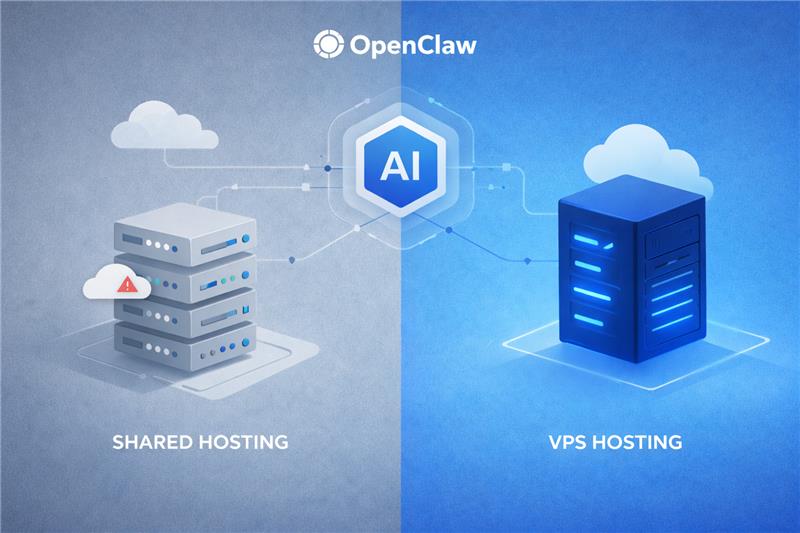
While it is possible to test OpenClaw on a local machine, production workflows heavily benefit from a VPS. This is because effective automation demands:
1. Uninterrupted server uptime
2. Secure remote accessibility
3. Dedicated computing resources
A VPS guarantees that your agents can reliably monitor infrastructure and respond to commands 24/7.
A Bluehost self-managed VPS provides the ideal environment for running AI agents like OpenClaw by offering the performance, control and reliability developers need for automation workflows.
It includes:
1. Guaranteed, dedicated processing power to handle AI-driven tasks and automation workloads efficiently
2. Complete root access so developers can configure the environment, install dependencies and customize workflows
3. Rock-solid uptime that keeps OpenClaw agents running continuously for monitoring, deployments and background tasks
4. Seamless scalability to support larger databases, more integrations and expanding agent networks
This combination ensures your OpenClaw agents have the power, stability and flexibility needed to manage complex development workflows securely. Want to see how Bluehost VPS can support your OpenClaw setup? Contact us to learn more about getting started.


Write A Comment