



Key highlights
- Understand what is domain lock and how to protect your domain by restricting sensitive actions like transfers, DNS changes and deletions.
- Know that domain transfer lock is the most common protection, preventing unauthorized domain transfers.
- Learn about registry lock, a higher security option requiring extra verification beyond standard registrar controls.
- Discover that automatic locks activate after certain changes, delaying transfers for 30 days for security.
- Explore best practices for keeping domain lock enabled by default and unlocking only when actively transferring.
Domain hijacking, accidental transfers and unauthorized DNS changes are among the most common and costly domain-related security incidents for businesses and website owners. A domain lock is one of the simplest protections you can enable to reduce these risks, yet many people only discover it when they see messages like domain transfer locked or why is domain transfer locked while trying to move their domain.
This guide explains what is domain lock, the domain lock across registrars and registries and the different types of domain locks (including registry lock and domain registry lock). You will also learn how to check if a domain is locked, how to toggle a domain transfer lock on and off safely and how privacy protection add-ons fit into a complete security approach.
What is domain lock?
A domain lock is a security feature applied to your domain name to prevent unauthorized actions. Its primary function is to stop the domain from being transferred to another registrar without your permission. When you see terms like domain locked or domain is locked, it generally means the registrar has enabled this restriction to safeguard your website against domain hijacking.
In technical terms, when you lock a domain, the registrar applies specific status codes to the domain’s registry record. The status code you will most frequently encounter is:
- clientTransferProhibited (often displayed as domain status client transfer prohibited)
This status explicitly blocks transfer requests unless you manually unlock the domain first. If you are wondering why domain transfer is locked, it is typically because the registrar enabled the lock by default for your protection or because a 60-day security lock was triggered following a new registration or a change in ownership details.
Domain lock vs. Domain privacy vs. Domain guard
| Feature | What it controls | Primary function |
|---|---|---|
| Domain lock | Actions performed on the domain | Restricts domain transfers and modifications to prevent unauthorized changes |
| Domain privacy | Personal information visibility | Controls what personal information is displayed publicly in WHOIS records |
| Domain guard | Overall domain security | Registrar’s branded security or protection bundle that may include transfer protection, change verification and monitoring (naming varies by provider) |
What are the different types of domain locks?
There is no single universal “one lock.” Instead, locks name a set of restrictions that can be applied at different layers (registrar and registry) and for different purposes (security, policy, legal compliance). Below are the most common types, including what they do, when they appear and what to do if you need to make changes.
1) Domain security lock
A domain security lock is a broad term many registrars use for controls that prevent unauthorized changes. In everyday usage, it often overlaps with the standard domain transfer lock (registrar lock). Some providers also bundle additional verification steps under “security lock” or “domain guard,” depending on their product naming.
- What it protects: Transfers and sometimes account-level changes.
- Best for: All domains, especially those tied to active businesses, email or paid ads.
- Common symptom: You see domain locked in your dashboard and cannot proceed with a transfer.
2) Domain legal lock
A domain legal lock can be applied when there is a dispute, court order, UDRP action, ownership challenge or other legal process affecting the domain. This type of lock is designed to preserve the status quo until the matter is resolved.
- What it protects: Prevents transfers and often prevents registrant changes.
- Best for: Not user-selected; it is typically imposed due to a legal requirement.
- What to do: Work with the registrar’s compliance team and provide documentation. Unlocking is not usually a simple toggle.
3) Domain transfer lock (Registrar lock)
A domain transfer lock (commonly known as a registrar lock) is the standard security feature used to prevent unauthorized attempts to move your domain to a different registrar. This lock is typically implemented using the Extensible Provisioning Protocol (EPP) status code clientTransferProhibited. Most registrars enable this setting by default to safeguard your asset against hijacking.
- What it protects: Prevents the domain from being transferred to another registrar without your explicit permission.
- Also called: Registrar lock services, “transfer lock,” or simply “domain lock.”
- When you notice it: You will encounter an error message or a “transfer locked” status if you attempt to initiate a transfer without first unlocking the domain.
If you are wondering is it safe to leave the domain registrar lock off during a transfer, the answer is yes, but only temporarily. You must disable the lock to generate your authorization code (EPP code) and approve the transfer request. However, leaving the domain unlocked for longer than necessary increases security risks. Once the transfer is finalized, verify that the lock is immediately re-enabled at your new registrar.
4) Delete lock
A delete lock prevents the domain from being deleted (or entering the deletion lifecycle) accidentally or by an attacker. For businesses, accidental deletion can be just as disruptive as a hijack, because it can take down a website and email.
- What it protects: Deletion and sometimes expiration-related actions.
- Best for: High-value domains or domains tied to revenue, customer support and email.
- Tip: Pair with strong account security (MFA) and up-to-date recovery information.
5) 30-Day lock
A 30-day lock (previously known as the “60-day transfer lock”) is an automatic restriction that prevents domain transfers for a specific period following certain account or ownership changes. This mandatory waiting period is a common answer to why is domain transfer locked even after you have manually unlocked the domain in your control panel.
What triggers a 30-day domain lock? This restriction is typically activated by the following events:
- Updates to the registrant’s name, email or organization information
- Registration of a brand-new domain name
- Recent completion of a domain transfer between registrars
- Security-related account modifications or identity verification processes
If you are planning to transfer your domain, avoid making changes to your contact details immediately before initiating the process, as this will trigger the lock and cause a 30-day delay.
6) Change of registrar (COR) lock
A Change of Registrar (COR) Lock is a security restriction that prevents a domain name from being transferred to a new provider for a set period, typically 60 days. This lock is automatically triggered by specific events, such as a recent domain transfer or significant updates to the registrant’s contact information (first name, last name or email address). Its primary purpose is to protect domain owners from unauthorized transfer attempts immediately following a change in ownership or account details.
Is the COR Lock mandatory? Can I remove it? The application of this lock is largely governed by ICANN’s Transfer Policy to ensure domain security. While the 60-day lock is standard practice, some registrars may allow you to opt-out of the transfer restriction during the contact update process. However, if the lock is already active, it usually cannot be removed until the 60-day waiting period has passed.
Registry lock vs. Registrar lock: What’s the difference?
Understanding the distinction between these two security levels is critical when evaluating domain lock services. While both prevent unauthorized transfers, they operate at different layers of the domain system and offer vastly different levels of protection.
- Registrar lock (Client Transfer Prohibited): This is the standard security control managed directly by your registrar. You can typically toggle this “on” or “off” instantly within your domain management dashboard. It applies the clientTransferProhibited status code to your domain, blocking most automated transfer requests. However, if your registrar account credentials are compromised, an attacker can simply unlock and steal the domain.
- Registry lock (Server Transfer Prohibited): This is a premium, high-security control applied at the registry level (the organization that manages the TLD, such as Verisign for .com). A registry lock sets the serverTransferProhibited status, meaning the domain cannot be unlocked or modified via the registrar’s dashboard alone. Unlocking requires a manual, out-of-band verification process often involving a three-way authentication between you, the registrar and the registry, making it virtually impossible to bypass through account theft.
For high-value assets such as corporate brand domains, eCommerce sites or domains used for critical email infrastructure domain registry lock is considered the gold standard. It ensures that even if a registrar account is hacked, the domain itself remains secure.
Where do “OCRA Locks” and other verification methods fit?
You may also encounter references to the OCRA lock (Outbound Change of Registrant). Unlike a permanent security feature, this is typically a temporary 30-day lock triggered automatically by some registrars when you update key contact information (such as the registrant’s name or email address). Its primary purpose is to prevent immediate transfers after sensitive account changes.
In broader security discussions, “OCRA” can also refer to OATH Challenge-Response Algorithms used in multi-factor authentication. While the acronyms overlap, the key takeaway for domain owners is that the strongest protection comes from human-verified approval steps (like those in a Registry Lock) rather than just automated or temporary locks.
How to check if your domain is transfer locked (Domain lock check)
If you are unsure what is domain lock status or need to verify if your web address is secure, there are two reliable places to look: your registrar’s management dashboard and the official domain status codes (accessible via a WHOIS lookup tool).
Quick checklist: Check if domain is locked
- In your domain manager, locate the security settings and look for a toggle labeled Domain Lock, Transfer Lock or “Theft Protection.”
- Review the domain status codes in a WHOIS search. If you see the status clientTransferProhibited, the transfer lock is currently enabled.
- If you cannot unlock the domain, check for time-based restrictions. A 30-day lock (recently updated from 60 days by ICANN) often applies after a new registration or a recent transfer.
Common domain lock status values you might see
While registrars often simplify these settings in the dashboard, understanding the raw status codes is helpful for a precise domain lock check. You may encounter the following:
- clientTransferProhibited: The transfer is blocked by your registrar. This is the standard domain transfer lock used to prevent unauthorized moves.
- serverTransferProhibited: The transfer is blocked at the registry level. This can indicate a high-security registry lock, a legal dispute or that the domain is too new to transfer.
- clientUpdateProhibited: Prevents updates to the domain details, such as contact information or nameservers.
- clientDeleteProhibited: Prevents the domain from being deleted by the registrar, adding a layer of protection against accidental loss.
If your dashboard simply says Domain Lock Status: ON, it usually corresponds to the clientTransferProhibited restriction working in the background.
How to toggle domain lock on and off (step-by-step)
Most registrars make it easy to lock domain settings from the control panel. The exact labels differ, but the workflow is usually consistent.
1. Log in to your Bluehost Account Manager.
2. From the left-hand menu, click Domains.
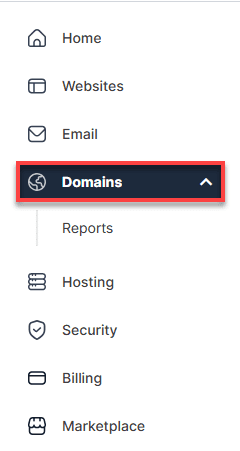
3. If your account has only one domain, you will be taken directly to the domain management panel.
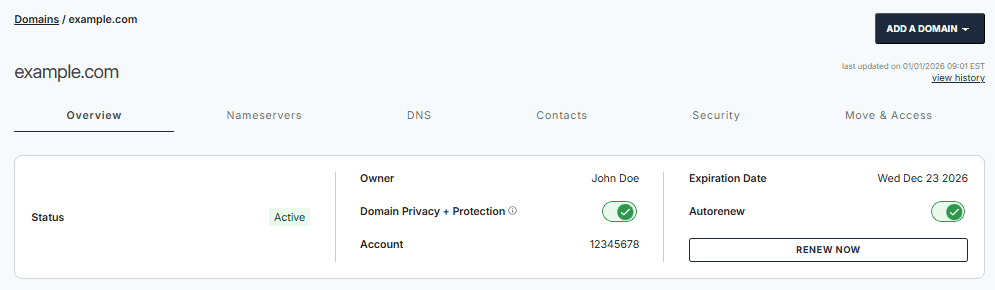
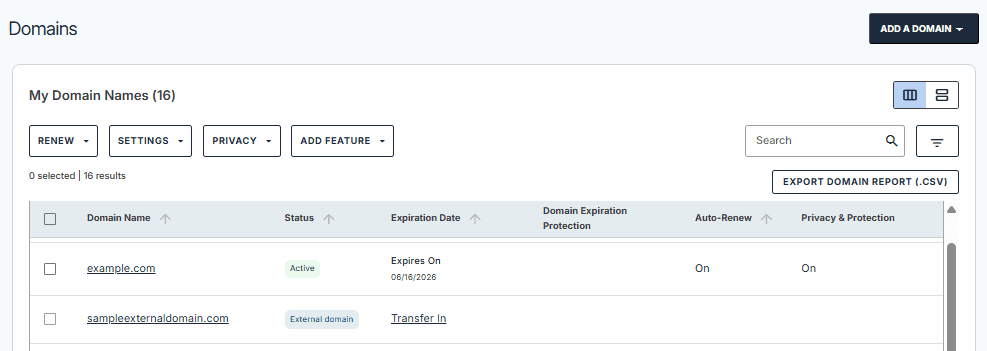
4. If your account has multiple domains, select the domain you want to manage to open its domain management panel.
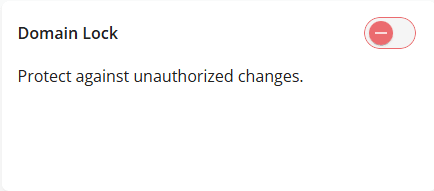
5. Scroll down to the Domain Lock section.
6. Use the toggle switch to turn Domain Lock On or Off, depending on your preference.
7. Wait for the confirmation message indicating that your changes have been saved successfully.

Safety tip: When should you unlock?
Unlock only when necessary, typically right before initiating a transfer and only for the period required to complete it. If you are asking is it safe to leave domain registrar lock off during transfer, the safer practice is to keep it off for the shortest possible time and ensure your account uses strong passwords and multi-factor authentication.
Why are domain locks important?
Domain locks are critical because your domain acts as the central control point for your website, email and customer trust. A single unauthorized change to your DNS settings can redirect visitors, intercept sensitive emails or take your entire online operation offline.
- Protect against hijacking: Enabling a lock significantly reduces the risk of attackers transferring your domain to another registrar without your permission.
- Prevent accidental transfers: This is especially helpful for teams where multiple people have access to the account, preventing human error from causing service disruptions.
- Secure DNS and ownership details: Stronger locking mechanisms help prevent unauthorized updates to your contact information and nameservers.
- Enhance brand security: For high-value domains, adding a registry lock provides the highest level of protection against sophisticated attacks.
Real-world example: Why one misstep can be expensive
Consider a business domain used primarily for email invoicing. If that domain is transferred or its DNS records are altered without authorization, attackers could intercept invoices and reroute client payments to their own accounts. Keeping a standard domain lock enabled and upgrading to a registry lock for critical assets is a simple, proactive way to prevent these costly scenarios and protect your customer trust.
How Bluehost domain privacy and protection services enhance domain security
Domain locks are just one layer of protection for your online presence. Bluehost’s Domain Privacy + Protection services work alongside domain locks to create a comprehensive security strategy. At $11.99 per domain name, this service masks your personal information on the public WHOIS database, replacing it with alternate contact details to shield you from spam, phishing attempts and potential identity theft.
- Complete registrant control ensures you maintain full ownership as the registrant of record, unlike proxy services that may limit your access.
- Trusted privacy protection replaces your name, address, email and phone number with generic contact information on public WHOIS records.
- SMS alerts provide immediate mobile notifications when changes are made to your domain name registration, adding an extra verification layer.
- Blacklist monitoring identifies issues before they impact your SEO, traffic and online reputation, with clear steps to resolve any problems.
- Daily malware scanning monitors your site for suspicious activity and immediately alerts you to potential security threats.
While Domain Privacy + Protection shields your contact information from public view, remember to keep your domain transfer lock enabled in your Bluehost dashboard. Only disable the transfer lock temporarily when you’re actively completing a verified domain transfer to another registrar or account.
Why your domain is locked during a transfer
If you encounter a “domain is locked” error while trying to move your domain to a new provider, it is usually due to a security protocol. The most common reasons include:
- Registrar transfer lock is active: This is a standard security setting (often labeled “ClientTransferProhibited”) that you must manually disable in your domain management panel.
- Recent contact updates: Updating your registrant information (such as name or email) typically triggers a 60-day transfer lock to prevent hijacking, though some policies may set this to 30 days.
- Registry-level restrictions: A specialized registry lock may be in place, which requires additional verification with the registry to remove.
- Pending verification: The domain may be locked if your email address or identity has not yet been verified following a recent registration or update.
To resolve this, check your current domain lock status in your registrar’s dashboard. If the lock is time-based due to a recent change, you may need to wait until the security period expires.
Final thoughts
The simplest, most effective baseline protection for any domain is enabling a domain lock, especially a domain transfer lock that prevents unauthorized moves. For higher-risk domains, upgrading your posture with a registry lock (also called a domain registry lock or registry lock domain) can provide an additional layer of verification that is much harder to bypass.
Next steps: perform a quick domain lock check, confirm whether the domain status client transfer prohibited is active and only unlock your domain during planned transfers or verified maintenance. Combined with privacy and protection controls, a well-managed domain lock status is a foundational part of protecting your brand, website and email.
FAQs
What is a domain lock and why is it important?
A domain lock is a restriction that prevents sensitive actions, most commonly domain transfers, unless you explicitly unlock the domain first. It is important because it helps prevent hijacking, unauthorized transfers and accidental changes that can take your website and email offline.
How do I know if my domain is locked?
Use your registrar dashboard to check if the domain is locked and look for “Domain Lock” or “Transfer Lock.” You can also confirm via status codes; if you see the domain status client transfer prohibited, your domain transfer lock is enabled. This is a practical way to do a quick domain lock check.
Can I transfer my domain while it’s locked?
No. If the domain transfer lock is enabled, you must unlock the domain before the transfer can proceed. If the domain still cannot be transferred after unlocking, a time-based restriction (such as a 30-day lock) or a domain legal lock may be in effect.
What triggers a 30-day domain lock?
A 30-day lock is commonly triggered by registrantownership contact changes, newly registered domains, post-transfer policies or certain securityverification events. The exact triggers can vary by registrar, TLD and policy requirements.
Is the COR Lock mandatory? Can I remove it?
Sometimes. A Change of Registrar (COR) Lock may be policy-driven or implemented as a security measure. Whether you can remove it depends on the registrar’s process and the applicable registry rules. If it is mandatory, you may need to wait until the lock period ends or complete the required verification.
How do I unlock my domain in Bluehost?
In general, you would sign in to your Bluehost dashboard, open domain management for the specific domain and locate the domain lock or domain transfer lock setting to toggle it off, then save changes. If you do not see the option, check whether an automatic time-based lock or a higher-level restriction is preventing changes.
Will unlocking my domain make it vulnerable?
Unlocking can increase risk if left off unnecessarily. If you must unlock for a transfer, keep the window short, ensure your registrar account is protected with strong authentication and re-enable the domain lock immediately after the transfer completes. For high-value domains, consider registry lock to add stronger safeguards.


Write A Comment