



Key highlights:
- Control URL routing at the server level before your website code executes using htaccess redirects.
- Provide complete redirect control without modifying your codebase through the .htaccess file.
- Execute server-level redirects faster and more reliably than code-based alternatives.
- Learn both simple Redirect directives and advanced RewriteRule patterns.
- Avoid critical SEO mistakes in redirect configuration that can silently damage your search rankings.
Your website structure evolves. Pages move, URLs update, content reorganizes—and without proper redirects, visitors and search engines slam into dead ends. An htaccess redirect solves this by controlling how your Apache or LiteSpeed server handles incoming requests before your site loads any code.
The .htaccess file sits in your website’s root directory and gives you complete control over URL redirects without touching your codebase. This makes htaccess redirects faster and more reliable than code-based alternatives, executing at the server level with minimal overhead.
This guide shows you how to redirect URLs using htaccess. You’ll also learn htaccess rewrite methods, syntax rules and real-world examples right from simple Redirect directives to advanced RewriteRule patterns.
Why htaccess redirects matter for SEO and user experience?
When you redirect old URLs to new ones, you preserve the SEO value accumulated over months or years. Search engines transfer page authority through proper 301 redirects, meaning your new URL inherits the ranking power of the old one. Without redirects, visitors hit error pages, your site loses professional credibility and search engines drop your pages from their index.
The server-level execution of htaccess redirects makes them superior to alternatives. They process before WordPress loads, before PHP executes, before any application code runs. You can redirect entire domains, specific pages or URL patterns with simple rules that work across your entire site.
| Method | Best for | Complexity | SEO impact |
|---|---|---|---|
| Redirect 301 | Simple URL changes | Low | Passes full authority |
| RewriteRule | Pattern matching, complex rules | Medium to High | Passes full authority when configured correctly |
| RedirectMatch | Regex patterns without RewriteEngine | Medium | Passes full authority |
Understanding URL redirect types and status codes
Before you create redirect rules, you need to understand redirect status codes. Each code tells browsers and search engines how to handle the redirect, which directly affects SEO, caching behavior and user experience.
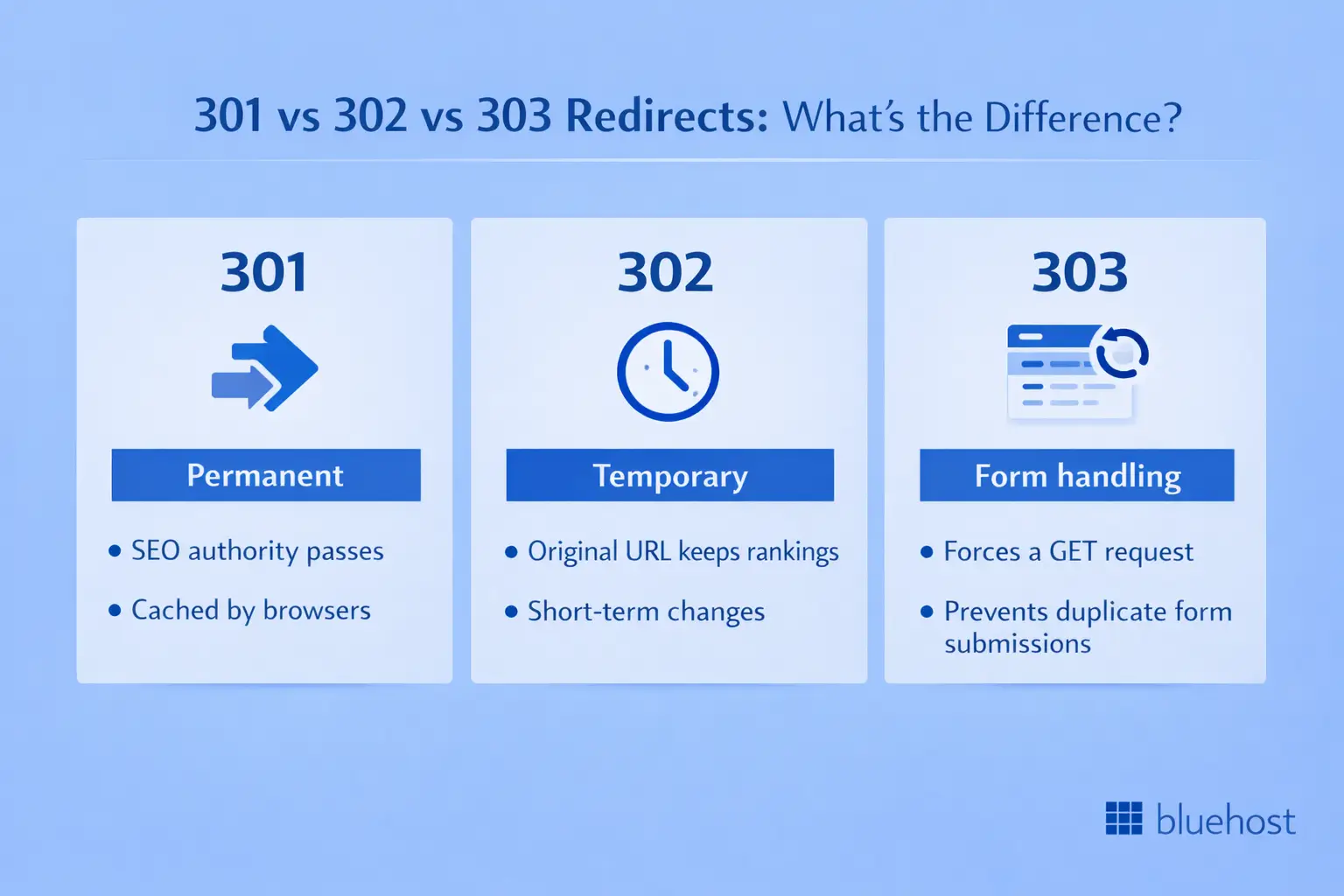
301 redirect
A 301 redirect signals that a URL has permanently moved to a new location. This is your primary tool for SEO-safe URL changes because search engines transfer page authority to the new destination. Google explicitly states that 301 redirects pass ranking signals, meaning you preserve years of link-building effort with one properly configured redirect.
Browsers cache 301 redirects aggressively, which speeds up future visits but makes testing changes more difficult. Use this redirect type when you’ve permanently moved content and have no intention of using the old URL again.
302 redirect
A 302 redirect indicates a temporary move, telling search engines to keep the original URL in their index. The original page retains its authority and rankings because search engines expect you to restore the old URL eventually.
Think of 302 redirects for seasonal scenarios—redirecting your homepage to a holiday sale page for two weeks, then removing the redirect after the promotion ends. Your original homepage maintains its search rankings throughout the temporary redirect period.
303 redirect
A 303 redirect tells browsers to fetch the target URL using a GET request, primarily useful for form submissions on Apache servers. This prevents duplicate form submissions when users refresh their browsers after submitting data. You’ll encounter this redirect type less frequently than 301 or 302 in typical website scenarios.
Before implementing new redirects, verify your existing configuration isn’t already causing problems. Our Bluehost SEO Checker audits your site for redirect errors, broken link chains and configuration issues that search engines penalize but most site owners never discover until traffic drops.
How to locate and access your htaccess file?
Your .htaccess file lives in your website’s root directory typically the public_html or www folder on your server. Because the filename starts with a dot, it’s hidden by default in most file managers. You’ll need to enable hidden file visibility to see it.
Access the file through FTP, SSH or your hosting control panel’s file manager. In cPanel or similar interfaces, navigate to the File Manager, select the public_html directory, then enable “Show Hidden Files” in your settings. The .htaccess file should now appear in the file list.
How to create an htaccess file when none exists
If no .htaccess file exists on your server, you can create one. Open your text editor or hosting file manager, create a new file named exactly .htaccess (no file extension, no additional characters), then save it to your root directory with permissions set to 644.
Critical rule: Always back up your existing .htaccess file before making changes. One syntax error can break your entire website, returning 500 Internal Server errors to every visitor. Download a copy to your local computer so you can restore it instantly if something goes wrong.
How to create simple 301 redirects with the redirect directive?
The Redirect directive offers the simplest way to redirect URLs, requiring just one line of code for basic redirects. This method works perfectly for straightforward URL changes that don’t require pattern matching or conditional logic.
Basic redirect 301 syntax
The Redirect directive follows this structure: Redirect 301 /old-path /new-path. The status code comes first (301 for permanent), the old path comes next and the new destination follows last.
Redirect 301 /old-blog-post /new-blog-post
Redirect 301 /products-item /products/new-item
Redirect 301 /about-us https://example.com/about
Use relative paths for internal redirects on the same domain. Include the full URL with protocol (https://) for external redirects to different domains. Each redirect processes independently, making this method ideal when you have a specific list of URL changes to implement.
Running WordPress? The .htaccess method works for any Apache site, but WordPress users have plugin-based alternatives that don’t require manual file editing. See our complete guide to 301 redirects in WordPress for plugin recommendations, dashboard-based redirect management and WordPress-specific troubleshooting.
Redirecting an entire domain
When you rebrand or move to a new domain, you can redirect all pages from one domain to another while preserving the URL structure. This passes authority for every page from your old domain to your new one.
Redirect 301 / https://newdomain.com/
This single line redirects every page on your old domain. A visitor accessing olddomain.com/any-page automatically reaches newdomain.com/any-page because the URL path structure stays intact throughout the redirect.
Using RewriteRule for advanced pattern-based redirects
RewriteRule gives you pattern-matching power for complex redirect scenarios, allowing you to redirect multiple URLs with one rule. This method requires the mod_rewrite module on your Apache server, which most hosting providers enable by default.
Enabling the rewrite engine
Before using any RewriteRule directives, you must activate the rewrite engine:
RewriteEngine On
This single command activates mod_rewrite functionality. Place it once at the beginning of your rewrite rules section and all subsequent RewriteRule and RewriteCond directives will work properly.
RewriteRule syntax and structure
RewriteRule follows this pattern: RewriteRule Pattern Substitution [Flags]. The Pattern uses regular expressions to match URLs, the Substitution specifies where to redirect and Flags control redirect behavior in square brackets.
RewriteRule ^old-page$ /new-page [R=301,L]
RewriteRule ^products/(.*)$ /shop/$1 [R=301,L]
The ^ marks the URL start, the $ marks the URL end and parentheses create capture groups you can reference with $1, $2, etc. The R=301 flag creates a 301 redirect, while the L flag (last) stops processing additional rules. Without the L flag, Apache continues evaluating subsequent rules, which can create unexpected behavior.
Adding Conditions with RewriteCond
RewriteCond adds conditions that must be true before your RewriteRule executes. You can check domain names, request methods, query strings or dozens of other server variables, creating powerful conditional redirects.
RewriteCond %{HTTP_HOST} ^example\.com [NC]
RewriteRule ^(.*)$ https://www.example.com/$1 [R=301,L]
This example redirects non-www to www URLs. The RewriteCond checks the domain first and the RewriteRule applies only when the condition matches. The NC flag makes the match case-insensitive, catching [EXAMPLE].com, [Example].com and [example].com identically.
Redirect 301 vs RewriteRule: Choosing the right method
Both methods achieve permanent redirects, but they differ in complexity, flexibility and ideal use cases. Your choice depends on whether you’re redirecting specific known URLs or implementing pattern-based redirects.
When redirect 301 makes sense
Use Redirect 301 for straightforward URL changes where you know both the old and new URLs explicitly. This method requires no regular expression knowledge and produces clean, readable code that any developer understands instantly. It executes faster than RewriteRule because the server processes it with less overhead.
Choose Redirect 301 when redirecting specific pages during content updates, fixing typos in URLs or implementing a short list of individual redirects. The simplicity makes troubleshooting easier when redirects don’t work as expected.
When RewriteRule becomes essential
Choose RewriteRule when you need pattern matching to redirect multiple URLs with one rule. This method handles complex scenarios like query string manipulation, conditional redirects based on user agent or URL structure changes affecting hundreds of pages.
RewriteRule becomes necessary when you’re changing URL structures site-wide, redirecting all blog posts from /blog/post-name to /articles/post-name, for example. This requires one RewriteRule instead of hundreds of Redirect directives.
| Feature | Redirect 301 | RewriteRule |
|---|---|---|
| Syntax complexity | Simple | Advanced |
| Pattern matching | No | Yes (regex) |
| Best for | Individual URLs | Multiple URLs, patterns |
| Conditions | No | Yes (with RewriteCond) |
| Module required | mod_alias (default) | mod_rewrite |
How to handle common redirect scenarios?
Real-world websites face specific redirect challenges that appear repeatedly across different sites and industries. These tested solutions cover the most frequent redirect requirements for SEO and site management.
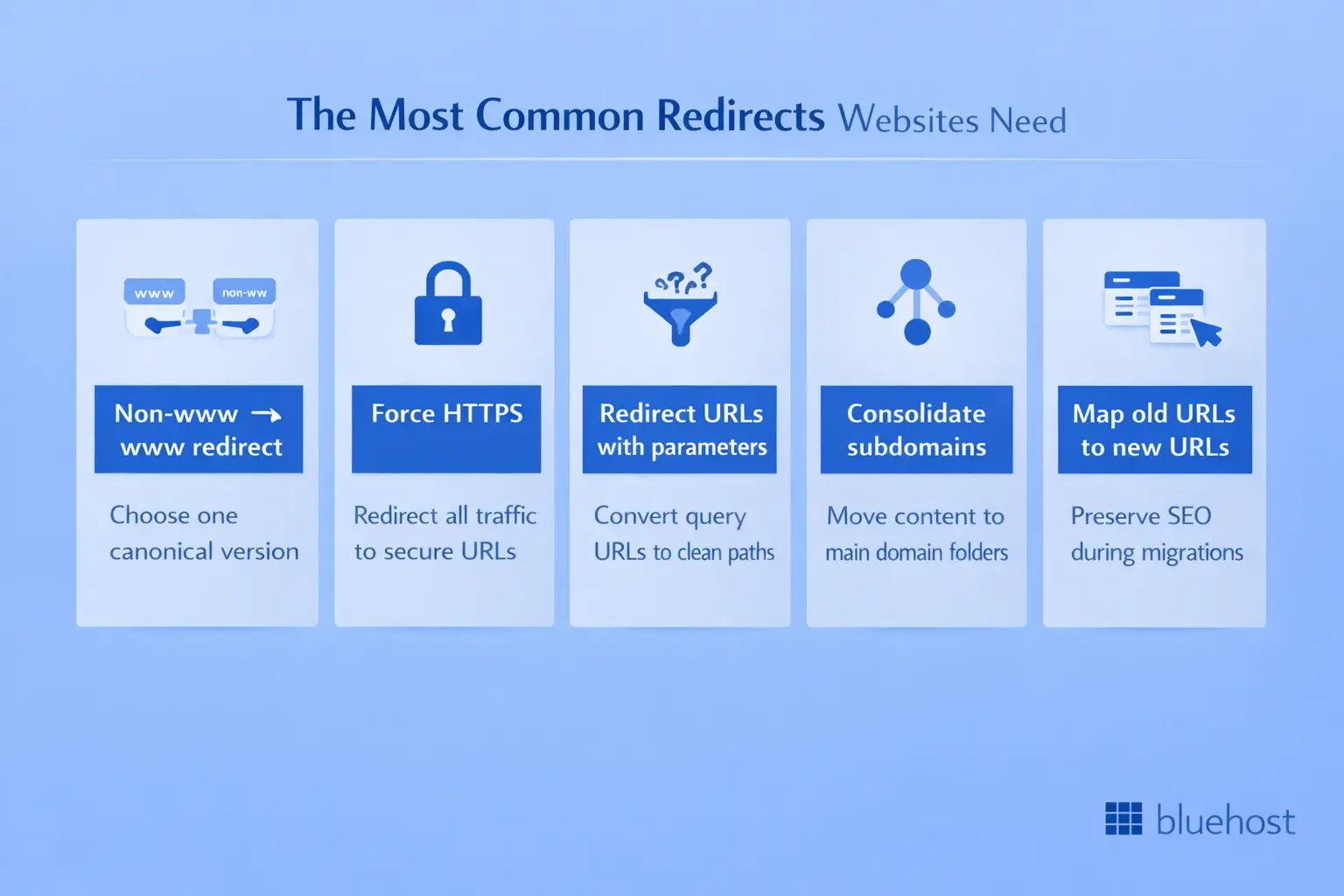
1. Redirecting non-www to www (or vice versa)
Search engines treat example.com and www.example.com as separate sites, splitting your SEO authority between them. Choose one version as canonical and redirect the other.
RewriteEngine On
RewriteCond %{HTTP_HOST} ^example\.com [NC]
RewriteRule ^(.*)$ https://www.example.com/$1 [R=301,L]
This rule checks if the domain lacks www, then redirects to the www version while preserving the URL path. The pattern ^(.*)$ captures the entire requested path and $1 inserts it into the destination URL.
2. Forcing HTTPS for security and SEO
Google prioritizes secure sites in search results and modern browsers flag HTTP sites as “Not Secure.” This redirect forces all traffic to your secure protocol.
RewriteEngine On
RewriteCond %{HTTPS} off
RewriteRule ^(.*)$ https://%{HTTP_HOST}%{REQUEST_URI} [R=301,L]
The condition checks if HTTPS is off, triggering the redirect to the HTTPS version. The rule maintains the exact domain and path from the original request using server variables, so it works regardless of the specific URL requested.
3. Redirecting URLs with query parameters
Old site structures might use query strings like /product.php?id=123, while your new structure uses clean URLs like /products/awesome-product. This redirect handles parameter-based URLs.
RewriteEngine On
RewriteCond %{QUERY_STRING} ^id=123$
RewriteRule ^product$ /products/awesome-product? [R=301,L]
The RewriteCond matches the query string separately from the URL path. The question mark in the substitution removes old parameters from the redirect, though you can also pass parameters to the new URL by including them before the question mark.
4. Consolidating subdomains
Subdomain consolidation redirects content from blog.example.com to example.com/blog, often necessary when simplifying site architecture or improving SEO through consolidated authority.
RewriteEngine On
RewriteCond %{HTTP_HOST} ^blog\.example\.com [NC]
RewriteRule ^(.*)$ https://example.com/blog/$1 [R=301,L]
This redirects all subdomain content to a directory structure on the main domain. The captured path $1 ensures that blog.example.com/post-name redirects to example.com/blog/post-name, preserving the content hierarchy.
5. Mapping old URLs to new URLs during migrations
Content migrations require explicit URL mapping where each old URL redirects to its corresponding new location. Create a redirect for every changed URL to prevent 404 errors and preserve SEO value.
Redirect 301 /old-services /new-services
Redirect 301 /company-info /about-us
Redirect 301 /contact-form /contact
List each redirect on a separate line for clarity. Test every redirect after implementation to verify users reach the correct destination pages—automated redirect testing tools can help when you have dozens or hundreds of redirects.
Critical mistakes that damage SEO and break sites
Your redirect configuration can silently damage SEO and user experience if you make common mistakes. Small syntax errors create redirect loops, break your entire site or fail to pass SEO authority to new URLs.
Redirect loops
A redirect loop occurs when URL A redirects to URL B, which redirects back to URL A. Browsers display error messages like “This page isn’t working” or “Too many redirects,” and search engines cannot index the affected pages.
Check your redirect logic to ensure each redirect has a clear final destination. Never create circular redirect chains; if you’re redirecting /page-a to /page-b, make absolutely certain that /page-b doesn’t redirect back to /page-a or through a series of intermediate redirects that eventually return to /page-a. Test redirects in an incognito browser window to avoid cached redirects masking the problem.
Incorrect redirect flags
The [R] flag alone creates a 302 temporary redirect, not the 301 permanent redirect you likely intend. This mistake costs you SEO value because search engines don’t pass authority through 302 redirects; they keep the old URL indexed and wait for you to restore it.
# WRONG - Creates 302 temporary redirect
RewriteRule ^old-page$ /new-page [R,L]
# CORRECT - Creates 301 permanent redirect
RewriteRule ^old-page$ /new-page [R=301,L]
Always include the =301 specification explicitly. This ensures proper authority transfer to your new URLs, moving your rankings to the correct pages rather than leaving them stranded on obsolete URLs.
Testing failures
Untested redirects cause broken user experiences that you discover only after users complain. Visitors reach wrong pages, encounter error messages or land on irrelevant content, increasing your bounce rate and destroying conversions.
Test every redirect manually in your browser by typing the old URL and verifying the destination. Check both desktop and mobile versions because some configurations handle them differently. Use redirect checker tools to verify status codes programmatically and monitor your server error logs for redirect-related issues like redirect loops or missing destinations.
How to test and verify redirects before going live?
Testing confirms your redirects work correctly before real users encounter problems. You need multiple verification methods to catch all issues because different problems manifest in different ways.
Browser developer tools for real-time testing
Open your browser’s developer tools (F12 in most browsers), navigate to the Network tab, then type your old URL in the address bar. Look for 301 or 302 status codes in the response headers. The Network tab shows the entire redirect chain, revealing unexpected intermediate redirects or loops.
Check the “Preserve log” option in developer tools to see redirects that happen before the page loads. Without this setting, the Network tab clears when the redirect completes, hiding the redirect from your analysis.
Online redirect checkers for detailed analysis
Online redirect checker tools provide detailed redirect chain analysis without requiring technical expertise. These tools show every redirect hop, identify loops, report status codes and flag potential problems. Popular options include httpstatus.io, redirect-checker.org and the HTTP Status and Redirect Checker Chrome extension.
Test a sample of your redirects immediately after implementation, focusing on the most important pages first. If you discover problems with your test sample, check all redirects before declaring the implementation successful.
Critical verification points
Check that the status code matches your intention: 301 for permanent moves, 302 only when truly temporary. Verify the destination URL is correct and loads properly. Test the redirect from multiple devices and browsers because server configurations sometimes handle different user agents differently. Confirm that the redirect preserves URL parameters if your new URL structure requires them.
Monitor your Google Search Console for crawl errors in the Coverage report after implementing redirects. Search engines report redirect issues they encounter during indexing, giving you early warning of problems before they significantly impact your traffic. Fix any errors quickly to maintain your search rankings and prevent authority loss.
Final thoughts
Mastering .htaccess redirects is a vital skill for managing your site’s structure and SEO performance. By implementing everything from simple Redirect 301 commands to advanced RewriteRule patterns, you can optimize your site’s navigation while avoiding the configuration errors that lead to broken links and lost search rankings.
To ensure stability, always maintain a fresh backup of your .htaccess file before making edits and test your changes in a staging environment. This preventative approach helps avoid site-wide errors and downtime. As your site grows, performing regular audits of your redirect rules ensures a seamless experience for both users and search engine crawlers.
Ready to take full control of your server configuration with dedicated resources? Bluehost’s managed VPS hosting offers the power and flexibility needed to handle complex technical requirements and high traffic volumes with ease. Get started with Bluehost Managed VPS hosting today and enjoy a high-performance environment backed by 24/7 expert support.
FAQs
Yes, you can combine Redirect and RewriteRule directives in one file. Place RewriteEngine On before any RewriteRule commands and keep redirects organized with comments for future maintenance. The server processes Redirect directives before RewriteRule directives by default.
No, .htaccess files only work on Apache and LiteSpeed servers. NGINX uses different configuration files and syntax. You must implement redirects in your nginx.conf or site-specific configuration file using NGINX’s rewrite directive syntax.
You can add thousands of redirects to your .htaccess file without technical limits. However, large files slow server response times because Apache parses the entire file on every request. Consider moving extensive redirect lists to your server configuration file or using a redirect plugin when you exceed several hundred redirects.
Each redirect adds a small delay to page loading typically 100-200 milliseconds for one redirect. Avoid redirect chains where one redirect leads to another, as each hop adds additional latency. Minimize the total number of redirects and eliminate chains for best performance.
Maintain 301 redirects for at least one year after URL changes to give search engines time to update their indexes completely. Keep redirects indefinitely for URLs with significant backlinks or traffic history because those external links will continue sending visitors to your old URLs for years after the change.



Write A Comment