 ChatGPT,
 Claude,
 Gemini,
 Grok — all four for
Key highlights
- A membership website gates content or community behind a login, with access controlled by membership status or payment tier
- Membership sites with a dedicated community area see significantly lower churn than content-only models
- There are 7 common membership models, from content libraries to eCommerce VIP tiers – your niche determines which fits
- Recurring billing is what separates a membership site from a one-time digital sale
- Bluehost’s membership website builder handles recurring billing, access control and member management in one place
Most online businesses chase one-time sales. A membership website flips that model – you build something once, gate it and get paid on repeat.
A membership site creates recurring revenue by charging members for ongoing access to content, community or exclusive benefits. It works for course creators, coaches, publishers, fitness brands and eCommerce stores with loyal customers.
This guide breaks down what a membership website is, what types exist, what features it needs and how to launch one.
What is a membership website?
A membership website is a gated online platform where users pay or sign up to access content, resources or a community that non-members can’t see. Think of it as a private section of your site: visitors can browse the public pages, but the good stuff stays locked until someone joins.
Membership sites can be free, paid or a mix of both. Most businesses that monetize through memberships use a recurring billing model – monthly or annual fees – which is what separates a membership site from a one-time digital sale.
At the core, every membership website runs on three things: a way to restrict content, a way to register and manage members and a way to collect payments. Strip away the niche, the content format and the branding – and that’s what you’re always building.
Membership site vs. subscription site – what’s the difference?
The terms get used interchangeably, but there’s a distinction worth knowing. A subscription site requires payment for access – Netflix is the classic example. A membership site can offer free access alongside paid tiers and the experience often includes community, identity or status – not just content. In practice, most paid membership sites function like subscriptions. The label you use matters less than the model you build
What are the different types of membership websites?
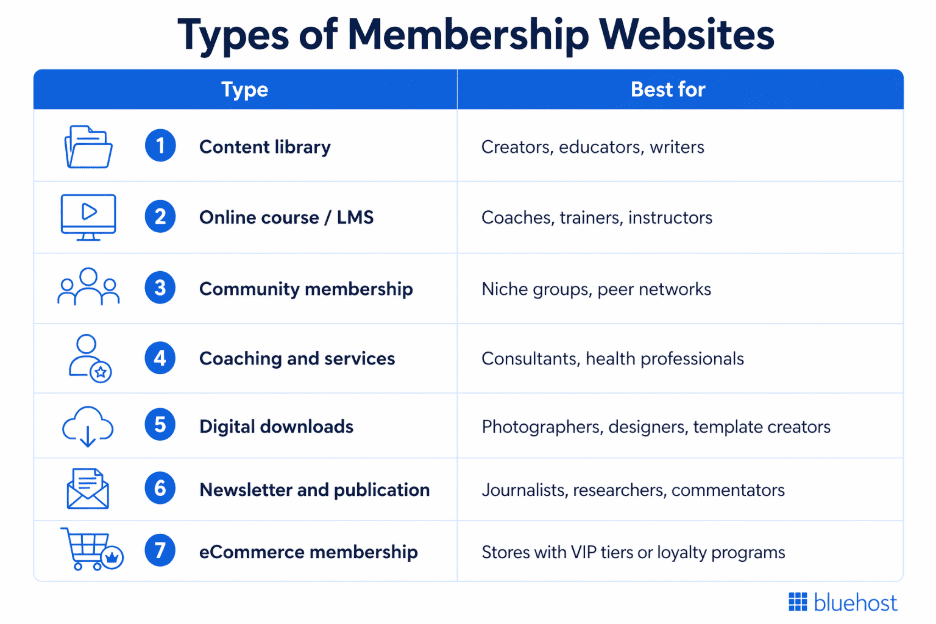
Membership sites don’t follow one template. The model you choose depends on what you’re selling, who your audience is and how you want to deliver value. Here’s a quick look at the seven most common types before we break each one down.
Each type works differently – and most successful membership sites blend two or more. Here’s what each one looks like in practice.
1. Content library membership
Members pay for ongoing access to a growing library of articles, videos, templates or resources. New content gets added on a set schedule – weekly, biweekly or monthly – so there’s always a reason to stay subscribed. This model works well for creators who produce consistently and want to reward loyal audiences without selling individual pieces.
2. Online course membership
Members access one or more structured courses behind a paywall, often with drip content that unlocks over time. Coaches, fitness trainers and educators use this model to deliver high-value instruction without one-to-one time commitments. The course content stays evergreen, which means you build it once and sell it repeatedly.
3. Community membership
The value here isn’t content – it’s access to people. Members join for peer connection, group discussions, live events or a forum tied to a shared interest or professional niche. Community-driven membership sites consistently outperform content-only models on retention because members build relationships that keep them coming back.
4. Coaching and services membership
Members pay for recurring access to you – through group coaching calls, Q&A sessions, audits or live office hours. This model suits consultants, health professionals and expert practitioners who want to serve more clients without multiplying their workload. The membership fee covers the relationship, not just the content.
5. Digital downloads membership
Members get access to a library of downloadable assets – stock photos, design templates, contract documents, presets or tools. Payment is often a flat monthly or annual fee for unlimited downloads. Designers, photographers and legal or business resource creators use this model to monetize their back catalog while adding new assets over time.
6. Newsletter and publication membership
Members pay to read. This model gates written content – long-form analysis, industry reporting or opinion – behind a paywall, similar to how The New York Times or Substack publications operate. It works best when your point of view is specific, consistent and genuinely hard to find elsewhere for free.
7. eCommerce membership
Online stores use this model to offer paying members VIP perks – early access to new products, exclusive discounts, free shipping or a private community. It layers a recurring revenue stream on top of an existing product business and turns occasional buyers into loyal, high-lifetime-value customers.
What are some examples of membership websites?
Membership sites exist across almost every niche. The model works because the value proposition is clear: pay once, access everything. Here are six real-world examples that show how different businesses use membership to build recurring revenue.
Duolingo (Education): Duolingo’s free app teaches languages to anyone. Its Super Duolingo membership removes ads, adds offline access and unlocks unlimited hearts – features that matter enough to paying users to sustain a subscription. The free tier builds the audience. The membership tier monetizes it.
Peloton (Fitness) Peloton sells hardware, but the real business is the membership. Members pay a monthly fee for access to live and on-demand classes across cycling, running, strength and yoga. The content library grows every day, which means the membership gets more valuable the longer someone stays subscribed.
MasterClass (Online courses): MasterClass gates its entire course catalog – taught by world-recognized experts – behind an annual membership. One fee unlocks everything. The model works because the talent is the differentiator: you can’t get Gordon Ramsay’s cooking lessons or Serena Williams’ tennis coaching anywhere else.
The New York Times (Publication): The Times operates on a metered paywall. A limited number of articles are free each month. After that, access requires a digital subscription. It’s one of the most scaled examples of a newsletter and publication membership model – millions of paying subscribers funding independent journalism.
Amazon Prime (eCommerce membership): Prime is the benchmark eCommerce membership model. Members pay an annual fee for free shipping, streaming access, exclusive deals and early sale access. It turns transactional shoppers into loyal customers who spend more, buy more often and rarely churn because the membership is woven into their daily habits.
An independent WooCommerce store with a VIP tier: A smaller-scale but highly replicable example: an online store that offers a paid membership for early product drops, members-only discounts and a private community. WooCommerce store owners use this model to increase average order value and reduce dependence on paid acquisition.
What features does a membership website need?
Your membership site is only as strong as the infrastructure behind it. Visitors decide to join based on what you promise – but members stay based on how well the experience actually works. These are the six features every membership website needs to function and retain members.
| Feature | What it does | Why it matters |
| Member registration and login | Lets users create accounts and access their member area | Without it, you can’t control who sees what |
| Content restriction | Gates pages, posts, videos or downloads by membership tier | Protects your paid content from non-members |
| Recurring billing | Automates monthly or annual payment collection | Manual invoicing doesn’t scale – automation does |
| Membership tiers | Creates multiple access levels at different price points | Lowers the barrier to entry and increases revenue ceiling |
| Member dashboard | Gives members a central hub to manage their account | Reduces support requests and improves member experience |
| Email automation | Sends onboarding, renewal and re-engagement emails automatically | The first 7 days determine long-term retention |
Most platforms deliver some of these out of the box. The gap shows up in how well they work together – especially billing, access control and the member dashboard. A broken payment flow or a confusing login experience is enough to spike cancellations.
Member registration and login: Members need a frictionless way to sign up and return. Your registration page is the first impression your paid experience makes – it should be clean, fast and ask for only what’s necessary. Every time a returning member logs in, they’re reaffirming the decision to stay subscribed. A clunky login is a quiet churn driver most site owners underestimate.
Content restriction: This is what makes a membership site a membership site. Content restriction lets you decide exactly what non-members can see, what free members access and what paid tiers unlock. The tighter your restriction logic, the more you can build a tiered value ladder that moves members from free to paid and from basic to premium.
Recurring billing: Manual invoicing doesn’t scale past a handful of members. Recurring billing automates the full payment cycle – charging members on schedule, handling failed payments and triggering access changes when a subscription lapses. Your billing system needs to connect directly to your access control layer. When those two aren’t synced, members who cancel still get in – and members who pay sometimes get locked out.
Membership tiers: A single membership level limits your revenue ceiling. Tiers let you offer a lower-priced entry point alongside a premium option with more access, more content or more direct interaction. Most membership sites that scale do so by moving members up tiers over time – not by constantly acquiring new ones.
Member dashboard: Your member dashboard is where the experience lives after the sale. Members use it to manage billing, update account details, track their content progress and find what they came for. A well-built dashboard reduces the volume of support requests you handle manually and signals to members that the product is professionally run.
Email automation: Most membership churn happens in the first 30 days. A welcome sequence that orients new members, highlights key content and confirms the value of their subscription directly reduces early cancellations. Renewal reminders, re-engagement emails for inactive members and failed payment alerts are equally important – and all of them should run without you touching them manually.
Pro tip: Before you choose a platform, map out your access logic first. Decide how many tiers you need, what each tier unlocks and how billing connects to access. Platforms that separate these functions into different plugins create more failure points than platforms that handle them in one system.
Most membership site owners on WordPress need their hosting environment, membership plugin and billing system to work as one – not three separate tools that break when one updates.
Bluehost WooCommerce hosting includes a built-in membership website builder powered by WooCommerce, so recurring billing, content restriction and member management are handled within a single setup. You get the infrastructure your membership needs without stitching together plugins that weren’t built to work together.
How do membership websites make money?
A membership site’s primary revenue is the membership fee itself. But the most profitable membership businesses don’t stop there. Once you have an engaged member base, you have multiple ways to grow revenue without growing your audience.
Recurring membership fees: This is the foundation. Members pay on a set schedule – monthly, quarterly or annually – for continued access to your content, community or services. Recurring fees are predictable, which makes membership one of the few online business models where you can forecast revenue before the month begins.
Most membership sites offer two billing cycles side by side. Monthly plans convert easier because the commitment feels smaller. Annual plans improve cash flow and reduce churn because members who pay upfront rarely cancel mid-year.
Pro tip: If you’re choosing between monthly and annual pricing, lead with monthly to lower the sign-up barrier – then offer a discount for annual on the confirmation page. You’ll convert more members and move a meaningful percentage to the higher-value plan in the same flow.
Membership tiers: Tiers are your revenue multiplier. A basic tier at a lower price point brings in members who aren’t ready to commit fully. A premium tier at a higher price point serves your most engaged audience with more access, more interaction or more exclusive content. The gap between tiers is where upsell revenue lives – members who start basic and upgrade over time generate more lifetime value than those who join at the top tier from day one.
Online course upsells: If your membership includes educational content, a standalone course is a natural upsell. Members pay the recurring fee for ongoing access, then pay a one-time fee for a structured, self-contained course they can keep permanently. The course doesn’t replace the membership – it complements it.
Digital product sales: Templates, toolkits, ebooks, presets or downloads can be sold individually to members at a discount or to non-members at full price. This model turns your content library into a product catalog without requiring you to build a separate store.
Affiliate marketing: Your member content is a natural environment for affiliate recommendations. If you run a fitness membership, recommending equipment, supplements or apps your members already want to buy earns you a commission without creating anything new. The key is relevance – affiliate links that match what your members came for convert. Generic promotions erode trust.
Live events and webinars: Members pay for access to your library. They pay extra for access to you. Live Q&A sessions, group coaching calls, virtual workshops and webinars create a premium layer above your standard membership that higher-intent members will buy. These can be included in a top-tier plan or sold as standalone add-ons.
Community and peer access: A private community – whether a forum, a Slack group or a Discord server – adds a social dimension that pure content can’t replicate. Some membership sites monetize this directly with a community-only tier. Others include it as the core value proposition of their premium plan. Either way, members who are active in a community churn at a fraction of the rate of those who consume content passively.
How do I start a membership website?
Starting a membership website feels complex until you break it into steps. The technology is the easy part – the decisions you make before you build determine whether the site actually generates revenue. Here’s the full process in order.
Work through each step in order – skipping ahead to the build before your offer is defined is the most common reason membership sites stall before they launch.
1. Define your niche and membership offer
Start with who you’re building for and what problem your membership solves. A membership site without a specific audience is just a website with a paywall. The narrower your niche, the easier it is to create content that members find indispensable – and indispensable content is what keeps people subscribed.
Ask yourself three questions before anything else: Who is this for? What do they get that they can’t easily find for free? Why would they pay on a recurring basis rather than buying once?
2. Choose your membership model and pricing
Your model determines how you deliver value – content library, community, courses, coaching or a combination. Your pricing determines who can afford to join and how much revenue each member generates over time.
Most new membership sites start with a single tier at a straightforward monthly price. Once you understand what members value most, you add tiers. Starting simple is not a weakness – it’s how you avoid building features nobody asked for.
3. Pick a platform and hosting
This is the decision that affects everything downstream. Your platform needs to handle content restriction, member registration and recurring billing – and those three systems need to work together without manual intervention.
WordPress is the most flexible foundation for a membership site. It gives you full control over your content, your design and your member experience. Pair it with the right hosting and a membership plugin and you can build any model covered in this guide.
4. Set up access control and billing
Access control decides what each membership tier can see. Billing decides how and when members pay. These two systems need to talk to each other in real time – when a payment fails, access should pause. When a member upgrades, new content should unlock immediately.
Test every scenario before you launch: successful payment, failed payment, cancellation, upgrade and downgrade. Catching a billing or access bug before members experience it saves you from the support volume and trust damage that comes after.
5. Create and organize your member content
You don’t need a full library before you launch. You need enough content to deliver on the promise you made on your sign-up page. A focused set of high-value resources beats a large volume of average content every time.
Organize your content so new members know exactly where to start. A clear onboarding path – “start here” content, a welcome email and a structured first week – directly reduces the early churn that kills most membership sites before they gain momentum.
6. Launch and drive traffic
Your launch audience is your existing audience – email list, social following or professional network. Start there before spending on paid traffic. Offer founding member pricing to reward early joiners and create urgency without discounting your long-term value.
After launch, track three numbers weekly: new sign-ups, login frequency and cancellation rate. Those three metrics tell you whether your content and community are delivering enough value to hold members past the first billing cycle.
Final thoughts
A membership website turns what you know into income you don’t have to re-earn every month. The model works across niches – education, fitness, publishing, coaching and eCommerce – because the core mechanics are the same: gate something valuable, charge for access and keep delivering enough to make renewal an easy decision.
The type of membership you build, the content you create and the monetization layers you add are all decisions you make once you understand your audience. What stays constant is the infrastructure underneath – your hosting, your billing system and your access control need to work together without gaps.
Ready to launch yours? Bluehost WooCommerce hosting gives you the foundation to get started.
Start your membership website with Bluehost today.
FAQs
A membership website is a gated online platform where users sign up to access exclusive content, community or services. Access is controlled by membership status – free, paid or tiered – and paid membership sites typically charge a recurring monthly or annual fee.
A subscription site requires payment for access – think Netflix or Spotify. A membership site can offer free and paid tiers side by side and the experience often includes community or identity alongside content. In practice, most paid membership sites function like subscriptions.
The seven most common types are content libraries, online course sites, community memberships, coaching and services, digital downloads, newsletters and publications and eCommerce membership tiers. Most successful membership sites blend two or more models.
The primary revenue source is recurring membership fees. Beyond that, membership sites monetize through tier upgrades, course upsells, digital product sales, affiliate marketing and paid live events.
Yes. WordPress is the most flexible foundation for a membership site. With the right hosting and a membership plugin, you can build any membership model – content library, community, courses or eCommerce VIP tiers – without custom development.
Start with your existing audience – email list, social following or professional network. Offer founding member pricing to reward early joiners. After launch, SEO-driven content and email marketing are the most sustainable long-term acquisition channels.

Write A Comment