



Key highlights
- Understand the core differences between Yoast SEO and Surfer SEO to identify which tool is the right fit for your content strategy and ranking goals.
- Learn how Yoast SEO streamlines on-page optimization inside WordPress, covering everything from meta tags to readability scores for beginners and experienced users alike.
- Explore Surfer SEO’s data-driven content scoring and NLP-based recommendations to see how it helps you build pages designed to outrank competitors.
- Compare key factors like pricing, core features and ideal use cases side by side to make a confident, informed choice between the two platforms.
- Know when using Yoast, Surfer SEO or both together makes the most strategic sense for building an SEO workflow that drives consistent organic traffic.
If you’ve been researching SEO tools for your WordPress site in 2026, you’ve almost certainly landed in the middle of one of the most searched debates in the industry: Yoast SEO vs Surfer SEO. Which one is better? Do you need both? Can one replace the other? And most importantly — which one actually helps you rank?
The confusion is understandable. Both tools have ‘SEO’ in the name. Both promise to help your content perform better in search. Both are trusted by thousands of marketers, bloggers and businesses worldwide. But the reality is that Yoast SEO and Surfer SEO are fundamentally different tools built for different jobs, operating at different stages of the SEO workflow and delivering value in entirely different ways.
In this guide, we’re going to settle the Surfer SEO vs Yoast plugin debate once and for all. You’ll get a complete feature-by-feature breakdown, a clear at-a-glance comparison table, honest pricing analysis and a definitive recommendation based on your specific situation.
We’ll keep the focus squarely on Yoast SEO as the recommended WordPress SEO solution and explain exactly where Surfer SEO fits (and doesn’t fit) into the picture.
Understanding Yoast SEO and Surfer SEO
Before we compare them, let’s establish what each tool actually is because this is where most people’s confusion begins.
Yoast SEO: The WordPress SEO plugin
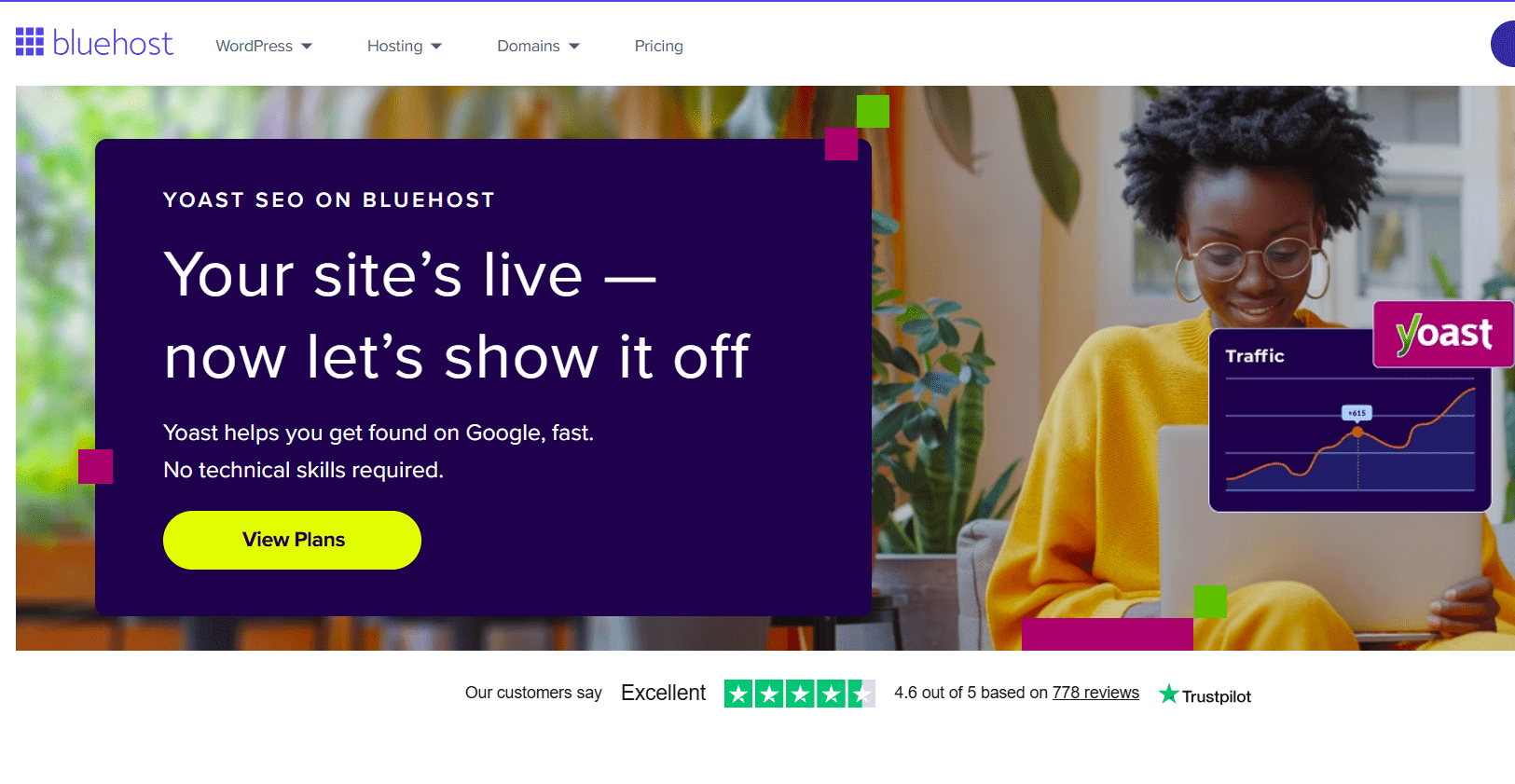
Yoast SEO is a WordPress plugin, meaning it lives directly inside your WordPress dashboard and works on your site in real time. It is the most widely used SEO plugin in the world, powering millions of websites across every niche and industry. Yoast SEO handles the technical side of on-site SEO: structured data and schema markup, XML sitemaps, meta titles and descriptions, breadcrumb navigation, canonical URLs, readability analysis and much more.
In short, Yoast SEO is your WordPress site’s SEO engine. It makes sure every page and post on your site is technically sound, search-engine-friendly and set up to rank before a single word of content is written.
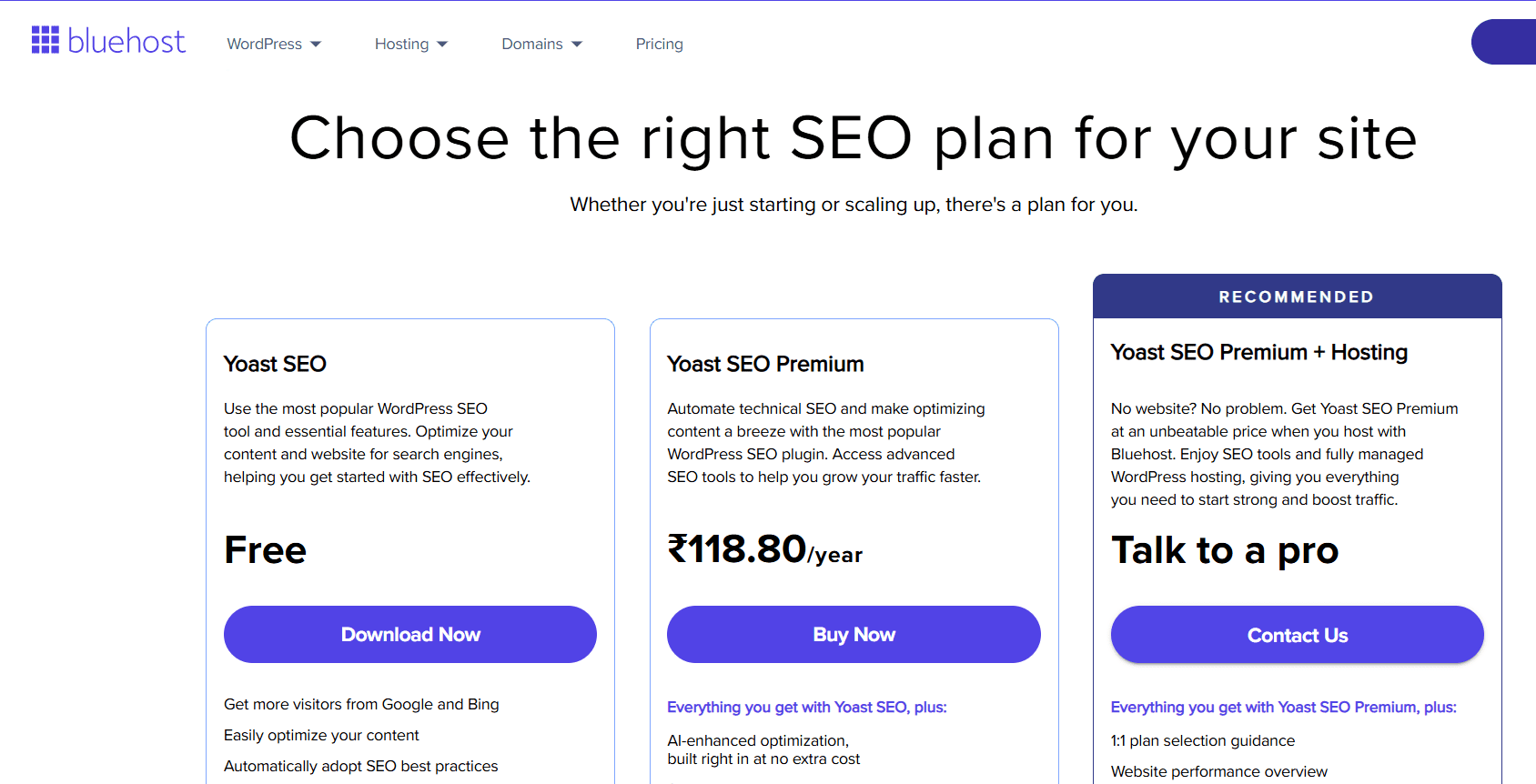
Yoast SEO is available in two versions: a robust free version and a Premium plan at $118.80/year (available on Bluehost), which unlocks AI-powered tools, internal linking suggestions, redirect management, Google Docs integration, 24/7 support and access to Yoast SEO Academy.
Note: Pricing mentioned above is accurate as of March 4, 2026. For the most up-to-date pricing details, please refer to Bluehost official website.
Surfer SEO: The cloud-based content intelligence platform
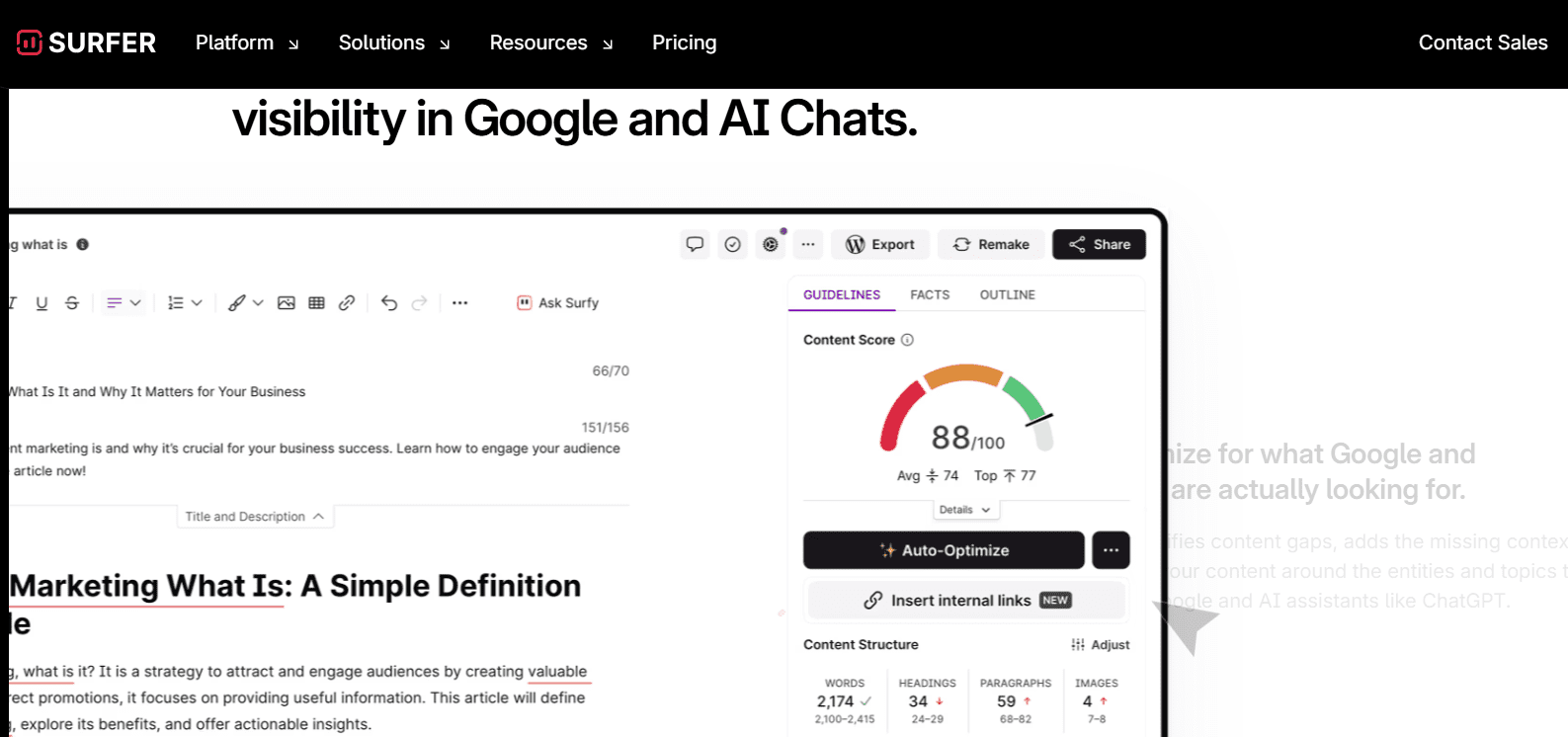
Surfer SEO is NOT a WordPress plugin. It is a cloud-based content optimization platform. You can use it in a web browser, separate from your WordPress site. Surfer SEO is designed to help you plan, write and optimize content that ranks in Google and gets cited by AI tools like ChatGPT, Google Gemini and Perplexity.
Surfer’s core technology is built around NLP (Natural Language Processing) and analysis of over 500 web signals from billions of live SERP data points. Its proprietary Content Score metric has become an industry benchmark. In 2026, Surfer has expanded significantly into AI Search Optimization helping brands track and improve how they appear in AI-generated answers, not just traditional Google results.
Also read: Yoast SEO for WordPress: Best SEO Plugin Guide in2026
At a glance: Yoast SEO vs Surfer SEO comparison table
Here’s the complete side-by-side overview before we get into the details:
| Feature / category | Yoast SEO | Surfer SEO |
| Tool type | WordPress Plugin | Cloud-Based Web Platform |
| Works inside wordPress | ✅ Yes — lives in your dashboard | ⚠️ Via extension/integration only |
| Structured data / schema | ✅ Automatic JSON-LD (full Schema Graph) | ❌ Not available |
| XML sitemaps | ✅ Auto-generated | ❌ Not available |
| Meta title & description control | ✅ Full per-page control | ❌ Not available |
| On-Page SEO analysis | ✅ Real-time traffic light system | ✅ Content Score (NLP-based) |
| Readability analysis | ✅ Yes (Flesch, passive voice, etc.) | ❌ No |
| Keyword optimization | ✅ Focus keyphrase + synonyms | ✅ NLP terms + semantic keywords |
| AI content writing tools | ✅ Premium (meta, titles) | ✅ Core feature (Surfy AI writer) |
| AI visibility tracking | ⚠️ llms.txt support only | ✅ Full (ChatGPT, Gemini, Perplexity, AI Overviews) |
| Content audit | ❌ No | ✅ Yes |
| Topical mapping / clusters | ❌ No | ✅ Yes |
| SERP competitor analysis | ❌ No | ✅ Yes |
| Rank drop detection | ❌ No | ✅ Yes (Pro+) |
| Internal linking tool | ✅ Premium | ✅ Pro+ (1-click) |
| Redirect manager | ✅ Premium | ❌ No |
| WooCommerce SEO | ✅ Premium Add-on | ❌ No |
| Technical SEO | ✅ Full suite | ❌ None |
| Breadcrumb control | ✅ Yes | ❌ No |
| Free version | ✅ Yes | ❌ No |
| Pricing | Free / $118.80/yr (Premium) | From $49/mo ($588/yr minimum) |
| Best for | WordPress technical SEO + schema | Content strategy + AI visibility |
The table tells a clear story: these tools are not rivals, they occupy entirely different lanes. Yoast SEO owns the technical SEO and structured data space on WordPress. Surfer SEO owns the content intelligence and AI visibility space. The real question isn’t which is better, it’s which one you need right now, and whether your goals call for one or both.
Get the best of both worlds — Start with Yoast SEO on Bluehost
Bluehost Yoast SEO Premium gives you structured data, sitemaps, AI optimization tools and 24/7 support all for less than Surfer SEO costs in a single month.
Feature-by-feature comparison: Yoast SEO vs Surfer SEO
1. Structured data & schema markup
This is perhaps the most important distinction between the two tools and the one most relevant to WordPress site owners looking to win rich results in 2026.
Yoast SEO automatically generates comprehensive JSON-LD structured data across your entire website the moment it’s installed. It builds a connected Schema Graph linking your site’s Organization or Person entity to every Article, WebPage, BreadcrumbList and more. This gives Google a rich, accurate, machine-readable understanding of your entire site. On Bluehost, Yoast’s schema automation is seamlessly integrated. You configure it once during setup, and it works automatically on every piece of content you publish from that point forward.
Surfer SEO generates zero structured data. It has no schema markup features, no JSON-LD output and no ability to control how your content appears in rich results. If structured data and schema markup are a priority and in 2026, they absolutely should be. Surfer SEO cannot help you here at all.
Winner: Yoast SEO — by a wide margin. Surfer SEO does not compete in this category.
2. On-Page SEO analysis
Both tools offer on-page SEO analysis, but they approach it very differently.
Yoast SEO analyzes your content in real time as you write inside WordPress. Its traffic light system (red/orange/green) gives you instant, actionable feedback on your focus keyphrase, keyword density, meta title and description, internal and external links, image alt text and more. Yoast Premium adds multi-keyword support, synonym recognition and related keyword analysis so you can optimize for the full semantic range of your topic, not just a single phrase.
Surfer SEO’s on-page analysis is powered by NLP and live SERP data. Its Content Score measures how well your content matches the semantic patterns of top-ranking pages for your target keyword. Surfer analyzes over 500 web signals and uses its proprietary algorithms to give you a real-time score and keyword recommendations as you write. This is genuinely powerful for content optimization but it operates in Surfer’s own content editor, not directly inside WordPress.
Winner: Tie — but for different use cases. Yoast SEO wins for technical on-page SEO within WordPress. Surfer SEO wins for deep NLP-driven content optimization and competitor benchmarking.
Also read: SEO Fundamentals: 2026 Beginners Guide
3. AI tools & smart content creation
Both platforms have invested heavily in AI capabilities, but again — they serve different purposes.
Yoast SEO Premium includes built-in AI tools that help you generate optimized meta descriptions and SEO titles instantly. According to Bluehost’s official Yoast SEO page, these AI tools are included at no extra cost in the Premium plan saving significant time on repetitive optimization tasks while keeping your content aligned with search engine requirements.
Surfer SEO’s AI capabilities are far more expansive and rightly so, since AI content creation is one of Surfer’s core value propositions. Surfy, Surfer’s AI writing assistant, can generate ready-to-rank article drafts in your tone and brand voice in minutes. Surfer AI also powers 1-click content optimization, AI Detector and Humanizer tools and custom voices and templates. Surfer’s AI content tools are designed for teams that need to publish at scale with consistent quality.
Winner: Surfer SEO for AI content creation and scale. Yoast SEO wins for AI-assisted meta optimization within WordPress. Both are valuable — they do different AI jobs.
4. AI visibility tracking — The 2026 game changer
This is arguably the most forward-looking feature category in 2026 SEO, and it’s an area where Surfer SEO has a significant, clear advantage.
Surfer SEO now offers comprehensive AI Search Optimization and visibility tracking. You can monitor exactly how and where your brand appears in ChatGPT, Google Gemini, Perplexity, Google AI Mode and Google AI Overviews, all tracked simultaneously across multiple AI platforms. Surfer tracks up to 25 AI prompts weekly (Standard), 50 prompts daily (Pro) or 100 prompts daily (Peace of Mind), with detailed Visibility Score reporting, mention gap analysis, competitor share of voice and brand sentiment insights.
Yoast SEO’s response to AI search is llms.txt support a newer feature that helps AI tools like ChatGPT and Gemini better understand and represent your website. This is a meaningful step, but it is fundamentally a passive tool (you publish a file and hope AI tools read it) rather than the active monitoring and optimization that Surfer provides.
Winner: Surfer SEO — significantly. If AI search visibility is a priority for your business in 2026, Surfer’s AI Tracker is the most complete platform available for this use case.
5. Content strategy: Topical authority & content clusters
Surfer SEO offers a dedicated Topical Map feature that helps you plan entire content clusters around your target niche. It identifies the questions search engines and AI tools are trained to answer in your category, maps out gaps your competitors have missed and gives your team a clear, prioritized content plan. This topical authority approach is a core ranking factor for both traditional Google search and AI citation. It makes it one of Surfer’s most powerful differentiators.
Yoast SEO has no content strategy or topical mapping features. It’s built to optimize the content you’ve already decided to create, not to help you figure out what to create next.
Winner: Surfer SEO — this category is uniquely Surfer’s. Yoast doesn’t compete here.
6. Technical SEO: Sitemaps, redirects & breadcrumbs
Yoast SEO dominates technical SEO on WordPress. It automatically generates and submits XML sitemaps for all content types, manages canonical URLs, controls robots meta tags, handles 301/302 redirects (Premium), enables SEO-friendly breadcrumb navigation and integrates with Google Search Console. These are the foundational technical signals that determine whether your content can even be crawled and indexed.
Surfer SEO has no technical SEO features whatsoever. It cannot generate sitemaps, manage redirects, control canonical tags or configure any of the backend technical settings that WordPress sites need. Without a plugin like Yoast handling these functions, even the best Surfer-optimized content will struggle to reach its ranking potential.
Winner: Yoast SEO — completely unchallenged. Technical SEO is Yoast’s home ground.
7. Content audit & performance monitoring
Surfer SEO includes a powerful Content Audit feature that monitors your published content’s performance, detects ranking drops in real time and identifies which existing pages have the highest quick-win refresh potential. Its Rank Drop Detection (available on Pro and above) sends live alerts when your pages lose rankings so you can act immediately. Surfer’s weekly performance reports give your team clear next steps to stay ahead of algorithm changes.
Yoast SEO does not include a content audit tool or rank tracking. You’d need to pair Yoast with Google Search Console or a dedicated rank tracker for this level of performance monitoring.
Winner: Surfer SEO — another category where Surfer has built clear, dedicated functionality that Yoast doesn’t offer.
8. Pricing & value for money
This is where the comparison becomes very clear for most WordPress site owners.
Yoast SEO has a robust, genuinely useful free version that covers structured data, sitemaps, meta tag control and readability analysis. The Premium plan is $118.80/year on Bluehost, which works out to under $10/month for the full feature set, including AI tools, redirect management, internal linking, Google Docs integration and 24/7 support.
Surfer SEO’s entry-level standard plan is $99/month (if billed annually). The pro plan — which most teams actually need — is $182/month (if billed annually). The peace of mind plan is $299/month (if billed annually). There is no free version.
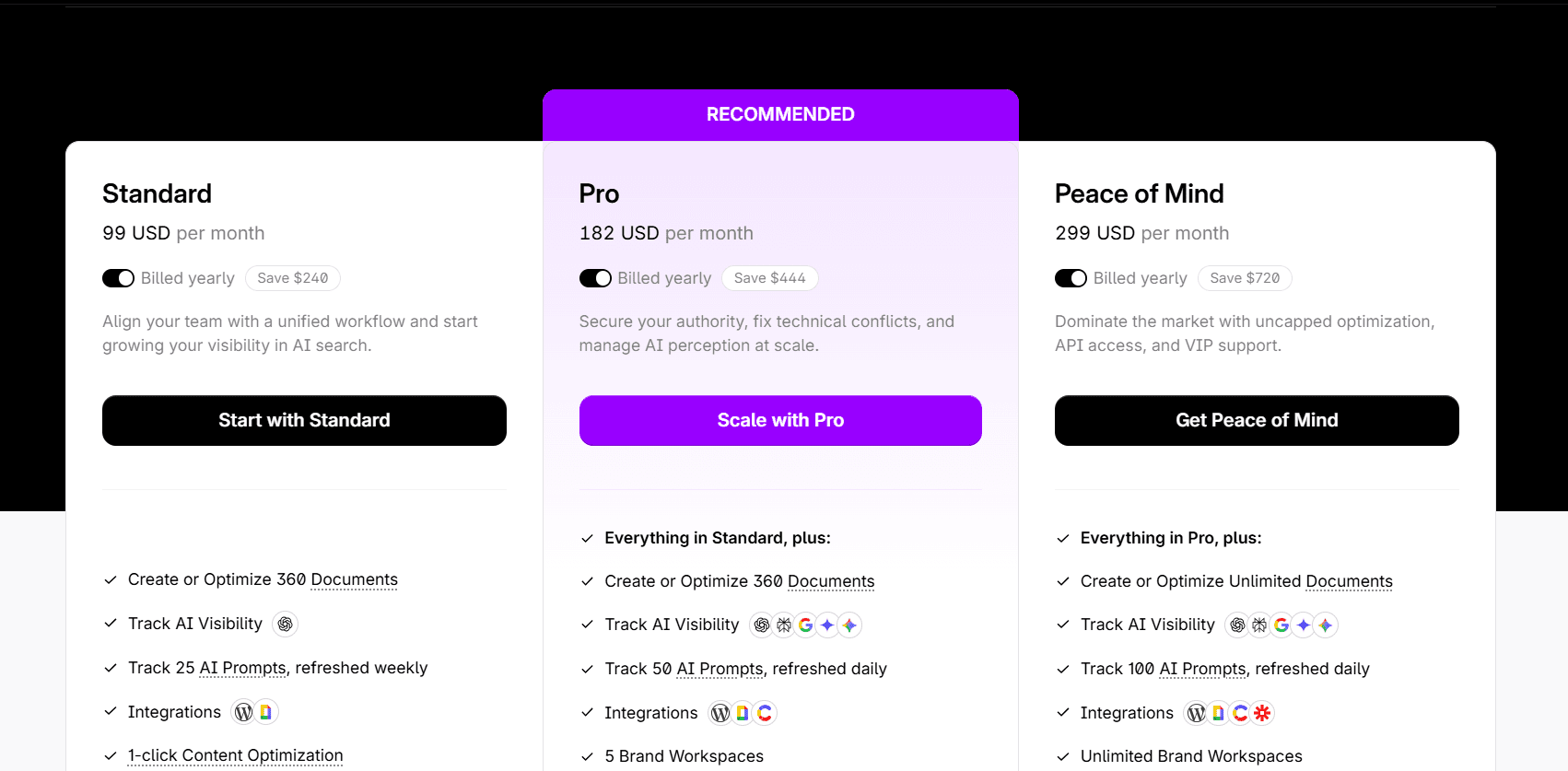
To put this in perspective: Surfer SEO’s cheapest plan costs more per month than Yoast SEO Premium costs for an entire year. This is not a criticism of Surfer’s value for teams scaling content at volume; Surfer’s ROI can be exceptional. But for the majority of WordPress site owners, especially bloggers, small businesses, and early-stage sites, Yoast SEO Premium delivers better value dramatically.
Winner: Yoast SEO — for most individual site owners and small businesses. Surfer SEO’s pricing is justified for content teams and agencies at scale.
Feature comparison summary: Who wins each category
| Feature category | Winner | Why |
| Structured data / Schema | Yoast SEO | Surfer has zero schema features |
| XML sitemaps & Technical SEO | Yoast SEO | Core WordPress technical SEO |
| Meta titles & descriptions | Yoast SEO | Full per-page control in WP |
| Readability analysis | Yoast SEO | Built-in content quality checks |
| On-Page SEO (NLP/Content Score) | Tie | Different approaches, both strong |
| AI writing & content creation | Surfer SEO | Surfy AI + 1-click optimization |
| AI search visibility tracking | Surfer SEO | ChatGPT, Gemini, Perplexity tracking |
| Topical maps & content strategy | Surfer SEO | No equivalent in Yoast |
| Content audit & rank monitoring | Surfer SEO | No equivalent in Yoast |
| WooCommerce / eCommerce SEO | Yoast SEO | Dedicated WooCommerce add-on |
| Free version available | Yoast SEO | Surfer has no free option |
| Value for money | Yoast SEO | $118.80/yr vs $49+/mo |
Surfer SEO vs Yoast: Which should you use?
Let’s make this practical. Here’s a clear recommendation based on where you are and what you’re trying to achieve.
Use Yoast SEO if you…
- Are building or managing a WordPress website of any size
- Need structured data, schema markup and rich results — and want it automated
- Want real-time on-page SEO feedback as you write in WordPress
- Need XML sitemaps, redirects, breadcrumbs and technical SEO handled automatically
- Are a blogger, small business, local business or solo site owner
- Have a limited budget and need maximum SEO coverage for minimum cost
- Are just starting out and want one plugin that covers all the SEO fundamentals
- Run a WooCommerce store and need product schema and eCommerce SEO
Use Surfer SEO if you…
- Are managing a content team that publishes multiple articles per week
- Want to track how your brand appears in ChatGPT, Gemini and AI Overviews
- Need a data-driven content scoring system to consistently outperform competitors
- Are building topical authority through strategic content clustering
- Run an SEO agency managing multiple clients and content calendars
- Have budget for a professional content optimization platform ($49–$299/month)
- Need content audit and rank drop monitoring with real-time alerts
- Want AI-generated article drafts that are ready to rank with minimal editing
Use both if you…
- Are a serious content marketer or SEO professional scaling organic traffic
- Publish 4+ pieces of content per week and need both technical SEO and content intelligence
- Manage an in-house content team with dedicated writers, editors and SEO strategists
- Want to dominate both traditional Google rankings AND AI-generated answers
- Have the budget to invest in a professional-grade, full-stack SEO workflow
The bottom line: If you can only choose one, choose Yoast SEO. It covers the technical SEO fundamentals that your site cannot rank without — and it does so at a fraction of Surfer’s cost. Surfer SEO is a powerful upgrade when you’re ready to scale.
Don’t wait — Your competitors started yesterday
Every day without proper SEO is a day your competitors gain ground. Bluehost Yoast SEO Premium is the fastest, most reliable to build a fully optimized WordPress site. Free domain, free SSL, AI-powered setup and Yoast SEO Premium — all in one package.
Final verdict: Yoast SEO vs Surfer SEO in 2026
After a complete head-to-head comparison across 12 feature categories, here’s the definitive verdict:
Best WordPress SEO Plugin: Yoast SEO — the undisputed leader for structured data, technical SEO, on-page optimization and WordPress integration. It’s the non-negotiable foundation for every WordPress site.
Best content intelligence platform: Surfer SEO — the most powerful tool available for NLP content optimization, AI search visibility tracking, topical authority building and content team workflows at scale.
Best combined stack: Yoast SEO Premium (on Bluehost) + Surfer SEO Standard or Pro — the ultimate setup for content marketers and SEO professionals who want to dominate both traditional and AI search in 2026.
The Surfer SEO vs Yoast plugin debate has a clear answer once you understand what each tool is actually built for. They don’t compete they complete each other. But if you’re starting from scratch or working with a limited budget, Yoast SEO is the right first move, every single time.
How to get started with Yoast SEO on Bluehost in 5 steps
Starting with Yoast SEO on Bluehost ensures your website is optimized from day one. With fast hosting, easy WordPress installation and built-in plugin support, the setup process is easy.
Let’s walk through the exact steps to get everything running smoothly.
Step 1: Buy Domain and hosting from Bluehost.
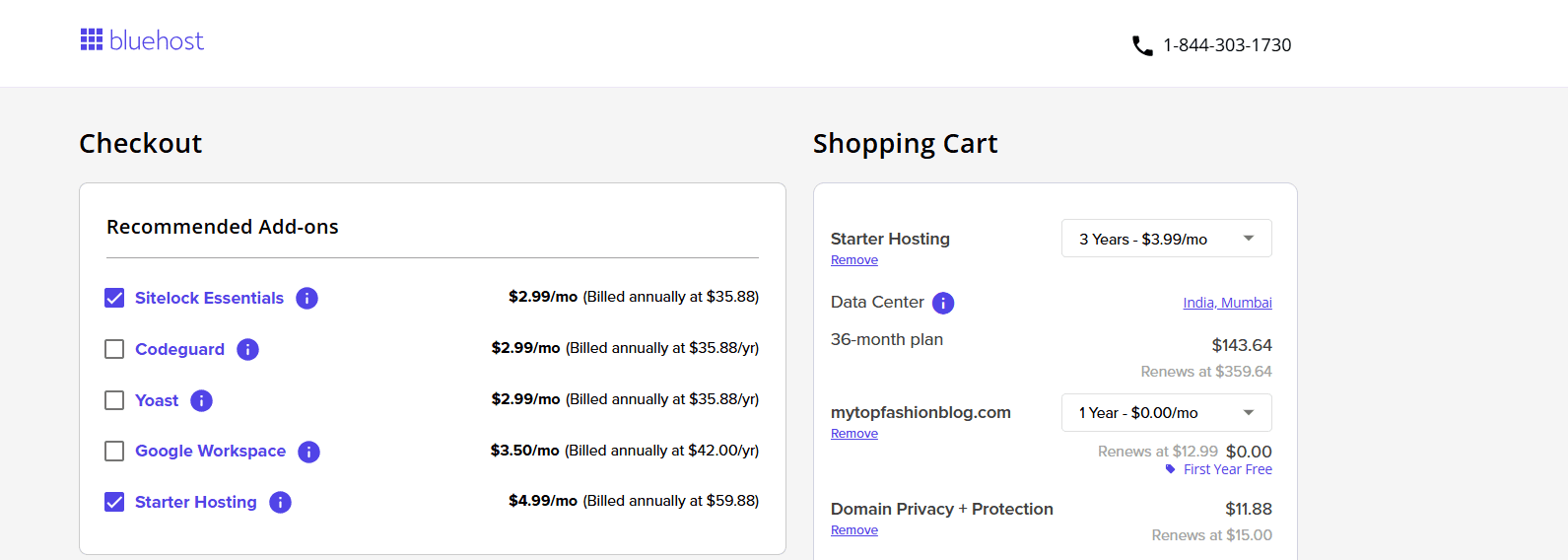
Step 2: Sign up for Bluehost account using provided credentials.
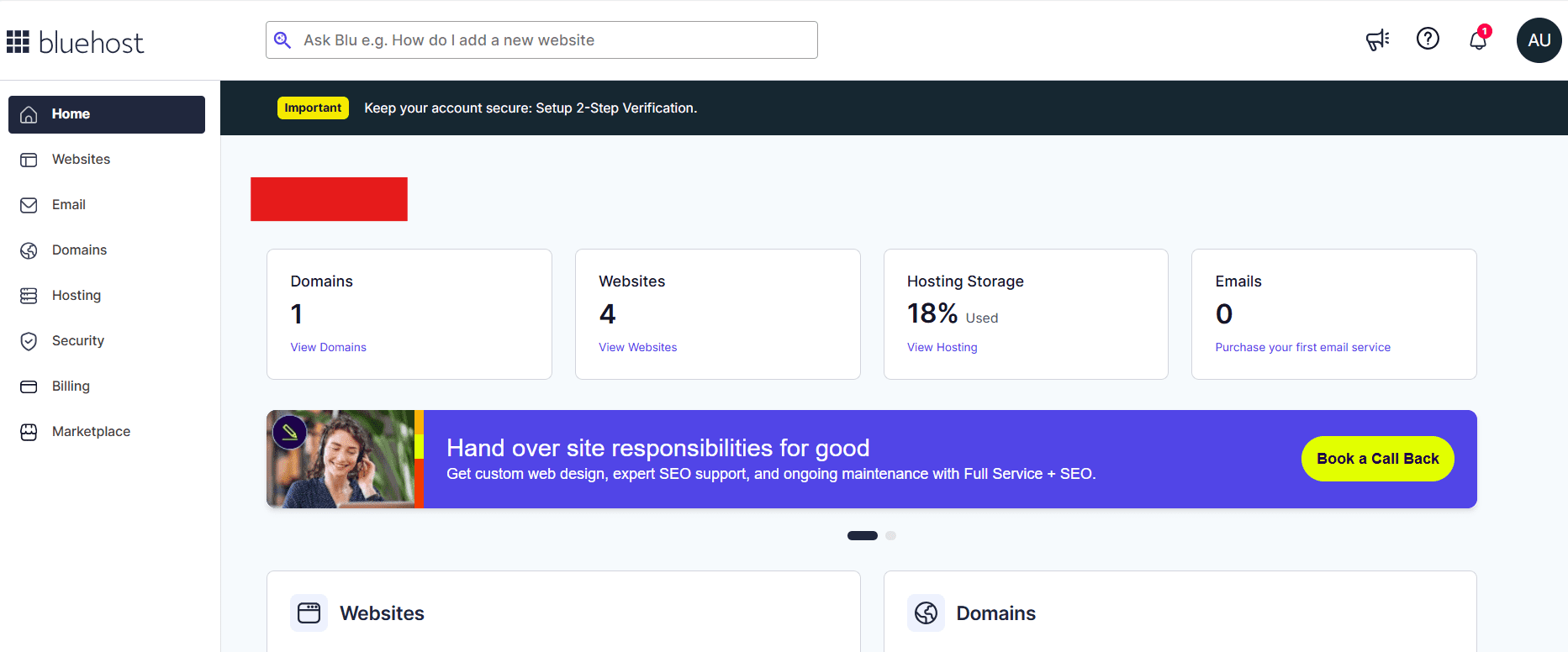
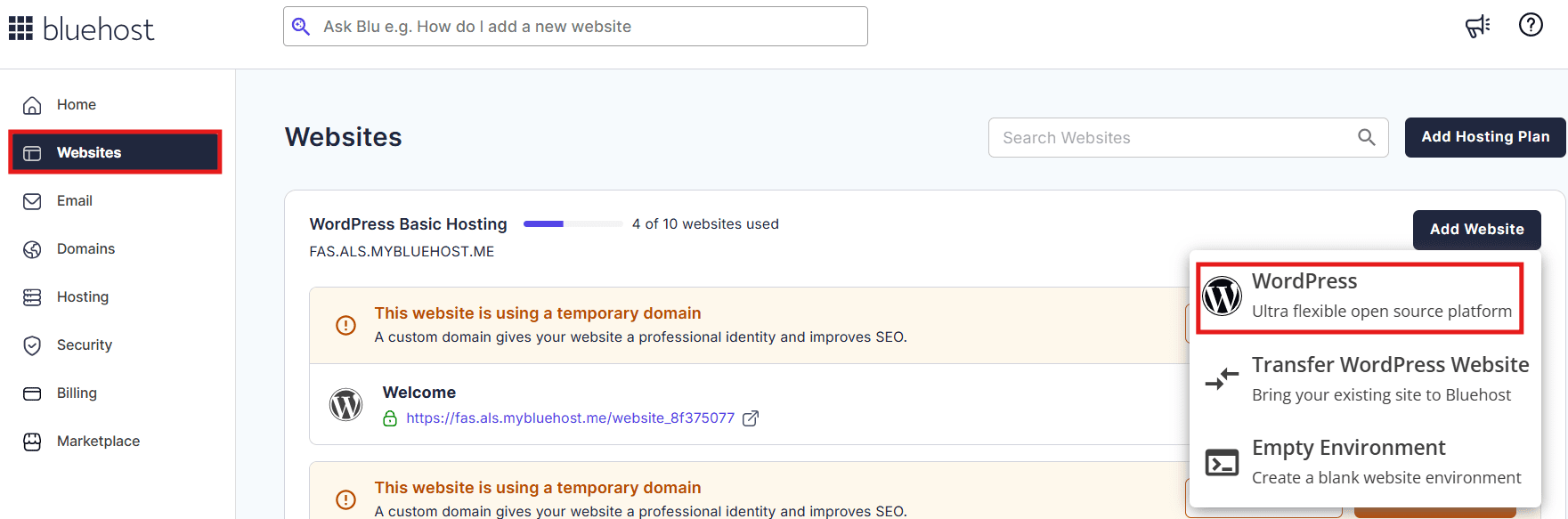
Step 3: Now, click on ‘Website’ and then, click ‘Add Website’.
Step 4: Add Yoast SEO Premium via the Bluehost + Yoast bundle (recommended) or install directly from the WordPress plugin directory.
Step 5: Run Yoast’s guided Setup Wizard to configure your site’s schema type (organization or person), social profiles, sitemap settings and breadcrumb preferences.
Step 6: Start publishing content. Yoast’s real-time analysis will guide every post toward SEO best practices, structured data, readability and keyphrase optimization automatically.
The entire setup takes under 30 minutes. From that point on, every piece of content you publish is automatically optimized, indexed and schema-tagged giving you the technical SEO foundation to compete and rank.
Also read: How to Set Up Yoast Local SEO Plugin in WordPress
Final thoughts
The Yoast vs Surfer SEO debate is one of the most misunderstood comparisons in WordPress SEO because these two tools are not actually competing for the same job. Yoast SEO is your technical SEO engine: it handles structured data, schema markup, sitemaps, meta tags, breadcrumbs and on-page optimization directly inside WordPress. Surfer SEO is your content intelligence platform: it handles NLP optimization, topical mapping, AI search visibility and content performance monitoring in a cloud-based workflow.
Both are excellent at what they do. Both have earned their reputations among the best SEO professionals in the world. But for the vast majority of WordPress site owners in 2026 especially those who are just starting out, scaling on a budget or building a site that needs to rank, Yoast SEO is the clear, smart, cost-effective first choice.
With Yoast SEO Premium built in, you get structured data automation, AI SEO tools, sitemaps, redirects, readability analysis and 24/7 expert support. Don’t build your site on a shaky SEO foundation
FAQ
Yoast SEO is a WordPress plugin that handles technical SEO, structured data, sitemaps and on-page optimization. Surfer SEO is a cloud-based content intelligence platform that handles NLP content scoring, topical mapping and AI search visibility. For most WordPress site owners, Yoast SEO is the essential first tool. Surfer SEO is a powerful addition for teams scaling content at volume.
Surfer SEO is not a native WordPress plugin. It is a cloud-based platform that integrates with WordPress via a Chrome extension and WordPress integration. It does not live inside your WordPress dashboard the way Yoast SEO does. For full WordPress functionality, structured data, sitemaps, meta tags, redirects and breadcrumbs, you still need a dedicated plugin like Yoast SEO.
Absolutely. Many professional SEOs do exactly this. Yoast SEO handles the technical SEO layer on your WordPress site, while Surfer SEO guides the creation and optimization of your content. They work in complementary ways and do not conflict with each other.
Yes. Yoast SEO has a robust free version available in the WordPress plugin directory that includes structured data, XML sitemaps, meta tag control, readability analysis and Open Graph support. Yoast SEO Premium ($118.80/year on Bluehost) adds AI tools, internal linking, redirect management, Google Docs integration and 24/7 support.
Surfer SEO starts at $49/month (Discovery) and goes up to $299/month (Peace of Mind), with no free version available. Yoast SEO Premium is $118.80/year on Bluehost which is less than what most users pay for Surfer SEO in a single month. For budget-conscious site owners, Yoast SEO delivers exceptional value.
Pairing Yoast SEO Premium with Bluehost creates a powerful, fully integrated SEO foundation. Bluehost provides fast, managed WordPress hosting with a free domain, free SSL, malware protection and website backups. Yoast SEO Premium adds structured data automation, AI optimization tools, redirect management, internal linking and 24/7 expert support. The bundle gives you everything you need to launch, optimize and grow a high-performing WordPress site at an unbeatable price.
No. Surfer SEO has no structured data or schema markup features. It cannot generate JSON-LD, create schema graphs or control how your content appears in rich results. For structured data on WordPress, Yoast SEO is the right tool it handles all of this automatically.


Write A Comment