 ChatGPT,
  Claude,
  Gemini,
  Grok — all four for
How to View Full Email Headers in SmarterMail Webmail
When troubleshooting email issues—such as bouncebacks, suspected spam filtering, or delivery delays—viewing the full email headers is one of the most effective ways to identify the root cause. SmarterMail makes it easy to access this information directly from webmail.
Why Email Headers Are Important
Email headers contain detailed diagnostic information, such as:
- The original sender and sending server
- Authentication results (SPF, DKIM, DMARC)
- Spam scores and triggered filters
- Routing path from the sender to the recipient
- Reasons the message was delayed, filtered, or bounced
This data allows our support team to quickly identify and resolve issues related to email delivery and spam detection.
View Full Email Headers
- Sign in to your SmarterMail webmail account using the email address that received the message.
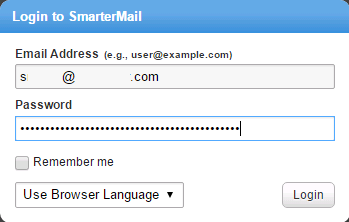
- If you are troubleshooting a bounceback, log in using the sender’s SmarterMail account.
- If you are investigating a message marked as spam, use the recipient’s account.
- From your inbox, click the message you want to analyze. This can be a normal email or a bounceback message.
- At the top of the message window, click View and in the dropdown menu, select Raw Content.
This opens a panel showing the full email header, including routing details, spam score, authentication results, and technical metadata.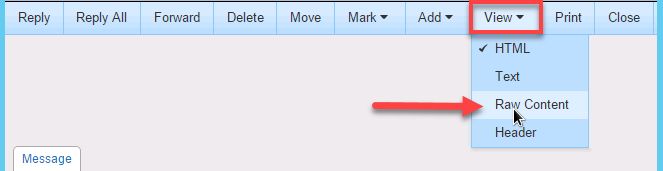
- Once the raw message content is displayed, you can copy the entire text.
This information can be provided when contacting customer support via phone or chat.
Summary
Viewing full email headers in SmarterMail is essential for diagnosing delivery problems, spam filtering issues, and bouncebacks. By using the Raw Content option in SmarterMail, you can easily access the message’s technical details and share them with support for faster troubleshooting.
If you need further assistance, Bluehost Chat Support is available 24 hours a day, 7days a week while Bluehost Phone Support is available 7 days a week from 7 am-12 midnight EST.
- Chat Support - While on our website, you should see a CHAT bubble in the bottom right-hand corner of the page. Click anywhere on the bubble to begin a chat session.
- Phone Support -
- US: 888-401-4678
- International: +1 801-765-9400
You may also refer to our Knowledge Base articles to help answer common questions and guide you through various setup, configuration, and troubleshooting steps.