 ChatGPT,
  Claude,
  Gemini,
  Grok — all four for
 Site Health Advisor: Website Audit and Health Dashboard
Site Health Advisor is a website audit tool that helps you understand your website's overall health, including performance, security, SEO, email setup, domain configuration, and AI readiness.
The platform provides an easy-to-understand overview of your website and delivers recommendations to help improve your online presence and customer experience.
What Site Health Advisor Provides
- A Website Health Score
- Automated website analysis
- Prioritized recommendations for improvement
- AI-powered audit assistance
- Detailed website health reports
- Product recommendations based on identified issues
Site Health Advisor helps you identify opportunities to improve website performance, security, search visibility, and overall customer experience.
How Site Health Advisor Helps Your Business
- Improve website speed and performance
- Increase visitor engagement
- Enhance SEO and search visibility
- Build customer trust and credibility
- Strengthen website security
- Improve email deliverability
- Prepare for AI-powered search experiences
- Discover growth opportunities through actionable insights
By combining website health audits, SEO analysis, security monitoring, and AI readiness assessments, Site Health Advisor helps businesses make informed decisions to support long-term website growth and success.
Accessing Site Health Advisor
Site Health Advisor is a comprehensive website audit tool that helps analyze a website's health, performance, security, SEO, email configuration, domain setup, and AI readiness using a domain name.
How to Start a Website Health Audit
- Open the Site Health Advisor page.
Alternatively, visit the Bluehost website, select Hosting, then choose Site Health Advisor under Security & Performance.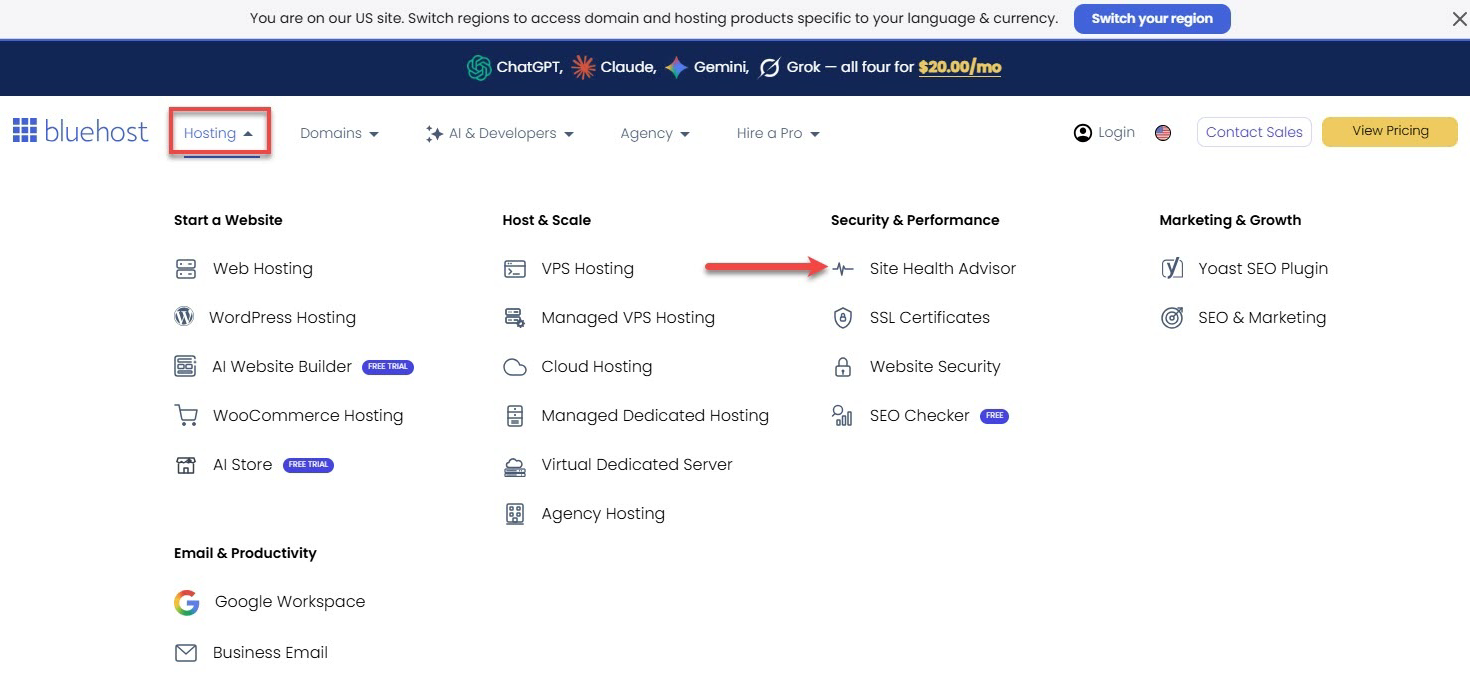
- Enter a domain name.
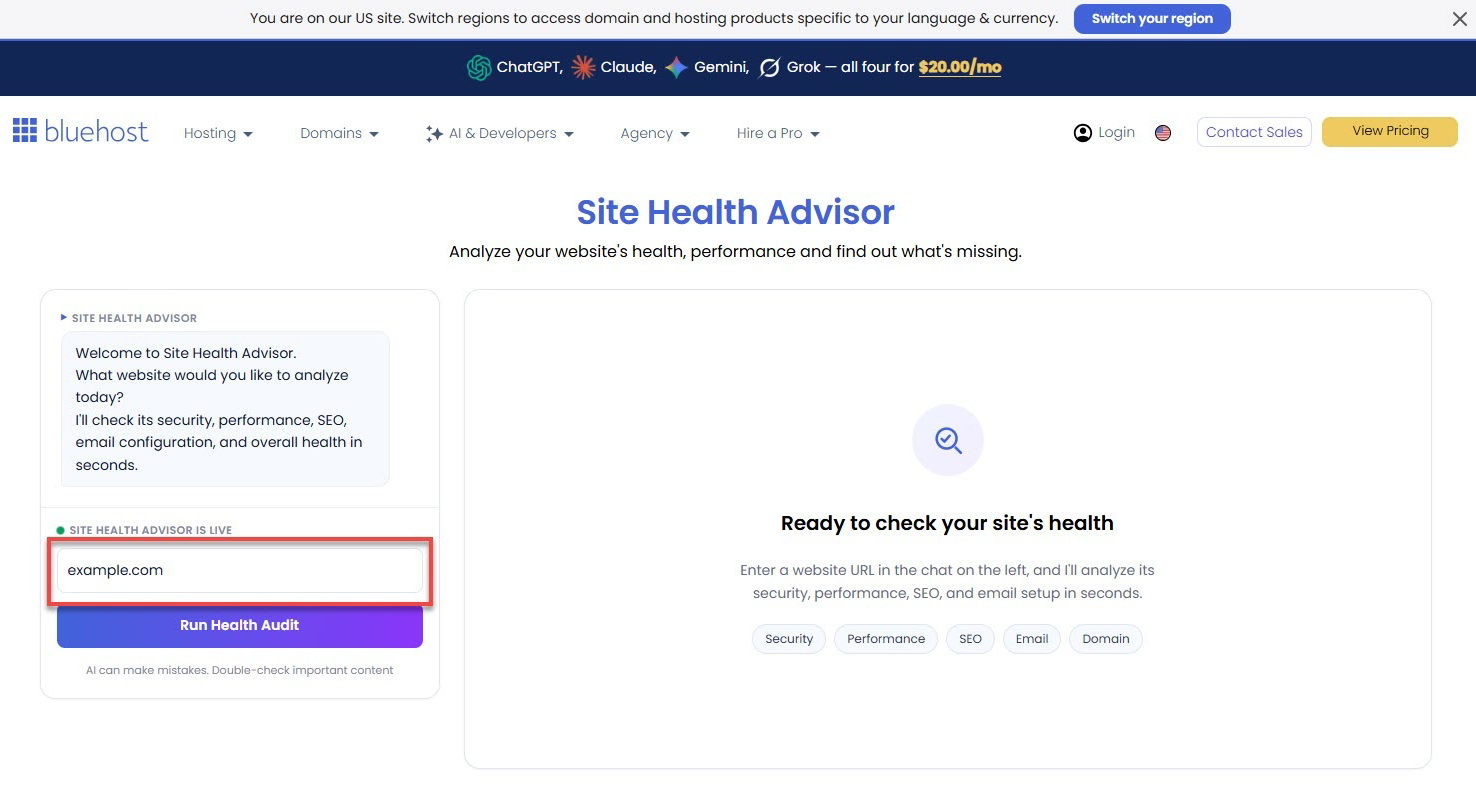
- Click Run Health Audit.
- Wait for the website health scan to complete.
After the audit finishes, you'll receive a detailed website health report covering multiple areas of website performance and optimization.
Understanding the Website Health Dashboard
- The example shown is for reference only. Actual scores, issues, and recommendations depend on the website's configuration, performance, security settings, SEO implementation, domain setup, and other factors detected during the audit.
- Each metric will display a status such as Pass, Fail, or Warning to help identify areas that may need attention.
The Site Health Advisor Dashboard provides a complete overview of your website health and includes:
Overall Score
The Overall Score provides a high-level summary of a website's health based on findings across Security, Email Health, SEO, Performance, and Domain Health.
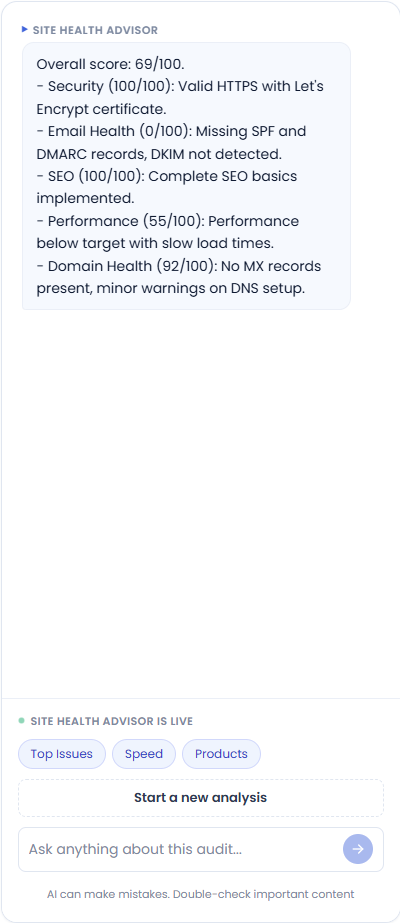
- The options displayed below the summary, such as Top Issues, Speed, and Products, are interactive and can be selected to view additional details and recommendations related to the chosen category. The information presented will update dynamically based on the selected option and the website's audit results.
- The "Ask anything about this audit..." chat feature allows users to ask questions about their audit results and receive AI-generated insights, explanations, and recommendations based on the website analysis. Users can interact with the audit by requesting additional details about specific issues, performance metrics, security findings, SEO recommendations, and more.
Health Score
The Health Score provides an overall rating of your website's health based on Security, Email Health, SEO, Performance, and Domain Health findings.

Along with the overall score, you will see two important sections:
- Actions
The Actions section displays recommended improvements that can help increase your website's health score and overall performance. These recommendations are prioritized based on their potential impact.
- High Risk
The High Risk section highlights critical issues that should be addressed as soon as possible because they may affect website functionality, security, email deliverability, search visibility, or visitor experience.
Below the Health Score provides a list of Important Action Items that identify opportunities for improvement.
Performance and Experience
The Performance & Experience section evaluates website speed, usability, accessibility, and technical SEO using Lighthouse metrics.
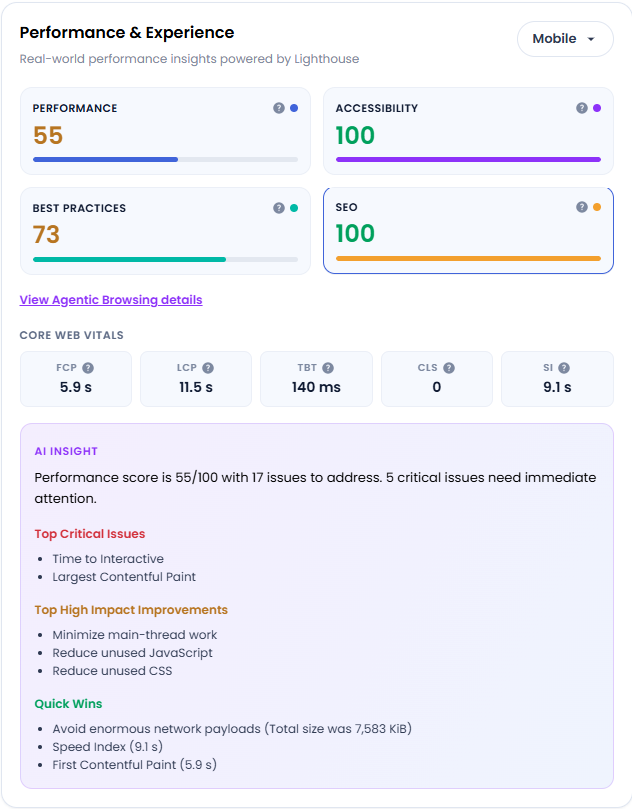
- Performance
Measures how quickly and efficiently your website loads. Faster websites typically provide a better experience for visitors.
- Accessibility
Measures how easy your website is to use for people of all abilities, including visitors using screen readers or keyboard navigation.
- Best Practices
Checks whether your website follows modern web development, performance, and security recommendations.
- SEO
Measures how well your website follows basic search engine optimization (SEO) best practices to support online visibility.
- Core Web Vitals
- First Contentful Paint (FCP)
Measures how long it takes for visitors to see the first piece of content on the page. Faster times help visitors know the website is loading.
- Largest Contentful Paint (LCP)
Measures how long it takes for the main content of the page to appear. Google recommends this occur within approximately 2.5 seconds.
- Total Blocking Time (TBT)
Measures how long your website is unable to respond to visitor interactions, such as clicks, taps, or typing, while the page is loading. Lower times indicate a more responsive website experience.
- Cumulative Layout Shift (CLS)
Measures how much page content unexpectedly moves while loading. Lower movement provides a more stable user experience.
- Speed Index (SI)
Measures how quickly visible page content appears during loading. Faster scores typically create a smoother browsing experience.
- First Contentful Paint (FCP)
- AI Insight
The AI Insight section provides an automated summary of the website audit results and highlights the most important opportunities for improvement.
The report includes:
- Mobile Performance Analysis
Evaluates website performance on smartphones and tablets.
- Desktop Performance Analysis
Evaluates website performance on desktop devices and identifies platform-specific optimization opportunities.
Helps identify:
- Slow page speeds
- Mobile usability issues
- Resource-heavy content
- Performance bottlenecks
- User experience concerns
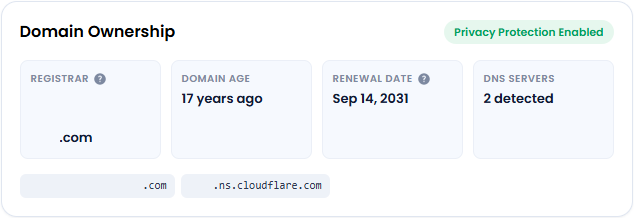
Domain Ownership
The Domain Ownership section provides a quick overview of your domain registration information and DNS configuration. This information helps verify that your domain is active, properly configured, and protected.
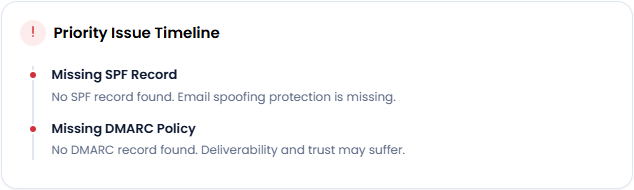
Priority Issue Timeline
The Priority Issue Timeline highlights the most important issues identified during the website audit. It helps you quickly understand which findings should be addressed first based on their potential impact on your website's health, security, performance, email deliverability, or search visibility.
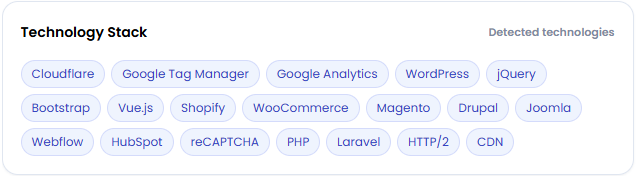
Technology Stack
The Technology Stack section displays the technologies, platforms, frameworks, and services detected on your website. This information provides insight into the tools being used to power your website and can help explain certain audit findings or recommendations.
Security
The Security section evaluates your website's security configuration and helps identify settings that protect your website and visitors.
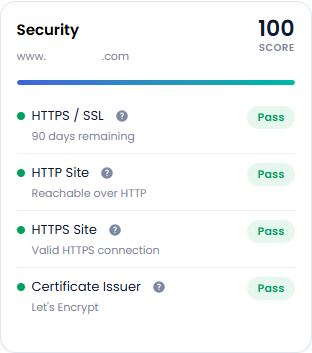
This section reviews key security items such as SSL certificates, HTTPS configuration, redirects, and certificate validation.
- HTTPS / SSL
Checks whether your website has an active SSL certificate and uses HTTPS encryption.
- HTTP Site
Checks whether the website can still be accessed using the non-secure HTTP version.
- HTTPS Site
Confirms that the secure HTTPS version of the website is working correctly.
- Certificate Issuer
Displays the organization that issued and validated the website's SSL certificate.
Email Health
The Email Health section evaluates your domain's email authentication settings and helps ensure that emails sent from your domain are trusted by receiving mail providers.
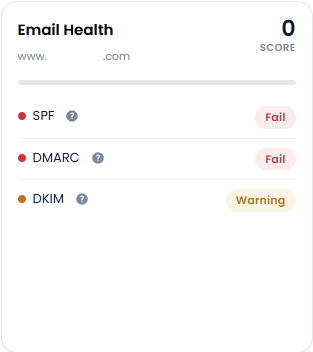
Proper email authentication can help improve email deliverability, reduce spam issues, and protect your domain from phishing and spoofing attempts.
- SPF (Sender Policy Framework)
Verifies that only authorized mail servers can send emails on behalf of your domain.
- DMARC (Domain-based Message Authentication, Reporting & Conformance)
Defines how email providers should handle messages that fail SPF or DKIM authentication checks.
- DKIM (DomainKeys Identified Mail)
Adds a digital signature to outgoing emails to verify that messages have not been altered during delivery.
SEO
The SEO Audit Results section evaluates key search engine optimization (SEO) elements that help search engines understand, crawl, and display your website in search results.
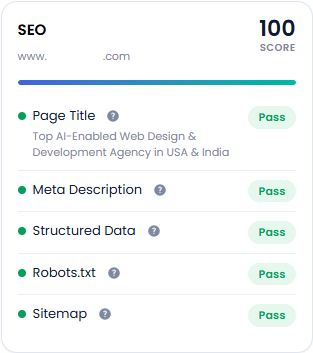
- Page Title
Displays the main title of a webpage that appears in search engine results.
- Meta Description
Reviews the short description that may appear beneath your page title in search results.
- Structured Data
Checks for structured data (schema markup) that provides additional information about your content to search engines.
- Robots.txt
Verifies the presence and configuration of the robots.txt file.
- Sitemap
Checks whether an XML sitemap is available and accessible.
Performance
The Performance section measures how efficiently your website loads, responds, and delivers content to visitors. These insights help identify opportunities to improve user experience, engagement, and overall website effectiveness.
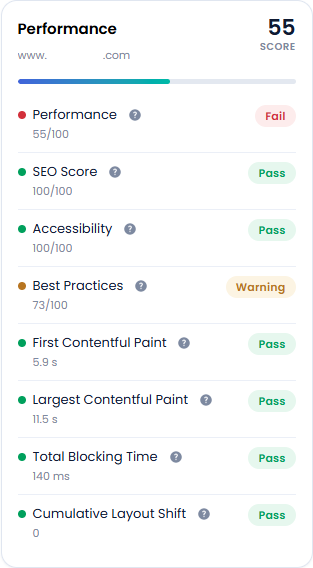
- Performance
Measures how quickly and efficiently your website loads and performs for visitors.
- SEO Score
Measures how well your website follows basic search engine optimization (SEO) best practices.
- Accessibility
Measures how easy your website is to use for people of all abilities, including visitors who rely on screen readers or keyboard navigation.
- Best Practices
Checks whether your website follows modern web development, performance, and security recommendations.
- First Contentful Paint (FCP)
Measures how long it takes before visitors see the first piece of content on the page.
- Largest Contentful Paint (LCP)
Measures how long it takes for the main content of the page to appear.
- Total Blocking Time (TBT)
Measures how long your website is unable to respond to clicks, taps, or typing while the page is loading.
- Cumulative Layout Shift (CLS)
Measures how much content unexpectedly moves while the page is loading.
Domain and DNS
The Domain & DNS section reviews important domain and DNS records that help keep your website and email services running properly.
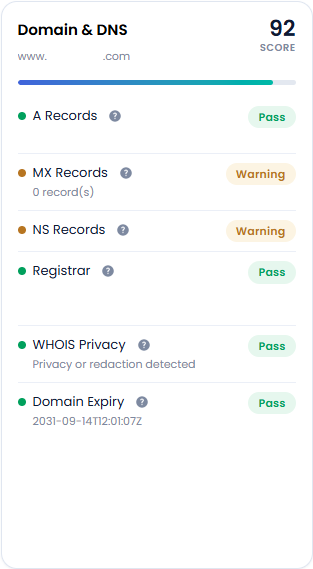
- A Records
Shows the server IP address associated with your domain.
- MX Records
Displays the mail server records configured for the domain.
- NS Records
Shows the authoritative nameservers responsible for managing your domain's DNS records.
- Registrar
Displays the company responsible for managing your domain registration.
- WHOIS Privacy
Indicates whether domain privacy protection is enabled.
- Domain Expiry
Displays the domain's expiration date.
Authority and Spam Metrics
The Authority & Spam Metrics section provides insight into your website's reputation, trustworthiness, and overall online presence. These metrics help identify factors that may influence how search engines and other websites view your domain.
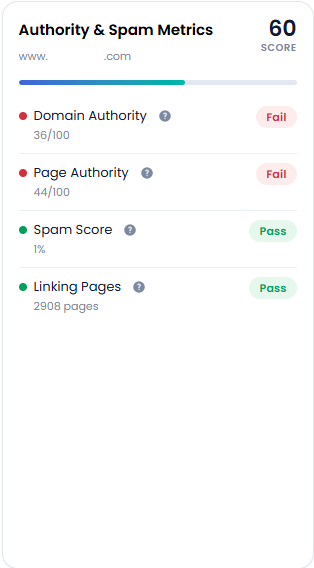
- Domain Authority
Measures the overall strength and credibility of your domain compared to other websites.
- Page Authority
Measures the ranking strength of an individual webpage rather than the entire website.
- Spam Score
Evaluates whether a website has characteristics commonly associated with spam or low-quality websites.
- Linking Pages
Shows the number of external webpages linking to your website.
Agent Readiness
The Agent Readiness section measures how well your website is prepared for AI-powered search engines, assistants, and automated tools to discover, understand, and interact with your content.
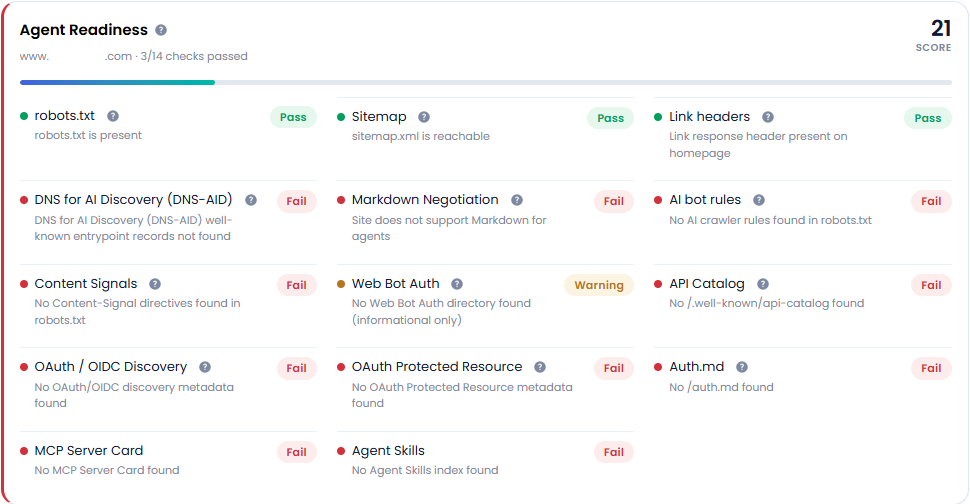
- robots.txt
Checks whether the website has a robots.txt file and reviews the instructions it provides to search engines and automated tools.
- DNS for AI Discovery (DNS-AID)
Checks for experimental DNS records that help AI systems and automated tools discover and understand information about your website more efficiently.
- Content Signals
Checks for metadata and directives that provide AI systems with additional information about your website content, including usage preferences, licensing information, and content accessibility guidelines.
- OAuth / OIDC Discovery
Checks whether your website provides OAuth or OpenID Connect (OIDC) discovery metadata, which allows applications and services to automatically locate authentication and identity settings.
- MCP Server Card
Checks whether the website provides an MCP (Model Context Protocol) Server Card, which helps AI systems discover available AI services, tools, capabilities, and integration endpoints associated with the website.
- Sitemap
Checks whether your website has an XML sitemap and whether it is accessible to search engines.
- Markdown Negotiation
Checks whether your website supports Markdown-formatted content that AI systems and automated tools can easily access and interpret.
- Web Bot Auth
Checks whether your website supports Web Bot Authentication, which allows automated systems and AI agents to securely verify their identity when accessing your website.
- OAuth Protected Resource
Checks whether your website provides metadata that identifies resources requiring secure authentication before they can be accessed.
- Agent Skills
Checks whether your website provides an Agent Skills Index, which helps AI assistants and automated systems understand what capabilities, tools, services, or actions are available through your website.
- Link headers
Checks whether your website provides Link Headers, which are additional instructions sent by the web server to help browsers, search engines, and AI systems discover important website resources.
- AI bot rules
Checks whether your website provides instructions that tell AI crawlers and automated systems what content they are allowed to access, crawl, or use.
- API Catalog
Checks whether your website publishes an API Catalog, which is a structured list of available APIs that software applications, developers, and AI tools can use to discover services, integrations, and capabilities offered by your website.
- Auth.md
Checks whether your website provides an Auth.md file, a standardized document that helps developers, applications, and AI systems understand how to authenticate when accessing APIs or protected resources.
Recommended Products
Provides recommendations that may help resolve identified issues.
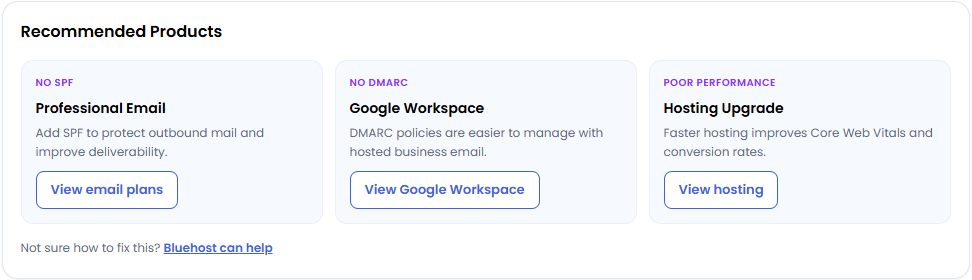
Examples may include:
- Security solutions
- Email enhancements
- Hosting upgrades
- Performance optimization services
- Productivity tools
Not sure how to fix issues? Bluehost can help!
Summary
Site Health Advisor is a website audit tool that analyzes your website's overall health, including performance, security, SEO, email configuration, domain settings, and AI readiness. It provides a Website Health Score, detailed audit reports, prioritized recommendations, and actionable insights to help improve your website's visibility, security, user experience, and overall online performance.
If you need further assistance, Bluehost Chat Support is available 24 hours a day, 7days a week while Bluehost Phone Support is available 7 days a week from 7 am-12 midnight EST.
- Chat Support - While on our website, you should see a CHAT bubble in the bottom right-hand corner of the page. Click anywhere on the bubble to begin a chat session.
- Phone Support -
- US: 888-401-4678
- International: +1 801-765-9400
You may also refer to our Knowledge Base articles to help answer common questions and guide you through various setup, configuration, and troubleshooting steps.