 ChatGPT,
  Claude,
  Gemini,
  Grok — all four for
 Bluehost AI All- Access Pack: Manage Auto-Renew Easily
Welcome to Bluehost AI All-Access! We’re excited to help you get the most out of your AI-powered tools and features. To keep everything running smoothly, it’s important to make sure your AI All-Access subscription is set to automatically renew so you never miss a beat.
This article will walk you through how to manage the renewal settings for your Bluehost AI All-Access subscription.
We have created a video to guide you through the process.
Looking to purchase Bluehost AI All-Access? Check out our article on How to Purchase Bluehost AI All-Access for step-by-step instructions.
How to Manage Auto-Renew for Bluehost AI All-Access
- Log in to your Bluehost Portal.
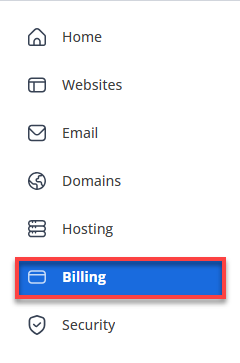
- In the left-hand menu, click Billing.
- Under the Renewal Center tab, find and select your AI All-Access subscription from the list of products.
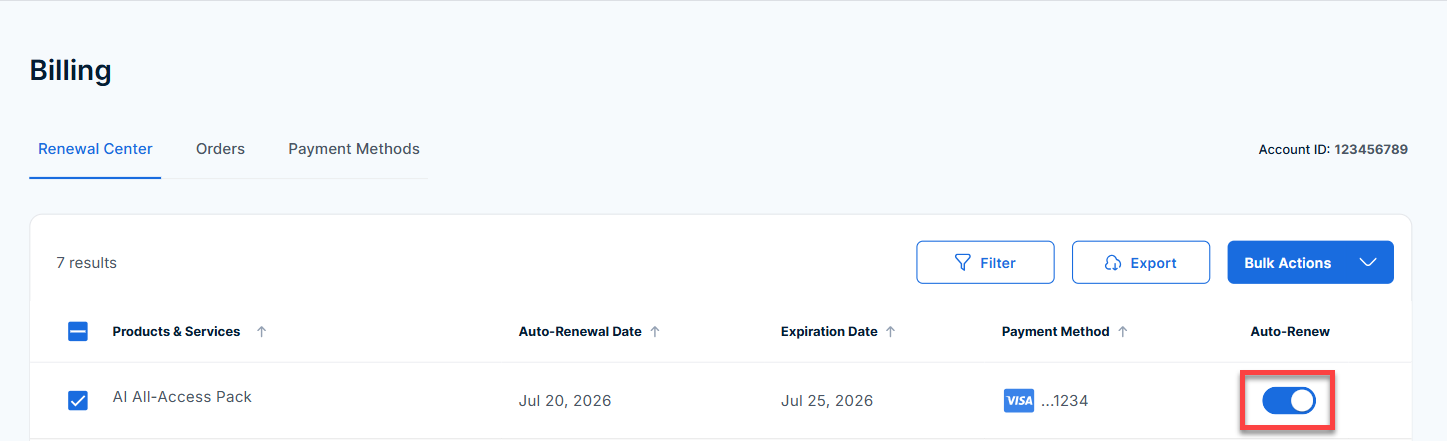
- Use the Auto-Renew toggle to turn auto-renew on or off, depending on your preference.
For AI All-Access, there is no Renew Now button or manual checkout option. The only way to manage your renewal is by toggling auto-renew on or off. If auto-renew is enabled, your subscription will renew automatically when the term ends.
What Happens if I Don’t Renew AI All-Access?
If you turn off auto-renew or allow your Bluehost AI All-Access subscription to expire, you'll lose access to all AI features and tools included in your plan. That means no more AI assistants, content generation, or any of the services included in your plan. Additionally, any data or settings associated with your subscription may no longer be available. To keep everything running smoothly, make sure Auto-Renew is enabled if you want uninterrupted service!
Summary
Managing your Bluehost AI All-Access renewal is easy—just use the auto-renew toggle in your account. If you receive a renewal reminder, review your Auto-Renew settings to ensure uninterrupted access to your AI tools and features.
If you need further assistance, Bluehost Chat Support is available 24 hours a day, 7days a week while Bluehost Phone Support is available 7 days a week from 7 am-12 midnight EST.
- Chat Support - While on our website, you should see a CHAT bubble in the bottom right-hand corner of the page. Click anywhere on the bubble to begin a chat session.
- Phone Support -
- US: 888-401-4678
- International: +1 801-765-9400
You may also refer to our Knowledge Base articles to help answer common questions and guide you through various setup, configuration, and troubleshooting steps.