 ChatGPT,
  Claude,
  Gemini,
  Grok — all four for
Joomla Troubleshooting Guide
Joomla is a flexible content management system (CMS) that powers everything from personal blogs to e-commerce stores. Like any platform, it can encounter errors during installation or everyday use. This Joomla troubleshooting guide addresses common issues, including the "session.save_path is unwritable" error, and offers solutions to help you get your site up and running smoothly.
It offers numerous features, including page caching, RSS feeds, printable page forms, news flashes, blogging services, search options, and language localization support. The huge directory of extensions for Joomla enables users to increase the capabilities of their site by incorporating feature modules such as galleries, message boards, shopping carts, social networking options, etc.
Troubleshoot Joomla Installation
A "session.save_path is unwritable" error may stall the process of installing Joomla manually, frustrating you and leaving you wanting to get some help. This is often not an uncommon error; this is because Joomla uses a specific directory where session data is to be stored. This directory, however, needs to be opened by the web server on your server. In order to resolve this error, one needs to understand how Joomla was set up and the file permission settings of a server. This solution aims to sidestep the error by offering candid remedies that will make the installation run smoothly, paving the way for you to set up your Joomla website.
- Log in to your Bluehost Portal.
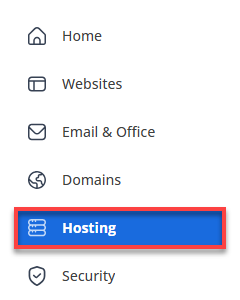
- Click Hosting in the left-hand menu.
- Click on the FILE MANAGER button.
- Find the public_html file, then php.ini, and then right-click.
- Select Code Edit.
- Around line 824 is something that looks like ;session.save_path = /tmp
- Remove the semicolon ';' in the front so it looks like this: session.save_path = /tmp
- Make the path go to the temp folder in your account session.save_path = /home/username/tmp, where the username is your cPanel username listed inside cPanel.
- Save the changes.
Joomla is an open-source project, meaning a developer community develops it. Everything from the documentation to the code was created by and for the community. The Joomla community provides extensive documentation and support via their website, Joomla.org. Thousands of independent sites also provide information, extensions, templates, tips, tricks, and hacks.
Here are some suggested resources for Joomla:
- Joomla.org
- Joomla.org Documentation
- Joomla.org Forums
- Joomla Extensions
- Joomla Templates Documentation
- List of Extensions (with links to developers) on Joomla.org
- Yahoo!
- Bing
Joomla.org
The official Joomla script website, featuring comprehensive documentation and support forums, allows you to ask questions and get answers. When you encounter aa problem with Joomla, this is where you should go to seek support, as common problems and solutions are typically listed on this website. There is also a great community to which you can pose your questions.
Extension or Template Designer's Official Website
As you work with Joomla, you may add extensions and templates to your website. When you encounter an issue with a particular extension or template, it is best to contact the creator of that extension or template. You can locate this information on Joomla.org under the "Do More > Extensions" menu or by searching.
Try a Search Engine
Are you experiencing an issue, or would you like to act on Joomla? Since Joomla powers 2.7% of the entire Web, someone else has likely encountered a similar issue and posted a solution online. You can use search engines to find information about Joomla that you may need.
Place a copy of the modified php.ini file into the administrator or another appropriate folder.
Summary
Learning how to troubleshoot a Joomla installation and resolving the "session.save_path is unwritable" error contributes to a successful installation. This can be achieved by understanding what Joomla requires and successfully administering server permissions. The Joomla community and its wealth of resources are excellent sources for troubleshooting and improving your Joomla-based website. Never forget to visit the official Joomla website and forums, as well as the official websites of extension and template designers, and search engines, which are top sources for help and knowledge.
If you need further assistance, Bluehost Chat Support is available 24 hours a day, 7days a week while Bluehost Phone Support is available 7 days a week from 7 am-12 midnight EST.
- Chat Support - While on our website, you should see a CHAT bubble in the bottom right-hand corner of the page. Click anywhere on the bubble to begin a chat session.
- Phone Support -
- US: 888-401-4678
- International: +1 801-765-9400
You may also refer to our Knowledge Base articles to help answer common questions and guide you through various setup, configuration, and troubleshooting steps.