 ChatGPT,
  Claude,
  Gemini,
  Grok — all four for
 Hermes Agent works with AI Credits, so you can power your agent using your Bluehost AI Credits balance instead of a separate provider subscription. This guide applies to Hermes Agent running on a Self-Managed VPS or Virtual Dedicated Server (VDS), and shows you how to connect them whether you're setting up Hermes Agent for the first time or adding AI Credits to an existing install.
What you'll need
- A terminal or SSH access to your server
- Your AI Credits API key
- Your AI Credits gateway URL
Section 1: First-Time Setup (New Hermes Installation)
The setup wizard in Hermes Agent uses a clear, step-by-step menu to configure your provider settings. Instead of a free-text chat, it guides you through a brief series of fixed prompts to quickly connect your model backend. Follow these simple steps to link your AI Credits gateway.
- Log in to your Bluehost Portal.
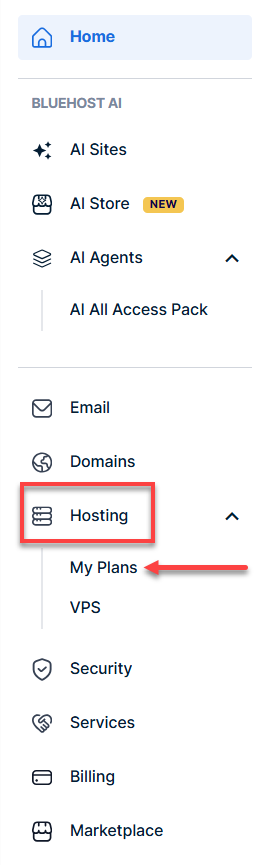
- In the left-hand menu, click Hosting, then select My Plans.
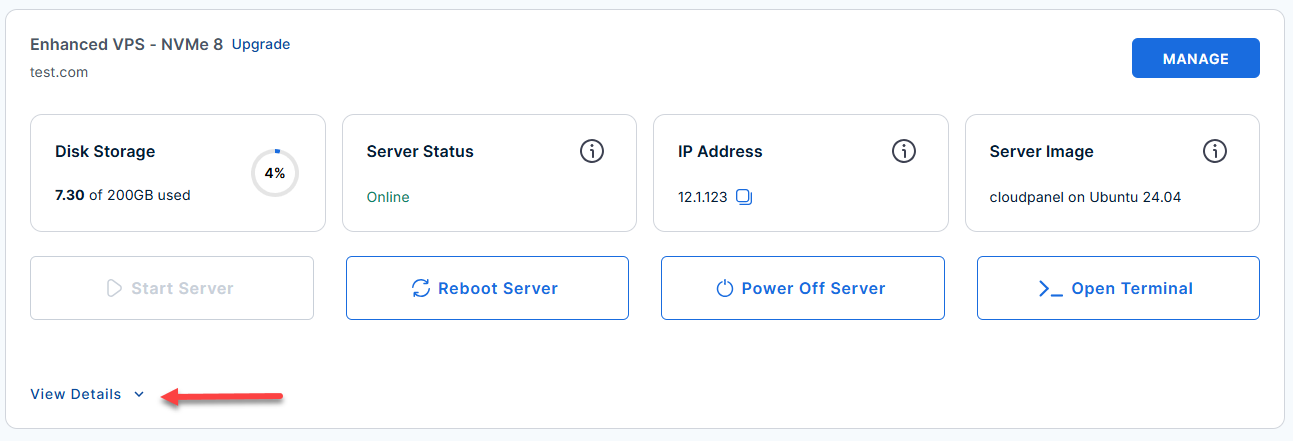
- Locate the server you want to manage, then click View Details in the bottom-left corner to expand the section and access additional server information.
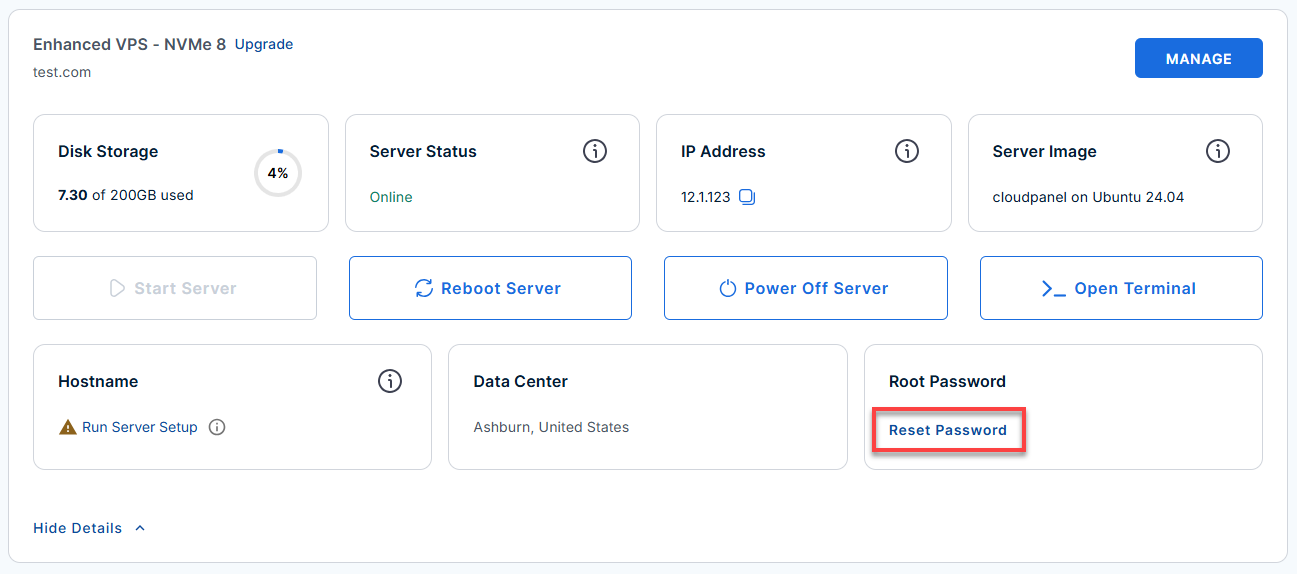
- Click the Reset Password.
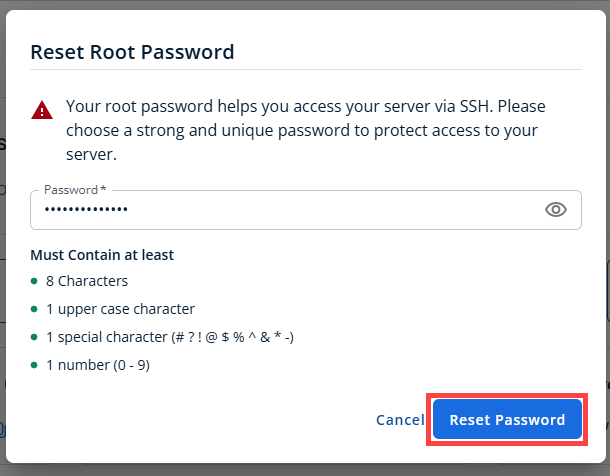
- In the pop-up window, type your new root password, then click Reset Password again to confirm and save the changes.
Use your server IP and credentials with an SSH client, follow the prompts, and enter your Root Password when asked:
- Connect to your server via SSH.
Replace
your_server_ipwith your actual server IP address.ssh root@your_server_ip - Verify your server model and specifications by running the following command:
hermes model
Example Output
Select provider: ↑↓ navigate ENTER/SPACE select ESC cancel (○)Nous Portal (Nous Research subscription) (○) OpenRouter (100+ models, pay-per-use) (○) LM Studio (local desktop app with built-in model server) (○) Anthropic (Claude models — API key or Claude Code) (○) OpenAI Codex (○) Xiaomi MiMo (MiMo-V2.5 and V2 models — pro, omni, flash) (○) Tencent TokenHub (Hy3 Preview — direct API via tokenhub.tencentmaas.com) (○) NVIDIA NIM (Nemotron models — build.nvidia.com or local NIM) (○) Qwen OAuth (reuses local Qwen CLI login) (○) GitHub Copilot (uses GITHUB_TOKEN or gh auth token) (○) GitHub Copilot ACP (spawns `copilot --acp --stdio`) (○) Hugging Face Inference Providers (20+ open models) (○) Google AI Studio (Gemini models — native Gemini API) (○) Google Gemini via OAuth + Code Assist (free tier supported; no API key needed) (○) DeepSeek (DeepSeek-V3, R1, coder — direct API) (○) xAI (Grok models — direct API) (○) Z.AI / GLM (Zhipu AI direct API) (○) Kimi Coding Plan (api.kimi.com) & Moonshot API (○) Kimi / Moonshot China (Moonshot CN direct API) (○) StepFun Step Plan (agent/coding models via Step Plan API) (○) MiniMax (global direct API) (○) MiniMax via OAuth browser login (Coding Plan, minimax.io) (○) MiniMax China (domestic direct API) (○) Alibaba Cloud / DashScope Coding (Qwen + multi-provider) (○) Ollama Cloud (cloud-hosted open models — ollama.com) (○) Arcee AI (Trinity models — direct API) (○) GMI Cloud (multi-model direct API) (○) Kilo Code (Kilo Gateway API) (○) OpenCode Zen (35+ curated models, pay-as-you-go) (○) OpenCode Go (open models, $10/month subscription) (○) AWS Bedrock (Claude, Nova, Llama, DeepSeek — IAM or API key) (○) Azure Foundry (OpenAI-style or Anthropic-style endpoint — your Azure AI deployment) (○) Vercel AI Gateway → (●) Custom endpoint (enter URL manually) (○) Configure auxiliary models... (○) Leave unchanged - The menu displays named providers (e.g., Nous Portal, OpenRouter, Anthropic, OpenAI) along with custom options. Scroll down using your arrow keys and select:
(o) Custom endpoint (enter URL manually) - At the API base URL prompt, enter your gateway endpoint:
https://gateway.ai.bluehost.com
Example Output
Custom OpenAI-compatible endpoint configuration: API base URL [e.g. https://api.example.com/v1]: https://gateway.ai.bluehost.com API key [optional]: - At the API key prompt, paste your AI Credits API key. At the Model name prompt, enter the exact model ID you want to use as your default — for example:
orclaude-haiku-4-5hermes-3-llama-3.1-405bSee AI Models and Credit Pricing for the full list of supported model IDs.
If the details are correct, Hermes Agent will output Verification successful and save the configuration.
Section 2: Adding an AI Credits API key to an Existing Hermes Agent Install
If Hermes Agent is already configured and you want to switch to or add an AI Credits key manually, update the Hermes configuration and environment files directly.
If nano is not yet installed on your system, run the following command:
- Open your terminal and add your API key to the environment secrets file:
nano ~/.hermes/.env
- Save your key under the appropriate variable name:
AI_CREDITS_API_KEY="YOUR_AI_CREDITS_API_KEY"
- Open the primary Hermes configuration file:
nano ~/.hermes/config.yaml
- Add a named entry for AI Credits under
providers:, using your gateway endpoint and API key:ReplaceYOUR_AI_CREDITS_API_KEYwith your actual server API Key.providers: bluehost-ai-credits: api: https://gateway.ai.bluehost.com api_key: YOUR_AI_CREDITS_API_KEY transport: chat_completions models: claude-haiku-4-5: context_length: 200000 model: provider: custom:bluehost-ai-credits default: claude-haiku-4-5 - Save and exit (
Ctrl+O,Enter,Ctrl+X).
transport: chat_completions matches how the AI Credits gateway is built. Don't set transport: anthropic_messages or codex_responses — those are different request formats the gateway doesn't use.
Adding the new provider this way doesn't remove your existing provider configuration — only the top-level model.provider / model.default values determine which one Hermes actually uses by default. Your other provider stays defined under providers: (or as whatever you had set before) and you can switch back to it any time.
If you'd rather store the key in an environment variable instead of inline in config.yaml, use key_env in place of api_key:
Replace YOUR_AI_CREDITS_API_KEY with your actual server API Key.
Which model ID to use: Enter the exact model ID as listed in AI Models and Credit Pricing (for example, claude-haiku-4-5 or gpt-5.6) — that same page also shows the credit cost per model, which is worth checking before picking a default.
Testing the Connection
To confirm that the agent responds using your AI Credits endpoint:
- Launch a chat session:
hermes
Example Output
██╗ ██╗███████╗██████╗ ███╗ ███╗███████╗███████╗ █████╗ ██████╗ ███████╗███╗ ██╗████████╗ ██║ ██║██╔════╝██╔══██╗████╗ ████║██╔════╝██╔════╝ ██╔══██╗██╔════╝ ██╔════╝████╗ ██║╚══██╔══╝ ███████║█████╗ ██████╔╝██╔████╔██║█████╗ ███████╗█████╗███████║██║ ███╗█████╗ ██╔██╗ ██║ ██║ ██╔══██║██╔══╝ ██╔══██╗██║╚██╔╝██║██╔══╝ ╚════██║╚════╝██╔══██║██║ ██║██╔══╝ ██║╚██╗██║ ██║ ██║ ██║███████╗██║ ██║██║ ╚═╝ ██║███████╗███████║ ██║ ██║╚██████╔╝███████╗██║ ╚████║ ██║ ╚═╝ ╚═╝╚══════╝╚═╝ ╚═╝╚═╝ ╚═╝╚══════╝╚══════╝ ╚═╝ ╚═╝ ╚═════╝ ╚══════╝╚═╝ ╚═══╝ ╚═╝ ╭─────────────────────────────────────── Hermes Agent v0.20.5 (2026.8.19) · upstream 057dcdf2 ────────────────────────────────────────╮ │ Available Tools │ │ ⠀⠀⠀⠀⠀⠀⠀⠀⠀⠀⢀⣀⡀⠀⣀⣀⠀⢀⣀⡀⠀⠀⠀⠀⠀⠀⠀⠀⠀⠀ bfl: bfl_flux3_get_result, ... │ │ ⠀⠀⠀⠀⠀⠀⢀⣠⣴⣾⣿⣿⣇⠸⣿⣿⠇⣸⣿⣿⣷⣦⣄⡀⠀⠀⠀⠀⠀⠀ browser: browser_back, browser_click, ... │ │ ⠀⢀⣠⣴⣶⠿⠋⣩⡿⣿⡿⠻⣿⡇⢠⡄⢸⣿⠟⢿⣿⢿⣍⠙⠿⣶⣦⣄⡀⠀ browser-use: browser_exec │ │ ⠀⠀⠉⠉⠁⠶⠟⠋⠀⠉⠀⢀⣈⣁⡈⢁⣈⣁⡀⠀⠉⠀⠙⠻⠶⠈⠉⠉⠀⠀ clarify: clarify │ │ ⠀⠀⠀⠀⠀⠀⠀⠀⠀⠀⣴⣿⡿⠛⢁⡈⠛⢿⣿⣦⠀⠀⠀⠀⠀⠀⠀⠀⠀⠀ code_execution: execute_code │ │ ⠀⠀⠀⠀⠀⠀⠀⠀⠀⠀⠿⣿⣦⣤⣈⠁⢠⣴⣿⠿⠀⠀⠀⠀⠀⠀⠀⠀⠀⠀ computer_use: computer_use │ │ ⠀⠀⠀⠀⠀⠀⠀⠀⠀⠀⠀⠈⠉⠻⢿⣿⣦⡉⠁⠀⠀⠀⠀⠀⠀⠀⠀⠀⠀⠀ cronjob: cronjob │ │ ⠀⠀⠀⠀⠀⠀⠀⠀⠀⠀⠀⠀⠘⢷⣦⣈⠛⠃⠀⠀⠀⠀⠀⠀⠀⠀⠀⠀⠀⠀ delegation: delegate_task │ │ ⠀⠀⠀⠀⠀⠀⠀⠀⠀⠀⠀⢠⣴⠦⠈⠙⠿⣦⡄⠀⠀⠀⠀⠀⠀⠀⠀⠀⠀⠀ (and 11 more toolsets...) │ │ ⠀⠀⠀⠀⠀⠀⠀⠀⠀⠀⠀⠸⣿⣤⡈⠁⢤⣿⠇⠀⠀⠀⠀⠀⠀⠀⠀⠀⠀⠀ │ │ ⠀⠀⠀⠀⠀⠀⠀⠀⠀⠀⠀⠀⠀⠉⠛⠷⠄⠀⠀⠀⠀⠀⠀⠀⠀⠀⠀⠀⠀⠀ Available Skills │ │ ⠀⠀⠀⠀⠀⠀⠀⠀⠀⠀⠀⠀⢀⣀⠑⢶⣄⡀⠀⠀⠀⠀⠀⠀⠀⠀⠀⠀⠀⠀ autonomous-ai-agents: claude-code, codex, computer-use, +3 more │ │ ⠀⠀⠀⠀⠀⠀⠀⠀⠀⠀⠀⠀⣿⠁⢰⡆⠈⡿⠀⠀⠀⠀⠀⠀⠀⠀⠀⠀⠀⠀ creative: architecture-diagram, ascii-art, ascii-video, +16 more │ │ ⠀⠀⠀⠀⠀⠀⠀⠀⠀⠀⠀⠀⠈⠳⠈⣡⠞⠁⠀⠀⠀⠀⠀⠀⠀⠀⠀⠀⠀⠀ data-science: jupyter-live-kernel │ │ ⠀⠀⠀⠀⠀⠀⠀⠀⠀⠀⠀⠀⠀⠀⠈⠀⠀⠀⠀⠀⠀⠀⠀⠀⠀⠀⠀⠀⠀⠀ devops: kanban-orchestrator, kanban-worker, sdlc-review, +1 more │ │ email: email-inbox-triage, himalaya │ │ claude-haiku-4-5 · Nous Research gaming: minecraft-modpack-server, pokemon-player │ │ /root general: yuanbao │ │ Session: 123444_1234_abs github: codebase-inspection, github-auth, github-code-review, +4 more │ │ mcp: native-mcp │ │ media: gif-search, heartmula, songsee, spotify, youtube-content │ │ mlops: audiocraft-audio-generation, axolotl, dspy, +10 more │ │ note-taking: obsidian │ │ productivity: airtable, box, document-to-action-items, docx, +14 more │ │ │ │ research: arxiv, blocked-page-recovery, blogwatcher, +5 more │ │ smart-home: openhue │ │ social-media: xurl │ │ software-development: debugging-hermes-tui-commands, dogfood, +12 more │ │ │ │ 21 tools · 105 skills · /help for commands │ ╰─────────────────────────────────────────────────────────────────────────────────────────────────────────────────────────────────────╯ Welcome to Hermes Agent! Type your message or /help for commands. ✦ Tip: When a provider returns HTTP 402 (payment required), the auxiliary client auto-falls back to the next one. - Send a test message:
hello
Example Output
Using custom:bluehost-ai-credits/claude-haiku-4-5

────────────────────────────────────────
● hello
Initializing agent...
────────────────────────────────────────


╭─ ⚕ Hermes ──────────────────────────────────────────────────────────────────────────────────────────────────────────────────────────╮
Hello! I'm Hermes Agent, here to help you with a wide range of tasks. Whether you need help with:

- Coding & development (writing, reviewing, debugging code)
- Data analysis & research (web search, document extraction, analysis)
- Automation & scripting (terminal commands, workflows)
- Creative work (design, writing, ideation)
- Productivity (managing files, documents, spreadsheets)
- And much more

Just let me know what you'd like to work on, and I'll get started. What can I help you with today?
Check the status line at the top of the session — it should show your custom provider and model (for example,
custom:bluehost-ai-credits/claude-haiku-4-5), confirming the reply came through your AI Credits gateway.
Troubleshooting Connection Issues
If Hermes Agent fails to connect to your gateway, review these common configuration fixes to resolve routing and authentication errors.
- Auth Errors (401 Unauthorized): Re-check that your API key is pasted accurately in
~/.hermes/.envwithout any leading or trailing spaces, and ensure your credit balance is active. - Endpoint Errors (404 Not Found): Ensure the
base_urlis set to the API root (e.g.,https://gateway.ai.bluehost.com) and does not include/chat/completionsat the end, as Hermes Agent appends path routes automatically.
Summary
To set up a fresh Hermes Agent install, run hermes model, select Custom endpoint (enter URL manually), and enter your gateway URL, API key, and model ID. If you already have an existing install, simply re-run hermes model or add the bluehost-ai-credits provider directly into your ~/.hermes/config.yaml file. Always set your transport protocol to chat_completions and use the base gateway URL without extra path routes. Finally, run hermes and send a test message to confirm your agent actively responds through your new endpoint.