 ChatGPT,
 Claude,
 Gemini,
 Grok — all four for

Key highlights
- A domain name is your website’s identity online. A URL is the complete address of one specific page within a website.
- Behind every domain name is a numerical IP address. DNS translates one into the other every time someone visits your site.
- You register and own a domain through a registrar. URLs are created automatically every time you publish a new page.
- Your domain name builds site-wide authority and trust over time. Your URL structure helps individual pages rank in search results.
- Choosing a short, memorable domain name that matches your brand is one of the most important decisions for your website.
- Bluehost includes a free domain for the first year with eligible hosting plans, making it easy to get started.
You have a business idea, a brand name in your head and you are ready to get online. Then someone asks: “Have you registered your domain? What about your URL structure?” And just like that, the excitement hits a wall.
Most people starting their first website have no idea that domain vs URL are two different things, let alone why it matters. But here is the thing: understanding the difference takes less than five minutes and saves you hours of confusion later.
This guide explains both terms in plain English, shows you how they work together and helps you make the right decisions before you build.
TL;DR: Domain vs URL
Not sure which is which? Here is the short answer before we get into the details.
| Feature | Domain name | URL |
|---|---|---|
| Definition | The unique name that identifies your website on the internet | The complete address your browser uses to load one specific page or resource |
| Example | bluehost.com | https://www.bluehost.com/blog/what-is-a-domain-name |
| Made of | Subdomain + second-level domain + TLD extension | Protocol + subdomain + domain + path + page slug |
| Ownership | Registered and renewed annually through a domain registrar | Auto-generated when you create a page – not bought or owned |
| SEO impact | Builds site-wide trust and authority over time | Signals page-level relevance to search engines for specific topics |
What is a domain name?
A domain name is the human-friendly address that identifies a website on the internet. Instead of memorizing a numerical IP address like 192.168.1.1, you use a recognizable name like [yourbusiness].com. Think of it as the name on the front of a building – it tells visitors where to find you without requiring them to know your exact coordinates.
Your domain name anchors your entire online presence. It appears in your website address, your email address and any links pointing back to your site. It’s the single most consistent element of your brand online.
How does a domain work?
When someone types your domain name into a browser, a system called DNS – Domain Name System – translates that name into an IP address. That IP address directs the browser to the server where your website files are stored. The server retrieves those files and displays your website. This entire process typically happens in milliseconds.
Think of DNS as the internet’s directory service. It matches readable domain names to the numerical addresses that computers actually use to communicate. Without DNS, every user would need to remember a string of numbers to visit any website.
The three parts of a domain name within a URL
A domain name has up to three parts, each serving a specific purpose.
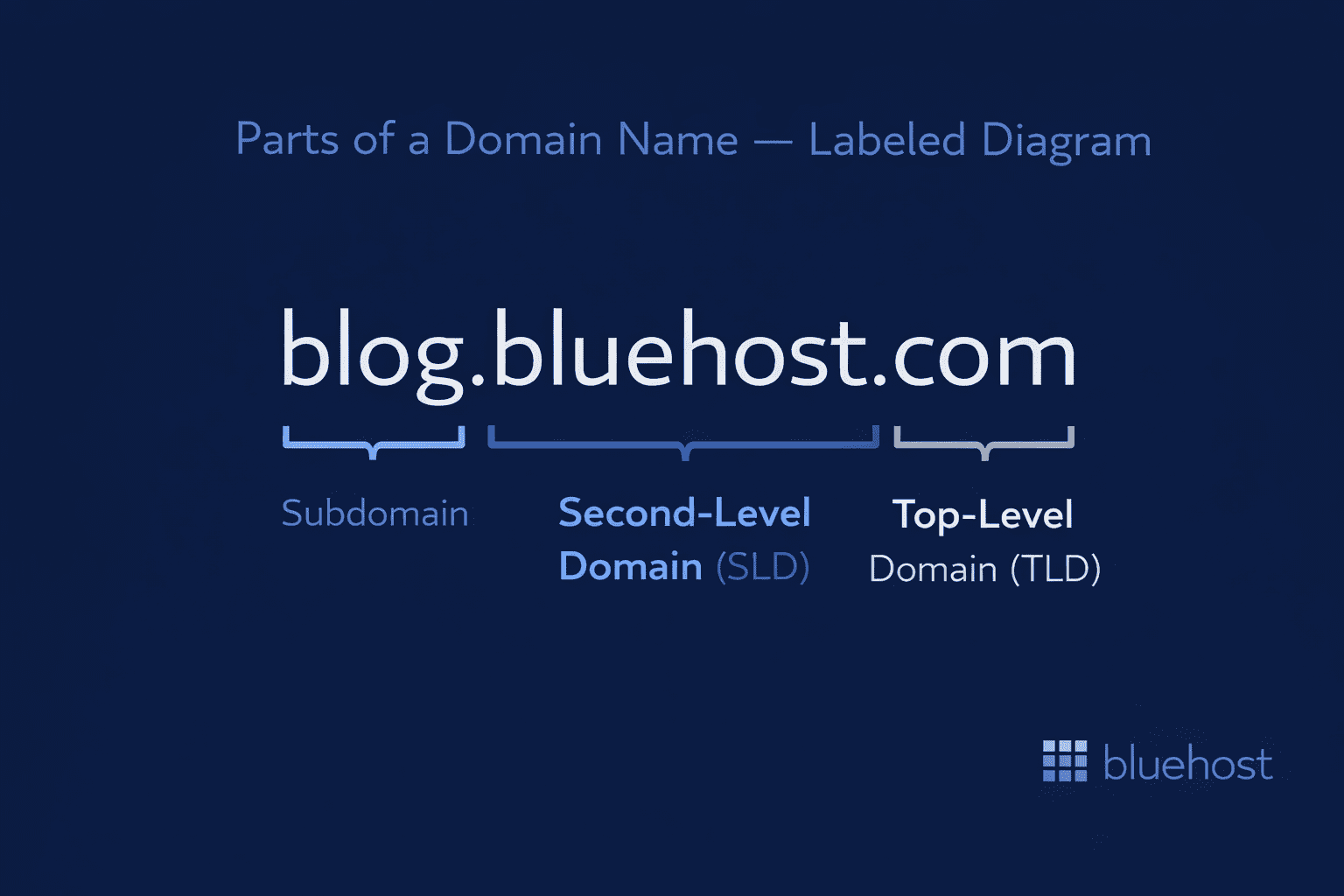
Here is what each part means:
- Subdomain: The optional prefix before the main domain name. The most common subdomain is , but custom subdomains like [blog.yourdomain].com or [shop.yourdomain].com are used to organize different sections of a website.
- Second-level domain (SLD): This is the core of your domain name – the part you choose and register. It is your brand name, your business name or whatever identifier you want to own online.
- Top-level domain (TLD): The suffix at the end of the domain, like .com, .org or .net. It signals the type or origin of the website.
Together, these three parts form the complete domain name that identifies your website across the internet.
What is a domain extension?
A domain extension, also called a top-level domain or TLD, is the suffix that appears at the end of a domain name. It’s the part that comes after the final dot. Common domain extensions include:
- .com: The most widely used extension globally; ideal for commercial websites
- .org: Traditionally associated with nonprofits and community organizations
- .net: Often used by networking and technology-focused companies
- .co: S popular and modern alternative to .com
- .io: Widely adopted by tech startups and SaaS platforms
- Country-code TLDs: Such as .uk, .ca or .au for region-specific audiences
For most businesses and content creators, .com remains the most recognizable, authoritative and trusted extension. When building credibility online, the right extension matters almost as much as the name itself.
Also read: New Domain Extensions 2026: Top Unique Domain Choices
What is a URL?
A URL is short for Uniform Resource Locator – is the full address used to access a specific resource on the internet. When you type an address into your browser’s address bar and land on a page, that complete string of text is the URL. Understanding what a URL is used for helps you navigate, share and optimize web content more effectively.
Every page, image, file or document on the internet has its own URL that points to its location. While multiple URL variations can sometimes lead to the same resource through redirects or alternate paths, each URL string itself is a distinct address – and that structure is what makes the web navigable at scale.
Domain vs URL: Understanding Every Part of a Web Address
Every URL follows a defined structure. Knowing the parts of a URL helps you understand how the web works and how to build clean, readable addresses for your own site. Here’s what a typical URL looks like:
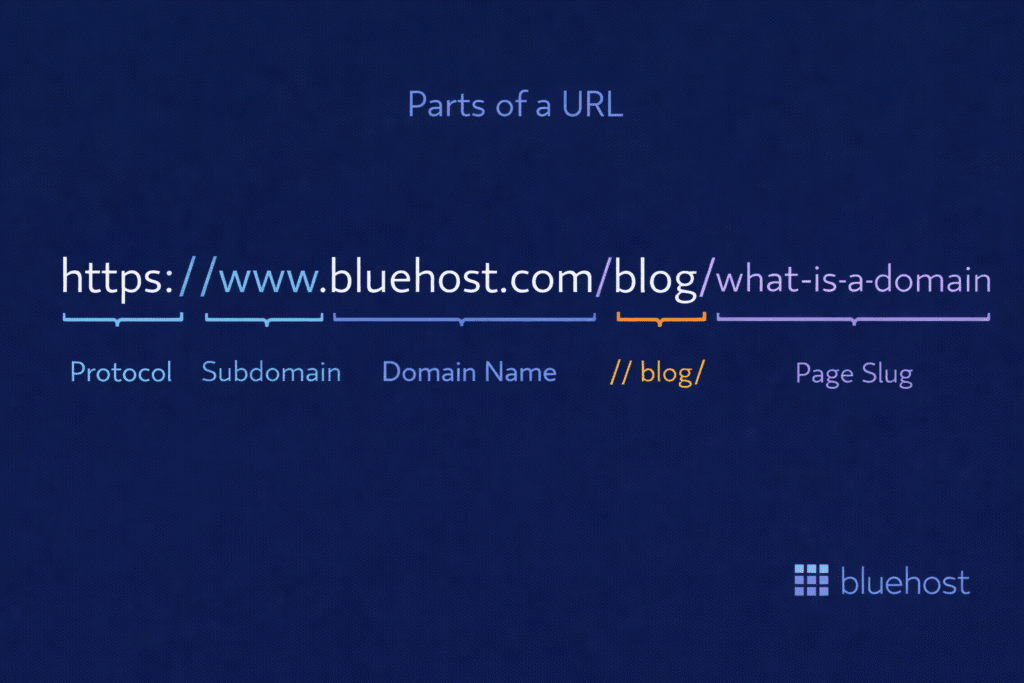
Each component plays a specific role:
- Protocol (https://): Tells your browser how to retrieve the page. HTTPS means the connection is encrypted and secure. HTTP is the older, unsecured version. Every modern website should use HTTPS – it is a trust signal for users and a ranking factor for Google.
- Subdomain (www): Indicates the resource is on the World Wide Web. Custom subdomains like blog. or shop. can be used to organize distinct sections of a site.
- Domain name (bluehost.com): The core website address – the part you register and own.
- Path (/blog/): Organizes your site like folders on a computer. It tells the browser which section of the site to look in.
- Page slug (/what-is-a-domain): The specific page within that folder. A clean, descriptive slug helps both users and search engines understand what the page is about.
- Optional elements: URLs can also include query strings (?) that filter or sort content and fragments (#) that jump to a specific section within a page.
URL examples
Seeing concrete URL examples makes the concept easier to grasp. Here’s an example of a URL for different types of pages on the same site:
| Page | URL |
|---|---|
| Homepage | https://www.bluehost.com |
| Blog post | https://www.bluehost.com/blog/gtld-vs-cctld/ |
| Product page | https://www.bluehost.com/hosting/shared-hosting |
| Contact page | https://www.bluehost.com/contact |
Each is a unique URL pointing to a distinct location. It’s the specific address your browser uses to load that page – and every page on your site has its own.
URL syntax: How web addresses are built
URL syntax is the standardized set of rules that defines how a web address is structured so browsers and servers can consistently interpret it and request the right resource.
The standard structure breaks down into three core components:
- Scheme: The protocol that instructs your browser how to access the resource – for example,
https://signals an encrypted connection. - Authority: The server hosting the resource, which includes the domain name and an optional port number that directs traffic to the correct service on that server.
- Path: The specific location of the resource on that server, pointing to a particular page, file or folder.
This consistent framework is what keeps the internet organized at scale. Without it, no two systems would interpret a web address the same way.
Difference between domain and URL
A domain name is the name of your website. A URL is the full address of a specific page within that website. A domain name and a URL are not the same thing, even though people use them interchangeably all the time. The simplest way to understand the difference is this:
For example:
- Domain: bluehost.com
- URL: https://www.bluehost.com/blog/gtld-vs-cctld/
Your domain is part of every URL on your site. But a URL is never just the domain. It always contains more. Every page, file and resource on your website has its own unique URL built around the same domain name.
Which part of a URL is the domain name?
In a complete URL, the domain name sits in the middle – after the protocol and optional subdomain, but before the path. Take this example: https://www.[yourbrand].com/products. Here, is the protocol, www is the subdomain and is the domain name. Everything that follows the first forward slash – in this case /products – is the path, which is not part of the domain.
This distinction matters when troubleshooting. If a specific page URL is broken but others load fine, the issue likely lies in the path or slug, not the domain itself. If nothing on your site loads, that points to a domain-level or DNS problem. Knowing exactly where the domain ends and the path begins helps you isolate issues faster and communicate them clearly with your hosting provider or developer.
1. Scope: Domain vs URL
A domain name represents your entire website. It is the address people type to reach you online and the name associated with your brand across every page, email and link on your site.
A URL is far more specific. It points to one exact resource on the internet, whether that is a blog post, a product page, an image or a PDF. Your website has one domain name but can have hundreds or thousands of URLs, each pointing to a different piece of content sitting under that same domain.
Think of it this way: the domain gets someone to your website. The URL gets them to the right page within it.
2. Ownership: Domain vs URL
A domain name is something you register and own through a domain registrar. You pay for it, you renew it and no one else can use that exact name while it is registered to you.
URLs are not bought or owned in the same way. They are created automatically as you build pages, publish posts and add content to your site. Every time you create a new page, your website generates a new URL. You control how they are structured, but there is no marketplace where you purchase individual URLs.
This is an important distinction if you are just starting out: what you need to search for, register and secure is your domain name. The URLs take care of themselves once your site is live.
3. Permanence: Domain vs URL
A domain name is built to be stable. As long as you renew your registration, your domain stays yours and remains consistent. It is the one thing about your website that should never change.
URLs are far more flexible and frequently do change. Every time you rename a page, restructure your site navigation or reorganize content into new folders, the URLs for those pages update. This is normal and expected as your website grows.
The key is managing those changes carefully. When a URL changes, setting up a proper redirect from the old address to the new one ensures visitors and search engines are never left with a broken link.
4. SEO role: Domain vs URL
Your domain name and your URL structure each influence SEO, but in different ways.
Your domain builds overall site authority and trust over time. A clean, credible domain name tells search engines and users that your website is legitimate. The longer your domain has been active and the more quality content it hosts, the stronger its authority becomes.
Your URL structure works at the page level. A descriptive, readable URL helps search engines understand what a specific page is about before they even crawl it. A URL like /blog/what-is-a-domain-name signals relevance far more clearly than /page?id=204. Clean URLs also improve the user experience, which is itself a ranking signal.
In short: your domain builds authority for your site as a whole. Your URLs help individual pages rank for specific topics.
Also read: How to Boost SEO Rankings on Your WordPress Website
IP address, domain name and URL – How they connect
Most people never think about what actually happens when they type a web address into a browser. Behind every domain name and every URL is a third element that makes it all work: an IP address.
These three things are not the same. They are three layers that work together, each doing a different job.
IP Address is a numerical label assigned to every device and server connected to the internet. Every website lives on a server and every server has an IP address. Computers use these numbers to locate and communicate with each other. For example: 192.168.1.1.
A domain name is the human-friendly version of that IP address. Because no one can realistically memorize a string of numbers for every website they visit, domain names were created to replace them. When you register bluehost.com, you are essentially giving a memorable name to a specific IP address. The DNS system handles the translation between the two every time someone visits your site.
URL is the complete address that tells a browser not just which server to go to, but exactly which resource to load once it gets there. It contains the domain name inside it, along with the protocol, path and any other parameters needed to locate one specific page or file.
Here is how all three relate to each other:
| Features | IP Address | Domain name | URL |
|---|---|---|---|
| What it is | Numerical server address | Human-readable website name | Full address of a specific resource |
| Example | 192.168.1.1 | bluehost.com | https://www.bluehost.com/blog/post-title |
| Who uses it | Computers and servers | People and browsers | Browsers to load specific pages |
| Can you see it | Rarely, in technical settings | Yes, in every URL | Yes, in your browser address bar |
Similarities between domains and URLs
Domains and URLs both make the internet accessible by replacing complex IP addresses with human-readable text. They work together to ensure the web remains easy to navigate, share and remember.
These elements define your online identity and impact SEO. While a domain establishes site-wide authority, URLs reinforce relevance at the page level. Search engines analyze both to determine your site’s ranking and credibility.
Quality is essential for both. Clean domains and structured URLs build visitor trust, whereas cluttered addresses appear unprofessional. Maintaining precise, purposeful addresses across your site is key to strengthening online credibility
What is a domain registrar?
Before you can use a domain name, someone has to officially record that it belongs to you. That is exactly what a domain registrar does.
A domain registrar is an accredited organization authorized to register and manage domain names on your behalf. When you search for a domain, check its availability and complete a purchase, you are doing all of that through a registrar. They handle the technical registration, maintain your ownership records and send you renewal reminders so your domain stays active.
Domain registrars are accredited either directly by ICANN (Internet Corporation for Assigned Names and Numbers) or operate as authorized resellers of ICANN-accredited registrars. ICANN is the global organization responsible for coordinating domain name policies and keeping the Internet’s naming system stable.
A few things to know about how registrars work:
- Registration period: Domain names are registered for a set period, typically one year and renewed annually. Your registrar manages this on your behalf.
- Domain privacy protection: When you register a domain, your contact details are added to a public WHOIS database by default. Most registrars offer domain privacy protection to keep that personal information out of public records.
- Transfer between registrars: If you registered your domain with one provider and want to move it to another, you can transfer it. Your ownership is not tied permanently to any single registrar.
Choosing a registrar that also offers hosting means your domain and website are managed from one dashboard, which simplifies setup, configuration and renewals significantly.
Also read: The Best Domain Registrars: Choose the Right Domain Registrar
How to get your domain name?
Getting a domain name is straightforward but the choices you make upfront matter. Your domain is the one thing about your website that should stay consistent for the long term, so it is worth taking a few minutes to get it right before you register.
Here is what to keep in mind when choosing:
- Keep it short and memorable: Shorter domains are easier to type, share and recall. If someone has to spell it out loud, it is probably too complicated.
- Match it to your brand: Your domain name should reflect your business name or what your website is about. Consistency between your domain and your brand makes you easier to find and trust.
- Choose the right extension: For most websites, .com is still the strongest choice. If your preferred .com is taken, check availability across other relevant extensions before settling on a variation.
Not sure if your preferred name is available? Use Bluehost’s domain search tool to check availability in real time and explore alternatives across all major extensions instantly.
Buying a domain name
Once you have found the right name, registering it through Bluehost takes just a few minutes. Here is how the process works:
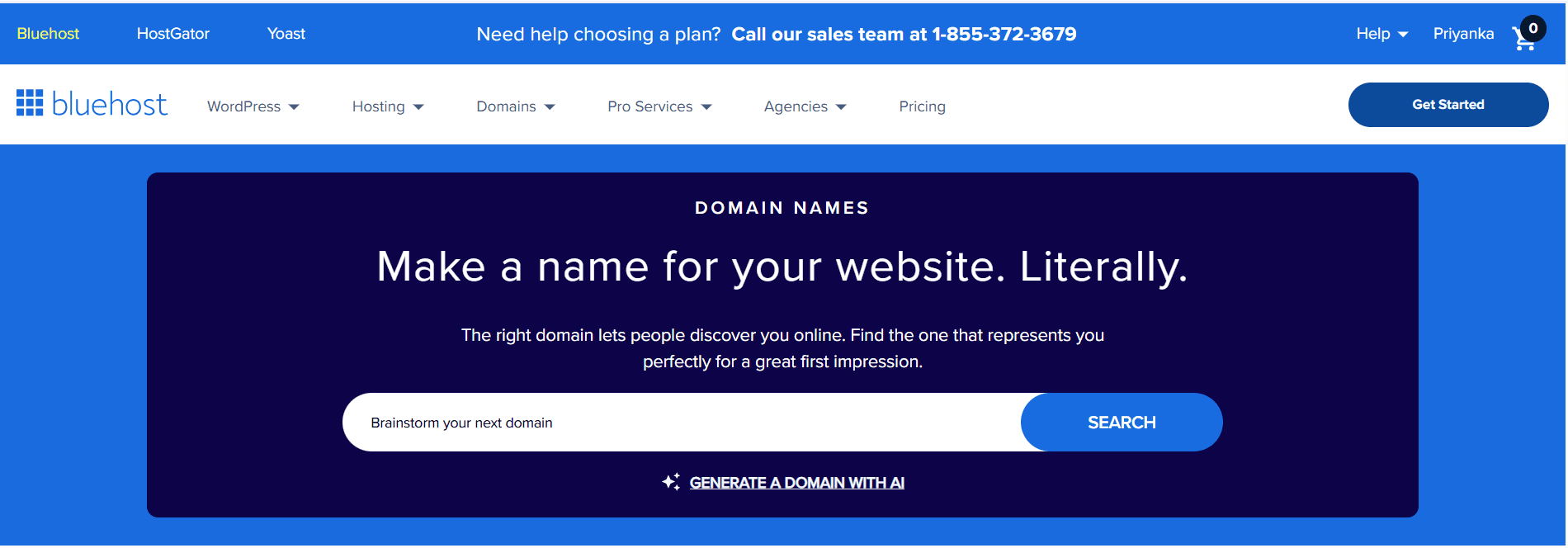
Step 1: Search for your domain: Go to Bluehost’s domain search tool, type in your preferred domain name and hit search. Bluehost will show you instantly whether it is available and suggest alternatives if it is already taken.
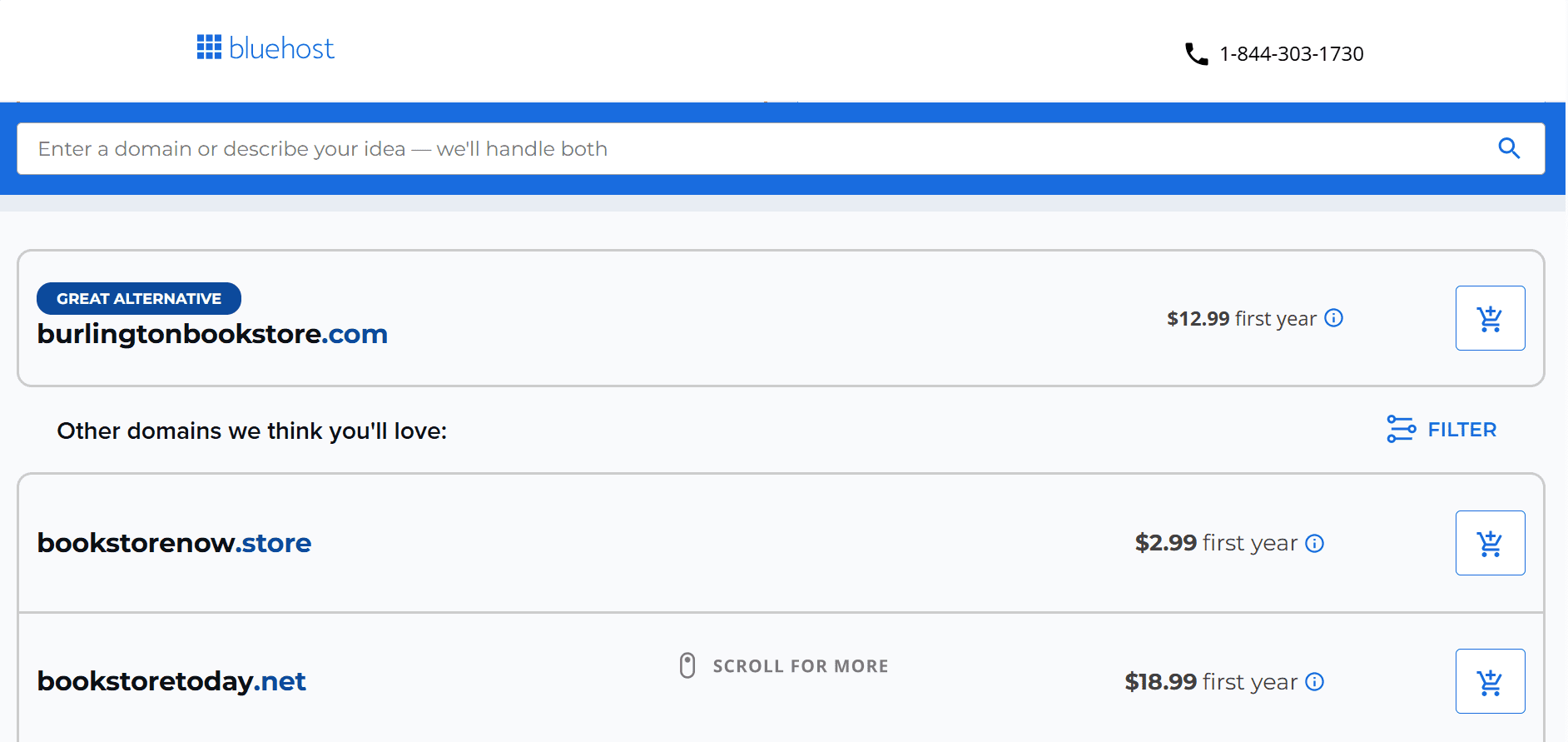
Step 2: Select your domain: Choose the domain name and extension that fits your brand best. If your preferred .com is unavailable, Bluehost shows you available options across other extensions so you can make an informed choice right there.
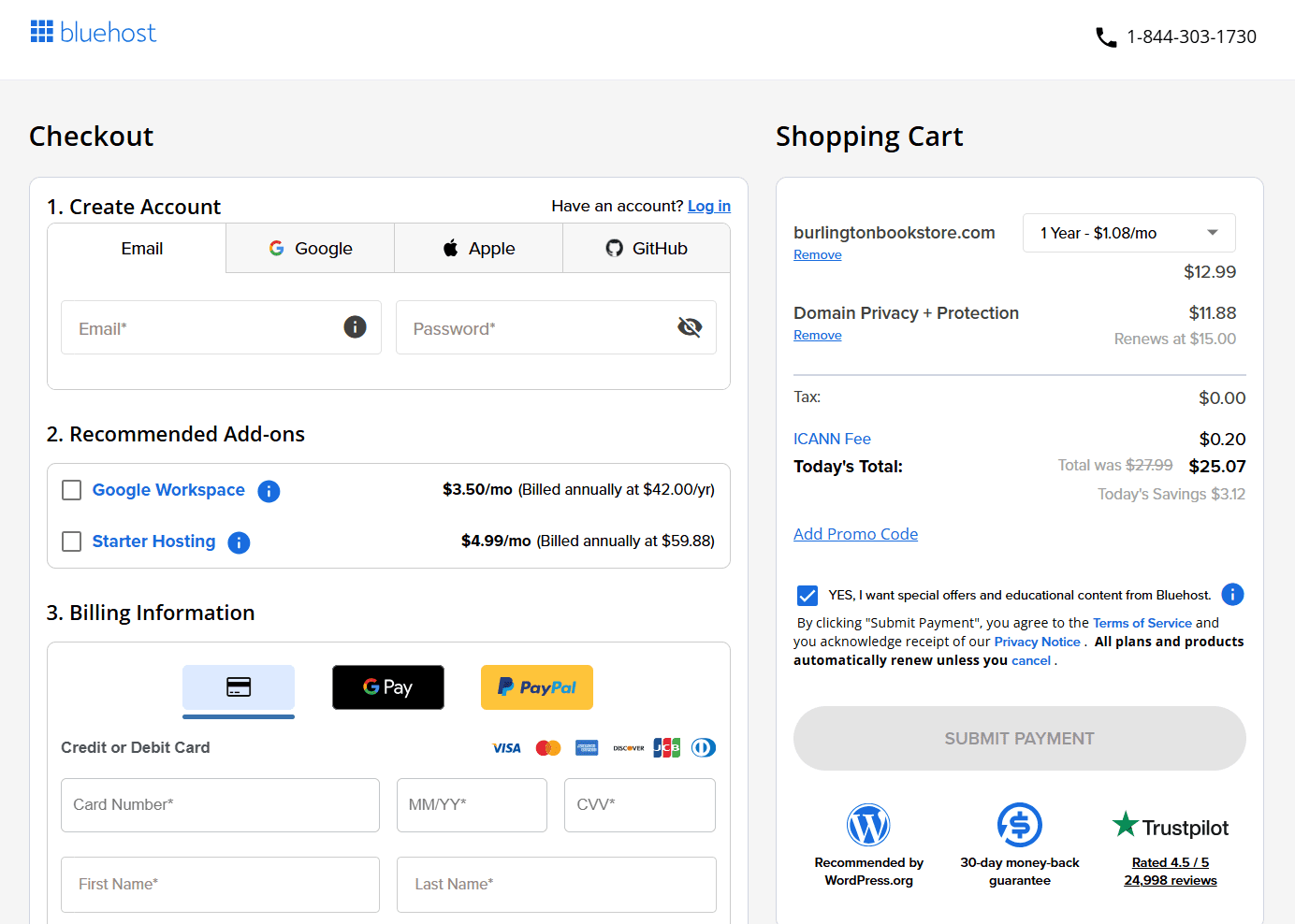
Step 3: Add domain privacy protection: At checkout, you will have the option to add domain privacy protection. This keeps your personal contact information out of the publicly accessible WHOIS database. It is a straightforward addition worth considering.
Step 4: Create your Bluehost account: Set up your Bluehost account with your details. If you are pairing your domain with a hosting plan, this is where you select it.
Step 5: Complete your purchase: Review your order, complete payment and your domain is officially registered. You can manage everything, including renewals, DNS settings and privacy, directly from your Bluehost dashboard.
Why your domain name and URL structure matter for SEO
Understanding domain vs URL isn’t just theoretical. It has direct, practical consequences for how your website performs in search engine rankings. Search Engine Optimization (SEO) relies on both your domain name and your URL structure to determine relevance, authority and ranking position.
How your domain name affects SEO?
Your domain name does not need to contain keywords to rank well, but it does need to build trust. Search engines evaluate your domain as part of assessing your overall site authority. Here is what matters:
- Clean history: If you are buying an existing domain, its past history matters. A domain previously associated with spam or penalties carries that baggage into your new site
- Age and consistency: A domain that has been active, maintained and consistently producing content builds authority over time. Changing your domain name resets that process, which is another reason to choose carefully from the start.
- Brandability over keyword stuffing: A clean, brand-driven domain like bluehost.com carries more long-term SEO value than a keyword-heavy domain that feels generic or spammy.
- Extension credibility: A .com domain is still the most widely trusted extension among users and carries strong recognition with search engines.
How your URL structure affects SEO?
While your domain builds authority at the site level, your URL structure works at the page level. Every URL on your site is an opportunity to signal relevance to search engines and make navigation clearer for users.
- Use descriptive slugs: A URL like
/blog/what-is-a-domain-nametells both users and search engines exactly what the page covers. A URL like/page?id=204tells them nothing. - Keep URLs short and readable: Shorter URLs are easier to share, remember and understand at a glance. Cut out unnecessary words or folder layers wherever possible.
- Use hyphens to separate words: Search engines read hyphens as word separators. Use them consistently instead of underscores or spaces.
- Reflect your site structure: A logical URL structure mirrors your site’s content hierarchy. For example
/blog/for all blog posts and/hosting/for all hosting pages makes it easier for search engines to crawl and index your content systematically. - Avoid changing URLs unnecessarily: Once a page is indexed and ranking, changing its URL disrupts that progress. If a URL change is unavoidable, always set up a redirect from the old address to the new one to preserve existing SEO value.
Pro tips for maintaining a professional URL structure
A clean URL structure does not happen by accident – it is the result of small, consistent decisions made every time you create a new page. Cleaner URLs earn higher click-through rates because users can read them at a glance and immediately understand what the page covers. They also signal professionalism to search engines. Here are the habits worth building from day one:
- Always use lowercase letters: URLs are case-sensitive on many servers. Mixing cases creates duplicate page risks and can cause broken links. Keeping everything lowercase eliminates that problem entirely.
- Use hyphens to separate words: Search engines treat hyphens as word separators, making your slug readable. Underscores are not treated the same way and can cause words to appear merged to crawlers.
- Avoid special characters and spaces: Characters like &, %, $ and # have technical meanings in URLs. Spaces get converted into %20, which makes addresses look cluttered and untrustworthy to users.
- Keep slugs short and descriptive: A URL like
/blog/domain-vs-urltells both users and search engines exactly what to expect. Remove stop words like “a,” “the” or “and” to keep slugs tight. - Reflect your site structure in the path: Consistent folder naming such as
/blog/for articles and/products/for offerings makes your site easier for both visitors and crawlers to navigate logically.
These small choices compound over time. A consistent URL structure across your entire site reduces confusion for users and makes your content far easier for search engines to crawl and index.
Final thoughts
Understanding the difference between a domain and a URL is foundational knowledge for anyone building or managing a website.
Every great website starts with two things done right: a domain name worth remembering and URLs that make sense to both people and search engines. Now you know exactly what each one does and why both matter.
Getting these fundamentals right from the start gives you a clear advantage. A strong, well-chosen domain establishes brand credibility. A clean, logical URL structure supports SEO, user experience and long-term site growth.
The only thing left is to actually claim your domain before someone else does.
With select Bluehost hosting plans, you get a free domain name included for the first year, so you can launch your website without any extra cost. In additional we have 24*7 support and the reliable infrastructure you need to grow. Get your free domain with Bluehost and build your online presence with confidence.
FAQs
A domain name is the identifying name of a website (e.g., [yourdomain].com). A URL is the complete address of a specific page on that website, including the protocol, domain, path and any additional parameters. Every URL contains a domain name, but a domain name alone is not a full URL.
Technically, a URL can use a raw IP address instead of a domain name to point to a server. However, in practice, all professional websites use domain names because they are far more memorable, trustworthy and SEO-friendly than numerical IP addresses.
You can use a domain name checker – a tool offered by most domain registrars and hosting providers – to search for your desired domain in real time. If it’s unavailable, the tool will usually suggest alternative names or extensions so you can find the best available option.
In WordPress, a permalink is the permanent URL assigned to each page or post on your site. WordPress allows you to customize your <a href=”https://www.bluehost.com/blog/how-to-customize-your-wordpress-permalink-settings/” target=”_blank” title=”How to Change Permalink in WordPress”>permalink structure</a> through the Settings menu. The most SEO-friendly format uses the post name (e.g., /your-post-title/) rather than numeric IDs or dates.
Buying an expired domain can be worthwhile if the domain has a clean history, relevant existing backlinks and strong authority metrics. However, it’s essential to audit the domain for spam links, manual penalties or brand conflicts before purchasing. When done carefully, an expired domain can give a new site a measurable SEO advantage over starting from scratch.
HTTP (HyperText Transfer Protocol) and HTTPS (HyperText Transfer Protocol Secure) are both protocols that determine how data is transferred between a browser and a server. The key difference is security. HTTPS encrypts the connection, protecting data exchanged between the user and the website. Every modern website should use HTTPS. It is a trust signal for visitors and a confirmed ranking factor for Google.
A domain name is your website’s address. Web hosting is the service that stores your website’s files and makes them accessible on the internet. You need both to run a website. Think of your domain as your street address and hosting as the building itself. One tells people where to find you. The other is where everything actually lives.
A domain registrar is an accredited organization authorized to register and manage domain names on your behalf. When you search for a domain, check its availability and complete a purchase, you do all of that through a registrar. All registrars operate under the oversight of ICANN, the global organization responsible for managing the internet’s domain name system.

Write A Comment