 ChatGPT,
 Claude,
 Gemini,
 Grok — all four for
WordPress has introduced a new way to use the platform without installing software or setting up hosting.
The project has launched My.WordPress.net, a WordPress browser workspace that runs a full WordPress environment directly on your device.
Instead of deploying a site on a server, users can now open WordPress in a browser tab and start writing, testing plugins or experimenting with site ideas instantly.
The service is powered by WordPress Playground, which allows WordPress to run locally using modern browser technologies.
What My.WordPress.net does
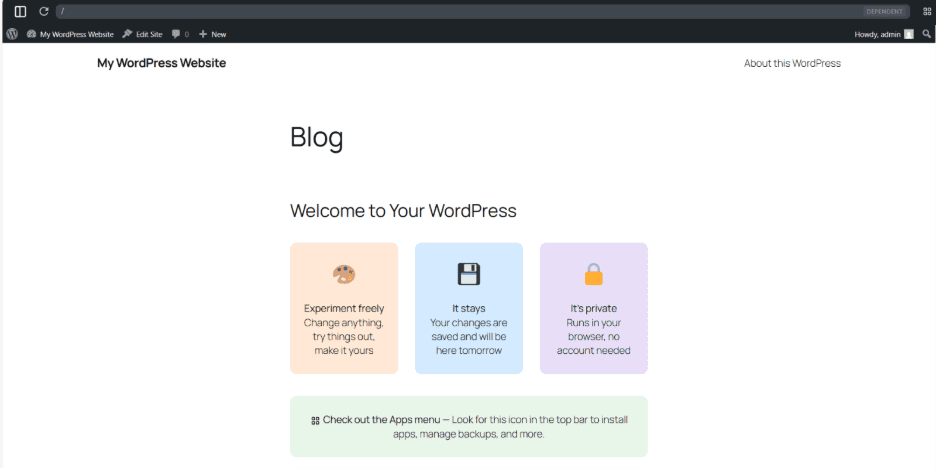
The new service creates a private WordPress workspace inside the browser.
Users can open the workspace and start working immediately without:
- buying hosting
- registering a domain
- creating an account
- configuring a server
Once the workspace loads, it behaves like a normal WordPress installation.
Users can write posts, install plugins, change themes and explore the WordPress dashboard.
Because the workspace is stored locally in the browser, it remains tied to the device and browser where it was created. It is designed to persist there, but it may not carry across devices and could be lost if browser storage is cleared.
This makes the environment useful for several tasks:
- testing new plugins or themes
- building quick site prototypes
- learning how WordPress works
- experimenting with ideas before launching a site
Instead of installing WordPress on a computer or server, users can start working immediately from a browser tab.
How to try My.WordPress.net in minutes
My.WordPress.net is designed to remove the usual setup steps that come with testing WordPress. Instead of installing software or configuring a local environment, users can open the browser workspace and begin exploring right away.
To try it, open My.WordPress.net in your browser and:
- wait for the workspace to load
- start writing posts
- test plugins
- switch themes
- explore the WordPress dashboard just like you would in a standard installation
Because the workspace runs in the browser, it is best treated as a personal sandbox for learning, drafting and experimentation.
It should be noted that before publishing, storage behavior and persistence should be verified against official WordPress and WordPress Playground documentation. This is because browser-based environments can behave differently across devices, browser settings and future product updates.
How does WordPress run inside the browser?
The service runs on WordPress Playground, an experimental project developed by the WordPress community.
Playground allows the entire WordPress stack to run inside the browser using technologies such as WebAssembly and local browser storage.
When a user opens My.WordPress.net, the browser downloads the components needed to run WordPress locally.
From that point, the environment operates as if it were a regular WordPress installation.
Posts, settings and plugin activity are stored inside the browser rather than on a remote server.
This design means the workspace only exists on the device where it was created.
If users switch devices or clear their browser storage, the environment may disappear.
What can you build inside the WordPress browser workspace?
The WordPress browser workspace is not intended to host public websites. Instead, it functions as a private environment for experimentation and development.
Users can treat it like a digital notebook or testing environment. For example, creators can draft articles, experiment with page layouts or explore new design ideas.
Developers can also use the workspace to test plugin behavior or prototype new features. Because the setup requires no installation, the barrier to entry is extremely low. Someone curious about WordPress can open a browser and begin exploring the platform in seconds.
What does this launch mean for the WordPress ecosystem?
The launch of My.WordPress.net highlights a gradual shift in how WordPress environments are created and used.
At the most immediate level, it simplifies experimentation. Developers and creators can open a browser and start working with WordPress instantly, without setting up local stacks such as XAMPP, MAMP or Docker.
Expanding how WordPress environments are tested and learned
This also changes how tools are demonstrated and tested. Plugin and theme developers can share working environments that run directly in the browser, allowing users to explore features without installing anything on their own systems.
The impact extends to learning and onboarding as well. Training programs and documentation can now introduce WordPress without requiring software setup, allowing new users to focus on the platform itself.
Viewed at a broader level, My.WordPress.net separates two parts of the WordPress workflow more clearly. The browser becomes a lightweight environment for drafting, testing and experimentation, while hosted infrastructure continues to power live websites that require reliability, persistence and scale.
In that sense, the update expands how people interact with WordPress at the early stages of development, while the role of hosting remains unchanged for production sites.
How we verified this information
This article is based on official WordPress.org announcements. We did not perform hands-on testing for this draft. Product behavior, browser storage and persistence may vary by browser, device and future updates.
Final thoughts
My.WordPress.net makes WordPress easier to approach. Users can open a browser and begin writing, testing and experimenting without first dealing with hosting or local setup. That lowers the barrier for creators exploring ideas and for developers validating concepts quickly.
At the same time, the launch clarifies where browser-based WordPress fits. It works well as a space for experimentation, learning and early development, but not as a replacement for live website infrastructure. The larger implication is practical. WordPress is becoming easier to enter at the earliest stage, while hosting continues to matter where persistence, security, performance and scale are required.

Write A Comment