Key highlights
- Learn how the n8n AI agent node works through its execution loop, so you can build workflows that reason, act and adapt dynamically.
- Understand the core components of n8n AI agent node architecture, including prompts, memory and tools, to design agents that perform reliably.
- Explore how to configure prompts, memory and tools correctly in n8n, so your agents produce consistent and predictable outputs.
- Know how to build your first AI agent workflow step by step in n8n, from trigger setup to validation and output handling.
- Uncover best practices, limitations and debugging techniques, so you can deploy AI agents that work reliably in real-world production environments.
Most automation workflows are predictable by design. A trigger fires, data moves through a fixed chain of nodes and the output lands where you expect it. That model works, until it doesn’t. The moment your workflow needs to handle ambiguity, adapt to changing inputs or make decisions on the fly, traditional automation starts to break.
This is exactly where the n8n AI agent node changes everything.
Instead of following a rigid path, an AI agent can interpret context, decide what to do next and use the right tools dynamically. It turns workflows from linear pipelines into systems that can think, iterate and act with a level of flexibility that static logic simply cannot match.
This n8n AI Agent Node Guide is built for developers and builders who want to make that shift. Whether you are exploring your first agent or refining a production workflow, this n8n AI agent node beginner guide walks you through how these systems actually work in practice.
You will learn the real n8n AI agent node architecture, how the execution loop operates under the hood, how to structure prompts, memory and tools correctly and how to avoid the failure patterns that make agents unreliable. We will also connect this to real deployment considerations, including how to host n8n on Bluehost for stable, scalable agent workflows.
By the end, you will not just understand AI agents in n8n. You will know how to build them so they work reliably in the real world.
How we tested this workflow
This guide is based on a detailed review of official n8n documentation, LLM provider guidelines and commonly used workflow design patterns.
While the concepts, configurations and examples reflect real-world usage, we did not conduct hands-on testing across live environments for this article. The workflow structure is designed to illustrate how the n8n AI Agent node operates, including tool selection, iteration and output handling.
Actual behavior may vary depending on your hosting setup, model provider and specific workflow configuration.
What is an n8n AI agent node?
In n8n, the AI Agent node is built for workflows that cannot be predefined step by step. It allows your workflow to think through a task rather than just execute instructions. If you are new to the platform, start by understanding what n8n is and how it works.
A standard node does one job. It takes an input and produces an output in a fixed way. The AI Agent node works differently. It looks at the task, understands the context, decides what to do next and then takes action using the tools available to it.
This is the core shift in the n8n AI Agent Node Guide. You are no longer building a fixed pipeline. You are building a system that can decide its own path at runtime.
At a technical level, the n8n AI agent node architecture is powered by a loop. The agent receives input, reasons about it, selects a tool, executes it, evaluates the result and then repeats the process until it reaches an answer or completes the task.
What does a custom AI agent in n8n actually include?
A custom AI agent in n8n is not just one prompt connected to a model. It is usually made up of a few core parts that work together:
- Trigger: starts the workflow through a webhook, form submission or schedule
- Model: powers the reasoning layer and interprets the task
- Instructions: define the agent’s role, constraints and expected output
- Tools: let the agent call APIs, query databases or interact with other apps
- Logic: supports routing, validation and conditional decisions around the agent
- Memory: optionally stores context across steps or sessions
- Output: returns an answer or triggers an action in another system
Thinking about the agent this way makes it easier to design workflows that are both flexible and reliable.
AI agent node vs OpenAI node vs function node
Before choosing the AI Agent node, you need to clearly understand how it differs from other commonly used nodes in n8n. Many implementation mistakes come from using the wrong node for the job, not from misconfiguring the agent itself.
Here is a simple breakdown to help you make that distinction:
| Node type | What it does | How it behaves | When to use |
|---|---|---|---|
| OpenAI node | Sends a prompt and returns a response | Single-step interaction with no memory, no tool use and no iteration | Text generation, summarization, classification |
| Function node | Runs custom JavaScript code | Fully deterministic. Executes exactly as written with no interpretation | Data transformation, custom logic, calculations |
| AI Agent node | Solves tasks using reasoning and tools | Multi-step execution. Chooses tools, evaluates results and continues until completion | Complex workflows, decision-making, dynamic tasks |
This comparison is central to the n8n AI Agent Node Guide because it defines when an agent is actually necessary. If you choose the right node upfront, your workflow stays simpler, faster and easier to debug.
When you should and should not use an agent?
Use the AI Agent node when your workflow needs to make decisions independently.
This includes cases where:
- The input format is unpredictable
- The task requires multiple steps that cannot be mapped in advance
- The workflow needs to choose between different tools based on context
- The output depends on reasoning, not just transformation
Avoid using an agent when the workflow is clearly defined.
This includes cases where:
- The steps are fixed and repeatable
- Low latency is critical
- You need strict control over every output
- Errors or variability are not acceptable
A good rule is simple. If you can write the workflow as a clear sequence of steps, do not use an agent. If you cannot, the AI Agent node is likely the right tool. To use the AI Agent node effectively, you need to understand how its execution model works in practice.
How does the n8n AI agent actually work?
Understanding the n8n AI agent node architecture is the single most important prerequisite for building reliable agents. Many configuration errors, from infinite loops to missed tool calls, trace back to a misunderstanding of how the agent actually executes. The n8n AI agent node architecture follows a structured loop that you need to visualize clearly.
Step-by-step lifecycle of an agent run
- Input enters the agent: The agent receives data from the preceding node in the workflow. This becomes the user-facing task input.
- System and user prompt assembled: The agent combines your system prompt (behavioral instructions) with the user prompt (the specific task) and any existing memory context into a single payload, which is sent to the LLM.
- LLM reasoning step: The model evaluates the combined prompt and determines the next action. It may decide to call a tool, return a final answer or request clarification.
- Tool selection: If the model determines that a tool is needed, it identifies the most appropriate tool from the available set and constructs the required parameters.
- Tool execution: n8n executes the selected tool which may be an HTTP request, a database query or a custom function and returns the result to the agent.
- Context update: The tool result is appended to the conversation context. The agent now has new information to reason from.
- Loop until completion: The agent repeats the reasoning and tool-call cycle until it determines that the task is complete, at which point it returns a final output to the workflow.
This is called the agent loop. Each iteration consumes tokens and may incur API costs, making loop termination logic an important part of your design.
Deterministic vs non-deterministic behavior
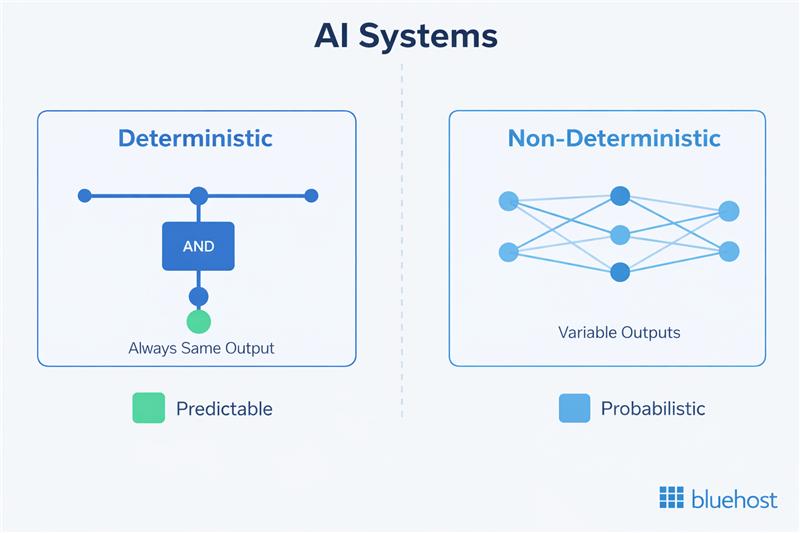
Unlike a function node or a standard workflow branch, agent behavior is inherently probabilistic. The same input will not always produce the same sequence of tool calls or the same final output.
Temperature settings on your LLM provider influence this variability, introducing controlled randomness in the generation of responses. This differs from components like embeddings, which are deterministic and do not use temperature parameters.
Now that you understand how the agent loop executes, the next step is to break down the core components that control this behavior.
Core components of an n8n AI agent node
Every AI agent in n8n is composed of four functional layers. Mastering each one is essential to producing agents that perform predictably and at scale. The following breakdown serves as the structural foundation for this n8n AI Agent Node Guide.
1. System prompts (behavior control layer)
The system prompt is your primary mechanism for controlling the agent’s behavior. It defines the agent’s role, the constraints it operates within and the output format it should produce. Think of it as the job description you give a new team member before they start work.
A well-crafted system prompt includes three elements:
- Role definition: Who the agent is and what domain it operates in (e.g., “You are a customer support assistant that handles order-related inquiries only”).
- Constraints and guardrails: What the agent must not do, what format it must follow and how it should handle edge cases.
- Tool use instructions: When to call tools, how to prioritize them and how to handle tool errors.
The two most common system prompt mistakes are being too vague (the agent interprets its role too broadly and behaves unpredictably) and being too long (the prompt consumes a large portion of your context window before any task input is added). Aim for clarity over comprehensiveness. Prioritize behavioral constraints and role specificity over exhaustive instructions.
2. User prompts (task input layer)
The user prompt represents the specific task the agent needs to complete on each run. In most production workflows, this is not a static string — it is dynamically assembled from the output of previous nodes using n8n’s expression syntax.
Structuring your user prompt inputs for reliability means being explicit about what the agent is expected to produce. Ambiguous task descriptions lead to inconsistent outputs. Include the key variables, state the expected output format and specify any constraints relevant to the specific task instance rather than repeating them in the system prompt.
3. Memory management
Memory in the context of n8n AI agents refers to how context from previous interactions is retained and made available to the LLM. There are two distinct types to understand:
- Short-term memory: Context maintained within a single agent run across multiple loop iterations. This is handled automatically by n8n as the agent appends tool results to the conversation history.
- Persistent memory: Context carried across separate workflow executions or user sessions. n8n does not handle this natively. You need to integrate an external storage solution — a database node, a Redis connection or a vector store — to persist and retrieve memory across runs.
Token limits are the practical ceiling for memory. Every message in the conversation history consumes tokens. As the agent loop runs more iterations, context grows and you risk hitting the LLM’s context window limit. Design your agents to summarize or truncate history when working on extended tasks to avoid this bottleneck.
4. Tools (action layer)
Tools are the mechanism through which the agent interacts with the external world. In n8n, a tool is any node or capability that the agent can invoke to retrieve information or perform an action. When the LLM decides it needs to call a tool, it uses the tool’s schema to construct the required input parameters.
n8n supports three primary tool types:
- HTTP request tools: Call external APIs, retrieve data from web services or post data to third-party systems.
- Internal workflow nodes: Trigger other n8n workflows or nodes as tools, enabling modular agent architectures.
- Custom functions: JavaScript code nodes that perform specific data transformations or logic that the LLM can invoke when needed.
Each tool requires a clear name, a description written for the LLM (not for humans) and a defined input schema. The quality of your tool descriptions directly determines how reliably the agent selects and uses them. Simply knowing the components is not enough. Reliable agents depend on how well prompts, memory and tools are configured in n8n.
How to set up prompts, memory and tools in an n8n AI agent?
In this section, we look at the practical steps for correctly setting up each component of the agent. In n8n, prompts, memory and tools are configured within the AI Agent node and connected as sub-nodes that extend its capabilities. If you are new to building workflows in n8n, start by understanding how workflows actually work in practice with this n8n Workflows Guide.
1. Setting up system prompts for predictable behavior
Write your system prompt as a direct set of instructions in the second person. Define the role in one to two sentences, state what the agent must always do and what it must never do and specify the output format explicitly.
A well-structured system prompt should clearly define:
- Role: who the agent is and what domain it operates in
- Constraints: what it must and must not do
- Tool usage: when to call tools and how to handle failures
Test your system prompt against edge cases before attaching tools. An agent that behaves incorrectly without tools will not improve when tools are added.
2. Passing dynamic user input from previous nodes
The user prompt represents the task for the current execution. In n8n, this is typically assembled dynamically using data from previous nodes.
Use the expression editor to pull structured input into the prompt:
{{ $json.fieldName }} for current node data

{{ $node["NodeName"].json.fieldName }} for specific node output
You can also configure the agent to take input automatically (for example, using a chatInput field), but in most production workflows, explicitly constructing the prompt gives you more control.
Concatenate multiple fields into a structured natural language input instead of passing raw JSON. The LLM handles formatted instructions more reliably than unstructured data.
3. Configuring memory (when to use it and when not to)
Memory allows the agent to retain context across iterations or sessions. In n8n, memory is connected as a sub-node to the AI Agent node and must be configured explicitly.
There are two levels to consider:
- Short-term memory: Maintained within a single agent run across loop iterations (handled automatically)
- Persistent memory: Stored across workflow executions using external systems
Common memory types in n8n include:
- Simple memory: Suitable for testing, but not persistent
- Redis or Postgres memory: Recommended for production use cases
When using persistent memory, always configure a session ID to ensure that each user or workflow instance maintains its own context.
Memory should only be enabled when the task requires continuity. For single-turn workflows, it adds token overhead without improving results.
Token limits are the practical ceiling. As context grows, you risk exceeding the model’s context window. Design your workflows to summarize or trim history when needed.
4. Defining tools and schemas correctly
Tools are the actions your agent can take. In n8n, tools are implemented by connecting nodes (such as HTTP requests, database queries or entire workflows) as callable capabilities for the agent.
Each tool should follow these conventions:
- Naming: Use clear, verb-first names (e.g.,
get_order_status) - Descriptions: Explain when the tool should be used, not just what it does
- Structured outputs: Return consistent, parseable data
- Avoid ambiguity: Ensure tools do not overlap in purpose
You can also expose entire workflows as tools using the “Call n8n Workflow” pattern, which allows you to modularize complex logic behind a single tool interface.
For sensitive operations, consider adding a human-in-the-loop step. This pauses execution and requires approval before the action is completed, reducing the risk of unintended behavior.
With each component configured correctly, you are ready to assemble them into a complete working workflow.
Building your first AI agent workflow in n8n (step-by-step)
This section gives you a hands-on foundation to start building your own agents. Instead of rigid workflows, you will learn how to create systems that think, use tools and respond dynamically to different inputs..
Step 1: Choose your environment
Before you build, decide where your workflow will run.
- n8n Cloud: Faster to get started. Infrastructure, updates and scaling are handled for you
- Self-hosted (VPS or Docker): Full control over data, credentials and performance
If you are planning production workflows or handling sensitive data, a self-hosted setup is usually the better choice.
Step 2: Add your trigger node
Every workflow starts with a trigger that defines when the agent runs.
Common options include:
- Webhook: for real-time inputs (APIs, forms, apps)
- On chat message: for interactive agent workflows
- Schedule: for periodic tasks
Configure the trigger to pass task data into the workflow as structured JSON.
Step 3: Prepare and structure the input
Before sending data to the agent, clean and structure it.
Add a Set or Code node to:
- extract only relevant fields
- remove unnecessary data
- format inputs clearly
Well-structured input improves accuracy and reduces token usage.
Step 4: Add the AI Agent node
Connect the AI Agent node to your trigger.
This node acts as the decision layer of your workflow. It evaluates the input, decides what to do next and uses tools when needed.
Step 5: Connect a chat model
The agent requires an LLM to function.
- Click the Chat Model (+) option inside the AI Agent node
- Select a provider (OpenAI, Anthropic, Mistral, etc.)
- Add your API credentials
- Choose a model (for example, GPT-4o or similar)
This model powers the agent’s reasoning loop.
Step 6: Configure memory (if needed)
Memory allows the agent to retain context across interactions.
- Click the Memory (+) option on the AI Agent node
- Choose a memory type:
- Simple memory: for testing
- Redis or Postgres memory: for production
Configure:
- Session ID: to isolate user or workflow context
- Context window: how many past messages to retain
Enable memory only when the task requires continuity. For single-run workflows, it adds unnecessary overhead.
Step 7: Add and define tools
Tools allow the agent to take action.
- Click the Tool (+) option on the AI Agent node
- Connect nodes such as:
- HTTP requests (APIs)
- databases
- email or messaging services
- “Call n8n Workflow” for modular logic
For each tool:
- use clear, verb-first names
- write descriptions that explain when to use the tool
- define structured inputs and outputs
Start with one or two tools and expand as needed.
Step 8: Define the system message
The system message controls how the agent behaves.
Include:
- Role: what the agent is responsible for
- Context: any relevant background or constraints
- Tool usage: when and how to use tools
- Restrictions: what the agent must avoid
Keep it clear and direct. Test the agent’s behavior before adding more tools or complexity.
Step 9: Test and refine the workflow
Run your workflow and interact with the agent.
- Use Open Chat or Test Workflow
- Trigger tasks that require tool usage
- Inspect execution logs and intermediate steps
This helps you understand:
- Which tools were selected
- How the agent reasoned
- Where failures occur
For sensitive actions, add a human-in-the-loop step to require approval before execution.
Step 10: Handle and validate the output
After the agent completes its task:
- Add a node to process the output
- Validate structure and required fields
- Route valid results to downstream systems
- Send failures to retry or review paths
Never pass agent output directly into critical systems without validation. At this point, you have a complete working agent with a trigger, structured input, AI logic, memory and tools. It also includes a validated output layer to ensure reliable results.
This forms the foundation of any n8n AI agent workflow. A working agent is not the same as a reliable one. To run these workflows in the real world, your hosting environment needs to support stability, scalability and visibility.
Where to host n8n for reliable agent workflows?
Building an agent workflow is only the first step. Reliably running it is where most challenges begin.
AI agents are not lightweight workflows. They involve multiple execution loops, external API calls, memory handling and tool orchestration. A local setup or temporary environment may work for testing, but it quickly becomes a bottleneck when you move toward real usage.
This is a supporting idea behind this n8n AI Agent Guide, you can read it to get a broader understanding of the topic.
To run agent workflows in production, your hosting environment needs to support a few key requirements:
- Consistent uptime so long-running workflows do not fail midway
- Docker-based deployment for clean, repeatable setups
- Scalable resources to handle multiple agent runs and tool calls
- Secure credential management for APIs and external integrations
- Execution visibility for debugging and monitoring agent behavior
This is where VPS hosting becomes important.
How Bluehost VPS for n8n meets the requirements of reliable agent workflows?
If you are moving from testing to production, understanding how to host n8n on Bluehost VPS environment gives you a reliable setup for running agent workflows at scale.
Bluehost VPS for n8n provides a One-Click deployment that lets you run n8n alongside OpenClaw in a single environment. This creates a private AI and automation stack where you control your workflows, data and integrations.
In this setup, you get everything you expect from a hosting environment to run n8n effectively:
- Reliable uptime for uninterrupted agent runs: Bluehost VPS provides a stable environment where long-running agent loops can complete without interruption, reducing the risk of mid-execution failures.
- Containerized deployment with Docker and Portainer: The stack runs on Docker with Portainer, making deployments clean, repeatable and easy to manage across updates.
- Flexible scaling for growing workflows: You can increase CPU and memory as your workflows grow, which is critical for handling concurrent agent runs and tool-heavy executions.
- Full control over credentials and integrations: Running in a private VPS environment gives you full control over API keys, integrations and sensitive data.
- Built-in visibility for monitoring and debugging: With Portainer and n8n logs, you can monitor workflows, inspect failures and debug agent behavior more effectively.
This is where n8n becomes more than a workflow tool. When it runs with OpenClaw on a Bluehost VPS, it gives teams a private environment for building AI-powered automation that connects models, apps and internal systems. Instead of moving between separate tools, you can manage the workflow layer, agent layer and hosting layer from one controlled setup.
Common use cases for n8n AI agents
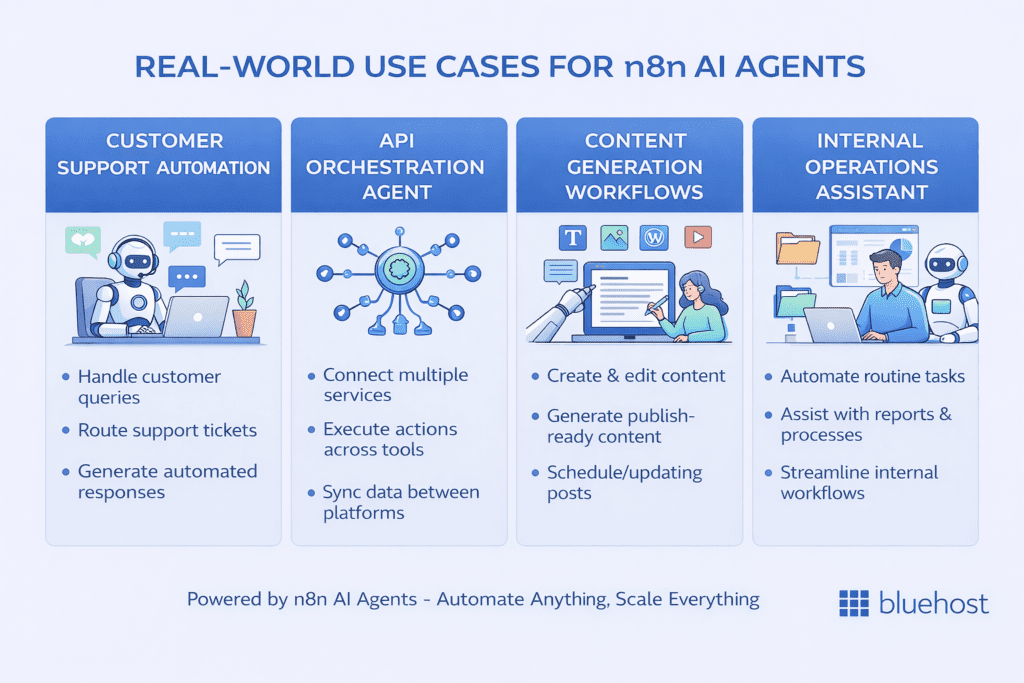
The following use cases are grounded in actual n8n workflow architectures, not hypothetical AI scenarios. Each one takes advantage of the agent’s ability to reason and adapt rather than follow a fixed script.
- Customer support automation: An agent receives support tickets via webhook, queries a knowledge base tool, checks an order status API tool and drafts a context-aware response. Unlike a keyword-matching chatbot, the agent adapts its response based on the specific combination of information it retrieves.
- API orchestration agent: An agent manages a multi-step data enrichment process, calling different APIs in a sequence that depends on the data returned by each prior call. This replaces complex branching workflows with a single reasoning node.
- Content generation and publishing workflows: An agent receives a topic brief, queries a research tool, structures an outline based on the retrieved information and passes a formatted draft to a publishing node. The workflow handles the mechanical steps while the agent handles the reasoning.
- Internal operations assistant: An agent integrated with Slack or a form trigger answers team questions by querying internal documentation, checking project management systems and returning summarized answers — all within a single n8n workflow execution.
These examples show the strengths of agent-based workflows. To use them effectively, you also need to understand their limitations.
Limitations of the n8n AI agent node
A credible beginner’s guide to n8n AI agent nodes must clearly address what agents cannot do as much as what they can. Understanding these limitations will save you significant debugging time and prevent you from deploying agents in contexts where they will fail.
- No true long-term memory without external storage: n8n’s native memory nodes maintain session context but do not persist data across workflows or user sessions without an external database or vector store integration.
- Token and cost constraints: Each agent loop iteration consumes input and output tokens. Long-running agents on complex tasks can consume significantly more tokens than anticipated, leading to unexpected API costs and potential context window failures.
- Tool hallucination risk: The LLM can generate plausible-sounding but incorrect tool call parameters, particularly when tool schemas are ambiguous or when the task input contains unfamiliar data. Strict schema validation mitigates this risk but does not eliminate it.
- Lack of strict determinism: The same workflow input will not always produce the same agent behavior. For workflows that require exact reproducibility, an AI agent is the wrong choice.
- Debugging complexity: When a standard workflow fails, you trace the error to a specific node. When an agent fails, the cause may be a system prompt ambiguity, a tool description issue, a context window overflow or a model-level error. Each of these requires a different diagnostic approach.
These limitations define the boundaries of agent behavior. To operate within them effectively, you need to follow a set of best practices.
Best practices for building reliable AI agents in n8n
The following practices emerge from real-world agent deployments and directly address the failure modes described above.
- Keep tools simple and well-defined: Each tool should do exactly one thing. Multi-purpose tools create ambiguity that leads to incorrect tool selection. If a tool retrieves data and transforms it, split it into two tools.
- Use strict schemas: Define every tool input and output with explicit data types. Use JSON Schema notation in your tool definitions. Reject malformed inputs at the tool level rather than allowing the agent to handle schema errors.
- Limit agent autonomy where needed: For high-stakes operations, add human-in-the-loop approval steps between the agent’s action proposal and execution. Use n8n’s Wait node to pause the workflow pending approval before committing irreversible actions.
- Add validation layers after agent output: Never route agent output directly to a downstream system without a validation node. Check for required fields, format compliance and value ranges before the output leaves your workflow.
- Log intermediate steps: Enable execution logging in n8n and add explicit logging nodes within your agent tools. When something goes wrong, the intermediate step logs are your primary diagnostic resource.
Even with best practices in place, agent behavior can still be unpredictable. Debugging becomes a critical part of the workflow.
Debugging and troubleshooting AI agents
Debugging an n8n AI agent requires a methodical approach because failures are often not hard errors but behavioral anomalies. Here are the most common issues and how to diagnose them.
1. The agent does not call tools
If your agent consistently fails to invoke tools, the most likely causes are a tool description that does not clearly signal when the tool should be used, a system prompt that does not instruct the agent to use tools proactively or a mismatch between the task input and the conditions described in the tool description. Review your tool descriptions and add explicit trigger phrases that match the language likely to appear in your user prompts.
2. The agent loops endlessly
Infinite agent loops occur when the agent’s completion condition is never satisfied. This typically means the agent cannot find a satisfactory answer using the available tools or the system prompt does not include a clear instruction to return a final answer when tools are exhausted. Add a maximum iteration limit in your agent configuration and instruct the agent in the system prompt to return a best-effort answer if it cannot fully resolve the task within a set number of steps.
3. Outputs are inconsistent
Output inconsistency usually originates from a combination of high model temperature, an underspecified output format requirement in the system prompt and variable input data quality. Lower the temperature setting, add an explicit output format specification to your system prompt and normalize your input data before it reaches the agent.
4. Execution logs reveal agent behavior
n8n records the full execution history of each workflow run, including intermediate node outputs. In the agent node’s execution view, you can inspect each loop iteration’s tool call, the parameters passed and the tool response received. This step-by-step trace is the most effective way to identify exactly where the agent’s reasoning diverged from your expectation.
Debugging helps you resolve issues, but some problems stem from using an agent where it shouldn’t be used in the first place.
When not to use an AI agent node?
Building authority on this topic requires being explicit about the scenarios where an AI agent is the wrong tool entirely. Deploying an agent in these contexts creates unnecessary complexity, cost and risk.
- Simple deterministic workflows: If your workflow follows a fixed sequence of steps with predictable inputs and outputs, a standard n8n workflow with function nodes is faster, cheaper and more reliable. Adding an agent to a deterministic task introduces non-determinism without benefit.
- High-stakes operations requiring precision: Financial transactions, medical data processing and legal document generation require exact, verifiable outputs. Agent-based workflows cannot guarantee this level of precision. Use deterministic logic with strict validation for these use cases.
- Low-latency requirements: Each agent loop iteration adds latency — the round trip to the LLM provider, tool execution time and context assembly all contribute. If your workflow must complete within a strict time window (sub-second responses, for example), an agent is not appropriate.
Recognizing these boundaries is a mark of mature automation design. The best builders use AI agents selectively, reserving them for the tasks that genuinely require reasoning while keeping deterministic workflows for everything else.
Final thoughts
The n8n AI agent node shifts automation from fixed workflows to systems that can reason, decide and act.
In this guide, you learned how the agent loop works, how to structure prompts, memory and tools, how to build your first workflow and how to avoid common failure patterns. Just as importantly, you now know when not to use an agent.
The key takeaway is simple: keep agents structured, constrained and observable. Simpler, well-defined agents are far more reliable than complex ones.
As you move toward production, the platform running your workflows becomes just as important as the workflows themselves. With Bluehost n8n Hosting, you can deploy and manage AI-powered automations in a dedicated environment built for reliability, control and scalability, making it easier to run agent workflows with confidence as your automation needs grow.
FAQs
The OpenAI node sends a single prompt to the LLM. Then it returns one response with no tool use or looping. The AI Agent node runs a reasoning loop that can call multiple tools, evaluate results and continue working until the task is complete. Use the OpenAI node for simple text generation tasks and the AI Agent node for multi-step reasoning workflows.
Connect a memory node — such as the Simple Memory or Redis Memory node — to the memory input slot on the AI Agent node. Configure a session key to track conversation history per user or task. For persistent memory across separate workflow runs, use an external database connected through a memory node rather than relying on n8n’s built-in session handling.
To host n8n on Bluehost, you need a VPS or dedicated hosting plan that supports Docker. Bluehost’s self-managed VPS plans include Docker and Portainer support, which allows you to deploy n8n as a containerized application with full control over your environment, credentials and workflow data. This setup gives you complete ownership of your automation infrastructure with no per-task fees.
Endless loops typically occur when the agent cannot satisfy its completion condition using the available tools. Add a maximum iteration limit in the agent configuration, include an explicit instruction in the system prompt to return a best-effort answer when the task cannot be fully resolved and verify that your tools return clear, actionable responses rather than errors or ambiguous data.
The n8n AI agent node architecture consists of four core layers: the system prompt (which controls agent behavior and role), the user prompt (which carries the specific task input), memory (which manages context across iterations or sessions) and tools (which give the agent the ability to take actions and retrieve information). Mastering the configuration of all four layers is essential for building reliable production agents.

Write A Comment