 ChatGPT,
 Claude,
 Gemini,
 Grok — all four for
Key highlights
- Learn how to construct precise AI store builder prompts to launch your online shop quickly.
- Discover methods to customize your product copy and store layout without writing code.
- Avoid typical errors first-time sellers encounter when using generative tools for eCommerce design.
- Improve your search engine optimization by prompting AI tools for search-friendly metadata.
- Save setup time by copying structured prompt templates built for immediate deployment.
You know what you want to sell. What you don’t know is what to type into an AI tool to get a store that looks like it was built by a professional instead of a first attempt. That gap, between having a product and knowing how to phrase a request, is exactly where most first-time online sellers get stuck. Good AI store builder prompts close that gap by giving you exact wording you can copy, adjust and reuse across every part of your storefront, from the homepage to the product page to the return policy nobody wants to write.
This guide walks through the prompt structures that actually produce usable results, not generic filler copy you have to rewrite anyway. You’ll get templates for store setup, product descriptions and fixing AI output that sounds flat, along with a clear path for turning those prompts into a real, live store.
TL;DR: What are AI store builder prompts?
AI store builder prompts are structured instructions that tell an AI what to create, who the store serves, how the brand should sound and what shoppers should do next. Effective prompts include verified product details, the target customer, tone, output format and clear constraints.
What makes an AI store builder prompt effective?
An effective prompt gives the AI enough information to make useful decisions. It should define the task and add the business context that a generic model cannot know.
The four elements every prompt needs
- Product details: State what you sell, important features, materials, sizes, prices or limitations.
- Target customer: Describe who is likely to buy and what problem the product solves.
- Tone of voice: Choose a clear style such as practical, warm, premium or playful.
- Desired action: Tell the AI what the reader should do, such as browse a category, compare products or add an item to the cart.
A simple prompt formula is:
Create [deliverable] for a store selling [product]. The target customer is [audience]. Use a [tone] voice. Highlight [benefits or proof]. Keep it to [format or length]. End with [desired action]. Do not use [words, claims or styles to avoid].
Common prompting mistakes
Avoid broad instructions such as “make this better” or “write something that sells.” These requests do not define the audience, format or goal.
Do not ask AI to invent product facts, customer reviews, safety claims or delivery promises. Provide verified details and tell the tool not to add unsupported information.
Specific prompts also reduce revision time. That matters for a small business owner who needs to manage inventory orders and customers instead of rewriting the same paragraph five times.
How specificity reduces revision cycles
Every round of back and forth with an AI tool costs time you’d rather spend on the business itself. A detailed prompt on the first attempt typically means one or two follow-up adjustments instead of five or six full rewrites. That difference matters most to time-starved solopreneurs who don’t have an afternoon to spend fine-tuning a homepage headline.
AI prompts for eCommerce store setup
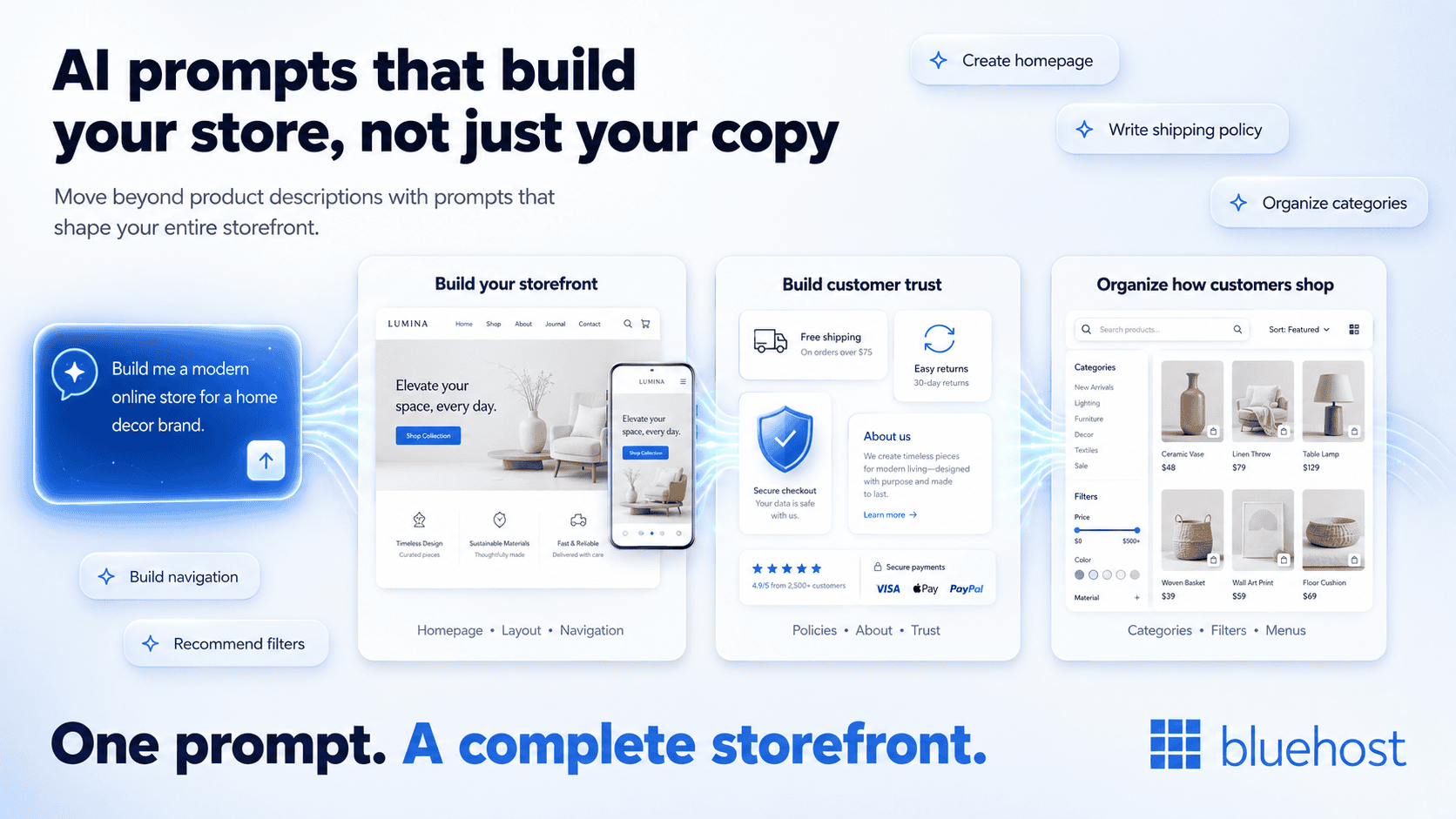
Most guides stop at product descriptions and skip the structural parts of a store that a first-time seller has never had to think about before. Homepage layout, navigation and policy pages all need their own prompts and getting these right matters just as much as good product copy.
1. Homepage and layout prompts
Your homepage has to communicate what you sell and who it’s for within seconds. A useful prompt might read: “Write a homepage hero section for a handmade jewelry shop targeting gift buyers aged 25 to 45, with a warm and personal tone, including a clear call to action to shop new arrivals.” Notice this names the category, the audience, the tone and the action, all four elements from the section above.
Homepage structure prompt
Create a homepage structure for a [product type] store serving [customer type]. Include a hero section, three key benefits, featured categories, a trust section and a final call to action. Use plain language. Explain the purpose of each section in one sentence.
Homepage hero prompt
Write three homepage hero options for a store selling [products]. Our customers want [main outcome]. Use a [tone] voice. Keep each headline under eight words and each supporting line under 20 words. Add one clear shopping CTA.
Storefront design prompt
Recommend a simple storefront layout for a [brand style] [product category] business. Prioritize mobile browsing, easy product discovery and a clear path to checkout. Avoid unnecessary animations or crowded sections.
2. Store policy and trust page prompts
Shipping policies, return terms and an about-us page are often the pages new sellers put off writing because they don’t know where to start. Try: “Write a plain-language shipping and returns policy for a small candle business that ships within the United States, offers a 30-day return window and wants to sound approachable rather than legal.”
Note: A policy prompt should help organize your verified terms. It should not decide legal requirements for you.
Shipping policy prompt
Turn the following verified shipping details into a clear customer-facing policy: [processing time], [delivery estimates], [shipping regions], [fees] and [tracking process]. Use short sections and plain language. Do not add guarantees.
Returns policy prompt
Draft a returns policy using only these approved terms: [return window], [eligible items], [excluded items], [refund method] and [return process]. Flag any missing information instead of making assumptions.
About page prompt
Write a 150-word About page for [store name]. We started the business because [reason]. We sell [products] for [audience]. Our values are [values]. Use a genuine first-person voice and avoid exaggerated claims.
3. Category and navigation prompts
Organizing products logically is harder than it sounds when you’ve never structured a catalog before. A simple template works well here:
“Create a three-item navigation menu for a [product type] store targeting [customer type], using everyday language and no retail jargon.”
Swap in your own product type and customer and you get a navigation structure without needing to know terms like SKU grouping or taxonomy. Once your structure is set, the same approach carries over into writing the copy that fills each category page.
Simple menu prompt
Create a three-item navigation menu for a [product type] store targeting [customer type]. Use plain language and no jargon. Add a short reason for each menu item.
Product category prompt
Organize these products into five customer-friendly categories: [product list]. Name each category based on how customers shop, not internal inventory terms. Identify products that could fit in more than one category.
Filter prompt
Recommend useful product filters for a store selling [product type]. Focus on factors customers compare before buying, such as size, material, use case or price. Limit the list to six filters.
AI prompts for product descriptions that convert
Product copy is where most sellers spend the bulk of their prompting time and it’s also where the gap between generic and effective output is easiest to see.
According to Statista’s 2026 survey of small business owners, content creation is one of the most common marketing applications of AI.
1. Prompts for feature-to-benefit translation
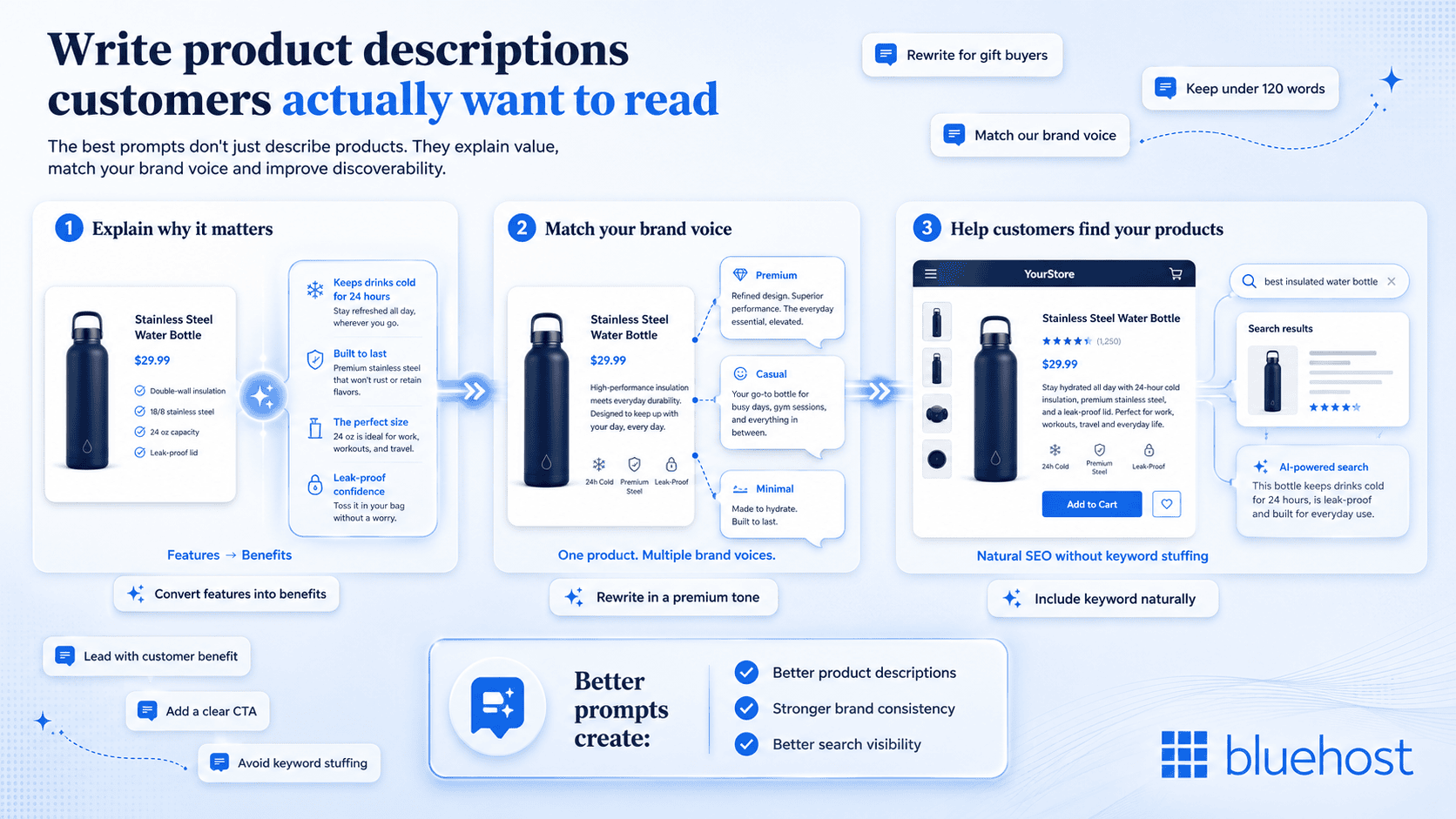
A spec sheet lists what a product has. A good description explains what that means for the buyer. Ask the AI: “Turn this list of features into a two-sentence benefit-driven product description for a customer who values sustainability: soy wax, cotton wick, 40-hour burn time.” The result connects the material to a reason the customer already cares about.
Feature-to-benefit prompt
Write a product description for [product name]. The target customer is [audience]. Convert these features into practical benefits: [features]. Use a [tone] voice. Include a 40-word summary, four benefit bullets and a one-sentence CTA. Do not invent claims.
2. Prompts for tone matching
The same product needs different wording depending on your brand. A premium jewelry shop and a casual craft stall selling similar items shouldn’t sound alike. Specify the tone directly: “Rewrite this description in a premium, minimal tone suitable for a boutique audience” versus “Rewrite this in a warm, casual tone as if a friend is recommending it.”
Tone-matching prompt
Rewrite this product description in our brand voice: [paste description]. Our voice is [three traits]. Use words such as [preferred words]. Avoid [words to avoid]. Keep all specifications and factual details unchanged.
3. Prompts for SEO-aware descriptions
Search Engine Optimization (SEO) basics still apply to AI-generated copy. Ask for target keywords to appear naturally rather than stuffed in: “Include the phrase ‘handmade soy candle’ once in the description without repeating it and keep the sentence flow natural.”
SEO-aware product description prompt
Write a 120-word product description for [product]. Use the primary keyword [keyword] once and the related phrase [related phrase] only if it fits naturally. Lead with the customer benefit, include verified specifications and avoid keyword stuffing. Write for a person comparing products.
Before and after: Candle product prompt
The table below shows how a structured prompt changes the output compared to a generic request, using a handmade candle listing as the example.
| Prompt type | Output |
|---|---|
| Generic prompt: “Write a description for my candle” | “This candle is great for relaxing at home. It smells nice and burns well.” |
| Structured prompt with product, customer and tone specified | “Hand-poured with soy wax and a cotton wick, this lavender candle burns cleanly for 40 hours, giving you a calm evening ritual without the soot or synthetic scent of mass-produced candles.” |
A basic request may produce vague copy such as “transform your space with a beautiful candle.” The structured version gives the AI verified facts, a customer, a use case and clear writing limits. The difference isn’t the AI getting smarter between the two attempts. It’s the prompt carrying more of the information the AI needs to sound specific instead of interchangeable.
How to refine AI output without technical skills
The first AI response is a draft, not the final version. Instead of rewriting your entire prompt, improve the output with short follow-up instructions that tell the AI exactly what to change.
1. Use follow-up prompts to refine the output
If the response isn’t quite right, ask the AI to:
- Shorten this to 80 words without removing key details.
- Make this sound more conversational.
- Replace generic language with specific customer benefits.
- Remove repeated words and keep each sentence under 20 words.
- Rewrite this for someone who has never used this product before.
- Give me three headline or description variations for A/B testing.
- Highlight any claims that need verification.
These small adjustments usually produce a better result in seconds without starting over.
2. Compare multiple versions before choosing
Don’t settle for the first response. Ask the AI for different versions, such as one that is casual, one that sounds more premium and one that creates urgency. Comparing variations makes it easier to choose the tone that best fits your audience.
3. Know when to edit manually
Keep AI-generated content if it’s accurate, natural and aligned with your brand voice. Edit it yourself when adding product-specific details, pricing, legal or compliance information, customer stories or any claims that require verification.
4. Learn from the AI’s revisions
If a revised response still misses the mark, ask the AI what it changed and why. Its explanation can reveal missing context or unclear instructions, helping you write better prompts next time.
This version preserves the key ideas from both images while removing repetition and keeping the section concise and blog-friendly.
Turn AI prompts into a fully functioning online store with Bluehost
An AI store prompt is a natural language instruction that directs the system to build, update and manage your online shop. Instead of manually configuring backend settings, you describe what you need in plain English.
With Bluehost AI Store you can start with a simple prompt, add brand logo, run the prompt and see your store takes shape in minutes.
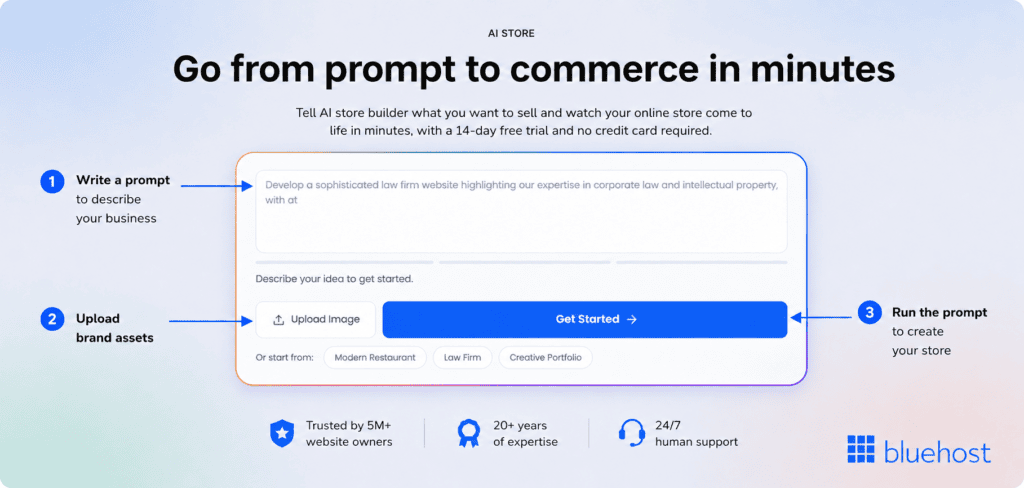
Conversational prompts in the Bluehost AI Store act as your direct interface for day-to-day eCommerce operations, helping you run your entire business through natural conversation without touching code or WooCommerce settings.
Start fast with a built-in prompt library or write custom prompts
The Bluehost AI Store gives you immediate access to a pre-built library of optimized prompts to help you launch your store quickly. You do not have to create instructions from scratch, though you retain the freedom to write custom prompts tailored to your specific business goals.
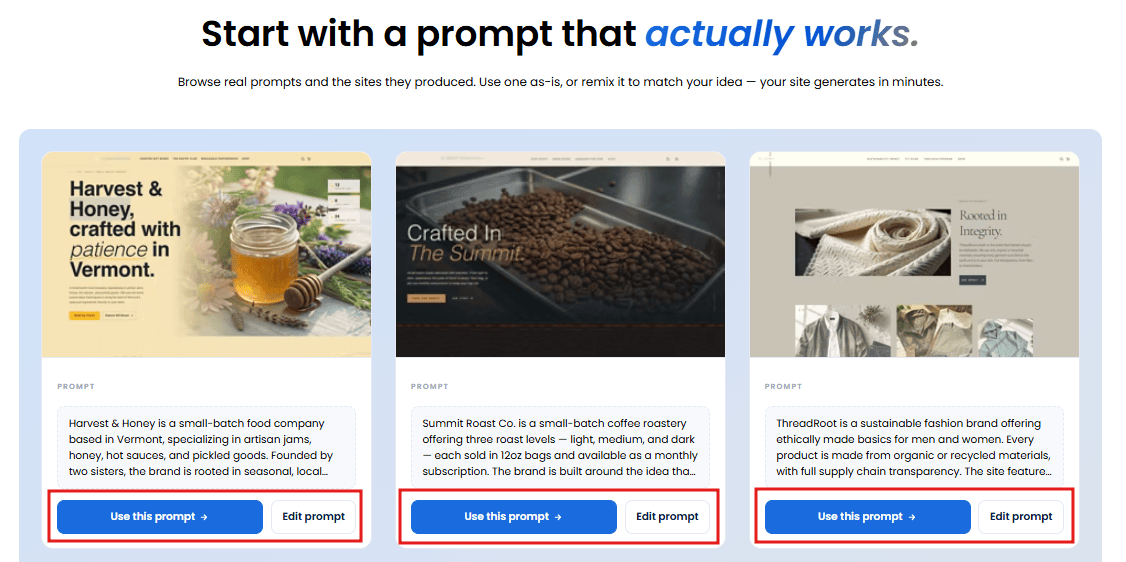
You can combine both methods to manage your storefront exactly how you want.
- The prompt library: Use pre-configured, tested prompts to quickly set up shipping zones, connect payment gateways and launch initial product catalogs.
- Custom prompts: Type unique instructions in plain language to personalize your storefront, adjust design layouts or run specialized promotions.
What you can do with AI prompts beyond store creation
Prompts do much more than build your initial storefront. They serve as an ongoing management tool that helps you complete everyday tasks faster. You can direct the AI store agent to handle complex back-of-house tasks, administrative chores and marketing setups.
- Build your storefront: Describe your business, products and customers to automatically configure your store layout.
- Manage your catalog: Generate search-optimized product descriptions, organize categories, set prices and update inventory details.
- Configure store settings: Set up tax controls, establish domestic shipping zones and pre-configure payment options like Stripe.
- Coordinate sales channels: Connect your catalog to Google Shopping and Meta Commerce to keep your product listings synchronized.
- Create promotional content: Launch discount codes, set promotional run times and write marketing copy for seasonal campaigns.
- Receive operational guidance: Ask questions about your live store data, review weekly revenue, identify lapse risks for high-value customers and view prioritized action plans.
Also read: Bluehost AI Store: Build & Run eCommerce Store With AI Agents
Why true eCommerce ownership matters
Building on a platform you fully control means you retain total ownership of your customer data and brand. Unlike closed platforms, Bluehost AI Store does not charge additional transaction fees on top of what your payment gateway charges. Because the platform is built on WordPress and WooCommerce, your store remains highly extensible, giving you the power of the most flexible commerce engine without its traditional technical setup complexity.
Get started with Bluehost AI Store today to build, run and grow your online business using conversational AI prompts on a storefront you completely own.
Final thoughts
The real skill behind AI store builder prompts isn’t clever wording. It’s giving the AI enough context to do the specific job you need done. Whether that’s a homepage headline, a return policy or a product description that doesn’t sound like everyone else’s.
The best AI store builder prompts are not the longest. They are the clearest.
State the task, add verified product details, define the customer and set limits for tone, length and format. Then use focused follow-up prompts to refine the result.
Save the templates that work for your business. A repeatable prompt library can help you update product pages, add new categories and maintain a consistent brand voice as your catalog grows.
Build your online store with us.
FAQs
Include the product name, key features, target customer and desired tone so the AI has enough context to avoid generic phrasing.
Yes. Prompts can guide homepage layout, navigation and policy pages in addition to product copy. The Bluehost AI Store translates these prompts directly into a functional eCommerce website, allowing you to launch your shop without writing code.
More specific prompts that name the audience, tone and format typically produce output that needs fewer revisions.
No. Prompts are written in everyday language and are designed for non-technical store owners.
Use a follow-up prompt asking for a specific tone, shorter length or additional product detail rather than starting over.

Write A Comment