 ChatGPT,
 Claude,
 Gemini,
 Grok — all four for
Key highlights
- Learn how visual drag-and-drop interfaces allow users to design complete websites without writing code.
- Discover cost-effective strategies to launch professional business sites and online stores quickly.
- Evaluate primary use cases ranging from personal portfolios to corporate landing pages.
- Identify essential built-in features including pre-made templates, responsive design settings and search engine optimization tools.
- Choose the right website builder based on specific technical requirements, budget and scaling goals.
Building a website no longer requires coding skills or a developer. A no-code website builder lets you build a working website by clicking, dragging or typing instructions instead of writing HTML, CSS or JavaScript. If you have ever assumed you needed programming skills before launching a site, that assumption is exactly what this category of tool removes.
So, what is a no-code website builder in practical terms? It is any platform that generates the underlying code for you while you focus on layout, content and design through a visual interface or a conversation with an AI assistant.
This article defines the category, clears up a few common misunderstandings and helps you understand how Bluehost AI Website Builder puts the concept into practice.
TL;DR: Quick answer
A no-code website builder lets you create and publish a website using visual tools, templates and AI without writing code. It is best suited for standard business, portfolio, blog and eCommerce websites, while low-code or custom development may be better for complex functionality and specialized workflows.
No-code vs. low-code vs. custom development
| Approach | Coding required | Best suited for | Customization level |
| No-code | None | Business websites, portfolios, blogs and standard online stores | Moderate |
| Low-code | Some | Websites requiring integrations, custom workflows or advanced features | High |
| Custom development | Extensive | Complex platforms, proprietary systems and highly specialized applications | Very high |
What is a no-code website builder?
A no-code website builder is a platform that lets you create, customize and publish a website without writing programming code. Instead of editing HTML, CSS or JavaScript directly, you use visual controls, templates or natural-language prompts and the platform handles the technical structure underneath.
The table below breaks down what a website builder without coding actually does across the parts of site creation that matter most to a first-time builder.
| Aspect | Answer |
|---|---|
| What it is | A visual or conversational platform for building websites |
| Does the site still use code | Yes, the platform writes and manages the code behind the scenes |
| How you interact with it | Drag-and-drop editors, templates, forms or AI prompts |
| What it can create | Business sites, portfolios, blogs, landing pages and online stores |
| Is AI required | No, though many newer builders add AI to speed up setup |
These basics apply whether you’re working from a fixed template or describing your business to an AI assistant, which is the newer end of the no-code spectrum.
Also read: How To Use a Website Template: A Step-by-Step Guide
What does “no-code” mean in website building?
“No-code” describes your side of the building process, not the finished website. You never open a code editor, but the site you publish still runs on HTML, CSS, JavaScript and often a content management system working quietly in the background.
The label refers to how you build, not what powers the page once it’s live. If you want a closer look at what happens between describing your site and publishing it, a separate guide on how a no-code website builder works covers that technical process in more depth.
What makes a website builder low-code?
A low-code website builder combines visual design tools with the option to add custom code, application programming interfaces (APIs) and advanced integrations. The visual layer speeds up common work, while developer access supports requirements that templates alone cannot handle, such as connecting specialized business systems.
The difference comes down to who builds and how far the project needs to go. A no-code platform keeps technical controls out of sight, making it a good fit for standard sites that do not need custom functionality. Low-code tools expect some development knowledge. In return, developers can tailor page behavior, connect a custom database or integrate an internal booking or customer relationship management system.
For example, an API connection can pull live information from another service into a site, reducing manual updates. Custom code can create a feature unavailable in the visual editor, giving a business more control but also adding testing and maintenance work.
While no-code website builders can take different approaches, Bluehost AI Website Builder is designed to make website creation accessible without requiring coding or WordPress expertise. You can describe your website and business needs in natural language, and the AI generates a starting point that you can customize using the visual editor.
Built on React and Tailwind, Bluehost AI Website Builder is a no-code product that lets you create and edit a website without writing custom code.
Who should use a no-code website builder?
A no-code website builder works well for standard websites that need to be launched quickly without developer support. However, projects with complex technical requirements may need low-code tools or custom development.
Low-code website builder is best for:
- Small businesses that need to launch quickly
- Creators and freelancers building portfolios
- Bloggers and content-focused websites
- Standard eCommerce stores
- Users without coding experience
Low-code website builder is not ideal for:
- Complex web applications
- Highly customized databases or workflows
- Platforms requiring proprietary backend systems
- Projects needing complete control over the underlying code
What can you create with a no-code website builder?
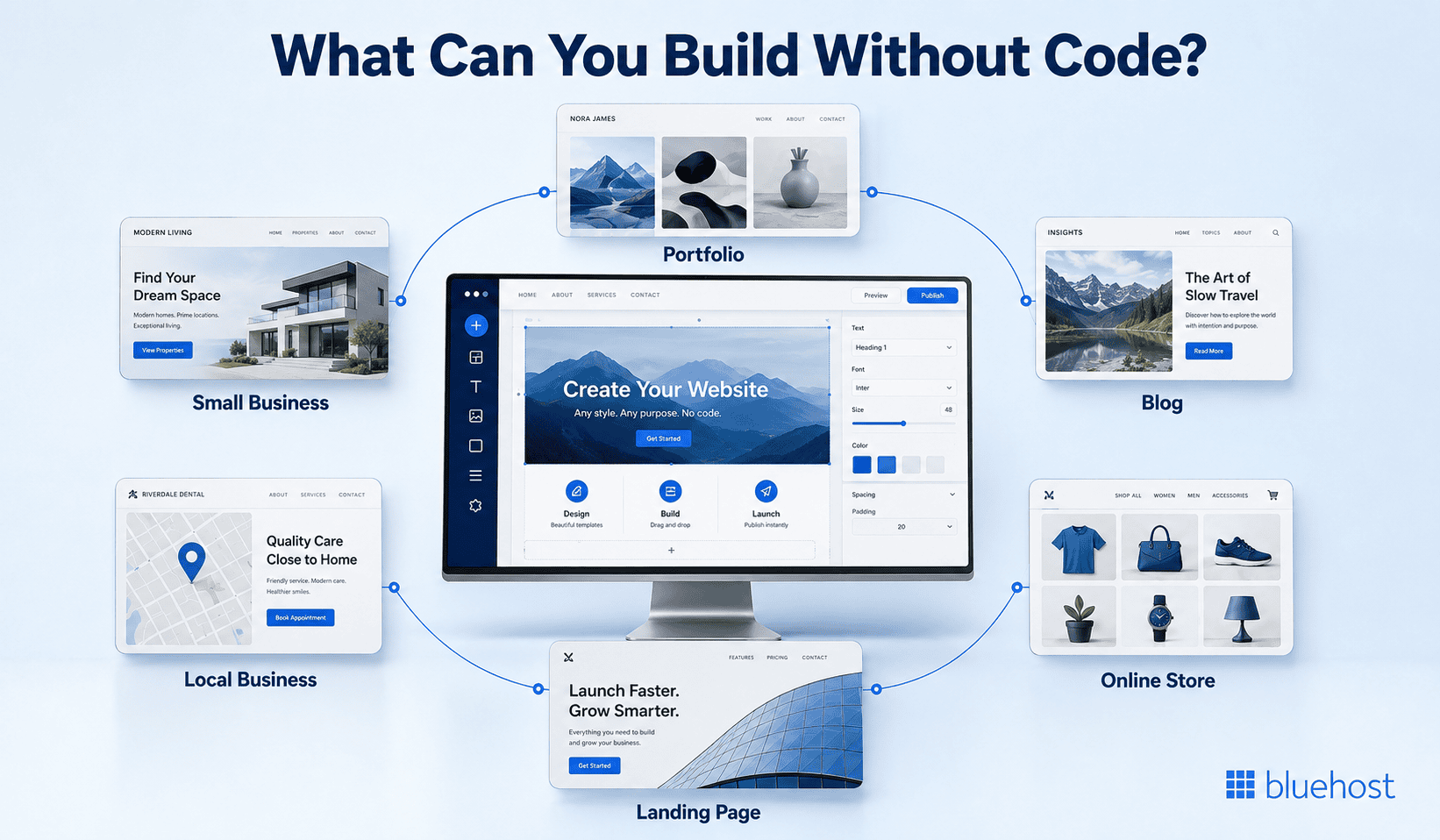
No-code platforms cover most of the website types that small business owners, freelancers and creators actually need, including:
- A business website to establish a professional online presence
- A service or lead-generation site built around a contact form or booking tool
- A portfolio to showcase creative or professional work
- A blog for regular content publishing
- A landing page for a single offer, event or campaign
- A restaurant or local business site with hours, menus and location details
- An online store with product listings, checkout and basic inventory tracking
Complex web applications, custom databases or highly specialized workflows usually call for a different approach, such as custom development or a low-code platform that allows some coding when it’s actually needed.
Tip: If your website’s main job is showing information, collecting leads or selling a manageable product catalog, a no-code website builder is almost always enough.
Common use cases and prompts for a no-code website builder
A no-code website builder can create many standard business, content and eCommerce websites without requiring users to write code. To generate a more relevant first draft, the prompt should describe the business, audience, required pages, visual style and primary visitor action.
1. Small business websites
Businesses can create a professional website with service pages, contact details, customer testimonials and inquiry forms.
Example prompt for Bluehost AI Website Builder:
Create a professional website for an Austin-based landscaping company serving homeowners. Include Home, About, Services, Project Gallery and Contact pages. Use a clean green and white design with outdoor imagery. Highlight lawn care, garden design and seasonal maintenance. Add “Request a Free Quote” as the main call to action.
2. Portfolio websites
Freelancers and creators can build portfolios that display their work, experience and contact information.
Example prompt for Bluehost AI Website Builder:
Create a modern portfolio website for a freelance brand designer who works with small businesses. Include Home, About, Portfolio, Services and Contact pages. Use a minimal black, white and blue design with large project images. Feature 4 case studies and add “Start a Project” as the main call to action.
3. Blogs and content websites
A no-code website builder can support educational blogs, company updates and other regularly published content.
Example prompt for Bluehost AI Website Builder:
Create an educational personal finance blog for young professionals. Include a homepage, About page, Contact page and blog categories for budgeting, saving, credit and investing. Use a trustworthy blue and white design with clear typography. Feature recent articles on the homepage and encourage readers to explore the latest guides.
4. Landing pages
Businesses can create focused landing pages for campaigns, events, product launches or lead-generation offers.
Example prompt for Bluehost AI Website Builder:
Create a single-page landing page for a weekend yoga workshop in San Diego. Include the event date, location, instructor introduction, session schedule, participant testimonials and registration details. Use calming neutral colors and natural imagery. Add “Reserve Your Spot” as the primary call to action.
5. Local business websites
Restaurants, salons and other local businesses can publish their location, opening hours, services and contact information.
Example prompt for Bluehost AI Website Builder:
Create a welcoming website for a family-owned Italian restaurant in Chicago. Include Home, Menu, Our Story, Gallery and Contact pages. Display the address, opening hours and reservation link prominently. Use warm red, cream and dark green colors with authentic food photography. Add “Book a Table” as the main call to action.
6. Online stores
No-code builders with eCommerce functionality can create stores that display products, accept payments and manage customer orders.
Example prompt for Bluehost AI Website Builder:
Create an online store for a handmade candle brand selling soy candles in floral, woody and seasonal scents. Include Home, Shop, About, FAQs and Contact pages. Feature bestsellers and product categories on the homepage. Use an earthy cream and brown color palette with clean product photography. Add “Shop Candles” as the main call to action.
Note: These prompts can be refined after the first website draft is generated. Users can request changes to the layout, copy, colors, images or calls to action until the website better reflects their business. Try out these prompts with our Bluehost AI Website Builder now.
A website without coding works well for many standard use cases. Complex web applications, custom databases or specialized workflows may still require custom development or additional integrations.
Who is a no-code website builder for?
Website builders that require no coding are built for people who want a working website without hiring a developer or learning to program first. Small business owners use them to get a professional presence online quickly, without worrying about ongoing technical maintenance. Freelancers and creators lean on the same tools to build portfolios or sell their work, often on a tight budget and an even tighter timeline.
Nontechnical teams inside larger organizations use no-code builders too, especially for landing pages or campaign sites that need to go live fast without waiting on an engineering queue. Across all of these groups, the common thread is a preference for visual or conversational tools over writing code by hand.
What is the best no-code website builder for your needs?
The best website builder without coding depends on your website goal, required features and preferred editing experience. Compare the tools against the work you need the site to do after launch, not only how quickly you can create a first draft.
| User goal | Must-have capabilities | Factors to verify | Suitable builder type |
|---|---|---|---|
| Business site | Service pages, contact forms and mobile-friendly design. | Confirm custom domain options, SSL protection, integrations and human support. | A visual or conversational builder with business-focused templates. |
| Portfolio | Image galleries, flexible layouts and clear contact details. | Check responsive previews, storage limits and control over typography. | A design-led builder with manual editing controls. |
| Blog | Easy publishing, categories and Search Engine Optimization (SEO) tools. | Review SEO settings, content management features and growth capacity. | A content-focused platform built for regular updates. |
| Landing page | Fast editing, focused calls to action and lead forms. | Compare pricing, integrations and AI usage limits before running campaigns. | An agent-powered builder for rapid campaign drafts. |
| eCommerce store | Products, checkout and order management. | Verify payment options, scalability, SSL and store integrations. | AI Builder for users who want Build-to-Buy access, WooCommerce hosting, Yoast SEO Premium and 24/7 human support. |
What does a no-code website builder not mean?
The term “no-code” gets misunderstood in a few consistent ways, and clearing them up now will save you from unrealistic expectations later.
- The finished website does not use code: it does. The platform writes and manages that code for you, you just don’t see or edit it directly.
- Every customization is possible: most no-code tools work within a set of templates, blocks or design rules, so highly custom layouts may be out of reach.
- Hosting and domains are always included: some builders bundle these, while others require you to connect your own domain or purchase hosting separately.
- Every no-code website is automatically secure, fast or search-ready: the platform provides the foundation, but your settings, content and images still affect performance and Search Engine Optimization (SEO) results. SEO results are not guaranteed and may vary by business, industry and market conditions.
- Every no-code builder uses AI: many rely on templates and manual editing only, with no AI assistance involved at all.
Knowing these limits upfront helps you pick a builder that actually matches what you’re trying to launch, rather than one that just sounds simple in its marketing.
Is a no-code website builder right for you?
A no-code website builder is right for you when your priority is publishing and maintaining a standard site without developer involvement. It reduces initial development work and speeds up routine updates, though you accept the platform’s templates, recurring subscription costs and limited control over the underlying source code.
A website builder without coding works especially well for informational sites, lead-generation pages and eCommerce stores with manageable catalogs. You can update services, publish content and adjust offers yourself, which helps when details change often.
Choose low-code or custom development when the project depends on a custom database, specialized application programming interface (API) connections or complex behavior beyond standard forms, product pages and booking tools. Those requirements need deeper technical control and ongoing development support.
Is an AI website builder a no-code website builder?
Yes, an AI website builder is a no-code website builder, as long as you can generate and edit the site without writing code yourself. Traditional no-code tools rely on templates and drag-and-drop editors, while AI-powered builders add natural-language prompts, letting you describe your business and get a working draft as a starting point.
Both fall under the same no-code umbrella. The real difference is how much of the setup work the platform does for you before you start making manual adjustments.
Can WordPress function as a no-code website builder?
WordPress is a content management system, not a dedicated no-code builder. Its block editor, themes and selected plugins can support website creation without coding, especially for standard pages, blogs and small stores. The experience still involves more setup and ongoing choices than a fully managed visual builder.
A beginner can choose a theme, arrange blocks for text and images, then add features such as contact forms or search tools through plugins. WordPress knowledge becomes more useful when a theme behaves unexpectedly, a plugin conflicts with another tool or the site needs an update. Site owners also need to review plugin quality, apply security updates and keep backups.
Bluehost AI Website Builder takes a different route. The Bluehost no-code website builder runs on React and Tailwind rather than WordPress, keeps the content management system invisible and requires no WordPress knowledge. Its conversational AI agent handles the starting structure, while users guide changes through prompts or direct editing controls.
Also read: AI Website Builder for Small Businesses | Create Your Website Faster
How Bluehost AI Website Builder applies the no-code approach?
Bluehost AI Website Builder is a real-world example of the no-code approach in action. Instead of starting from a blank template, you describe your business in a few sentences and answer a handful of targeted questions about your industry, goals and style preferences.
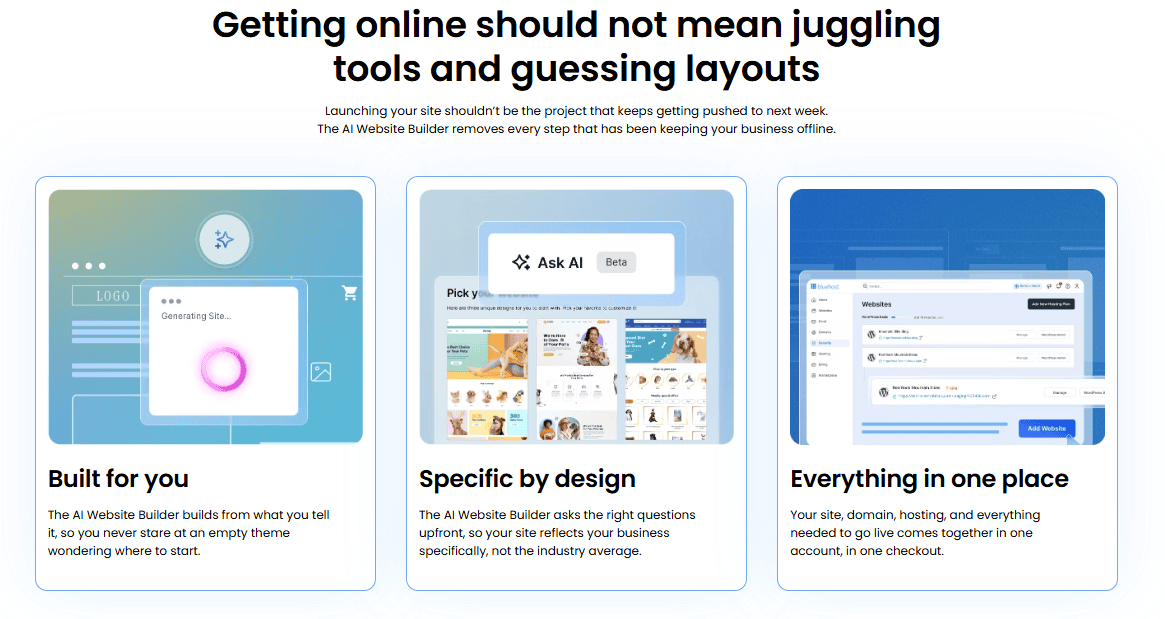
The platform then generates a working website for you to review. From there, you can keep editing through natural-language prompts, asking for specific changes like a new color palette or a different homepage headline. You can also switch to manual controls to fine-tune text, images and layout by hand. You can build and preview the site before deciding whether to purchase a plan, which lets you see the actual result first instead of committing upfront.
How do you create a no-code website with Bluehost AI Website Builder?
Bluehost AI Website Builder lets you create a site through a guided, agentic process with no coding, no blank-page anxiety.
- Describe your business or choose from 22 prompt gallery options. The conversational AI agent asks up to five chip-based questions, then can extract colors and tone from your logo while pairing title and body fonts in real time.
- Review three contextual themes and select a direction. Create an account only when you choose “Build my site.” The agent-powered builder shows its work in real time and can complete the draft in up to 5 minutes.
- Refine the result without starting over. Select Regenerate to rebuild from the original prompt, use full-chat AI for site-wide requests, choose inline section AI for focused changes or adjust content and layout with manual controls.
- Build before you buy. The 14-day trial requires no credit card and includes 10 AI credits. Your 14-day trial starts the day you sign up. Trial days run consecutively and do not extend.
- Publish when ready. Get Online costs $9.99 per month on annual terms or $15.99 monthly. Paid plans include 20 AI edits monthly, plus 10 bonus edits in month one, Yoast SEO Premium, WooCommerce, a free first-year domain and 24/7 human support.
Try Bluehost AI Website Builder and build your no-code website with confidence.
Disclaimer: Bluehost pricing, plan features and trial availability mentioned in this article are accurate as of September 2026 and may change over time.
Final thoughts
A no-code website builder removes the coding step from building a website, so you can focus on your business, your content and your customers instead of syntax.
So, what is a no-code website builder, in the end? It’s simply the fastest path from an idea to a live site, whether you’re working from a template or guiding an AI assistant through a short conversation.
If you’re ready to see what an AI-guided, no-code website looks like for your own business, get started with Bluehost AI Website Builder.
FAQs
No-code means you can build and publish a website without writing HTML, CSS or JavaScript yourself. You work through visual tools, templates or AI prompts instead of a code editor.
Yes. The finished website runs on code, but the platform generates and manages it automatically so you never have to write or edit it directly.
Most modern website builders are also no-code platforms, since they let you build a site visually. Some low-code or developer-focused tools also call themselves website builders while still allowing custom code, so the two terms aren’t always interchangeable.
Yes. Templates, brand colors, custom domains and mobile-friendly layouts are standard in most no-code builders, which makes a polished result possible without any programming knowledge.
Template-based builders start you with a fixed layout that you customize by hand. AI-generated no-code sites build a draft automatically based on your business description, then let you refine it with prompts or manual edits.

Write A Comment