 ChatGPT,
 Claude,
 Gemini,
 Grok — all four for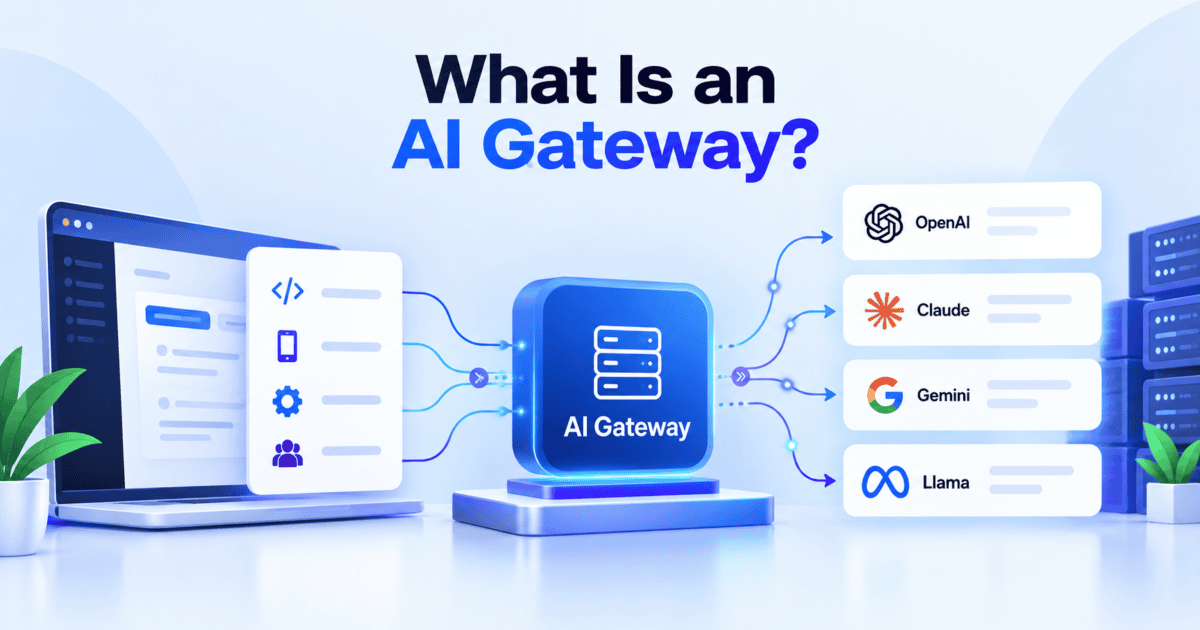
Key highlights
- Learn what an AI gateway is and where it sits between your applications and AI models.
- Understand how an AI gateway differs from a traditional application programming interface (API) gateway.
- Know which gateway features help control model spending, protect API keys and reduce security risks.
- Discover how to decide whether your applications and AI agents need a gateway now.
As AI applications and agents use more models, providers and APIs, managing those connections can become increasingly complex. An AI gateway provides a centralized layer between your applications and the AI models they use.
It can manage model access, route requests, control usage and give you visibility into AI traffic. This becomes especially useful when multiple applications share models or when your workflows need different models for different tasks.
But an AI gateway is more than a proxy between an application and a model. It can also provide controls for authentication, spending, routing, caching and security.
In this guide, you’ll learn what an AI gateway is, how it works, how it differs from a traditional API gateway and which features matter. You’ll also see how Bluehost AI Gateway brings these capabilities together for AI applications running on Self-Managed VPS and VDS.
What is an AI gateway?
An AI gateway is a proxy layer that manages traffic between your applications and AI models. It is also commonly called an LLM gateway.
Instead of connecting each application directly to individual model providers, you can route requests through the gateway. The gateway then manages the connection between your application and the selected model.
The request path typically has three layers:
- Your applications and agents: Tools such as n8n workflows or OpenClaw agents send requests for AI tasks.
- The AI gateway: The gateway authenticates requests, applies policies, routes traffic and records usage.
- Model providers: Providers such as OpenAI, Anthropic and Google process requests and return responses.
Many gateways provide a single OpenAI-compatible endpoint that connects applications with multiple model backends. You can often switch models by changing the model name or routing configuration instead of rebuilding your application.
Your application can also run on your own VPS while the model runs with a third-party provider. This means self-hosting the application does not necessarily mean hosting the model itself.
This naturally leads to the next question: what actually happens when a request passes through the gateway?
How does an AI gateway work?
Each model request follows a short lifecycle. The exact steps vary by gateway and configuration.
- Request: Your application sends a request to the gateway instead of directly to the provider.
- Authentication: The gateway verifies the application’s credentials.
- Policy checks: It applies configured limits, budgets or content controls.
- Routing: It sends the request to the selected model or provider.
- Response checks: It can inspect or filter the response when configured.
- Logging: It records usage information such as tokens, latency and cost.
For example, an n8n workflow running on a VPS could send support tickets through an AI gateway. The gateway could route simple classification tasks to one model while sending more complex requests to another.
If the selected provider becomes unavailable, some gateways can retry the request or use a fallback model.
Now that the request flow is clear, the next distinction is understanding how an AI gateway differs from the API gateways developers already use.
How is an AI gateway different from an API gateway?
Both gateway types sit between applications and backend services. They can handle authentication, routing and rate limiting.
The difference is that an AI gateway adds controls designed around AI workloads.
| Criterion | Traditional API gateway | AI gateway |
|---|---|---|
| Main unit of control | Requests | Tokens and requests |
| Routing | Services or servers | Models and providers |
| Caching | Exact responses | May support semantic caching |
| Payload inspection | Headers and schemas | Prompts and responses |
| Cost tracking | Request volume | Tokens and model costs |
| Typical backends | APIs and microservices | Model APIs and AI services |
AI workloads also introduce considerations such as token usage, model selection and generated responses. An AI gateway can expose controls for these areas that a traditional API gateway may not provide by default.
However, “AI gateway” is not the only term you will encounter. Several related terms describe different types of AI traffic.
How do AI gateway, LLM gateway and MCP gateway differ?
These terms overlap, and vendors may use them differently. The main distinction is the type of traffic they manage.
| Criterion | Traditional API gateway | AI gateway |
|---|---|---|
| Main unit of control | Requests per second | Tokens per minute (TPM) and token budgets |
| Routing | Routes to services or servers | Routes to models and providers, with fallback |
| Caching | Exact-match responses | Semantic caching of prompts with similar meaning |
| Payload inspection | Headers and schemas | Prompt and response content, such as PII or injection attempts |
| Cost tracking | Request counts | Tokens and cost per app or key |
| Typical backends | Your own microservices | Model APIs and Model Context Protocol (MCP) tool servers |
The takeaway: An API gateway can proxy LLM calls, but it has no built-in sense of tokens or prompts. Some AI gateways still offer request-based limits alongside token controls, so check which unit a product uses by default.
How do AI Gateway, LLM Gateway and MCP Gateway differ?
These terms overlap, and vendors may use them differently. The main distinction is the type of AI traffic each gateway manages.
| Gateway type | What it manages | Common use |
|---|---|---|
| LLM gateway | Application requests to AI models | Model routing, keys, usage and cost |
| MCP gateway | Agent requests to MCP servers | Tool access, authentication and routing |
| AI gateway | Broader AI traffic | Models, tools and agent workflows |
An LLM gateway generally focuses on model API requests. Many vendors use “LLM gateway” and “AI gateway” interchangeably.
An MCP gateway focuses on communication between AI agents and MCP servers. It can control access to the tools those agents use.
An AI gateway is often the broader term. Some products combine model, tool and agent traffic under one control layer.
For example, Kong describes its AI Gateway as supporting LLM, MCP and A2A traffic.
With those distinctions in place, we can look at what an AI gateway actually gives you.
What are the core features of an AI Gateway?
AI gateways typically combine several controls for managing model traffic. The exact feature set varies across managed services and open-source projects.
1. Multi-model access
A gateway can give applications one endpoint and one gateway key while managing multiple model providers behind it. This centralizes provider credentials and makes it easier to rotate or replace them. You can also create separate gateway keys for individual applications or clients.
The trade-off is that a gateway key becomes an important credential. Separate keys for each application make it easier to revoke access without affecting other applications.
2. Model routing and fallback
Routing lets you send different tasks to different models. For example, a smaller model may handle simple classification while a larger model handles complex reasoning.
Fallback can improve resilience by retrying failed requests or routing traffic to another model. However, different models can produce different outputs, so test important workflows before relying on fallback.
3. Token limits and budgets
Token limits control how much model usage an application or key can consume.
This can be useful for AI agents that make several model calls during one workflow. A per-application budget can limit how much a runaway workflow consumes. Set limits based on real usage. Limits that are too restrictive can interrupt legitimate traffic.
4. Semantic caching
Exact caching returns a stored response when a request matches an earlier request.
Semantic caching goes further. It can reuse a response when a new prompt has a similar meaning to an earlier one. Caching can reduce model calls, costs and response times for repetitive workloads. It is less suitable for personalized or frequently changing responses.
5. AI guardrails
Guardrails can inspect prompts and responses based on the gateway’s capabilities.
Some gateways can redact PII or detect potential prompt-injection attempts. These controls can reduce certain risks but do not replace server security. You still need appropriate firewall rules, access controls and software updates.
6. Usage and cost visibility
Gateway logs can show requests, tokens, latency, errors and costs.
This visibility helps identify which applications or workflows consume the most resources. However, prompts and responses may contain sensitive information. Decide what to log and how long to retain it before enabling detailed request logging.
These features show what an AI gateway can manage. The next question is whether those controls solve a real problem for smaller teams and self-hosted builders.
Why do small teams and self-hosted builders use an AI gateway?
AI tools are becoming part of everyday development work. The 2025 Stack Overflow Developer Survey found that 84% of respondents use or plan to use AI tools in development.
The survey measures AI tool usage rather than gateway adoption. Still, frequent AI usage means developers increasingly manage model connections as part of their application stacks.
Without a gateway, each application can manage its own provider accounts, API keys and usage.
With a gateway, applications can use a centralized connection while provider credentials remain behind the gateway.
This can provide:
- Fewer provider connections: Centralize model access across applications.
- Simpler model switching: Change routing without rebuilding every application.
- Usage visibility: Track spending by application, agent or key.
- Centralized credentials: Keep provider keys outside individual application configurations.
- Consistent controls: Apply shared limits and policies across connected applications.
This is where Bluehost AI Gateway becomes relevant for builders running AI applications on their own infrastructure.
How does Bluehost AI Gateway work?
Bluehost AI Gateway gives eligible Self-Managed VPS and VDS users a centralized way to connect supported AI applications with supported models.
It uses an OpenAI-compatible endpoint and gateway API keys. AI Credits provide a shared prepaid balance for supported model usage.
The basic flow is:
AI application → Bluehost AI Gateway → Supported model → Response
You add AI Credits and create an API key through the AI Tooling section in the Bluehost Portal. Your eligible application then uses the gateway endpoint and key to make model requests.
Supported applications include AI tools such as OpenClaw, Hermes Agent, n8n and Claude Code.
The gateway also continues to expand beyond general-purpose model access. Jev is the latest addition and brings a different capability to AI workflows.
How does Jev fit into the AI Gateway?
Jev is a decision model from TypeSafe AI designed for structured decisions rather than conversational text generation. It can return typed answers for tasks such as routing, scoring and yes-or-no decisions.
For example, an AI workflow could use Jev to:
- Route: Decide which team or model should handle a task.
- Gate: Check whether an action should proceed.
- Rerank: Identify the most relevant result.
- Verify: Check whether an output meets defined criteria.
- Judge: Evaluate whether a response meets a defined standard.
Jev can also work alongside agents that already use an LLM. An agent can use its primary model for reasoning while using Jev for specific structured decisions within the workflow.
For Bluehost customers, Jev is available through the same AI Gateway access and AI Credits balance. This means builders can add structured decision capabilities without opening a separate vendor account.
With the general capabilities and Bluehost implementation covered, you can now decide whether adding a gateway makes sense for your setup.
Do you need an AI gateway?
Whether you need an AI gateway depends on the complexity of your AI stack.
You may benefit from one if you have:
- Several apps or agents: Multiple applications make model requests.
- Multiple providers: You use models from different providers.
- Per-app or client limits: Different projects need separate spending controls.
- Shared access: Multiple users need model access without provider credentials.
- Centralized logs: You want usage from multiple applications in one place.
You may not need one yet if you have:
- One application: A single app handles your model requests.
- One provider: You have no immediate need to test alternatives.
- Modest usage: Your usage is low and predictable.
- Sufficient provider tools: Existing dashboards and controls meet your needs.
If you’re unsure, start with one non-critical workflow. Compare its usage, costs and logs before moving additional applications.
Once you decide to use a gateway, a few implementation practices can make the setup easier to manage.
What are the best practices for adding an AI gateway?
A few practices can help you maintain control as your AI traffic grows.
- Use one key per application: This makes individual access easier to revoke.
- Set budgets early: Establish usage limits before an agent goes live.
- Test fallback models: Compare outputs before relying on fallback routing.
- Log deliberately: Avoid storing sensitive prompts unnecessarily.
- Use environment variables: Keep gateway credentials out of application code.
- Harden the server: Maintain firewall rules, encrypted connections and software updates.
Also check your gateway’s model list before changing application configurations. Model names can differ between providers and gateways.
Final thoughts
An AI gateway gives applications a centralized path to AI models. It can simplify model access while providing controls for authentication, routing, usage and cost visibility.
For smaller setups, connecting directly to one provider may be enough. As applications, models and users increase, a gateway can provide a more centralized way to manage that traffic.
For builders using eligible AI applications on a Self-Managed VPS or VDS, Bluehost AI Gateway adds centralized model access through one gateway connection and AI Credits. Its supported capabilities now also include Jev for structured decisions inside AI workflows. Jev on the Bluehost AI Gateway.
Ready to simplify how your AI applications connect to models? Explore Bluehost AI Gateway and connect your first application.
FAQs
Yes. Kong Gateway and Azure API Management are examples of general-purpose API gateways. They can handle authentication, routing and request limits for web services and APIs.
Not necessarily. An AI gateway can still help when several applications share one provider. It can centralize API keys, usage limits and logs while keeping your applications connected through one endpoint.
An AI gateway can help manage LLM costs by routing requests, applying usage limits and making token usage more visible. Actual savings depend on your models, traffic and routing strategy. Bluehost AI Gateway uses prepaid AI Credits for eligible Self-Managed VPS and VDS customers. Supported models can have different credit costs, so model selection can also affect spending.
Yes. Envoy AI Gateway and LiteLLM are examples of open-source AI gateway options. With a self-hosted gateway, you are responsible for deployment, updates, monitoring and security.
It depends on the gateway and its logging configuration. Some gateways can log prompts and responses for debugging, monitoring or auditing.
Yes. Jev can work alongside AI applications that use model access through a gateway. Jev is a decision model designed for structured tasks such as routing, scoring and yes/no decisions.
For supported integrations, Jev can work through the Bluehost AI Gateway using the same gateway access and AI Credits. This lets an application use Jev for structured decisions while using a full LLM for broader reasoning tasks.

Write A Comment