 ChatGPT,
 Claude,
 Gemini,
 Grok — all four for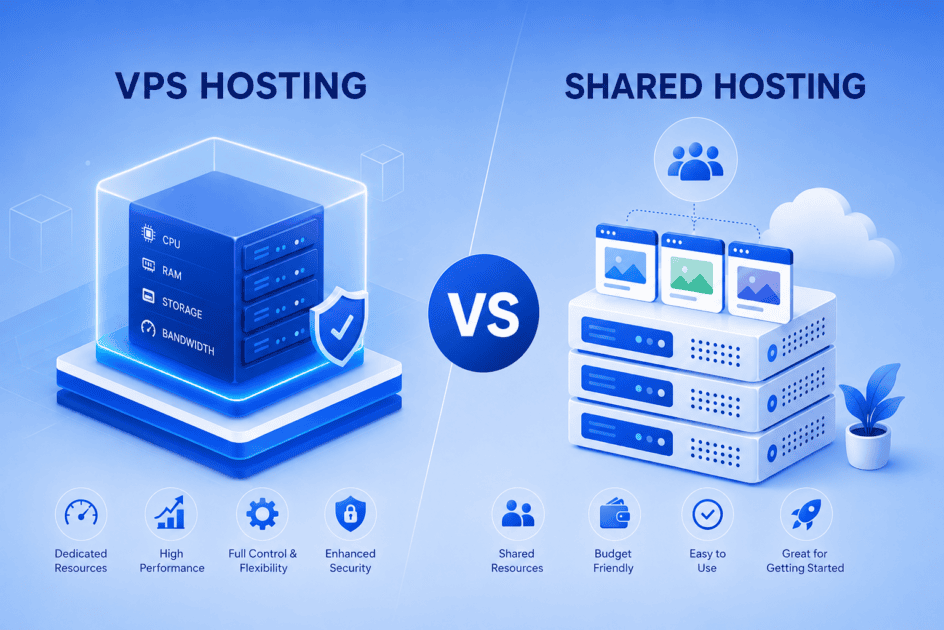
Key highlights
- Understand the key differences between VPS and shared hosting to choose the right plan for your website’s needs.
- Learn how different hosting solutions affect performance, scalability and security for growing businesses.
- Explore the pros and cons of VPS hosting vs shared hosting to see which fits your budget and goals.
- Determine where VPS vs shared hosting stands in terms of resources and control.
- Uncover when upgrading to VPS hosting makes sense for better speed, reliability and flexibility.
Choosing the right web hosting plan is one of the most important decisions you’ll make when building a website for your business. With so many options available, it can be difficult to know where to start, especially when terms like VPS and shared hosting represent very different hosting environments.
Both VPS and shared hosting are among the most widely used hosting solutions for businesses of all sizes, each with its own set of advantages and trade-offs. Whether you’re launching a brand-new site or looking to upgrade your current setup, understanding the differences between these two options is essential to making the right call.
In this guide, we’ll break down VPS vs shared hosting across key factors, including performance, security, scalability and cost, to help you determine which hosting solution best fits your website’s needs and long-term goals.
Quick TL; DR: Shared hosting vs VPS hosting
Shared hosting is best for new websites, blogs and small business sites that need a simple, cost-effective hosting option. VPS hosting is better for growing websites that need more advanced resources, control and scalability.
| Choose shared hosting if you want to | Choose VPS hosting if you want to |
| Launch a new website with lower upfront costs | Support a growing website with more dedicated resources |
| Let your hosting provider manage server maintenance | Get more control over server settings and configurations |
| Run a blog, portfolio or small business site | Manage higher traffic, apps or resource-heavy websites |
| Start simple and upgrade later | Scale performance as your website grows |
Let’s explore both options in more detail to help you choose the right hosting solution for your business.
What is shared hosting?
Shared hosting is a web hosting setup where multiple websites share the same physical server and its resources, including CPU, RAM, storage and bandwidth. The hosting provider manages server maintenance, updates and security patches, which makes shared hosting easier for beginners.
Because server resources and maintenance are shared across many users, shared hosting is usually a cost-effective option for new websites, personal blogs and small business sites with low to medium traffic needs.
In a shared hosting vs VPS hosting comparison, shared hosting is a good choice when ease of use and lower cost matter more than advanced control or dedicated resources.
The pros of shared hosting
- Cost-effective: Shared hosting is a much more cost-effective option when compared to dedicated or VPS hosting, especially if you’re on a tight budget.
- Beginner-friendly: Shared hosting doesn’t require complex configurations or advanced technical knowledge. This makes it a perfect option for first-time website owners.
- Easy maintenance: The hosting provider handles almost all management and maintenance for the servers in its shared hosting plans. This means you can focus less on server updates or security patches and more on running your website.
- Scalable starting point: You can begin with shared hosting and move to a higher plan later. This keeps your upfront cost low while your website is still growing.
The cons of shared hosting
- Not optimized for high traffic: Shared hosting customers have limited access to server resources, as these are shared among all websites on the server. This could impact your website’s performance, especially when there’s a traffic surge.
- Higher security dependency: Multiple websites run on the same server environment. Following security best practices can help reduce risks from malware or compromised sites.
- Limited customization: You don’t have root access to your shared hosting server. This means you are restricted from performing administrative tasks, such as installing software or updating servers yourself.
So, are you ready to launch your website, the easy way? Get started with Bluehost Shared Web hosting, where you get an easy setup, an inexpensive entry point and provider-managed server upkeep.
What is VPS hosting?
Managed VPS hosting is a web hosting solution where a physical server is divided into multiple virtual servers, each with its own dedicated CPU, RAM and storage resources. Unlike shared hosting, your website runs in an isolated environment with resources reserved specifically for your account.
What sets managed VPS hosting apart is that your hosting provider takes care of essential server management tasks such as operating system updates, security patches, server monitoring and maintenance. This allows you to enjoy the performance and flexibility of a VPS without the complexity of managing the server yourself.
Managed VPS hosting is ideal for growing businesses, high-traffic websites and resource-intensive applications that need better performance, scalability and reliability than shared hosting can provide.
The pros of VPS hosting
- Better performance: Dedicated virtual resources deliver faster load times and more consistent website performance, even during traffic spikes.
- Managed server maintenance: Your hosting provider handles server updates, monitoring, security patches and routine maintenance, allowing you to focus on your website instead of server administration.
- Greater flexibility: You can configure your hosting environment, install supported applications and scale resources as your business grows.
- Improved security: Resource isolation, managed security updates and enhanced monitoring provide stronger protection than a typical shared hosting environment.
- Easy scalability: CPU, RAM and storage can be upgraded without migrating to an entirely new hosting platform.
The cons of VPS hosting
- Higher cost: Managed VPS hosting typically costs more than shared hosting because it includes dedicated resources and provider-managed services.
- More features than some websites need: Small personal websites or new blogs may not fully utilize the additional resources and flexibility that managed VPS provides.
- Some administrative responsibilities remain: While your hosting provider manages the server infrastructure, you may still be responsible for managing your website, applications and certain configurations depending on your hosting plan.
So, are you ready to take full control of your hosting? With our Bluehost VPS hosting, you get scalable resources, root access and enhanced security for growing websites. Check out our plans now!
What is the difference between shared hosting and VPS?
The main difference between VPS and shared hosting is the level of control you have over the server on which your website runs. With shared hosting plans, you have basically no control over the server. Everything is pre-packaged for you and there’s very little opportunity for customization. In contrast, VPS hosting provides you with root access to the server’s operating system.
To understand this better, let’s look at a few key parameters:
- Cost
- Performance
- Server resource allocation
- Security
- Flexibility
- Control
- Server administration
- Scalability
The table below provides a quick side-by-side overview of how shared hosting and VPS hosting compare across these factors.
| Parameter | Shared hosting | VPS hosting |
| Cost | Generally, the most cost-effective hosting option because multiple websites share the same server resources. | Higher cost since each user gets dedicated virtual resources on the server with expert support. |
| Performance | Performance can vary depending on how other websites on the server use shared resources. | More consistent performance with allocated CPU, RAM and storage resources. |
| Server resource allocation | Resources such as CPU, RAM and storage are shared among multiple users on the same server. | Dedicated virtual resources are allocated to each VPS environment. |
| Security | Basic security features are provided, but vulnerabilities on one site could potentially affect others on the same server. | Greater isolation between users and the ability to install custom security tools. |
| Flexibility | Limited customization options since the hosting provider controls most settings. | High flexibility with the ability to configure the server environment and install custom applications. |
| Control | Very limited control over server configuration and software installation. | Full root access allows users to customize server settings and install required software. |
| Server administration | The hosting provider manages server maintenance, updates and monitoring. | The hosting provider manages server maintenance, updates, security patches and monitoring while giving you greater flexibility and access to dedicated virtual resources. |
| Scalability | Scaling resources is limited and may require upgrading to a different hosting type. | Resources such as CPU, RAM and storage can be scaled more easily as your website grows. |
Now, let’s explore the key differences between VPS vs. shared hosting in detail:
1. Cost
Cost is one of the primary reasons while choosing hosting plans. The first thing is how both plans are structured.
Since shared hosting customers share resources on the same physical server, hosting companies don’t need as many resources to support customers on these plans. As a result, they price them lower than other plans that require dedicated resources. For example, Bluehost’s shared hosting plans start at $3.99/month*.
Managed VPS hosting typically costs more because each customer receives dedicated virtual resources, such as CPU, RAM and storage, within an isolated environment. In addition to improved performance and scalability, managed VPS plans include provider-managed services such as server maintenance, operating system updates, security patches and monitoring.
These services reduce the administrative burden while delivering greater reliability and flexibility than shared hosting. At Bluehost, our managed VPS plans start at $49.99/mo.
Also read: Bluehost VPS Hosting Plans Comparison
*Note: Prices are subject to change. Please check our website for the latest pricing.
2. Performance
Hosting companies usually offer VPS plans for professional customers such as designers, developers, system administrators and medium to large-scale businesses. For these customers, their needs extend beyond just having a website online.
They also have specific requirements for the speed and performance of their web applications. Because of this, the server hardware for VPS hosting uses high-performance components to ensure that customer sites operate at a high level and maintain maximum uptime.
VPS packages take advantage of powerful CPUs to handle more computational tasks, non-volatile memory express (NVMe) SSD drives for high read and write speeds and more disk space for larger web applications. Choosing a VPS plan also means you’ll receive access to unmetered bandwidth, allowing your website to handle more network traffic.
Shared hosting packages, on the other hand, are geared toward customers with less performance-oriented website hosting needs. For example, lower-spec server hardware is a good fit for websites hosted with these plans.
Also read: How to Upgrade VPS Hosting Plan
3. Server resource allocation
Most shared hosting plans come with strict resource limitations that can hurt your website’s performance once those limits are reached.
For instance, the Bluehost basic shared hosting plan will give you access to 10 GB of NVMe storage to host websites. These specifications are perfect if you only want to host a small site for your business or hobbies. Web hosts impose these limitations to ensure the availability of their hosting services.
Since shared hosting customers use the same physical server for their websites, it’s essential that no one website hogs all the available resources. Doing so would impact the server’s performance for everyone else.
Managed VPS hosting provides your website with dedicated virtual resources within an isolated environment. Your allocated CPU, RAM and storage are reserved for your hosting account, helping deliver more consistent performance regardless of activity on other websites hosted on the same physical server.
4. Security
The level and scope of security between VPS and shared hosting plans also vary. Shared hosting plans usually include the basic security features needed to protect your website. It includes free SSL certificates, malware scans and weekly website backups.
If you’re looking to customize your website’s security features beyond these essentials, you might be out of luck. It is because most hosting services don’t let you change much.
Managed VPS hosting provides stronger isolation between websites, along with provider-managed security updates, monitoring and server maintenance. Depending on your hosting plan, you may also have access to advanced security features and backup options that further strengthen your website’s protection.
5. Flexibility
Managed VPS hosting gives you greater flexibility than shared hosting while removing much of the complexity of server management. Depending on your hosting plan, you can customize your hosting environment, deploy supported applications and scale resources such as CPU, RAM and storage as your website grows
Shared hosting plans typically don’t have this level of flexibility or scalability. Allocated resources are usually fixed and customers do not get access to advanced tools for modifying server configurations or managing the hosting environment directly.
That said, while the level of customization you get with VPS hosting is an advantage. Shared hosting, while less customizable, is ready to go straight out of the box. It means you won’t have to spend time fine-tuning your settings and installing software packages.
6. Control
When comparing VPS hosting vs shared hosting, one of the biggest distinctions is the amount of control you have. With shared hosting, customers get very limited control over server settings. Everything is pre-configured and the hosting provider manages the technical aspects behind the scenes.
This works well for beginners and small business owners who just want to get a site online quickly without worrying about setup. With Bluehost, you can also use our WordPress AI Builder to create a professional-looking site; no coding required.
Compared to shared hosting, managed VPS hosting gives you significantly more control over your hosting environment. While your hosting provider continues to manage the underlying server infrastructure, you gain access to more advanced configurations, dedicated resources and greater flexibility to support your website’s requirements.
This balance of control and managed support makes managed VPS hosting well suited for growing businesses that need more than shared hosting without the operational overhead of managing an entire server.
7. Server administration
In a shared vs VPS hosting comparison, the way server administration is handled is very different. With shared hosting plans, we at Bluehost take care of most technical aspects for you, including updates, patches and server monitoring. This is ideal for site owners who don’t have server management experience or the time to maintain infrastructure.
Managed VPS hosting offers a similar hands-off experience while providing significantly more dedicated resources and flexibility. Your hosting provider handles essential server management tasks- including operating system updates, monitoring and maintenance, while giving you greater control over your hosting environment than shared hosting.
8. Scalability
When comparing VPS vs. shared hosting, scalability is one of the most important factors to consider. With shared hosting, you’re on an entire physical server that’s divided among other websites. This means your resources are limited and if your site grows, you may quickly hit those limits. While it’s a cost-effective starting point, scaling usually requires upgrading to a more advanced plan.
VPS hosting, however, is designed for small and medium businesses that expect to grow. You can scale your server configuration as needed by adding more CPU, RAM or storage without migrating to a new environment. You also gain complete server control, which lets you fine-tune performance and strengthens protection for sensitive data.
For example, Bluehost VPS hosting makes it easy to scale resources as your site traffic increases, giving you the flexibility to expand without the limitations of shared hosting.
Shared hosting vs VPS hosting: Which is right for you?
Now that you understand the key differences between VPS and shared hosting, it’s time to figure out which option best suits your needs. Every website has unique requirements, so we’ve broken down the most common scenarios to help you make a confident, informed decision.
When to choose shared hosting?
Shared hosting is an excellent starting point for anyone looking to establish an online presence without overcomplicating the process or stretching their budget. It is likely the right fit if you’re:
- New to web hosting, have limited technical experience and want a cost-effective, beginner-friendly plan to get started.
- Starting an online business but are still in the early planning or development stages.
- Running or planning to launch a small website or blog that doesn’t demand significant storage space or bandwidth.
- Working within a tight budget and needing a cost-effective hosting solution for the foreseeable future.
- Prioritizing simplicity and low cost over advanced performance, control or customization.
When to choose VPS hosting?
VPS hosting is the smart upgrade for websites that have outgrown the limitations of a shared environment and need more power, flexibility and control to keep up with demand. VPS hosting is likely the better choice if you’re:
- Running a growing business or high-traffic website.
- Experiencing slower performance or resource limitations on shared hosting.
- Hosting multiple websites or resource-intensive applications.
- Looking for dedicated resources and more consistent performance.
- Planning to scale your website over time.
- Wanting stronger security and greater reliability.
- Needing more flexibility than shared hosting offers without managing the server yourself.
Ultimately, the choice between VPS vs. shared hosting comes down to where your website stands today and where you plan to take it tomorrow. If you’re just starting, shared hosting offers a cost-effective, low-maintenance way to get online. But as your traffic grows, your performance demands increase and your business scales, upgrading to a VPS becomes not just an option; it becomes a necessity.
If you’re ready to make that move, our Bluehost VPS Hosting offers powerful, scalable plans built for growing websites, with the reliability and support you need to keep your site running at its best. Start with what fits your needs and budget today and scale with confidence when the time is right.
Final thoughts
Now that you understand the key differences between VPS vs shared hosting, choosing the right option depends on your specific needs. Shared hosting is ideal for individuals and small businesses seeking a cost-effective, easy-to-manage solution. VPS hosting, on the other hand, is better suited for growing or high-traffic websites that require greater control, enhanced security and scalability.
At Bluehost, we offer both feature-rich shared hosting and flexible VPS hosting plans to match every stage of your website’s growth. Not sure which one is right for you? Explore our Bluehost Shared Web hosting and VPS hosting plans side by side to see which option aligns with your performance, control and scalability needs.
FAQs
Shared hosting plans are great for beginners because the provider manages the technical server work. WordPress is easy to set up and maintain, making it a perfect match for shared hosting. Bluehost offers custom WordPress hosting with AI tools to help you create a site quickly. However, managed VPS hosting is also beginner-friendly since your hosting provider handles server maintenance while giving you access to dedicated resources and improved performance.
VPS hosting is generally better for eCommerce websites due to higher traffic and storage needs. While a higher-tier shared hosting plan could work, it lacks the flexibility to handle traffic surges and increased activity. Cloud hosting, an upgrade from shared and VPS, offers more flexibility and expert support.
VPS hosting offers better uptime and reliability thanks to more resilient hardware and redundancy. It’s designed for larger businesses that can’t afford frequent outages. While shared hosting is also reliable, resource sharing can increase the risk of outages or malware affecting other websites on the same server.
With shared hosting, backup and restoration options depend on the provider and some may only offer them with higher-tier plans. VPS hosting gives customers root access, allowing them to set up their own backup solutions for the entire server or individual websites. WordPress users on shared hosting can use plugins like UpdraftPlus or Jetpack for scheduled backups if backup features are not included in their hosting plan.
Shared hosting customers can migrate to a VPS plan as their website grows. The ease of upgrading depends on the provider. Switching from VPS to shared hosting is usually not supported due to functional differences, but you can manually move your website, potentially losing some features.
Shared hosting is generally cost-effective. VPS is slightly higher but offers better performance and control. Shared hosting works best for beginners and small websites that need a simple, low-cost solution. On the other hand, VPS is an investment for websites that demand speed, security and room to scale.
You should upgrade from shared hosting to VPS hosting when your website has outgrown a basic setup. Shared hosting can work well for new or smaller websites, but VPS hosting may be a better fit when your site needs consistent performance, advanced control or more room to scale.
The main difference between shared hosting and VPS hosting is how server resources are allocated. In shared hosting, multiple websites use the same server resources. In VPS hosting, your website gets dedicated virtual resources, giving you more control, better scalability and more consistent performance.


Write A Comment