 ChatGPT,
 Claude,
 Gemini,
 Grok — all four for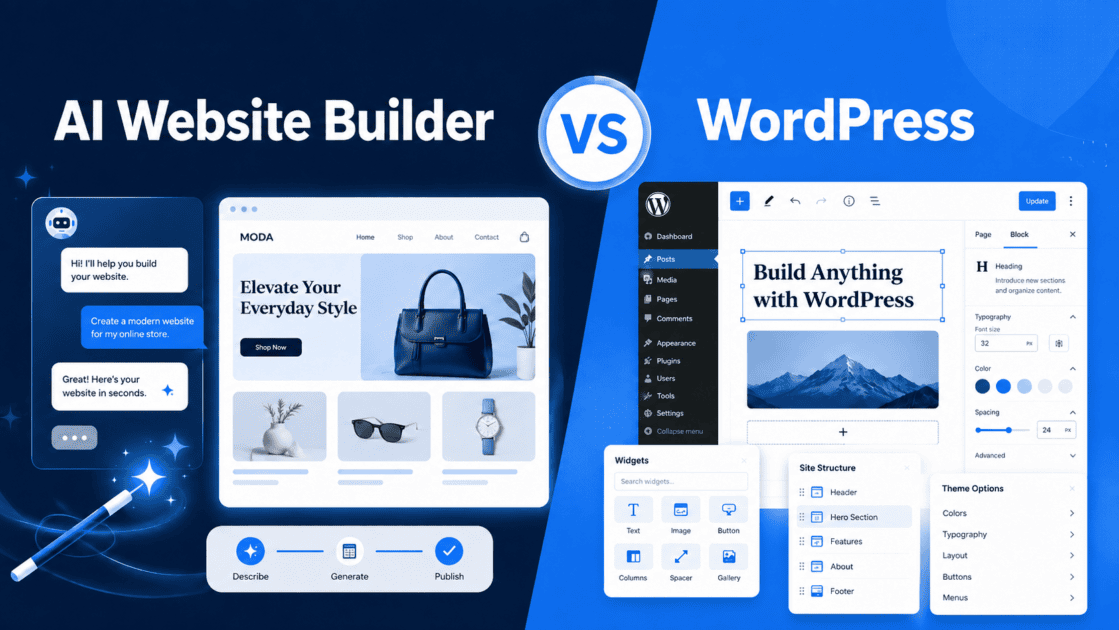
Key highlights
- Understand the core differences between an AI website builder and WordPress to select the most suitable platform for your business.
- Learn how conversational AI design tools speed up the creation process and allow real-time edits.
- Uncover the flexibility and security advantages of choosing self-hosted WordPress for complete ownership of your online presence.
- Explore the long-term cost differences of both systems to avoid unexpected fees as your traffic increases.
- Know how to assess your technical capabilities and business goals to select your ideal web design setup.
AI website builders and WordPress can both help you create a professional website, but they take different paths to get you there. WordPress offers flexibility, control and room for advanced customization.
AI website builders focus on speed, guided setup and simpler editing for users who want to launch with fewer technical steps.
At Bluehost, we support businesses looking for a practical way to get online, so this guide walks through the comparison clearly. We’ll look at setup, ease of use, SEO, customization, maintenance and growth so you can decide which option fits your website goals.
TL;DR: AI Website Builder vs WordPress
An AI website builder is best if you need to launch a professional business website quickly without technical setup or design experience. WordPress is the better option if you require deep customization, complex eCommerce capabilities or complete control over your files and hosting database. While WordPress offers flexibility, AI builders remove the learning curve entirely.
What is an AI website builder?
An AI website builder is a modern creation tool that uses artificial intelligence to generate a complete website from simple text prompts. Instead of starting with a blank canvas or coding from scratch, you describe your business, answer guided questions and let the technology build/generate your layout. The system automatically generates a tailored site structure, custom copy and a cohesive design foundation in minutes.
These platforms operate on a build-to-buy model, meaning you can design and preview your entire site for free, only paying when you are ready to publish. They eliminate the need for manual design configuration, making them popular for small business owners who prioritize speed and simplicity.
What is WordPress?
WordPress is an open-source content management system (CMS) that powers over 41% of all websites globally. It offers unmatched flexibility through a massive ecosystem of themes, plugins and custom integrations. This deep level of customization allows you to build virtually any type of site, from a simple blog to a large enterprise portal.
This power requires a more intensive setup. You must purchase web hosting, install the WordPress software, configure security tools and manage ongoing updates. WordPress offers complete ownership of your data, but it comes with a steeper learning curve and a more hands-on maintenance responsibility.
Key differences between AI website builders and WordPress
| Factor | AI website builder | WordPress |
| Setup | Guided, faster | More manual decisions |
| Learning curve | Lower | Higher |
| Design start | AI-generated first draft | Theme/template selection |
| Content | AI-assisted | Manual or plugin-assisted |
| SEO | Foundation handled | More granular control |
| Customization | Conversational + editor controls | More advanced/customizable |
| Maintenance | Mostly handled | More user/developer responsibility |
| Best for | Fast business launch | Complex/advanced sites |
AI Website Builder vs WordPress: A factor-by-factor comparison
Not sure whether an AI website builder or WordPress is the better fit? Use the comparison below to evaluate the features, flexibility and trade-offs of each option before you decide.
1. Ease of use and learning curve
Starting a new website often triggers blank-page paralysis. With traditional platforms, deciding where to place your first block or how to structure your homepage can stall your progress. AI website builders bypass this initial hurdle by presenting a started website draft based on your specific business goals, leaving you to refine rather than build from scratch.
WordPress presents a different set of challenges. The standard dashboard is highly functional but can cause decision fatigue for beginners. You must choose a theme, research compatible plugins and learn the block editor interface. While this provides robust control, the initial learning curve is significantly steeper than the guided experience of an AI tool.
2. Website setup and time to launch
An AI-guided setup focuses on speed. You answer a few questions about your services, select your style preferences and watch the site generate in real time. Because hosting, security and core structure are bundled together, you can customize your text and launch your website on a custom domain in under an hour.
WordPress requires a multi-step onboarding process. You must select a hosting plan, link your domain, perform the software installation and choose a theme. From there, you must manually install plugins for contact forms, security and search engine optimization. This manual configuration means launching a professional WordPress site typically takes several days or weeks.
3. Customization and control
WordPress is the industry standard for depth and control. It grants complete access to your site code, database and files. If you want to build custom search functions, integrate complex user databases or create unique animation patterns, WordPress can handle it. There are virtually no limits to how you can customize your digital presence.
AI website builders focus on simplified post-generation personalization. They are designed for typical business sites that need clean layouts, contact forms and service pages. You can easily adjust colors, swap images and move sections using conversational chat commands or simple editor controls, but you do not have direct access to back-end code files.
Also read: How Do AI Website Builders Work? A Beginner’s Guide
4. SEO and website growth considerations
Both platforms support strong search engine optimization (SEO) practices. AI builders handle your structural foundation automatically by generating clean code, fast page load speeds and responsive mobile layouts. For a detailed breakdown of how search engines evaluate these platforms, read our guide on: Are AI Website Builders Good for SEO?
WordPress offers highly granular control over your optimization strategy. By using plugins like Yoast SEO, you can manage advanced schema markup, control breadcrumb trails and adjust canonical tags on an individual page level. This depth makes WordPress ideal for content-heavy sites and complex keyword strategies.
5. Maintenance, updates and support
Maintenance is a major point of differentiation. AI website builders operate as hosted services, meaning the platform provider manages server performance, applies security patches and updates the core editor in the background. If you run into issues, you have direct access to dedicated customer support teams to resolve problems quickly.
WordPress shifts the responsibility of maintenance to the website owner. You must regularly update the core WordPress software, active themes and individual plugins to prevent security vulnerabilities. While managed hosting plans can automate some of these tasks, resolving plugin conflicts or troubleshooting database errors remains your responsibility.
When an AI website builder is the better choice
An AI website builder is the ideal solution for small and medium businesses (SMBs) that need a fast, professional online presence without ongoing technical overhead. This option is highly effective for:
- Local service providers like plumbers, landscapers and electricians.
- Independent consultants, coaches and professional advisors.
- Content creators building simple portfolios or landing pages.
- Agencies requiring quick landing pages for specific marketing campaigns.
- Small businesses launching their first website on a strict timeline.
Your decision depends on your technical comfort, available time and immediate business goals. If you want to launch a professional website quickly without writing code, the Bluehost AI Website Builder offers an efficient solution. The builder allows you to design your site for free using an interactive conversational AI assistant and only pay when you are ready to publish.
When WordPress may be the better choice
WordPress remains the preferred choice for projects that demand advanced functionality, complete data ownership and limitless scalability. You should choose WordPress for:
- Complex eCommerce stores with thousands of products and custom checkout systems.
- Membership sites requiring subscription portals and restricted content areas.
- Large publishing operations with multiple authors and editorial workflows.
- Advanced developer-controlled builds requiring custom PHP, React or database integrations.
- Businesses that want complete ownership over their hosting infrastructure and files.
If you require complete ownership of your site code, custom databases or advanced customization, WordPress remains the industry standard. Choosing Bluehost WordPress hosting provides a highly reliable foundation recommended by WordPress.org since 2005. Our hosting plans deliver a 99.99% uptime SLA, unmetered bandwidth and a 0.65-second First Contentful Paint to ensure your site loads quickly as your business grows.
How Bluehost AI Website Builder simplifies website creation
Bluehost AI Website Builder removes the most time-consuming parts of getting online. Instead of starting with a blank theme, choosing plugins or setting up everything manually, you describe your business and let the AI guide the process.

Our AI asks business-specific questions, then creates a professional website draft with a clear structure, relevant copy and a polished design foundation. You can review the site, request changes in plain language and keep refining sections without touching code.
Key features that simplify website creation:
- Conversational website building: Describe your business and goals in simple language.
- Guided questions: The AI asks relevant questions to better understand your business before building.
- Real-time website generation: Watch your website come together instead of waiting for a static draft.
- AI-generated structure and copy: Get a starting layout, page sections and content tailored to your business.
- Natural-language edits: Ask for changes like updating copy, adding a section or changing the look.
- No blank-page setup: Start with a ready-to-edit website draft instead of building from scratch.
- SEO-friendly foundation: Yoast SEO Premium comes pre-installed on every paid Bluehost AI Website Builder plan, giving users tools to manage metadata and on-page optimization.
- Hosting and domain in one place: Build, publish and manage your website without switching between tools.
- Built-in security and support: Get hosting support, SSL and help when you need it.
- Easy updates after launch: Continue editing your content, layout and pages as your business grows.
This makes Bluehost AI Website Builder a practical option for SMBs, creators, service providers and business owners who want to launch faster, stay in control and avoid technical setup delays.
Final thoughts
The best website platform is the one that matches your next step.
WordPress gives you more room to customize and scale complex projects. An AI website builder helps you move faster when you need a polished site without technical setup. Compare your timeline, skills and website goals before deciding.
Ready to build with fewer steps? Try Bluehost AI Website Builder and turn your business idea into a live website faster.
FAQs
Neither option is universally better, as the choice depends on your specific needs. An AI website builder is better for speed, simplicity and hands-off maintenance. WordPress is better for complex functionality, advanced customization and full data control.
Yes, WordPress has a steeper learning curve. You must manage hosting, themes, plugins and updates yourself. A hosted AI builder generally manages the underlying platform and hosting environment, though the exact website maintenance and support coverage varies by provider.
An AI builder can replace WordPress for standard business websites, portfolios and landing pages. However, it cannot replace WordPress for massive publishing platforms, complex eCommerce systems or highly customized web applications.
Small businesses should use an AI website builder if they need to launch quickly without technical hassle. If the business requires a highly customized platform, complex scheduling systems or advanced eCommerce integrations, WordPress is the stronger long-term option.
An AI website builder is significantly faster. It can generate a complete website layout with images and copy in seconds, allowing you to launch in under an hour. Setting up WordPress typically takes several days due to manual software, theme and plugin configuration.
Both options can rank well on search engines. An AI website builder provides a solid, clean code foundation automatically. WordPress offers more granular, manual control over advanced technical SEO settings, making it better for complex, content-heavy optimization strategies.
Yes, you can customize your website after generation. Our editor allows you to adjust colors, fonts, layouts and text using simple visual controls or live conversational chat commands.
No, you do not need coding skills for either platform. An AI builder is entirely visual and conversational. WordPress also features a visual block editor, though basic HTML or CSS knowledge can help you make advanced modifications.
Yes, modern AI website builders are highly reliable and secure. They generate clean, mobile-responsive layouts that are ideal for service businesses, consultants, agencies and creators.
The easiest way is using a conversational tool like the Bluehost AI Website Builder. By answering guided questions, you get a fully functional, designed website draft that you can publish in minutes without touching a single line of code.

Write A Comment