



Key highlights
- Selling digital downloads is a great start for a business with high scalability and zero cost needed for inventory.
- Automated delivery of digital files will make for passive income 24 hours a day.
- An optimized digital store creates a seamless purchasing experience, helping customers navigate, purchase and receive their products effortlessly.
- Strategic pricing is crucial in helping you maximize your profit and attract more buyers to trigger conversions as well.
Do you want to start selling digital products and earn from your creativity? With the right strategy, you can sell digital downloads and build a thriving online business. Whether it’s eBooks, online courses, templates or music, digital assets let you earn without worrying about inventory, shipping or restocking.
The best part? Setting up your online store is easier than ever.
Selling digital products online requires minimal upfront investment and once created, your products can be sold repeatedly without additional costs. With a website hosting platform and the right marketing strategy, you make your business reach a global audience.
This guide will help you learn everything you need to know to successfully launch and sell digital products online. Let’s get started!
Find your perfect plan
📋 View PlansWhat are digital products and why sell them?
Digital downloads or products are intangible assets that can be sold and distributed online. They include downloadable or streamable content that customers can access instantly in digital format. Some common examples include:
- eBooks, PDFs and guides
- Online courses and webinars
- Software, plugins and themes
- Stock photos, videos and music
- Design templates (Canva, Photoshop, WordPress themes, etc.)
Why should you sell digital downloads?
Once you choose to sell digital downloads over physical products, you enjoy several benefits compared to selling physical goods.
- Low initial investment – No production or stock cost.
- Scalability – Sell to a number of customers at one time without added costs.
- Automated shipping – Customers get products right away.
- Worldwide access – Sell to anyone, anywhere.
- Environmentally friendly – No wastage or shipping required.
- Passive income possibility – Get paid for the same product multiple times.
By choosing the right product and selling it through optimized channels, you can generate a steady income while minimizing overhead costs.
How to setup an online store to sell downloads?
Selling digital downloads is not an instinctive job. It needs proper planning and strategy to start. From choosing the right digital product to selecting the best ecommerce platform, every decision you make will shape the success of your digital download business.
Following a step-by-step approach will help you avoid common pitfalls and get your store up and running faster so you can start generating sales sooner.

Step 1. Define your niche
If you want to create a successful business online, finding a niche is the first step. The best way to identify your niche is to reflect on what you truly like.
Once you have shortened the niche, you need to get in-depth market knowledge before finalizing. This helps you to understand the demand in the online marketplace for the product you intend to sell.
Tools like Google Trends can help gauge consumer interest in your product and lay the foundation for a lucrative business model.
Step 2. Identify your audience
Identifying your audience is the first step to starting any business. Understanding the answer to these basic questions can help you get more success:
- Where are your potential customers?
- How old are they?
- What is their purchasing power?
- What are their pain points and preferences?
Create a buyer persona using the answers to these questions that can help you further understand your audience. When creating your marketing strategies, this customized profile will serve as a valuable guide for your digital content.
Step 3. Create your digital product
With a clear idea of your niche, product and target audience, it’s time that you start creating digital products.
Whether it’s an eBook, online course or software, use the information you gleaned about your target audience to create a high-quality product that best meets their needs.
Step 4. Create your WordPress website with Bluehost
Launching a professional storefront to sell digital downloads is incredibly efficient when using Bluehost. Our specialized hosting environment is pre-configured to handle a high-performance eCommerce store. You can establish your digital marketplace by following these essential steps:
- Choose a Bluehost WooCommerce plan: Visit our website and select a plan specifically engineered for eCommerce. To effectively sell digital downloads, the eCommerce premium solution is the superior choice. You get WooCommerce pre-installed along with specialized tools designed to manage and deliver digital assets.
- Secure your custom domain: Identify a unique domain name that represents your brand. We include a free domain for the first year, allowing you to invest more of your initial budget into creating the digital products you intend to sell.
- Leverage the one-click WooCommerce setup: At Bluehost, we provide a seamless, automated installation process for WordPress and WooCommerce. This ensures your store’s backend is perfectly tuned for speed and reliability without requiring any manual database configuration or technical expertise.
- Enable your free SSL certificate: Security is critical when you sell digital downloads to protect both customer transactions and your proprietary files. Bluehost automatically provides an SSL certificate, building immediate trust with your buyers and ensuring secure data encryption during the checkout process.
With Bluehost’s specialized WooCommerce infrastructure, your digital download store benefits from superior uptime and lightning-fast page loads. This optimized hosting environment guarantees that your customers experience a frictionless journey from product discovery to the final download. By following this setup, you have built a powerful, secure foundation that is ready for product uploads and long-term passive income generation.
Find your perfect plan
📋 View PlansStep 5. Install an eCommerce plugin
Once you have created your site, the next step is to install a plugin that is a digital product-specific for selling. These plugins provide you with tools to display and sell digital files online.
There are countless options. A thorough investigation will assist you in selecting the plugin that most suits your purposes.
Below are some of the best options:
Also read: Best eCommerce Plugins for WordPress Website
Step 6. Add products to your store
After activating your eCommerce plugin, it’s time to add digital goods to your store.
When adding new digital products to your store, include relevant details such as the name, description, images and price. You can combine this with powerful email marketing tools to effectively ensure your product’s outreach to the target audience.
Step 7. Set up payment processing
A secure and convenient payment gateway is crucial when you sell digital downloads. Select a WooCommerce payment gateway (for example, PayPal, Stripe or Square) supported by your chosen eCommerce plugin. It is important to consider that the gateway is convenient for your target customers.
Follow the instructions provided to integrate your payment gateway with your store and configure essential settings like currency and tax.
Step 8. Customize your online store
Enhancing your online store’s appearance and functionality is essential when you want to sell digital downloads effectively. Beyond standard themes, you can use specialized plugins to add unique features and improve the user experience before your site officially goes live.
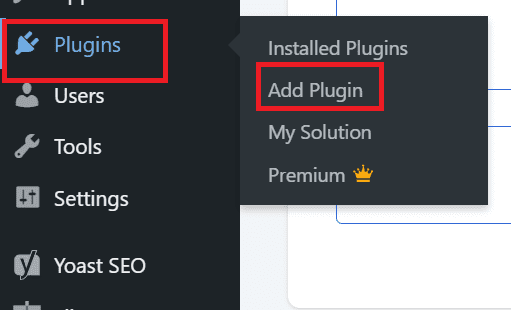
To start customizing, navigate to your WordPress admin dashboard and select Plugins > Add New. From here, you can search for and install tools that help you manage your digital products or create a more professional storefront tailored to your brand.
You can also use inbuild Gutenberg editor for easy block designs. This interface allows you to build complex pages by simply adding individual content elements, eliminating the need for complex coding.
Blocks provide an intuitive way to customize layouts specifically for your digital download store. You can easily insert, drag and drop different blocks to highlight your passive income products:
- Media & text blocks: Display high-quality previews of your digital goods alongside persuasive descriptions.
- Button blocks: Create prominent “Buy Now” or “Download” calls-to-action to improve conversion rates.
- Column blocks: Organize your site layout to compare different pricing tiers or product versions side-by-side.
- File blocks: Provide direct access to downloadable assets for your customers in a clean, organized manner.
Using these blocks, you have complete creative control over every page, ensuring your storefront is optimized to sell digital downloads and generate passive income efficiently.
Read more: WordPress Admin Dashboard: Tips for Effective Management
Step 9. Test and launch your store
It’s important to test your website before it goes live. For example, you can make a mock purchase. This allows you to verify that the payment process and product delivery mechanism work seamlessly.
You can also test other elements affecting your website’s user experience, such as page loading speeds or responsiveness across different devices.
Once you’ve rectified all issues, you can start selling products digitally.
Also read: 8 Quick Tips On How To Improve Website User Experience
If you already have a store and feel the hosting is not performing well, we at Bluehost offer you 99.99% uptime with scalable plans for your growing business.
https://www.youtube.com/watch?v=VSXGkQt1Iqs
Now that you have learned how to set up an online store with Bluehost, it’s time to understand where can you sell digital products online?
Which platforms to choose for selling digital downloads?
Choosing the right platform to sell digital products online impacts your control, branding and revenue. Here are the top options:
- Your own website: Hosting your store with Bluehost allows full ownership, no marketplace fees and complete customization. It’s ideal for long-term growth.
- Online marketplaces: Platforms such as Etsy, Gumroad and Creative Market offer access to established buyer audiences but involve transaction fees and restricted flexibility. These can be integrated with your site to help you sell digital downloads across multiple channels.
- Course and membership platforms: Tools like Teachable, Podia and Kajabi are specifically designed for selling online courses and memberships. However, hosting your own membership site on Bluehost with WooCommerce Memberships gives you significantly more control over your content and revenue streams.
A self-hosted WooCommerce store on Bluehost is a highly scalable solution for entrepreneurs. This all-in-one platform allows you to sell digital downloads directly to your audience, establish your own pricing models and avoid the limitations and fees found on third-party marketplaces.
Why sell digital downloads using WordPress?
According to W3 Techs research, WordPress is the world’s leading content management system, powering over 43.6% of all websites.
Thanks to several compelling benefits, it’s a top choice for digital creators looking to sell digital files.
Here are some reasons why using WordPress is beneficial for selling digital products:
1. Customizability
WordPress provides extensive customization options, making it easy for you to build a unique website.
With a vast selection of themes, plugins and templates, you can design sales pages that align perfectly with your branding and enhance the customer experience from browsing to checkout.
2. User-friendliness
WordPress is known for its user-friendly interface, making it accessible even to beginners.
Setting up your own website to sell digital products is straightforward, regardless of your technical skill level.
Thanks to WordPress’s simple setup for profitable digital products and management, customers can quickly download purchased files.
3. Affordability
The core WordPress software is free. It offers an extensive library of free and cost-effective themes and plugins.
This affordability makes it ideal for creators to start an online business without significant upfront investment.
4. Strong community support
With a vast and active user community, WordPress users can access extensive support resources.
You’ll find solutions, advice and resources from the WordPress community if you encounter any issues.
This support can help you overcome challenges related to sales pages, downloadable files or customer data management.
Fix WordPress issues faster with expert guides
Help CenterNow that you understand the advantages of using WordPress to sell digital files, you can launch your online business and empower customers to download your creations seamlessly.
What are the best tips to sell digital downloads online?
To sell digital downloads online requires more than just setting up a store. Having the right strategies in place will maximize sales and expand your business.
1. Effective pricing strategy
Pricing your digital goods right on the web ensures profitability yet brings in buyers. Here are some strategies to consider:
2. Value-based pricing
Determine your prices based on the perceived value and the specific problems your digital downloads solve for the customer, rather than just the time spent creating them.
3. Tiered pricing and bundles
Offering multiple price points or grouping related products into a single bundle can increase your average order value and provide better options for different customer segments.
4. Promotions and discounts
Strategic use of limited-time discounts and seasonal promotions can create a sense of urgency, encouraging customers to complete their purchase of your digital products.
5. Digital marketing tactics
Marketing is crucial for all businesses, whether on the field or digital. Here are some pointers to consider for your online business:
6. Content marketing
Develop high-quality blog posts, guides or videos that showcase your expertise and naturally lead prospects toward your digital downloads.
7. Social media and influencer marketing
Utilize social platforms to build a community and collaborate with influencers who can introduce your digital products to an established, trusting audience.
8. SEO and paid advertising
Optimize your product pages for search engines and invest in targeted paid ads to drive consistent, high-intent traffic to your storefront.
9. Strategic email marketing
Build an email list to nurture leads and provide ongoing value, making it easier to sell digital downloads to a loyal audience over the long term.
Keep an eye out for Google trends and keep your search engine optimization on point to enhance your marketing tactics. This ensures that your strategy helps build strong lead magnets for the successful sales of digital products.
Final thoughts
Digital products are a goldmine for those with the right skills and tools. You can break into this booming market by following the steps outlined in this guide.
While a high-demand product is vital for profitability, you need a solid foundation to become successful as an online entrepreneur. That foundation starts with reliable hosting, a flexible eCommerce platform and a secure system for delivering your digital downloads to customers.
Bluehost WooCommerce hosting gives you exactly that, combining ease of use with the scalability needed to grow your digital product sales over time. As your audience expands, you can layer in email marketing, SEO and strategic promotions to compound your passive income streams.
The key is to start with a well-structured store, focus on delivering genuine value through your digital products and consistently refine your approach based on customer feedback and sales data. Let’s get your journey started.
Find your perfect plan
📋 View PlansFAQs
Yes! Set up multiple currencies and payment options in WooCommerce to reach a worldwide audience.
Use value-based pricing, tiered pricing or bundles to attract buyers. Running limited-time discounts can also boost sales.
To create a digital product, identify a market need and conceptualize a digital product idea that meets that need. Next, allocate time to develop the product. Finally, create an effective marketing strategy that drives conversions and gives you a competitive edge.
The primary challenge in selling digital products online is the potential for piracy and unauthorized sharing. Once downloaded, some digital products can be redistributed without your consent, hurting sales and profitability.
Common formats include PDF, PNG, JPG, ZIP, MP3, MP4 and PSD files.
No. Marketplaces allow you to sell downloads without a website, but having your own site gives more control over branding and pricing.


Write A Comment