 ChatGPT,
 Claude,
 Gemini,
 Grok — all four for

Key highlights
- Understand what Moodle LMS is and how its open-source framework powers virtual classrooms.
- Explore core Moodle features including course creation, automated quizzes, themes and plugins.
- Compare self-hosted Moodle on VPS hosting against MoodleCloud SaaS and shared hosting.
- Learn the setup and installation options for deploying Moodle via cPanel or manual SSH.
- Discover why Bluehost VPS delivers the dedicated RAM, CPU and NVMe speed required for Moodle.
Managing an online course platform can quickly become overwhelming when proprietary Learning Management Systems impose strict user limits and high monthly fees. Moodle LMS offers a powerful, open-source alternative that gives educators, universities and businesses complete control over their virtual classrooms.
This guide explains what Moodle is. It, breaks down its core LMS features and compares self-hosted VPS, shared hosting and SaaS deployment options. The aim of this article is to help you choose the best setup for your growing academy.
Moodle at a Glance
| Feature | Details |
| Software Type | Open-source Learning Management System (LMS) |
| License | GNU General Public License (GPL) |
| Programming Language | PHP |
| Database | MySQL or MariaDB |
| Web Server | Apache or Nginx |
| Best For | Schools, universities, businesses, online academies |
| Hosting Options | Shared Hosting, VPS, Dedicated Server, MoodleCloud |
| Recommended Hosting | VPS for growing learning platforms |
To make the right hosting decision later, you first need a clear picture of how Moodle works under the hood.
What is Moodle LMS and how does it work?
Moodle is a free, open-source Learning Management System that allows educators and organizations to create, deliver and manage online learning experiences. Because it is open source, you can customize the platform, install plugins and retain complete ownership of your course data.
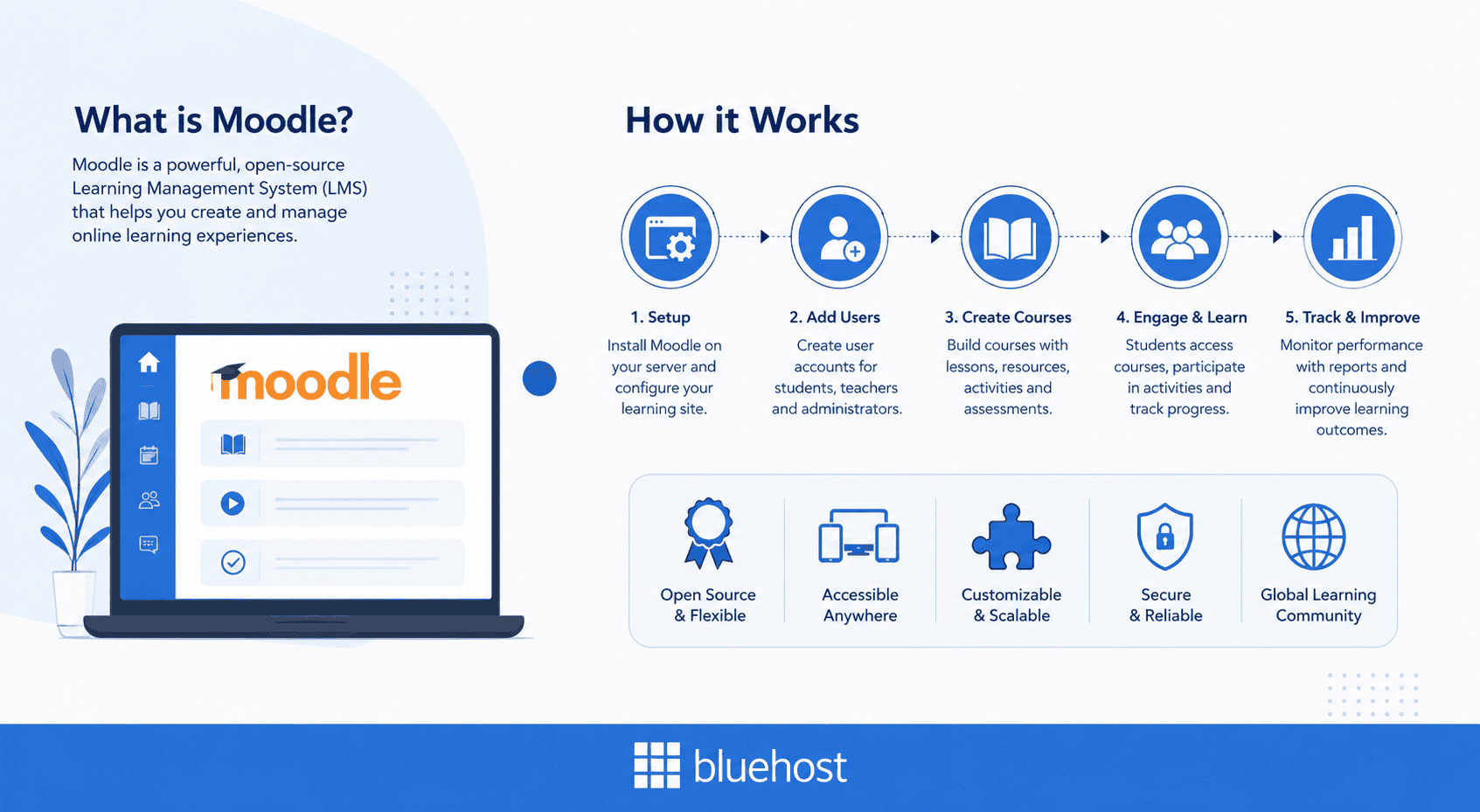
How Moodle works?
The platform runs on web servers using PHP and a MySQL or MariaDB database backend. This architecture allows course creators to customize learning workflows for any class size or industry.
School districts build elementary reading hubs, while global corporations host compliance portals for thousands of workers. Independent instructors also launch paid membership courses without giving up per-student transaction fees to proprietary platforms.
Self-hosting Moodle gives administrators complete freedom to modify source code, install add-ons and control security settings. You maintain full privacy over student records, assignment submissions and grade books.
SaaS learning management systems often restrict user seats, lock down files and impose monthly usage caps. In contrast, open-source Moodle scales according to your server capacity without artificial software restrictions.
Also read: What is Moodle? A Complete Overview
Understanding Moodle’s underlying software architecture helps explain why its core tools offer such exceptional educational flexibility.
What key features make Moodle a powerful LMS?
Moodle’s modular architecture is engineered specifically for active learning, corporate skill building and remote education. Its modular design lets administrators enable or disable functional plugins based on teaching requirements. Rather than forcing a rigid layout, Moodle adapts to diverse teaching styles and curriculum structures.
| Feature | What it does |
| Course Builder | Organize lessons into structured learning paths |
| Quiz Engine | Create quizzes with automatic grading |
| Gradebook | Track learner performance |
| User Roles | Assign permissions to teachers, students and administrators |
| Plugins | Extend functionality with thousands of add-ons |
| Themes | Customize your learning portal’s appearance |
| Reports | Monitor student progress and course completion |
The platform organizes its tools into three primary categories: course management, student assessment and site customization. Together, these tools allow instructors to deliver engaging learning paths while tracking student achievement in real time.
1. Course management and interactive learning tools
Moodle provides robust course organization tools that give educators full control over lesson delivery and student permissions. Course managers can build structured learning paths using interactive modules and multimedia content.
Core course management features include:
- Granular user role management: Assign distinct permissions to teachers, students, course creators, teaching assistants and site administrators.
- Interactive learning workflows: Support file submissions, peer-reviewed assignments, discussion forums and embedded video or audio content.
- Global content standards: Enable SCORM and AICC compliance alongside native translation support for over 100 languages.
These flexible administration options help schools and businesses run international training programs smoothly.
2. Quizzes, automated grading and assessment tracking
The Moodle quiz engine supports multiple assessment formats, including:
- Multiple-choice questions
- Matching questions
- Short-answer questions
- Essay questions
- Drag-and-drop activities
- Randomized question banks
Automatic grading saves instructors significant time while built-in analytics help monitor learner progress.
Large online exams can generate heavy database activity. For high-concurrency environments, dedicated VPS resources help maintain consistent performance during peak usage.
3. Extensive plugin directory and custom theme customization
Site administrators can expand Moodle capabilities using over 2,000 free community add-ons. The official plugin directory includes tools for gamification, attendance tracking, web conferencing and advanced reporting. You can easily connect external platforms like Zoom, Kaltura or H5P to enrich student participation.
Custom themes allow course creators to apply unique colors, logos and layouts to their learning portals. You can modify CSS files directly to match corporate branding without paying extra developer fees. Explore our curated guide on the best Moodle themes and templates to discover top visual layouts for your online academy.
Having the right features is essential, but choosing the right hosting environment determines how reliably those tools perform.
What are the main hosting options for Moodle LMS?
While Moodle software is completely free, your choice of hosting infrastructure dictates site performance and user capacity. A weak server leads to slow page loads, database timeouts and crashes during student login spikes.
Course creators can review our guide on the best Moodle hosting providers to compare server configurations for online academies. Weighing self-hosted options against SaaS plans helps you choose the right path for your growing school.
Self-hosted Moodle vs MoodleCloud SaaS hosting
Comparing self-hosted Moodle with MoodleCloud SaaS hosting reveals clear trade-offs in flexibility and long-term cost. MoodleCloud offers quick setup but imposes strict student limits, file storage caps and code restrictions. Self-hosting provides complete administrative freedom, unlimited user growth and fixed server costs as your academy scales.
| Feature | Self-Hosted Moodle (VPS) | MoodleCloud SaaS |
| User Capacity | Unlimited student accounts | Strict account caps (50 to 1,000 users) |
| Plugin & Theme Freedom | Full directory access and custom uploads | Standard plugins only; no custom code |
| Storage Limits | Scalable server disk space | Capped disk storage (400 MB to 5 GB) |
| Cost Structure | Predictable monthly server pricing | Tiered pricing scaling by user tiers |
| Server Access | Full root access for custom PHP tuning | No server or file system access |
As student enrollment grows, MoodleCloud SaaS pricing escalates rapidly while forcing strict functional limitations. In contrast, self-hosting on a Virtual Private Server keeps your monthly expenses predictable regardless of student volume. You retain total control over student data without facing abrupt account upgrades or feature lockouts.
Moodle on shared hosting vs VPS hosting
Many course creators start on shared hosting because of low initial costs. However, shared servers distribute CPU cores and memory among hundreds of unrelated websites.
When multiple students log in simultaneously to submit assignments, shared memory limits cause severe site slowdowns. Read our detailed breakdown on shared hosting vs VPS for Moodle to understand how resource contention affects course delivery.
What a VPS changes?
Virtual Private Server hosting solves these bottlenecks by providing dedicated RAM and isolated CPU cores. Dedicated hardware resources prevent database crashes during high-concurrency quiz submissions and final exam windows.
Fast NVMe SSD storage accelerates database queries, while reliable background cron execution handles automated grading. Review our specialized strategy guide on Moodle VPS for high-concurrency exams to prepare your server for peak exam windows.
Once you understand the ideal hosting environment for Moodle, the next step is deploying the software onto your server.
How do you set up and install Moodle on a web server?
Deploying Moodle requires meeting specific core server specifications for reliable performance. Your web server needs Apache or Nginx, PHP with required extensions and a MySQL or MariaDB database. Required PHP extensions include gd, mbstring, xml, curl, zip and intl for full feature compatibility.
Once your server environment meets these prerequisites, you can choose between two primary installation methods. Beginners usually prefer cPanel auto-installers, while experienced administrators often select manual SSH command-line setups.
One-click installer setup via cPanel
Using an automated script installer simplifies Moodle installation into a fast graphical workflow.
- Step 1: Access the Softaculous installer: Log in to your cPanel dashboard and open the Softaculous app installer tool.
- Step 2: Configure installation settings: Select Moodle, pick your domain directory and enter admin credentials and database settings.
- Step 3: Complete automated setup: Click install to finish setup and log into your Moodle control panel.
Also read: Moodle Installation and PHP Versions
Manual installation via SSH and MySQL setup
Manual installation over SSH provides maximum control over database configurations, file paths and security permissions.
- Step 1: Prepare server files and database: Download official Moodle files and create a MySQL database with full privileges.
- Step 2: Upload files and secure directories: Extract Moodle files to your web root and create a moodledata folder.
- Step 3: Execute setup wizard and cron: Run the web installer in your browser and schedule background cron jobs.
Choosing a hosting provider that supports both automated script installs and root SSH access ensures a seamless setup process.
Why choose Bluehost VPS for self-hosted Moodle?
Running Moodle efficiently requires consistent server resources, especially during periods of heavy student activity.
Bluehost VPS provides dedicated CPU, memory and NVMe storage that help keep courses, quizzes and student dashboards responsive as your learning platform grows.
Why Bluehost VPS is well suited for Moodle:
- Dedicated CPU and memory: Isolated resources help maintain consistent performance during student logins, quizzes and other high-traffic periods.
- Fast NVMe storage: High-speed NVMe SSDs accelerate database queries, course loading times and file access for a smoother user experience.
- Full root access: Install custom Moodle plugins, optimize PHP settings, fine-tune your database and configure the server to match your deployment requirements.
- Flexible scalability: Start with the resources you need and upgrade as your courses, users and content library grow.
- Self-managed flexibility: Deploy Moodle your way using cPanel, SSH, Docker or your preferred Linux environment.
Also read: Purchase a Self-Managed VPS with Moodle Installation
Whether you’re building an online classroom, employee training portal or educational platform, Bluehost VPS gives you the flexibility and performance to self-host Moodle with confidence.
Ready to launch your Moodle site?
Moodle is a powerful open-source learning management system that gives educators, businesses and organizations the flexibility to build and manage online learning experiences without software licensing fees. Its extensive customization options, plugin ecosystem and scalability make it a popular choice for everything from small training portals to large educational platforms.
While you can run Moodle on shared hosting for smaller deployments, growing learning environments often benefit from the dedicated resources and server control that a VPS provides. Choosing the right hosting infrastructure helps ensure consistent performance as your courses, users and content expand.
If you’re planning to self-host Moodle, Bluehost Self-Managed VPS offers the dedicated resources, root access and scalability needed to build a reliable learning platform that can grow with your needs.
FAQs
Moodle is an open-source Learning Management System (LMS) used to create, manage and deliver online courses. Schools, universities, businesses and training organizations use Moodle for virtual classrooms, employee onboarding, certification programs and blended learning.
Yes, Moodle is free and open source under the GNU General Public License (GPL). You can download, install and customize the software without paying licensing fees. However, you’ll need web hosting and a domain name to make your Moodle site accessible online.
Yes, you can run Moodle on shared hosting for small learning portals or testing environments. However, if you expect multiple concurrent users, large course libraries or frequent online assessments, a VPS offers dedicated resources for more consistent performance and scalability.
Moodle requires a web server such as Apache or Nginx, a supported version of PHP with the necessary extensions and a MySQL or MariaDB database. For growing learning platforms, VPS hosting provides the dedicated CPU, memory and storage needed to support higher user activity.
A VPS provides dedicated CPU, memory and storage, helping Moodle handle concurrent users, online quizzes and multimedia course content more efficiently than shared hosting. It also gives you full control over server configurations, plugin installations and performance optimization.
Yes. If you self-host Moodle on a VPS, you can install custom themes, plugins and integrations to tailor your learning platform. This flexibility makes it easy to add features such as attendance tracking, video conferencing and advanced reporting.
You can install Moodle using the Softaculous one-click installer in cPanel or perform a manual installation through SSH for greater control over your server configuration. Both methods allow you to deploy and manage a self-hosted Moodle environment on Bluehost VPS.
Yes. Moodle is designed to scale from small classrooms to large educational and corporate training platforms. As your user base and course content grow, upgrading to a VPS with additional CPU, memory and storage helps maintain reliable performance and a smooth learning experience.

Write A Comment