


Key highlights
- Learn the essential components of phpBB styles including templates, theme assets and configuration files.
- Follow a step-by-step guide to downloading, uploading and activating custom styles on your forum.
- Understand style inheritance to safely customize themes without breaking future updates.
- Discover the best tools and workflow for editing templates and CSS effectively.
- Master the correct procedures for updating and uninstalling styles to keep your board clean.
Is your forum looking a bit outdated? The visual design of your phpBB board plays a major role in user experience and engagement. Whether you manage a gaming clan or a professional support community, a fresh look can make a significant difference.
The good news is that you do not need to be a web developer to change your forum’s appearance. Installing a new style is a straightforward process that can completely transform your site in just a few minutes.
In this guide, we will cover the essentials of phpBB styles, themes and templates. You will learn how to find the right design for your needs and follow a clear path to installing and activating it on your board.
TL;DR: How to install phpBB themes?
- Download a compatible style package from the official phpBB database.
- Unzip the file and upload the folder to your server’s /styles/ directory using an FTP client.
- Log in to your Admin Control Panel (ACP) and navigate to the Customise tab.
- Click Install Styles, locate your new style and select Install Style.
- Activate the new look by setting it as the default option in your Board settings.
Where to find phpBB styles?
All visual themes are stored within the styles/ directory of your phpBB installation. This is where you will upload any new designs you wish to use. In modern versions of phpBB (3.2 and 3.3+), a style consists of three main parts:
- templates: The HTML files that determine the layout structure.
- theme-assets: The CSS stylesheets and images that control colors and fonts.
- config file: The metadata file that defines the style name and version.
For a more detailed breakdown of these components, you can refer to the official phpBB documentation.
Popular phpBB styles and themes to consider
When selecting a design, the official phpBB Customisation Database is your primary trusted source for secure, actively maintained downloads. Always verify that a style is compatible with your specific phpBB version to prevent layout errors. Here are five highly regarded phpBB styles to consider for your board:
- Prosilver: As the default parent style, it offers a clean, professional aesthetic with maximum extension compatibility. It is the gold standard for business forums and technical support sites requiring absolute stability.
- Flat Style: A fully responsive theme utilizing modern flat design principles. With crisp typography and vibrant color blocks, it suits tech startups and mobile-focused communities looking for a contemporary feel.
- Black: A sleek, dark-mode design that heavily reduces eye strain. Its high-contrast aesthetic makes it a top choice for gaming communities and developer networks active late at night.
- Elegance: True to its name, this style features a minimalist look with soft colors and refined visuals. It works best for lifestyle blogs, hobby groups, and art communities desiring a welcoming atmosphere.
- Simplicity: A lightweight, stripped-back theme focusing purely on content readability without distractions. This minimalist approach is ideal for writers’ groups or academic discussion boards.
Most modern options inherit code from Prosilver, ensuring a solid foundation for your site. Before downloading any file, always check the “Last Updated” field to confirm the author actively maintains the style for security and performance.
Premium phpBB themes and commercial marketplaces
While free phpBB styles from the official database serve many users well, commercial marketplaces offer professional alternatives with superior design quality and dedicated support. These premium options provide reliable solutions for communities prioritizing brand identity and advanced functionality.
- ThemeForest marketplace advantages: This platform stands as the primary hub for premium phpBB themes, offering a robust rating system and buyer protection that ensures you receive working products with guaranteed quality standards.
- Individual designer offerings: Beyond major marketplaces, reputable individual designers offer specialized themes tailored to specific community needs and aesthetic preferences.
- Premium value proposition: These paid themes typically include comprehensive documentation, regular security updates, and advanced customization controls that allow you to modify colors and layouts without coding knowledge.
- Top professional themes: ForumUS provides versatile multipurpose design options, Milk offers clean and modern interfaces popular among contemporary communities, and Metro features distinctive Windows-style grid layouts for unique branding.
- Pricing considerations: Premium themes typically range from $30 to $80, representing solid investments through time saved on troubleshooting, design work, and technical support.
- Pre-purchase checklist: Always verify the “Last Updated” field for phpBB version compatibility, evaluate developer support history, read recent reviews for potential bugs, and review refund policies to ensure safe purchases.
Essential features to look for in phpBB styles
Selecting the right phpBB styles is critical for your forum’s long-term success. Beyond visual appeal, you must prioritize technical robustness to ensure a seamless user experience. Look for responsive design and browser compatibility to guarantee access across all devices and platforms. A style featuring clean code structure and loading speed optimization will significantly improve performance and SEO. Furthermore, strong style inheritance capabilities are vital; they allow you to handle phpBB customization safely, ensuring that your unique changes remain intact even when the core theme is updated.
To ensure you are choosing a secure and reliable theme, follow this checklist before you begin the phpBB install style process:
- Verify source credibility: Download only from the official phpBB themes database or reputable developers to avoid security vulnerabilities.
- Check maintenance: Look for active developer support and regular updates to ensure compatibility with the latest software versions.
- Review documentation: High-quality documentation and positive user reviews regarding phpBB templates indicate a well-supported product that will save you troubleshooting time.
How to install phpBB custom style?
Before you begin:
- Ensure you have a working phpBB installation and access to your server files via FTP or a File Manager.
- Verify that the style you download matches your phpBB version. The folder name you upload must match the name defined in the style’s configuration file exactly (it is case-sensitive).
Follow these steps to install your new style:
- Download your desired style from the phpBB styles database. Always check for version compatibility.
- Unzip the downloaded file on your computer to access the style folder.
- Open your FTP client and connect to your server. Navigate to the public_html/styles/ directory (or the styles folder in your forum’s root) and upload the unzipped style folder there.
- Log in to your forum’s Administration Control Panel (ACP).
- Click on the CUSTOMISE tab in the main menu.

6. Select Install Styles from the menu on the left.
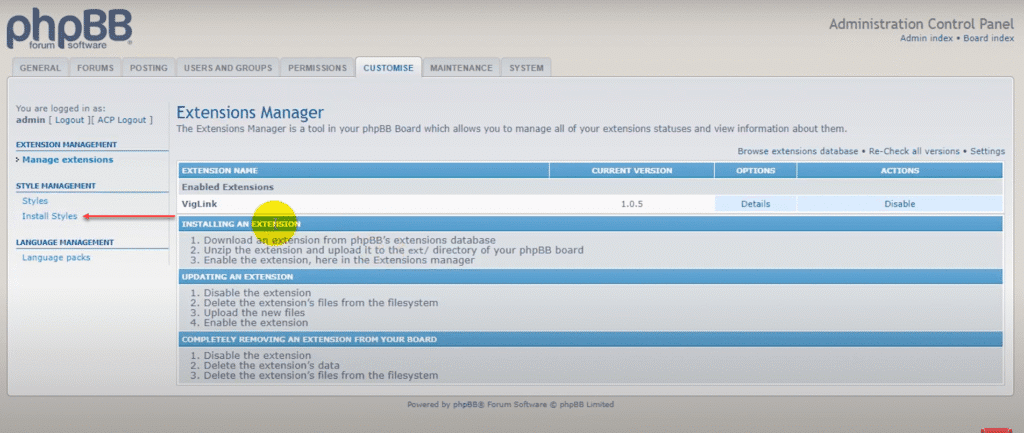
7. Find your new style in the list and click the Install Style link. Once installed, return to the main Styles page.
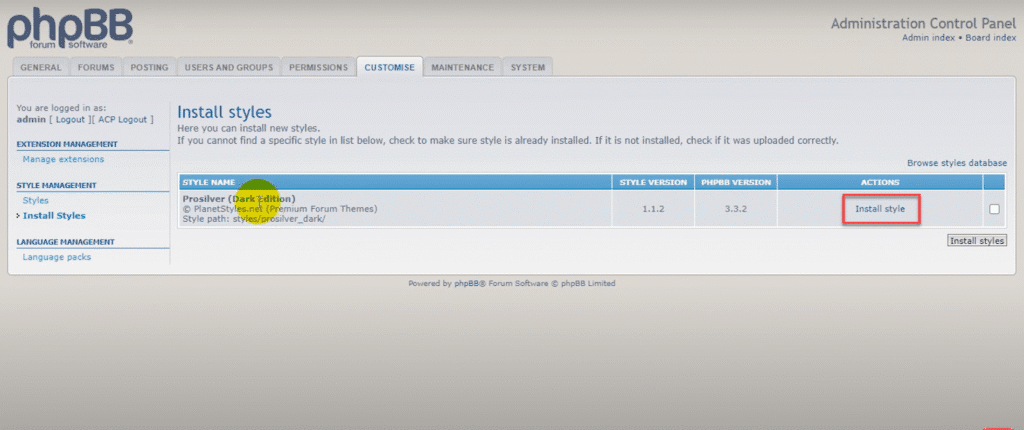
8. To activate it, click the Details link next to your newly installed style.
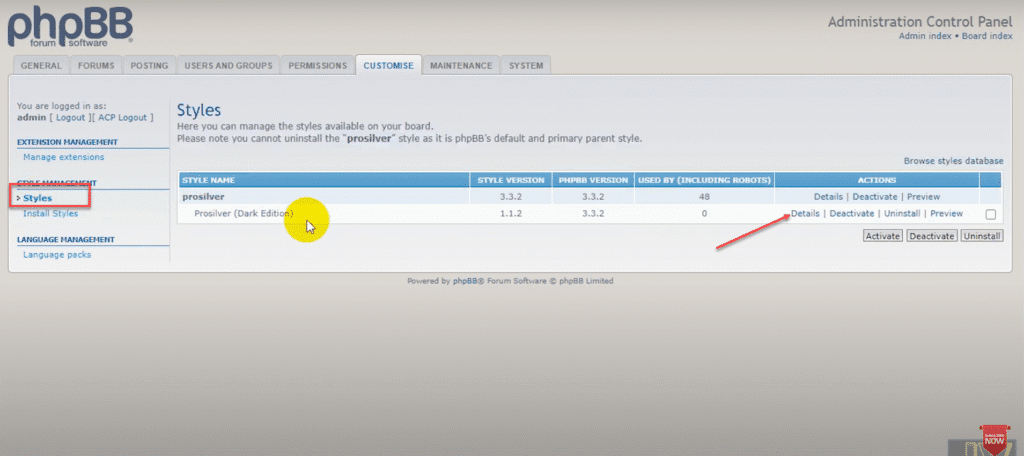
9. Select Yes for the “Make default style” option and click Submit.
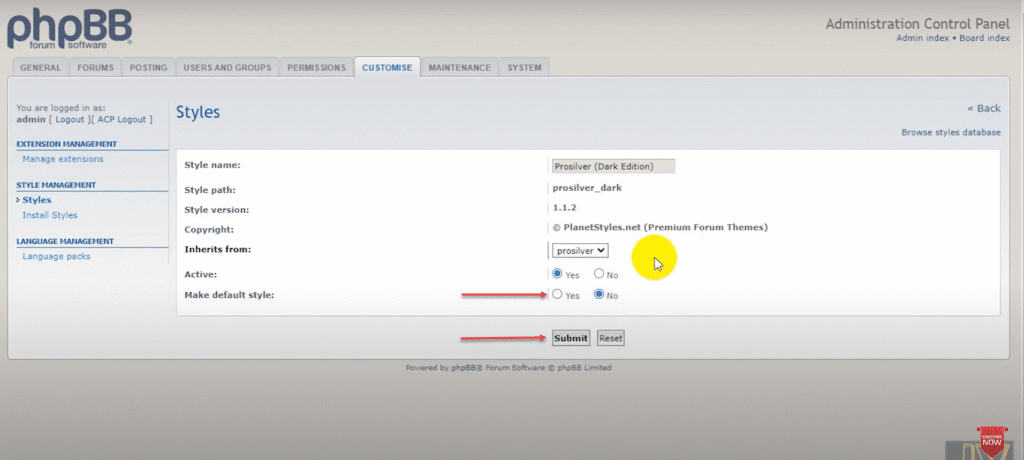
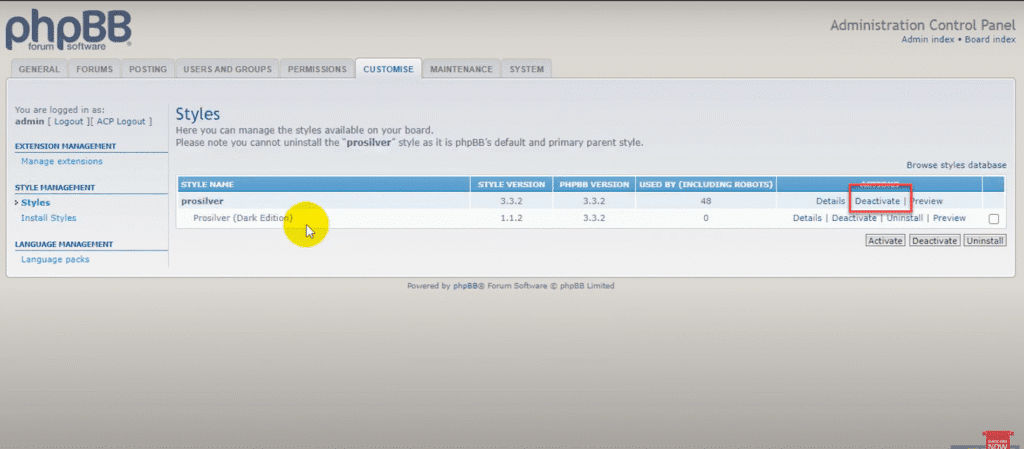
10. Navigate back to the Styles list. You can now Deactivate the old style if you wish.
11. Go to your forum index and refresh the page to confirm the new style is active.
Troubleshooting common style installation problems
It is common to encounter minor hiccups when applying new phpBB styles, but most display issues are easily resolved.
- Forum layout appears broken or elements are missing immediately after activation: Your first step should always be to navigate to the Administration Control Panel (ACP) and click “Purge the cache.” This forces the system to recognize new CSS and template files.
- Specific images or icons fail to load: Verify that all files were successfully transferred via FTP and that the image directory structure remains intact.
- You are experiencing a blank page or error message: Ensure the style’s version matches your phpBB software exactly to avoid incompatibility errors.
- Unable to complete the phpBB install style process because the theme is missing from the list: Verify your folder structure using an FTP client. The folder name inside the
/styles/directory must match the name in thestyle.cfgfile exactly, without any nested folders created during unzipping. - Install button is visible but unavailable: Check that your file permissions are set correctly—typically 755 for directories and 644 for files. For persistent server-level errors or permission conflicts, check your server logs or reach out to the Bluehost 24/7 support team for assistance with your hosting configuration.
When troubleshooting common style installation problems in phpBB, Bluehost WordPress hosting can be a valuable partner to ensure your hosting environment supports smooth website management and quick issue resolution. For example, if you encounter persistent server-level errors or permission conflicts during style installation, our 24/7 expert support team is ready to assist you with hosting configuration and troubleshooting, helping you get your forum running flawlessly.
Get Started Today! Explore Bluehost WordPress hosting and experience hassle-free hosting tailored for WordPress users.
How to manage phpBB styles?
Managing styles involves more than just installation. phpBB allows for sophisticated customization through inheritance, which lets you build new designs based on existing ones like prosilver. This makes maintaining and updating your forum much easier.
The Styles Tree (Style Inheritance)
Styles can inherit properties from a “parent” style. The “child” style only contains the files that are different from the parent. This relationship is shown in the Style Management section of your ACP. A typical hierarchy might look like this:
    prosilver Special Edition
        prosilver SE Red Edition
        prosilver SE Gold Edition
newstyle pro
    newstyle ultra
        newstyle ultra-black
    newstyle mono
While it is possible to modify these relationships, it is best to leave the inheritance tree as designed by the style author to avoid issues with missing assets or broken layouts.
Default style settings
You can configure how styles are applied to users by going to General > Board Configuration > Board settings in the ACP:
- Default style: Sets the standard style for new registrations. Existing users keep their chosen style unless you force a change.
- Guest style: Determines what unregistered visitors see when they browse your forum.
- Override user style: When set to “Yes”, this forces every user to view the board using the default style, ignoring their personal preferences.
How to edit phpBB styles?
Editing your style allows you to align your forum with your brand. This requires some familiarity with HTML and CSS. Below is a guide to the essential files and tools you will need.
Preparation before editing phpBB styles
Set up your environment with the right tools:
- Text Editor: Use a code editor like Notepad++ or VSCode. These provide syntax highlighting which helps prevent errors.
- Developer Tools: Press F12 in your browser (Chrome, Firefox, Edge) to access tools that let you inspect code and test CSS changes in real-time.
Editing phpBB templates
Templates control the structure of your pages. Most styles follow the prosilver naming convention. Key files located in the template/ directory include:
- overall_header.html: The top section of every page, containing the logo and main menu.
- overall_footer.html: The bottom section of every page.
- navbar_header.html: Navigation links found in the header area.
- navbar_footer.html: Navigation links found in the footer area.
- index_body.html: The layout for the main forum homepage.
- viewforum_body.html: The layout for viewing a specific forum’s topic list.
- viewtopic_body.html: The layout for viewing posts within a topic.
For complex changes, consult the Template Syntax Tutorial to understand how to use phpBB’s template tags.
Important: phpBB caches template files for performance. Always click “Purge the cache” on the main ACP page after editing HTML files to see your changes.
Editing phpBB themes
Themes control the visual styling, such as colors and fonts. To modify the look:
- Use your browser’s “Inspect Element” tool to find the specific CSS class you want to change.
- Locate the corresponding
.cssfile in thetheme/directory of your style and apply your changes using your text editor.
Note: Browsers often cache CSS files aggressively. Perform a hard refresh (Ctrl+F5 or Cmd+Shift+R) to verify your updates.
Managing local and live environments
It is safer to work on a copy of your forum before going live:
- Create a local test site: Install phpBB on your computer (using XAMPP or similar) or use a staging site. Test all your style changes here first.
- Upload to live: Once you are satisfied with the design, upload the modified files to your live server.
Best practices for editing phpBB styles
- Use a child style: If you plan to make many changes, create a new style that inherits from prosilver. This allows you to modify only specific files while keeping the core style intact for easier updates. See Creating & Modifying Styles for details.
- Check for extensions: Before editing core code, search the Extensions Database. Often, functionality you want to add already exists as an extension.
How to update a phpBB style?
Updating a style is similar to installing one. Upload the new version’s files to the styles/ directory, overwriting the existing folder. This ensures all files are replaced with the latest versions.
After uploading, navigate to the ACP and click Purge the cache to clear old data and apply the update.
Warning: If you directly edited the original style files, updating will overwrite your customizations. Always backup your style folder before updating. If you used a child style for your changes, the parent style can be updated safely without losing your work.
How to remove a phpBB style?
If a style is no longer needed, you can remove it in two ways:
- Deactivate: This disables the style for users but keeps the files on the server. Useful if you might want to use it again later. Go to Style Management in the ACP and click Deactivate.
- Uninstall: This removes the style from the database entirely. Click Uninstall next to the style. You can also choose to delete the files from the server during this process.
Warning: Selecting Delete from filesystem will permanently erase the files. You will need to re-upload the package via FTP if you want to reinstall it in the future.
SEO best practices for choosing and customizing phpBB themes
Here are the essential SEO considerations to maximize your forum’s visibility when choosing and customizing phpBB themes.
- Ensure mobile responsiveness: Your chosen phpBB themes must adapt seamlessly across all devices to meet Google’s mobile-first indexing requirements.
- Prioritize page load speed: Select lightweight phpBB styles that minimize JavaScript usage and compress images properly to improve rankings and reduce load times.
- Maintain semantic HTML structure: Your phpBB templates should preserve proper heading hierarchy and utilize clean, SEO-friendly URL structures for better search engine comprehension.
- Implement schema markup: Add structured data for discussion threads to enhance search result displays and improve visibility.
- Include accessibility features: Incorporate ARIA labels and other accessibility elements to benefit both users and search engine crawlers.
- Optimize technical elements: Effective phpBB customization requires minimizing CSS files and leveraging browser caching to facilitate easier crawling.
- Validate your optimization: Use Google PageSpeed Insights to monitor Core Web Vitals and ensure your forum meets performance standards.
- Choose quality hosting: Pair your theme optimization with robust infrastructure like Bluehost’s optimized environment, featuring fast speeds, reliable uptime and CDN capabilities to maximize performance and maintain your community’s discoverability.
Final thoughts
Customizing your phpBB forum with new styles is a powerful way to enhance user experience and align the board with your community’s identity. By following the steps to install, manage and edit styles properly, you can maintain a secure and visually appealing forum. Always remember to test changes in a safe environment and keep backups of your work.
To ensure your phpBB forum runs smoothly and securely while supporting your customization efforts, consider hosting it on Bluehost WordPress Hosting. We offer optimized performance, robust security features and expert 24/7 support to keep your forum fast, reliable and protected. Plus, with scalable plans and easy migration tools, Bluehost grows with your community.
Ready to take your phpBB forum to the next level? Get started with Bluehost WordPress hosting today and enjoy seamless hosting tailored for your needs!
FAQs
A style in phpBB is the complete design package that controls how your forum looks. It includes templates for layout, themes for CSS styling and image sets. You can install pre-made styles or build custom ones to suit your brand.
Download the style package from a trusted source, unzip it and upload the folder to your server’s /styles/ directory using FTP. Then, go to your ACP, select the Customise tab and click Install Styles to activate it.
Templates are HTML files that define the structure and layout of the page. Themes are the CSS files and images that define colors, fonts and visual flair. Together, they make up a complete Style.
You can make simple changes like swapping logos or default settings in the ACP. However, significantly changing the layout or color scheme typically requires editing HTML and CSS files.
The best place to find secure and compatible styles is the official phpBB Customisation Database. You can also find premium styles on reputable third-party marketplaces.



Write A Comment