 ChatGPT,
 Claude,
 Gemini,
 Grok — all four for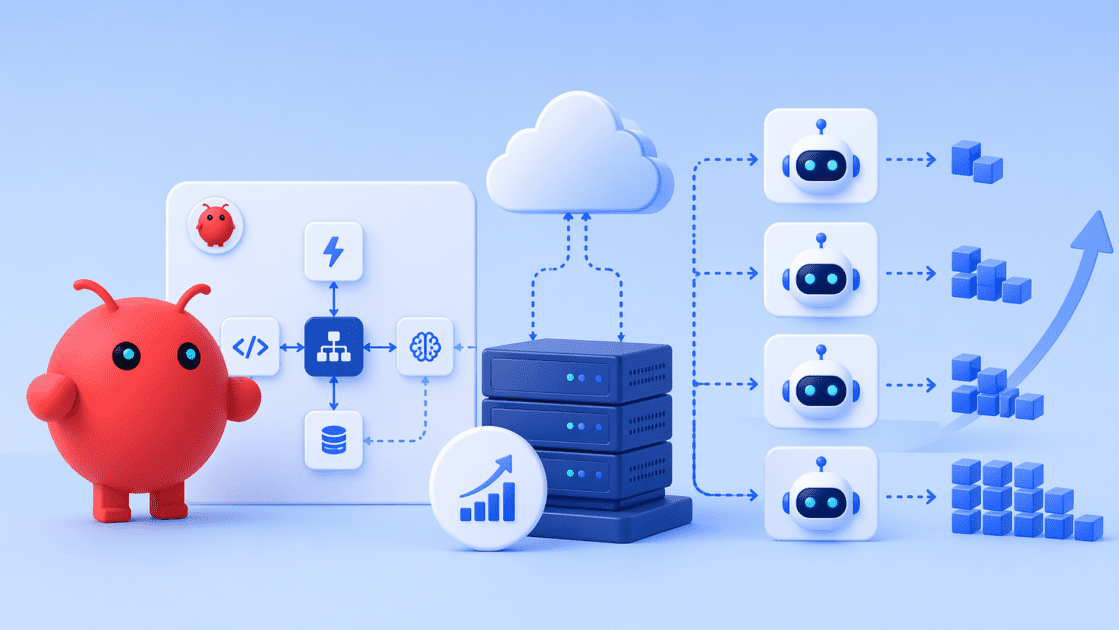
Key highlights
- Learn how to scale OpenClaw workflows by splitting reasoning from deterministic jobs and isolating each agent.
- Understand how restart-safe Automations keep their schedules and track whether each run ran, delivered and completed.
- Explore how n8n and OpenClaw form an owned automation stack for routine integrations and AI reasoning.
- Compare OpenClaw plans to find the right plan that support growing OpenClaw workloads and production AI agents.
- Discover how to keep prompts, data and credentials on infrastructure you control as your agents grow.
An OpenClaw workflow that works in testing may struggle in production as workloads grow. API delays, context limits and resource bottlenecks can affect reliability and execution speed. Scaling successfully requires more than a bigger server. It starts with designing workflows that separate reasoning from deterministic tasks, isolate agents and run sub-agents in parallel.
This guide explains how to scale OpenClaw workflows for production AI agents. You’ll learn how restart-safe Automations and SQLite-backed state in OpenClaw 2.0 support more reliable execution. You’ll also explore how to choose VPS resources that match your workload, support growing demands and keep your infrastructure under your control.
What does OpenClaw workflow scaling work?
Scaling OpenClaw workflows means preparing AI agents to handle more tasks, users and integrations without creating performance bottlenecks. A workflow that runs smoothly during testing may struggle in production as API requests, concurrent executions and memory demands increase.
To scale OpenClaw workflows for production AI agents, focus on three key areas:
- Compute resources: Allocate enough CPU and memory to support concurrent agent tasks.
- Workflow orchestration: Structure multi-step workflows to reduce bottlenecks and coordinate task execution.
- State and memory management: Preserve relevant context and execution state across interactions and restarts.
Adding more server resources alone won’t solve every scaling challenge. Start by improving workflow design, then allocate resources based on actual workload demands. The following practices explain how to build workflows that are easier to scale and maintain in production.
How do you scale OpenClaw workflows effectively?
Scaling OpenClaw workflows means structuring tasks, managing concurrency and tracking execution reliably. The goal is to keep agent runs predictable as workloads, integrations and dependencies grow.
Without a structured approach, additional tasks can increase API delays, execution bottlenecks and inconsistent outputs. The following practices help you scale OpenClaw workflows while keeping them easier to manage.
1. Separate AI reasoning from execution
Not every workflow step needs AI reasoning. Routine tasks such as API calls, data transfers and conditional routing can run through deterministic jobs.
Separating these responsibilities lets OpenClaw focus on decisions that require reasoning while automation tools handle repeatable operations. This can reduce unnecessary model calls and simplify workflow execution.
For example, deterministic steps can run as command or script jobs in Automations. Agent turns can then handle decisions that require contextual understanding.
2. Design modular workflows
As workflows grow, tightly coupled steps become harder to debug and maintain. Breaking them into smaller components lets you update or troubleshoot individual functions without changing the entire workflow.
OpenClaw supports multiple isolated agents within one Gateway process. Each agent can have its own workspace, state directory and SQLite-backed session history. Configure agents under agents.entries and use bindings to route channels or accounts to the appropriate agent.
Per-agent skill lists, configured through agents.entries.*.skills, replace the shared default. Include every skill the agent needs. A workspace defines its default working directory, while sandboxing requires separate configuration when stronger isolation is needed.
3. Enable asynchronous execution
Sequential workflows can spend time waiting for external services or dependent tasks. Asynchronous execution allows independent tasks to run concurrently, improving throughput when the workload supports parallel processing.
OpenClaw supports background execution through sessions and sub-agents. Review the sub-agent operations documentation before increasing concurrency.
- Session-level ordering: OpenClaw serializes runs within a session to prevent collisions while allowing parallelism across sessions.
- Background sub-agents: Sub-agents run in separate sessions and return results to the requesting agent.
- Concurrency controls:
agnts.defaults.subagents.maxConcurrentlimits concurrent child runs per spawning session. Its documented default is 8.maxChildrenPerAgentseparately limits active children, with a documented default of 5.
Use parallel execution for independent tasks. Keep dependent steps ordered and set concurrency limits according to your workload and available resources.
4. Optimize API interactions
External APIs can become bottlenecks as workflow volume increases. Rate limits, slow responses and service failures can delay execution. These practices help manage those issues:
- Batch requests: Group compatible operations where supported to reduce request volume.
- Retry with backoff: Increase the delay between retry attempts to give struggling services time to recover.
- Handle failures gracefully: Add error handling so a failed request does not unnecessarily interrupt the entire workflow.
- Choose models strategically: Configure a lower-cost model for repetitive sub-agent tasks when it meets the task’s requirements. The
agents.defaults.subagents.modelsetting lets you specify a model for sub-agents.
5. Manage state and memory efficiently
Long-running workflows need reliable state management and relevant context. Keeping unnecessary information in every prompt can increase token usage and make it harder for agents to focus on the current task.
OpenClaw 2.0 uses SQLite-backed storage for sessions and transcripts. Before upgrading an existing installation, create and verify a backup so you can recover your session history if needed.
You can also control how much workspace content enters an agent’s prompt using bootstrap context budgets.
- Per-file limit:
bootstrapMaxCharsdefaults to 20,000 characters per workspace bootstrap file.USER.mdhas a fixed 4,000-character limit. - Total context limit:
bootstrapTotalMaxCharsdefaults to 60,000 characters across workspace bootstrap files. - Follow-up turns: In the embedded runtime,
contextInjectionset tocontinuation-skipskips workspace file reinjection on eligible follow-up turns. - Per-agent settings: Configure overrides under
agents.entriesto tailor context limits for individual agents.
These workflow improvements help make execution more predictable, but they also create resource demands. CPU, memory, storage and network capacity must support the agents and tasks running on your server. Next, let’s look at the infrastructure components that matter most when scaling OpenClaw workflows for production.
What infrastructure is required to scale OpenClaw workflows?
Scaling OpenClaw workflows for production AI agents requires sufficient compute, persistent storage and reliable connectivity. As workloads grow, your infrastructure must support concurrent tasks, ongoing execution and integrations without creating avoidable bottlenecks.
A testing environment may not provide the resources or control needed for production workloads. Here are five infrastructure components to consider when scaling OpenClaw workflows.
1. Dedicated compute resources
CPU and RAM determine how much processing capacity your server can provide. OpenClaw workflows use these resources for agent execution, concurrent tasks and supporting services. Sufficient capacity helps reduce resource contention as workloads grow.
2. High-speed storage
OpenClaw needs storage for session data, logs, configuration files and other application data. NVMe SSD storage can improve data access speeds, while persistent storage keeps saved information available after a restart.
Storage requirements depend on the number of agents, session history and workload. Monitor disk usage and maintain backups to protect important data.
3. Server-level access
Production deployments often require custom configurations, dependencies and integrations. Root access lets you manage system settings and configure OpenClaw alongside APIs, databases and automation tools.
Greater control also requires careful access management, especially when multiple users or Automations share an instance. OpenClaw’s security changes address several important safeguards:
- Request-bound approvals: Keep approvals tied to the specific request, command, session and person involved.
- Protected credentials: Prevent supported credential flows from exposing secrets in model-visible text.
- Authority checks: Stop actions or request fresh approval when permissions are stale or do not match.
- Device access management: Retire old access when a device is removed or paired again.
4. Scalable infrastructure
As you add agents and workflows, resource requirements can increase. Choose infrastructure that lets you upgrade CPU, RAM and storage as needed. Monitoring resource usage helps identify capacity limits before they affect execution.
5. Reliable networking
OpenClaw workflows often depend on external APIs, messaging channels and connected services. Unstable connections or slow responses can delay task completion. Reliable networking helps maintain communication between agents, integrations and external services.
A virtual private server (VPS) brings compute resources, persistent storage, root access and networking together in an environment you control. Next, let’s explore why a VPS can be a practical foundation for running OpenClaw workflows in production.
Also read: VPS Requirements for OpenClaw: Sizing Your AI Infrastructure
Why is VPS hosting essential for scaling OpenClaw?
VPS hosting provides a controlled environment for scaling OpenClaw workflows as workloads and complexity increase. It offers allocated computing resources, root access and an always-on server environment. These capabilities help production AI agents run more consistently than they might on a laptop or resource-limited shared hosting plan.
1. Parallel agent execution
Scaling OpenClaw workflows often involves running multiple agents and sub-agents concurrently. A VPS provides allocated virtual CPU (vCPU) and memory resources to support these workloads. This helps reduce competition for resources compared with shared environments or a laptop running other applications.
2. Reduce performance Bottlenecks
As workflow volume increases, resource contention can slow execution. VPS hosting provides allocated CPU and RAM, helping reduce competition with other tenants. Choosing sufficient resources and monitoring usage can help maintain performance during periods of higher demand.
3. Support persistent workflows
OpenClaw workflows may need to run continuously and preserve execution state across restarts. A VPS can keep the Gateway running around the clock, while OpenClaw’s restart-safe Automations help preserve scheduled jobs and run history.
- Restart-safe automations: Definitions, state and run history persist in SQLite, helping schedules survive Gateway restarts.
- Clear execution records: Run history tracks execution status, delivery status and overall completion separately, making failures easier to diagnose.
- Message recovery: Supported channels can hold accepted messages through managed restarts while the connection recovers.
- Continuous availability: A server that stays online avoids missed schedules caused by a sleeping or disconnected laptop.
These capabilities depend on correct configuration and a running Gateway. Review the OpenClaw Automation and scheduling documentation for implementation details.
4. Scale with growing workloads
As OpenClaw workflows become more complex, they may require additional CPU, RAM and storage. VPS hosting lets you upgrade resources as your workload grows, depending on your provider and plan. Monitor resource consumption to identify when an upgrade is necessary.
5. More system control
Root access lets you install dependencies, configure system services and integrate tools required by your workflows. This is useful when deploying OpenClaw with databases, APIs or Model Context Protocol (MCP) connectors.
Unlike many managed SaaS AI tools, a self-managed VPS gives you greater control over the hosting environment. You remain responsible for configuring access, securing credentials, applying updates and protecting stored data.
6. Support integrations and automation
OpenClaw workflows can connect to APIs, databases, automation platforms and messaging channels. A continuously running VPS provides a stable host for these integrations, including services that receive webhooks or process incoming messages.
This setup makes it easier to coordinate connected workflows from one environment. You can also manage dependencies and monitor services centrally as your production workload grows.
A VPS combines allocated resources, persistent storage, system-level access and continuous operation in one environment. The right plan depends on your agents, concurrency requirements and workload. Now, let’s see how Bluehost VPS Hosting supports growing OpenClaw workloads with flexible resources and built-in deployment tools.
How does Bluehost VPS hosting support OpenClaw scaling?
Scaling OpenClaw workflows requires more than additional server resources. You also need reliable deployment, flexible integrations and control over your AI environment. Bluehost OpenClaw VPS Hosting combines one-click installation, dedicated resources and root access to help you build and manage production AI workflows.
1. Deploy OpenClaw with One-click installation
Manual installation can involve several configuration steps and dependencies. Bluehost’s one-click installation deploys OpenClaw 2.0 Community edition with guided setup. It can also reuse supported subscriptions, API keys or local models you already have.
Supported update paths inspect the installation before replacing it. If an update candidate is unsafe, the process stops while keeping the previous command-line interface (CLI) runnable. Failed managed installations return to a retryable state.
Because the VPS is self-managed, you decide when to apply updates. Follow our guide to setting up OpenClaw on a VPS for the installation process.
2. Run concurrent agents on dedicated resources
OpenClaw workflows may involve multiple agents, sub-agents and Automations running concurrently. Bluehost VPS plans provide dedicated vCPU, DDR5 RAM and NVMe storage on AMD EPYC hardware. These resources help support concurrent execution without competing for the same allocated resources as other tenants.
Choose a configuration based on your workload and monitor resource usage as you scale. This helps you identify when additional CPU or memory may be necessary.
3. Manage AI workflows through one control interface
OpenClaw 2.0 includes a browser-based Control UI for managing agent activity and related tools. Bluehost’s deployment supports a managed hub for installing, enabling, disabling and removing plugins, ClawHub skills and vetted Model Context Protocol (MCP) connectors.
The environment also brings several workflow management capabilities together:
- Managed installations: Failed managed installs can roll back to a retryable state.
- Unified Automations: Manage scheduled work across the agent, Control UI, CLI and supported native apps.
- Conversation-centered workspace: Access files, approvals, settings and live agent activity through the Control UI.
You can also connect one instance to supported channels such as Slack, Discord, Telegram, WhatsApp, Signal, Microsoft Teams and Twilio. Bindings help route each channel or account to the appropriate agent. Twilio supports SMS and MMS messaging.
4. Build an automation stack with n8n
OpenClaw and n8n can handle different parts of a production workflow. OpenClaw focuses on AI reasoning and agent execution, while n8n handles event-driven workflows and integrations.
With root access, you can install n8n alongside OpenClaw on the same VPS. Alternatively, you can use a separate Bluehost n8n Hosting server when the applications need to scale independently.
This setup lets routine integrations run through n8n while OpenClaw handles tasks requiring contextual reasoning. Each tool maintains its own scheduled workflows, giving you more flexibility when managing complex automation pipelines.
5. Upgrade resources as workloads grow
Your initial VPS configuration may not meet your needs as you add agents, channels and integrations. Bluehost lets you upgrade from one preset plan to a larger tier through the VPS plan upgrade process.
The server restarts during an upgrade, so schedule it outside busy Automations. Plan upgrades are available, but downgrades are not supported.
Bluehost maintains the underlying hardware, network and virtualization layer. You remain responsible for the operating system, OpenClaw configuration, software updates, integrations and server security.y at scale.
Which Bluehost VPS plan is best for OpenClaw?
The right plan depends on your agent count, channels, Automations and supporting services. Bluehost offers three NVMe VPS tiers to support different workloads. NVMe 4 is a recommended starting point for smaller deployments, while higher tiers provide more resources as workloads grow.
| Plan | vCPU | DDR5 RAM | NVMe storage | Best for | Intro price | Renewal price |
| NVMe 4 | 2 Cores | 4 GB | 100 GB | One agent, a few channels and basic Automations | $9.49/mo | $11.99/mo |
| NVMe 8 | 4 Cores | 8 GB | 200 GB | Multi-container deployments and heavier traffic | $12.99/mo | $28.99/mo |
| NVMe 16 | 8 Cores | 16 GB | 450GB | Heavy AI workloads, larger teams and complex deployments | $25.99/mo | $49.99/mo |
Also read: How to Run OpenClaw 24/7 on a VPS
All three plans include unmetered bandwidth, subject to the Terms of Service, and infrastructure and hardware support. Each tier includes dedicated vCPU, DDR5 RAM and NVMe storage.
How do you choose the right OpenClaw VPS size?
- Choose NVMe 4 for a smaller deployment with one agent, a few channels and basic Automations.
- Consider NVMe 8 when you need more memory, concurrent processing or multiple containers.
- Choose NVMe 16 for demanding workloads, larger teams and more complex deployments.
Your actual requirements depend on agent concurrency, integrations, session history and the services running alongside OpenClaw. Monitor CPU, memory and storage usage to identify when additional capacity is necessary.
For detailed sizing recommendations, read our guide to choosing the best VPS size for OpenClaw.
Note: Introductory prices apply to a 24-month term. Pricing was verified in October 2026 and may change. Check the current Bluehost OpenClaw VPS plans for the latest pricing.
Bluehost OpenClaw VPS Hosting gives you a starting point for deploying AI agents and expanding your automation stack. Choose a plan based on your current workload, then scale resources as monitoring reveals new requirements.
Also read: How to Host OpenClaw for API Integrations: A Practical Engineering Guide
Final thoughts
Scaling OpenClaw workflows for production starts with reliable orchestration, restart-safe Automations and infrastructure sized to your workload. Separate reasoning from deterministic tasks, monitor run history and add resources as your agents and integrations grow.
Stop experimenting with AI. Start building workflows you can rely on. Deploy OpenClaw on Bluehost OpenClaw VPS Hosting, start with NVMe 4 and upgrade as your workload demands. Take control of your AI infrastructure and scale with confidence.
Frequently asked questions
OpenClaw generally requires server-level access and support for its runtime dependencies. Shared hosting plans typically do not provide the control needed for this setup. A VPS offers more flexibility to configure and manage your OpenClaw environment.
Self-hosting OpenClaw gives you greater control over your infrastructure, configuration and data. However, you’re responsible for server security, maintenance and software updates. When you use external AI model providers, your requests may still leave your server. Running a compatible local model can help keep model inference on your own infrastructure.
Yes. You can upgrade your Bluehost VPS from NVMe 4 to NVMe 8 or NVMe 16 through the Bluehost Portal. The server restarts during an upgrade, so schedule it outside busy Automations. Plan downgrades aren’t supported.
n8n specializes in event-driven workflows, rule-based automation and API integrations. OpenClaw focuses on AI agents that handle tasks requiring contextual reasoning. You can use both together, with n8n managing routine integrations while OpenClaw handles more complex decisions.
Bluehost provides infrastructure and hardware support for the server, network and virtualization layer. You’re responsible for managing the operating system, OpenClaw configuration, software updates, integrations and custom AI agents.
OpenClaw’s restart behavior depends on how Automations and their state are configured. With supported persistent storage, schedules and run history can remain available after a restart. However, not every interrupted task or script automatically resumes or replays. Review run history after restarting to confirm which jobs ran, delivered their output and completed successfully.
Back up your configuration and data before updating OpenClaw. Use a supported update path and review its compatibility and rollback behavior. Schedule updates outside busy Automations, then check run history and verify critical workflows after the update. Test significant changes in a separate environment when possible.

Write A Comment