



Key highlights
- Select the best type of web hosting based on your site’s goals and expected visitor volume.
- Consider storage capacity, security features and technical skill requirements when comparing types of web hosting.
- Evaluate web hosting options by comparing features, pricing, uptime guarantees and support quality across different types of web hosting plans.
- Upgrade to a higher-tier hosting plan when your site experiences slow performance or traffic growth.
- Leverage hosting plan features like SSL certificates, automatic backups, CDN and site builders included with different types of web hosting to enhance your website performance.
When it comes to picking the right web hosting plan for your business, countless packages are available across so many web hosting providers and companies. Sifting through the different types of web hosting can leave you with a headache – but if you pick one at random, you’ll likely end up with a hosting plan that does your business more harm than good.
In this guide, you will discover the types of hosting and how to choose a web hosting service provider and plan that are the perfect fit for your business.
Types of web hosting
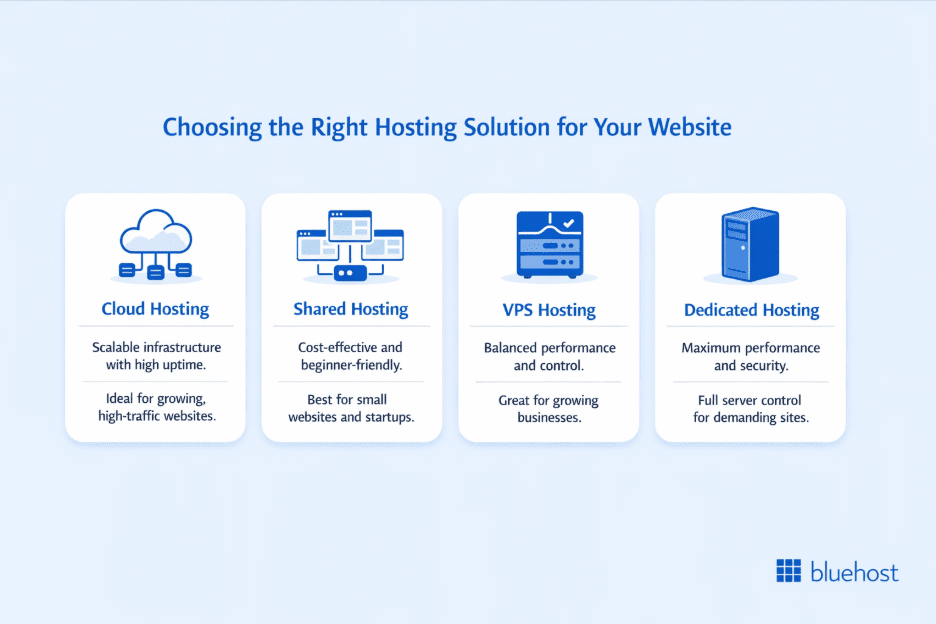
Types of web hosting include cloud hosting, shared hosting, VPS hosting and dedicated hosting.
- Cloud hosting: Scalable infrastructure with high uptime
- Shared hosting: Best for beginners and small websites
- Dedicated hosting: Maximum performance and full server control
- VPS hosting: Balanced performance, control and cost
Let’s explore each hosting type in detail.
1. Cloud hosting
Cloud hosting revolutionizes WordPress performance with unmatched speed and scalability. This hosting is an excellent solution for agencies managing multiple high-traffic websites.
Cloud hosting distributes your website files across multiple servers, ensuring greater reliability and uptime by reducing the risk of server failure. It also allows for easy resource scaling, making it ideal for websites experiencing fluctuating or rapidly growing traffic.
2. Shared hosting
Shared hosting has the advantage of providing competitive value compared to most other types of hosting. That’s because these plans share the same server and resources. One web server will have multiple customers using its resources simultaneously.
Shared web hosting plans are easier to manage, making them an excellent choice for small businesses without an IT team and those new to website hosting.
3. Dedicated hosting
Dedicated hosting offers unparalleled performance, security and control. With an entire server to yourself, it ensures consistent and optimal performance, making it ideal for resource-intensive applications.
While pricier, it is the top choice for businesses demanding the highest reliability and customization.
4. VPS hosting
VPS (Virtual Private Server) hosting balances cost efficiency and flexibility. It’s suitable for growing websites and applications needing more resources and control than shared hosting. So, you can scale resources as needed and enjoy increased security.
VPS suits businesses with varying traffic demands and a need for customization.
How to choose the right web hosting plan?
To choose the right web hosting plan, follow these four steps:
- Define your website type and goals.
- List hosting requirements (traffic, storage, security, budget).
- Compare hosting providers and included features.
- Select a plan that matches current and future needs.
Before diving into specifics, it’s important to know the complete process of picking a web hosting plan.
Step 1: Determine what type of website you want to build and host
Define why you want to create and host a website.
If you own a small business, the purpose of your website may be to have an online presence for your company and increase its reach. In that case, you could meet those requirements using a simple website with a few pages about your business’s services, some testimonials from clients and perhaps a blog section.
On the other hand, what if you run a brick-and-mortar retail store and want to start an online version of your store? For this, you would need an eCommerce hosting website with a secure online payment solution, customer support channels, order tracking and media-rich pages for each product.
Each type of website requires a different set of features to perform at its best. This plays a significant role in determining the hosting plans you will need.
Also read: Choosing the Right Web Hosting Provider With Satish Hemachandran
Step 2: Outline the web hosting requirements for your website
Once you know what kind of website you want to create, you can identify the type of hosting you need to get your website online. Use the following questions to guide you at this stage of the process:
- Which platform will you use to build your website?
- How much traffic do you expect your website to receive?
- What level of security does your audience need?
- Will your website have a lot of media files?
- How vital are speed and uptime to you?
- Do you have the technical capacity to build and manage the website on your own?
- What is your web hosting budget?
- How much do you expect or want your website to grow in the future?
- What functionalities should the website have?
Answering these questions will determine the best type of hosting for you.
Step 3: Choose an appropriate web hosting provider
Now that you know what kind of web hosting you need, it’s time to find a recommended hosting provider that offers the right plans. You will likely find dozens based on your requirements. How do you narrow down the list?
Pay attention to the additional features that each service provider includes with its plan. These features will help you figure out the best value for your money. So, feel free to live chat with the sales team and ask questions.
Look out for customer and expert reviews about the quality of service. These reviews are a good indicator of what you’ll experience. Using these investigative steps, narrow your options to the provider that offers above and beyond what you need. When you compare web hosting providers, this approach ensures you make an informed choice.
Step 4: Review the available hosting plans and select the right one
Compare the features of each plan from your chosen hosting company. You may also see different packages for each plan type. For example, we have shared hosting plans for both WordPress websites and WooCommerce stores.
If you intend to set up an online store, look at the WooCommerce plans. If you’re starting a WordPress website for your personal blog or small to medium size business, Bluehost has you covered as well.
Your chosen hosting solution offers different price tiers, compare the features in each one and select whichever tier best matches the requirements you outlined in step two.
When should you upgrade your hosting plan?
Upgrade your hosting plan when you experience slow performance, rising traffic, resource limits, security risks or planned growth.
- Slow website performance: If your website experiences slow loading times, frequent downtime or sluggish response rates, it’s a sign that your current hosting plan may not be able to handle your traffic and resource demands. Upgrading to a higher-tier plan with more resources can improve speed and reliability.
- Traffic growth: It’s a good time to evaluate your hosting bandwidth if you notice a consistent rise in visitors. This is one of the moments when you should consider upgrading to a more robust hosting solution to withstand the growing traffic.
- Resource limitations: If you frequently encounter resource limitations such as CPU or memory shortages, especially during traffic spikes, it’s a clear signal to upgrade. Resource constraints can lead to website crashes and poor user experiences.
- Security concerns: Hosting plans with inadequate security measures can leave your website vulnerable to attacks. If you handle sensitive data or experience security breaches, it’s time to consider upgrading to a plan with enhanced security features and support.
- Future expansion: If you have plans to expand your online presence, such as launching additional websites or applications, upgrading your hosting plan in advance can ensure you’re prepared for future growth.
To choose the right hosting plan, start by evaluating the core requirements your website must support.
How to assess your web hosting needs?
As you define the purpose of your website, you’ll recognize which functions will make it possible for your website to fulfill its purpose. Consider the following factors when creating a requirements list for your website.
Decide which platform you will use to build your website
These are the development tools you use to create your new website. Will you build everything from scratch using HTML, CSS and JavaScript or will you use a content management system like WordPress? You can also use software-as-a-service (SaaS) platforms like Squarespace and Wix to build your website.
For eCommerce websites, there’s even more to consider. You can use WordPress with a plugin like WooCommerce. Alternatively, you can use SaaS eCommerce platforms like Shopify
Define the performance level your website requires
Your website’s performance requirements are strongly linked to its purpose.
Small business websites often work with a single server or basic shared hosting plan. In contrast, an enterprise organization that runs custom web applications requires a dedicated hosting plan with more computing power and scalable infrastructure.
Estimate how much storage your website will need
The quantity of space needed for your website will affect the type of hosting you need.
To illustrate: A personal blog may not need as much storage as a website for a multimedia company. That’s because the latter would upload primarily videos and other website files to its website, which takes up a lot of space. The blog would presumably focus more on text-based content, using fewer media files.
Pick a plan with a comfortable amount of storage, making sure to consider space for future content as your website grows over the years.
Identify the security level your website must meet
Websites vary in their security needs. While all sites should maintain basic security, eCommerce platforms handling sensitive data must adhere to stringent standards like Payment Card Industry Data Security Standard (PCI DSS). Conversely, a small business site may suffice with an SSL certificate to secure page visits, as long as it doesn’t collect sensitive data. Security measures should align with the nature of data handled to ensure user trust and compliance.
Determine which additional hosting features you need
For your website to achieve its purpose, will it require additional features from the hosting provider or a third-party vendor?
Consider these examples:
- To run a news website that constantly updates its content, an owner can seek a hosting provider offering daily backups.
- For security reasons, malware detection may be a focus for someone running a bookkeeping website where clients submit their tax info.
- A business owner with international customers may prioritize content delivery networks to increase load speeds for everyone.
If you’re unsure what you’ll need, take a peek at your hosting solution’s features and see if any resonate with you.
A web host may bundle some of these features as part of a managed WordPress hosting plan. Alternatively, you can visit third-party vendors to purchase the features as add-ons and integrate them into your website.
Evaluate the level of technical support you will require
Consider your team’s technical expertise when choosing a hosting solution. Building a website from code demands more skills than using a CMS. Additionally, managed hosting plans are easier to navigate than dedicated or VPS hosting plans. So, assess your team’s capabilities or opt for a cloud hosting or service with support to meet your requirements effectively.
Project how much traffic your website will receive
Bandwidth is crucial for website responsiveness. High-traffic sites need unmetered bandwidth or high-capacity bandwidth. Server specs, including storage type, RAM and PHP workers, are equally vital for performance, alongside bandwidth.
Now that you know what your website requires, let’s examine the hosting factors that make it possible.
Factors to look out for while choosing the web hosting plan
Knowing your web hosting requirements is just one part of the equation. You also need to find a good web hosting provider. To do so, pay attention to the following features.
Server speed
Server response time measures how quickly (in milliseconds) content loads when a webpage is accessed from a web host’s server. It’s a decent measure of how well you can expect your website to perform when you host it with that company.
Slower response times can reduce the responsiveness of your website, leading to a bad user experience for visitors.
Reliability
Server uptime reflects a hosting company’s reliability. Higher uptime ensures fewer website outages. The closer to 100% a hosting provider’s server uptime figure is, the more peace of mind you’ll have.
This means your site is backed by a top-tier reliable server uptime with an enforceable Service Level Agreement that even pays back hosting costs if any downtime occurs.
Pricing
Consider web hosting plan costs when choosing a provider. Compare prices from other web hosts, making sure to factor in the features included in each package. While some providers advertise free web hosting services, these often come with significant limitations and may not provide the reliability needed for business websites.
Customer support
The scope and quality of customer support will impact how well you can make use of your web hosting. Moreover, good support is crucial for businesses with limited technical skills across the team.
Bluehost provides 24/7 customer support via live chat, phone support and ticket for all customers across all plans. Additionally, Bluehost offers a 30-day money-back guarantee on hosting services, giving you peace of mind if you find the service isn’t the right fit within the first month.
This level of support makes Bluehost one of the best web hosting services choices for those who need access to immediate help as they are building, tweaking or fixing their websites.
Type of web hosting plan from Bluehost
Plans can be based on the type of web hosting or the customer’s use case. A web host that offers plans based on a mix of these criteria is more likely to meet your requirements.
Bluehost hosting plans include shared, VPS and dedicated server environments for performance-critical websites. All plans run on cloud-powered infrastructure that improves speed, uptime and scalability.
So whether you’re an individual looking to start a simple website or a large corporation that needs specialized hosting infrastructure, Bluehost Web Hosting has a package that can meet your requirements.
Bluehost Web Hosting plan comparison
Bluehost shared hosting has several different hosting plans, each of which falls under the following web hosting types:
- Shared hosting plan
- Dedicated hosting plan
- Bluehost for Agencies (Managed WordPress)
- VPS hosting plan
Shared hosting plans
Each Bluehost shared hosting plan from Bluehost focuses on either WordPress hosting for simple websites or WooCommerce hosting for eCommerce businesses. All of Bluehost’s shared hosting plans include the following features.
- Free SSL certificates: These certificates are necessary to ensure the confidentiality and integrity of eCommerce transactions, personal information and other sensitive data on your website.
- Automatic WordPress installation: Once you pay for and create a hosting plan, Bluehost installs the most recent version of WordPress so you can promptly start building your websites.
- WordPress Academy: This is an eLearning portal with video lessons to help you build a WordPress site from scratch and customize it to meet your needs.
- Resource protection: This feature ensures that your website maintains its performance and remains unaffected by the resource usage of other shared hosting customers on your server.
- Automatic malware scans: Consistent detection and protection against viruses and malicious software.
- Free domain: Our shared hosting plans include a free domain name for the first year.
Shared hosting plans are great for:
- Individuals who want to start a personal website or blog.
- Small and medium-sized business owners looking to increase their online presence.
- eCommerce business owners who don’t expect much traffic.
Dedicated hosting plans
What’s the difference between dedicated and shared hosting plans? Well, Bluehost’s dedicated server plans fit customers who need more powerful infrastructure and greater control over their setup.
For these customers, Bluehost offers the following benefits of dedicated hosting:
- Multi-server management: Easily scale your infrastructure by bundling more hosting services. You can also use one hosting account to manage all the hosting services you accumulate.
- Complete server control: You’ll have unrestricted access to manage and maintain your Linux-based hosting server. Install whatever software you want and set up your own monitoring and security features. You’ll even get a dedicated IP address to use for your web applications.
- Latest generation hardware: This includes AMD EPYC 9534 CPU Chips for high-performance processing, DDR5 Memory for faster data transfer and efficiency, ultra-fast NVMe SSD storage drives for superior read/write speeds and PCIe 5.0 for high-speed data transfer between components.
- 99.9% uptime guarantee: It provides minimal downtime with reliable server operation, supported by a robust Tier 3 data center infrastructure with redundant power, cooling and network systems.
- One-click app installer: Get easy installation of applications with a single click.
- Free dedicated IP address: This includes a unique IP address for enhanced performance and security.
- Full root access: Acquire complete control for custom software installations and advanced configuration.
- cPanel access: Dedicated hosting plans include the cPanel management platform. This control panel application gives users a central location to manage email accounts, websites, subdomains and server resources.
- Advanced security features: Stay secured with DDoS protection and SSL certificates for enhanced security.
- 24/7 support: Contact experts for a smooth server set up. This includes a guided server setup/onboarding call and continuous technical support to address any issues.
Dedicated hosting plans are perfect for:
- Enterprise businesses with multiple websites.
- eCommerce businesses pulling a lot of internet traffic.
- Clients with web applications that have unique hosting requirements.
- Clients with resource-intensive websites.
Bluehost for Agencies (Managed WordPress plans for high-performance sites)
Websites that previously required a traditional “cloud hosting” performance tier are now best served by Bluehost for Agencies, an all-in-one Managed WordPress platform built for high-traffic, scalable and reliability-critical environments.
Bluehost for Agencies delivers 100% network uptime backed by redundant global infrastructure and real-time failover, ensuring sites remain continuously available.
Some of the major platform capabilities include:
- Managed WordPress built by WordPress experts: With this platform, you don’t need to manage low-level technical tasks such as PHP configuration, WordPress core updates, automatic backups or security updates.
- Redundant infrastructure and uptime monitoring: Real-time replication and data-center-level failover help maintain continuous availability even during infrastructure-level failures.
- Global performance optimization: A built-in global CDN with edge caching and image optimization reduces page-load latency worldwide.
- Integrated security protections: Includes SSL, automated DDoS mitigation, web application firewall coverage, backups and one-click restore capabilities.
- Priority WordPress expert support: Support requests are routed directly to trained WordPress specialists for faster and more accurate assistance.
Best suited for:
- Businesses that need fast load times, scalable resources and consistent uptime.
- Organizations that cannot maintain on-premise infrastructure.
- Agencies managing multiple high-traffic WordPress websites requiring centralized performance, security and reliability.
Virtual private server (VPS) hosting plans
When you compare VPS to shared hosting, traditional cloud-style infrastructure benefits and dedicated hosting, you’ll find that VPS is the sweet spot in between. You’ll also get some of the cost savings from shared hosting plans and some of the perks of dedicated and cloud hosting, like improved performance and control. Bluehost VPS hosting includes the following features:
- Virtual server environment: You’ll have an entire virtual server environment with operating system access providing you with the flexibility to customize it however you’d like.
- Unlimited websites: With a VPS hosting plan, you can host as many websites as you want.
- Ultra-fast NVMe SSD storage drives: For even higher performance, Bluehost’s VPS plans include NVMe SSDs, which offer superior read/write speeds compared to traditional SSDs.
- Latest generation hardware: Includes AMD EPYC 9534 CPU Chips for high-performance processing, DDR5 Memory for faster data transfer and enhanced efficiency and PCIe 5.0 for high-speed data transfer between components, all contributing to robust performance and improved overall system efficiency.
- 10 Gbps network with unmetered bandwidth: Offers high-speed network connectivity with no data limits, ideal for high-traffic websites and applications.
- 99.9% uptime guarantee: Ensures minimal downtime, so your server remains operational and reliable, supported by a Tier 3 Data Center that provides robust infrastructure with redundant power, cooling and network systems to ensure high availability.
- Free dedicated IP address: Provides a unique IP address for enhanced website performance and security.
- Full root access: Grants complete control over the server environment, allowing for custom software installations and advanced configuration.
- One-click app installer: Allows for easy installation of various applications with a single click.
- Advanced security features: Includes protections such as DDoS prevention and SSL certificates to secure data and communications.
- Weekly Offsite Backups: Regular backups stored offsite to protect against data loss and corruption.
- 24/7 support: Provides continuous technical assistance to resolve any issues or questions, including a guided server setup / onboarding call for smooth server setup and configuration and a cPanel License Included to simplify server management with a popular control panel.
VPS plans will work best for:
- Medium or large-scale businesses that don’t have the budget for a dedicated plan but still require improved hosting performance and control.
- Web application developers.
If you want to compare web hosts, Bluehost offers a variety of plans to suit different needs, making it easier to find the perfect match for your website requirements.
Also read: Bluehost Addons Renewal Price List
Final thoughts
The key to getting the right hosting plan lies in understanding your website’s needs. Once you know them, find a reliable hosting provider and choose the package that works best for your requirements.
Bluehost has provided excellent web hosting services to millions of satisfied customers for over a decade. If you’re looking for easy-to-use, WordPress hosting plans and 24/7 professional customer support, check out Bluehost’s pricing page to get started.
Get expert guidance in a 5-minute call
📞 Call 888-401-4678FAQs
Yes, Bluehost does offer monthly billing options for many of its hosting plans and addons. For example, our Managed WordPress Hosting plans have monthly renewal pricing and many addons like CodeGuard and Professional Email can be billed monthly or annually. You can choose the billing cycle that best fits your needs when signing up or renewing your services.
You can definitely upgrade your hosting plan to get more resources and better performance. To upgrade, simply:1) Log in to your Bluehost Account Manager.2) Click the Hosting tab in the left menu.3) Find your current hosting plan and click the Upgrade Plan link.4) Select the new plan that suits your needs.5) Click Upgrade Now and complete the payment. However, please note that downgrading your VPS or Dedicated hosting plans is not supported at this time. For VPS to Dedicated upgrades, you’ll need to sign up for the new plan and migrate your site, then cancel the old account.
If you purchase a Bluehost plan to host a WordPress website, you don’t need to pay an additional fee to access or install WordPress. That’s because WordPress is free to use. In fact, if you use any of the WordPress hosting plans from Bluehost, WordPress comes pre-installed for you at no extra cost.
Bluehost hosting plans come with essential security features such as free SSL certificates, malware scanning and DDoS protection. These features help protect your website and visitors’ data, ensuring a safer browsing experience. Higher-tier plans may also include additional security enhancements and daily backups to further safeguard your site.
Yes, Bluehost offer free WordPress website migration services for eligible new customers, where our team assists in transferring your WordPress site to Bluehost smoothly with minimal downtime. However, for full website migrations beyond WordPress, including other types of sites or email accounts, we provide paid migration services.





Write A Comment