 ChatGPT,
 Claude,
 Gemini,
 Grok — all four for
Key highlights
- Learn how virtual receptionist appointment booking moves a customer request to a confirmed slot on your calendar.
- Compare phone, website and booking-page options so you choose the channel your customers already use.
- Set lead times, buffers, daily limits and blackout dates before your first customer books an appointment.
- Reduce no-shows with reminders, simple rescheduling and clear rules for when your staff should step in.
- Understand per-minute, per-call and flat monthly pricing models so you can estimate costs before committing.
Virtual receptionist appointment booking means a remote person or an artificial intelligence (AI) assistant takes booking requests from your customers for you. It checks your real-time calendar availability, collects the details you need and books, reschedules or cancels appointments, including after your office closes.
For clinics, salons, consultants and other appointment-based small businesses, that can mean fewer bookings lost to missed calls, slow replies and phone tag.
This guide helps you choose a booking channel, set your booking rules, cut no-shows, plan human handoffs and compare costs. If most of your customers find you online, Bluehost AI Receptionist can take bookings through conversations on your website.
How does virtual receptionist appointment booking work?
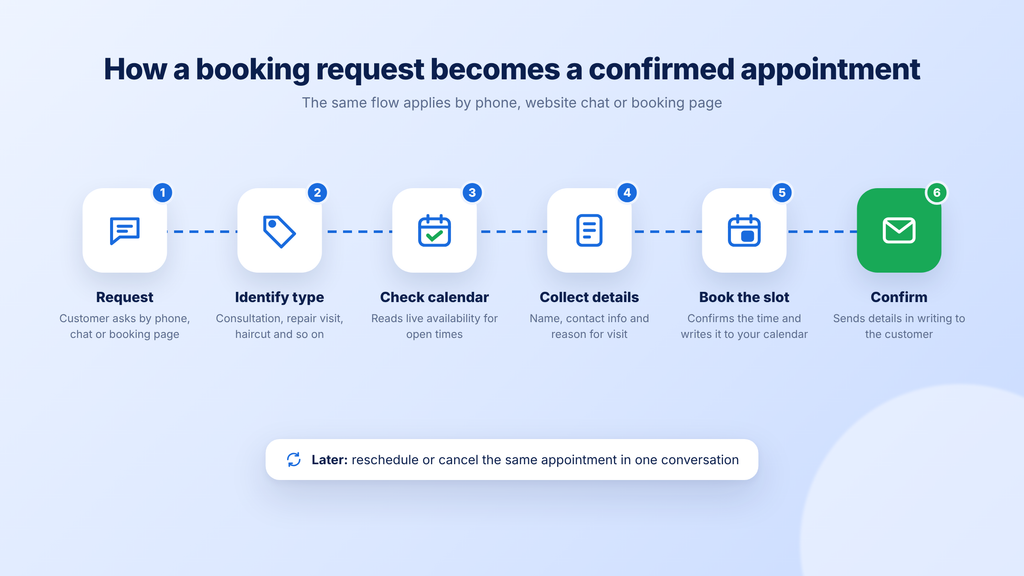
A virtual receptionist turns a customer’s request into a confirmed calendar event by reading your live availability and booking the slot. The receptionist can be a person working remotely or an AI assistant, and the request can come by phone, website chat or a booking page.
Most booking flows follow the same sequence, whatever the channel. Knowing each stage helps you spot where a tool might stall or create extra work for your team:
- A customer asks for an appointment by phone, website chat or booking page.
- The receptionist identifies the appointment type, such as a consultation or a repair visit.
- It checks your live calendar for open times that fit that appointment.
- It collects the details you need, such as name, contact information and reason for the visit.
- It confirms the slot with the customer and writes the event to your calendar.
- It sends a confirmation so the customer has the time and details in writing.
- It handles later requests to reschedule or cancel the same appointment.
A receptionist that only takes messages creates call-back work and double-booking risk. One that reads your availability can finish the booking in one conversation.
Live calendar access also lets booking continue when your office is closed. For example, a customer who visits your site at 9 p.m. can book a time without waiting for a call back.
How far you automate depends on the request. Routine bookings suit a virtual receptionist well, while complex or sensitive requests still need a person, as the handoff section below explains.
Also read: AI receptionist vs chatbots
Phone, website or booking page: which booking channel fits your business?
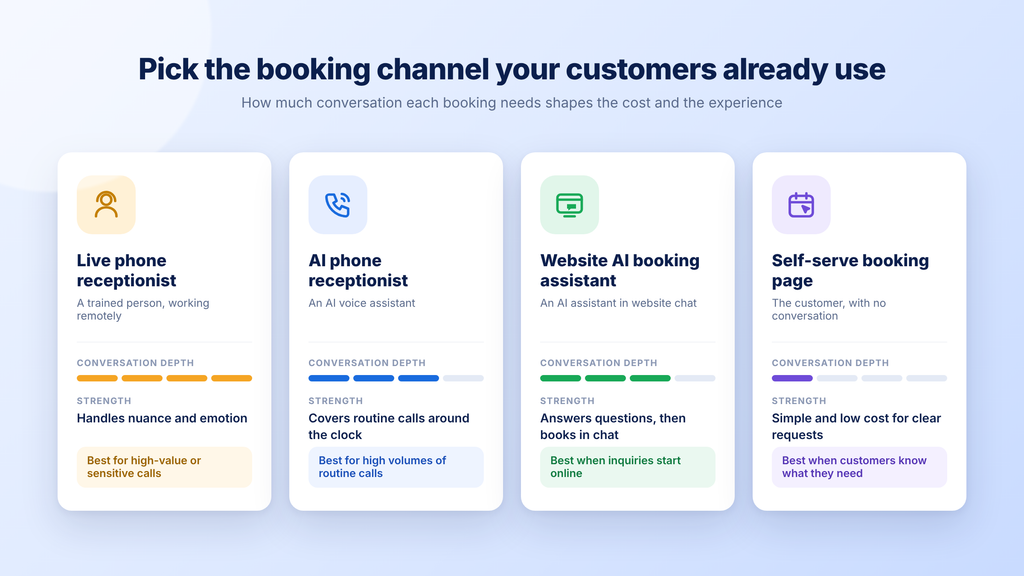
The right channel is the one your customers already use to contact you. If most people call, a phone option fits best, and if most start on your website, a website assistant or booking page fits better.
Virtual receptionist booking channels compared
The table compares four common ways to take bookings. Who handles the conversation shapes both the customer experience and the cost.
| Option | Who handles the conversation | How bookings are made | Strengths | Trade-offs | Best fit |
|---|---|---|---|---|---|
| Live phone receptionist | A trained person working remotely | The receptionist books by phone using your calendar or booking tool | Handles nuance, emotion and complex questions | Often a higher cost per call or minute | High-value or sensitive calls |
| AI phone receptionist | An AI voice assistant | The assistant books during the call using a connected calendar | Covers routine calls around the clock | Can struggle with unusual or emotional requests | High volumes of routine phone bookings |
| Website AI booking assistant | An AI assistant in a website chat | The assistant answers questions and books inside the conversation | Answers service and policy questions before booking | Reaches only customers who visit your website | Businesses whose inquiries start online |
| Self-serve booking page | The customer, with no conversation | The customer picks an open slot on a booking page | Simple and low cost for clear requests | Can’t answer questions or guide choices | Customers who already know what they need |
The takeaway: Match the channel to how customers reach you, then weigh how much conversation each booking needs. You can also combine two channels, such as a website assistant for online visitors plus a phone service for callers.
Choose a live phone receptionist if:
- Your calls are often complex, emotional or high-value
- Your customers expect to speak with a person
- Your bookings depend on judgment calls or custom quotes
- Your budget can support per-minute or per-call pricing
Choose an AI phone receptionist if:
- Your phone gets a high volume of routine booking calls
- Your callers mostly want standard appointment types
- Your business needs phone coverage outside office hours
- Your team can review calls the assistant can’t resolve
Choose a website AI booking assistant if:
- Your inquiries mostly start on your website
- Your customers ask about services and policies before booking
- Your answers should come from your own content and documents
- Your visitors arrive after hours and want a reply right away
Choose a self-serve booking page if:
- Your customers already know which service they want
- Your appointment types are simple and few
- Your bookings rarely need a conversation first
- Your priority is the lowest setup effort
If you run a WordPress site and want a self-serve option, WordPress appointment booking plugins can add a booking page to your site.
What to set up before you take your first booking?
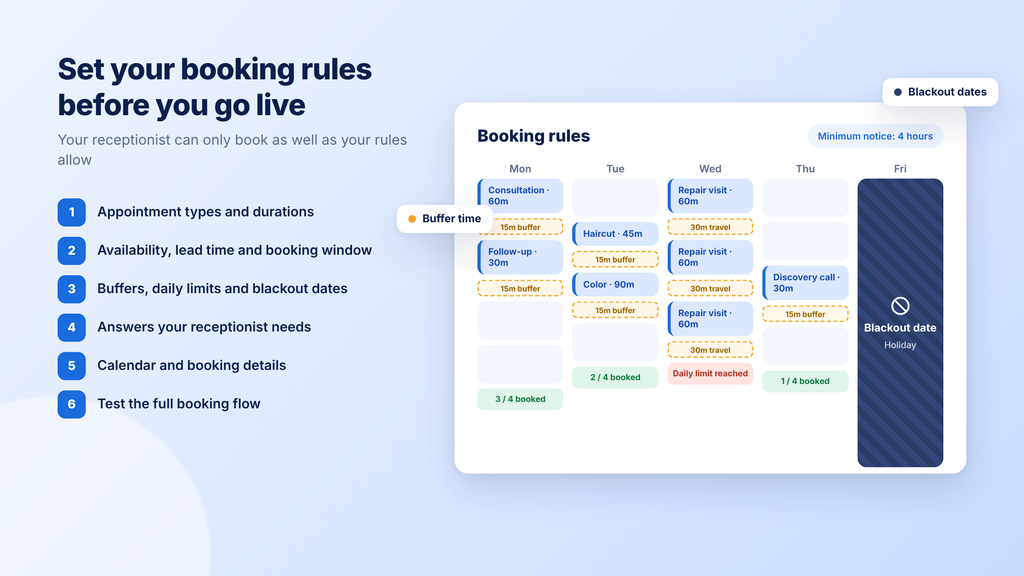
A virtual receptionist can only book appointments as well as your rules allow. Before you go live, define what customers can book, when they can book it and what happens to the details afterward.
These six steps apply to a live service, an AI assistant or a booking page. This guide uses Google Calendar’s booking controls as a concrete example.
Also read: create an online booking system
1. List your appointment types and durations
Start with a simple list of everything a customer can book. Your receptionist uses this list to match each request to the right slot.
- Service name: Use the name customers would recognize.
- Duration: Note how long the appointment takes from start to finish.
- Provider: Note who performs the service.
- Prep: Add anything the customer or your team must do beforehand.
- Client type: Separate new-client and returning-client visits when they differ.
Use clear names, durations and providers so each booking lands in the right slot with the right price and prep. Save one master list as the source of truth for your receptionist and booking tool to keep buffers and reminders accurate.
2. Set availability, lead time and how far ahead people can book
Your availability rules stop last-minute surprises and over-booked months. Google Calendar appointment schedules show what these controls look like, including a scheduling window with a default minimum notice of 4 hours. Google’s version also offers buffer time, daily booking caps and up to 5 reminder emails, and you set it up on a computer.
- Weekly hours: Set the days and times you accept appointments.
- Minimum notice: Choose how much warning you need before a booking.
- Advance window: Limit how far ahead customers can book.
- Time zone: Confirm the calendar’s time zone matches your location.
3. Add buffers, daily limits and blackout dates
Buffers and limits protect the time around your appointments. Google’s appointment schedules from step 2 include these controls, though checking availability across multiple calendars needs an eligible Google One or Workspace plan. Look for similar settings in whichever tool you choose.
- Buffer time: Add a gap between appointments for cleanup, notes or travel.
- Daily limit: Cap the number of bookings per day to prevent burnout.
- Adjusted availability: Change hours for specific dates, such as a half-day.
- Blackout dates: Block holidays, vacations and closures ahead of time.
- Conflict checks: Check other calendars so personal events block booking times.
4. Write the answers your receptionist needs before it books
Booking conversations stall when a customer asks a question nobody prepared for. Write down the answers first, in one source document your receptionist can use.
- Services: Explain what each service includes.
- Prices: List prices or typical price ranges.
- Policies: Cover cancellations, deposits and late arrivals.
- Location: Add your address, parking and entry instructions.
- Prep instructions: Tell customers what to bring or do before arriving.
- Service area: List the areas you cover if you travel to customers.
When a price or policy changes, update this document first so your receptionist doesn’t repeat old information.
5. Connect your calendar and decide where booking details go
Bookings need to land on the calendar your team actually checks. Pick one calendar as your source of truth so nobody books from an outdated copy.
- Calendar: Use the calendar your staff already work from each day.
- Fields: Decide which customer details each booking must capture.
- Lead records: Decide whether details should flow into a customer relationship management (CRM) tool.
- Notifications: Choose who on your team gets alerted about new bookings.
For a closer look at passing booking and lead data along, see our guide to AI receptionist CRM integration.
6. Test the full booking flow before you go live
Testing catches rule errors before your customers do. Act as a test customer and run through each scenario.
- Book: Make a new appointment from start to finish.
- Reschedule: Move that appointment to a different day.
- Cancel: Cancel it and confirm the slot reopens.
- After hours: Send a request at night or on a weekend.
- Out of range: Try booking outside your advance window.
- Unknown question: Ask something your source document doesn’t cover.
Check that each test creates the right calendar event, confirmation and team notification. Fix any gaps, then run the tests again. Our AI receptionist buying checklist includes more ways to test a tool before you commit.
How to cut no-shows with reminders and easy rescheduling?
Reminders can reduce no-shows, and an easy way to reschedule helps you reuse slots that would otherwise sit empty. Booking the appointment is half the job, and getting the customer to show up is the other half.
Researchers behind a 2026 meta-analysis of reminders pooled 10 trials of hospital outpatient appointments. Published in the Journal of Hospital Management and Health Policy in March 2026, it found patients with reminders were about 11% more likely to attend. Both text message (SMS) and telephone reminders were linked to higher attendance, though only the telephone result was statistically significant.
Those results come from healthcare, so results in salons, consulting or home services may differ. Still, they suggest reminder settings are worth configuring before launch.
A reminder works best when it makes the next step easy. These habits help customers keep their appointments or free up the slot early:
- Confirm right away: Send a confirmation as soon as the booking is made.
- Remind ahead of time: Send a reminder a day or two before the appointment.
- Offer a way out: Include a reschedule or cancel option in each message.
- State your policy: Share your cancellation policy at booking and in reminders.
- Track repeat no-shows: Note customers who miss more than once and follow up.
Check what your tool includes before you rely on it. Google’s premium booking page features show why: Automatic email reminders need an eligible Google One or Workspace plan.
When a person should take over the booking?
Hand off to a person when a request needs judgment, empathy or authority your receptionist doesn’t have. Clear handoff rules protect the customer experience and keep automation focused on routine work.
Set these triggers before launch and share them with your team. Each one signals that a person should take the request:
- Urgent or safety-related issues
- Requests for medical, legal or financial advice
- Complaints or emotional situations
- Pricing exceptions or custom quotes
- Repeated misunderstandings in the same conversation
- Requests that fall outside your booking rules
A good handoff passes along the customer’s details and a short summary of the request. That way, the customer doesn’t have to repeat themselves. Tell the customer when to expect a reply, such as within one business day.
Plan a backup in case your booking tool goes down, such as a contact form or a phone number on your site.
For fallback rules and escalation paths, see our guide to AI receptionist handoff options.
Booking rules for clinics, salons, consultants and home services
Your booking rules should reflect how your business runs. These examples show how the six setup steps play out in four appointment-based businesses.
Clinics and wellness practices: For example, a physical therapy clinic might set visit types by provider and add intake questions to each booking. Clinical questions stay with staff, and the FAQs below cover Health Insurance Portability and Accountability Act (HIPAA) rules.
Salons and spas: A salon might list each service with its own duration and add-ons, such as a deep-conditioning treatment. It could let clients choose a preferred stylist and add short buffers for cleanup between clients.
Consultants and agencies: For example, a consultant might offer a 30-minute discovery call and ask two or three qualifying questions at booking. A limited booking window, such as two afternoons a week, can protect focus time for client work.
Home services and trades: A plumbing business might limit bookings to its service area and add travel buffers between jobs. It could cap jobs per day and send urgent requests, such as a burst pipe, straight to a person.
What virtual receptionist appointment booking costs?
The cost depends on the pricing model and on whether booking is included or billed as an add-on. Services usually charge per minute, per call or a flat monthly fee.
An in-house hire gives you a useful baseline. SkipCalls’ receptionist salary guide breaks down receptionist pay by state. The average hourly pay is about $18, though it varies by state. Those figures reflect wages only, so an employer’s total cost would also include benefits and payroll taxes.
For an AI phone option, Smith.ai AI Receptionist plans include a free tier and a Pro plan with AI scheduling. For website booking, our AI Receptionist for small businesses uses a flat monthly price per agent and works with a site hosted anywhere.
Pricing models for virtual receptionist booking (as of October 2026)
The table compares starting prices and booking terms for five named options. Each uses a different channel, so compare the pricing model alongside the price.
| Service | Channel | Pricing model | Starting price | Booking included? |
|---|---|---|---|---|
| Ruby | Live phone receptionist | Per receptionist minute | $250/month for 50 minutes | Scheduling is listed as an optional plan feature |
| Smith.ai Virtual Receptionists | Live phone receptionist | Per call | $300/month for 30 calls | Add-on at $1.50 per call |
| Smith.ai AI Receptionist | AI phone receptionist | Per call allowance | Free for 25 calls/month; Pro is $150/month for 75 calls | Yes, AI scheduling is included |
| Google Calendar appointment schedules | Self-serve booking page | Included with a Google account; more features on eligible plans | One booking page on a personal Google account or Business Starter | Yes, self-serve; automatic email reminders and more need an eligible Google One or Workspace plan |
| Bluehost AI Receptionist | Website AI assistant | Flat monthly, per agent | $25/month per agent | Yes, Google Calendar booking is included |
To compare fairly, estimate your monthly calls or chats and their average length. Then check each plan’s add-ons and overage charges before you choose.
Note: Pricing is as of October 2026. For the latest pricing and offerings for each tool, visit the provider’s website directly.
How to keep your booking calendar accurate after launch
A booking setup needs regular upkeep to stay accurate. Prices change, staff take vacations and customers ask new questions, so a short routine keeps your calendar current:
- Policy updates: Update prices and policies in your source document when they change.
- Holiday planning: Add holiday and vacation blackout dates at least a month ahead.
- Weekly review: Check booking and conversation reports for repeat questions.
- Monthly no-show audit: Review missed appointments and adjust reminder timing.
- Staff changes: Recheck your handoff contact list when someone joins or leaves.
- Retesting: Rerun your booking tests after any calendar or service change.
None of these tasks takes long, but skipping them is how outdated prices, missed blackout dates and stale contacts creep into customer conversations. Block a recurring slot on your own calendar for the weekly and monthly checks so they become routine. If a review turns up a gap, such as a question your receptionist couldn’t answer, add the answer to your source document and run your booking tests again.
How Bluehost AI Receptionist helps your business take bookings?
Bluehost AI Receptionist is a website-based assistant that answers questions and supports bookings on your website 24/7. It suits businesses whose customers start online and ask questions before they book. These capabilities connect directly to the setup steps in this guide:
- Company-specific answers: It’s trained on your website and documents, so replies reflect your services and policies.
- Your brand voice: You can customize its tone and personality to match how your team talks.
- Booking in the conversation: Customers can schedule, reschedule or cancel based on real-time Google Calendar availability and blackout dates.
- Guided setup: Our team connects your calendar, uploads your knowledge base and configures your brand voice.
- No coding: You don’t need technical skills, and there’s no setup fee.
- Any host: Your website can be hosted anywhere, so you can keep your current host.
- Booking insights: A dashboard tracks bookings, chat trends and lead volumes.
Once you hand off your content, the assistant can go live in just a few steps. It handles routine questions and bookings so your team can focus on requests that need a person.
One fit note: AI Receptionist handles website conversations. If most of your customers call, you can pair it with a phone answering option for callers.
Final thoughts
Virtual receptionist appointment booking works best when the channel matches where customers already reach you and your rules are set before launch. This week, list your appointment types, then write down your lead time, buffers and blackout dates.
If your customers mostly find you online, AI Receptionist can put that list to work on your website. Our team connects your calendar and sets up your knowledge base, so you can start without coding. Start taking website bookings with AI Receptionist.
FAQs
Some can, but not all of them do. AI phone receptionists answer calls with a voice assistant, while website AI assistants like Bluehost AI Receptionist handle conversations on your site. If most of your customers call, pair a website assistant with a phone answering option so both channels are covered.
No. Bluehost AI Receptionist works with a website hosted anywhere, so you can keep your current host. Your team connects your calendar and sets up your knowledge base, so you don’t need to move your site or write code.
The cost mostly depends on your monthly volume and how a service bills it. Per-minute plans reward short calls, while per-call plans suit longer conversations. Before you sign, ask about overage rates, setup fees, contract length and whether booking costs extra. Also ask whether unused minutes or calls roll over to the next month.
Yes, if it can read your live calendar and your booking rules allow after-hours requests. Check your minimum notice setting first. For example, with 12 hours of minimum notice, a customer chatting at 10 p.m. couldn’t book a 9 a.m. slot the next day. Shorten the notice period if you want late-night requests to fill early appointments.
An answering service mainly takes messages and passes them to your team, while a virtual receptionist can act on the request. That action might include booking, rescheduling or answering common questions. Some providers sell booking separately, so compare plans by what they do with a request. Ask whether booking is included, available as an add-on or missing.
Yes, as long as each person’s calendar or availability rules are set up in the tool. Check how it handles staff preference, such as letting a client pick a specific stylist. If some appointments need two people at once, test whether the tool can check both calendars before it confirms a slot.

Write A Comment