


Key highlights
- Learn how Bluehost VPS hosting works for OpenClaw, including how isolated server resources and NVMe SSD storage deliver the consistent performance your setup demands.
- Understand the benefits of VPS hosting for OpenClaw so you can see exactly why dedicated resources outperform shared environments for growing, resource-intensive applications.
- Explore Bluehost VPS hosting plans and pricing to find the right tier for your OpenClaw needs without overcommitting to resources you are not yet ready to use.
- Uncover the full range of Bluehost VPS features explained in straightforward terms, from instant provisioning and Docker support to built-in security tools that protect your environment around the clock.
- Know how to use the Bluehost VPS login and management dashboard to confidently oversee your OpenClaw setup, whether you prefer a managed or self-managed approach.
Lots of developers are looking at OpenClaw for private AI agents and automation, but let’s be real, getting the infrastructure right is usually the trickiest part. Since OpenClaw runs autonomous agents that juggle APIs and complex workflows, it needs an environment that stays awake and responsive. Without that reliability, those multi-step processes simply fall apart.
This is exactly why VPS hosting is often recommended. A Virtual Private Server gives you the dedicated compute power and stable networking you need, plus complete control over your server settings. It’s the ideal middle ground for anyone running serious AI automation platforms where stability is everything.
At Bluehost, we’ve tailored our VPS hosting to support tools like OpenClaw. Between the lightning-fast NVMe storage and total server access, developers have everything they need to deploy agents and manage integrations securely. Overall, it’s about helping teams transition from basic AI experimentation to running professional, self-hosted systems on their own private infrastructure.
Why infrastructure matters for running OpenClaw
OpenClaw is designed to power AI-driven workflows, autonomous agents and system integrations, which makes infrastructure a critical factor for performance and reliability. Unlike lightweight applications, OpenClaw operates as an automation layer that continuously processes tasks, communicates with external services and executes multi-step workflows.
Because of this architecture, the platform requires a server environment that can maintain stable compute resources, persistent storage and dependable connectivity.
1. Security and control for production use
As OpenClaw moves from experimentation to production, security becomes part of infrastructure planning. AI agents may interact with internal workflows, operational data and system-level actions, which means the hosting environment must provide strong operational control.
A VPS helps by allowing operators to manage access policies, firewall rules, update schedules and service isolation. This makes it easier to protect sensitive integrations and maintain control over how OpenClaw interacts with internal systems while keeping the platform available for real workloads.
2. Continuous AI agent execution
OpenClaw agents are built to operate independently and handle tasks triggered by schedules, events or system conditions. These tasks may include monitoring processes, processing requests or initiating automation pipelines.
To keep these agents active at all times, developers need a hosting environment that supports continuous operation without downtime or resource interruptions. VPS hosting provides that stability by offering a dedicated virtual server environment that remains active for long-running processes.
3. Multi-step reasoning and automation
Many OpenClaw workflows involve sequential task execution, where outputs from one stage become inputs for the next. This type of automation requires consistent performance from the server to ensure tasks run smoothly.
A VPS environment supports these workflows by providing reliable CPU and memory allocation, helping agents process complex operations and maintain workflow continuity.
4. Integration-heavy architecture
OpenClaw is designed to connect with multiple systems and services. Agents often interact with APIs, messaging platforms, databases and productivity tools to perform tasks across an organization’s technology stack.
Because these integrations depend on stable networking and server performance, running OpenClaw on a VPS helps ensure that automation workflows remain responsive and dependable across connected systems. Understanding these demands helps set the criteria for choosing a VPS environment that can support OpenClaw reliably. With that in mind, let us look at Bluehost VPS and see how it aligns with those requirements.
Also read: OpenClaw GitHub Installation Guide: Clone, Setup and Run OpenClaw on a VPS
Why choose Bluehost VPS for OpenClaw
Running OpenClaw effectively requires infrastructure that can support AI orchestration, automation workflows and persistent agents. The right VPS environment ensures these systems run reliably while giving developers full control over their AI infrastructure.
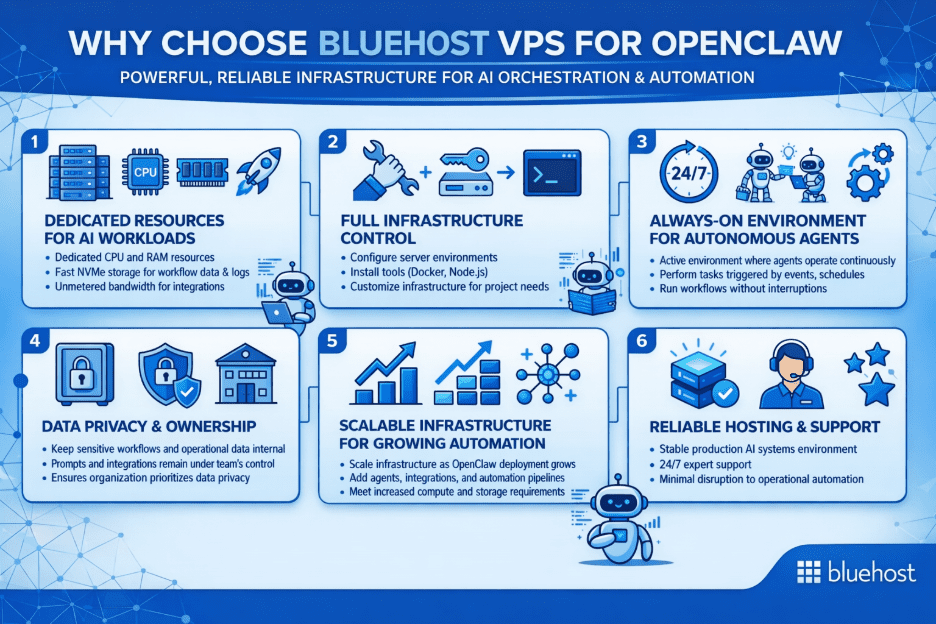
At Bluehost, we built our VPS environment to support platforms like OpenClaw that need dedicated resources, infrastructure ownership and flexibility.
1. Dedicated resources for AI workloads
OpenClaw coordinates multiple AI agents that execute structured tasks across systems and workflows. These processes often run simultaneously and require consistent compute performance.
With Bluehost VPS, developers get:
- Dedicated CPU and RAM resources
- Fast NVMe storage for workflow data and logs
- Unmetered bandwidth for integrations and automation
These resources help maintain stable performance when agents are executing multi-step tasks or handling multiple workflows.
2. Full infrastructure control
Many development teams prefer hosting AI systems on infrastructure they fully control rather than relying on external SaaS services. OpenClaw is designed for this model by allowing teams to manage prompts, workflows and integrations inside their own environment.
This is where Bluehost VPS fits naturally for OpenClaw deployments. We provide root-level access, which allows developers to:
- Configure server environments
- Install tools such as Docker, Node.js and automation frameworks
- Customize infrastructure based on project needs
This makes Bluehost VPS a strong fit for OpenClaw teams that want a self-managed environment with the flexibility to shape deployment around their use case.
3. Always-on environment for autonomous agents
OpenClaw supports autonomous task execution, where agents perform tasks triggered by events, schedules or system conditions.
To support this functionality, the hosting environment must remain active at all times. Bluehost VPS provides a persistent server environment where AI agents can operate continuously and run workflows without interruptions.
4. Data privacy and ownership
Organizations often want to keep their AI systems and operational data within their own infrastructure. Running OpenClaw on a VPS helps ensure that sensitive workflows, prompts and integrations remain under the team’s control rather than being processed by external AI platforms.
This approach supports teams that prioritize data privacy, infrastructure ownership and long-term flexibility.
5. Scalable infrastructure for growing automation
As AI workflows expand, infrastructure requirements often increase. Additional agents, integrations and automation pipelines can require more compute and storage resources.
Bluehost VPS allows developers to scale their infrastructure as their OpenClaw deployment grows, ensuring the platform continues to perform reliably as automation workloads increase.
6. Reliable hosting and support
Production AI systems require stable hosting environments. Bluehost VPS provides reliable infrastructure along with 24/7 support, helping developers maintain operational automation systems with minimal disruption.
Together, these capabilities make Bluehost VPS a practical foundation for running self-hosted AI agents and automation platforms like OpenClaw.
Which key OpenClaw features benefit most from a Bluehost VPS?
OpenClaw is designed to function as an AI orchestration and automation layer that coordinates tasks across tools, services and internal systems. Running it on a VPS environment allows these capabilities to operate consistently while maintaining infrastructure-level control.
Below are some of the core OpenClaw features that work effectively when deployed on Bluehost VPS.
1. AI orchestration
OpenClaw’s AI orchestration capabilities benefit from infrastructure that can handle persistent workflows, coordinated tasks and growing system complexity. Bluehost VPS provides a controlled environment that helps these orchestration processes run reliably as workloads expand
2. Workflow and prompt pipelines
OpenClaw allows teams to build reusable workflow pipelines from prompt chains and execution logic, helping transform ad hoc AI usage into structured and repeatable processes.
These pipelines often run across multiple stages and require a stable runtime environment to maintain consistency. Bluehost VPS supports this capability by providing infrastructure that helps keep workflow pipelines reliable, predictable and easier to manage as automation systems evolve.
3. Tool calling and API chaining
OpenClaw agents can use API calls and automated integrations to trigger workflows, access data and update connected systems as part of larger automation processes.
Bluehost VPS supports this capability by providing stable networking, continuous uptime and a controlled server environment. This helps ensure that integration-heavy workflows run reliably as agents interact with multiple services across the technology stack.
4. Persistent context for reliable workflow execution
OpenClaw supports persistent memory and contextual awareness across interactions, allowing workflows to maintain state and continue processes without repeated input. Bluehost VPS supports this capability by providing the stable runtime and reliable server environment needed to preserve continuity, track longer-running tasks and support more consistent execution over time.
Also read: SSD vs HDD VPS Hosting: Which One Will Power Your Website Faster and Smarter?
5. Autonomous task execution
OpenClaw agents can execute tasks automatically based on events, schedules or predefined conditions, allowing operational workflows to continue without constant manual oversight. Bluehost VPS benefits from this capability by providing the stable, always-on environment needed to keep those processes running reliably over time.
What are the real-world use cases for OpenClaw on Bluehost VPS?
Running OpenClaw on Bluehost VPS helps teams move AI from simple experimentation to a reliable operational capability. With dedicated infrastructure, organizations can deploy AI agents that integrate directly with internal systems while maintaining full control over their data and workflows.
1. Private AI knowledge assistants and Copilots
Organizations can build internal assistants that support teams with research, documentation lookup and data retrieval while keeping sensitive information within their own infrastructure.
- The challenge: Many teams want AI tools for internal use but prefer not to expose proprietary data to external AI platforms.
- How Bluehost VPS helps: Running OpenClaw on a self-hosted VPS keeps prompts, workflows and internal data on your own server.
- What OpenClaw enables: With memory and context systems, agents can persist information across interactions, allowing them to provide consistent support for ongoing research and operational tasks.
2. Autonomous DevOps and infrastructure monitoring
Technical teams can deploy AI agents that track system activity and respond to operational events.
- The challenge: Manual monitoring and ad-hoc automation often lack the reliability required for infrastructure management.
- How Bluehost VPS helps: Hosting OpenClaw on a VPS allows operators to monitor workflows, review logs and maintain visibility over system activity in real time.
- What OpenClaw enables: Using autonomous task execution, agents can respond to triggers such as scheduled events or system conditions with minimal manual input.
3. End-to-end business workflow automation
Operations teams often manage tasks across multiple platforms such as communication tools, repositories and knowledge systems.
- The challenge: Many AI tools generate responses but cannot directly interact with business systems or automate multi-step workflows.
- How Bluehost VPS helps: With dedicated infrastructure and simplified deployment, teams can quickly set up OpenClaw and begin connecting it to internal tools.
- What OpenClaw enables: Through tool calling and API chaining, agents can interact with internal services and execute actions such as updating records, triggering workflows or retrieving data.
4. Multi-stage content and research triage
Some tasks require analyzing large volumes of information and producing structured outputs.
- The challenge: Single-prompt AI outputs may not provide enough depth for complex research or analysis workflows.
- How Bluehost VPS helps: High-performance storage and reliable compute resources help support data-heavy automation tasks and workflow processing.
- What OpenClaw enables: Using multi-step reasoning flows, agents can execute structured plans where each stage informs the next step, producing more comprehensive results for research and analysis.
To ensure your autonomous agents have the necessary power to handle these intensive multi-stage operations without performance bottlenecks, choosing the right server environment is essential.
Recommended Bluehost VPS plans for OpenClaw
Choosing the right VPS plan is important when deploying OpenClaw, as the platform relies on compute resources to run AI agents, process workflows and manage integrations across systems. With scalable configurations, Bluehost VPS hosting plans allow developers to select resources based on the size and complexity of their automation workloads.
Below is an overview of available Bluehost VPS hosting plans and pricing, along with the resources each configuration provides.
| Plan | CPU | RAM | Storage | Ideal use |
|---|---|---|---|---|
| NVMe 2 | 1 vCPU | 2 GB | 50 GB NVMe | Testing OpenClaw, lightweight development environments and basic single-agent workflows |
| NVMe 4 | 2 vCPU | 4 GB | 100 GB NVMe | Small OpenClaw deployments, low-volume automation and early-stage production use |
| NVMe 8 | 4 vCPU | 8 GB | 200 GB NVMe | Growing OpenClaw workloads, multiple workflow pipelines and more frequent integrations |
| NVMe 16 | 8 vCPU | 16 GB | 450 GB NVMe | Production-scale OpenClaw deployments, persistent agents, heavier automation and integration-heavy workflows |
All Bluehost VPS plans include:
- Unmetered bandwidth for handling integrations and workflow traffic
- Dedicated virtual resources for stable performance
- Free SSL certificates for secure connections
- 24/7 support for server-related assistance
- Multiple IP addresses for infrastructure flexibility
These configurations provide the scalable infrastructure required to run OpenClaw agents and automation pipelines reliably, allowing developers to increase resources as their AI workloads grow.
For smaller deployments or testing environments, entry-level VPS plans can support lightweight workflows. As automation systems expand, higher-tier plans offer additional CPU cores, RAM and NVMe storage to maintain consistent performance for more complex AI operations.
Why developers choose Bluehost for AI infrastructure
For teams building internal AI systems, infrastructure is not just about hosting. It’s about creating a platform where automation, AI reasoning and system integrations can run reliably within their own environment.
At Bluehost, our VPS infrastructure supports this shift by enabling developers and technical operators to move from simple AI experimentation to owned AI systems embedded directly into operational workflows.
1. Private AI infrastructure
Many organizations want to build internal AI tools without relying entirely on external SaaS platforms. Hosting OpenClaw on Bluehost VPS allows teams to deploy self-hosted AI agents and workflows on their own infrastructure, ensuring that prompts, workflows and operational data remain under their control.
This approach allows businesses to run AI systems internally while maintaining data privacy and long-term infrastructure ownership.
2. AI embedded directly into workflows
OpenClaw is designed to integrate AI into real operational processes rather than operating as a standalone chatbot or experimentation tool. It coordinates agents, APIs and automation pipelines across systems to execute structured tasks.
Running OpenClaw on Bluehost VPS enables teams to connect these AI agents with existing tools, making it easier to integrate AI into business workflows and operational systems.
3. Infrastructure for automation and AI reasoning
Automation platforms often rely on multiple services working together. OpenClaw can orchestrate AI agents while other tools manage event-driven workflows and system integrations.
When deployed on Bluehost VPS, this creates an environment where:
- Automation tools manage integrations and triggers
- OpenClaw agents handle reasoning, analysis and AI-driven tasks
This combination helps teams build an owned automation and AI stack within their own infrastructure.
4. Full control over AI systems
Organizations that deploy AI internally often want control over how their systems operate. This includes managing prompts, workflows, integrations and execution logic.
With Bluehost VPS, teams can run OpenClaw in a self-hosted environment, allowing them to configure their AI systems based on operational requirements rather than relying on third-party platform limitations.
5. Built for builders, not subscribers
Bluehost VPS supports teams that want to build AI systems as part of their technology stack rather than consuming AI only through subscription-based tools.
By providing dedicated infrastructure for OpenClaw deployments, Bluehost VPS allows developers to create scalable AI automation systems that operate as long-term operational capabilities within their own infrastructure.
6. Security for Production AI Workloads
As AI systems move into production environments, security becomes an important part of infrastructure planning. OpenClaw agents may interact with internal tools, operational data and system-level processes.
Running OpenClaw on Bluehost VPS allows teams to implement server-level security controls, including managing access permissions, firewall rules, update policies and secret handling. This helps protect sensitive integrations while maintaining a secure environment for AI-driven automation workflows.
Quick checklist for deploying OpenClaw on Bluehost VPS
Developers can typically deploy OpenClaw on a VPS environment using the following steps:
- Provision a Bluehost VPS instance
- Connect to the server using SSH
- Install required runtime tools such as Docker or Node.js
- Clone the OpenClaw repository from GitHub
- Configure environment variables and API integrations
- Deploy the OpenClaw service or container
- Set up a reverse proxy and enable HTTPS
Following this process helps ensure the OpenClaw environment runs reliably in production.
Final thoughts
Getting started with OpenClaw on Bluehost VPS is straightforward and gives developers the infrastructure needed to run private AI agents and automation workflows. By deploying OpenClaw on a self-hosted VPS, teams can integrate AI directly into their internal systems while maintaining full control over data, prompts and execution logic.
After choosing a suitable Bluehost VPS hosting plan, you can access your server through the Bluehost VPS login and configure the environment for OpenClaw deployment. Once set up, developers can begin building AI agents, connecting integrations and creating automation pipelines that support real operational workflows.
With scalable resources and dedicated infrastructure, Bluehost VPS for OpenClaw helps teams move from AI experimentation to reliable, production-ready AI systems.
FAQs
What are the benefits of VPS hosting for OpenClaw?
VPS hosting gives OpenClaw dedicated CPU, RAM and storage, which helps AI agents run reliably. It also provides full server control, better data privacy and the ability to run continuous automation workflows without relying on external SaaS platforms.
How does VPS hosting work for OpenClaw?
VPS hosting creates a dedicated virtual server where OpenClaw can run AI agents, workflows and integrations continuously. Developers can install required tools, configure APIs and manage automation processes within a persistent server environment.
Which Bluehost VPS plan is best for OpenClaw?
The best Bluehost VPS plan for OpenClaw depends on your workload. Smaller deployments can run on NVMe 2 or NVMe 4 plans, while larger AI workflows and multiple agents benefit from NVMe 8 or NVMe 16 resources.
Can I run OpenClaw privately on Bluehost VPS?
Yes. Bluehost VPS allows you to run OpenClaw in a self-hosted environment. This means AI agents, workflows and prompts run on your own server, helping maintain data privacy and full control over your AI infrastructure.


Write A Comment