


Key highlights
- Understand what a subdomain is and how it helps organize your website into separate sections like a blog, store or help center.
- Learn about the structure of a subdomain, how it connects to your main domain and where it fits in the URL hierarchy.
- Discover the benefits of subdomains for content management, branding, SEO and targeting different audiences.
- With Bluehost, you can easily create and manage subdomains. We offer multiple subdomains, one-click WordPress installation, DNS tools and secure hosting.
Feeling overwhelmed by all the website jargon out there, like domain names, URLs or subdomains? You’re not alone. One of the most common questions we hear from new users is: what is a subdomain, and do I really need one?
If you’re a blogger launching your first site, a small business owner expanding online or a student exploring web development, subdomains can be a smart solution. They help you organize and grow your website without complicating your main site. Best of all, you don’t need to buy a new domain to get started.
At Bluehost, we specialize in making the web easier to navigate, especially for beginners. In this guide, we’ll break down exactly what a subdomain is, how it works within your main domain and when to use one. Plus, we’ll walk you through how to create a subdomain in just a few clicks using our tools. Let’s get started!
What is a subdomain?
A subdomain is a specific part of your main domain that functions as a separate section of your website. It’s created by adding a prefix to your existing domain name, forming a unique subdomain URL. Subdomains are commonly used to organize website content without interfering with your main site.
Subdomains allow you to build and manage distinct sections of your website. You can build a blog, online store or help center under the same parent domain.
In simple terms, if your domain is your home address, a subdomain is like a specific room inside your house. It’s still part of your overall property, but it serves its own purpose and can be customized separately.
Now that you understand what a subdomain is and how it works, let’s explore how it compares to a full domain and why that difference matters for your website setup.
What is the structure of a subdomain?
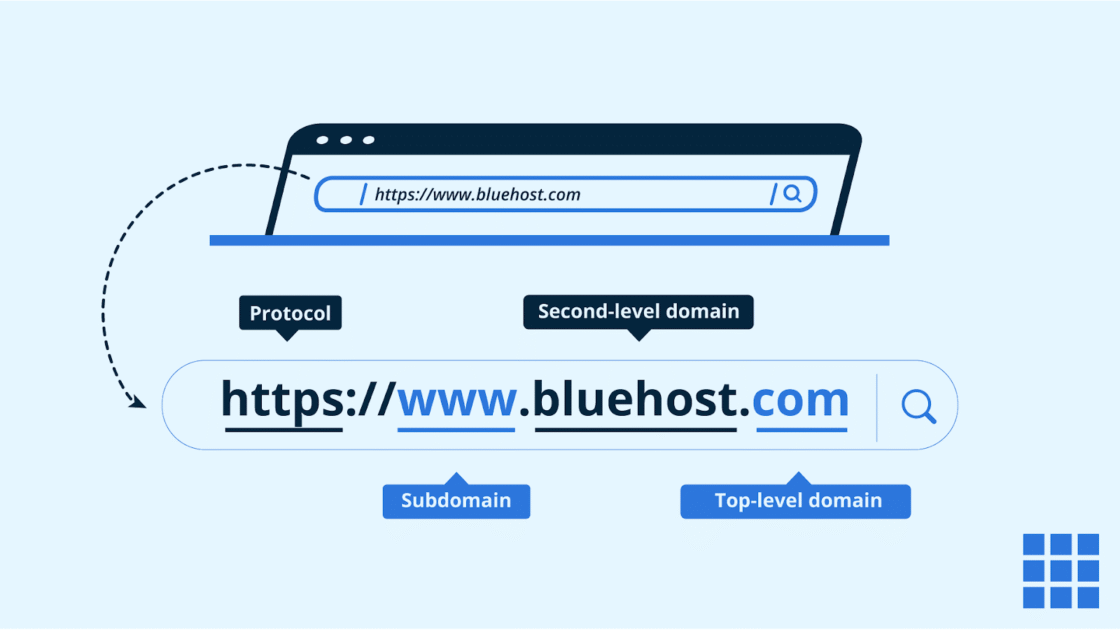
The subdomain structure follows a hierarchical format that reads from left to right, moving from a specific section to the broader root domain. To understand what is a subdomain in technical terms, you can break it down into three core components separated by dots:
| Component | Description | Example (blog.example.com) |
|---|---|---|
| Prefix | The specific subdomain name | blog |
| Second-Level Domain | Your main registered domain | example |
| Top-Level Domain | The domain extension (TLD) | com |
Subdomains always precede the main domain and can be layered multiple levels deep for complex organization, such as [support].[help].[example].[com]. Technically, each subdomain functions as a separate DNS (Domain Name System) record. This provides the technical foundation to host different sections of your site on unique servers or platforms while keeping everything organized under a single brand identity.
Subdomain vs domain: Key differences
Understanding the difference between a domain and a subdomain is key to managing your website effectively. This is especially important when you’re organizing content or expanding into areas like an online store or support center.
While both are part of your website address, they serve different purposes. Let’s break it down:
| Feature | Domain | Subdomain |
| Type | Main website address | Extension of the main domain |
| Purpose | Hosts your primary content | Hosts specific or separate content |
| Ownership | Requires domain registration | Created under your existing domain |
| Example | www.bluehost.com | support.[example].com |
| SEO impact | Centralized authority | Can rank separately with specific keywords |
| Setup | Comes with domain registrar | Created via hosting or cPanel |
| Use case | Main homepage and landing pages | Blog, help center, eCommerce site, etc. |
Now that you’ve seen how domains and subdomains compare side by side, let’s take a closer look at how each one functions:
Subdomain
A subdomain is a part of your main domain that operates as its own unique section of your website. It comes before the root domain in a URL and is used to organize specific types of content or functions separately from your main site.
For example, if your main domain is [example].com, a subdomain might look like:
- blog.[example].com for your blog
- support.[example].com for your help center
Each subdomain can run independently with its own design, content and even a different content management system like WordPress.
Also read: What is the Difference Between Add-on, Parked and Sub-Domains?
Domain
A domain is your website’s main address on the internet. It’s what people type into their browser to visit your site, like bluehost.com.
When you register a domain, you’re securing your brand’s presence on the world wide web. Your domain is essential for brand recognition, search engine visibility and building trust with users. Once you own a domain, you can create as many subdomains as needed to expand your website.
With Bluehost domain registration, you can search for available domain names, secure your brand instantly and connect it directly to your hosting account without any manual configuration. Register a domain with Bluehost today and secure your online identity.
As you can see, your main domain serves as the core of your online presence, while subdomains help you structure your site into logical, separate areas. This setup is ideal if you want to run a dedicated subdomain for things like a blog or a multilingual version of your site.
Subdomain vs Subdirectory: What’s better?
When organizing your website, you’ll often face a choice: should you use a subdomain (like blog.[example].com) or a subdirectory (like [example].com/blog)? Both have their advantages, and the right choice depends on your website’s structure, content goals and SEO strategy.
Here’s how subdomains and subdirectories stack up in different scenarios:
| Feature | Subdomain | Subdirectory |
| URL structure | Separate from the main site | Nested under the main domain |
| SEO treatment | Treated as a separate website by Google | Inherits SEO value from the main domain |
| Use case | Best for blogs, stores, help centers or separate teams | Best for organizing content under one site |
| CMS or platform | Can run a different CMS or app | Shares the same CMS and codebase as the main site |
| Ease of setup | Slightly more complex (new environment) | Simpler setup within the same environment |
| Audience targeting | Ideal for targeting different audiences or regions | Ideal for a unified user experience |
| Content separation | High; acts as a standalone site | Moderate; remains part of the main site |
| Hosting flexibility | Can host on a separate server if needed | Must be hosted under the same plan |
When to use a subdomain:
Use a subdomain if you want:
- A blog or store separate from your main site
- A different CMS or platform
- Multilingual content
- A testing/staging environment
Bluehost lets you create subdomains in minutes, no coding required.
When to use a subdirectory:
- You want to boost SEO for your main site using unified content.
- You’re running everything under one CMS and don’t need separate environments.
- Your website sections are closely related and intended to feel like one site.
Now let’s take a closer look at how Bluehost makes it incredibly easy to create, manage and grow your subdomains all from one powerful dashboard.
What are the benefits of using subdomains?
Using subdomains can give your website more flexibility, better organization and a stronger user experience. Whether you’re managing multiple content areas or targeting different audiences, subdomains help you scale your site without cluttering your main domain.
Here are five key benefits of using subdomains:
1. Better structure and branding
A subdomain lets you separate your site into sections like a blog, store or support center without cluttering your homepage. This structure helps users navigate easily and understand what each section is for.
2. Separate CMS or platform for each subdomain
Subdomains give you the freedom to run each part of your site using a different content management system (CMS). You can even use a completely different web development stack.
You can run your main site, store and docs on different platforms each on its own subdomain under one root domain. This separation can simplify management and boost performance.
3. Target different audiences with focused content
When you’re serving different audiences like shoppers, readers or international users, dedicated subdomains help you tailor the experience to their needs. You can tailor messaging, layout and keywords for each audience without disrupting your main site’s experience.
This is especially useful if you’re launching a multilingual website or localizing your content for different regions.
4. Improve search engine optimization (SEO)
Used strategically, subdomains can support better search engine optimization. They allow you to build keyword-rich content around specific topics or services. Each subdomain can rank independently in search results, giving you more opportunities to reach users searching for different content types.
5. Easier testing and staging environments
Many developers use subdomains for staging or testing new features before pushing them live. A subdomain like beta.[example].com lets you preview changes in a safe environment that won’t affect your main website or confuse your users.
It’s a smart, scalable way to manage updates and ensure your site performs well before launch.
From branding to SEO to content management, subdomains give you the power to build a more organized, professional and user-friendly site. Up next, let’s walk through how to set up a subdomain using Bluehost in just a few steps.
What are the common use cases for subdomains?
A subdomain can be used to create dedicated spaces for different types of website content without affecting your main domain. Whether you’re expanding your site for business, support or international users, subdomains offer a flexible way to manage it all. Below are some of the most common subdomains use cases:
1. Blog
Launching a blog is one of the most popular reasons to create a subdomain. With a subdomain like ‘blog.[example].com’, you can keep your articles and updates separate from your main site, while still building your brand.
This setup helps you target specific keywords for blogging and search engine optimization, without mixing content types on your homepage. It’s also great for WordPress users who want to run a blog using a separate CMS or theme.
2. Store
Running an eCommerce site? A subdomain such as ‘shop.[example].com’ is ideal for hosting an online store. This lets you manage your store independently from the rest of your main website, whether you’re using WooCommerce, Magento or another eCommerce platform.
Having a dedicated subdomain for your store helps you organize product pages, track inventory and streamline the checkout process. It also allows you to maintain strong SEO for product-related search terms.
Also read: How to Build Your eCommerce Website on WordPress
3. Help center
If you offer support or documentation, you can host a full help center or FAQ section on a subdomain like ‘support.[example].com’. This keeps customer service content organized and separate from your marketing pages or main offerings.
Subdomains make it easier to integrate tools like live chat, ticketing systems or knowledge bases. So, you can keep your main domain clean and focused for a better user experience.
4. Localization or language-specific content
Reaching a global audience? Subdomains are perfect for delivering content in different languages. For instance, ‘es.[example].com’ can serve Spanish-speaking users, while ‘fr.[example].com’ targets French speakers.
Using a subdomain extension for localization helps you maintain regional branding and align your content with local SEO and cultural preferences. It’s a smart way to scale your website internationally without cluttering your root domain.
Each of these use cases shows how a separate subdomain can simplify your site’s organization while improving performance, clarity and search results. Next, let’s take a closer look at the specific benefits subdomains offer.
Real-world subdomain examples
Many of the internet’s most recognizable brands use a specific subdomain structure to manage vast amounts of specialized content. By separating distinct functions, these companies provide a more organized user experience while ensuring that complex web applications and databases remain stable and secure.
- support.google.com: This customer support subdomain isolates troubleshooting guides from marketing pages to help users find technical solutions quickly.
- m.facebook.com: This mobile-optimized version subdomain delivers a lightweight, faster experience for users on mobile devices or limited data plans.
- store.apple.com: Apple uses this subdomain for its eCommerce shop to keep transactional features separate from its primary product display galleries.
- developers.google.com: This subdomain for technical documentation hub provides a dedicated space for tools and APIs intended for web professionals and agencies.
- mail.google.com: As a dedicated web application, Gmail operates on its own subdomain to maintain high security standards and optimal performance.
- es.wikipedia.org: This language localization subdomain example organizes Spanish-language content separately to better serve international users and improve regional search relevance.
How to create a subdomain with Bluehost?
Creating a subdomain might sound technical, but with Bluehost, it’s a beginner-friendly process you can complete in just a few clicks.
Follow these step-by-step instructions to create a subdomain with Bluehost:
Step 1: Access cPanel
- Log in to your Bluehost Account Manager.
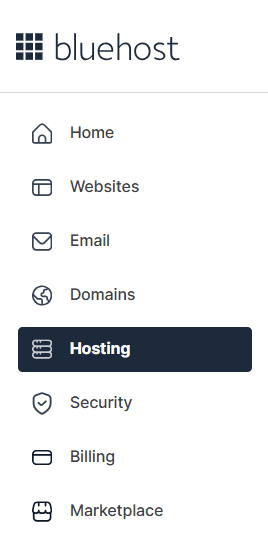
- Click the ‘Hosting’ tab from the left side navigation.
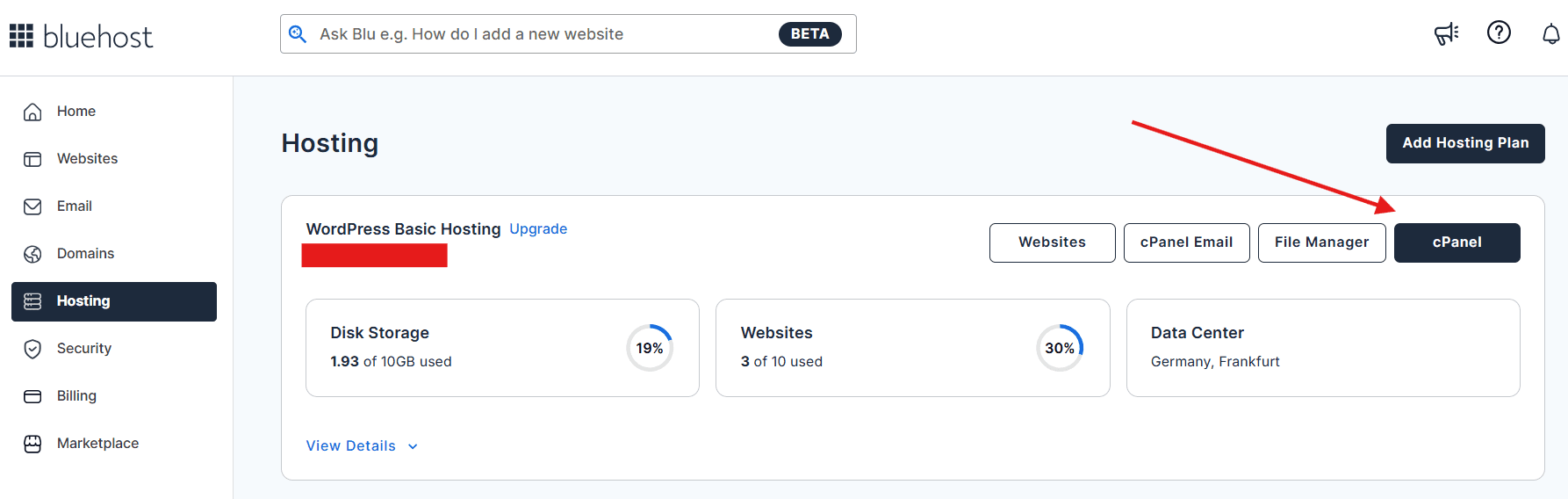
3. Locate the ‘cPanel’. This is where all your website management tools live, including everything related to domain name settings, file management and WordPress installation.
Step 2: Navigate to the subdomains tool
4. Scroll down to the ‘Domains’ section and click on ‘Domains’.

This tool allows you to create and manage subdomains for any domain connected to your Bluehost hosting account.
Step 3: Create your subdomain path
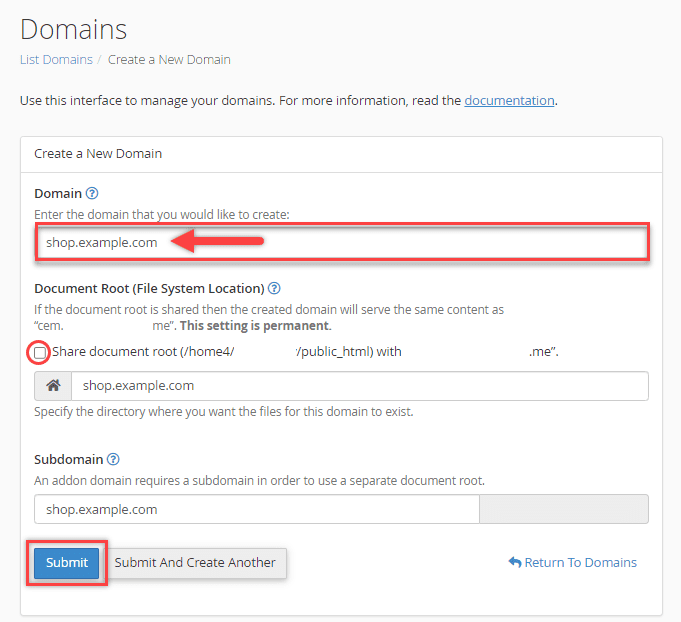
5. Inside the subdomains tool:
- Enter a prefix for your new subdomain like blog, shop or support.
- Select the root domain you want to connect to.
- Bluehost will automatically generate the document root, which is the folder where your subdomain’s files will be stored (e.g., /public_html/blog).
- Click Create to complete the setup. Your subdomain is now active.
Step 4: Install WordPress or upload your own content
6. Now that your subdomain is created, it’s time to add content to it. You have a few easy options:
- Install WordPress: Use our one-click WordPress installer to set up a full-featured blog, store or support portal.
- Upload custom files: Add your own HTML, CSS, JavaScript or PHP files using Bluehost’s File Manager or FTP.
- Use another CMS: If you’re working with a platform like Magento or a static site generator, you can deploy it to your subdomain as well.
Each subdomain functions as its own website, giving you the freedom to build and customize independently from your main site.
Step 5: Manage DNS settings and enable SSL
7. To ensure your subdomain works smoothly and is secure, you can update a few optional settings:
- Use the ‘DNS Zone Editor’ to add ‘A’, ‘CNAME’ or ‘TXT’ records for custom apps or integrations.
- Enable free SSL certificates for your subdomain with one click to encrypt user data and improve SEO.
- If you’re using third-party services, you can point your subdomain to a different IP address using our DNS tools.
Step 6: Preview and launch your subdomain
8. Once you’ve added content:
- Visit your new subdomain URL in a browser to confirm it’s live.
- Install any additional WordPress themes, plugins or eCommerce tools if needed.
- Monitor performance and make updates using Bluehost’s built-in features like analytics, caching and backups.
Now that you’ve successfully created a subdomain, let’s compare this setup with using a subdirectory so you can decide which structure is best for your website’s goals.
Also read: How to Create A Subdomain
SEO best practices for subdomains
To master SEO for subdomains, you must treat each one as a unique asset. Since search engines often view a subdomain structure as separate from your main site, they don’t automatically inherit its domain authority. Proper optimization helps your subdomains rank independently for niche topics, expanding your digital footprint. You should develop targeted keyword strategies for each specific audience and build quality backlinks to these sections independently to earn separate rankings.
To ensure smooth indexing, submit separate XML sitemaps in Google Search Console and use canonical tags to prevent duplicate content issues between your main domain and subdomains. Strategic cross-linking and consistent branding help search engines understand your site’s hierarchy while improving the user journey. Always monitor performance using analytics tools to track individual subdomain growth. Bluehost simplifies this process with built-in SEO tools and free SSL certificates, ensuring your setup is secure and search-engine ready from day one.
Internal linking strategy for subdomains
Strategic cross-linking between your main domain and subdomains is essential for both user experience and SEO for subdomains. By connecting these sections, you help users navigate seamlessly between related content, such as moving from a product page to a help center. From an SEO perspective, links from your root domain can pass authority signals to your subdomains, helping search engines understand your subdomain structure and index new pages faster.
To maintain site coherence, implement consistent navigation elements like header menus and footer links across all subdomains. This reinforces brand hierarchy and helps users find your homepage easily. Internal linking should always feel natural and serve the user’s journey rather than appearing manipulative. Use descriptive anchor text to ensure optimal site performance and search engine clarity.
How does Bluehost hosting make subdomains easy?
When it comes to organizing your website efficiently, subdomains are a powerful tool. And with Bluehost, using them couldn’t be easier. We’ve designed our hosting services to give you complete freedom to create, manage and scale subdomains with ease, whether you’re a beginner or an experienced site owner.
Here’s how we make it simple for you to take full advantage of subdomains:
1. Multiple subdomains with most plans
At Bluehost, you can create multiple subdomains, depending on the web hosting plan you choose.
This means you can create as many unique sections of your site as you need:
- Launch a product catalog at shop.[example].com.
- Run a blog from blog.[example].com.
- Create multilingual experiences like fr.[example].com.
- Test new features in beta.[example].com.
There’s no need to purchase new domains or set up separate accounts. Everything is organized under one main domain, giving you flexibility without the extra cost or confusion.
2. Build an online store with WooCommerce
Build an online store with WooCommerce on a subdomain to keep your shop separate and streamlined. Bluehost offers WooCommerce setup on subdomains like store.[example].com, allowing you to:
- Run your eCommerce site separately from your main business website.
- Customize the shopping experience without affecting the rest of your domain.
- Optimize performance, SEO and security for your storefront specifically.
Our WooCommerce hosting includes built-in tools like secure payments, shipping integrations and inventory management. So, your subdomain isn’t just a page, it’s a powerful online business.
Ready to launch your eCommerce store? Explore Bluehost WooCommerce hosting and turn your subdomain into a powerful online business platform today.
3. WordPress setup in just a few clicks
Each subdomain you create can host its own WordPress installation. With our one-click installer, you can launch a blog, course portal or help center independently from your homepage.
Each subdomain can have its own layout, plugins and content, giving you multi-site flexibility with centralized management.
Also read: How To Make an Online Store in 2025: The Complete Guide
4. DNS tools and file management built in
Behind the scenes, we give you all the tools you need to manage subdomains like a pro:
- The DNS Zone Editor helps you configure records like A, CNAME or TXT.
- File Manager and FTP access let you upload and organize your content.
- Free SSL certificates keep every subdomain secure and SEO-friendly.
Whether you’re launching a blog, building a storefront or creating content for global audiences, Bluehost makes subdomain setup smooth, scalable and stress-free.
When should you avoid using subdomains?
Deciding when to use a subdomain structure requires a strategic look at your long-term goals and technical capacity. While they offer excellent organization, they are not always the optimal choice, particularly if your primary goal is maximizing SEO authority on a single domain. As shown in the comparison table in the previous section, subdirectories consolidate ranking signals more effectively. If you are just starting out, focusing your efforts on one root domain is a more efficient way to build the initial authority needed to compete in search results.
You should generally avoid using subdomains in the following scenarios:
- Consolidating SEO power: When you want every piece of content to directly boost the ranking of your main domain.
- Simple or single-purpose sites: When your website is straightforward and does not require deep content separation.
- Resource constraints: When you lack the technical time to maintain and optimize multiple separate site environments.
- Closely related content: When your topics benefit from a unified architecture to establish better topical authority.
- Limited content volume: When you have a small amount of content that does not justify creating a standalone section.
- New brand growth: When focusing on one primary URL is more effective for building brand recognition and domain strength.
Choosing the right structure is not about subdomains being inherently flawed; it is about matching your website’s architecture to your specific resources and growth stage. If subdomains seem to add unnecessary complexity to your workflow, utilizing subdirectories or even entirely separate domains for distinct brands may be a better alternative for your project.
Final thoughts
Subdomains make it easy to structure your site for blogs, stores, support hubs or multilingual content all under one domain. They give you the flexibility to expand without cluttering your main website, and the freedom to manage each section independently.
At Bluehost, we make it easy to set up and manage subdomains, without any technical background required. With multiple subdomains, one-click WordPress and WooCommerce installs, built-in DNS tools and 24/7 support, you have everything you need to grow your online presence confidently.
Ready to launch your blog, store or support hub? Register a domain with Bluehost today.
FAQs
No, you don’t need to purchase a new domain. A subdomain is part of your existing main domain. For example, if you already own [example].com, you can create subdomains like blogs.[example].com or store.[example].com at no additional cost.
Yes! With Bluehost, subdomains are free with most hosting plans. You can create multiple subdomains without paying extra, making it easy to structure your site for blogs, online stores, help centers or regional content.
Subdomains are treated as separate entities by search engines like Google. That means they won’t automatically inherit SEO value from your main website. However, subdomains can still rank well in search results with proper internal linking and consistent branding. Use them strategically to organize your content and improve user experience.
Yes. Bluehost makes it easy to install WordPress on any subdomain with just one click. Each subdomain can run a fully independent WordPress site, allowing you to customize the design, plugins and content separately from your main domain.



Write A Comment