



Key highlights
- Building a subscription-based website gives you a central platform to manage recurring payments, deliver better customer experiences, scale your business efficiently, and establish lasting credibility with your subscribers.
- Bluehost eCommerce Essentials pre-bundles YITH Subscriptions, YITH Membership and YITH Booking, saving you hundreds in annual plugin costs compared to sourcing each tool separately.
- Your hosting plan determines what subscription tools you can run — choosing a plan without WooCommerce support forces you to buy, configure and maintain every billing plugin yourself.
- A subscription site built on WooCommerce supports digital memberships, physical subscription boxes, service bookings and course sales from the same dashboard.
- Bluehost WooCommerce Hosting includes a 99.99% uptime SLA, built-in Cloudflare CDN and NVMe storage — all critical for keeping billing and checkout operations reliable under load.
Most subscription businesses don’t fail because of the product. They fail before their first subscriber ever sees a checkout page.
A fitness coach building a membership site spends three weeks wrestling with plugin conflicts, broken payment forms and a subscription plugin that doesn’t talk to her billing gateway. By launch day, she’s exhausted — and her “start your free trial” button still doesn’t work on mobile.
That experience is more common than it should be. The problem isn’t WordPress or WooCommerce. It’s starting with a hosting setup that wasn’t built for subscription commerce.
WordPress and WooCommerce are the right stack for subscription businesses — flexible, open and supported by thousands of purpose-built plugins. But the hosting plan underneath your site determines which tools you can actually run, how reliable your recurring billing is under load and whether your checkout survives a traffic spike on launch day.
This guide walks you through every step of building a subscription site that’s set up correctly from the start — so you launch with a payment flow that works, not one you’re still debugging at midnight.
Why does your subscription business need a dedicated website?
A subscription business without its own website hands control of its customer relationships to someone else’s platform.
Platforms like Substack, Patreon and Gumroad make launching fast. But they take a percentage of every payment, restrict your checkout design and give you no ownership of your subscriber list or billing data. When you build on WordPress and WooCommerce, you own the platform, the data and the revenue.
The subscription economy reached $3 trillion in annual value in 2025 — and the businesses capturing the largest share of that growth run on owned infrastructure, not third-party platforms. A dedicated website is what separates a hobby subscription from a scalable business.
Here’s what a properly built subscription site gives you:
- Centralized operations: Showcase plans, process payments and manage subscriber accounts from one WordPress dashboard. WooCommerce automates recurring billing, renewal emails and cancellation handling so you don’t manage these manually.
- Improved customer experience: Subscribers browse, register and manage their accounts on your branded site. A well-structured membership portal reduces cancellations because subscribers can pause, upgrade or change plans without contacting support.
- Scalability: Your site grows with your subscriber count. SEO-driven organic traffic converts visitors into subscribers at no per-acquisition cost — unlike paid platforms where your discovery depends on their algorithm.
- Professional credibility: A branded domain and custom checkout builds trust before a visitor enters their payment details. Platforms like Substack show your subscribers that they’re transacting with Substack — not with you.
Step-by-step guide: How to build a subscription business
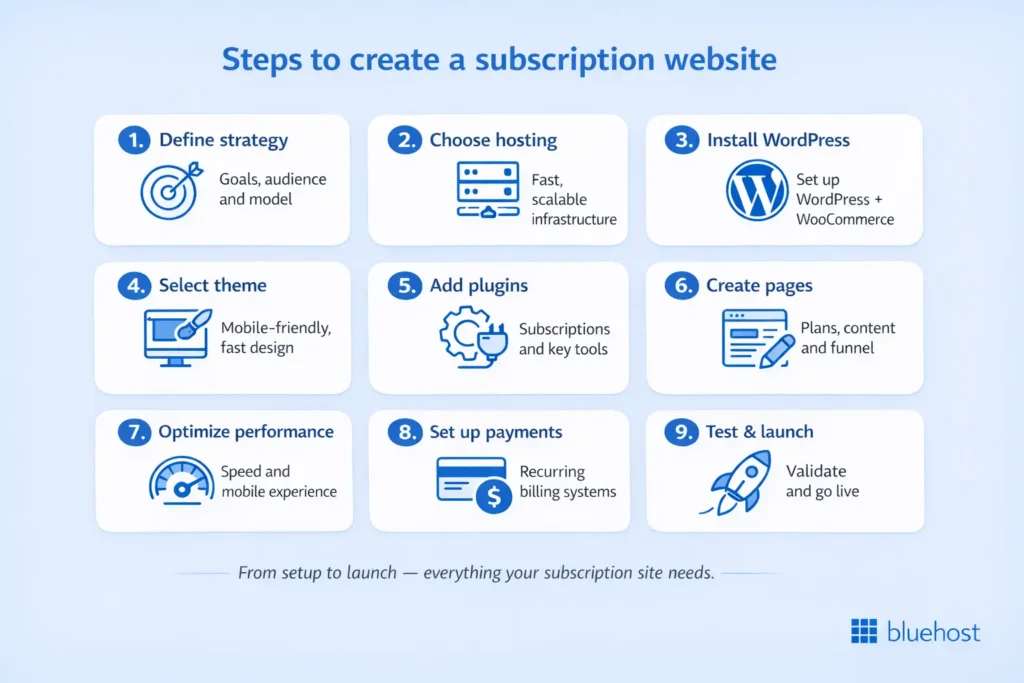
Step 1: Define your website’s goals and purpose
Before choosing any tool, define exactly what your subscription site needs to do — because the answer determines every setup decision that follows.
Not all subscription models need the same infrastructure. A digital content membership (exclusive articles, videos or downloads) needs a gated content system and recurring billing. A physical subscription box needs inventory management and shipping label integration. A service booking subscription needs a calendar and appointment system. Getting this wrong at Step 1 means rebuilding your plugin stack at Step 5.
Answer these four questions before moving forward:
- What subscription model will you offer? Decide between digital products, physical goods, service-based bookings or a hybrid model. Each requires a different WooCommerce plugin configuration.
- Who is your target audience? Define the person — their budget, their urgency and what they’re comparing you against. A creator selling a $29/month membership competes with free newsletters. A software tool selling a $99/month subscription competes with enterprise alternatives. These are different conversion problems.
- What sets you apart? Name the single reason a visitor should subscribe to you rather than a competitor. Every CTA, every headline and every plan description on your site must reinforce that one reason.
- What are your long-term objectives? f you expect 500 subscribers in year one, a basic setup works. If you’re projecting 5,000 or running seasonal promotions with traffic spikes, you need hosting that auto-scales — and you need to choose that hosting plan before you build, not after your site goes down under load.
Why WordPress and WooCommerce — not Kajabi, Squarespace or Substack?
This is worth addressing directly. Kajabi and Teachable are purpose-built for course creators but charge $119–$399/month and take a revenue cut. Squarespace offers subscriptions but has limited WooCommerce plugin compatibility. Substack is free but takes 10% of paid subscriptions and gives you no storefront ownership. WordPress with WooCommerce is the only option that gives you full platform ownership, zero platform fees and access to thousands of plugins — at hosting costs that start under $10/month.
If you’re selling digital subscriptions only, Bluehost eCommerce Essentials includes YITH Subscriptions and YITH Membership pre-installed. If you also need physical product fulfillment or marketplace syncing, start at eCommerce Premium instead.
Step 2: Choose a reliable hosting provider
Most how-to guides tell you to “choose reliable hosting.” But for a subscription site, the hosting plan you choose determines which billing tools are available, how your checkout performs under recurring transaction load and whether your YITH plugin stack runs without conflicts.
Generic shared hosting works for blogs. It wasn’t designed for subscription commerce.
Subscription sites have specific hosting requirements that standard plans don’t cover:
- Your server needs consistent performance for recurring billing processes transactions on a schedule, not shared resources that degrade under load.
- WooCommerce subscription plugins require specific PHP version compatibility and database performance that cheap hosting limits.
- Every additional second of checkout load time increases cart abandonment. Fast First Contentful Paint (FCP) keeps subscribers in the funnel.
What to look for in a hosting plan for your subscription site
| Requirement | Why it matters for subscriptions | What Bluehost delivers |
|---|---|---|
| WooCommerce pre-installation | Eliminates manual setup conflicts | Included in all WooCommerce Hosting plans |
| YITH Subscriptions + Membership | Core recurring billing and access control | Pre-bundled in eCommerce Essentials |
| NVMe SSD storage | Fast database reads for member account queries | 100 GB NVMe on eCommerce Essentials |
| 99.99% uptime SLA | Billing failures during outages = lost revenue and churn | Guaranteed SLA |
| Built-in Cloudflare CDN | Fast checkout delivery globally | Included — Argo routing on all plans |
| YITH Booking and Appointment | Service-based subscription scheduling | Pre-bundled in eCommerce Premium |
| Auto-scalability | Traffic spikes on launch day or promotions | Oracle Cloud infrastructure for seamless scalability |
| 30-day money-back guarantee | Risk-free first month | Included on all plans |
The right plan for most subscription sites
Bluehost eCommerce Essentials is the correct starting point for subscription businesses. It includes YITH Subscriptions, YITH Membership, YITH Email Templates and YITH Easy Login pre-installed — tools you’d otherwise pay $200–$400/year to source separately. WooCommerce installs automatically. Your free domain is included for the first year.
The eCommerce Essentials plan bundles the exact tools a subscription site needs on day one — no plugin shopping, no compatibility guesswork.
Step 3: Install WordPress with Bluehost
WordPress installs in under two minutes on Bluehost — and on WooCommerce Hosting plans, WooCommerce installs automatically at the same time.
On generic hosting, you install WordPress, then install WooCommerce, then configure payment gateways, then install your subscription plugin, then debug the conflicts between them.
On Bluehost WooCommerce Hosting, WordPress and WooCommerce arrive pre-configured so you start at plugin setup, not at square one.
Here’s how the setup works:
- Sign up for a hosting plan: Visit our WooCommerce Hosting page and choose Bluehost eCommerce Essentials for subscription-focused sites.
- Install WordPress: Bluehost’s one-click WordPress installation triggers from your control panel. On WooCommerce Hosting plans, WooCommerce installs in the same step.
- Access your WordPress dashboard: Once installed, you’ll manage your theme, plugins, subscription products and subscriber accounts from the WordPress admin panel.
Also read: Getting Started with WordPress: Setup Guide
Step 4: Select a subscription-friendly theme and customize your design
Your theme controls the first impression every potential subscriber gets. A theme that looks wrong, loads slowly or breaks on mobile kills conversions before a visitor ever reaches your plans page.
Choose a theme that meets these requirements for subscription sites:
- Mobile-responsive by default: Over 60% of web traffic is mobile. A theme that requires manual mobile optimization will cost you conversions and developer time.
- WooCommerce compatible: Not all themes render WooCommerce product pages, subscription plan cards and checkout flows correctly. Test on the WooThemes or Bluehost marketplace before committing.
- Fast baseline load time: A theme with heavy scripts, large CSS files or unoptimized images adds load time before you’ve installed a single plugin.
- Customizable membership page layouts: Subscription sites need plan comparison sections, member login areas and gated content pages. Choose a theme with these layouts built in.
Configuring your design with Bluehost’s AI website builder
Bluehost’s AI website builder (available on all WooCommerce Hosting plans) gives you a guided design setup that produces three site variations based on your business type, color preferences and content goals. You select the version closest to your vision, then customize from there. This is especially useful for subscription site owners who need professional plan pages and member dashboards quickly — without hiring a designer.
With the AI website builder, you can:
- Modify your homepage layout to lead with your subscription plans and primary value proposition.
- Personalize brand colors, typography and navigation to match your existing brand identity.
- Add high-quality images and subscription-specific page layouts from the built-in template library.
If you’re already comfortable with the WordPress block editor, you can bypass the AI builder and configure your theme directly in WordPress admin. The builder is designed to reduce time-to-launch, not to replace WordPress functionality.
By customizing your site with WonderSuite, you’ll create a unique, user-friendly experience that keeps subscribers engaged and encourages long-term retention.
Your subscription plugin stack is only as reliable as the hosting underneath it. Bluehost eCommerce Essentials includes YITH Subscriptions, YITH Membership and WooCommerce pre-installed — the core tools for recurring billing, member access control and payment processing, bundled in one plan.
Start your subscription site with Bluehost eCommerce Essentials → Includes a 30-day money-back guarantee. No risk to try.
Step 5: Install essential plugins for subscription websites
The right plugin stack is the operational engine of your subscription business. Choose incorrectly and you’ll spend more time managing plugin conflicts than managing subscribers.
A critical note before you install anything: many of the plugins below are pre-included in Bluehost’s eCommerce Essentials and eCommerce Premium plans. Check the table below before purchasing any plugin separately — you may already have it.
Plugin comparison: standalone cost vs. included in Bluehost eCommerce plans
| Plugin | What it does | Standalone annual cost (approx.) | Included in eCommerce Essentials | Included in eCommerce Premium |
|---|---|---|---|---|
| YITH Subscriptions | Recurring billing, renewal management, free trials | ~$179.99/yr | Yes | Yes |
| YITH Membership | Gated content, member tiers, access control | ~$179.99/yr | Yes | Yes |
| YITH Booking and Appointment | Service booking, scheduling, calendar management | ~$179.99/yr | No | Yes |
| YITH WooCommerce SMS Notifications | Automated SMS for renewals, billing and updates | ~$79.99/yr | No | Yes |
| YITH WooCommerce Advanced Reviews | Enhanced review system with images and star ratings | ~$79.99/yr | No | Yes |
| YITH WooCommerce Gift Cards | Gift card creation and redemption | ~$89.99/yr | No | Yes |
| YITH One-Click Checkout | Single-click checkout for returning subscribers | ~$79.99/yr | No | Yes |
| WonderCart | Sales promotions, discounts and bundle management | Included | No | Yes |
| YITH WooCommerce Wishlist | Subscriber plan saving and sharing | ~$79.99/yr | No | Yes |
| YITH Ajax Product Filter | Plan and product filtering | ~$89.99/yr | No | Yes |
| Yoast SEO (Free) | On-page SEO optimization for plan and content pages | Free | Yes | Yes |
| Jetpack (included) | Security: brute force and spam protection | Free tier | Yes | Yes |
Below is a breakdown of the key plugin categories and what each tool does for your subscription business.
Marketing & lead generation:
Creative Mail
Creative Mail helps you engage with subscribers through email marketing campaigns. With easy-to-use templates, automated workflows and tracking tools, it allows you to send personalized emails and stay connected with your customers. This plugin ensures your subscription business grows through targeted marketing strategies and increased lead generation.
YITH Request a Quote
This plugin is perfect for offering potential subscribers the ability to request quotes for products or services before committing. It simplifies communication, allowing customers to ask questions and receive pricing information. The plugin integrates seamlessly with WooCommerce and helps convert inquiries into paying customers by providing a smooth and professional experience.
Local SEO optimization:
Yoast Local SEO
Yoast Local SEO is a powerful plugin designed to improve your website’s visibility in local search results. It optimizes your site for local keywords, addresses and map listings, helping you attract more local customers to your subscription services. Using this plugin, your business can rank higher in searches from potential clients in your area, increasing local engagement and conversions.
YITH Store Locator
YITH Store Locator helps your customers find your physical store or service locations with ease. This plugin adds a store locator feature to your website, which is especially useful for subscription businesses with multiple locations. By improving the customer experience with easy location searches, you increase customer satisfaction and retention.
Client booking & communication:
YITH Booking and Appointment
For subscription businesses offering services, YITH Booking and Appointment allows customers to book and schedule appointments directly on your site. With this plugin, you can manage bookings, set availability and ensure your subscription service is accessible for your clients. It integrates seamlessly with WooCommerce to keep everything in sync and organized.
YITH WooCommerce SMS Notifications
YITH WooCommerce SMS Notifications sends automatic updates and reminders to customers via SMS. This plugin is ideal for subscription businesses that need to keep their subscribers informed about upcoming payments, renewals and service updates. By integrating SMS notifications, you improve communication and reduce no-shows, cancellations and missed payments.
Invoicing & customer relationship management:
YITH PDF Invoices
YITH PDF Invoices automatically generates and sends professional-looking invoices in PDF format for all your subscription transactions. This plugin simplifies the invoicing process, saving you time and ensuring compliance. It’s particularly helpful for subscription businesses that need to manage recurring payments and provide transparent billing information to customers.
Jetpack CRM
Jetpack CRM is a comprehensive customer relationship management tool for WooCommerce. It helps you keep track of your subscriber information, manage client communication and improve customer satisfaction. With features like automated follow-ups, custom fields and reporting tools, Jetpack CRM streamlines your subscription business’s interactions with customers, helping you build long-term relationships.
Quote requests & service display:
YITH Catalogue Mode
YITH Catalogue Mode turns your subscription website into an online catalogue by hiding pricing and enabling customers to request more information. It’s perfect for businesses that want to provide details about their subscription services without showing prices upfront. Additionally, this plugin enhances your website’s professional image, while simultaneously encouraging potential subscribers to inquire for more details.
YITH WooCommerce Advanced Reviews
YITH WooCommerce Advanced Reviews allows your subscribers to leave detailed reviews, improving your site’s trustworthiness and conversion rates. This plugin enhances your review system by adding features like review images, star ratings and more. By encouraging user feedback, you build credibility with potential subscribers, helping them make informed decisions about your subscription service.
Other recommended plugins:
CodeGuard
CodeGuard is a website backup service that automatically backs up your subscription site’s data and files. It allows you to restore your website to a previous version in case of an issue. With CodeGuard, you ensure your subscription business’s data is safe and can be quickly recovered, preventing downtime and potential loss of customer information.
MonsterInsights
MonsterInsights helps you track your website’s performance by providing insights into user behavior, traffic sources and more. With this plugin, you can analyze how your subscribers interact with your site, enabling you to optimize your content and marketing strategies. Accurate analytics ensure your subscription business grows and adapts based on real data.
Simple Social Icons
Simple Social Icons allows you to easily integrate social media profiles into your website. By displaying your social media accounts, you increase engagement and encourage potential subscribers to follow and interact with your brand. It’s a simple yet effective way to connect with your audience and promote your subscription service on various platforms.
Social Sharing Buttons
Social Sharing Buttons enable your visitors to share your content and subscription services on social media platforms. This plugin helps increase your website’s exposure and drive traffic to your subscription offerings. By encouraging sharing, you increase your reach and attract potential subscribers to your business.
Social Follow Icons
Social Follow Icons provide easy access to your social media profiles, helping you grow your online community. This plugin integrates seamlessly into your subscription website, encouraging visitors to follow your brand on platforms like Facebook, Instagram and Twitter. More followers lead to greater brand visibility and potential subscribers.
Social Media Feeds
Social Media Feeds display your latest social media posts directly on your website. By integrating social media content, you make your subscription site more dynamic and engaging. This plugin helps keep your website fresh and interactive, showcasing your brand’s activity on social platforms.
By using the best WordPress plugins, you can elevate your website, offering a professional and seamless experience that keeps your subscribers engaged and satisfied.
Pro tip: Install YITH Subscriptions and YITH Membership first. Configure recurring billing and access control before adding any marketing or SEO plugins — your subscription flow must work correctly before you drive traffic to it.
Step 6: Create your core subscription pages and content
A subscription site needs five specific pages before it’s ready to convert visitors. Missing any one of them creates a leak in your conversion funnel.
Essential pages for subscription websites:
- Home page: Your homepage must answer one question in the first screen of content: “What do I get and why should I subscribe today?” Lead with your top plan and its primary benefit — not your company story. Save the origin story for the About page.
- About us page: Share why you built this subscription and how it benefits your subscribers. Make the content specific — a fitness coach explaining that she built her membership after failing to find structured programming for busy parents converts better than a generic mission statement.
- Subscription plans page: This is your highest-conversion page. Present your plans in a comparison format with clear feature differentiation between tiers. Include recurring price, billing frequency and the key feature that separates each plan. A visitor who can’t immediately compare your plans will leave without subscribing.
- Testimonials page: Subscriber reviews reduce the primary objection to any subscription: “Will this actually deliver value?” Display testimonials that speak to specific outcomes — not general satisfaction.
- Blog section: A blog that targets subscription-relevant search terms builds organic traffic that converts into subscribers at zero acquisition cost. Target keywords your prospective subscribers search before they know you exist.
- Contact page: Include your primary contact method and — for local subscription businesses — embed a Google Map. Clear contact information reduces churn because subscribers who can reach you easily stay longer than those who can’t.
Local SEO best practices for subscription sites
If your subscription business has a geographic component, optimize these elements:
- Consistent business name, address and phone number (NAP) across your site and Google Business Profile
- Location-specific landing pages if you serve multiple cities
- Schema markup for your business type and subscription offerings
- Yoast Local SEO configured with your service area and business category
Step 7: Optimize for mobile and configure site speed
A subscription checkout that breaks on mobile loses a sale that may never come back.
Mobile optimization:
Your theme must adapt to every screen size without requiring manual CSS overrides. Test your subscription sign-up flow, plan selection and checkout process on at least three screen sizes before launch. A checkout that works on desktop but requires horizontal scrolling on mobile will have a measurably higher abandonment rate.
Also read: Mobile Optimization Best Practices for SEO and Performance
Speed optimization:
Slow checkout pages increase subscription abandonment. Every additional second of load time costs conversions. But installing a caching plugin to solve this on top of a hosting plan that wasn’t built for WooCommerce is a workaround — not a fix.
Bluehost WooCommerce Hosting includes native object caching and a built-in Cloudflare CDN with Argo routing on every plan. This means your subscription pages are cached and delivered from the nearest global edge server without you installing and configuring a third-party caching plugin.
Performance features included in your hosting plan:
- Native object caching: Reuses database query results instead of re-running them on every page load. Subscriber account pages and plan pages load faster because the server isn’t repeating work it already did.
- Built-in Cloudflare CDN: Delivers your subscription site’s content from 200+ global edge servers. Subscribers in Europe load the same page at the same speed as subscribers in North America.
- NVMe SSD storage: NVMe is measurably faster than standard SSD for database-heavy operations. Subscription sites run constant billing queries, membership status checks and access control lookups — NVMe handles these with lower latency than SATA SSD alternatives.
Step 8: Integrate subscription billing and payment systems
Recurring billing is the operational core of your subscription business. If it fails, you don’t just lose a payment — you lose a subscriber. To manage payments effectively, integrate reliable payment gateways and subscription tools on your site.
WooCommerce subscription plugin setup
The best WooCommerce subscription plugin for most subscription businesses is either WooCommerce Subscriptions (from WooCommerce.com) or YITH Subscriptions. YITH Subscriptions is pre-included in Bluehost eCommerce Essentials — which means if you’re on that plan, you skip the $179.99/year plugin purchase entirely.
YITH Subscriptions handles:
- Recurring billing: Auto-charges subscribers on your chosen billing cycle (weekly, monthly, quarterly, annually).
- Free trials: Configure a trial period before the first charge runs.
- Failed payment recovery: Automatically retries failed charges and sends subscriber notifications before cancelling access.
- Subscriber self-management: Subscribers can pause, upgrade or cancel from their account page without contacting you.
Payment gateways:
WooCommerce integrates with payment gateways like PayPal and Stripe natively. PayPal and Stripe together cover over 85% of subscriber payment preferences — most subscription businesses don’t need additional gateways at launch.
WooCommerce subscription plugin:
The best WooCommerce subscription plugin allows you to manage recurring payments, free trials, renewals and cancellations effortlessly. It automates billing and ensures smooth management of subscription plans, helping keep your service organized.
Other tools:
Incorporating affiliate marketing with tools like AffiliateWP can help grow your subscriber base. Reward affiliates for referrals, driving traffic and increasing conversions while simplifying referral and payment management through WooCommerce integration.
Step 9: Test your site before launch
A single broken step in your subscription flow on launch day can cost you every subscriber who visits that day. Test every path before you go live.
Run through each of these in order:
- Subscription sign-up and payment processes: Ensure the sign-up process and payment gateways (like PayPal or Stripe) function smoothly without issues.
- Navigation and user experience: Test that the site is easy to navigate, with clear access to subscription plans, sign-up forms and other important pages.
- Mobile responsiveness: Verify that the site is optimized for mobile devices and offers a smooth experience on smartphones and tablets.
- Speed and loading times: Test the website’s load speed to ensure fast performance for a better user experience.
- Email notifications and integrations: Check that all automated emails (like welcome or renewal emails) are sent correctly and any integrations work seamlessly.
How to market your subscription website?
Launching your subscription site is step one. Getting your first 100 subscribers requires a deliberate traffic strategy — not just waiting for Google to find you.
Platforms like YouTube are particularly effective for small businesses, enabling you to share engaging content that showcases your services. Combine this with strategies like social media advertising, email campaigns and SEO to boost visibility and attract potential subscribers. Offering exclusive promotions or free trials can encourage sign-ups and build customer loyalty.
Here are some proven techniques to increase website traffic effectively:
Leverage social media:
Social media is a powerful tool for promoting your subscription service. Share engaging content that resonates with your audience, such as behind-the-scenes footage, customer success stories and special promotions. Create interactive posts, run contests and use platforms like Instagram, Facebook and TikTok to expand your reach and engage with potential subscribers.
SEO and PPC campaigns:
Optimize your WordPress site for search engines to increase organic traffic. Use keyword-rich content, optimized meta tags and local SEO strategies to help people find your site. Alongside SEO, consider running pay-per-click (PPC) campaigns through Google Ads or social media platforms to attract more subscribers quickly and effectively.
Building user groups:
Encourage engagement by creating user groups where your subscribers can interact with one another. This not only builds community but also keeps people coming back to your website. Use these groups to share insights, updates and sneak peeks of upcoming offers.
Sign up fee promotions:
Consider offering an initial signup fee discount to attract new subscribers. This strategy can drive immediate traffic and incentivize potential users to take the leap and commit to your subscription service.
Email marketing:
Build an email list to nurture and engage your audience. Send regular newsletters with updates, promotions and valuable content to keep subscribers informed. Additionally, offer exclusive deals and discounts through email to encourage sign-ups and keep existing subscribers engaged with new offerings.
If you’re looking to build a subscription site that thrives, integrating these strategies will help ensure long-term success and growth for your business.
Final thoughts
Building a subscription site with WordPress and WooCommerce is a proven, ownership-first approach to recurring revenue. The setup decisions you make in the first two steps — your business model and your hosting plan — determine how smoothly everything else goes.
Before you hit publish on your subscription site, make sure:
- At least one automated email sequence is live — welcome, renewal reminder and payment failed.
- Your hosting plan includes WooCommerce and YITH Subscriptions pre-installed (not as a separate purchase).
- Your recurring billing flow has been tested end-to-end — including failed payment recovery.
- Your checkout page loads in under 2 seconds on mobile.
- Your subscription plans page clearly compares tiers and leads with your primary differentiator.
Ready to begin? Get started with Bluehost eCommerce Essentials and take the first step toward success with your subscription.
FAQs
Choose a WooCommerce-compatible theme that is fully responsive by default. Test your checkout and plan selection pages on both iOS Safari and Android Chrome before launch. A theme that renders correctly in a desktop browser occasionally breaks on real mobile devices — always test on hardware, not just in browser dev tools.
Your core costs are hosting plus your domain name (free for the first year on Bluehost plans). YITH Subscriptions and YITH Membership are pre-bundled in eCommerce Essentials, saving you approximately $360/year in plugin costs compared to sourcing them separately.
WordPress and WooCommerce give you full platform ownership — no revenue cut, no platform restrictions and complete control over your subscriber data and checkout design. Kajabi costs $119–$399/month and takes a revenue percentage. Substack takes 10% of all paid subscriptions. WooCommerce charges no platform fee on revenue.
Yes. Bluehost WooCommerce Hosting plans are configured for WordPress and WooCommerce out of the box. YITH Subscriptions and YITH Membership are pre-installed on eCommerce Essentials, so you manage recurring billing, access control and subscriber accounts directly from your WordPress dashboard without additional plugin configuration.
Install the Yoast SEO plugin (free, included in all Bluehost plans) and optimize your subscription plans page for the search terms your prospective subscribers use. Include your plan names, key benefits and relevant topic keywords in your page titles, meta descriptions and headings. Target blog content at questions your subscribers search before they discover your service.
YITH Subscriptions is a WooCommerce plugin that manages recurring billing, renewal reminders, free trials and subscriber self-service from inside your WordPress dashboard. It handles the full billing lifecycle — charge, renewal, failed payment retry and cancellation — automatically. On Bluehost eCommerce Essentials, it comes pre-installed at no additional plugin cost.
YITH Subscriptions automatically retries failed payments on a configurable schedule and sends the subscriber an email notification before cancelling access. This built-in dunning process recovers a significant share of failed payments without any manual intervention from you. You configure the retry schedule and grace period from your WordPress admin panel.



Write A Comment