 ChatGPT,
  Claude,
  Gemini,
  Grok — all four for
 Bluehost Portal Website Insights
Having an optimized website is key to succeeding in today’s technological world. The Website Insights feature from Bluehost will help analyze the Performance, Best Practices, Accessibility, and SEO of your website, highlighting areas that need improvement. The following post highlights everything about Website Insights and how to make the most out of them.
The Importance of an Optimized Website
- An optimized site goes beyond speed; it is the key to online longevity.
- Provides users with a fast and stable browsing experience, which helps increase their engagement and prevents them from bouncing back from your site.
- Aids with your search ranking, allowing people searching for you to easily find you online.
- Increases accessibility for all people, including those with special needs.
- Fosters trust with visitors through secure and reliable website performance, encouraging conversions and repeat business.
- Leads to improved brand reputation, higher customer satisfaction, and greater business growth over time.
- Utilizing tools like Bluehost’s Website Insights helps maintain and continually improve your website's performance, keeping you ahead in the competitive online market.
Website Insights at a Glance
To access Website Insights:
- Log in to your Bluehost Portal.
- In the left-hand menu, click Websites.
- Click the Manage Site button located next to the website you want to manage.

- Click Insights in the horizontal menu.
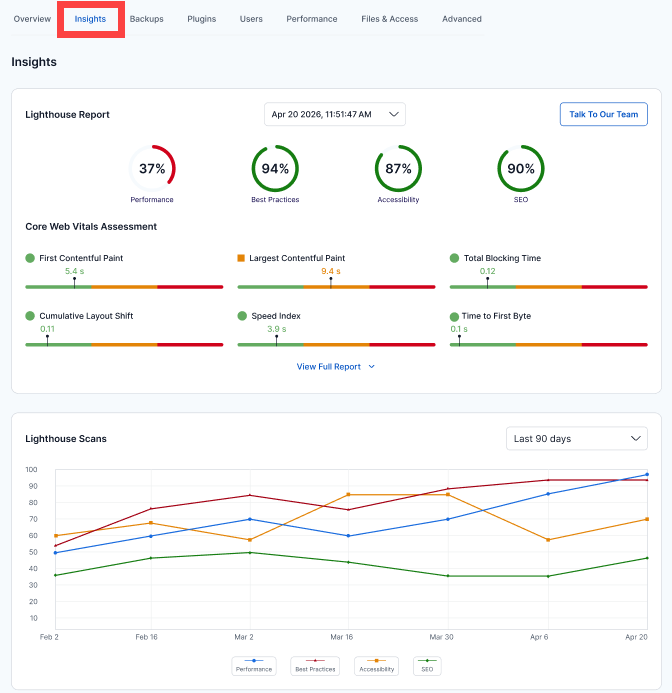
The Website Insights is the central platform that allows you to assess the essential elements of your site’s performance. You can access the detailed reports in two major categories:
Lighthouse Report
Core Web Vitals Assessment
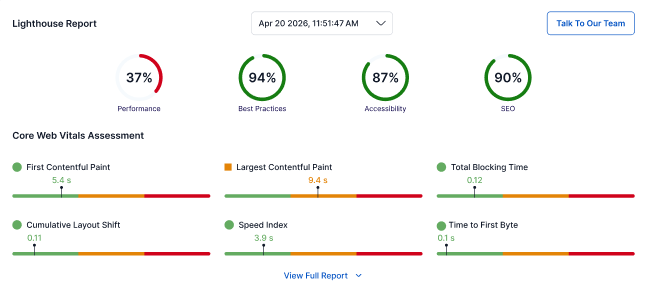
Below the main reports, you will find the Core Web Vitals Report. The following metrics are included:
- First Contentful Paint (FCP): How quickly the first piece of content appears.
- Largest Contentful Paint (LCP): When the largest visible content is rendered.
- Total Blocking Time (TBT): The duration the page is prevented from responding to user input.
- Cumulative Layout Shift (CLS): Visual stability during page loading.
- Speed Index: How quickly content visually loads.
- Time to First Byte (TTFB): How fast your server responds.
These metrics provide clear indicators of how your site performs from a real-world user perspective.
Lighthouse Scans
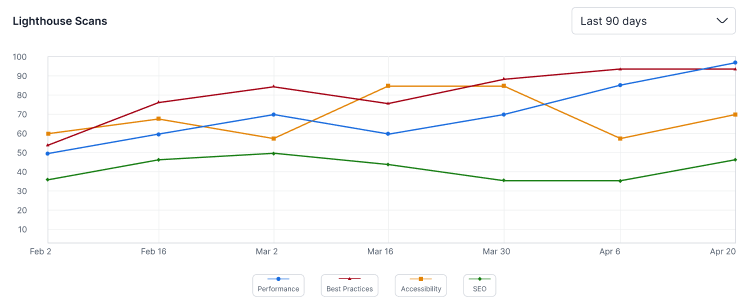
Stay on top of your website’s performance over time with a graph displaying Lighthouse scan results plotted across various dates. Use the filter at the top (e.g., Last 90 days) to review trends. The graph color-codes performance, best practices, accessibility, and SEO to give you a visual summary of your site’s ongoing health.
Summary
Bluehost’s Website Insights provides you with essential data focused on Core Web Vitals, a key indicator of your website's user experience. These insights allow you to monitor and optimize your site for speed, stability, and responsiveness from a user perspective.
The ability to track Lighthouse Scan results over time helps you visualize trends and stay proactive in maintaining your site’s health.
Whether you’re a site owner, developer, or marketer, utilizing these insights ensures your website runs efficiently and offers a great experience for all visitors.
With these deep insights and easy-to-use features, Bluehost empowers you to take control of your website’s performance and user experience. Whether you’re a small business owner, developer, or digital marketer, Lighthouse Reports gives you the tools and information you need to keep your website running at its best.
If you need further assistance, Bluehost Chat Support is available 24 hours a day, 7days a week while Bluehost Phone Support is available 7 days a week from 7 am-12 midnight EST.
- Chat Support - While on our website, you should see a CHAT bubble in the bottom right-hand corner of the page. Click anywhere on the bubble to begin a chat session.
- Phone Support -
- US: 888-401-4678
- International: +1 801-765-9400
You may also refer to our Knowledge Base articles to help answer common questions and guide you through various setup, configuration, and troubleshooting steps.