 ChatGPT,
  Claude,
  Gemini,
  Grok — all four for
 Understanding Your Home Directory
Your Bluehost home directory is a private space on the server assigned exclusively to your hosting account. It contains all the essential components your website needs—such as configuration files, data, scripts, symlinks, and the public_html folder. This directory is tied to your cPanel username and is accessible only to you.
What is a Home Directory?
Think of it as your personal folder on the server. Just like you store documents and files on your computer, your home directory stores everything required for your website to function, including pages, images, and scripts. Every hosting account has its own protected home directory, ensuring your files remain separate and secure from other users on the same server.
Why is the Home Directory Important
Your home directory is the starting point for managing all your website content. Understanding where it is and how to work with it can help you:
- Upload and update your website files easily.
- Keep your files organized in folders.
- Manage website backups.
- Troubleshoot issues or make changes safely.
How to Locate Your Home Directory
To find your correct home directory:
- Log in to your Bluehost Portal.
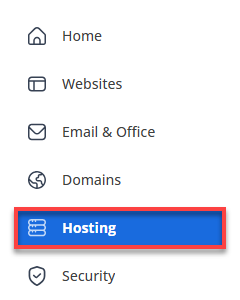
- In the left-hand menu, click Hosting, then select My Plans.
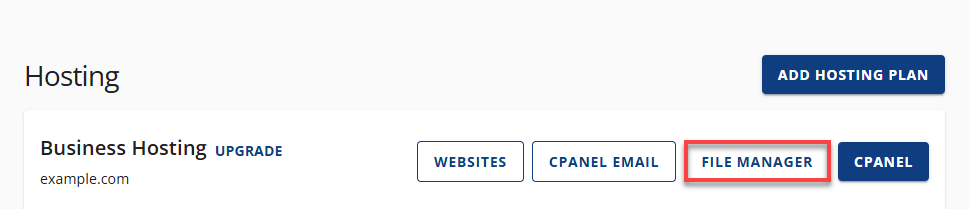
- In the hosting details page, click the File Manager button.
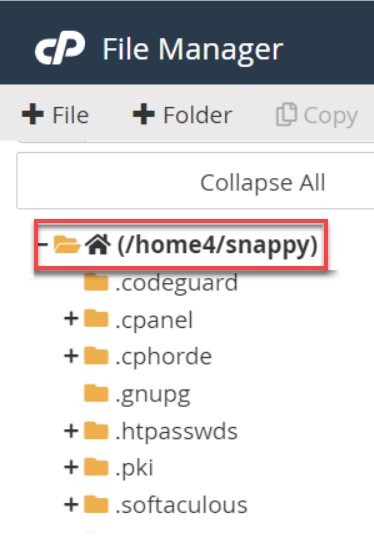
- You can find your home directory path at the top of the file tree on the left-hand side of File Manager. Below is an example of the home directory, which is /home4/snappy.
Summary
This will serve as your go-to guide in identifying and understanding your Bluehost home directory. This article also outlines an easy step-by-step process to locate your home directory path through your Bluehost File Manager.
If you need further assistance, Bluehost Chat Support is available 24 hours a day, 7days a week while Bluehost Phone Support is available 7 days a week from 7 am-12 midnight EST.
- Chat Support - While on our website, you should see a CHAT bubble in the bottom right-hand corner of the page. Click anywhere on the bubble to begin a chat session.
- Phone Support -
- US: 888-401-4678
- International: +1 801-765-9400
You may also refer to our Knowledge Base articles to help answer common questions and guide you through various setup, configuration, and troubleshooting steps.