 ChatGPT,
 Claude,
 Gemini,
 Grok — all four for
Key highlights
- Learn why your IP address may be blacklisted because of spam-like email activity, malware, failed login attempts, traffic spikes or suspicious network behavior.
- Understand how to tell whether your IP is blacklisted by checking access errors, email delivery issues, hosting login problems and blacklist lookup results.
- Find out what a temporarily blacklisted IP address means and why some blocks clear on their own after suspicious activity stops.
- Follow practical steps to secure your connection, website, devices and email setup before requesting blacklist removal or delisting.
- Learn when to contact Bluehost support if the block affects your hosting account, email, FTP, SSH, control panel or other business-critical services.
Seeing an IP blacklist warning can be frustrating, especially when it stops you from accessing your website, email, hosting account or another service you rely on.
In most cases, it does not mean you did anything intentionally harmful. It simply means a security system detected activity from your IP address that looked risky, unusual or automated. This could include spam-like email behavior, malware, repeated failed login attempts, sudden traffic spikes or suspicious activity from another device or user on the same network.
In this guide, we’ll explain why your IP is blacklisted, how to check what triggered it and what steps you can take to fix the issue, regain access and prevent it from happening again.
TL;DR
- If your IP is blacklisted, it usually means a security system detected suspicious activity from your connection, website, email account or network.
- Common causes include spam-like email behavior, malware, repeated failed login attempts, automated traffic, public Wi-Fi or shared network activity.
- Start by checking the error message, affected service and recent activity. Then secure your connection, website, devices and email authentication before requesting removal.
- Temporary IP blocks may clear after a few hours, but spam, malware or email-related listings may take longer and may require delisting.
- If the block affects your Bluehost hosting account, email, FTP, SSH or control panel, contact Bluehost support with the error message, your IP address and the steps you’ve already taken.
Is my IP blacklisted? How to tell?
Your IP may be blacklisted if you suddenly lose access to a website, email account, hosting dashboard or online service. The block may appear as an error message, failed login attempt or email delivery issue.
Common signs include:
- You see an “Access denied” or “your IP has been blocked” message.
- You cannot log in to your hosting account, email, FTP, SSH or control panel.
- Emails sent from your domain bounce back or land in spam.
- Your website or server becomes temporarily unreachable from your network.
- The issue happens only on one internet connection, such as your home Wi-Fi, office network, VPN or public hotspot.
- An IP blacklist checker shows your IP address on one or more blocklists.
If only one device or network is affected, the issue may be tied to that specific IP address. If the problem affects multiple users or services, check for recent login failures, email activity, malware or unusual traffic before requesting removal.
Why is my IP blacklisted?
Your IP address can be blacklisted when activity from that address looks suspicious, harmful or automated. Security systems use IP blacklists to protect websites, servers, email accounts and users from spam, malware, brute-force login attempts and unusual traffic patterns.
This does not always mean you did something wrong. Your IP may also be blocked because of activity from a shared network, public Wi-Fi, VPN or another device connected to the same internet connection.
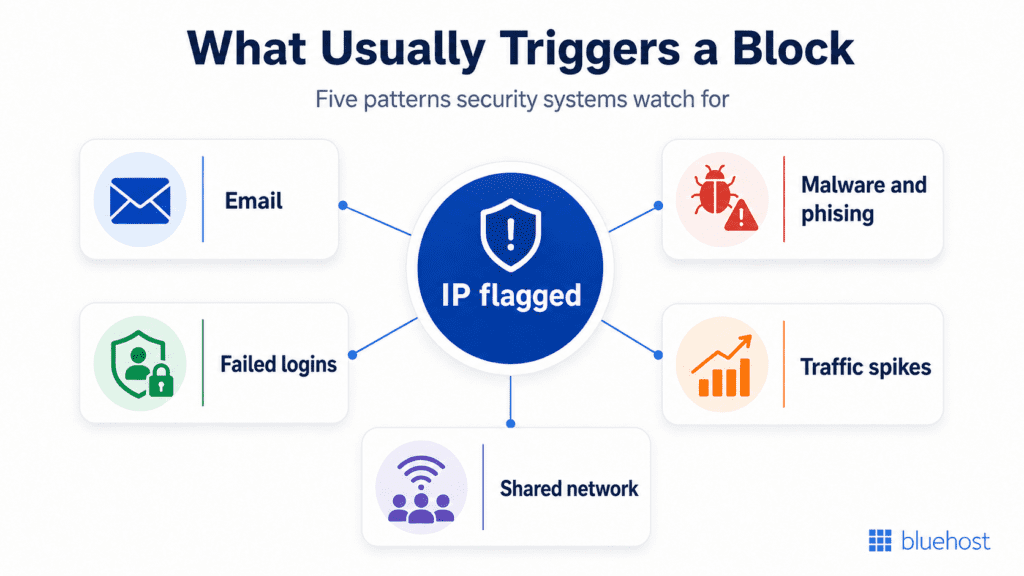
Here are the most common reasons your IP may be blacklisted:
1. Spam or suspicious email activity
Your IP address may be blacklisted if it appears to be sending spam or suspicious email. This can happen when email providers or anti-spam systems detect unusual sending patterns from your IP address.
Common triggers include:
- Sending a large number of emails in a short period
- Using spam-like subject lines, keywords or suspicious links
- Receiving high spam complaints or bounce rates
- Missing or incorrectly configured SPF, DKIM or DMARC records
Email authentication helps providers verify that your messages are legitimate. If these records are missing or misconfigured, your emails may look less trustworthy and your IP may be more likely to be flagged.
Visit the article Why Emails Go to Spam: Common Causes and Solutions to learn more.
2. Malware, phishing or compromised devices
Your IP may be blacklisted if it is linked to malware, phishing pages or other harmful activity. This can happen when a device, website or server on your network is compromised.
For example, attackers may use an infected device or hacked website to send spam, host phishing links, distribute malware or generate suspicious traffic. Even if you did not create the activity yourself, it can still be associated with your IP address.
3. Too many failed login attempts
Repeated failed login attempts are one of the most common reasons an IP address gets blocked. Security systems monitor login activity to detect brute-force attacks, where someone repeatedly guesses passwords to gain access to an account.
At Bluehost, a high number of failed login attempts to your control panel, email accounts, site builders, SQL, SSH, FTP or other services within a short period can trigger a temporary IP block. This may happen if you forgot your password, used outdated saved credentials or someone is trying to access your account without permission.
If your IP is blocked because of failed login attempts, wait about two hours before trying again. In the meantime, reset your password and make sure your saved login details are updated.
Check out how to create a strong password for a few tips.
4. Suspicious network activity
Your IP may be blacklisted if it sends an unusual number of requests or connections in a short period. Security systems may treat this as suspicious if the activity affects server performance or looks like an automated attack.
This can happen because of:
- Automated scripts
- Repeated manual actions
- Connection floods
- Bot traffic
- Misconfigured applications
- Sudden traffic spikes from one IP address
If the activity appears to overload or negatively affect a server, the IP may be blocked to protect the service.
5. Shared network or public Wi-Fi activity
Sometimes your IP is blacklisted because of activity from another person or device on the same network. This is common on public Wi-Fi, office networks, hotspots, VPNs and shared internet connections.
If someone else on that network sends spam, runs automated scripts or triggers suspicious login activity, the shared IP address may be flagged. That can block legitimate users on the same connection.
If the issue happens only on one network, try switching to a trusted connection and check again. If the block remains after a few hours, it may be a false positive or may need support review.
What does a temporarily blacklisted IP address mean?
A temporarily blacklisted IP address means your IP has been blocked for a limited time because a security system detected suspicious activity from that connection.
This can happen after repeated failed login attempts, unusual traffic, spam-like email behavior or activity that looks automated. The block is usually meant to protect servers, websites and accounts from abuse.
A temporary blacklist does not always mean your device, website or account is compromised. Sometimes it happens because of a false positive, outdated saved passwords, a misconfigured app or another user on the same network.
In many cases, the block clears after a few hours. While you wait, avoid repeated login attempts, reset affected passwords and check your devices, website and email activity for anything unusual.
What should I do if my IP is blacklisted?
If your IP is blacklisted, start by finding what triggered the block. Requesting removal too early may not help if the same suspicious activity continues. Secure the issue first, then check whether the block clears or needs manual review.
First, check what triggered the blacklist
Use this checklist to narrow down the cause before you request removal or contact support.
- Check the exact error message you’re seeing.
- Confirm what is affected: website access, email, hosting login, FTP, SSH or control panel.
- Test from another trusted network to see if the issue is limited to one IP address.
- Look up your public IP address and run it through an IP blacklist checker.
- Review recent failed login attempts or password changes.
- Check whether your email account or domain sent a high volume of messages.
- Scan your devices, website files and plugins for malware.
- Review SPF, DKIM and DMARC records if email delivery is affected.
- Stop any automated scripts, repeated requests or unusual traffic from your network.
Once you have a better idea of what caused the block, start with the area most likely responsible: your connection, website, devices or email setup.
Secure your connection
If the activity came from your internet connection, secure your network before trying again. Scan all devices connected to the network for malware, update your router password and avoid using public Wi-Fi or shared hotspots to access sensitive accounts.
Also check whether anyone on the same network is running automated scripts, sending bulk emails or repeating actions that could create too many requests from the same IP address.
If your connection looks secure but the issue continues, check whether the activity may be coming from your website or hosting account.
Secure your website
If your website is compromised, attackers may use it to send spam, host phishing pages or generate suspicious traffic. Start by updating your CMS, themes and plugins. Then reset admin passwords, remove suspicious files and review recent changes.
To keep your website safe and running well, follow these steps.
- Use strong passwords.
- Keep your software and plugins updated.
- Back up your website regularly.
Website security tools such as malware scanning, backups and file monitoring can help detect and prevent these issues.
Even if your website looks fine, a compromised device on your network can still trigger suspicious activity.
Scan your devices for malware
Run a malware scan on your computer, phone and any device connected to the same network. A compromised device can send suspicious traffic without you noticing, which may cause your IP address to be flagged.
Use a reputable antivirus or anti-malware tool and keep it updated. Examples include:
- Windows: Avira Anti-virus, Malwarebytes Anti-Malware, Panda Free Anti-virus
- Mac: Avast! Anti-virus, Avira Anti-virus, Sophos Anti-virus
- Linux: Bitdefender Anti-virus, ClamAV, Sophos Anti-virus
You should also regularly:
- Scan all devices connected to your network.
- Update your operating system, browser and security software.
- Remove suspicious apps, browser extensions or scripts.
- Restart your device after removing malware or unwanted software.
- Check whether the issue continues on the same network.
If the blacklist is related to bounced emails, spam complaints or mail delivery issues, review your email setup next.
Check email authentication
If email activity caused the blacklist, review your sending behavior and authentication records. Avoid sending large volumes of email in a short period and check for spam complaints, bouncebacks or unauthorized use of your email account.
Make sure SPF, DKIM and DMARC records are configured correctly. These records help email providers verify that your messages are legitimate and reduce the risk of your IP or domain being flagged.
After you fix the source of the issue, you can check whether the block clears or needs a delisting request.
Request blacklist removal or delisting
After you fix the cause, check whether the block clears on its own. Temporary IP blocks may expire after a few hours.
If your IP is still blacklisted, request delisting from the relevant blacklist provider or contact your hosting provider or ISP. Share the exact error message, your IP address, the affected service, when the issue started and the steps you’ve already taken.
Now that you know what you should do when your IP address gets blacklisted, its time you understand the most common reasons and how they usually appear in real-world cases to avoid them in future.
Common reasons an IP address gets blacklisted
Once you’ve checked the immediate issue, it helps to connect the block to the most likely cause. Most IP blacklist issues come from one of five areas: email activity, malware, failed logins, traffic spikes or shared network behavior.
| Reason | What triggers it | What to check |
|---|---|---|
| Spam or suspicious email activity | High-volume sending, spam complaints, suspicious links or missing email authentication | Sending volume, bouncebacks, SPF, DKIM and DMARC records |
| Malware or phishing activity | A compromised device, website or server sends harmful traffic or hosts suspicious content | Malware scans, website files, plugins and recent changes |
| Failed login attempts | Too many incorrect login attempts in a short period | Saved passwords, login logs, control panel, email, FTP, SSH and database access |
| Suspicious network traffic | Automated scripts, repeated requests or traffic spikes affect server performance | Scripts, bots, repeated tasks and unusual connection patterns |
| Shared network behavior | Another user on the same IP triggers suspicious activity | Public Wi-Fi, office networks, hotspots, VPNs or shared connections |
This table can also help you decide which fix to prioritize. For example, email-related blocks should start with authentication and sending behavior, while access-related blocks should start with login attempts, passwords and network security.
How long does an IP blacklist last?
An IP blacklist can last anywhere from a few hours to several days, depending on what triggered the block and who manages the blacklist.
If the block is temporary, such as one caused by repeated failed login attempts, it may clear on its own after a few hours. If your IP was flagged for spam, malware or suspicious server activity, removal may take longer and may require a delisting request.
Before requesting removal, make sure you’ve fixed the issue that caused the blacklist. If the same activity continues, your IP may be blocked again even after it is removed. This fits the current flow after the fix and cause-matching sections.
How can I prevent future blacklisting?
To prevent future blacklisting, we encourage you to take the following steps:
1. Keep good email hygiene
If you send emails from your domain, make sure your sending behavior looks trustworthy.
- Keep your email list clean.
- Avoid sending bulk emails in a short period.
- Monitor spam complaints and bouncebacks.
- Use SPF, DKIM and DMARC records to authenticate your emails.
- Avoid spam-like subject lines, trigger words and suspicious links.
2. Strengthen your security measures
A compromised device, website or account can trigger suspicious activity without you noticing.
- Run regular malware scans on devices connected to your network.
- Use strong, unique passwords for email, hosting, FTP, SSH and admin accounts.
- Keep your software, CMS, themes and plugins updated.
- Secure your router and Wi-Fi network with a strong password.
- Configure your firewall properly if you use one.
3. Regularly check your blacklist status
Monitoring your IP reputation helps you catch issues before they affect access or email delivery.
- Check your IP address against common blacklists.
- Use online blacklist tools to monitor your IP reputation.
- Review login activity, email sending patterns and unusual traffic.
- Fix security or email issues before requesting delisting.
Also read: How to Access Cpanel Error Logs for Troubleshooting
When should I Bluehost contact support?
In many cases, a temporary IP block clears on its own after a few hours. But if you’ve already secured your connection, checked your website, scanned your devices and reviewed your email setup, the issue may need manual review.
If you’re a Bluehost customer, our support team can help you understand whether the block is related to your hosting account, email, FTP, SSH, control panel or another service connected to your account.
Contact Bluehost support if:
- The block lasts longer than expected.
- You cannot identify what triggered the suspicious activity.
- You are locked out of your Bluehost hosting account, email, FTP, SSH or control panel.
- Your website, email or other business-critical services are affected.
- You’ve fixed the likely cause, but your IP is still blocked.
Call us at 888-401-4678 to get your issue resolved (International call charges may apply)
To help us review the issue faster, share:
- The exact error message you’re seeing
- Your IP address
- The affected service
- When the issue started
- Any recent login attempts, password changes or email activity
- The steps you’ve already taken to secure your connection, website, devices or email setup
The more context you provide, the easier it is for us to check what happened and guide you toward the right next step.
Final thoughts
An IP blacklist is usually a sign that something needs attention, not a reason to panic. Start by identifying where the issue began, then secure your connection, devices, website, login activity and email setup before requesting removal.
If you use Bluehost and the block affects your hosting account, email, FTP, SSH or control panel, our support team can help review the issue and guide you through the next step.
To reduce future risks, choose a hosting provider that makes website security, email setup, backups and support easier to manage.
Ready to secure your website from the start? Explore Bluehost web hosting plans and choose the right option for your site.
FAQs
Your IP may be blacklisted if activity from your connection looks suspicious, harmful or automated. Common causes include spam-like email activity, malware, repeated failed login attempts, unusual traffic spikes or activity from another user on the same network.
You can check by looking for access errors, email bouncebacks, failed hosting logins or warnings that your IP has been blocked. You can also use an IP blacklist checker to see whether your public IP appears on known blocklists.
Start by identifying what triggered the block. Check the error message, affected service, recent login attempts, email activity, malware scans and network behavior. Fix the issue first, then wait for a temporary block to clear or request delisting if needed.
To unblacklist your IP, fix the cause first. This may include securing your network, scanning devices for malware, updating passwords, fixing email authentication or stopping suspicious traffic. After that, request delisting from the blacklist provider or contact your hosting provider or ISP.
A temporary IP block may clear within a few hours, especially if it was caused by failed login attempts. Blacklists related to spam, malware or email reputation can take longer and may require manual delisting after the issue is fixed.
Yes. Repeated failed login attempts can make your activity look like a brute-force attack. Security systems may temporarily block your IP to protect accounts, email, FTP, SSH, control panels and other login-based services.
Yes. A compromised device, website or server can send spam, host phishing links or generate suspicious traffic without you noticing. If that activity is tied to your IP address, it may be flagged by security systems or blacklist providers.
It can affect access, email delivery and trust signals, but it is not always permanent. Many IP blocks are temporary or can be removed after you fix the root cause. The important step is to identify why the IP was flagged before requesting removal.
Yes. IP blacklisting can happen because of false positives, shared networks, public Wi-Fi, VPNs or another user on the same IP address. It can also happen if saved login credentials are outdated and repeatedly fail.
Keep your devices and website secure, use strong passwords, avoid repeated failed logins, monitor email sending activity and configure SPF, DKIM and DMARC records correctly. Regularly checking your IP reputation can also help catch issues early.

Write A Comment