 ChatGPT,
 Claude,
 Gemini,
 Grok — all four for
Key highlights
- Test plugins and themes instantly in a browser based WordPress environment.
- Validate updates safely before applying changes to a live site.
- Experiment freely without risk using disposable testing sessions.
- Compare tools side by side to make informed configuration decisions.
- Move validated changes to staging before deploying to production.
One small plugin update can break an entire website. That possibility alone stops many improvements before they begin.
WordPress Playground changes that dynamic. It creates an instant, browser based WordPress environment where plugins, themes and updates can be tested safely without touching a live site. Risk drops to zero because every session disappears when closed.
This WordPress Playground guide explains how the platform works, what it does well and when to move beyond it. The focus remains practical: faster validation, safer experimentation and smarter deployment decisions. This WordPress Playground beginner guide covers everything from basic concepts to advanced workflows.
What is WordPress Playground?
WordPress Playground is an instant WordPress environment that runs entirely in your browser. It launches a temporary site in seconds, which means you do not install software or configure servers. Everything happens locally within your browser session.
You can test plugins, themes and core WordPress features without affecting your real website. Once you close the tab, the environment disappears and your live site remains untouched.
This WordPress Playground definition establishes the core concept. Now that the definition is clear, the real question becomes why this tool matters in practical, everyday website management.
Now that the definition is clear, the real question becomes why this tool matters in practical, everyday website management.
Why does WordPress Playground matter for website owners?
Most website owners hesitate to test changes because the process feels risky and complex. A single plugin conflict can break layouts or disable critical features, which makes experimentation feel dangerous. Fear of disruption often outweighs the desire to improve the site. Understanding WordPress Playground helps eliminate that fear through safe, isolated testing.
Traditional testing introduces technical overhead. It usually requires:
- A staging environment
- Reliable backups before changes
- Technical knowledge to restore the site if something fails
This setup consumes time and mental bandwidth, which discourages even minor experimentation.
WordPress Playground removes that friction. A fresh WordPress installation loads instantly in the browser, without accounts or downloads. The low barrier to entry changes how testing feels. This explains why use WordPress Playground for quick validation before committing changes.
The environment is disposable by design. It allows:
- Plugin installation and activation
- Theme switching and configuration changes
- Intentional breakage for learning purposes
Closing the browser tab resets everything, while the live site remains untouched.
Consider a practical scenario. A contact form plugin shows strong reviews and promising features, yet compatibility concerns create hesitation. Instead of installing it on production, it can be tested inside Playground.
Within minutes, the plugin can be installed, configured and evaluated. Sample forms can be created, responsiveness verified and submission flows tested. Validation happens safely, without any impact on the production site.
Understanding the value is important, but understanding the mechanics explains why it feels so effortless.
How does WordPress Playground work?
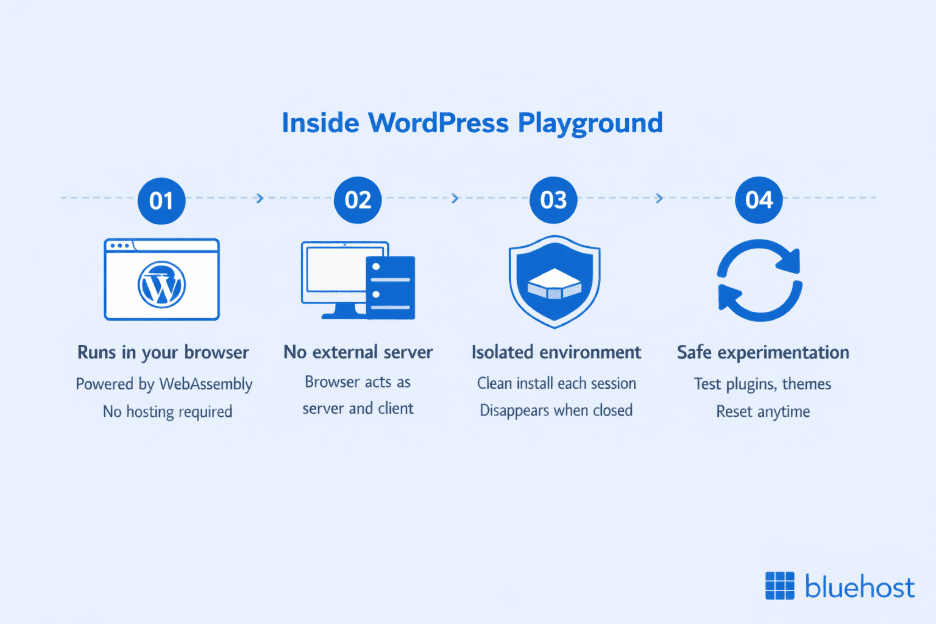
WordPress Playground runs entirely inside the browser. It relies on WebAssembly, which allows complex applications to execute at near native speed within modern browsers. That capability makes a full WordPress environment possible without traditional hosting.
No external server processes the session. All files load temporarily into browser memory, which means the browser functions as both server and client during execution. The entire installation exists locally and disappears once the session ends. This WordPress Playground overview of the technology reveals why it performs so efficiently.
Each session starts with a clean WordPress installation. The instance remains isolated from other sessions and vanishes when the tab closes. Nothing persists unless it is deliberately exported.
A simple analogy clarifies the concept. Playground behaves like a sandbox where structures can be built, destroyed and rebuilt without affecting anything outside the boundary. WordPress operates the same way within this isolated environment.
What this means for you?
The technical architecture enables safe experimentation. Risky changes such as theme file edits or plugin conflicts remain confined to the temporary instance. Production environments stay unaffected.
Practical use cases include:
- Testing complex plugins before live installation
- Evaluating premium themes before purchase
- Exploring advanced settings without backup anxiety
- Following tutorials and experimenting in parallel
The environment resets instantly when needed. That reset loop encourages exploration, reduces hesitation and supports faster learning.
With the technical foundation in place, it becomes easier to see where Playground delivers real world benefits.
What can you do with WordPress Playground?
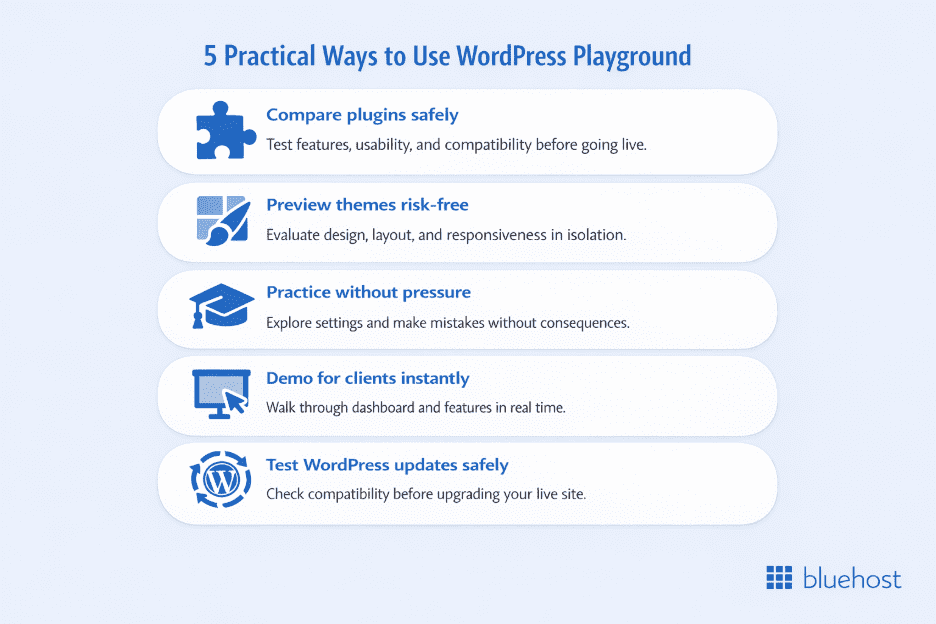
WordPress Playground supports rapid validation, comparison and learning. Its temporary structure encourages experimentation without long term risk. The following use cases demonstrate what does WordPress Playground do and where it delivers the most value.
1. Test plugins before installing on your live site
Selecting the right plugin often involves uncertainty. Multiple options may offer similar features, yet complexity and compatibility concerns make direct installation risky. Playground enables side by side evaluation without touching production.
A structured testing workflow might include:
- Installing and activating the first plugin
- Exploring configuration settings and feature depth
- Creating a realistic sample setup
- Testing responsiveness and user flow
After evaluation, the session can be closed and restarted to test the next option under identical conditions. This repeatable comparison reveals usability differences that reviews alone cannot expose.
Hands on testing replaces assumption with evidence.
Also read: How to Install a Plugin
2. Try themes without committing
Theme selection influences design, performance and workflow. Demo pages rarely reflect actual content structures, which makes decision making difficult. Playground solves this through isolated theme testing.
A practical evaluation process includes:
- Activating one theme at a time
- Testing layout variations and gallery behavior
- Reviewing customization controls
- Checking display across screen sizes
Each reset creates a neutral baseline for comparison. After testing all options, strengths and weaknesses become clear, which prevents costly redesign cycles.
Direct experience reduces buyer’s remorse.
3. Learn WordPress safely
New users often hesitate to explore the dashboard fully. The number of menus and settings creates anxiety about accidental misconfiguration. Playground removes that pressure. This makes it an ideal WordPress Playground for beginners learning environment.
A learning session can involve:
- Creating posts and pages freely.
- Modifying permalink structures.
- Installing unfamiliar plugins.
- Testing advanced settings intentionally.
If errors occur, refreshing the browser restores a clean installation instantly. The reset loop supports experimentation without consequence.
Confidence grows through controlled failure.
Also read: How to Learn WordPress Easily: Beginners Guide
4. Demonstrate WordPress to clients
Client education frequently determines project success. Abstract explanations rarely replace live demonstration, especially when skepticism exists. Playground enables real time walkthroughs without setup.
During a session, it becomes possible to:
- Showcase the dashboard interface
- Create pages using the block editor
- Install and activate example plugins
- Demonstrate content formatting and customization
Because the environment is shareable and disposable, clients can explore independently without commitment. Experiential exposure builds trust more effectively than slides.
5. Test WordPress updates before upgrading
Core updates introduce improvements but also potential conflicts. Production upgrades without validation create unnecessary risk. Playground offers a controlled environment for compatibility testing.
A careful update review can include:
- Loading the latest WordPress version.
- Installing essential plugins.
- Testing key site workflows.
- Verifying theme and block compatibility.
Early detection of conflicts allows time for troubleshooting or waiting for patches. Preventative validation protects production stability.
Playground functions as an early warning system rather than a deployment platform.
Playground is powerful, but it is not the only tool available, so choosing the right environment at the right time becomes critical.
When should WordPress Playground be used instead of other tools?
Different tools serve different stages of development. WordPress Playground supports rapid validation, while staging and local environments support structured builds. The right choice depends on the objective.
1. Use Playground for quick testing and experimentation
Playground excels at answering immediate questions. It loads instantly and requires no setup, which makes it ideal for evaluating ideas in minutes rather than hours. Speed is its primary advantage.
Common use cases include:
- Checking whether a plugin meets specific requirements
- Testing a theme layout against sample content
- Reviewing compatibility with a new WordPress version
- Exploring unfamiliar settings without risk
Because the environment resets automatically, experimentation carries no long term consequence. This makes it particularly useful before purchasing premium plugins or committing to design changes.
However, instant testing does not replace structured development.
2. Use staging environments for serious development
Staging environments become essential when changes must persist. They mirror production sites with real themes, plugins and content, which exposes conflicts that sample installations may hide. Persistence supports longer projects.
Staging is appropriate for:
- Major redesigns or theme migrations.
- Custom code intended for deployment.
- Feature rollouts requiring multi day testing.
- Collaborative workflows involving multiple contributors.
Because staging reflects real site data, it provides deployment confidence. This level of realism extends beyond Playground’s isolated testing model.
For even deeper technical control, another option exists.
3. Use local development for advanced workflows
Local development environments support full scale customization. They provide database access, debugging tools and version control integration, which are essential for custom theme or plugin creation. Control and flexibility define this setup.
Advanced scenarios often include:
- Building plugins from scratch
- Running automated tests
- Managing code through Git
- Developing offline without internet access
Local setups demand configuration effort, yet they enable workflows that browser based environments cannot support.
Choosing the right tool for your needs
A practical workflow moves through stages intentionally. Playground validates ideas quickly, staging refines them with real data and production deployment finalizes the release. Each stage reduces risk progressively.
The sequence typically follows:
- Validate concepts in Playground
- Refine changes in staging with real content
- Deploy to production after verification
Used together, these tools create a structured development pipeline. Speed begins the process, persistence strengthens it and controlled deployment completes it.
Every tool has constraints and recognizing them prevents misplaced expectations.
What are the limitations of WordPress Playground?
WordPress Playground prioritizes speed and isolation. That design delivers instant testing, yet it introduces structural constraints. Understanding these limits prevents misuse.
1. Temporary nature and data loss
Playground sessions disappear when the browser tab closes. All changes vanish and nothing persists automatically, which makes long term development impossible. The temporary design is intentional.
This limitation affects:
- Ongoing plugin or theme development
- Multi session configuration work
- Detailed testing setups that require reuse
There is also no built in export system for configurations. Settings must be recreated manually on staging or production, which increases duplication and the risk of error.
2. Performance constraints
Playground runs entirely inside the browser. Performance depends on local device resources rather than optimized hosting infrastructure. Load times and plugin responsiveness may feel slower than production hosting.
Key constraints include:
- Limited memory shared with other open tabs
- Reduced stability for resource intensive plugins
- Inaccurate representation of real hosting speed
Because of this, performance benchmarking inside Playground is unreliable. It cannot reflect how a site behaves on production servers.
3. No production deployment path
Playground does not connect to live hosting environments. Configurations built inside the session cannot be pushed to production automatically. All validated changes must be recreated manually.
This affects scenarios such as:
- Complex form builders with conditional logic
- Detailed WooCommerce configurations
- Multi plugin setups requiring coordination
The absence of integration prevents accidental deployment, yet it also limits workflow continuity.
4. Missing production features
Certain hosting dependent features do not function normally. Email delivery, cron jobs and background processing remain unsupported or limited. Plugins that rely on these systems cannot be fully evaluated.
Additional constraints include:
- Limited file uploads
- Incomplete SMTP testing
- No automated scheduled task execution
These restrictions prevent Playground from acting as a full hosting replacement.
Why do these limitations exist by design?
Playground was built for disposable experimentation, not production stability. Instant access requires tradeoffs and persistence was intentionally excluded to maintain isolation. Convenience replaces permanence.
The isolation also provides protection. Playground cannot modify hosting accounts, access live databases or interfere with production infrastructure. That separation guarantees safety.
For persistent builds and deployment workflows, proper WordPress hosting with staging and backups becomes necessary. Playground validates ideas quickly, yet staging environments convert those ideas into production ready implementations.
Once the strengths and boundaries are clear, getting started becomes straightforward.
How to get started with WordPress Playground?
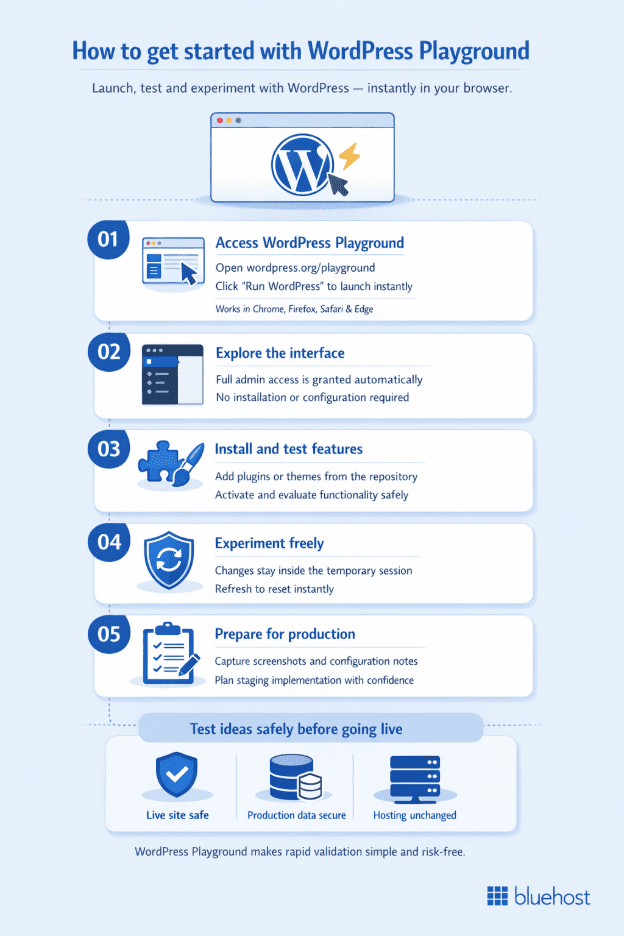
Getting started requires no setup, installation or configuration. The process moves from access to testing in minutes. Each step builds toward controlled experimentation. These WordPress Playground basics provide a foundation for effective testing.
Step 1: Access WordPress Playground
Open wordpress.org/playground in any modern browser. The page loads immediately and does not require account creation, downloads or permissions. The entry barrier is effectively zero.
Supported browsers include:
- Chrome
- Firefox
- Safari
- Edge
Mobile browsers also work and the interface adapts to smaller screens.
Click the Run WordPress button on the page. After a few seconds, the WordPress dashboard loads directly in the browser. The environment becomes ready for testing instantly.
Step 2: Explore the Playground interface
The interface mirrors a standard WordPress installation. The familiar sidebar displays Posts, Pages, Plugins and Settings in their usual locations. Navigation feels identical to production WordPress.
Administrator access is granted automatically. All settings remain editable and any plugin from the directory can be installed. The session starts with a default theme and sample content.
This immediate access removes setup friction and supports rapid exploration.
Step 3: Test a plugin or theme
To evaluate a plugin, navigate to Plugins and select Add New. Search for the desired plugin and install it from the repository. Activation completes the setup.
A typical plugin test may involve:
- Installing and activating the plugin
- Reviewing configuration settings
- Creating a sample setup
- Testing core functionality
To test a theme, go to Appearance and select Themes, then choose Add New. Install and activate the theme to begin evaluating layout, customization and display behavior.
Each installation operates within the isolated session.
Step 4: Experiment freely without consequences
The temporary structure encourages bold experimentation. Settings can be modified aggressively and conflicting plugins can be installed without fear of permanent damage. All changes remain confined to the session.
Because the environment is isolated:
- The live site remains unaffected
- Hosting accounts remain untouched
- Production data stays protected
If a reset becomes necessary, refreshing the browser restores a clean WordPress installation instantly.
Step 5: Document findings for production use
Since sessions do not persist, documentation becomes essential. Screenshots, configuration notes and plugin combinations should be recorded before closing the tab. These records bridge testing and staging.
Effective documentation may include:
- Screenshots of successful plugin settings
- Lists of compatible plugin combinations
- Notes on theme customization choices
- Checklists for staging implementation
This structured approach converts disposable testing into actionable production planning.
Testing validates ideas, yet validation alone does not launch a website.
What happens after testing in WordPress Playground?
Testing inside Playground provides clarity. Plugins and themes can be evaluated quickly and the best option often becomes obvious after direct comparison. At this stage, uncertainty disappears.
Configuration details are now documented. Screenshots capture important settings and notes record compatible plugin combinations. The concept has been validated and the build plan is clear.
Validation, however, does not equal deployment.
The safe deployment path from testing to production
Production environments require persistence. Staging environments mirror the live site with real themes, plugins and data, which exposes compatibility issues that sample installs cannot reveal. Work remains saved across sessions.
A staging workflow supports:
- Testing with real content instead of placeholders
- Verifying email delivery and scheduled tasks
- Reviewing performance under realistic conditions
- Collaborating across multiple contributors
Why do production sites require more than Playground?
Playground validates ideas efficiently. It confirms whether a plugin works, whether a theme fits and whether a feature behaves as expected. It serves as a rapid evaluation tool.
Production websites demand different qualities. They require uptime reliability, performance optimization and security safeguards that browser based environments cannot provide. Customers interact with infrastructure, not temporary sessions.
Persistent hosting ensures that content remains stored, configurations stay intact and changes survive across sessions. Professional support also becomes essential when plugin conflicts, payment failures or update issues arise.
Playground begins the process with safe experimentation. Staging refines the build with real data. Production hosting delivers reliability and long term stability.
At this stage, comparing testing environments clarifies how each fits into a structured workflow.
WordPress Playground vs Bluehost staging: what is the difference?
Both tools support safer development, yet they serve different stages. Playground focuses on instant validation, while staging supports controlled production ready builds. Understanding that distinction prevents workflow confusion.
What WordPress Playground does best?
Playground removes all setup friction. It launches directly in the browser without account creation, installation or configuration. Testing begins within seconds.
Its strengths include:
- Completely free access with no subscription
- Instant plugin and theme evaluation
- Safe exploration for new users
- Disposable environments for experimentation
Because sessions reset automatically, Playground excels at rapid idea validation. It answers immediate questions but does not support persistent development.
What does Bluehost staging environments offer?
Staging environments operate differently. They mirror the live site using real themes, plugins and content, which reveals compatibility issues that isolated testing may miss. Work persists across sessions.
Staging provides:
- Testing with real pages and production data.
- Accurate performance behavior under hosting infrastructure.
- Email functionality and scheduled task execution.
- Multi session development continuity.
Deployment becomes predictable rather than manual. Verified changes move to production with one click and integrated backups allow instant rollback if an issue appears.
Collaboration also becomes practical. Multiple contributors can review, refine and approve changes before release, which reduces the risk of production errors.
When experimentation evolves into implementation, a persistent environment becomes necessary. Bluehost WordPress hosting includes built in staging, automatic backups and controlled deployment tools, which allow validated ideas to move safely from testing to live production.
How to use both tools together?
An efficient workflow combines both systems strategically. Playground validates the concept quickly and staging refines it with real data. Production deployment follows once verification is complete.
A typical progression includes:
- Validatingplugins or themes in Playground
- Implementing and configuring them in staging
- Testing with real content and workflows
- Deploying to production after confirmation
Each stage reduces risk incrementally. Speed begins the process, persistence strengthens it and controlled deployment finalizes it.
When to graduate from Playground to staging?
Transition occurs once validation is complete. The chosen plugin or theme meets requirements and the concept is proven. The next step requires persistence and realism.
Move to staging when:
- Real site data must be tested
- Development spans multiple sessions
- Collaboration becomes necessary
- Deployment to production is approaching
Get expert guidance in a 5-minute call
? Call 888-401-4678Playground initiates experimentation. Staging transforms validation into stable implementation.
After staging confirms stability, deployment can occur confidently. Controlled promotion of changes reduces risk during go live.
Rollback capability adds protection. If an unexpected issue appears after deployment, reverting to a previous version restores stability quickly. This safety layer prevents prolonged disruption.
Final thoughts
Stop delaying improvements because of fear. Validate plugins, themes and updates in WordPress Playground first, then move forward with clarity instead of hesitation. Quick testing creates informed decisions.
Once the concept proves itself, transition to a persistent environment. Refine changes with real content, verify compatibility and confirm performance before release. Structured progression reduces risk at every stage.
Ready to turn validated ideas into a live site? Bluehost WordPress hosting includes staging environments, automatic backups and one click deployment. Build confidently and move from testing to production with control.
FAQs
Yes. WordPress Playground is completely free forever. No account creation is required. No subscription fees exist. No trial period expires. Simply visit wordpress.org/playground and start testing immediately. No credit card gets requested. Completely free access for everyone.
No. Playground environments are temporary and disposable. All changes disappear when you close the browser tab. Nothing persists to the next session. This temporary nature is intentional by design. Playground focuses on quick testing, not persistent development. For development work that saves across sessions, use a staging environment on your WordPress hosting.
No. Playground is designed exclusively for testing. You cannot run live websites in Playground. Your visitors cannot access Playground environments. Changes disappear when the browser closes. You need proper WordPress hosting for production websites. Bluehost offers managed WordPress hosting with staging environments, automatic backups and production infrastructure.
No. If you can use regular WordPress, you can use Playground. The interface looks identical to standard WordPress administration. Navigation works exactly the same way. You click the same menus. You install plugins identically. You activate themes the same way. No special knowledge required.
You can only test plugins available in the WordPress.org repository. These are free plugins accessible to everyone. The repository contains thousands of excellent options. Premium plugins require license keys for activation. These licenses won’t work in disposable Playground environments. Many premium plugins offer free versions with limited features. Test these free versions in Playground to evaluate whether the premium version is worth purchasing.
Yes. Playground is completely safe for experimentation. It runs isolated in your browser. It cannot affect your actual WordPress sites. It cannot access your hosting accounts. Playground cannot damage your live site ever. You can break Playground without consequences. Your production website remains completely untouched. The isolation provides absolute safety.
Playground instances last as long as your browser tab stays open. You can work for hours if needed. The environment remains active and functional. Once you close the browser tab, the environment disappears completely. All changes vanish immediately. No cleanup is required. No data persists anywhere.

Write A Comment